Saturday, June 07, 2008

Scrum in 90 Minutes – The Presentation

Mountain Goat Software - A Reusable Scrum Presentation

“This is a 90 minute introduction to Scrum that is fully redistributable and reusable. Use it to introduce Scrum to your user group or organization. Provided as a PowerPoint file so you can customize it. For Mac users, the presentation is also available in Keynote, which is what it was created in. Please acknowledge the source but please use it widely. Also available is a French version translated by Claude Aubry, a German version translated by Simon Roberts, and a Portuguese version translated by Cesar Brod that is also available in Open Office format and as a PDF.

Thank you to these translators to their generous contributions.

This is a completely updated, much fancier version of this popular file that has been available for download since 2002. 

…”

image

Need to introduce Scrum to your Team? Senior Management? Customers? Clients? Mom and Dad? Then these 43 slides of Scrum presentation goodness may be just the thing you need…

Thanks to The Haxr Chick for pointing this out to me.


Related Past Post XRef:
Speaking of Scrum – “Scrum in Five Minutes”

Scrum Day [Subscript out of range] – Time for a minor reset, I’m pushing back the Sprint Planning Meeting by a week…

I just finished reading Agile Project Management with Scrum (Microsoft Professional) and am now starting on The Enterprise and Scrum.

At this point I’m feeling better than I did yesterday. It’s interesting how having a little bit more of a complete picture helps dispel the fear, uncertainty and doubt. Still I’m going to push back the “official” start of our Scrum’ing. I’m going to push back what I thought was to be our Sprint Planning meeting by a week.

Why?

a) I only scheduled an hour long meeting for the “Sprint Planning Meeting”. Doh! (These are supposed to be time-boxed at 8 hours, 4 for Product Backlog selection, 4 for prep’ing the Sprint Backlog). So yeah, this scope of a meeting needs to be communicated and agreed to.

b) For the project/product I’m starting to Scrum with, I have some ideas for a Product Owner, but I’ll need to talk to them first (obviously).

c) I want to work with the Product Owner (if they are will to accept the position) and flesh out the Product Backlog a little more. Also I want to brief him on Scrum, his role and responsibility, etc.

d) I want to chat with the Team and talk about Scrum some more. Discuss the three roles (Product Owner, ScrumMaster and Team), how we can work together to succeed and what’s in it for them, for our department and our company.

e) I need to learn to let go… I’m very much a Type-A, directive manager (I should have, “Lead, follow or get out of the way” or “Make a decision! Right one, wrong one, but MAKE one!” tattooed on my… err… um… body… somewhere… ;) I don’t, well try not to, micro-manage, but I have been very directive in the tasks, features, dates, etc. Now I have to learn to let go and to empower my Team to self-organize. They are some outstanding people, so I have little doubt that they will be able to do this, but it IS different and a pretty big change…

f) Chat about my ScrumMaster’ing rules (i.e. Don’t be late the the Daily Scrums… MAN I hate when people are late to meetings! That they value their time more than they do the people who make the effort to arrive on time… It’s just fricken rude… But that’s just me… LOL ;)  Also as to work out how we’re going to do our Daily Scrum’s when I’m, or we’re, working remotely.

g) Work with the Dev Leadership to ensure we have a cross functional team (i.e. that QA is part of the team… this is what I want, but our QA is a “shared resource” so may require some horse trading, discussion, and so on).

h) And finally decide if the product I picked for our first Scrum project is the right one… Based on my understanding of intent of Scrum, I’m thinking I may could picked the wrong project. It’s one that needs to be done, that’s important to our users and will provide a good return on investment, but is also not the highest priority, nor the highest ROI.

I picked it because it DOES need to get done, but is also a lower risk project if it fails. Also the team is still new, both to our company and to .Net as well. While they are getting up to speed very quickly, I also thought to use this project as a further tool to help get them up to speed, get us used to working together on the same project, provide a spring board for getting QA integrated into the team, get used to Continuous Integration AND up to speed with Scrum and the new TFS Template.

sigh… I’ll discuss it with the Team and Product Owner(s as the two may have different Owners… maybe) and see where we are.


So I think next week will be “interesting”…  lol…


Related Past Post XRef:
Scrum Day 0 – The Search for ScrumMaster
Scrum Day –1 – Infrastructure Day
Scrum Day -2 - The Decision is Made

Have some HASHes with your Shell – HashTab, the File Hash Explorer Shell Extension (a new “Much Have” Shell Extension?)

Beeblebrox.org - HashTab Windows Shell Extension

hashtab

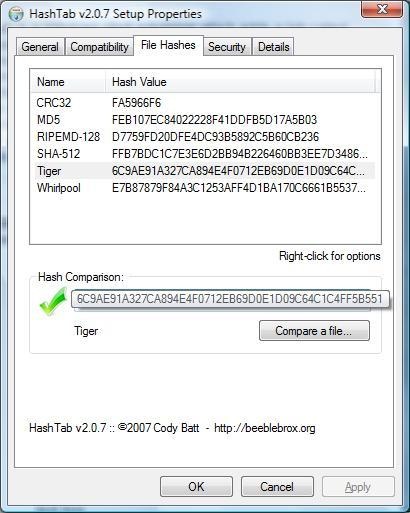
HashTab is a Windows shell extension which adds a tab called "File Hashes" to the Windows Explorer file properties. The tab contains the MD5, SHA1 and CRC-32 file hashes. These are common hashes that are used to verify the integrity and authenticity of files. Many download sites list the MD5 hash along with the download link. The HashTab makes it very simple for Windows users to check these hashes on any file on the system without using external tools. The screenshot to the right shows an example.

…”

How cool! (And how have I never found this in the past?… ). I mean, WOW, this makes getting a file hash almost too easy. Microsoft, grab this and bake it into Windows 7, please?


The install on my Vista box was smooth and easy (NT, 2000, 2003, 2008, XP, and Vista are all supported.) and the Extension worked the first time with no problems. Works for both local files and those on network shares.


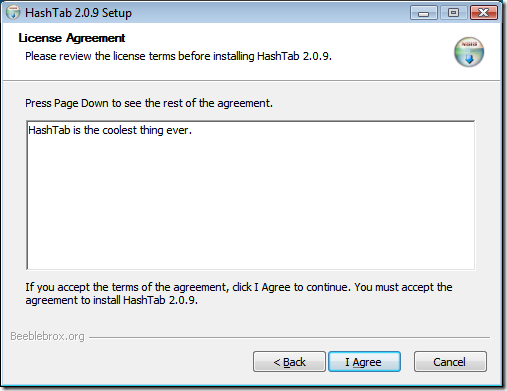
The License page on the installer made me laugh…

image

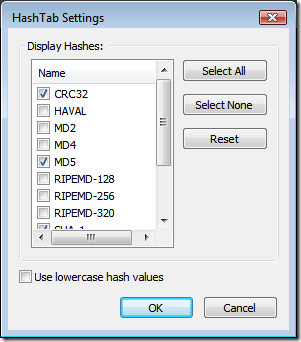
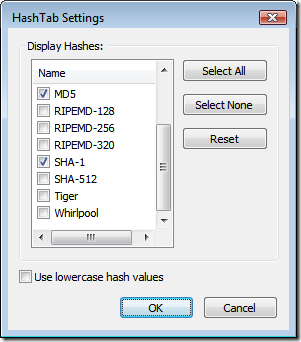
This should be more than enough hash variants for about everyone…

image image


(via James Manning's blog - HashTab - easily see the hashes for files)

Bart De Smet is at it again… This time with LINQ to MSI…

B# .NET Blog - LINQ to MSI - Part 0 - Introduction

“Introduction

Lately I've been delivering talks entitled "LINQ to Anything", to be repeated this summer at TechEd Africa. The goal of those talks is to focus on LINQ from the extensibility point of view, in other words: how to write query providers like LINQ to AD or LINQ to SharePoint (amongst many others I should give credits like LINQ to Amazon). Obviously, I'm always looking to improve the content of the talk and as a firm believer in the "small is beautiful" approach, smaller samples that pinpoint the core of LINQ providers are always welcome.

Goals and non-goals of LINQ to MSI

Just like LINQ to AD, the goal of LINQ to MSI is to act as a sample. Although many people have mailed me already telling they absolutely love LINQ to AD and are productizing it, I have to stress the fact it's sample-level quality (which nevertheless can be very useful to extend upon). This being said, LINQ to AD and LINQ to SharePoint will get their promised updates some time in the near future (I keep a little vague on the scheduling I know, but both projects I'd categorize as "personal incubation projects" have spread their tangles into other projects I'm working on from time to time).

Where the sample distinguishes itself from LINQ to AD is in its approach:

  • We won't go down the IQueryable route.
  • We'll focus more on the structure of and cross-relationships between a query provider, entity objects, data collections and query objects.
  • There'll be less focus on implementing the query parser.

So how can MSI be queried? Well, MSIs are just little databases. …

To convince you it actually works, here's the output of the following piece of LINQ code (omitted the straight-forward foreach loop):

var msi = new MyMsi(@"C:\temp\PowerShell_Setup_x86.msi");
var res = from prop in msi.Properties select new { prop.Name, prop.Value };

Next time, we'll start by the plumbing of MSI interop to allow querying an MSI database from managed code. You'll see classes like MsiConnection, MsiCommand and MsiDataReader appear on the surface of the bloge. Stay tuned!”

I wish I were 1/10th as smart as some of the people I subscribe too… sigh…

Anyway… Bart De Smet is at it again, this time with LINQ to MSI. I can totally see how something like this could be useful. Tie this to a PowerShell Cmdlet…

SilverLight 2 and ADO.Net Data Services – Better Together

theADOguy - Using ADO.NET Data Services in Silverlight 2 Beta 2

URL: http://msdn.microsoft.com/en-us/data/bb931106.aspx

Now that Silverlight 2 Beta 2 has launched, we have the ability to consume ADO.NET Data Services (formerly Astoria) from within Silverlight projects. ADO.NET Data Services are a perfect match for client-side technologies like Silverlight and ASP.NET AJAX.

For the uninitiated, ADO.NET Data Services is a new part of the .NET 3.5 framework that supports exposing a data model (e.g. LINQ for SQL, Entity Framework, etc.) as a set of queryable REST endpoints. ADO.NET Data Services maps the four data verbs into the four HTTP verbs:

  • Create == PUT
  • Read == GET
  • Update == POST
  • Delete == DELETE

While its not as straightforward as synchronous execution, the new ADO.NET Data Services certainly works well in Silverlight 2 Beta 2 and provides a great way to use existing or planned data models over Internet applications. There are a couple of caveats:

I am currently working on two examples for this (a simple one and a more complex one) as well as an article for MSDN, all of which will greatly expand the details of how to use ADO.NET Data Services (including how to save changes back to the server. Be sure to watch here for details of those samples and articles.”

Shawn provides a nice overview of using SilverLight 2 and ADO.Net Data Services together. While the SilverLight side is still a little rough (Not Shawn’s work, but the fact SL2 is still beta), this still provides a view of what I currently believe will be a common future, SL2 and ADO.NET DS being used together.

Classic Photos – Lego Style

MAKE: - Classic photos remade in LEGO

classiclego_iwojima

classiclego_unknownrebel

Flickr user Balakov recreated some famous photographs in Lego .

The reinvisioned images cast a strangely cute tone over some historical moments - Classics in Lego[Post leached in full]

Wow…You have to click through and check out the rest…

SQL Server 2008 Discontinued and Deprecated Feature Link List

Just The Facts - SQL Server 2008: Deprecated & Discontinued Features!

“With the impending arrival of Microsoft SQL Server 2008 come several new enhancements. These enhancements can be categorized as new capabilities, old constraints removed, and improvements in scalability. In the SQL Server community (including this blog) you can find numerous amounts of information on the new features found in SQL Server 2008…however you seldom see much on deprecated features. Deprecated features are abilities of the new release which are either being removed completely or are being replaced by a future build of the software product. Discontinued features on the other hand are software features removed in the new release of the product.

Before I dive into the ‘list’ I wanted to mention that SQL Server 2008 includes a performance counter which will increment each time you use a deprecated feature. The counter is called SQL Server:Deprecated Features. …

Here is the deprecated & discontinued list by component, MSDN URLs:

SQL Server 2008 Database Engine Deprecated Features

SQL Server 2008 Database Engine Discontinued Features

…”

Derek provides a nice link list of the discontinued and deprecated features in SQL Server 2008’s Database Engine, Reporting Services, Integration Services and Analysis Services. It’s pretty amazing the number of things in these lists.

The SQL Server team seems to have gotten real aggressive in their discontinue and deprecate drive. Hopefully setting the stage for more improvements, etc in future releases…

BTW, I dig the new Deprecates Features performance counter. I think that’s a cool way to help us look for things that may bite us in the butt in the future…

Friday, June 06, 2008

Scrum Day 0 – The Search for ScrumMaster

Monday I want to kick off my first Scrum Sprint Planning Meeting and I’m getting a little… um… well… a little concerned (cough… scared really… cough). I’ve been reading when I can and am about half way through the Agile Project Management with Scrum book and really want to make this work.

The more I learn, the more I dig Scrum. The self organizing and empowered teams, the transparency, the ability to adapt to changing realities, etc. All of it sounds like something that will not only help us provide better products but also strengthen my team.

But as I read, I’m wondering if we’re not setting ourselves up for failure. The last I heard, we’re not getting “professional” help in getting up to speed on Scrum. Each Dev Manager is going to be their own ScrumMaster, and we’re (again, last I heard) going to have to learn how as we go. We may get some training, but nothing has been said for sure. And I’m supposed to be Mr. Scrum by Monday? lol… Well heck, I’m sure as hell going to try anyway. Even though I know I’m going to screw this up a bit, I’m still going to do all that I can and hopefully, as we progress, we’ll get better at it together.

Another challenge is our Product Owners. We don’t have them (yet). Well actually we do have them. We have a ton of them as a matter of fact. We have User Groups and Steering Committees filled with them… The challenge is to get the Organization to empower one, one for our Scrum teams. Also for someone to stand up and accept being the Product Owner…

So who is likely going to be the “Product Owner” for many of our/my Scrum projects? I’ll give you three guesses… (Yes, that’s right the Dev Manager).

Now we’ve already been playing this role, so we’re used to it, but I’m worried about how it will affect our ability to succeed with Scrum. The Product Owner is a critical piece of the puzzle and without a “real” one, well…

Well I need to finish moving some work items (those with attachments… sigh).


Related Past Post XRef:
Scrum Day –1 – Infrastructure Day
Scrum Day -2 - The Decision is Made

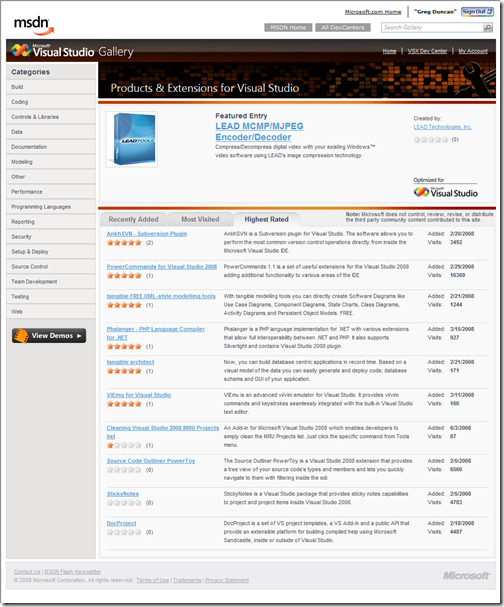
Visual Studio Gallery gets some Social love… (which is only legal in a few states…)

Anthony @ MS - The Visual Studio Gallery gets a little more community friendly

“Over the last few months the Visual Studio Gallery has been growing as the one stop shop for Visual Studio Extensions. We launched the Visual Studio Gallery with the release of Visual Studio 2008 and in just three months we’ve gathered 600 extensions.  It has been great to see just how well recieved this site has been.

Today we release a new set of needed features that will improve the appeal of the Visual studio Gallery.

  • Users can now contribute their own ratings on the quality extensions they’ve tried
  • Visitors can optionally provide a detailed review about the extensions.
  • We’ve added a Review Tab were visitors can sort through the various reviews on an extension
  • The “Was this review helpful” lets other browsers sort credible reviews from the rest
  • Authors of an extension now get aggregate information about the ratings of their extension
  • Last we jazzed up the category & search results page giving a better summary of the matching extensions

Sign in and start reviewing the extensions you've used so far.  …

…”

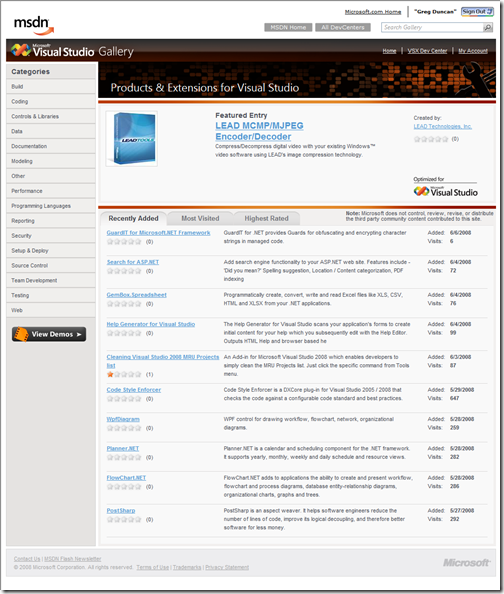
Anthony gave me the heads up (because I’m way behind on my feeds… stupid work… ;) that the Visual Studio has gotten some community and social goodness added into the mix.

Plus, there looks like they have more stuff coming soon (like RSS feeds… Yea! )

I’ve already made my voice heard and have started rating some of my fav’s.

image

image


Related Past Post XRef:
Visual Studio Gallery - Free/Trial/Pay Stuff for Visual Studio

I’m now using John Papa’s Footer WLW (1.1 CTP) and Scott’s Profanity Checker Plugins…

JohnPapa.net - DZone PlugIn for Windows Live Writer

“I had a good response to my DotNetKicks plugin for Windows Live Writer. One of the requests that came along was to write a Live Writer plugin for DZone, too. DZone is another one of the aggregating sites … they state on their site “fresh links for developers”.

If you just want to use this plugin, simply download the dll and drop it in your Live Writer plugin folder.I only added a single option: the style of the link. The style can either be tall or wide.

This is Tall dzone_tall  and this is Wide dzone_wide

…”

CodeProject - Windows Live Writer PlugIn for DotNetKicks

“Windows Live Writer PlugIn for DotNetKicks. Generates a KickIt image and link to embed in a post.

…”

InsertableContentSource - New Writer Plugins Using The New SDK

“…

This plugin was something I discussed with the Writer team as a good example of the PublishNotificationHook base class for checking the contents of a post and cancelling the publish if certain criteria are met. So this allows you to configure what words would cancel a blog post from being published, and just to make sure they can’t easily be changed (say by a child), you have to password protect them

…”

This is until I can get moving on my own plugins… ;)

The coolest things about these plugins? Their authors have released the source for them. Kudo's to them!

Remember, these require the new Windows Live Writer CTP…


Note to self:
Make a suggestion for a future improvement that lets the user turn on/off these kind of footer plugins per post, at post edit time. For example, if I'm writing a personal post, it seems silly to have the DNK's and DZone gadgets on it. Know what I mean? I'm thinking some way to opt-in or opt-out per post. (unless I'm confused as to how they work... this is my first post with these installed).

I wonder if you could hork in something to make this work? Say a ContentSource that you add to a post that creates design time only content? Then the Footer Plugin checks the post (since it can access the body) to see if that special data is there. And if so, THEN it adds the footer. So two plugins, one ContentSource and one HeaderFooter...

Or an opt-out ContentSource where if it exists the FooterPlugin deletes it (or hides it) and also doesn't add the footer stuff.

I think that would work... wouldn't it? That would give the user a design/edit time view and the coolness of the new Plugins.

Well it's an idea anyway...


Related Past Post XRef:
And you thought Windows Live Writer Development had stalled... NOPE! A new WLW CTP is now available, with some cool new features and plugin goodness

Want some help getting started with Scrum for Team System 2? Well here you go…

blogs.conchango.com - Getting Started With Scrum for Team System Version 2

Getting started with Scrum for Team System

I’ve written the below blog post to help people new to scrum get started with the Scrum for Team System process template. It will take you through setting up a simple project, creating user stories, creating tasks and working through a sprint.

Pre-requisites:

In order to continue with this guide you will need:

  • A Team Foundation Server (TFS) 2008 environment (including WSS 3.0)
  • Installed the latest Scrum for Team System process template (at time of writing, the current version is 2.1).

Creating a new team project:

  • Open Team Explorer

Exploring the new team project:

Project initial set up:

Create the user stories:

Creating the Sprint Tasks:

…”

What I liked about this post was part on creating User Stories (Product Backlog Items) and turning them into Sprint Tasks (Sprint Backlog Items).


Related Past Post XRef:
Scrum for Team System (SfTS) Work Item Migration Utility Released (SfTS 1.x/2.x to SfTS 2.1)
Scrum for Team System v2.1 Released
Scrum for Team System V2 (TFS 2008) RTM
Scrum 1.1 for Team System/TFS Released
Free Scrum Process Template for TFS

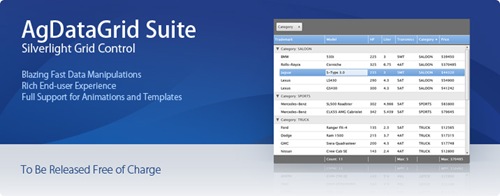
Coming Soon a free SilverLight 2 DataGrid WITH Full Source

DevExpress - Announcing the Upcoming AgDataGrid Suite for Silverlight

overview

As the release of Silverlight draws near, DevExpress has invested the engineering resources needed to deliver a feature-rich grid control for Silverlight. Not just a "preview" of what is possible with Silverlight, the AgDataGrid Suite was developed to fully exploit the power and flexibility of the platform and will ship with the following features:

  • Data Grouping against multiple Silverlight Grid columns
  • Data Sorting against multiple Silverlight Grid columns

AgDataGrid Suite will be available to you for free with FULL SOURCE CODE. When released, you will be able to obtain your free license directly from this page...so stay tuned …”

Yes, not only a free DataGrid, but free WITH its full source code too! Nice…


(via Method ~ of ~ Failed - Free Silverlight DataGrid with source code!)

Google Chart API Fun - “50 Cool Things You Can Do with Google Charts API”

College@Home - 50 Cool Things You Can Do with Google Charts API

“Chartophiles, have you heard that Google has made it incredibly easy to generate your own slick-looking charts? It’s true, and all it takes to make one is the ability to read and edit a URL. This has made it possible for lots of people to get creative with charts. Read on to see what’s been done, and how you can do it yourself.

1. Create Pac-man Charts: Google’s own Matt Cutts describes how you can make a pie chart that looks like Pac-man.

7. Thematic Mapping with the Google Charts API-A Brief Tutorial: You can create your own red state/blue state style map using Google Charts.

24. Google Gadget to Keep Track of Your Feedburner Stats: Visually display your Feedburner subscriber count with Google Charts.

31. Excel and Google Charts: With Google Charts, you can easily and quickly make charts for Excel that would otherwise be difficult or impossible.

41. Docoloco: This tool has used Google Charts to find and recommend places to eat and drink.

49. Weight loss: This user has set up a chart to track his weight loss.

…”

Fiona sent me an email letting me know about this cool list… Any list that starts with creating Pac-man charts is a list for me!  ;)

While you’re there, check out some of their other lists too. Like  Virtual Learning: 25 Best Sims and Games For the Classroom, 100 Free Library 2.0 Webinars and Tutorials and 40+ Most Useful Mashups for College Students.


Related Past Post XRef:
Google Chart API Released

Thursday, June 05, 2008

Another’s journey down the TFS and Agile road…

Teams WIT Tools - Using TFS, Excel, and Agile to deliver on time and on budget

“We just finished our first real sprint using TFS, Excel, and the Agile process. One of the things that we had trouble doing in our last sprint, which wasn't really a sprint, but rather more of a marathon that seemed to never end, was shut down. We slipped our end date several times and each time was somewhat of a surprise for management, etc. This time around we decided to following a date driven Agile model and it worked out quite well. With TFS as the backbone of our project management and Excel (Iteration Backlog.xlsx that shipped with CTP12) as the front end, we were able to track daily/weekly progress easily. The Burndown chart and velocity chart helped us see if we were on track or not quickly and easily. We held daily stand ups to get face to face status and gut feel from everyone and then held weekly over view meetings to go over progress for the week. We were able to deliver what we said we would deliver when we said we were able to deliver and TFS, Excel and Agile were key in helping us do that.

In conclusion, I would highly recommend using TFS, Excel integration, and the Agile process to help you deliver on time and on budget.”

As I begin my own Agile/Scrum journey it’s nice to hear from others further along that same road…

Scrum Day -1 - Infrastructure Day

Today was infrastructure day… Moving from one TFS template to our Scrum template, while also moving from one server to another.

While I hate to whine (well in my blog posts at least... ;) can we all agree that moving Work Items and Source from one TFS server to another kind of bytes?

I tried the TFS To TFS Migration Tool but it didn't seem to want to move my work items. Source it seemed to do okay (for a very simple project at least), but it gacked on the work items. Likely due to the differences in the template types (I'm guessing... I'm firing up the source now to see if I can figure it out).

So it's back to the old Excel standby. Open the work items in Excel from the Source Team Project, paste them into another Excel spreadsheet for the new Project.

Now this works, and can be pretty fast, BUT it doesn't handle attachments, links, history, etc. And one of my remaining/to-do projects has a 100+ work items with attachments. Hence why I'm firing up the source to the TFS to TFS tool. I hoping I can hork it to make it work. Sounds like a mission for tomorrow...

TFS Noob Note: A Solution is NOT a TFS Team Project! (*.SLN != TeamProject) This is likely one of the most common mistakes TFS noob's make. We create a TFS Team Project for a given VS Solution. Sure we think we'll host all the future versions in the Team Project, so yeah, it needs its own Team Project. No, no, no! You have to think broader and wider...

Today I started with nine Team Projects, I'm moving to two (and in the end that might be one to many). These two Team Projects will host 14 products/exe's, tons of dll's, resources and such.

Just say no! Friends don't let friends create too many Team Projects...

As for my Scrum ed-u-ma-kat-tion, I've started my reading and by the first half of the first chapter realized I sure as heck didn't know Scrum like I thought I did. But then again, not a day goes by where I don't realize there's so much I don't know...

I want to be young again and know everything... :P

Related Past Post XRef:
Scrum Day -2 - The Decision is Made

NTFS Junction Points in C# & P/Invoke - Post Series

Brian - From The Inside Looking Out - Using NTFS Junctions in C#

“…

NTFS junction points are a type of reparse point where you can link to local directories. There are utilities out that allow you to create and delete junction points. You can find reference to them in this Microsoft Support Article: http://support.microsoft.com/kb/205524.

What I did was wrote C# code using Platform Invoke Support to call into NTFS to create, delete, and interrogate junction points. No rocket science but a challenge when you don't have access to the source code - that includes me.

In this post I will show you the layout of the reparse structures in C#.

In my next post I will show you some classes you need to create and the signatures for the PInvoke calls.

…”

NTFS Junction points are one of those OS things that really never had much tooling around, let alone managed code support. I’ll be follow Brian’s posts with interest…

The Managed Extensibility Framework (MEF) CTP Released (Not to be confused with the Managed Addin Framework [MAF] which became System.Addin)

Mircea Trofin's blog - The Managed Extensibility Framework (MEF) CTP is out!

“…

For those that are not familiar with the topic, MEF "provides developers with a tool to easily add extensibility to their applications and with minimal impact on existing code. The application developer can define extension points according to the functionality required of an extension, while the extension developer uses those points to interact with the application.

MEF enables this extensibility to take place without creating a hard dependency in either direction. Applications can be extended at run time without recompilation, and extensions can be used by multiple applications sharing the same extension requirements. MEF also allows an application to delay the loading of an extension while still examining its metadata, enabling efficient traversal of large catalogs of extensions”

Krzysztof Cwalina - Managed Extensibility Framework

“Several months ago we formed what we call Application Framework Core team. The charter of the team is to play the same role in the application frameworks space (WinForms, ASP.NET, WPF, Silverlight) as the Base Class Libraries (BCL) team plays at the bottom of the platform stack.

One of the first concrete projects that we are working on and are ready to slowly talk about is what we call the Managed Extensibility Framework (MEF). We observed that there are more and more places in the .NET Framework itself and increasingly managed applications (like Visual Studio) where we want to provide, or already provide, hooks for 3rd party extensions. Think about TraceListener plugins for the TraceSource APIs, pluggable rules for Visual Studio Code Analysis (and the standalone FxCop), etc. In the absence of a built-in extensibility framework (like MEF), our developers who want to enable such extensions often are forced to create custom mechanisms, thus duplication. We hope that MEF will both stop such duplication and encourage/enable more extensibility in the Framework and applications built on top of it.

We will blog more details about MEF in the upcoming months, but here are some early details (subject to changes, of course): MEF is a set of features referred in the academic community and in the industry as a Naming and Activation Service (returns an object given a “name”), Dependency Injection (DI) framework, and a Structural Type System (duck typing). These technologies (and other like System.AddIn) together are intended to enable the world of what we call Open and Dynamic Applications, i.e. make it easier and cheaper to build extensible applications and extensions.…”

I like System.Addin, and understand why it needs its complexity, but that doesn’t mean I can’t hope for something that’s easier… ;)

Wednesday, June 04, 2008

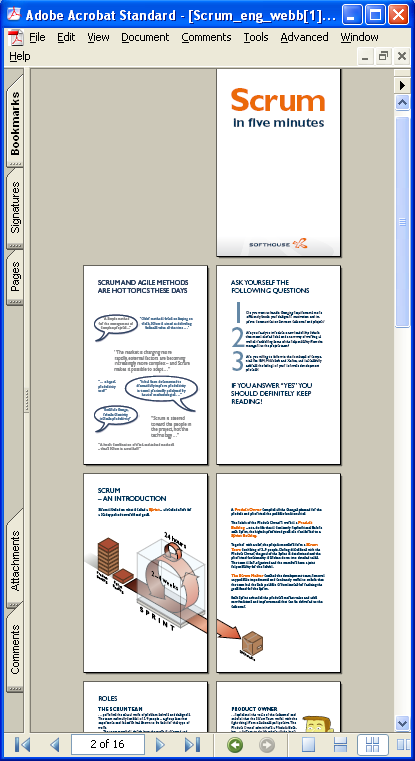
Speaking of Scrum – “Scrum in Five Minutes”

Peter, one of my team members, found this last month and I’ve been meaning to blog out it… Guess now is as good a time as any.

Softhouse - Scrum in Five Minutes

image

This is a 16 page, with lots of pretty pictures (so is upper management safe… OH… Did I say that out loud?), easy to digest yet provides a nice introduction to Scrum. I found that it helped me get the gist of Scrum, to solidify some of my thinking around it and answered a few questions.

For a quick intro to Scrum I think this would be hard to beat.

Scrum Day -2 - The Decision is Made
Well we’ve done it. We’ve made the call. The decision is in… We’re going to Scrum!

We’re moving from an ad-hoc management style, where every product team did their own thing, to a common process and set of management procedures. We’re Scrum’ing baby!

Well okay, we’re going to be “Scrum’ish” (I’m not “standing” at our Daily Scrum’s, some roles may be shared, Sprints may not be exactly 30 days, etc). But as a whole, we are going to give Scrum the old college try.

We’ve decided on a six month trial by four (all) product teams and we’ll using the Scrum for Team System TFS Project Template to help keep us on track (which means I have to migrate my team and team projects from our MSF Agile projects… but that will be for another post).

So how much do I know about Scrum and managing Scrum based projects?

Um… yeah… err… um… Not much.

I’ve gone over my past Scrum posts, listened to some Scrum related podcasts and done a little online reading. So yeah, not so much. Considering I want to starting planing a Sprint on Monday morning I had better INSERT INTO Greg.Brain SELECT * FROM World.Scrum

To start with, to get the Zen of it, I picked up a couple books today which I’ll likely be reading this weekend (instead of coding up some new WLW SDK 1.1 plugins… stupid work! :p )

The Enterprise and Scrum
by Ken Schwaber

Read more about this book...

Agile Project Management with Scrum (Microsoft Professional)
by Ken Schwaber

Read more about this book...

[BTW, books inserted via the Amazon Book Lookup Plugin]

Tomorrow I’ll get my “production” TFS Scrum Team Projects and will start working up my Areas and Integrations. Maybe I’ll also do some migrations too (which are not only moving from template to template, but server to server too).

More to come… (I hope)

Windows Search 4.0 Released – Faster, better and happier enterprise player…

LiveSide - News blog - Windows Search 4.0 released

“Having released a public beta of Windows Search 4.0 back at the end of March, a final version has now been released today (thanks Brandon!). As we’ve talked about previously, this update for Windows (XP, Vista, Server and WHS) upgrades the search technologies built in to the operating system. Specifically the new features include:

As we mentioned at the launch of the beta, while this is an update aimed at the enterprise market, there are still some significant benefits here for the home user. Notably much faster indexing with reduced resource usage, along with shorter loading times for search results.

…”

Description of Windows Search 4.0 and the Multilingual User Interface Pack for Windows Search 4.0

Windows Search 4.0 includes the following improvements:

  • Support for indexing encrypted documents of local file systems
  • Reduced affect on Microsoft Exchange when you index e-mail in online mode, and there is no local cache (.ost)
  • Support for indexing online delegate mailboxes
  • Support for client-to-client remote query to shared indexed locations
  • Improved indexing performance
  • Faster previewer updates for Windows XP
  • Per-user Group Policy settings
  • Windows software updates for Watson errors

Support for the following new enterprise Group Policy objects:

Computer policies

  • Prevent adding Universal Naming Convention (UNC) locations to index from Control Panel
  • Prevent customizing indexed locations in Control Panel
  • Prevent automatically adding shared folders to the index
  • Allow for indexing of encrypted files
  • Disable indexer back-off
  • Prevent clients from querying the index remotely
  • Allow for indexing of online delegate mailboxes
  • Prevent adding user
  • Specified locations to the All Locations menu
  • Enable throttling for online mail indexing

Per-user policies

  • Prevent adding UNC locations to the index from Control Panel
  • Prevent customizing indexed locations in Control Panel
  • Prevent indexing certain paths
  • Default indexed paths
  • Default excluded paths

Windows Search 4.0 packages include the following:

The Group Policy template (Search.adm or Search.admx /l) for managing Group Policy objects that span multiple versions of Windows Desktop Search and Windows Search

The Add-in for Files on Microsoft Networks for Windows XP and Windows Server 2003 packages
This add-in is described in the following Microsoft Knowledge Base article:

918996 (http://support.microsoft.com/kb/918996/) Availability of the Windows Desktop Search add-in for Files on Microsoft Networks

This add-in lets Windows Search index redirected "My Documents" folders. This add-in also lets Windows Search index shared items on remote networks. By default, this add-in is included for supported 32-bit operating systems.

Windows Search 4.0 supports the following operating systems:

  • 32-bit versions of Windows Vista with Service Pack 1 (SP1)
  • 64-bit versions of Windows Vista with SP1
  • 32-bit versions of Windows XP with Service Pack 2 (SP2) or a later version
  • 64-bit versions of Windows XP with Service Pack 2 (SP2) or a later version
  • 32-bit versions of Windows Server 2003 with SP2
  • 64-bit versions of Windows Server 2003 with SP2
  • Windows Server 2008
  • Windows Home Server

…”

I like better and faster…

Windows Server 2008 VHD’s Released (Core/Enterprise for Virtual Server/Virtual PC & Hyper-V)

Dugie’s Pensieve - Microsoft releases 2008 VHD images

“Microsoft have release Windows Server 2008 images for both Hyper-V and Virtual Server.

Each set of images come in two flavours, Full and Core.  If you want to know more, go check out the Microsoft Website, and a snippet is below:

VHD Images for Microsoft Virtual Server:

VHD Images for Microsoft Hyper-V:

…” [Post leached level: 90%]

I’ve been really wanting to play with Windows Server 2008, but just to lazy to build a VM from scratch (and don’t have any hardware to put it on). Now I can continue to be lazy and just get these VHD’s.  :)

It’s official, I’m registered for PDC 2008…

MicrosoftPDC

I’m in… Signed up… Registered… Good to go…

I’m not the most social guy (lol… to say the least) but I would like to connect with other bloggers, community members and any of you, my readers, while at PDC this year. I’m sure there will be a Bloggers Lounge, but what other ways can we connect? Being local to LA (and being “good” by taking the train to and from downtown) I don’t think I’ll be too available for dinners, parties and such, but I’d still like to touch base. Tell you what, lunch is on me… :p


Related Past Post XRef:
PDC 2008 registration open, with preconference and preliminary sessions highlighted and with Ray Ozzie Keynoting Day One

Tuesday, June 03, 2008

Scrum for Team System (SfTS) Work Item Migration Utility Released (SfTS 1.x/2.x to SfTS 2.1)

blogs.conchango.com - Scrum for Team System - Work Item Migration Utility

Scrum for Team System – Work Item Migration Utility

During the creation of the Scrum for Team System (SfTS) version 2 template, the development team created several utility programs to help test and work with the new template. One of these utilities is the “Work Item Migration Utility”.

Work Item Migration

By default, the team foundation server does not provide the ability to migrate work item data from one project to another. Work item data can be exported by opening queries in Excel, saving and then publishing to an alternative target project. This is a time consuming process that doesn’t maintain the linkage between work items and attachments and does not include all the work item history. The excel solution is less than ideal.

Enter the “Work Item Migration Utility”. This utility enables you to export work item data from SfTS v1.x and SfTS v2.x projects into an xml formatted save files and then import them into another SfTS v2.1 project. This process not only maintains the work item linkage, but also includes all the work item historical data. Global lists (Teams and Environments) are included in the exported data and in addition, you can also export / import the contents of the team project portal.

…”

This could come in handy…

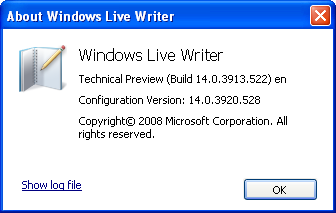
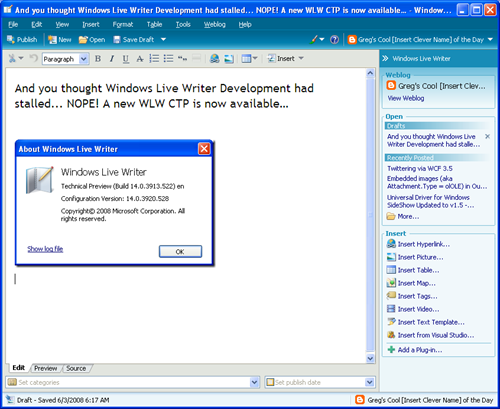
And you thought Windows Live Writer Development had stalled... NOPE! A new WLW CTP is now available, with some cool new features and plugin goodness

Writer Zone - Technical Preview: Now Available for Download 

“…

New Features

You’ll also get an early look at some improvements and new features we’ve been working on:

Video and Image Publishing Enhancements
  • Upload videos to Soapbox
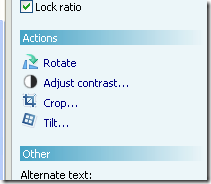
  • Image cropping and tilting
  • Additional border styles
  • Support for LightBox and other image previewing effects (like Slimbox, Smoothbox, and others)
  • Support for centering images
Editing Enhancements
  • Auto Linking
  • Smart quotes/typographic characters
  • Word count
UI Improvements
  • Revised main toolbar
  • Tabs for view switching
  • Improved category control with search/filtering

…”

Writer Dev Zone - Technical Preview: Now Available for Download

“…

The biggest changes are the additions of two new plugin types: publish notification hooks and header/footer content sources. Publish notification hook plugins allow you to execute code before and after Writer posts content to a weblog. They can examine the contents of the post and have the option to cancel the publish operation. Header/footer source plugins insert headers or footers during publishing. Headers and footers are not directly editable by Writer users and do not appear in Writer’s editing views, but are visible in the Preview view (and of course, on the published blog post). 

In the SDK Technical Preview you’ll find the following:

  • New SDK Features.doc – Detailed descriptions of the new plugin types. (Start here!)
  • SDK Reference.chm – Reference documentation for the entire Windows Live Writer API.
  • Samples – Source and binaries for two sample plugins:
    • Twitter Notify – Prompts you to make a Twitter status update after publishing a post
    • DiggThis – Automatically adds a DiggThis button or badge to each post

…”

YEAH! My favorite blogging tool is still alive and well!

The install over my existing version was smooth and easy and all my settings, etc seemed to upgrade with no issues. (I’m writing this post in the new version ;)

While the new features are cool (the tabbed view switching being one of nicer ones IMHO), I’m most excited about the new plugin features. The Pre/Post publish notification is something I can see using in a number of ways… Since these provide access to the permalink to the post, you can now do some pretty cool stuff. For example, you can write a plugin that as soon as the post was successfully posted, poke that new post URL directly into your Twitter feed… And that’s just one thing that comes to mind.

Scott Lovegrove has had his hands on a private beta for a bit and has already written a number of cool WLW Plugins using the new features. Make sure you check out these posts, New Writer Plugins Using The New SDK and The New Live Writer SDK


Here are some quick screen shots…

image

image

image image

Monday, June 02, 2008

Twittering via WCF 3.5

Dariusz quatscht - Programming Twitter with WCF 3.5

"Do you Twitter? If so, this could be of interest for you. If not, maybe you are interested in how to use the Twitter REST API to write own client applications.

Imagine you could just use Twitter from your code like this:

   1: TwitterStatusProxy proxy = new TwitterStatusProxy( "username", "password" );
   2:  
   3: // retrieve friends timeline
   4: XElement timeline = proxy.GetFriendsTimeline();
   5:  
   6: // do whatever you want to do with the data

I just wrote up a demo for a security talk I gave last friday, using the Twitter API from WCF 3.5. ...

Anyway, I want to show you how to use Twitter with WCF 3.5. Here we go. Twitters API is almost an authenticated one, this means for most calls you have to authenticate yourself before calling into the API. Therefore I have chosen to always provide a username and password in the constructor of the proxy class. I decided also to use for each category an own proxy implementation.

..."

I really want to start playing with WCF and thought this was a cool example of using it, it's 3.5 goodness and Twitter. He makes it looks easy, doesn't he? lol...

Now I want to build a Windows Live Writer plugin that posts a Shrinkster or TinyURL link to my Twitter when I publish a new post. ;)

Embedded images (aka Attachment.Type = olOLE) in Outlook messages and one way to get at them...

Jelle Druyts - Extracting OLE embedded images from emails in Outlook

"While it seemed a simple requirement, saving all attachments from emails in Outlook to disk proved to be challenging - to say the least. Using the Outlook Object Model, it's quite easy to enumerate all emails in a folder, look at their attachments and call the SaveAsFile method on them. However, for OLE-type attachments (typically images), this throws a COMException saying: "Outlook cannot do this action on this type of attachment". While looking for alternatives or workarounds, I found nothing but confirmation that this is indeed not an easy task - even from Dmitry Streblechenko, Outlook MVP and creator of the excellent and very affordable Outlook Redemption library: "If you mean embedded graphics objects in the RTF messages, there is not much you can do [...] You can look at the storage itself to figure that out, but I've never tried that".

Ultimately, after lots of trial and error, I did manage to find a fairly easy way to save these OLE embedded images by (mis)using the clipboard. Basically, I retrieve the attachment’s IStorage OLE interface (available through Redemption) and call OleLoad on it to have OLE load the contents and retrieve an IDataObject. The magic trick is to place that IDataObject on the clipboard and retrieve the actual image from the clipboard (so that the clipboard itself handles the nasty OLE details).

..."

Getting at olOLE attachments in Outlook can be a major pain. Jelle's method, while may seem "hacky", gets the job done and should be pretty reliable ("just barely good enough to get the job done" as I call it, is still getting the job done...).

On a related note, if you're doing Outlook development, you need to take a long hard look at Outlook Redemption. I've been using it for years and it makes the impossible by mortals, possible. It's also how some third party utilities do some of their magic (for instance Xobni uses it). And best of all, Dmitry provides outstanding and invaluable support...