Saturday, July 05, 2008

More free (reg-ware) SQL injection help, this time its the “SQL Injector and Crawler” aka Scrawlr, from HP

The HP Security Laboratory - Finding SQL Injection with Scrawlr

“…

Scrawlr, developed by the HP Web Security Research Group in coordination with the MSRC, is short for SQL Injector and Crawler. Scrawlr will crawl a website while simultaneously analyzing the parameters of each individual web page for SQL Injection vulnerabilities. Scrawlr is lightning fast and uses our intelligent engine technology to dynamically craft SQL Injection attacks on the fly. It can even provide proof positive results by displaying the type of backend database in use and a list of available table names. There is no denying you have SQL Injection when I can show you table names!

Technical details for Scrawlr

  • Identify Verbose SQL Injection vulnerabilities in URL parameters
  • Can be configured to use a Proxy to access the web site
  • Will identify the type of SQL server in use
  • Will extract table names (verbose only) to guarantee no false positives

Scrawlr does have some limitations versus our professional solutions and our fully functional SQL Injector tool …”

As we move from handling OS to application vulnerabilities, these kinds of tools will come in handy. Of course, in a prefect world, this kind of scanning would be part of our Software Development Lifecycle, baked into our dev and build environments, etc. But then again, in a prefect world I’d have won the lotto already too. Reality is a gritty, dirty and ugly place where we just do what we have to do… (wow, can you tell it’s been a long week? lol  ;)

(via Hosam Kamel - Free SQL Injection Vulnerability Scanner By HP)


Related Past Post XRef:
ASP SQL Injection Source Code Analysis (CTP)

Zune Buzz Word Bingo – My first Zune game attempt

CodePlexZune Buzz Word Bingo

I’ve just created the Project and checked in the source to my first XNA and Zune game attempt. Yeah!

For whatever reason, when programming mobile devices, the first game I seem to want to create is a Buzz Word Bingo game. This is the third time I’ve created one, the first for the Motorola PageWriter 2000, once for an old Windows Mobile version and now for the Zune.

Being a long time WinForm (and VB1-6, VB.Net7-9) developer, the hardest thing for me was/is to get over the fact that there's no design surface. No dragie dropie, no UI building help, no designers, etc. You're writing code to draw everything and to lay everything out, period. And that's okay, it just takes some mental adjustment.


It’s a very simple game, and the code is very fugly, and the UI... well the less said about the UI the better. :p

It's based on getting four in a row, across, diagonal or down. Once you get 4, you "Win."

The next thing I'm going to add is network play (luckily my son has a Zune too so I can even test it). Just think how cool it would be, to be in a "all hands" meeting/presentation and be playing a ah-hoc wirelessly networked peer-to-peer session of Buzz Word Bingo... LOL. Like the tagline says, "the cure for the common meeting." ;)

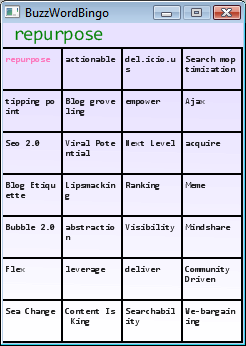
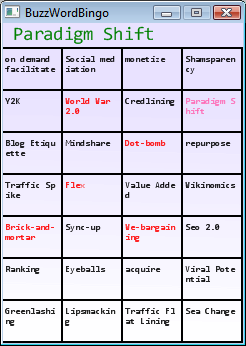
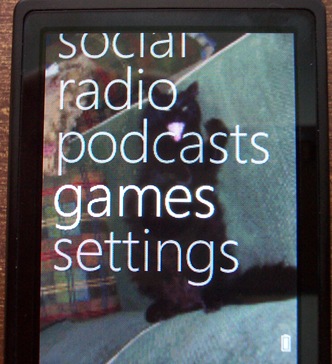
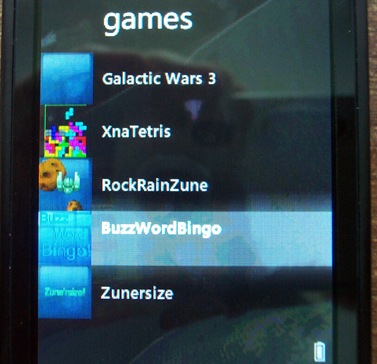
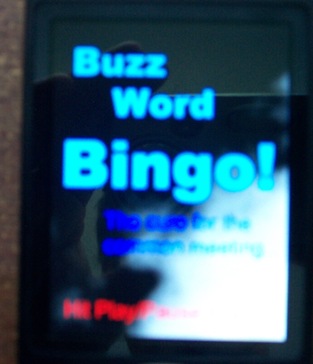
Here are some sample screenshots, from the "Windows Copy" project and as well as some pictures of it running on my Zune. On the Zune the "Card" actually looks better than the Windows version, though the picture doesn't do it justice.

Intro.1.0  GamePlayA.1.0  GamePlayB.1.0 Winner.1.0

DCP_3170

(The background is a picture we call "Frisky'zilla" :)

DCP_3173

DCP_3175

 DCP_3178


Related Past Post XRef:
XNA Game Studio 3.0 CTP Available (Get your Zune Gaming on! :)
All sorts of XNA Goodness Announced - Community XNA Games via XBox Live and XNA on the Zune!

Friday, July 04, 2008

VB Futures – Dan Fernandez Interviews Amanda Silver about VB (aka, Saying goodbye to the "_" in VB.Next?)

Channel 9 - TechEd Amanda Silver on Visual Basic 2008 and VB in the future

"I caught up with Amanda Silver to discuss new for 2008 features like LINQ, XML Literals, using LINQ to target LINQ for .NET Framework 2.0. Amanda shares her thoughts on the future of dynamic typing in Visual Basic, runtime changes in edit-and-continue,  how to make changes in pseudo-run mode, the challenges in adding IntelliSense for dynamic typing, and improving native/Pinvoke calls for .NET developers. Amanda also reveals her toughest feature cut that the team had to make for the VB 2008 release." [Description leached in full]


TechEd Amanda Silver on Visual Basic 2008 and VB in the future

Dan chats with Amanda about VB 2008 and where VB is going.

One of the coolest things, in my book at least, is that we may soon see the end of the line for the line continuation character "_"... (Pun intended ;)

It's a feature, or removal, or whatever, that almost made VS2008.

Dan: "Is it feasible?"

Amanda: "Yes, I've seen it..."


Besides that there were hints about much VB goodness coming at PDC 2008... (with the possibility of beta bits ;)


(via Goto 100 - Development with Visual Basic - Amanda Silver on Visual Basic 2008 and the future of VB)

Windows Vista + SideShow + Windows Mobile = PowerPoint Remote Controller

On10 - Control PowerPoint With Your Phone

“Got a Vista laptop and a Windows Mobile Smartphone? If so, then you already have a way to control PowerPoint with your phone – all you need is some SideShow software. To get started, you must first pair your phone with your laptop via Bluetooth (if you haven’t already done so), then download SideShow for Mobile. SideShow for Mobile is an application for Windows Mobile smartphones (versions 5 and 6) and PocketPCs that let you use your phone as a Bluetooth SideShow device. The final step is to download the Office PowerPoint Remote gadget. With this gadget installed, you can control PowerPoint with your phone - no remote required! You can move forward and back, jump to a specific slide in the presentation, preview the next slide, and view the slide speaker notes on your device. It will even work right from the Today screen so you can just use the hardware buttons on the phone to control the presentation. Nice” [Description leached in full]

I think we’re going to be seeing more and more SideShow stuff coming. I feel that the tooling, features and reach (i.e. Vista install base) is getting to the point where we’re going to start seeing some cool stuff…

(via ActiveWin - Control PowerPoint With Your Phone)

Update #1: 7/5/2008 @ 9:30 AM PDT:
Sorry for the brain fart on the title. It should have read (and does now) "PowerPoint Remote Control" and NOT "PowerShell Remote Control"

Doh!

Related Past Post XRef:
Windows SideShow Managed API and Runtime Released - A Managed SideShow...[Insert joke here]
Universal Driver for Windows SideShow Updated to v1.5 - Transports now include USB, Bluetooth and TCP/IP...

[Humor] Building airplanes the Scrum way

FileHelpers Library - If Airplanes Were Made By Using Scrum/Agile

“…

The best metaphor for Scrum that I see in a while :P

"

It’s somewhat of an oldie, but still funny… And while not a perfect Scrum metaphor, it’s pretty close.  ;)

Thursday, July 03, 2008

Ah… The Dream… The Throne for the “Real Man”? (err… “Real Person” sorry.. ;)

Gizmodo - 10 Gadgety Reasons Why I Love America

“…

Gizmodo1

America is obsessed with acquiring wealth to live lavish, lazy lifestyles. Plumbing service provider Roto-Rooter had America pegged when it ran a promotion last year with a pimped-out toilet featuring a 20-inch LCD, DVD player, XBox 360, iPod with toilet paper stereo docking station, TiVo, Avanti refrigerator with beer tap, a bike pedal exerciser and cup warmer/cooler. [Link]

…”

I’ll take two (so I don’t have to share with my son ;). I think all it needs is a gas fired BBQ, some power tools and to recline somehow…

Because you can just never have too many icons – 55 Icon Sets from Smashing Magazine

Smashing Magazine - 55 Free High Quality Icon Sets

“…

We love free icons. We love to smash things. And we respect hard-working designers. Therefore we are regularly looking for talented artists and creative designers and we are glad to support them by showcasing their work in our magazine. If you are going to create an icon set and experience any problems releasing it or spreading the word — let us know, we may figure something out.

In the overview below we present 55 more excellent, free and professional icons for desktop and web design. Some of them can be used for both private and commercial projects. You may always use them for free in your private projects. Nevertheless, it is always worth to take a look at the license agreements — they can change from time to time.

…”

Okay, maybe it’s just that I can never have too many icon sets… ;)


Related Past Post XRef:
Some Icon Sets via Smashing Magazine - Royal and Pirates (argh...)
35 Very Cool (and Free) Icon Sets From Smashing Magazine
700 Free 16x16 PNG Bitmaps

Argotic Syndication Framework Day – New Release and a DimeCast too!

CodeProject - Argotic Syndication Framework 2008.0.2.0

“…

Description

A powerful and extensible .NET web content syndication framework for RSS, Atom, OPML, APML, BlogML, RSD and more.

What is Argotic?

A powerful and extensible .NET web content syndication framework for RSS, Atom, OPML, APML, BlogML, RSD and more. The Argotic Syndication Framework is a Microsoft .NET class library framework that enables developers to easily consume and/or generate syndicated content from within their own applications. The framework makes the reading and writing syndicated content in common formats such as RSS, Atom, OPML, APML, BlogML, and RSD very easy while still remaining extensible enough to support common/custom extensions to the syndication publishing formats. The framework includes out-of-the-box implementations of the most commonly used syndication extensions, network clients for sending and receiving peer-to-peer notification protocol messages; as well as HTTP handlers, modules, services and controls that provide rich syndication functionality to ASP.NET developers.

…”

DimeCasts.Net - # 19 - Generating an RSS Feed with Argotic

“In this episode we will walk you though how to create and implement an RSS feed using the Argotic RSS framework.

We will walk through generating the document, creating the feed access point and finally creating the hooks so the world knows we have a feed.” [Post leached in full]

I can’t believe I haven’t blogged about the Argotic Syndication Framework before. It’s one of those projects I hear referenced allot and one that I’ve been following for a while (but haven’t yet actually used… It’s on my “list”). Well better late than never?

As an added bonus, we not only get a new release but a DimeCast on how to use it too. How cool is that?  :)


Related Past Post XRef:
DimeCasts.Net - Everyday coding issues covered in 10 minutes or less

RSS Reporter free for the 4th – Free 5 License Pack for the first 1,000

via email:

“…I thought I should let you know that we are doing a 4th of July celebration giveaway http://www.xsqlsoftware.com/Exclusive/July4GiveAway.aspx.

…”

You know me a sucker for free… xSQL Software is giving away, to the first 1000 people, a 5 license pack for their RSS Reporter product. That’s free free, no credit card or anything required (you do need to enter billing/shipping name & address, even though it’s a download, but again no CC info is asked for… ).

BTW, using RSS Reporter for just one SQL Server is still free…


Related Past Post XRef:
RSS Reporter for SQL Server V2 Released (with Custom Query Support & Database Size Feed)
RSSReporter - SQL Server Job Status via RSS Feeds

Wednesday, July 02, 2008

Got some RTF? Want to create your own parser? Don’t want to re-invent the wheel?

CodeProject - Writing your own RTF Converter

“…

The component introduced in this article has been designed with the following goals in mind:

  • Support for the current RTF Specification 1.9.1
  • Open source C# code
  • Unlimited usage in console, WinForms, WPF, and ASP.NET applications
  • Independence of third party components
  • Possibility to analyze RTF data on various levels
  • Separation of parsing and the actual interpretation of the RTF data
  • Extensibility of parser and interpreter
  • Providing simple predefined conversion modules for text, images, XML, and HTML
  • Ready-to-Use RTF converter applications for text, images, XML, and HTML
  • Open architecture for simple creation of custom RTF converters

Please keep the following shortcomings in mind:

  • The component offers no high-level functionality to create RTF content.
  • The present RTF interpreter is restricted to content data and basic formatting options.

    There is no special support for the following RTF layout elements:

    • Tables
    • Lists
    • Automatic numbering
    • All features which require knowledge of how MS-Word might mean it ...

In general, this should not pose a big problem for many areas of use. A conforming RTF writer should always write content with readers in mind that do not know about tags and features which were introduced later in the standards history. As a consequence, a lot of the content in an RTF document is stored several times (at least if the writer cares about other applications). This is taken advantage of by the interpreter here, which just simply focuses on the visual content. Some writers in common use, however, improperly support this alternate representation which will result in differences in the resulting output.

Thanks to its open architecture, the RTF parser is a solid base for development of an RTF converter which focuses on layout.

…”

The thought of writing my own RTF parser makes my brain hurt. That is a wheel I don’t think I’d EVER want to re-invent.

Creating Vista Sidebar Gadgets in Visual Studio (C#) – The Getting Started Guide

CodeProject - Create a Vista Gadget using Visual Studio IDE

“…

An absence of any tools in Visual Studio that can help for developers to create Vista Gadget is strange and disapointed surprise from guys from Microsoft, by my opinion. May be its a temporary situation, but for now, I want to show you some tools that can help develop Vista gadget using Visual Studio 2005 or Visual Studio 2008. This tools include Visual Studio template for begin creating Vista Gadget and Visual Studio Add-In for creating .gadget file from project and run gadget installation.

Background

For now if we want to create Vista gadget we should follow next process:
1. Create all needed folder and important files in some folder.
2. Create zip archive from all folders and files that should be included in the gadget.
3. Change .zip to .gadget extension for archived file.
4. Run this file using double click for starting process of gadget installation.
All this process required if we want to share your gadget with some people.
We haven't now any tools that can help us for develop Vista Gadget using Visual Studio. In this article I suggest you use Visual Studio template for point 1 and automate points 2-4 using Visual Studio Add-In. Both Visual Studio template and Visual Studio Add-In I prepared for you and try further to explain how to use their.

…”

This article seems like a nice getting started guide to get going writing a Vista Sidebar gadget with Visual Studio

AgDataGrid Beta 1 Now Available - Free Silverlight 2 DataGrid Goodness

via email:

“DevExpress is proud to announce the immediate availability of the AgDataGrid Suite Beta 1 and is providing it to the Silverlight developer community free of charge. 

To learn more about the newest DevExpress DataGrid control or to download your free copy, visit our Silverlight Grid information page at: http://www.devexpress.com/AgDataGrid

We’ve also prepared a number of video tutorials to help you get started: http://community.devexpress.com/blogs/theonewith/archive/tags/AgDataGrid/default.aspx

…”

Now all I need to do is start playing with SL2… sigh… ;)


Related Past Post XRef:
Coming Soon a free SilverLight 2 DataGrid WITH Full Source

Scrum Sprint 1 - Week 3 - Reevaluating “Done”

HanselMinutes - What is Done? - A Conversation with Scrum Co-Creator Ken Schwaber

“Scott chats with Ken Schwaber, the co-creator of Scrum, agile advocate and a founder of the Agile Alliance. Scott asks 'What is the definition of Done?' and gets a more complicated (and more interesting!) answer than he bargained for

...”

After listening to Scott Hanselman’s Scrum related “What is Done” podcast yesterday, I believe I need to redefine what I call “done.”

I have been very clear in stating our done means “done done.” That we need to have shippable, deployable code the day our sprint finishes. That when we demo the app, we can only show stuff that we can ship that day. That if at the Sprint Review the Product Owner says, “I want that now”, we can reply “is after lunch okay?”

So in that respect I think our “done done” is on the right track.

But where I think I need to work on (and why, as ScrumMaster, I have asked the team to listen to Scott’s podcast asap) is to better define what we mean as “done”.

I’ve been calling “Done” as being coded, tested, documented and ready for the user. Do you see the issue? Define “tested” or “documented” or “coded”. Does "coded" include well factored, well performing, unit tested code? Does “Tested” mean integration, manual, destruction, user acceptance testing? “Documented” at what level?

I look back on my work in this Sprint and have to say I’m not satisfied with my performance and “done” acceptance level. I’ve was lazy and was willing to accept “just barely good enough,” “it’s coded and seems to work,” “we should be doing ‘that’ but…” and "Oh we only need simple doc's..." from myself. That’s just not good enough.

I want my team to succeed. I want Scrum to succeed. I want to make the PO happy and deliver the needed solution as soon as we could.

So I accepted shortcuts from myself. And I can only expect the team to follow where I lead (as ScrumMaster, their Performance Manager, and “the guy who’s been here for forever” and group Manager). Like Ken Schwaber said, I could probably get away with this for 3-4 Sprints. But I can already see, now that I’m really looking and thinking about it, that these shortcuts would come back to haunt us.

sigh...

Live and learn. Luckily Scrum is so adaptive that we’ll be able to tweak our “done” and improve it before we get to far into “quality debt.” We control our destiny, at least during the Sprint, so we can fix this. I need to make it clear that slapping down some code isn't everything. That as the "Man" I accept and understand that doing it "right" may mean they are not banging on the keyboard the entire day. That fewer "good" and "really done done" features are better than more "kind of done" ones. It's the quality that's important as much as the quantity, if not more so. And more important than anything, I need to walk the walk...


Can you tell what one of my topics will be at the Sprint Retrospective?  LOL


Related Past Post XRef:
Scrum Sprint 1, Week 2 – A rolling stone gathers no moss (aka the Scare Factor of having a timeboxed integration)
Are you “really” using Scrum?
Sprint Day 1 – Here we GO!
Scrum Day [Decision + 1 Week] – Passion versus Religion
Scrum Day [Subscript out of range] – Time for a minor reset, I’m pushing back the Sprint Planning Meeting by a week…
Scrum Day 0 – The Search for ScrumMaster
Scrum Day -1 - Infrastructure Day
Scrum Day -2 - The Decision is Made

Tuesday, July 01, 2008

Craig “Scoop” Shoemaker - .Net 3.5/VS2008 SP1 RTM “weeks” away

Scott Hunter, while being interviewed by Craig Shoemaker for his very cool Dynamic Data Deep Dive podcast, made a comment that .Net 3.5/VS2008 SP1 RTM is “weeks” away.

(I’m paraphrasing here, conversation was about the RTM date for VS2008 SP1, 20:28)

Craig: “…if we were to say soon… Like weeks or months soon? What would it be closer too?”

Scott: “I would say, weeks”

PLEASE take that with a grain of salt, but it’s sounding like .Net 3.5/VS2008 SP1 is in our very near future.  :)

Tree Surgeon 2.0 Released

Fear and Loathing - Tree Surgeon 2.0 Released

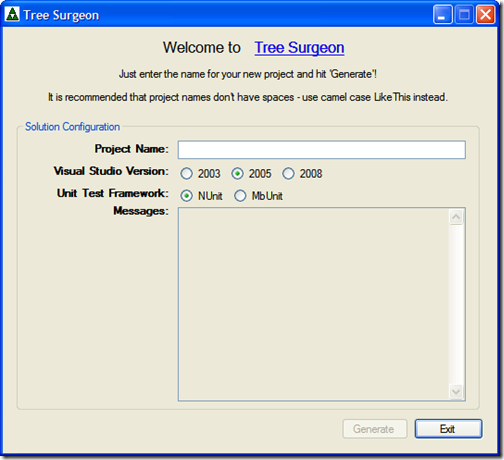
“We’ve released version 2.0 of Tree Surgeon. This is the first major release since I took the project over from Mike Roberts.

image_3

This release adds the following features:

  • 2005 and 2008 support in addition to the original 2003 support
  • Ability to choose the unit test framework generated (NUnit or MbUnit)
  • Updated tool resources to latest versions
  • NAnt build scripts will use the appropriate .NET versions (1.1, 2.0 and 3.5)
  • Minor bug fixes
  • Improved User Interface

…”

CodePlex - Welcome to the Tree Surgeon Project

“Have you ever spent a few days setting up a new development tree? Have you ever spent several days setting up several development trees? Have you even spent weeks trying to perfect all your development trees using a set of best practices?

If the answer to any of the above answers is 'yes', then you'll like Tree Surgeon!

Tree Surgeon is a .NET development tree generator. Just give it the name of your project, and it will set up a development tree for you in seconds. More than that, your new tree has years worth of accumulated build engineering experience built right in.

…”

Yes! I love it when a cool OSS project comes back from zombie mode.

Of course, my first thought was to look (and vote) for VB.Net and MS Test support. lol… Users are just never happy. But given that it’s OSS, if wanted I could just shut up and make it so… ;)

In any case, it’s good to see this project is active again. Congrats guys!


Related Past Post XRef:
Tree Surgeon Now Available on CodePlex
Tree Surgeon 1.0 [Development Source Directory Tree Setup Utility]

On your mark, get set, go… with "Velocity"

B# .NET Blog - A Lap Around Microsoft "Velocity" - Cache It NOW!

“At the beginning of this month, we released the first CTP of Velocity, an early preview of our distributed object cache solution. You can download it here. Notice it's a very early preview so things will definitely change moving forward. This post introduces how to install and use Velocity.

Introduction

But first... what's in a name? Multi-tiered distributed applications are common-sense nowadays and with cloud computing within reach the need to build scalable distributed services has never been bigger. One of the core aspects in enabling those scenarios is to have intelligent caching of objects, not only to reduce the number of accesses to the underlying data source but also to boost availability by employing scale out techniques. Obviously, developers want to be able to do all of this without having to worry about the complexities that this brings, having to deal with load balancing and availability themselves. That's where Velocity comes into play.

The core idea is very straightforward: we have a cache that behind the scenes is distributed and replicated across a bunch of machines called the cluster. Storing data in the distributed cache is as easy as calling some Add or Put method, and retrieving it is as easy as calling Get. With some creative stealing from the documentation we end up with the following picture:

…”

Bart De Smet provides a great level 100 guide to getting started with Velocity. What I found the most interesting is that the examples were simple .Net console apps. No ASP.Net, etc.

When I first heard of Velocity I didn’t think it would apply to me and my WinForm world all that much and thought it was mostly a web/ASP.Net thing. But now, after reading this, I’m having to adjust my thinking… I think this might coming in handy even for my projects.


BTW, sorry about the post title. Had to try to top Bart’s (but I still think his is better  ;)

SoCal Rock and Roll Code Camp – Next one is the weekend before PDC, 10/25 & 10/26

SoCal Code Camp - Code Camp San Diego is done! What’s next?

“… We have a new Code Camp to announce! Code Camp Los Angles on October 25th & 26th at USC! This is the weekend before the Microsoft Professional Developers.

We will open up session registration in the first week in September so start thinking of what you want to talk about now.

…”

I just found out about the SoCal Code Camps (via a tweet from Jon Galloway about his speaking at the recent San Diego event) and would like to start going (and who knows, maybe one day speak/present… lol… not sure about what though…).

The next one will be held PDC weekend, which is a little bit of a bummer since I’m going to the PDC pre-con on the 26th (and I have to say, PDC wins). Plus a six day straight stretch of tech downloading might just make my brain implode. But then again, brains are over rated anyway.  ;)

Read and Write Resources via Managed code - Access version, image, string, etc resources in compiled EXE’s, DLL’s, etc.

CodeProject - File Resource Management Library (.NET)

“Introduction

There are several good articles about reading and writing resources from/to a compiled binary. Most focus on retrieving module version information and modifying version information, mostly in C++. Some detail the same operations for cursor or dialog resources. There's, however, no single .NET library to retrieve and save any type of resources, or any library to edit version resources specifically.

This implementation is a framework that enumerates resources and implements both read and write of the file version (VS_VERSIONINFO) resources. It can be easily extended to other resource types.

Background

Initially, I started porting the version resource implementation from Denis Zabavchik's C++ VerInfoLib. Then, it grew bigger ...

…”

I don’t know if I’ve seen a read/write Managed Resource library like this. I may have seen ones that read, but not writes. Looks like you could use this to Linq to Resources… :)

Monday, June 30, 2008

Vista Windows Search Indexer Sidebar Gadget – Do you know what your Indexer is doing?

BrandonTools - Monitor and control the Windows Search indexer from this handy gadget!

“… Features:

  • Monitor the current state of the indexer
  • See how many items need to be processed
  • View the total count of indexed items
  • Stop and start the indexing service
  • Open the Indexing Options control panel
  • View the installed Windows Search version number
  • Multiple backgrounds / color combinations


Additional features with Windows Search 4.0:

  • Enable "Index Now" functionality.  This disables the "Back Off" functionality of the indexer for faster indexing.

…”

I recently upgraded a Vista box to Windows Search 4.0 (Windows Search 4.0 Released – Faster, better and happier enterprise player…) and was looking for some “search” info, like status, remaining items, version, etc, etc, and couldn’t seem to find it.

Having this gadget then would of made my life a little easier…

(via Neno Loje's Treasury - Vista Sidebar Gadget to monitor and control the Windows Search indexer)