Tuesday, October 07, 2008

Multi-Touch for Windows, without expensive hardware, Now! – All you need is a webcam and an idea…

Microsoft Office Labs - Touchless - A webcam multi-touch SDK

“…

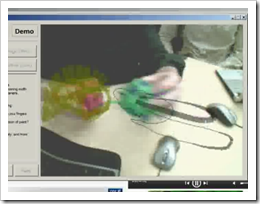
That brings us to today, releasing Touchless to the world outside Microsoft, as a *FREE* *OPEN-SOURCE* SDK with a low barrier to entry for developers and users. Touchless makes developing multi-touch capable software easy, and the results can be enjoyed by anyone with a webcam (and some M&Ms :))! Touchless has come a long way, but its journey has just begun. I can imagine a variety of great directions to explore using Touchless. Perhaps support for the forthcoming Windows multi-touch API, video chat white-boarding, implementing mouse/game/hotkey/media control, and designing decked out Minority Report style file/media browsers.

image

…”

CodePlex - Touchless SDK

“What is Touchless?

The Touchless SDK enables developers to create multi-touch based applications using a webcam for input. Touch without touching.

Touchless started as Mike Wasserman’s college project at Columbia University. The main idea: to offer users a new and cheap way of experiencing multi-touch capabilities, without the need of expensive hardware or software. All the user needs is a camera, which will track colored markers defined by the user.

Mike presented the project at the Microsoft Office Labs Productivity Science Fair, Office Labs fell in love with it, and Touchless was chosen as a Community Project. Our deliverables include an extensible demo application to showcase a limited set of multi-touch capabilities, but mainly we are delivering an SDK to allow users to build their own multi-touch applications.

Now, Touchless is released free and open-source to the world under the Microsoft Public License (Ms-PL) on CodePlex. Our goals are to drive community involvement and use of the SDK as it continues to develop.

Remember that this is just the beginning; and you're invited to join our journey. Send us your questions and feedback, use Touchless SDK in your .NET applications and XNA games, and support the community by contributing to the source code.

…”

That sounds pretty darn cool. I want to wave my hands and/or stuff around in the air in front of my PC and have stuff happen! Let’s see, I wonder if I could code up a single finger salute into an automated IM/Tweet response? :o

Now if only I can a webcam that I could get to would work on my dev/vista box… :/

Monday, October 06, 2008

Who says WPF/XAML isn’t ready for Line of Business apps? Well anyway, the XAML Power Toys will help you down that road at least (Think “XAML Meets LoB CRUD” but actually sounds and looks better)

Karl on WPF - XAML Power Toys

“Current Version 3.1.0.2, Last Update 5 October 2008

Introduction

XAML Power Toys is a Visual Studio 2008 SP1 Multi-AppDomain Add-In that empowers WPF & Silverlight developers while working in the XAML editor.  Its Line of Business form generation tools, Grid tools,  DataGrid and ListView generation really shorten the XAML page layout time.

It’s accessed through commands in the XAML editor context menu and the Solution Explorer item context menu.

XAML Power Toys generates .NET 3.5 SP1 WPF compliant XAML and Silverlight RC0 compliant XAML. 

Requirements

  • Visual Studio 2008 with SP1
  • For Silverlight Development Silverlight 2 RC0  (if your not doing Silverlight development, this is not required)
  • Windows XP, Vista, Server 2003 or Server 2008

Goal

The primary goal of XAML Power Toys is to deliver tools that enable developers to quickly layout and maintain Line of Business Application forms using the UI controls that ship with Visual Studio. 

Feature Set

  • Create WPF or Silverlight DataGrid For Class - quickly create a WPF DataGrid complete with bindings that are easily associated with properties on the source class
  • Create WPF ListView For Class - quickly create a ListView complete with bindings that are easily associated with properties on the source class
  • Create Business Form For Class - quickly create a form complete with bindings that are easily associated with properties on the source class
  • Create Business Form - quickly create a form complete with bindings if desired 
  • Show Fields List For Class - display a list of class fields similar to Microsoft Access.  Allows dragging of fields to create controls
  • Group Into - allows selecting one or more controls and group them inside a new parent control
  • Chainsaw - Minimize Cider Designer XAML - allows selecting of one or more controls and will remove all MinWidth, MinHeight, x:Name, Name, Margin properties and will set all row and column definitions to Auto.
  • Remove Margins - allows selecting one or more controls and removes the Margin property from them
  • Edit Grid Column and Rows - allows selecting a grid and then add or remove rows and columns
  • Set Defaults For Created Controls - allows customizing the initial properties that are set when the software creates a new control
  • About Box - see the version of XAML Power Toys installed on your system

untitled

…”

Wow, there’s a ton of coolness in this, free with source, package. Why code it from scratch when you can generate it? As a WPF/XAML noob, I see this as a means to learning WPF/XAML through working, real-world, code (i.e. mine).

And you know, I have this collection class now that I’m binding to a boring WinForm gridview…hum… Do I hear weekend project?  ;)

Make sure you click through for more information, screenshots and videos.

(via XAML, WPF, Silverlight, .NET, Office 2007, Windows - XAML PowerToys for VisualStudio - Speed up Development of Business Apps and Just Edit XAML Faster)

Have a long literals string in VB? Forget the underscore and just use VB9’s XML Literals

Goto 100 - Development with Visual Basic - Long strings in Visual Basic 2008

“I suspect everyone already knew this – but for me it was shiny and new :-) XML Literals do not require line continuation characters, hence rather than this:

 image

you can create a really long string using an XML Literal:

image

Note: the whitespace is maintained.” [Post leached in full]

This tip made me laugh as I just thought it was just too cool… And until we get rid of the line continuation character (in VB10, I hope), I think I might be able to use this a trick.

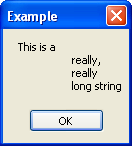
But note the note. Maintained whitespace means the above message would look like;

 image

So if you use this trick, make sure you understand this…

MSBuild Extension Pack (Think “FreeToDev MSBuild Tasks Suite” but now they’re cooking with gas! ;)

CodePlexMSBuild Extension Pack

image

“The MSBuild Extension Pack is the successor to the FreeToDev MSBuild Tasks Suite and provides a collection of over 170 MSBuild tasks designed for the .net 3.5 Framework. A high level summary of what the tasks currently cover includes the following:

  • System Items: Certificates, COM+, Console, Date and Time, Drives, Environment Variables, Event Logs, Files and Folders, GAC, Network, Performance Counters, Registry, Services, Sound
  • Code: Assemblies, CAB Files, Code Signing, File Detokenisation, GUID’s, Mathematics, Strings, Threads, Zip
  • Applications: BizTalk 2006, Email, IIS7, MSBuild, SourceSafe, StyleCop, Team Foundation Server, Visual Basic 6, WMI

It implements a TaskAction based design which improves usability and maintenance whilst reducing the code base, e.g. to start or stop a website, typically two task files would be created to perform each task, whereas the pack accomplishes this in a single task files using TaskAction=”Stop” and TaskAction=”Start”.

Each task is documented and provided with an example in the help file. Where applicable, tasks are remote enabled, simply specify a MachineName and the task will target the remote machine.

…”

Mike (aka FreeToDev) just gave me the heads up (Thanks Mike!) about his new and improved project. This is the FreeToDev MSBuild Tasks Suite, but with a ton of enhancements based on feedback from a number of different sources.

I have word that if you are interested in this project, MS Build, etc that you should keep your eyes open for more news coming soon (which when/if I get it, I’ll make sure to share it…  ;)

And again, the project is looking help. They have a backlog of 100 tasks which need… well… someone like YOU to help them code up. Here’s your chance for fame and fortune! (Well… okay… maybe not all that, but there’s no better resume-ware than helping out on an open source/source available project…)


Related Past Post XRef:
FreeToDev MSBuild Tasks Suite – First Non-Beta Release (and request for help…)
New (beta) MSBuild Tasks Suite - FreeToDev MSBuild Tasks Suite

Sunday, October 05, 2008

Using free eBooks to attract readers (to your blog)

ProBlogger - How To Get Free Books To Give Away On Your Blog

“One of the most successful ways to bring in new subscribers to your blog is to give away a bonus when people sign up.

If you’re like most people, you haven’t had time to write a great book to give away as a sign-up bonus. Well, today I’m going to show you two very easy ways to get such a book:

  • Create your own with an e-book template
  • Use someone else’s book that is in the public domain (you’d be amazed how many great books are out there for free!)
Create Your Own eBook In 48 Hours With An E-book Template

Second Option: Get Free Books To Give Away!

The second, and perhaps easier, method is to use a book that someone else has already written.

There are an amazing number of books in the public domain (and also under the creative commons license, more on this later) which you can give away on your site. For example, in my niche of entrepreneurship, I paid good money for three books years ago that I heard were excellent: Think and Grow Rich, The Richest Man In Babylon, and The Way To Wealth.

Imagine how surprised I was to discover that all three of these books were now available online for free!

…”

While I actually don’t care (much) to “attract” more subscribers/readers to my blog (as I’d blog the same stuff with 1 reader or 10,000, blogging about stuff I just find cool, and if others think it’s cool too… well… cool! ;) I DO like free eBooks.

Also I’ve been thinking of doing an eBook on “something”. Not sure what, but I’d like to author something development related both as a means toward giving back and professional advancement (and maybe one day, MVP status ;) so the eBook templates caught my eye.

(via Jason Haley - Interesting Finds: October 5, 2008)

TFS Access Tools – aka TFS Tool Belt Items

Visual Studio Team System (VSTS) Blog - by Neno Loje - Ways to access Team Foundation Server

image

Neno provides a short, yet cool, list of ways and means to access TFS. From in the box to third party (pay and free).

Friday, October 03, 2008

Planning for TFS 2010 (fka Rosario) – A picture says a thousand…

<FreeToDev.../> - Planning for Team Foundation Server 2010 (Rosario)

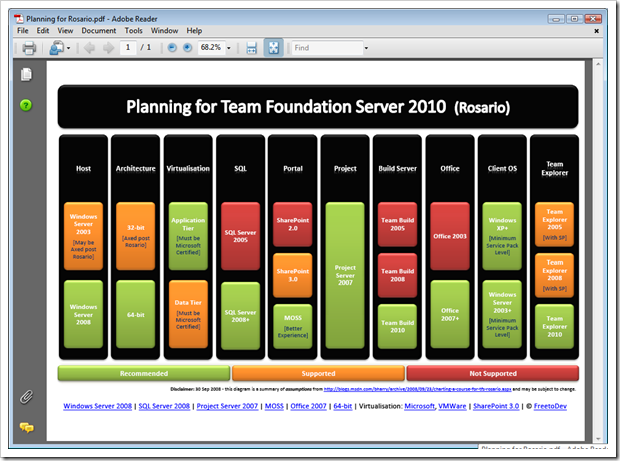
“Brian Harry posted an interesting blog which outlines some of the steps that can and should be taken in planning for Rosario. Note that this information is based on assumption and subject to change. Below is a summarised view that may be handy for your Rosario budget meeting… ” [Post leached in full, click through for PDF download link]

image  FreeToDev has put this great image together summarizing the planning we (TFS users, advocates, interested parties, etc) all need to start thinking about (as I bet after PDC we’re ALL going to REALLY want it… ;)

As they say a picture says a thousand words, and in this cause, that may be an understatement.

(via Team System Rocks/Team System News - VSTS Links - 10/03/2008)


Related Past Post XRef:
Preparing for Rosario – Think “less legacy” (no Office 2003, SharePoint 2 or SQL Server 2005)

Full Spectrum Warrior now free (Full game, ad-supported)

FileFront - Full Spectrum Warrior

“Filename: thq_fsw_filefront.exe
File Size: 1.62 GB (1,736,283,138 Bytes)
Date Added: Monday, September 29, 2008 01:48 PM
Downloads: 11,714 (This week: 11,714)

THQ’s Full Spectrum Warrior is now available to download and play for FREE as an ad supported game.

…”

Gameguru Mania News - Free Full Spectrum Warrior

“Publisher THQ has released Spectrum Warrior (review) for free. Originally released four years ago by Pandemic, the game was developed for the U.S. Army as a training tool, and then adapted for civilian use with extra booms and a storyline. If you like strategic squad games such as Ghost Recon then definitely take a look. …”

Note: There are some comments/questions about a possibly missing CD Key (3 comments), but given the 11k+ downloads, this may not be an issue? We’ll see as I’m downloading now as I’m just too much of a sucker for free Army games to pass it up… ;)

C# your way to Amazon’s S3 – ThreeSharp, a .Net Amazon S3 Library

CodePlex - C# Library and Code for Amazon S3

“Affirma Consulting http://www.affirmaconsulting.com developed this library and example code with Amazon Web Services, in an effort to simplify and empower the use of Amazon S3 in a .NET client environment. We decided together that hosting the code on CodePlex would be the best way to share the library and get community involvement on its future development.

Project Description
An advanced C# library for interfacing with the Amazon S3 system. Among its powerful features are:
- Full support for data streaming. No need to load data into memory before sending to S3.
- Data encryption.
- Thread safety and live statistics. Perform multiple simultaneous uploads and downloads and show progress in real-time.
- A powerful, unified object model that simplifies maintenance and extensions.
- Support for EU buckets.

The solution contains four projects:
- ThreeSharp. The C# library.
- ThreeSharp.Wrapper. A helper that wraps basic common procedures into single-line calls.
- ThreeSharp.ConsoleSample. A console application that demonstrates and describes the various procedures available in the ThreeSharp Library and the Wrapper.
- ThreeSharp.FormSample. A Windows Forms app that demonstrates the use of the Library in a multi-threaded, graphical environment.

…”

I haven’t S3’ed yet but when/if I do, I’m going to have to check out this library. Is sure sounds like a useful tool in the .Net S3’s developer tool belt, doesn’t it?


Related Past Post XRef:
Amazon S3 Browser for Windows Live Writer
S3 Drive - Mount your Amazon S3 Space as a Windows Network Drive
S3 from Amazon - Storage on the cheap.

TFS Build Status Screen – A quick window on your TFS Team Build Status (i.e. If you don’t have a Build Bunny or Build Lamp, then…)

Visual Studio Gallery - TFS Build Status Screen

“This is a tool for Team Foundation Server that allows users to see the current status of their builds.  This can be installed on any machine that has Visual Studio Team System 2008 Team Explorer installed on it.  This application was intended to be installed on a machine that is connected to 1 or more large LCD screens that are mounted throughout the work environment so that everyone can see.  It can also be installed on an end user machine if desired.

Build%20Screen%20Shot_thumb[Description leached in full]

Rob Aquila's Blog - Team Foundation Server Build Notification Screen

“I have been working on an application that will allow people to quickly look at a screen and determine the current status of the builds running in Team Foundation Server 2008.  This is an idea based off of having a lamp attached to your continuous build process so that everyone knows the current build status by looking at the current color of the lamp.  Besides using luminous devices, people have been using a rabbit called Nabaztag.  Basically the purpose of this device is to translate text into a spoken voice that everyone can hear.  Brian the Build Bunny is an example of using the Nabaztag API along with Team Foundation Sever to announce its events.

Lamps work well but there is an issue when there are multiple builds running at one time and you want to view each build's individual status.  The application I created builds on top of these ideas and allows people to quickly see the status of multiple builds simultaneously.  It can also be hooked up to your Nabaztag to announce build status changes.  …

…”

I’ve already downloaded, installed and am running this as it solves a problem I have. I have email alerts setup (and they actually work now.. yeah! ;) which are good for seeing the flow of TFS Project things as they change, build, etc, but the build notices can get lost in the mail, so to speak.

I’ve wanted a “build lamp” like thing (well really a Build Bunny… ;) but we have a number of builds going on and those things require a little more setup and cost than I’m ready to commit. I just wanted a simple form/window/screen that makes it really easy to see the status of our builds.

And low and behold, I see the TFS Build Status Screen!


The setup is smooth and easy. As you install, you’ll be prompted for the TFS Server, Port (which will already be defaulted to the usual 8080) and TFS Project Name. Fill those in, finish the setup and that’s it. You’re ready to run it.

My only wish is that I wish the source were available, so I could review, help and tweak it as need be (yes, I’m contacting the author right now… ;)

In any case, it worked first time for me and my projects does exactly what it says it does and for the price is just right…


Related Past Post XRef:
Building your own Brian the Build Bunny
Brian the TFS Build Bunny - That's just wrong... but in all the right ways...

Wednesday, October 01, 2008

Excel 2007 Limit List - How Accountants will love you, Excel, and EDD Professionals will hate you

Arvin's blog - Some Excel 2007 limitation

“Here is a list of all of the major changes we made to Excel 12 in the area of limits.

The total number of available columns in Excel
Old Limit: 256  (2^8)
New Limit: 16k  (2^14)

The total number of available rows in Excel
Old Limit: 64k  (2^16)
New Limit: 1M  (2^20)

…”

Arvin’s list is perfect. Simple and too the point.

Needless to say it, as a EDD (Electronic Data Discovery) professional, made me cry… The first time you see a single XLS explode into 25,000+ pages/images/tiff’s and realize that THAT was with 2003’s limits, well, that’s when you break out the tissue paper. 64K rows in 2003 and in 2007 “one million rows…” said in my best Dr Evil voice. Oh my…

Three Free .Net eBooks: “.NET Enterprise Solutions ...Best Practices for the Connoisseur”, “…Interoperability for the Connoisseur” and “…Software Engineers on their way to Pluto” (you just have to love the title of that last one)

Willy-Peter Schaub's Cave of Chamomile Simplicity - .NET Enterprise Books for the Connoisseur ... all available in PDF!

“We have just released the PDF, soft copy, eBook style books for the following three books on www.drp.co.za and www.saarchitect.net. On the later server find the books here and remember that www.drp.co.za is geared at American region and www.saarchitect.net for the MEA region.

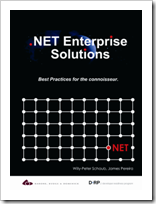
image_6

.NET Enterprise Solutions ... Best Practices for the Connoisseur
ISBN: 0-620-33013-9, published September 2004.
Authors: Willy-Peter Schaub, James Pereira

Information technologies change frequently and rapidly, but the principles, experience and best practices of system analysis, design, construction and deployment remain timeless. “This book is a small step towards making the toothpick of experience a reusable commodity”.

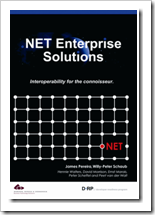
image_thumb_1

.NET Enterprise Solutions ... Interoperability for the Connoisseur
ISBN: 0-620-34680-9, published August 2006
Authors: James Pereira, Willy-Peter Schaub

Our new BB&D DRP book 2, entitled “.NET Enterprise Solutions … Interoperability for the Connoisseur”, ISBN 0-620-34680-9, is complete and currently on the printing press. We thank the authors, the contributors, the coordinators and the reviewers for sharing their knowledge and experience. The book continues the discussion and sharing of best practices we introduced with book ".NET Enterprise Solutions … Best Practices for the connoisseur, ISBN: 0-620-33013-9", focused specifically on interoperability and integration of similar and dissimilar (heterogeneous) solutions. Rather than specialising on any one concept or technology, this book presents a "broad scan" introduction to a variety of technologies within that scope.

image_thumb2

NET Enterprise Solutions ... Software Engineers on their way to Pluto

ISBN: 978-0-620-38514-5, published September 2007.
Authors: Willy-Peter Schaub, Geoff Bruce

This book continues the discussion and sharing of best practices we introduced with the books ".NET Enterprise Solutions … Best Practices for the connoisseur, ISBN: 0-620-33013-9" and .NET Enterprise Solutions … Interoperability for the Connoisseur, ISBN: 0-620-234680-9.

Unlike its predecessors this book is not focused on technology, but instead takes a critical look at how we are typically building information technology solutions, the way we define the modus-operandi of the team and the product life cycle.

…”

The DRP team’s at it a again! This time with three free .Net ebooks.

And hey, any free ebook with a title like “Software Engineers on their way to Pluto” is worth a quick download, don’t ya think?

Need a little Windows 2008 Server Core help? (aka Put down your google and pick up your Core Configurator)

CodePlex - Windows 2008 Server Core Configurator

“If your using Server Core in Windows Server 2008, you'll know that there are always certain tasks you need to do upon installation to enable things like Activation, Firewall.

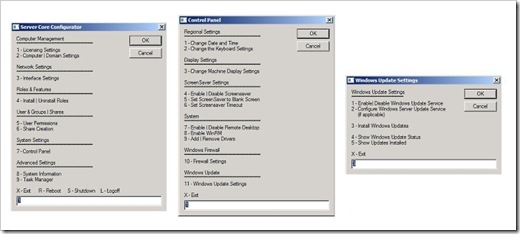
This Tool is a collection of scripts which will help provision and configure a Base Windows 2008 Server Core installation, The Server Core Configurator enables you to do all those 'little jobs' via a GUI, quickly and easily!

Product Licencing
Networking Features
DCPromo Tool
ISCSI Settings
Server Roles and Features
User and Group Permissions
Share Creation and Deletion
Firewall Settings
Display Settings
Add & Remove Drivers
Screensaver Settings
Windows Updates (Including WSUS)
and so much more...

control

…”

Windows 2008 Server Core Configurator - Core Configurator

“…

===================
Core Configurator Release
===================
First official release of Core Configurator

We have implemented major bug fixes and additions in the code base so any feedback would be great as it helps us make this product better and more reliable.

This tool will help anyone wanting to setup all flavour of Windows Server Core (Hyper-V Server and Server Core).

…”

When I was trying to configure my first Server Core system, I was in google more than I was on the system actually doing the configuration. So when I saw this I knew I needed to share it.

I thought it a nice touch to see the release available as an ISO, along with a CAB version as well as then source

(via [MSFT-BE] Arlindo's Blog - IT Pro Evangelist - Windows Server 2008 Core Config)


Related Past Post XRef:
Windows Update in a command line world. Installing Windows Updates on Windows 2008 Server Core.

Amazon EC2 to support Windows and SQL Server (later this fall)…

“Dear Amazon Web Services Developer,

We are excited to let you know that Amazon Elastic Compute Cloud (Amazon EC2) will offer you the ability to run Microsoft Windows Server or Microsoft SQL Server starting later this Fall. Today, you can choose from a variety of Unix-based operating systems, and soon you will be able to configure your instances to run the Windows Server operating system. In addition, you will be able to use SQL Server as another option within Amazon EC2 for running relational databases.

Amazon EC2 running Windows Server or SQL Server provides an ideal environment for deploying ASP.NET web sites, high performance computing clusters, media transcoding solutions, and many other Windows-based applications. By choosing Amazon EC2 as the deployment environment for your Windows-based applications, you will be able to take advantage of Amazons proven scalability and reliability, as well as the cost-effective, pay-as-you-go pricing model offered by Amazon Web Services.

Our goal is to support any and all of the programming models, operating systems and database servers that you need for building applications on our cloud computing platform. The ability to run a Windows environment within Amazon EC2 has been one of our most requested features, and we are excited to be able to provide this capability. We are currently operating a private beta of Amazon EC2 running Windows Server and SQL Server. Please go to aws.amazon.com/windows if you are interested in being notified later this Fall when the offering is released broadly.

Sincerely,

The Amazon Web Services Team” [Email in full]

Now EC2 has really entered into a space where I’m interested. It was pretty cool before, but of limited usefulness for me. Later this Fall when they add Windows machine support? Oh yeah, that’s officially cool.