Saturday, March 07, 2009

NGEN is Love, if you’re running your .Net applications via Citrix or Terminal Services

Mebyon Kernow - Developing .NET applications for deployment on Terminal Services or Citrix

“If you develop .NET client applications that are deployed to users over Terminal Services (TS) or Citrix then this is the post for you. Why? – well, there’s a bit of an issue that not a lot of people know about, and it can really ruin your day. First off some preamble about how we got here and why it’s an issue. I’ll then present a solution.

When a process runs on Windows it typically has some executable code and some data. To vastly simplify this let’s just say that the memory space taken up by my application includes different pages, some code - some data. There may well be other types of stuff in memory but that’s not important to this discussion at the moment. My application runs, loads up code into the pages allocated for code, and loads up data into the pages allocated for data. We’ll call these ‘Private’ memory pages.

Enter stage left: NGEN

You may never have found a use for NGEN (the Native Image Generator), and indeed you might not even know such a beast exists – so for those of you who don’t know, what NGEN does is pre-compile all of the IL into x86/x64 assembly language and stores the compiled image on disk to be used when needed.

The critical thing to understand about NGEN is that whilst it compiles your code, it also marks the code pages as shareable, so that multiple instances of your application can share parts of the memory space used by the first instance. And that’s really useful if you’re running under Terminal Services.

If you compare the first row from the shareable WS column you’ll see that the NGEN assembly has roughly 9Mb more shareable RAM than the original image. I know, 9Mb isn’t a huge amount, but it is a sizeable chunk if you run several users off the same box, and this was from one (admittedly large) .NET assembly. My app was about 3.5 Mb on disk – an application I’ve been working on from one of my customers is just over 40Mb as it includes a bunch of controls from 3rd parties and a whole host of other code.

Assuming I could get the same sort of benefit by running NGEN over my customers application then I might save 100Mb (!) per running instance. It doesn’t take a lot of users to make that significant – the 11th user would bring us to a saving of around 1Gb. Now we’re talking.

To Conclude

Hopefully this post has provided you with enough information to go out and grab some memory back on your TS/Citrix boxes. There’s another upside to running NGEN on your code – it’ll start up faster! This is because with a regular .NET application we have to JIT the code as we call it. With NGEN this has already been done, which generally means you get snappier application startup.

The ideas presented here are really only necessary when running your application under Terminal Services or Citrix. For regular client applications that’s unnecessary, but when running under TS/Citrix I’d say it’s not important, it’s imperative.

…”

If you’re using Citrix/TS as your deployment mechanism then you need to read the post in its entirety.

While my team doesn’t deploy via Citrix/TS there are a number of teams in our Practice that does, so I wanted to call out this post in the hope that it helps them and our clients…

Friday, March 06, 2009

Blacklight v3 RTW’s – Connected Controls (LiveSearchListBox, SyndicationFeedListBox and DeepZoomViewer), Shared Silverlight and WPF controls and more…

Martin Grayson: Adventures of a 'Devigner' - blacklight v3.0 (Mar09) released!

“After a ‘short delay’, V3.0 of the Blacklight controls are here! Thank very much for you patience with this release.

The showcase will be updated very shortly for you to see all of the controls in action!

Get the latest release here!

As always, here are the highlights for this release…

BRAND NEW ‘BLACKLIGHT CONNECTED’ CONTROLS

We have focused on providing controls that allow designers to start adding rich data and content to their application, without the need for code. This release sees 3 such controls: LiveSearchListBox, SyndicationFeedListBox and DeepZoomViewer!

OTHER NEW BITS

Animated Expander

FINALLY…

The project has had a BIG structural overhaul, and some namespace changes. This could result in some breaking changes in you application. Please use the codeplex discussion boards for further assistance.

The overhaul has been necessary to allow WPF and Silverlight to share controls, meaning plenty more controls for WPF too. The list below shows what is available for WPF now..

…”

backlight showcase

image

image

image

image

image

As I begin my WPF journey, these kind of controls and help is critical to my brain cell saving tactics (mostly due to my “Graphically Challenged” nature  ;)

It’s been a bit since I visited the Showcase and boy it’s grown up recently. I liked how the Showcase page discusses how you/we can use these controls in Blend and Visual Studio.

(via User Experience: The Art of the Possible - Blacklight V3.0 available now!)


Related Past Post XRef:
Blacklight 1.0 RTM’s - WPF/SilverLight “Controls for Designers”
Blacklight – The Silverlight UX code sharing project (aka “Mass hysteria, Developers and Designers living (in the UX) together…”)

PortableApps.com Platform v1.5 Released (with v2 coming in a few weeks) – Your App world is just a thumbdrive away…

PortableApps.com - PortableApps.com Platform 1.5 Released

“PortableApps.com is proud to announce the 1.5 release of the PortableApps.com Platform, making it easier than ever to carry your favorite software with you. This new update makes the most popular portable software platform even better than before with lots of new features and a slick new look. Browse the web, check your email, chat online, listen to music, keep your passwords secure, work on documents, check your datebook and even play a few games... all on the go. And, as always, it's all open source and completely free.

The PortableApps.com Platform 1.5 is available for immediate download from PortableApps.com.

platform_small

New In PortableApps.com Platform 1.5

The PortableApps.com Platform 1.5 release adds lots of new features including:

New Theme - The PortableApps.com Menu has a greatly improved display engine and a slick new theme to go along with it. It's PNG based allowing transparent hovers on buttons and other great looking extras. And the next release of the platform in 2 weeks will let you theme it yourself.

App Icon Renaming - Now you can rename all your apps so they appear just as you like.

App Icon Hiding - You can easily hide icons right from the menu. This is especially useful when you add apps that aren't in PortableApps.com Format (Did you know the PortableApps.com Platform works with all portable apps?).

Better Multilingual Support - The Platform now supports 37 languages and has a 55 langauge installer making it easy for everyone to install and use.

App Language Switching - When you switch languages in the menu and then launch one of our apps like Pidgin, GIMP, Notepad++, VLC and others, the app will automatically come up in the language the menu is set to. This way, you don't have to hunt around in an app to figure out how to change its language.

Improved Wallpaper Swapper - The built in wallpaper swapper now supports widescreen and standard wallpapers and will automatically use the best one for the PC you're on.

Run As (Admin) - You can now run individual applications as an admin or other user directly within the menu.

Hide Desktop Icons - You can optionally have the platform hide the PC's desktop icons while it's running, giving you a cleaner desktop.

Transparency - The menu supports a new transparency setting to give it a glassy effect and see the desktop below it.

App Details on Hover - When you hover over an app's icon, you can see all the details of the app. Now you don't have to start it up to remember what version you have installed.

And more...

Another Release Coming Soon!!

Best of all, another release of the PortableApps.com Platform is coming within the next couple weeks. We did this interim release to get some new features and functionality in the hands of users and so that OpenOffice.org could give away the latest and the greatest at CeBIT in Germany this week. The 2.0 release will have all the features of 1.5 plus new theming options and other advanced features. Look for the first beta test to hit the forums within a few days.

…”

The PortableApp Suite is one of my favorite thumbdrive additions. I’ve found it one of those “must have” items when you’re called on to “help” friends, family and neighbors (“Hey, you’re a computer guy, right? Well my computer…”  ;)


Related Past Post XRef:
Your Application Suite To Go - Portable App Suite v1.1 Released
PortableApps Suite

Thursday, March 05, 2009

Team Building your MSI – How to build a Setup Project via Team Build

David Williams - Building a Setup/Install project using Team Build/TFS

“Team Build is great for building Projects applications such as Windows or Web apps.  However it is not able to build Install packages.  Because of this you have to use the Visual Studio build command line option, and copy the .msi and setup.exe files out of the local build directory.  My builds usually copy the built files from to a stage or production server, However this is difficult to do, as no TB/MSbuild variables correctly reference the local build location.  To build a visual studio setup project, I did the following:

  1. Enable building in the Solution configuration manager.  Select the configuration manger, checked build next to the Install project name. 
  2. Open the ApplicationSetup.proj file in a text editor. Searching for ProjectOutput, SourcePath, I confirmed the path was relative to the project file (..\\obj\\Release\\HelloWorld.exe) rather then literal (C:\HelloWorld\obj\\Release\\HelloWorld.exe).
  3. Modified the Build project, adding the build target type
  4. …”

Some tips and snips for building your Setup Project/MSI via Team Build.

Remember friends don’t let friend use “F5” (or right click/build) as a long term deployment mechanism… ;)

Shaking, rattling and rolling - Quickly getting the scoop on what and where that future quake was with the new “earthquake” search from Google and the USGS

The Official Google Blog - Shaking up earthquake searches

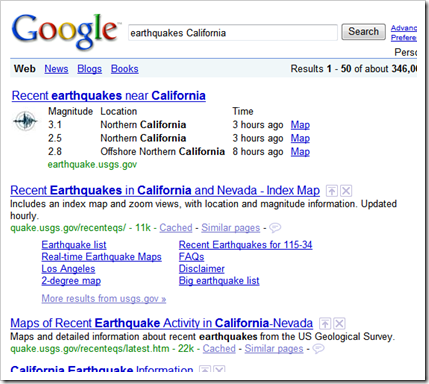
“Silicon Valley is well known as the home of technology companies like Google, but it's also one of many regions around the world with frequent earthquake activity. When we in the Bay Area feel an earthquake, we want to know how strong it was and where it occurred, as soon as possible. After all, even a small vibration could be the result of a severe earthquake far away. Traditionally, we've had to wait for answers as reporters scrambled to investigate and spread the news. But thanks to the US Geological Survey (USGS), we can get earthquake data straight from the source.

Now, when you search for "earthquakes" on Google, you'll get information on some of the most recent, significant earthquakes from around the world, right on the search results page. From there, you can click through to the USGS Earthquake Center for more information, or visit the epicenter of any quake on Google Maps. To find earthquakes closer to home, you can add a location to your query, for example: "earthquakes California.

…"

image

image

Nice!

Every time there’s an earthquake I end up hunting around for the information, links to the USGS, etc. With this new Google search feature I can now VERY easily get the information I need quickly. Saving this on my phone now…

Let’s hope we don’t really need this though in the near future… :|

Molding code to your will with Sculpture – The .NET open source Model-Driven Development Code Generation Framework

CodePlexSculpture - Model Your Life

“What is Sculpture?

  • Sculpture is a .NET open source Model-Driven Development code generation framework ideal for creating and managing .NET Enterprise Applications.
  • With Sculpture you can model your application components, and then transform this model to deployable components with your favorite technology.
  • Sculpture comes with a host of ready-made Molds (The word “Molds” comes from Molding) like (DAAB, NHibernate, LINQ, CSLA, WCF, ASMX, Windows forms, WPF, Silverlight, ASP.NET, & ASP.NET MVC).
  • Sculpture provides starter kit wizard enables choosing among available technologies to start your project with all layers in no time.
  • Sculpture doesn't force you to adhere to a specific architecture, it contains a guidance package for building your own Mold or customizes existing ones. If you have a custom architecture, using this guidance package you can build a custom code generator with your favorite technology.
  • Sculpture can generate any kind of text output using templates (source code, database scripts, web pages, XML, configuration files, etc.).
  • Sculpture takes you to the next level of abstraction by separating the problem from the implementation technology.
  • Sculpture takes you to the domain specific programming by adding your specifications to the model environment and the generated code.

img_1

Sculpture is divided into:

  • Sculpture Core Engine: it is a platform that hosts the molds, takes care of making all the Molds work together. It includes the model designer, mold discovery and loader, generic validation engine, generic code generation engine, command holder, and editor controls holder.
  • Mold: The primary plug-in of the Sculpture framework, with molds you can extend all the power of Sculpture to manage the model and the produced code as your needs, molds provide the ability to process model elements.

Ready-made Molds:

  • For Data Source Layer:
    • SQL Server.
  • For Data Access Layer:
    • DAAB (Data Access Application Block).
    • NHibernate.
    • LINQ to SQL.
    • CSLA framework.
  • For Service Layer:
    • Service Library.
    • ASMX (ASP.NET Web Service).
    • WCF (Windows Communication Foundation).
  • For User Interface Layer:
    • Windows Forms.
    • WPF (Windows Presentation Foundation)
    • Silverlight.
    • ASP.NET.
    • ASP.NET MVC.


img_2

Why Sculpture?

  • Sculpture does not come to the world to become another CRUD code generation tool, but the essence of it is allowing the developers to model all of the application components and rapidly get it on real application.
  • Sculpture gives you permanent preview to your application, the model can be easily updated in any application life cycle phase and see the reflections of these changes immediately.
  • The model gives you the control of tenuous details in your application, plus that you can extend it to meet your needs.
  • The pluggable environment of Sculpture enables Hugh amount of customizations. (For more information see Customize Sculpture screencast).
  • SQL Server Mold has reverse engineering engine that parses the database and translates it to model, so you can start your project from the database, additionally any updates in the database schema can reflect on the model easily without losing any metadata.
  • Unlike many other code generation engines Sculpture generates as possible simple and readable code, no complex structures, organized, tested, follows Microsoft best practice, and easy to understand and tweak code, plus giving you the pleasure when you try to write your custom code side by side the generated one. (For more information see Introduction to Sculpture screencast).
  • Sculpture provides ready-to-use Molds for common enterprise architectures (DAAB, NHibernate, LINQ, CSLA, WCF, ASMX, Windows forms, WPF, Silverlight, ASP.NET, & ASP.NET MVC).

…”

Sculpture - Model Your Life - Sculpture 1.0 Final

“…

Sculpture 1.0 Final Binary Installer (Include Molds)
application, 9644K, uploaded Mon

Sculpture Source Code
application, 3307K, uploaded Mon

Molds Source Code
application, 1093K, uploaded Mon

Release Notes
Welcome to the Sculpture 1.0 Final !

Sculpture 1.0 Final is the first production release of Sculpture.
It is quite similar to the beta 2.

Pre-requisites: You will need the following development environment to install and use Sculpture:

Warning: You MUST uninstall any previous versions of Sculpture before installing this version.

…”

I’m a huge sucker for code generators and “things” that propose to make my coding life easier, helping me from reinventing the wheel and handling the “goo” code.

(via Arquitetura de Soluções - Sculpture 1.0 Final : uma ferramenta de automação sobre o GAT/GAX.)

Freeware .Net library for email address validation and related “Stuff” – DF_MailStuff

Visual Studio Gallery - DF_MailStuff

“DF_MailStuff is a freeware .NET component useful in any circumstances you need to validate/check mail address input by the user.

Do you collect Internet mail addresses or accept addresses typed into a web form? If so, you already know the problems bad mail addresses can cause. Effective validation requires an in-depth knowledge and the correct implementation of the Internet standards relating to mail addresses and delivery protocols. When you need robust validation with ease of use, our library delivers advanced capabilities through its object oriented interface. With just 2 lines of code, you can check the syntax, domain, and user name of any mail address.

The library is ready for immediate use, has no external dependencies, and can be incorporated in to your new or existing scripts in minutes. Using the library you can:

Specify the validation level to perform on any query
Perform full syntax and several rules checking of any address based on current Internet standards.
Quickly identify invalid top level domains, private, and unreachable domains.
Determine if the specified mail address is from a well known free email domain.
Issue real time DNS queries to ensure the domain exists and retrieve the MX records pointing to its mail servers.
Issue real time SMTP requests to contact the domain's mail servers and see if they will accept mail to the address.
Issue real time WhoIs requests
Uses complex heuristic algorithms for catching invalid email addresses.

Bonus: extract mails addresses inside a test you pass to the library.

…” [Description Leach Level: 95%]

No doc’s or samples that I could quickly find (except for a few in the inline XML), but the the description above, and the price, was enough to catch my eye. Doing a RegEx on an email address to validate it is one thing, the provided level of validation is something completely else…

image

Wednesday, March 04, 2009

Data Dude Day – After spending some quality time with VSTS Database Professional Edition yesterday I have to say, it’s that time, it’s Data Dude Time.

Yesterday I had the chance to go to a local Microsoft hosted VSTS Database Professional workshop (Visual Studio Team System for Database Professionals Workshop) and I have to say, I believe it’s time. With the latest GDR release (I think of it as a “v2.5” release of Data Dude) the product is at a point where I think it’s time I start “really” using it.

As you can see below I’ve been following Data Dude, aka Database Edition, aka Team Edition for Database Professionals, for a while now. But I’ve never gotten to the point where I could take the plunge. There were just too many things in the way, both in product maturity, development workflow and learning curve.

After today I believe I’ve seen that the product maturity issue is solved and the rest of the problems are all in my head (well dugh!  ;)

The workshop walked us through using Data Dude via in a simple real world workflow (as much as you can in 6 hours, with the first 2 1/2 being an into to TFS/ work items, etc). How to create the database project, fill it, check it in and most importantly how manage the life cycle of the database. How to build the initial script, how to build a diff script for future releases, how to leverage source control to manage the life cycle of the database, how to unit test it, etc.

I walked away with a feeling that I am now beginning to grok it. The thing is that we all manage our SQL scripts today. We all have our different ways to building our update/diff scripts, for building our DB create scripts, for version controlling these scripts/objects/etc, right? And everyone’s is different. I see Data Dude leveling the playing field a little and setting a common baseline for this so very common work. Why are we reinventing this stilly wheel? I’m done and it’s time for change.

This week or next I’m going to have to create a DB project (actually two) load it up and see if I can roll with this this Sprint (which started last week). Worse case I can at least begin playing with it, do a dry run this Sprint and plan on moving to it next.


My biggest gripe with Data Dude? Diagrams, or lack there of. When I design and work with database tables, I like to see them diagrammed. I like to see their relationships. This is critical for me. And the fact that Data Dude doesn’t have that capability will hamper my usage of it. Sure I can use Management Studio, Visio, ERWin, etc, but I WANT to stay in Visual Studio. Any time I have to switch out of VS means a context switch and those cost. And it’s not like VS doesn’t have diagrams for many other things, right? Give me table/relationship diagrams (again think Visio or Management Studio, etc) and I will be a very happy camper…

I also need to R&D into if I can use the schema compare in Team Build. I want a nightly diff/upgrade script, comparing the “Prod” DB project with the “Dev” branch and generating the update script, that I can use for our database unit/integration testing. While I can do that manually, I want it automated and part of a CI and nightly build. I love R&D… :)


Related Past Post XRef:
Data Dude Updated for SQL Server 2008 – VSTS 2008 Database Edition GDR RTW’s (Think “VSTS 2008 Data Dude SP1++”)
Real World Data Dude - 17 minute video of using VS2008 Database Edition in the Real World
Team Build with Data Dude
Visual Studio Team System 2008 Database Edition Power Tools Released (Think VS2008 + Bunch o' New Features)
Data Dude (aka "Visual Studio Team Edition for Database Professionals") and TeamBuild
Visual Studio Team Edition for Database Professionals [aka Data Dude] Samples CodePlex Project
VSTE4DBPro (Data Dude) for VS2005 Team Suite Users
"VSTE4DBP" aka "VS For DB Pro's" aka "Data Dude" aka "Visual Studio Team Edition for Database Professionals - DVD (English)" now on MSDN Downloads...
"Data Dude" - Visual Studio Team Edition for Database Professionals RTM's 11/30
Tips for Installing the VSTE 4 DBPro CTP
Visual Studio Team Edition for Database Professionals CTP Released
Visual Studio 2005 Team Edition for Database Professionals