Sunday, June 07, 2009

Free WinForm Controls from BinaryMission (email-ware)

Visual Studio Gallery - UIControlSuite .NET Express edition

UIControlSuite .NET Express edition is a free pack of .NET WinForms controls.

This package contains several of the controls we offer in our Enterprise edition of UIControlSuite .NET package.

The express edition comprises of the following components:

SuperTooltip, Alertpopup, Header control, Button, Tooltip, ExplorerBar, Menu, Color picker, Button collection, UpDown spinner and Extended Textbox controls.

These are retail editions, and you can use them in your commercial applications for FREE.

If you need a lot more .NET controls for both WinForms and WPF, you may consider buying the enterprise edition.

To download your free Express (retail) edition, please visit us in our web site page here http://www.binarymission.co.uk/news.htm, and send an email, and you will be sent a link to download the Express edition package.

…” [Post Leach Level: 95%]

BinaryMission - Extended Textbox

 image

BinaryMission - Super Tooltip

image

BinaryMission - Menu

image

BinaryMission - Color Picker

image

BinaryMission - Explorer Bar

image

That’s just shots from a few of the controls… (make sure you click through as there’s more information available)


Free is a nice price point, one that my DFO heartily agrees with.  ;)

CLR 4 Team videos and a little Inproc SxS thrown in for taste

MaĆ­ra Wenzel's Blog - CLR Videos on Channel 9

“The CLR team is posting a series of Channel 9 videos mainly about the new CLR 4 features.

You can access all the videos posted, by clicking here.

This is the list of videos published so far:

You can download the Channel 9 videos in different formats so that you can even watch them at your Zune or IPod.

Enjoy!”

image

Speaking of In-Process Side-by-Side (Inproc SxS), CLR Team Blog - In-Process Side by Side (Part1)

“One of the new features in CLR 4 is In-Process Side-by-side (Inproc SxS) – a feature that lets you use multiple versions of .NET in the same process. For applications that use add-ins (particularly COM add-ins), in-proc SxS lets us provide a level of compatibility never before possible. If you write applications that use an add-in model (for Office or other hosts), you’ll want to understand the details of in-proc SxS, so that you can make use of the new hosting APIs that provide this compatibility. If you are thinking about using .NET 4, but worried about the impact of installing .NET 4 on end user machines, then you’ll want at least a high level understanding of in-proc SxS – it’s the feature that makes installing a new version of .NET less impactful than ever before. Finally, even if none of the above apply to you, you still might find this interesting – it’s probably the most complex change to the CLR in .NET 4.

This is a multi-part series dedicated to in-proc side-by-side, how it works, and all it’s nitty-gritty details.

What is In-Process Side by Side?

image

…”

It’s been a long time since we got a new CLR, and given the depth of features CLR4 will have, it’s not too early to start getting up to speed on it…

Windows 7 / Windows Server 2008 R2 Third Party VPN Clients

The Road to Know Where - Updated 3rd-Party Virtual Private Network (VPN) Clients Released for Windows 7 & Windows Server 2008 R2

“Microsoft's TechNet blog "Routing & Remote Access" has updated information on 3rd-Party Virtual Private Network (VPN) Clients for Windows 7 and Windows Server 2008 R2.

Download Updated Windows 7 VPN Clients:

AT&T

Checkpoint

CISCO

Citrix

F5

Juniper

Nortel

SafeNet

Sonic Wall

…”

Routing and Remote Access Blog - VPN Client Compatibility with Windows 7 and Windows Server 2008 R2

“When you upgrade your computer from an older version of Windows to Windows® 7 or Windows Server® 2008 R2, your 3rd-party virtual private network (VPN) client programs might not work. As Windows evolves, sometimes changes to the underlying infrastructure are required to implement new features, and these changes can sometime break compatibility with older programs. While Microsoft makes every effort to maintain compatibility with older programs, there are some categories of programs that are more likely to be impacted by these changes. VPN clients are one of them.

The tables below show the VPN clients available from different vendors. The tables include the minimum version number that has been tested and known to be compatible with Windows 7 and a link to the vendor’s Web site where you can download the client.

Be sure to review the More information column for any important notes that might be relevant to your use of the client.

Notes

· Microsoft provides third-party contact information to help you find technical support. This contact information may change without notice. Microsoft does not guarantee the accuracy of this third-party contact information.

· The third-party products that this article discusses are manufactured by companies that are independent of Microsoft. Microsoft makes no warranty, implied or otherwise, about the performance or reliability of these products.

image

…”

With Win7 just around the corner I thought these links/updates/etc might come in handy…

Saturday, June 06, 2009

“One Million…” visits… Thanks!

Last night we, you and I, hit the one million visit milestone. How cool is that?

For a little hobby I do in my spare time, a thing I do to capture stuff I find interesting for future reference, one million visits extremely humbling. I’m glad that this thing I do as a personal “thing” also helps others. There’s so much outstanding content available that it feels great to be able give back a little, contributing my tiny bit to “the world”  :)

Thank you

Thank you to those reading, to all of you who have linked to me and last, but by far not least, to everyone I’ve linked to. YOU are the real heroes here. This million visits is all because of you and your outstanding content. I just hope that I’ve been able to shine small ray of light onto your outstanding work and effort. Without you, this blog, and world, would be a much smaller and less informed place.

Thank you, thank you, a million times, thank you! You rock!

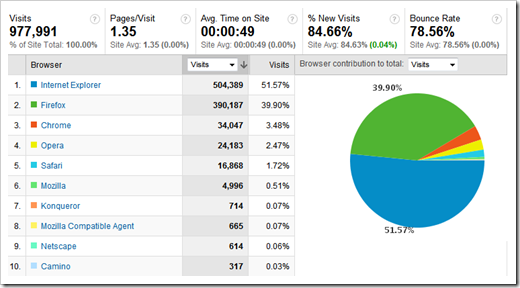
So now there requisite analytics screenshots… :)

From Site Meter;

image

More “fun” information from Google Analytics (which was added a few years into my blogging, so the numbers are not as complete, but pretty close);

image

image

 image

image

image

image

image

image


Again, thank you all…

1.43 thousand free SQL Server tools and utilities (okay, not really that many, but officially “a bunch”)

I want some Moore - Free SQL Server tools that might make your life a little easier

“This list will grow as I find new tools. So if you know of some not on this list do post them in the comments.

SQL Server Management Studio Add-in's

Free SQL Server books

SQL Injection tools

Administration

Best practices, analysis, health and performance

Database Publishing to hosted servers

Upgrade and Migration

SQL Server Analysis Services

SQL Server Integration Services

SQL Server 2005 BI Development Studio (BIDS)

Samples

Non MS stuff

SQL and other code Formatting

SQL

This is a great list of SQL Server, DBA, Administration and related resources. Make sure you also review the comments as there are a number of additional resources added by the community…

(via In Recovery… - Free SQL Server tools)

Friday, June 05, 2009

XAMLFest Online – 15 On Demand webcasts to wet your XAML appetite

Dave Bost - XAMLFest Comes Online

“If you missed the recent XAMLFest tour, don’t fret. Our friends over in the ISV Evangelism team have brought XAMLFest Online! XAMLFest is a series of free training seminars focused on what developers and designers need to know to “light up” their applications with XAML, WPF and Silverlight. For the week of June 1st, some of these seminars will be available as Live Meeting presentations where you can ask questions directly and participate in a dialog with the speaker and other subject matter experts.

If you’re looking to ramp up your skills in the land of XAML, I’d recommend adding these events to your calendar. Don’t worry if you can’t make the Live Meeting sessions as those will also be available on-demand.

Here’s a list of the great content you have to choose from…


XAML Continuum

XAML for Designers

XAML for Developers

XAML Fundamentals

Layouts and Controls in Blend

Layouts and Controls in Visual Studio

Prototyping

New Prototyping Features in Blend 3

Building a Domain Model in Visual Studio

Patterns and Practices

Styles, Resources, Templates and Animations

Implementing the M-V-VM Pattern

Upsizing

Using Blend to Create WPF Apps and Controls

Code Reusability between Silverlight and WPF

image …”

There are a number of sessions here that I want to catch when I get the chance…

Calling Bing - 1-800-Bing-411

The Road to Know Where - Call 1-800-Bing-411 for Free Mobile Phone Assistance & Information

Bing 411 - Get audio directions, traffic conditions, and weather reports.

Find local shops and restaurants

Get traffic, movie times, and weather

Try it now

Call --> 1-800-Bing-411

Call --> 1-800-246-4411”

Discover Bing

image

Just a couple days ago I was wondering if there was a mobile/call-in number for bing and low and behold Blake read my mind and posted on this very subject… ;)

Thursday, June 04, 2009

Ton’s-o-Training Kits

Gunnar Peipman's ASP.NET blog - List of Microsoft training kits

“Microsoft training kits are pretty good things to explore when you start learning some new technology. Here are links to some training kits I found to be interesting and useful. Some of these live also in my laptop and when I have free moments I explore them to learn more about these technologies. So, the list of training kits is here:

image

…”

I thought this was a nice list of recent Microsoft Training Kits, one I wanted to capture for future reference…


Related Past Post XRef:
A little VS2010/.Net 4 Training Kit with your Beta 1?
".NET 3.5 Enhancements" Training Kit Available (Hands on Labs)

Wednesday, June 03, 2009

Windows 7 to be available in stores on October 22nd (and RTM in 2nd half of July)

Windows 7 Team Blog - The Date for General Availability (GA) of Windows 7 is…

“…

I blogged a few weeks ago that it’s looking like we’ll have Windows 7 ready in time for the holidays.

Since then we’ve made enough progress to feel really good about announcing today that Windows 7 will be in stores beginning October 22nd.

Obviously, Release To Manufacturing (RTM) is an important milestone on the path to GA. We anticipate that we’ll be able to make the RTM code for Windows 7 available to our partners sometime in the 2nd half of July. We also expect to be able to make RTM code for Windows Server 2008 R2 available to our partners in this time frame as well.

For the one or two people who’ve not see this news…

Personally I can’t wait for Win7. Been a while since I’ve been so excited about an OS release. I do have to say that I’m glad they waiting to the 2nd half of July to RTM it, so as to not mess up my vacation in early July (I’d hate to see what my wife would do if I dragged everything along just so I could upgrade while away…LOL  ;)

I expect we’ll see Win7 on MSDN/TechNet around when OEM’s get the RTM (give or take a week or two?)

Controlling and managing Google Update behavior via Group Policy and/or the Registry

Google Update for Enterprise

“Table of contents

  • Introduction
  • Technical overview
  • Obtaining the Administrative Template
  • Configuring the Group Policies
  • Policies
  • Registry settings
  • Examples

Introduction

This document contains information about applying policies to Google Update/Google Installer within the enterprise. Google Update is an end-user application that installs and updates many of Google's applications for Microsoft Windows®.

The document is written for Microsoft Windows® domain administrators as well as power users who want to control updates on their individual computers. By defining enterprise-wide policies for Google Update, you can specify which Google applications users may install and how they are updated. For example, you can choose to only allow users to install specific applications, have Google Update check for updates once a week, or disable updates of an application until after you've tested them in your environment. You can configure update policies before installing applications that use Google Update or at any subsequent time.

Technical overview

Google Update for Enterprise makes use of Microsoft Windows® Group Policy and Active Directory, a services infrastructure that delivers and applies configurations to users and computers. If you are unfamiliar with Group Policy technology, see http://msdn.microsoft.com/en-us/library/aa374177.aspx. Power users can use the same policies to control updates on their own machines.

Google provides an Administrative Template that defines policies for Google Update/Google Installer. You can apply Google Update policies by loading the Administrative Template into the Group Policy Editor of your choice.

Network administrators can apply a set of policies to their managed computers using Active Directory. Alternatively, they can use other administration mechanisms, such as logon scripts, to directly modify the registry values described in the Registry settings section below.

Power users who want to use Google Update policies on an individual computer can do so by loading the Administrative Template into Group Policy Editor.

omaha_146164b_set_update_check_en

…”

An “official” means to help manage and control the Google Update process and behavior. From disabling it to turning off automatic updates to application specific behavior. It’s nice to see this level of manageability for a process I see running on so many machines. The admin in me really likes this…

(via LifeHacker - Use Group Policy Editor to Customize or Disable Google Update)

LINQ to SQL gets some love and attention in .Net 4

DamienG - LINQ to SQL changes in .NET 4.0
LINQ to SQL changes in .NET 4.0

“People have been asking via Twitter and the LINQ to SQL forums so here’s a list I put together on a number of the changes made for 4.0.

Change list

Performance

Usability

Query stability

Update stability

General stability

SQL Metal

LINQ to SQL class designer

Code generation (SQL Metal + LINQ to SQL class designer)

Potentially breaking changes

We worked very hard to avoid breaking changes but of course any potential bug fix is a breaking change if your application was depending on the wrong behavior. The ones I specifically want to call out are:

LINQ to SQL changes in NET 40 » DamienG

…”

With the team/organization changes related to LINQ To SQL, it’s good to see that there’s still some life left in it…

Monday, June 01, 2009

GhostDoc goes 2010, VB (and is now a property of SubMain)

SubMain.Blog() - SubMain acquires GhostDoc, releases new version, integrates it with CodeIt.Right

“As announced earlier today we just closed the acquisition of the popular XML Comment helper tool GhostDoc. We, SubMain, will continue to evolve the tool and distribute it as a free product.

We are also announcing today the availability of the new version of GhostDoc v2.5.09150 which improves the user setup experience, adds support for Visual Studio 2010 Beta 1 and full support for Visual Basic.

New in GhostDoc v2.5:

  • Compatible with VS2010
  • Support for VB - GhostDoc now has full support for VB
    • Removed "Enable experimental support for VB" option in Settings.
  • Improved product setup experience
    • Single setup for all supported versions of Visual Studio - VS2005, VS2008 and VS2010.
    • Setup will detect older version installed and automatically uninstall it.
  • Converted from VS Add-In to VS Package
  • Resolved installation issues related to the VS Add-In model - by converting to VS Package

Download

…”

SubMainGhostDoc

“GhostDoc is a free Visual Studio extension that automatically generates XML documentation comments for methods and properties based on their type, parameters, name, and other contextual information.

When generating documentation for class derived from a base class or for interface implementation (e.g. .NET Framework or your custom framework), GhostDoc will use the documentation that Microsoft or the framework vendor has already written for the base class or interface.

Benefits

  • Save keystrokes and time
  • Simplify documenting your code
  • Benefit of the base class documentation

If you follow good naming conventions in your code, then you will get very decent results on the summary GhostDoc generates.  When I see code that is not documented, it is as simple as hit Ctrl-Shift-D to have GhostDoc document it.

Features

  • Generates XML comments based on code element type, parameters, name, and other contextual information.
  • For a derived class uses the base class documentation.
  • Assignable shortcut (default Ctrl-Shift-D)
  • Configurable rules, acronyms and macros
  • Import/Export of the configuration and the rules
  • Option to re-build documentation

…”

Yes, Visual Studio already includes some built in XML comment support, but GhostDoc, which has been around for a while, extends that support, fleshing it out. And now that it officially supports VB, is something I’m going to take a look at (as I’m really unhappy with my XML commenting behavior and I want to improve it so if this tool makes that easier… ;)

Good to see this product given a new lease on life and I hope SubMain fulfills its comment in keeping it free for the long term…

Building Visual Studio IDE Extensions from SDK download to Gallery upload

Jason Zander's WebLog - VS2010 Tutorial: Building VS Extensions with the Beta 1 SDK

“The SDK is used to create extensions to Visual Studio itself like those you can find on VS Gallery.  You can download it here.  The installation is done on top of an existing install of VS 2010 and gives you a set of build tools, templates, and a short cut for debugging devenv.exe (VS) that can be used for testing your new extensions.

Once you get the SDK installed, you will find a new set of templates.  Let’s start by doing File, New Project.  Type ‘editor’ in the search box to find example editor extensions:

As you can see, loading new items, creating new items, etc is very straightforward.  I’m looking forward to seeing what you come up with.”

Jason Zander's WebLog  VS2010 Tutorial Building VS Extensions with the Beta 1 SDK

I thought there was a number of interesting points in this point, such as how the extension debugging gets hooked up and a look into the .vsixmanifest designer…


Related Past Post XRef:
Extending VS2010 – SDK is out, Scott Hanselman chats about it and there’s a good number of samples already on the Visual Studio Gallery
Here’s the 10-4 on downloading and installing Visual Studio 2010 Beta 1
Visual Studio 2010 and .NET Framework 4 Beta 1 now available for public download
A little VS2010/.Net 4 Training Kit with your Beta 1?
VS2010 Beta 1 is now really available on MSDN. Let the downloading begin…

Zipping up your UAC T-Shirts available…

THE OFFICIAL BLOG OF THE SBS "DIVA" - Get your UAC Defense in Depth Slider shirts here!

number7

If you want to make your own Windows 7 Tshirt - you can download the images from here:
http://cid-c756c44362cd94ad.skydrive.live.com/browse.aspx/Windows%207?uc=2  They are in various image types and sizes for your use.
You can print out the images (some of them are large for good resolution) and then print them with a color printer on iron on transfer paper --examples include the products below:

If you want to get a more "professional" image of the UAC pull up your Defense in Depth Slider - I've uploaded the image to CafePress.com so that you can buy shirts from them:
http://www.cafepress.com/windows7

Remember to bring your UAC slider bar all the way to the top

…”

CafepressWindows 7 UAC

image

Now to convince my DFO (Domestic Financial Officer… i.e. my wife…) that I need a couple of these.  ;)


Related Past Post XRef:
Don’t let your UAC hang out…