How-To Geek - Control Sysinternals Suite & NirSoft Utilities with a Single Interface
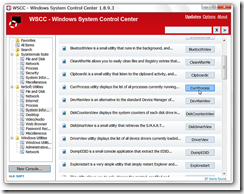
“Sysinternals and NirSoft both provide helpful utilities for your Windows system but may not be very convenient to access. Using the Windows System Control Center you can easily access everything through a single UI front end.
Setup
The first thing to do is set up three new folders in Program Files (or Program Files (x86) if you are using a 64bit system) with the following names (the first two need to exactly match what is shown here):
- Sysinternals Suite
- NirSoft Utilities (create this folder only if you have any of these apps downloaded)
- Windows System Control Center (or WSCC depending on your preferences)
Unzip the contents of the Sysinternals Suite into its’ folder. Then unzip any individual NirSoft Utilities programs that you have downloaded into the NirSoft folder.
…
…
Conclusion
WSCC provides an easy way to access all of the apps in the Sysinternals Suite and NirSoft Utilities in one place.
Note: A PortableApps version is also available.
…
…”
Windows System Control Center is new to me. There are few things cooler than a new cool utility to play with… :p
Related Past Post XRef:
Another portable application suite and launcher, NirLauncher (Beta) - 100+ NirSoft utilities + easy Sysinternals integration too
It’s a new Sysinternals Tool Day! RAMMap v1.0 released
Sysinternals Suite (8MB of Complete Sysinternals Goodness)
The latest Sysinternals utilities are just a URL away, Live.Sysinternals.com
A handy PowerShell script to keep your Sysinternals Suite up to date
Mesh'ing Live.Sysinternals.com, using Vista Scheduling and Robocopy
Hands On Learning How to Use the Sysinternals Process Monitor Utility
Sysinternals 101 – “Notes from the field,” a quick intro to a few Sysinternals utilities (Process Explorer, TCPView, Process Monitor, VMMap)
Use the Sysinternals Utilities? The EULA bug dialog you? Then try this…
No comments:
Post a Comment
NOTE: Anonymous Commenting has been turned off for a while... The comment spammers are just killing me...
ALL comments are moderated. I will review every comment before it will appear on the blog.
Your comment WILL NOT APPEAR UNTIL I approve it. This may take some hours...
I reserve, and will use, the right to not approve ANY comment for ANY reason. I will not usually, but if it's off topic, spam (or even close to spam-like), inflammatory, mean, etc, etc, well... then...
Please see my comment policy for more information if you are interested.
Thanks,
Greg
PS. I am proactively moderating comments. Your comment WILL NOT APPEAR UNTIL I approve it. This may take some hours...