Friday, February 13, 2009

“COBOL the Barbarian: Multi-Language .NET Snippet Compiler” – WPF Application with COBOL as the code behind…

CodePlex - COBOL the Barbarian: Multi-Language .NET Snippet Compiler

Project Description
COBOL the Barbarian is a multi-language .NET snippet compiler. The Barbarian is written in COBOL, and speaks C#. Support for additional .NET languages will be added in the near future.

History
The Barbarian has overthrown Add One Snippy, which was a straight port to COBOL of the C# code for Jon Skeet's Snippy. FxCop demanded a strong name for the assembly. The Gonzo COBOL Cooperative responded by unleashing COBOL the Barbarian.

Status: Alpha, Version 0.0.1.0
2009-02-12: The Barbarian does compile C#, but remains mute, and the Options menu still doesn't load dynamically. These issues will be addressed when possible. The clue to RoutedEventHandlers may lie in the generated files.

Development Tools
The development team uses the free Micro Focus NetExpress Personal Edition add-in for Visual Studio 2008. …” [Project Description Leach Level:90%]

image

The title caught my eye, but the code and implementation is what kept me.

How cool is it that this is a WPF app being written in COBOL? IHMO, pretty cool… (I don’t know COBOL, but I still think this is pretty cool in a geeky kind of way  ;)

Got to love .Net!  :)

Wednesday, February 11, 2009

Moonlight (Silverlight for Linux) v1.0 RTM’s

Port 25 - Moonlight 1.0 Hits the Street

“Moonlight 1.0 is now available.

Moonlight is an open source project that gives Linux users access to Microsoft Silverlight content, and is available for all major Linux distributions, including openSUSE, SUSE Linux Enterprise, Fedora, Red Hat, and Ubuntu. This milestone release is part of the technical collaboration between Novell and Microsoft.

Microsoft has worked with the Moonlight team and Novell to enable interoperability between Windows and Linux platforms and extend the high-quality interactive Web and video experience for the benefit of the Linux community, said Scott Guthrie, corporate vice president of Microsoft's .NET Developer Division.

…”

Moonlight - MoonlightRoadmap

“Mooonlight 1.0 Final

This will be the first Moonlight release that uses Microsoft's Media Pack 1.0 for playing back video and audio.

  • Silverlight 1.0 compatible engine.
  • Scriptable with the browser JavaScript.
  • C/C++ based, no managed code.
  • Distribution: Linux/x86 and Linux/x86-64.
  • Source code releases for any other operating systems

Release - Date

Beta - December 2, 2008

Final - February 9, 2009

…”

http://www.go-mono.com/ - Moonlight 1.0

moonlight_logo  Moonlight 1.0

Moonlight is an open source implementation of Microsoft Silverlight for Unix systems.

Release Notes

  • Final release of Moonlight 1.0
  • Support for the Microsoft Media Pack
  • Quick and easy installation of media codecs
  • Several media related bug fixes

Source

You can download a tarball of the source here or you can check it out from svn.

…”

Congrats to the Mono/Moonlight team for this very cool release. And keep your eyes open this summer for a SilverLight v2 compatible version (with alpha/beta’s before then :)

Tuesday, February 10, 2009

SharpDevelop (aka #develop) 3.0 RTM’s

SharpDevelop Community - SharpDevelop 3.0 Final

“Eigthteen months after the last SharpDevelop 2.x release, we are proud to announce the availability of SharpDevelop 3.0 Final! Without further ado, we’d like to point you to the features you will find in SharpDevelop 3.0:

Feature List

Downloads
SharpDevelop 3.0 Final:http://www.icsharpcode.net/OpenSource/SD/Download/#SharpDevelop30

Please note that to take full advantage of SharpDevelop 3.0 features, you must install the following software too:

…”

#develop - You get...

“Supported Programming Languages

  • C# (Code Completion, Windows Forms Designer)
  • VB.NET (Code Completion, Windows Forms Designer)
  • Boo (Code Completion, Windows Forms Designer)
  • IronPython
  • F#

Developer Productivity

  • Refactoring
  • Parallel build support for multi-core machines
  • Multi-framework targetting (.NET 2.0, 3.0 and 3.5)
  • Code Autoinsert
  • Starts from a USB memory stick (Link)
  • Read-only project support

Quality Tools

  • Integrated Debugger
  • Code Analysis (FxCop)
  • Unit Testing (NUnit)
  • Code Coverage (PartCover)
  • Integrated Subversion support (TortoiseSVN)
  • StyleCop addin (Link)

And More...

  • Setup projects (WiX)
  • Parser-based code converter (Online Code Converter)
  • XML "code completion"
  • Documentation generation (Sandcastle, SHFB)
  • Reflector addin (Link)
  • Easy addin extensibility mechanism
  • SharpDevelop for Applications (SDA) allows you to host SharpDevelop in your applications (Link)
  • Text editor is rehostable to add a programmer's editor to your applications (including code completion!)

…” [Page Leach Level: 95%]

The Open Source Development Environment for .NET

#develop (short for SharpDevelop) is a free IDE for C#, VB.NET and Boo projects on Microsoft's .NET platform. It is open-source, and you can download both sourcecode and executables from this site…

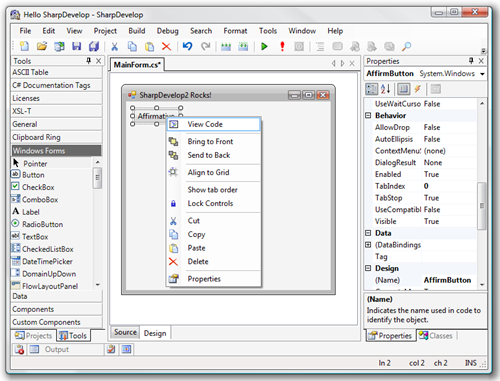
TeaserSharpDevelop2OnVista 

…”

The “other cola”… err… I mean… the “other .Net IDE” gets a major new rev.

#develop is an important project, one that benefits every .Net developer. While we don’t need a million .Net IDE’s we DO need more than just Visual Studio, if nothing else to keep MS on their toes and to provide a viable choice. Choice is good…

(via The #develop teamblog - SharpDevelop 3.0 Final)


Related Past Post XRef:
SharpDevelop for Applications (SDA)
Web Development with SharpDevelop, Web Matrix, and DBGCLR
SourceForge.net: #develop 1.0.2a stopgap release
SourceForge.net: #develop 1.0.2 available for download
SharpDevelop 1.0 Released

XAML Power Toys – The M-V-VM Edition

Karl on WPF - XAML Power Toys 4.0 Released - Code Name MVVM

“Over the last few months I’ve received many emails requesting features and I’ve got a few of my own that I’ve added to XAML Power Toys!

New Features In v4.0

Added Two New Videos that cover these new features.  Please watch them.

I’ve updated the Control Defaults section of the XAML Power Toys Home Page.  Please read this section as it explains some of the below new features.

  • Extract properties to a Style allows selecting a control, choosing desired properties and have those selected properties extracted to a newly created style
  • Create ViewModel Class from a VB.NET or C# code window.  Easily create a ViewModel stub that includes commands and exposed data class.
  • Group into GroupBox
  • Option to generate x:Name for controls
  • Option to add ForeReRead converter to TextBox bindings (both VB.NET & C# converters included in source and binary downloads.  Converter is also included in the OceanFramework.WPF namespace.)
  • Option to add TargetNullValue to TextBox.Text bindings when Source property is Nullable
  • Corrected secondary application domain load issue reported by DevExpress.  This fix also solves another edge case secondary application domain load issue.

Downloads

See XAML Power Toys Home Page.

…” [Post Leach Level: 95%]

Karl on WPF - XAML Power Toys

“Introduction

XAML Power Toys is a Visual Studio 2008 SP1 Multi-AppDomain Add-In that empowers WPF & Silverlight developers while working in the XAML editor.  Its Line of Business form generation tools, Grid tools,  DataGrid and ListView generation really shorten the XAML page layout time.

It’s accessed through commands in the XAML editor context menu and the Solution Explorer item context menu.

XAML Power Toys generates .NET 3.5 SP1 WPF compliant XAML and Silverlight 2 compliant XAML.

This version of XAML Power Toys is compatible with Silverlight 2.0 RTM.

I’ve tagged edited areas in the document with New, to identify new paragraphs and videos for version 4.0.

Goal

The primary goal of XAML Power Toys is to deliver tools that enable developers to quickly layout and maintain Line of Business Application forms using the UI controls that ship with Visual Studio.

You’ll notice that the below features are business form focused.  This does not limit the use of the software, I’m just providing the current target project type.

Feature Set

  • Create ViewModel Class - from a VB.NET or C# code window, easily create a ViewModel stub that includes commands and exposed data class.
  • Extract Properties To Style - allows selecting a control, choosing desired properties and have those selected properties extracted to a newly created style
  • Change Grid To Flow Layout - allows selecting of one of more control and will remove all MinWidth, MinHeight, Margin properties and will set all row and column definitions to Auto.
  • ….

…”

Good timing in that here I’m just getting up to speed on WPF/XAML and MVVM.  :)


Related Past Post XRef:
Who says WPF/XAML isn’t ready for Line of Business apps? Well anyway, the XAML Power Toys will help you down that road at least (Think “XAML Meets LoB CRUD” but actually sounds and looks better)

eXpert Web Performance Analysis via Fiddler - Microsoft neXpert Performance Analysis Plugin [For Fiddler]

Microsoft Downloads - Microsoft neXpert Performance Analysis Plugin

“…

File Name: neXpertV1.0.msi
Version: 1.0
Date Published: 2/9/2009
Language: English
Download Size: 386 KB


neXpert is an add-on to Fiddler which automates the classic performance best practice checks and produces a HTML report on the issues found in a Fiddler capture. neXpert adds the ability to insert step markers in Fiddler sessions to associate network objects together (create transactions). Using these steps, neXpert looks for performance issues and generates a HTML report based on the findings. A TCP model provided by Microsoft Research as well as a rudimentary algorithm to mimic web browser is used to generate response time predictions (Still considered Beta). More information can be found at the neXpert blog: http://blogs.msdn.com/nexpert/[Leach level: 99%]

neXpert Performance Tool - Introducing …. neXpert

“What is it?

neXpert is an add-on to Fiddler Web Debugger which aids in performance testing web applications. neXpert was created to reduce the time it takes to look for performance issues with Fiddler and to create a deliverable that can be used to educate development teams.

What are the features?

·         Add step markers while capturing traffic to create steps or clicks in a scenario

·         Easy access buttons for performance testing with Fiddler

o   Clear Cache/Cookies

o   Enable Streaming Mode

·         Ping each host in a capture to calculate current latency

·         Create rudimentary response time predictions for different latencies and browsers (BETA)

·         Create a HTML report which checks for performance issues with the following:

o   HTTP Response Code

o   ASP.NET View State

o   Static Files

o   Large Images

o   Compression

o   Authentication

o   ETags

o   Cache Headers

o   Connection Header

o   Vary Header

o   Cookies

…”

Sounds pretty interesting. I don’t do web dev near enough any more so when/if I do, a tool like this could very useful.


Related Past Post XRef:
Fiddler 2.1 Released...
Fiddler2 (Fiddler + HTTPS) Alpha Released
Microsoft Fiddler 1.2 Released and now Officially Out of Beta
Fiddler PowerToy - Part 1: HTTP Debugging
Fiddler HTTP Debugger - Fiddler

Kindle 2 is released – Is it time?

k2-email_002__V251584110_

New Features & Enhancements

Slim & Lightweight: Just over 1/3 inch and 10.2 ounces

Books in under 60 seconds: Get books delivered in less than 60 seconds; no PC required

Improved Display: Reads like real paper; now boasts 16 shades of gray for crisp images and text; even reads well in bright sunlight

Longer Battery Life: 25% longer battery life; read for days without recharging

More Storage: Take your library with you; holds over 1,500 books

Faster Page Turns: 20% faster page turns

Read-to-Me: Text-to-Speech feature means Kindle can read every book, blog, magazine, and newspaper out loud.

No Wireless Bills: No monthly wireless bills, data plans, or commitments. Amazon pays for Kindle’s wireless connectivity so you won’t see a monthly wireless bill.

Large Selection: Over 230,000 books, plus U.S. and international newspapers, magazines and blogs available

Low Book Prices: New York Times Best Sellers and New Releases $9.99, unless marked otherwise

…”


It’s got me thinking… but $359 still seems very steep to me. And the books are more expensive than the paperbacks I usually buy. Cheaper than hardbacks, it’s true, but not paperbacks. Book price is the big thing for me. I’m a voracious reader, easily reading a book or two a week (sometimes more, sometimes less, but one to two a week is about my current average) so book prices are king for me. Hence my focus on paperbacks (and my local “Friends of the Library” bookstore where books are 50 cents each ;)

When book prices come down, say between 3 and 5 for electronic formats, then I think I’ll be sold.

Also I think I’d really like only one “media” device. If this were also a MP3 player (with online music purchase/subscription?) then I might persuaded. I have room for two portable devices in my life, one small form factor device, i.e. phone, and then another man-purse’able, i.e. media player, eReader, maybe a netbook. Maybe one day these will all merge into a single portable device, today I think there’s room for two, but only two (in my world at least).

Still I think the Kindle is pretty darn cool and given all I’ve said, I do have Kindle lust… deep sigh…

Monday, February 09, 2009

“The Art of Debugging – A Developer’s Best Friend” – Ten lessons, so far, toward becoming a Visual Studio Debugging Ninja

Cloud Teacher Dot Com -

The Art of Debugging – A Developer’s Best Friend – Lesson 10 – Debugging Threads

The Art of Debugging – A Developer’s Best Friend – Lesson 9 – The Set Next Statement

The Art of Debugging – A Developer’s Best Friend – Lesson 8 – The Garbage Collector – GC

The Art of Debugging – A Developer’s Best Friend – Lesson 7 – Advanced Techniques – Using Object ID

The Art of Debugging – A Developer’s Best Friend – Lesson 6 – Watch and Immediate Windows – Advanced Techniques

The Art of Debugging – A Developer’s Best Friend – Lesson 5 – Using TracePoints

The Art of Debugging – A Developer’s Best Friend – Lesson 4 – Debugging Threads

The Art of Debugging – A Developer’s Best Friend – Lesson 3 – BreakPoint HitCount

The Art of Debugging – A Developer’s Best Friend – Lesson 2 – Breakpoints in SubExpressions

The Art of Debugging – A Developer’s Best Friend- Intro – Lesson 1

“Art is the process or product of deliberately arranging elements in a way that appeals to the sense or emotions. It encompasses a diverse range of human activities and I think debugging is an art form. There's nothing more beautiful (almost nothing) than watching your errant code expose it's semi-flawed algorithmic beauty. And nothing appeals to my emotions more than make my code more robust and more efficient after watching the debugger execute it one line at a time.

John Robbins is the pre-eminant debugger of today. You may check out his book for more information. Much of this material is based on his work.

Enter Visual Studio 2008

This blog is about Visual Studio. So the tips and techniques I talk about are things you can do with Visual Studio.

Download the sample project – debugging.zip

Here are the topics we want to cover

Stack Window Breakpoints

Sub Expression Breakpoints

Quickly Breaking on a Function

Breakpoint Hit Count

Breakpoint Condition

Assertions on the Fly

Filter Breakpoint Modifier

Tracepoints

The Amazing Data Tip

Calling Methods in the Watch Window

Testing Tricks

Make Object ID

Generational Objects

Set Next Statement

Threading Help

Setting up .NET Reference Source Code Stepping

…”

Some light Monday reading… ;)

This is a great series of articles, highly diagramed and to the point, on using the debugging in Visual Studio to its fullest.


Related Past Post XRef:
VS 2008 Tracepoints – Debug output without touching your code (Say goodbye to Debug.Write ?)

Sunday, February 08, 2009

Don’t Orca it, InstEd It! – MSI editing made simpler, easier and still free

InstEd - Make packaging more productive

“If you use Orca, you will love InstEd. If you use some of the more expensive tools, you may find that InstEd makes you more productive for the bread and butter packaging tasks.

InstEd is a Free msi editor built for professionals.

New release available now! Be fully prepared for Windows Installer 5.0 MSIs with the latest version of InstEd: 1.5.5.13. …

InstEd makes working with files fast and easy.

  • Build cabs from the Media table.  Right click a Media table entry to see the files belonging to that cab, or to rebuild the cab.
  • Multi-file editing using tabs. Built from the ground up to handle multiple files, everything from searching to validation can be applied to more than one file at a time.
  • Easy navigation. All relationships within the database are displayed and clickable for easy navigation.
  • Accurate editing. Changes to a field are optionally cascaded to all dependent fields. So, for example, renaming a component can have all references updated.
  • Change highlighting. All changes to an mst are highlighted. Msi files can be compared to highlight the differences. And by comparing an msi to itself while the msi is being edited, change tracking can be performed on an msi.
  • Easy validation. Validation profiles allow full flexibility to apply ICEs from more than one CUB to many files at once, allowing for easy Quality Assurance of many files at once.

…” [Page leach level: 95%]

image

Every time I fire up Orca my brain hurts. It’s a cool tool, don’t get me wrong, but pretty low level. (If you don’t know what that is, don’t worry… I won’t say you’re lucky… but… well… you’re lucky…lol ;) Editing MSI’s is not for the faint of heart. MSI’s are essentially databases and pretty complex ones at that. So it’s easy to get lost and/or screw up a change.

I think of Orca as kind of, sort of, like pointing Access at a big database. Lots of power and ability to change, but hard to navigate and easy to mess up the data. InstEd is still powerful in that way, but with an extra layer of sanity, help and validation provided.

The price is also just right, free…

(via Jason Haley - Interesting Finds: February 8, 2009 –> Under The Stairs - InstEd – A Replacement For Orca)


Related Past Post XRef:
"Less MSIérables: A tool to Extract the contents of an .msi File"
How do you turn on Logging/Log Files when installing an MSI? Oh yeah, /L or via the Registry…
InstallSite: Windows Installer Tools and Tips