Explains how to build an infrastructure for hosting Microsoft SQL Server Database as a Service by using the features of SQL Server 2014 and Hyper-V virtual machines with Microsoft System Center 2012.
Version: April 2014
Date Published: 4/7/2014
Database Hosting Reference Architecture Guide_SQL_2014.docx, 302 KB
This guide explains how to build an infrastructure for hosting Microsoft SQL Server Database as a Service (DBaaS). By using the features of SQL Server 2014 and Hyper-V virtual machines with Microsoft System Center 2012, a hosting service provider can start with very small tenant databases and scale to meet the needs of the largest and busiest SQL Server applications. This reference architecture includes information about hardware, software, system design, and component configuration.

...
This guide to building the infrastructure for hosting Microsoft® SQL Server® Database as a Service (DBaaS) is not limited to a particular type of hardware. By using the features of SQL Server 2014 and Hyper-V® virtual machines with Microsoft System Center 2012, a hosting service provider can start with very small tenant databases and scale out or scale up to meet the needs of the largest and busiest SQL Server applications. This reference architecture includes hardware, software, system design, and component configuration.
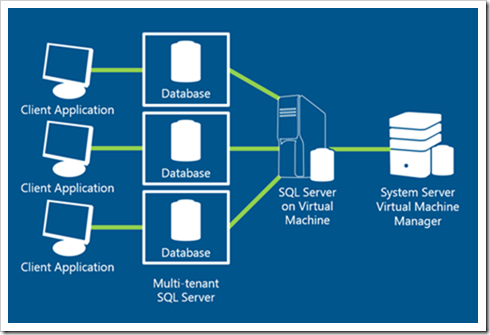
Database as a Service, for the purposes of this reference architecture, is a multitenant offering with isolation at the SQL Server database level. Many tenants can share an instance of SQL Server 2014 Enterprise Edition, each tenant with its own database. SQL Servers are hosted on Hyper-V virtual machines running Windows Server® 2012 R2 or using Windows® Core services. Hyper-V virtual machines are managed and monitored by System Center 2012 R2 Virtual Machine Manager and Operations Manager.
A hosted service provider (HSP), the intended audience for this guide, may offer a single server or many hundreds or thousands of servers. Servers may be in the same data center or distributed across data centers for load balancing and disaster recovery.
As an HSP, you make individual SQL Server databases available to the tenant with an agreed-upon maximum size and an agreed-upon amount of resources available. You are responsible for maintaining the SQL Server instance, the virtual host, and the physical host compute, network, and storage infrastructure.
You can secure a single instance of SQL Server easily. When you use the Partially Contained Database and Contained Users features of SQL Server 2014, a database can be made into a secure environment. Users cannot access other databases or the metadata about tenant databases.
You can also use the SQL Server 2014 Enterprise Resource Governor to prevent a single user or a single tenant from using too much of the available resources, and resource usage can be balanced among tenants.
In a SQL Server 2014 DBaaS environment, each tenant is responsible for the data in his SQL Server database. Tenants create the database architecture consisting of objects that store data and application code to maintain and search data and return results to clients. Within the database, a tenant database administrator (DBA) can set permissions enabling subsets of tenant users and groups to carry out these tasks.
The architecture of the database and how well the tenant optimizes code that performs searches will have a direct impact on performance and resource usage. You may wish to offer services to help tenants to optimize design and code to improve response times and minimize resource usage.
As the HSP, you are responsible for Windows and SQL Server maintenance and your standard agreement to provide hosted SQL Server services should define your maintenance windows. You may patch SQL Server and Windows on the virtual and physical hosts, migrate the database to a new virtual machine host when resource requirements require it, and migrate the virtual machine to a new physical host during routine maintenance.
You may also perform certain database-level services on behalf of the tenant, such as running scheduled jobs and backups. Scheduled jobs can run common maintenance tasks like Update Statistics or large scale data modification and aggregation, such as month-end processing. You may also make tools, such as an API or a self-service control panel, available to the tenant to manage such jobs while restricting the tenant’s access to only the data she needs.
You can automate provisioning services by using management APIs and offer features like self-service provisioning to your customers. Such services reduce operational expenses for both you and your tenants.
You can monitor usage at a very detailed level with tools like Microsoft System Center Operations Manager and the SQL Server Management Pack. Tenants can be billed according to very broad guidelines or for only what they use.
Customers will see lower capital expenditures and total cost of ownership when they consolidate database servers, reduce the proliferation of on-premises applications, and share the cost of administrative expertise with other tenants. Tenants can take advantage of advanced solutions without having to buy and administer an entire enterprise solution.
By leasing SQL Server DBaaS, the tenant can pay for only those resources required for an application with the option to scale up in the future. There is no need to over-provision for what might or might not happen in the future, because when more capacity is needed, the hardware will be available.
...
While targeted at hosted service provider, I still think this has value for large organizations or those dealing with SQL Server Sprawl... SQL Server Enterprise isn't cheap, so ensuring that you're using it to its maximum is important for everyone. IT groups like to say they are "service providers." Doing something like this makes that a real statement, without them giving away the keys to the store...


 Posts
Posts


