Thursday, February 07, 2008

.NET Mass Downloader v1.1 Update Released

John Robbins' Blog - .NET Mass Downloader 1.1 Released

"The feedback and downloads for .Net Mass Downloader have been quite pleasing! Kerem and I just went through and fixed all the reported bugs so the 1.1 release is better than ever. The big fixes were that we now properly handle paths with spaces in them (see what happens when you have two old DOS guys doing a project!), and if you had trouble behind a proxy server, you shouldn't any more. As always, let us know if you find any problems or have feature requests.

Just as a reminder, to download all the parts of the .NET Reference Source Code that Microsoft has released thus far, use the following command line (one line) on 32-bit:

..."

Before I had a chance to try 1.0, there's already v1.1... Darn, technology... lol


Related Past Post XRef:
Download all the .Net Source/Reference code/PDB's at once with .Net Mass Downloader

MSBuild By Example

C# Online - MSBuild: By Example

"Even if you have experience using an XML task-based build tool, such as Ant or NAnt, MSBuild is significantly different. In fact, MSBuild is different not only in execution but also in syntax. Therefore, to really get a feel for MSBuild, you must get your hands dirty using the tool. As you begin to explore what MSBuild has to offer to your projects, you will naturally seek more knowledge of MSBuild. This chapter will help you get your hands dirty by showing you several examples of how you can use MSBuild. Also, this chapter will present some important techniques for using MSBuild effectively. We will provide a variety of tips, covering topics such as integrating MSBuild into Visual Studio and formatting your output. These samples are set up to be mostly independent. This is because each sample expresses a set of specific ideas, so you will be able to examine and try each concept on its own. After this chapter, you should have a much greater feel for building your applications with MSBuild. Following this chapter, we will continue the coverage of MSBuild by showing how to use some of its more advanced features.

..."

This is the MSBuild Chapter from Deploying .NET Applications, Apress in wiki form.

While you're on C# Online, make sure you check out it. There's allot of great information (and not just C# stuff, but Visual Studio, .Net Framework and CLR, etc)

Buck also recommends reading, Compile Apps Your Way With Custom Tasks For The Microsoft Build Engine

(via Buck Hodges - MSBuild by Example)

I can see right through you... Transparent Labels in WinForms (with a VB implementation)

Rick Strahl's Web Log - Transparent Labels in WinForms

"One really annoying thing about WinForms is that there's no built in support for transparency for controls. If you want to create a label and want it to blend into any custom background colors this isn't inherently supported. Although there's a static Color.Transparent color property, when you apply to a label on a form it doesn't actually do anything - you get the same default background color (inherited fro the parent) applied instead.

...

If all else fails you can also create use raw GDI+ code to draw the label onto the form at the specified position form location. As it turns out it's not terribly difficult to do this: Here's a TransparentLabel class that does this. Didn't test this extensively (and the author warns of some possible rendering inconsistencies) but I plugged it into several of my simple scenarios of overlaying a label on top of various graphics this worked just fine.

..."

Label transparency in WinForms has bugged me for a while, one of the minor nuisance things. So when I saw the above post, I had to play with it... (and convert it to VB of course ;)

Below are a couple screenshots and the related code/class.

It is by NO means complete and the implementation is not perfect (or even really good, since I combined the transparent.designer.vb and transparent.vb into a single class for posting), but it does work and can be a good starting point for you...
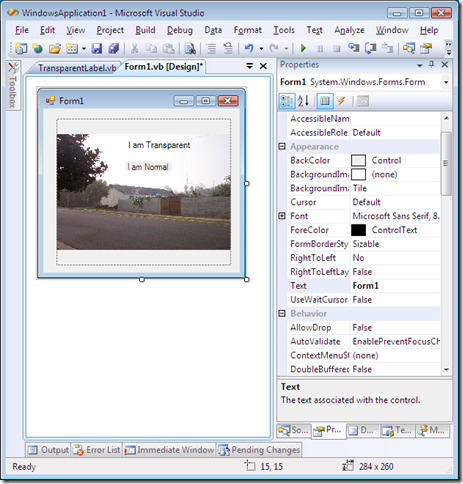
image

image

Public Class TransparentLabel
Inherits System.Windows.Forms.Control

'UserControl overrides dispose to clean up the component list.
<System.Diagnostics.DebuggerNonUserCode()> _
Protected Overrides Sub Dispose(ByVal disposing As Boolean)
Try
If
disposing AndAlso components IsNot Nothing Then
components.Dispose()
End If
Finally
MyBase
.Dispose(disposing)
End Try
End Sub

'Required by the Windows Form Designer
Private components As System.ComponentModel.IContainer

'NOTE: The following procedure is required by the Windows Form Designer
'It can be modified using the Windows Form Designer.
'Do not modify it using the code editor.
<System.Diagnostics.DebuggerStepThrough()> _
Private Sub InitializeComponent()
Me.SuspendLayout()
'
'TransparentLabel
'
Me.Name = "TransparentLabel"
Me.Text = "I am Transparent"
Me.Size = New System.Drawing.Size(217, 32)
Me.ResumeLayout(False)

End Sub
' Custom code starts here...
Public Sub New
()
' This call is required by the Windows Form Designer.
InitializeComponent()
Me.TabStop = False
End Sub


Protected Overrides ReadOnly Property
CreateParams() As System.Windows.Forms.CreateParams
Get
Dim
cp As CreateParams = MyBase.CreateParams
cp.ExStyle = cp.ExStyle Or &H20
Return cp
End Get
End Property


Protected Overrides Sub
OnPaintBackground(ByVal pevent As System.Windows.Forms.PaintEventArgs)
'Do nothing...
End Sub

Protected Overrides Sub
OnPaint(ByVal e As System.Windows.Forms.PaintEventArgs)
Using brush As SolidBrush = New SolidBrush(ForeColor)
e.Graphics.DrawString(Text, Font, brush, -1, 0)
End Using
End Sub

End Class

VB 9 - Funky Func Functions - The new Func Keyword

Wriju's BLOG - VB.NET 9.0: Lambda Expression Function

"If you want to use Lambda Expression as reusable function, you need to use Func. By using the Func we are actually calling in-build delegate.

So if you write

Dim sqr As Func(Of Double, Double) = Function(x) x * x

Then you can use it in you application to get the square of a number.

Console.WriteLine(sqr(2))

Console.WriteLine(sqr(8))

This could be used in multiple places with different parameter as you generally do with any function." [Post Leached in Full]

I don't know what it is, but I'm having a hard time wrapping my head around the new Lambda Expression feature in VB9. It's just not clicking yet. Oh, I understand what it is, and why it's cool and all that, but just the mechanics of writing Lambda Expressions (Func = Function calls like the one above) still hasn't sunk in.

As with most new things, I need to use it some more so it will sink in. And maybe decomposing it to a syntax I'm used to will help...

Kind of like this;

  Function sqr(ByVal x As Double) As Double
Return
x * x
End Function

... Yeah, I think that helps...

Wednesday, February 06, 2008

F1 to the Help Rescue - aka How to make the VS F1 key do what you end up doing anyway...

“Hello World” - The SlickEdit Developer Blog - Help With MSDN Help

"F1… it’s possibly the most feared key on my keyboard when writing code in Visual Studio. At best, it’s going to bring up MSDN help, aka dexplore.exe. That means that I’m in for a very, very long wait. ...

...

I could understand if dexplore were processing SETI data on startup, crunching genome data, or possibly computing sophisticated weather patterns. But let’s be honest, it’s a glorified web browser. ...

Apparently, I’m not the only one that completely hates the help system. AprilR reports in her blog that Microsoft is overhauling MSDN help based on user feedback. That’s great, but ...

...

I set up my own help launcher macro to spawn a web browser, take the selected text and do a Google search on MSDN and the selected text.

Here’s the macro:

...

Now, if you go into Tools > Options and select Environment / Keyboard, you can bind Macros.MyMacros.HelpModule.LaunchWebBrowser to the F1 key (or whatever you like). Now, when you press F1, it will go right to Google and search for “MSDN [selection]” where [selection] is any selected text in your active document ..."

Nice. A VS macro to help us do what we do already anyway... Search the web for help.

Like Scott, I'm glad MS has finally heard our cries about MSDN Help, and I really hope we don't have to wait until the next VS version to get the revamp. But until then, this macro may come in handy.

BTW, personally I think I'm going to first try www.searchdotnet.com as my F1 web search source... It's a much more .Net focused search portal put together by Dan Appleman. The search query is a tiny bit harder to code to, but probably well worth it.

Visio 2007 to XAML Export Add-in - The XAML Eye for the Non-Expression Guy

Saveen Reddy's blog - Updated Add-In for Visio 2007 to Export to XAML

"Just before the Visio 2008 conference began I published my first attempt at exporting XAML from Visio 2007. And within 12 hours, Thierry Bouquain hooked up his code and made the XAML output much better. I've now created third version with some extra UI to help with making the process easier and help me in debugging any problems.

The project has been published on codeplex: http://www.codeplex.com/VisioExportToXAML

Using the Add-In

image

..."

Okay, that title was a stretch, but it sounded good at the time... ;)

I can use Visio (mostly... in a developer FBUGLY [Function, But UGLY] kind of way), but Expression Blend is currently a little beyond me (but that could be because I fired it up once and said, "wow, okay... now what..." and left it at that).

Still with the better integration of WPF into VS2008, I can see the need to XAML in the near future. So I'm keeping my eyes open for stuff to make my XAML life easier...

Download all the .Net Source/Reference code/PDB's at once with .Net Mass Downloader

John Robbins' Blog - Download All the .NET Reference Source Code at Once with Net Mass Downloader

"Microsoft has really helped out the development community by making the .NET Reference Source Code available to the community. Being able to step in the debugger from your code to the Framework code truly helps with you understanding and use of all parts of .NET. The only drawback I've seen with what Microsoft is offering is that the source code can only be downloaded while you're debugging. ...

It turns out I wasn't the only one who had the same wishes. Kerem Kusmezer contacted me and said that he'd been hacking around with Fiddler and figured out how to download the PDBs and code from Microsoft. He asked if I I'd be interested in helping him develop the utility and I don't think I ever wrote a response faster in my life! Kerem had already started a discussion with Shawn Burke about the legality of producing a source downloader and once we got back a very encouraging "go for it" we got to work. ...

The tool is called Net Mass Downloader and we made the source code available at CodePlex at http://www.codeplex.com/NetMassDownloader so you can see how it works. It's a command line tool and running the tool without parameters produces the following output:

..."

If you want the .Net reference/source code, but don't want to wait for it to download "on demand," the .Net Mass Downloader utility built just for you...


Related Past Post XRef:
It's .Net Source Day! Let the Source Loose.... Today is the day you can configure VS2008 to grab the actual source code to the .Net Framework and step into it as you debug...

GuitarMatey - XNA game development series from the ground up... (How can you wrong with a Guitar Hero style controller and dancing pirates?)

Game Theory - Building a 3D Game in XNA From Scratch - Free Video Tutorial Series Now Available!

"After far too many hours of learning, teaching, recording, testing, video editing, and other glorious activities, I am ready to make available my massive collection of video tutorials for creating a 3D game in XNA from the ground up, without skipping steps, for you, the enthusiast, student, or educator!

The 3D game we build together is called GuitarMatey and it uses a regular Guitar Hero style controller.

About GuitarMatey

GuitarMatey is a 3D game for the Xbox that allows you to improvise guitar music with the accompaniment of a backing track. Five pirates dance for you as you play the game. While GuitarMatey lacks a real objective or purpose, it is perfect to help you learn about developing 3D games for free using XNA and our partner tools. 

Learning how to build GuitarMatey will teach you:

  • How to build a simple 3D model in SOFTIMAGE|XSI Mod Tool
  • How to build a more complex skinned, rigged & animated character model in SOFTIMAGE|XSI Mod Tool for use in an XNA game
  • Project setup for XNA and XSI projects
  • Pipeline & workflow between XSI and XNA 
  • How to animate a skinned XSI model in XNA using the XNAXSIRuntime library provided for free by SOFTIMAGE
  • How to creating and managing sound and audio using the DirectX XACT tool
  • How to handle input from the controller
  • How to prep an XNA PC game for XBOX 360
  • How to deploy an XNA game to the Xbox through the Creators Club
  • And many, many nuances and "gotchas" that will help make your development experience 1000% smoother.

..."

14 videos on starting from scratch and writing what looks link some interesting XNA code...

(via Computer Science Teacher - Thoughts and Information from Alfred Thompson - XNA, a Guitar Hero Guitar and a Game of Your Own)

Tuesday, February 05, 2008

Your Video *GA Standard Poster

def Softwaremaker() : - Display Resolution Reference

749px-Vector_Video_Standards2_svg

This made me laugh... I think I lost track of the *GA video resolutions somewhere around XGA...

Monday, February 04, 2008

Details on the File Copy Improvements in Vista SP1

Mark's Blog - Inside Vista SP1 File Copy Improvements

"Windows Vista SP1 includes a number of enhancements over the original Vista release in the areas of application compatibility, device support, power management, security and reliability. You can see a detailed list of the changes in the Notable Changes in Windows Vista Service Pack 1 whitepaper that you can download here. One of the improvements highlighted in the document is the increased performance of file copying for multiple scenarios, including local copies on the same disk, copying files from remote non-Windows Vista systems, and copying files between SP1 systems. How were these gains achieved? The answer is a complex one and lies in the changes to the file copy engine between Windows XP and Vista and further changes in SP1. Everyone copies files, so I thought it would be worth taking a break from the “Case of…” posts and dive deep into the evolution of the copy engine to show how SP1 improves its performance.

Copying a file seems like a relatively straightforward operation: open the source file, create the destination, and then read from the source and write to the destination. In reality, however, the performance of copying files is measured along the dimensions of accurate progress indication, CPU usage, memory usage, and throughput. In general, optimizing one area causes degradation in others. Further, there is semantic information not available to copy engines that could help them make better tradeoffs. For example, if they knew that you weren’t planning on accessing the target of the copy operation they could avoid caching the file’s data in memory, but if it knew that the file was going to be immediately consumed by another application, or in the case of a file server, client systems sharing the files, it would aggressively cache the data on the destination system.

..."

Mark provides a low level, detailed view into file copying, Vista and SP1.

If you ever wondered what's going on under the covers when you copy a file on Vista, this is a must read.

Add Excel "Comment" Indicator to a DataGridView Cell

Geeky Storytelling - Mimickin' Excel Comments in the DataGridView

"I had a need to make the WinForm DataGridView bend to my will by having some Excel-like behavior. Since I had do do some digging to make this happen, thought I'd share.

First off, my goal was to include those little comment indicator triangles in specific cells. In order to do this, you need to handle the the CellPainting event. And no - before you ask - I haven't yet created my own grid control to inherit and extend the grid behavior...but it is on my list of refactoring tasks to consider.

image

Here is the CellPainting event handler (for simplicity, I'm always showing the little glyph. In reality, I selectively show it based on the data for the row):

..."

I just thought of a cool usage for this this weekend, so I wanted to make sure I blogged about it before I forgot it.

Unfortunately I've already forgotten it... sigh...  stupid old brain. I need a brain v2 upgrade.

Anyway, I can at least blog about the inspiration for the idea. The above post shows how you can add an Excel like comment indicator to a DataGridView cell.

Tons of TFS Stuff - Team System Widgets List from Accentient

Accentient - Team System Widgets

"This is a list of various Visual Studio Team System add-ins, add-ons, widgets, and extensibility solutions. These widgets may be works in progress, open source, or commercially licensed products, so please read the respective license agreements!

..."

There are pages of TFS stuff on this site. From templates, tools, services, utilities, guides, and more.

If you're looking for TFS products, commercial, community or free or just TFS "stuff" then this should be one of your first stops...

(via Ozzie Rules Blogging - Team Foundation Server Process Templates?)

Bart's Quick Guide to PowerShell CmdLet Development and Debugging

B# .NET Blog - Easy Windows PowerShell cmdlet development and debugging

"Before posting another post in the Windows PowerShell domain, I thought it was useful to write down the way to write a simple cmdlet in Visual Studio, with easy iterative debugging support. I've used this recipe myself quite a bit, including in on-stage presentations where you want to avoid messing up things at any cost :-).

Step 1 - Create a Class Library project

..."

Bart has put together a nice guide/walk through on creating your first PowerShell CMDLET, including debugging it...


(via A Continuous Learner's Weblog - Links (2/3/2008))

Sunday, February 03, 2008

Low Cal LINQ Standard Query Operators Cheat Sheet

LINQ Standard Query Operators (2 Page PDF)

A raw/basic Linq, without language syntactical sugar, Quick Reference sheet.

(via Hilton Giesenow's Jumbled Mind - Linq Query Operators 'Cheat Sheet')

Managed Extensibility and Add-In Framework CodePlex Project - Meet .Net 3.5 System.Addin and Friends

CodePlex - Managed Extensibility and Add-In Framework

"Welcome to the CodePlex site for the Managed Extensibility and Add-In Team. This site will be the home to both samples and tools designed to help you make the best use of the new System.AddIn features in the .Net FX v3.5. We'll continue to use our blog http://blogs.msdn.com/clraddins/ for information and discussion about our work, but from now on we'll be hosting our samples here for easier access.
The initial focus will be on two things:

...

Project Description: Pipeline Builder
This has been one of the most requested features we've had since people started learning more about our model and playing with the bits. For a particular version of an application writing the code for the views and adapters can be a lot of mechanical repetitious work and generally only gets interesting when you are writing "cross-version" adapters. So what we've done is build a tool that will automatically generate the source code for the views and adapters for a given contract assembly. This tool is really just a library that can be used from various other places and our release will include a simple command line tool as well as a VS 2008 add-in that will automatically generate the projects and set references/build paths for you appropriately. For more information on this tool as well as links and descriptions of our releases please visit its wiki page: Pipeline Builder.

..."

System.Addin is one of the .Net 3.5 features (along with Linq of course ;) that has me wanting to upgrade from .Net 2.0 to 3.5.

I've written addin enabled/based projects and want to write more, but wasn't happy with work required to do it right in .Net 2.0. And now finally we have a very workable model backed into the Framework. All it requires is an upgrade to .Net 3.5 (and coding to it of course). The MAJOR saving grace is how 3.5 is a layer on top of 2.0/3.0. If it was a jump like 1.0/1.1 to 2.0 was, I think I'd be much more hesitant to move.

Anyway, the Pipleline Builder, based on the description and Kathleen's posts about it, seems like it could be a major helper and could really come in handy...

(via Leaning Into Windows - Kathleen Dollard's view of life and .NET development - First Experience with Pipeline Builder & Pipeline Builder is Released)


Related Past Post XRef:
Managed Addin Framework (MAF)

Saturday, February 02, 2008

Custom XPS Printer Driver Magic

Adrian Ford - Generating XPS Automagically

"I got a mail overnight asking about ways to automatically generate XPS from applications, specifically asking for a way to enable existing applications that don't have knowledge of XPS to generate XPS content. The Microsoft XPS Document Writer (MXDW) allows you to do this, irrespective of whether you're using the .Net or Win32 platforms. There's two ways that applications can invoke MXDW. The first is via the normal action of a user printing, where MXDW is explicitly selected as the target printer. When using this route MXDW displays a 'Save As' dialog so the user can set the target XPS filename. The second route is where the application programmatically selects MXDW as the printer, in this case it can automatically set the output filename by setting lpszOutput in DOCINFO [1] [2]. ...

...

If you don't want users to select the filename (perhaps you want the file saved to some magic folder for further processing), and you're not in a position to modify the application to support setting the destination with DOCINFO, then there is another option [3]. Microsoft makes available the core components of MXDW as part of the Windows Driver Kit (available on Microsoft Connect and MSDN Subscriber Downloads). Using the WDK it is possible to build a custom XPS print driver (XPSDrv) that automates the output process, including doing much more than just setting a destination filename automatically.

..."

XPS has not yet come up at work (where I do EDD, Electronic Data Discovery) as a possible output/delivery format, but I think it's only a matter of time.

There's a ton of goodness in XPS and I believe it will fit well in the Legal/Litigation Support/EDD world.

Why? Think redaction (where text is "blacked out", marked over, redacted because it's privileged, private, confidential information). With XPS you can REALLY redact a document, physically removing and replacing the redacted text. No cut-n-paste recovery, no hiding it or just covering it up, but text nuked, gone, removed, for now and forever. It's also a open format and easy to delve into (at it's heart, it's a zip with XML in it...).

So I'm keeping a minor watch on the XPS space and the above post is something I may be able to use on day...(i.e. Creating a special/specific implementation/instance of a XPS printer where I can control its output, file name, etc.)

Friday, February 01, 2008

Out Loud for Outlook - Voice Enabling Outlook

MSDN Code Gallery - Out Loud for Outlook

"Out Loud for Outlook is an add-in for Outlook 2007 created using the Visual Studio 2008 Tools for the Microsoft Office System.

The sample demonstrates:

  • Basic integration with Outlook 2007.
  • Consuming Outlook's events.
  • Accessing e-mail's.
  • Creating a Custom Action for Outlook rules.
  • Using Speech Synthesis.
  • Using Speech Recognition.

..." [Project description leached in full]

Visual Studio 2008: Microsoft Visual Studio Tools for Office - Out Loud for Outlook: Speech Recognition & Synthesis

"...

Out Loud for Outlook allows you to create a new Outlook rule that reads your designated email out loud when it triggers.   You can also use voice commands with a good microphone to open and navigate through your emails.

Nathan recently updated the solution to run on the release version of Visual Studio 2008.  The Out Loud for Outlook source code is available for download on the new Code Gallery site

..."

From the readme.htm in the download:

"...

Choosing Emails to be read:

Emails are chosen to be read through Outlook's Rules and Alerts dialogue.

Simply:

  1. Create a new rule.
    1. Select "Rules and Alerts..." from the Tools menu
    2. Click the "New Rule..." Button
  2. Choose your conditions and click Next.
  3. Choose "perform a custom action".
  4. In the bottom pane click "a custom action".
  5. Choose "Read With Out Loud for Outlook" as the action to be performed and click ok.
  6. Click Next.
  7. Choose any exceptions and click Next.
  8. Click Finish.
  9. You will get a warning that the rule is client side only. This is desired behavior.

Using Speech Commands:

Out Loud for Outlook uses spoken commands for most of its functionality.
The available commands are:
  • Pause: pauses speech.
  • Resume: resumes paused speech.
  • Open: opens the current email.
  • Read More: read the full text of the current email.
  • Previous: read the previous email.
  • Next: reads the next email.
  • Repeat: repeats the current email.
  • Volume Up: increases the volume of speech.
  • Volume Down: decreases the volume of speech.
  • Speak Faster: increases the rate of speech.
  • Speak Slower: decreases the rate of speech.
  • Go Back {0} Sentences: Goes back {0} sentences in the current speech.

..."

This seems like a pretty interesting project...

I'm playing with it a little and I can see some cool potential (and a chance to tweak it to make it work the way I want it to work... Added to my To Do list..  ;)

Channel 9 - Episode 1 of the "Show with No Name" (aka The Weekly Recap)

Dan Fernandez's Blog - Episode 1 of our Weekly Recap Show is up

"Kudos to Brian for editing everything last night, I think he's sleeping on my couch right now, but our video is now live, check it out as we go through lots in this episode.

...

Episode #1 Recap

  1. MSDN Code Gallery went Live (found on Greg Duncan's Cool Thing of the Day blog)
  2. Jason Olsen's App Compat C9 Video
  3. Pavel Bansky's Tetris on the .NET Micro Framework
  4. C# Future Focus: Dynamic Lookup
  5. Joel Spolsky on SQL Server 2008 Reset and Phil Factor on Microsoft doing their homework
  6. Dan interviewing April Reagan on MSDN Help

..."

Wait a second... Rewind to #1?

Check that out! They gave me a a very cool shout-out (and not only on the page, but in the video cast too). No way...! Dude, that's just cool...

Thank guys!  :)

As I'm sure you'll read everywhere today... It's finally real, Microsoft trying to buy Yahoo for $44.6 Billion.

 Gizmodo - Breaking: Microsoft Wants to Buy Yahoo for $44.6 Billion

"It seems that Bill is going to eat more than one burger before he leaves Microsoft. After countless rumors, it is now official: they want to buy Yahoo! for $31 per share, a total of $44.6 billion in cash and stock.

..."

Microsoft PressPass - Microsoft Proposes Acquisition of Yahoo! for $31 per Share

"REDMOND, Wash. — Feb. 1, 2008 — Microsoft Corp. (NASDAQ:MSFT) today announced that it has made a proposal to the Yahoo! Inc. (NASDAQ:YHOO) Board of Directors to acquire all the outstanding shares of Yahoo! common stock for per share consideration of $31 representing a total equity value of approximately $44.6 billion. Microsoft’s proposal would allow the Yahoo! shareholders to elect to receive cash or a fixed number of shares of Microsoft common stock, with the total consideration payable to Yahoo! shareholders consisting of one-half cash and one-half Microsoft common stock. The offer represents a 62 percent premium above the closing price of Yahoo! common stock on Jan. 31, 2008.

..."

The worlds longest rumored Tech merger may finally happen?