Saturday, October 11, 2008

[.Net 4.0]: Get your Parallel Extensions here… All baked in and part of the Core…. Get your Task Parallel Library here…

Parallel Programming with .NET - Parallel Programming and the .NET Framework 4.0

“…

Some phrases are likely jumping out at you by this point.  “Task Parallel Library”. “PLINQ”. “The Next Version”. So...

Parallel Extensions will indeed be a part of the .NET Framework 4.0.  Not only will it be a part of it, it will be a core part of it.  In Soma’s blog post announcing the next wave, he cites the following as key focuses for the release:

•    Significantly improve the core pillars of the developer experience
•    Support for the latest platforms spanning the client, web, server, services and devices
•    Targeted and simplified developer experiences for different application types

Parallelism is relevant to all of these.  So in the .NET Framework 4.0, you’ll find the Task Parallel Library at the heart of the Framework in mscorlib.dll.  You’ll find PLINQ sitting in System.Core.dll right alongside LINQ-to-Objects.  And you’ll find new coordination and synchronization data types spread across various DLLs, enabling not only your applications, but the .NET Framework itself.

…”

Wow, that’s huge news. That’s great that it will be baked into framework, that where every .Net 4 is, TPL, PLinq will be there too. Also the fact that since it is there, it seems that it will be used throughout the framework. I know I need all the help I can get to take advantage of all the processing cores in my systems… This is coming at just about the right time (My WAG is a late 2009 RTM for VS 2010/.Net 4..)

Also the fact the .Net 4 will support multiple Framework version in-process side-by-side means it should be even easier to take advantage of it.

PDC 2008 - Microsoft .NET Framework: CLR Futures

“Learn about the new features in the next major version of the Common Language Runtime (CLR) from the people building it. Hear about support for in-process side-by-side CLR version support. [GD: Emphasis added] Get a look at development improvements including code contracts and tools, mini dump debugging in Visual Studio, and enhanced base class libraries including BigInteger, tuples, and trees. Learn how improvements to the GC allow for greater scalability for multiple processors and much more!”


.Net 4 is really shaping up to be an outstanding v3… (As I see it, v1 was 1, v2 was 2, v3.0 was really v2+Extra Stuff, v3.5 was really v2.5 or v2.9. .Net 4 is shaping up to be a major, watershed release… )

(via The Moth - Parallel Extensions are part of the .NET Framework 4.0)

Do we really need to say goodbye to MD5’s? There are 340,282,366,920,938,463,463,374,607,431,768,211,456 reasons there’s maybe no rush…

Ride The Lighting - OF MD5 COLLISIONS AND TRAIN WHISTLES

“…

And on to MD5 collisions – in a previous post, I mentioned that all MD5 collisions which have thus far been documented have been “forced” and have not occurred in the wild. A reader wrote with a follow up question – and I must apologize because I seem to have “misfiled” (never say lost) his e-mail, so I cannot tip my hat and thank him by name.

To answer his question, the likelihood of two naturally occurring differing files having identical MD5 hash values has been calculated by experts to be 340 billion, billion, billion, billion. In short, you are not likely to ever see it. Just for grins, the exact number is 340,282,366,920,938,463,463,374,607,431,768,211,456.

You could be struck by lightning and win the lottery many times over before you would see this in real life.

…”

Every so often, the subject of MD5 collisions comes up at work (given my job, that’s no surprising) so I found these paragraphs interesting.

While it’s an important fact that there can be MD5 collisions, it’s also important to put the collision chance into perspective…

What worries me most is not the real world chance, but the “bad guy manufactured” chance. If I were a bad guy, and there was a file I wanted to hide, I might think about consciously altering it so its MD5 matches one on the NSRL RDS list (aka a known system file… say make its MD5 match that of notepad.exe, etc). I wonder how hard it would be to write a utility that given a MD5 hash it forces/tweaks another file to match it. THAT’s the MD5 thought that keeps me up at night…


Related Past Post XRef:
MD5 Collisions
Strategic Legal Technology :: E-discovery and De-duplicating

It’s the Bridge to… Vista – Getting and installing Vista Bridge Sample Library

Microsoft Windows SDK Blog - Using Windows SDK Vista Bridge Sample Library

“Many of you don’t know about the Vista Bridge sample library, what can it do or even where you can find it.

Let’s start with the basics; i.e. definitions. Vista Bridge is a sample library that contains managed wrappers for a number of Windows Vista APIs that are not exposed in the .NET Framework. The wrappers include common Open and Save file dialogs and new Vista advanced task dialogs.

So, where to download it?

There are three ways to obtain the sample library.  It’s included in both the Windows SDK for Windows Vista Update and in the newer Window SDK for Windows Server 2008 and .Net Framework 3.5; or a third option is to download the Vista Bridge sample library which is part of the Windows SDK Cross Technology samples.  I recommend downloading the Windows SDK for Windows Server 2008 and .Net Framework 3.5, but if you don’t have the network bandwidth or just want the samples, then the last option should be the most suitable.

You can find the samples in the Windows SDK in two locations: embedded in the .NET Framework documentation or in a .zip file under Windows SDK samples installation folder. 

…”

This article talks how to get the cool Vista Bridge downloaded, installed and working (as the article talks about a few bugs that you might run into).

If you want to use some of the native coolness that is in Vista (like the new Task Dialogs, enhanced File dialogs, etc), but via .Net are developing for Vista+ then this might be worth a quick look for you.

Here’s the sample app included in the Vista Bridge project.

image

The Vista Bridge was also recently covered by Craig Shoemaker in the UI Decisions: Why & How podcast (I thought I blogged about the Vista Bridge after listening to that cast… but I guess not…).


Related Past Post XRef:
Ease Use of Vista Task/Common Dialogs with Project Glidepath Windows Vista Bridge Package

Friday, October 10, 2008

It’s possible that SilverLight 2 will RTM on Monday (Oct 13th)? – Mary-Jo thinks so…

All About Microsoft - Mary-Jo Foley - Microsoft expected to release Silverlight 2.0 next week

“It sounds like Monday October 13 is the day that Microsoft will announce that Silverlight 2.0 is done.

Scott Guthrie, Corporate Vice President of the .NET Developer Division is slated to  make “a significant announcement related to Microsoft Silverlight” on October 13 at 9 a.m. PT, according to Microsoft.

…”

If I had to pick a date, I’d have said PDC, day 2 (where Scott will be keynoting)… But maybe they want to get the word out early so the RTM notice doesn’t get lost in the rest of the PDC buzz (i.e. Win7, WinCloud, etc)?

Guess we’ll see soon enough. I’d sure rather wait on word about this than word about what the stock markets are doing… :/

Thursday, October 09, 2008

SQL Server FileStream Whitepaper – A DBA/IT focused FILESTREAM paper

In Recovery… - SQL Server 2008 FILESTREAM whitepaper published on MSDN

“Just found out that the 25-page FILESTREAM whitepaper I wrote recently for the SQL team has been published on MSDN.

Here's the table of contents.

  • Introduction
  • Choices for BLOB Storage
  • Overview of FILESTREAM
    • Dual Programming Model Access to BLOB Data
    • When to Use FILESTREAM
  • Configuring Windows for FILESTREAM
    • Hardware Selection and Configuration
    • Physical Storage Layout
    • RAID Level Choice
    • Drive Interface Choice
    • NTFS Configuration
      • Optimizing NTFS Performance
      • Cluster Size
      • Managing Fragmentation
      • Compression
      • Space Management
      • Security
    • Antivirus Considerations
    • Enabling FILESTREAM in Windows
  • Configuring SQL Server for FILESTREAM
    • Security Considerations
    • Enabling FILESTREAM in SQL Server
    • Creating a Database Enabled for FILESTREAM
    • Creating a Table for Storing FILESTREAM Data
    • Configuring FILESTREAM Garbage Collection
    • Partitioning Considerations
    • Load Balancing of FILESTREAM Data
    • Feature Combinations and Restrictions
  • Performance Tuning and Benchmarking Considerations
  • Data Migration Considerations
  • FILESTREAM Usage Best Practices
  • Conclusion”
    [Post leach level: 98%]

SQL Server Whitepapers - FILESTREAM Storage in SQL Server 2008

“This white paper describes the FILESTREAM feature of SQL Server 2008, which allows storage of and efficient access to BLOB data using a combination of SQL Server 2008 and the NTFS file system. It covers choices for BLOB storage, configuring Windows and SQL Server for using FILESTREAM data, considerations for combining FILESTREAM with other features, and implementation details such as partitioning and performance.

This white paper is targeted at architects, IT Pros, and DBAs tasked with evaluating or implementing FILESTREAM. It assumes the reader is familiar with Windows and SQL Server and has at least a rudimentary knowledge of database concepts such as transactions.

image

…”

If you’re interested in SQL Server 2008’s FileStream attribute, then this database side of the house focused document is a good read.

Related Past Post XRef:
Run to Run As Radio for a great SQL Server 2008 FILESTREAM show
SQL Server 2008 FILESTREAM Attribute from Start to C#
SQL Server 2008, the FILESTREAM Attribute and Partitioning - Apparently not as easy as it looks (yet at least)...
A future world without the SQL Server Image/Text/NText data types. Now's the time to start planning for that future...
SQL Server 2008 FILESTREAM - Writing a file to a FILESTREAM column
More SQL Server 2008 FileStream Fun
Playing with the SQL Server 2008 FileStream Attribute


All you Active Tabs? To the left… That’s it, keep it to the left… - Keep your Visual Studio Tabs, the most recently used tabs, visible

Sara Ford's WebLog - Did you know… You can keep recently-used files from falling off the File Tab Channel? - #331

“…

Now let’s say you click on Class1.vb. It becomes the most-recently used file, so it moves to the left.

From the person who told me about this hack, here’s how he uses it:

Basically I like my tabs to be ordered in MRU (Most Recently Used) order (i.e. the current window is always the left most tab, the previously visited window is second tab, and so forth). In this way the documents I visit most frequently stay in view. One of my common situations is that I open a favorite file first (e.g. an important .idl file for .h file) and constantly return to the file during my editing session. Normally this file keeps moving to the right in the tab channel as I open more files even if I am visiting it constantly. Very soon it falls off to the right out of view, and I am annoyed.”

Nice. I dig the way this feature sounds. Turning it on now…

Tuesday, October 07, 2008

Multi-Touch for Windows, without expensive hardware, Now! – All you need is a webcam and an idea…

Microsoft Office Labs - Touchless - A webcam multi-touch SDK

“…

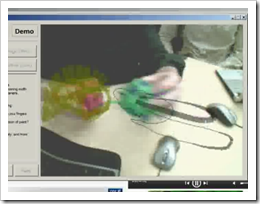
That brings us to today, releasing Touchless to the world outside Microsoft, as a *FREE* *OPEN-SOURCE* SDK with a low barrier to entry for developers and users. Touchless makes developing multi-touch capable software easy, and the results can be enjoyed by anyone with a webcam (and some M&Ms :))! Touchless has come a long way, but its journey has just begun. I can imagine a variety of great directions to explore using Touchless. Perhaps support for the forthcoming Windows multi-touch API, video chat white-boarding, implementing mouse/game/hotkey/media control, and designing decked out Minority Report style file/media browsers.

image

…”

CodePlex - Touchless SDK

“What is Touchless?

The Touchless SDK enables developers to create multi-touch based applications using a webcam for input. Touch without touching.

Touchless started as Mike Wasserman’s college project at Columbia University. The main idea: to offer users a new and cheap way of experiencing multi-touch capabilities, without the need of expensive hardware or software. All the user needs is a camera, which will track colored markers defined by the user.

Mike presented the project at the Microsoft Office Labs Productivity Science Fair, Office Labs fell in love with it, and Touchless was chosen as a Community Project. Our deliverables include an extensible demo application to showcase a limited set of multi-touch capabilities, but mainly we are delivering an SDK to allow users to build their own multi-touch applications.

Now, Touchless is released free and open-source to the world under the Microsoft Public License (Ms-PL) on CodePlex. Our goals are to drive community involvement and use of the SDK as it continues to develop.

Remember that this is just the beginning; and you're invited to join our journey. Send us your questions and feedback, use Touchless SDK in your .NET applications and XNA games, and support the community by contributing to the source code.

…”

That sounds pretty darn cool. I want to wave my hands and/or stuff around in the air in front of my PC and have stuff happen! Let’s see, I wonder if I could code up a single finger salute into an automated IM/Tweet response? :o

Now if only I can a webcam that I could get to would work on my dev/vista box… :/

Monday, October 06, 2008

Who says WPF/XAML isn’t ready for Line of Business apps? Well anyway, the XAML Power Toys will help you down that road at least (Think “XAML Meets LoB CRUD” but actually sounds and looks better)

Karl on WPF - XAML Power Toys

“Current Version 3.1.0.2, Last Update 5 October 2008

Introduction

XAML Power Toys is a Visual Studio 2008 SP1 Multi-AppDomain Add-In that empowers WPF & Silverlight developers while working in the XAML editor.  Its Line of Business form generation tools, Grid tools,  DataGrid and ListView generation really shorten the XAML page layout time.

It’s accessed through commands in the XAML editor context menu and the Solution Explorer item context menu.

XAML Power Toys generates .NET 3.5 SP1 WPF compliant XAML and Silverlight RC0 compliant XAML. 

Requirements

  • Visual Studio 2008 with SP1
  • For Silverlight Development Silverlight 2 RC0  (if your not doing Silverlight development, this is not required)
  • Windows XP, Vista, Server 2003 or Server 2008

Goal

The primary goal of XAML Power Toys is to deliver tools that enable developers to quickly layout and maintain Line of Business Application forms using the UI controls that ship with Visual Studio. 

Feature Set

  • Create WPF or Silverlight DataGrid For Class - quickly create a WPF DataGrid complete with bindings that are easily associated with properties on the source class
  • Create WPF ListView For Class - quickly create a ListView complete with bindings that are easily associated with properties on the source class
  • Create Business Form For Class - quickly create a form complete with bindings that are easily associated with properties on the source class
  • Create Business Form - quickly create a form complete with bindings if desired 
  • Show Fields List For Class - display a list of class fields similar to Microsoft Access.  Allows dragging of fields to create controls
  • Group Into - allows selecting one or more controls and group them inside a new parent control
  • Chainsaw - Minimize Cider Designer XAML - allows selecting of one or more controls and will remove all MinWidth, MinHeight, x:Name, Name, Margin properties and will set all row and column definitions to Auto.
  • Remove Margins - allows selecting one or more controls and removes the Margin property from them
  • Edit Grid Column and Rows - allows selecting a grid and then add or remove rows and columns
  • Set Defaults For Created Controls - allows customizing the initial properties that are set when the software creates a new control
  • About Box - see the version of XAML Power Toys installed on your system

untitled

…”

Wow, there’s a ton of coolness in this, free with source, package. Why code it from scratch when you can generate it? As a WPF/XAML noob, I see this as a means to learning WPF/XAML through working, real-world, code (i.e. mine).

And you know, I have this collection class now that I’m binding to a boring WinForm gridview…hum… Do I hear weekend project?  ;)

Make sure you click through for more information, screenshots and videos.

(via XAML, WPF, Silverlight, .NET, Office 2007, Windows - XAML PowerToys for VisualStudio - Speed up Development of Business Apps and Just Edit XAML Faster)

Have a long literals string in VB? Forget the underscore and just use VB9’s XML Literals

Goto 100 - Development with Visual Basic - Long strings in Visual Basic 2008

“I suspect everyone already knew this – but for me it was shiny and new :-) XML Literals do not require line continuation characters, hence rather than this:

 image

you can create a really long string using an XML Literal:

image

Note: the whitespace is maintained.” [Post leached in full]

This tip made me laugh as I just thought it was just too cool… And until we get rid of the line continuation character (in VB10, I hope), I think I might be able to use this a trick.

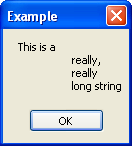
But note the note. Maintained whitespace means the above message would look like;

 image

So if you use this trick, make sure you understand this…

MSBuild Extension Pack (Think “FreeToDev MSBuild Tasks Suite” but now they’re cooking with gas! ;)

CodePlexMSBuild Extension Pack

image

“The MSBuild Extension Pack is the successor to the FreeToDev MSBuild Tasks Suite and provides a collection of over 170 MSBuild tasks designed for the .net 3.5 Framework. A high level summary of what the tasks currently cover includes the following:

  • System Items: Certificates, COM+, Console, Date and Time, Drives, Environment Variables, Event Logs, Files and Folders, GAC, Network, Performance Counters, Registry, Services, Sound
  • Code: Assemblies, CAB Files, Code Signing, File Detokenisation, GUID’s, Mathematics, Strings, Threads, Zip
  • Applications: BizTalk 2006, Email, IIS7, MSBuild, SourceSafe, StyleCop, Team Foundation Server, Visual Basic 6, WMI

It implements a TaskAction based design which improves usability and maintenance whilst reducing the code base, e.g. to start or stop a website, typically two task files would be created to perform each task, whereas the pack accomplishes this in a single task files using TaskAction=”Stop” and TaskAction=”Start”.

Each task is documented and provided with an example in the help file. Where applicable, tasks are remote enabled, simply specify a MachineName and the task will target the remote machine.

…”

Mike (aka FreeToDev) just gave me the heads up (Thanks Mike!) about his new and improved project. This is the FreeToDev MSBuild Tasks Suite, but with a ton of enhancements based on feedback from a number of different sources.

I have word that if you are interested in this project, MS Build, etc that you should keep your eyes open for more news coming soon (which when/if I get it, I’ll make sure to share it…  ;)

And again, the project is looking help. They have a backlog of 100 tasks which need… well… someone like YOU to help them code up. Here’s your chance for fame and fortune! (Well… okay… maybe not all that, but there’s no better resume-ware than helping out on an open source/source available project…)


Related Past Post XRef:
FreeToDev MSBuild Tasks Suite – First Non-Beta Release (and request for help…)
New (beta) MSBuild Tasks Suite - FreeToDev MSBuild Tasks Suite

Sunday, October 05, 2008

Using free eBooks to attract readers (to your blog)

ProBlogger - How To Get Free Books To Give Away On Your Blog

“One of the most successful ways to bring in new subscribers to your blog is to give away a bonus when people sign up.

If you’re like most people, you haven’t had time to write a great book to give away as a sign-up bonus. Well, today I’m going to show you two very easy ways to get such a book:

  • Create your own with an e-book template
  • Use someone else’s book that is in the public domain (you’d be amazed how many great books are out there for free!)
Create Your Own eBook In 48 Hours With An E-book Template

Second Option: Get Free Books To Give Away!

The second, and perhaps easier, method is to use a book that someone else has already written.

There are an amazing number of books in the public domain (and also under the creative commons license, more on this later) which you can give away on your site. For example, in my niche of entrepreneurship, I paid good money for three books years ago that I heard were excellent: Think and Grow Rich, The Richest Man In Babylon, and The Way To Wealth.

Imagine how surprised I was to discover that all three of these books were now available online for free!

…”

While I actually don’t care (much) to “attract” more subscribers/readers to my blog (as I’d blog the same stuff with 1 reader or 10,000, blogging about stuff I just find cool, and if others think it’s cool too… well… cool! ;) I DO like free eBooks.

Also I’ve been thinking of doing an eBook on “something”. Not sure what, but I’d like to author something development related both as a means toward giving back and professional advancement (and maybe one day, MVP status ;) so the eBook templates caught my eye.

(via Jason Haley - Interesting Finds: October 5, 2008)

TFS Access Tools – aka TFS Tool Belt Items

Visual Studio Team System (VSTS) Blog - by Neno Loje - Ways to access Team Foundation Server

image

Neno provides a short, yet cool, list of ways and means to access TFS. From in the box to third party (pay and free).