Friday, June 12, 2009

Visual Studio gets Mono (Tools that is) – Sign up for the preview now…

Mono Project - Mono Tools for Visual Studio Preview Released

debug2

Mono Tools for Visual Studio have been released to a limited number of developers for a closed preview cycle.

This first release of the Mono tools integrates four major pieces of new functionality into Visual Studio:

  • Scan for Mono Compatibility (MoMA integration) - The integrated Mono Migration Analyzer (MoMA) can scan open projects for incompatibilities and guide you to directly to them, making it easy to find and work through issues as you develop.
  • Run on Mono on Windows - Testing against Mono on Windows can help isolate issues arising from differences between Mono and .NET.
  • Run on Mono on Linux - Testing against Mono on Linux helps work through issues that could be caused by differences in Windows and Linux.
  • Debug on Mono on Linux - Often, the best way to work through an issue will be to debug the application on the target environment. Debug on Mono on Linux brings this functionality to Visual Studio developers by enabling remote debugging of Mono applications running on Linux.

…”

As a wanna-be Linux dev, I’ve been following Mono for forever. Every year it seems to get better and better, but the tools never seemed to be quite there. Now that tool divide seems to be closing…

On a related note, I keep wondering of the uber cool new (and true) multi-targeting in Visual Studio 2010 will enable a third party to integrate Mono into VS as a “Target”? Think about how cool it would be if the multi-targeting that’s currently in VS could be extended to support something like Mono! That VS features, capabilities, code, etc could be multi-targeted at Mono, just like you can .Net 2/3/3.5/4. That would be pretty darn cool…

(via Granville Barnett - Mono Tools for Visual Studio (Preview) released)

Fan (i.e. someone not on the team) MEF Tutorial and Hands On Lab

Continuously Integrating - MEF Tutorial

“You know that everyone’s doing it.  MEF is everywhere.  It’s on the streets, the kid down the block is using, it’s easy to make.  It’s practically addictive.

To get a handle on it I worked through a simple sample of my own and then thought it might make a good one to share so I put together a real quick and dirty hands-on-lab.  The document and code are available from my skydrive here.  Check it out, first one’s free….”

image

They, and I, say that the best way to learn something is to teach it. Well Larry has taken that message and turned it into a quick and dirty MEF HOL with source and shared it with us! Yeah, sharing!  :)

MEF is a topic we’re actually going to get sick of hearing about, it’s sounds so cool, so many are starting to use it and it seems to easy (compared to other like implementations) that everyone is going to do it. And talk about it. And talk more about it. And… and… until we’re MEF’ed out.

But until them, here you go.  ;)

Wednesday, June 10, 2009

PS your Bing (or is it Bing your PS?) – PoshBing brings Bing and PowerShell together

CodePlexPoshBing

PoshBing

PoshBing is a PowerShell library for accessing the Bing API programming interfaces.
Commands are exposed to access the following SourceTypes

…”

Joe Pruitt - Introducing PoshBing – The PowerShell library for Microsoft’s Bing Search Engine

“…

What interested me about Bing is that Microsoft has released a full API to allow you to use their services in your applications.  The Bing API is documented at Microsoft’s developer site and I thought to myself how I could test it out.  The obvious answer was PowerShell of course.  My previous PoshTweet Twitter Library has been fairly popular so I figured I’d give a “library” type project another go around and tackle the Bing APIs.

The Bing API has the concept of “SourceTypes” which are essentially data sources that you can search into.  My script library provides access to the Image, InstantAnswer, News, MobileWeb, Phonebook, RelatedSearch, Spell, Web, Translation, and Video SourceTypes with the following functions:

  • Get-BingImage – Search the Image SourceType for a list of images including properties about the media files.
  • Get-BingInstantAnswer – Get single, authoritative answers to questions.
  • Get-BingNews – Provide news specific to a topic, a location, or breaking news.
  • Get-BingMobileWeb – Returns mobile web results, primarily relevant XHTML or WML pages.
  • Get-BingPhonebook – Enables you to view details about a business for which you are searching as if they were a phonebook entry.
  • Get-BingRelatedSearch – View searches that provide information in which you might be interested, based on your current search.
  • Get-BingSpell – Query alternative spellings for a given word or phrase.
  • Get-BingWeb – Get pages relevant to the queried terms.
  • Get-BingTranslation – Translate a term from one language to another.
  • Get-BingVideo – return a list of videos and their properties relevant to the query terms.

…”

SSIS Junkie - Powershell over Bing = geek coolness

“…

Today I stumbled upon Joe Pruitt’s PoshBing – a Powershell library for Microsoft’s new Bing search engine. Its a wrapper around the Bing API and enables you to call the Bing search engine and consume the results inside the Powershell pipeline. A picture speaks a thousand words so here are some example of what you can do with it:

 image 

binging via PowerShell, that’s just too cool…

(via The Road to Know Where - Microsoft's CodePlex Releases "PoshBing" PowerShell Library for Microsoft’s Bing Search Engine)

Free, for MSDN Subscribers/reg-ware, WPF Controls from Telerik (Limited time only!)

Telerik - Special Promotion for all active MSDN subscribers (valid until July 31st, 2009)

RadControls for WPF – FREE Developer License with Community Support.

Take advantage of the offer now and enjoy a powerful grid, scheduler, animated 3D charts and gauges, and everything you need to build rich and visually stunning WPF line-of-business applications.

Included controls.

Calendar, Carousel, Chart, DatePicker, Gauge, GridView, NumericUpDown, PanelBar, ProgressBar, Scheduler Slider, TabControl, TreeView.

License details.

The Developer License is perpetual and has no deployment limitations – it allows the use of the controls for an unlimited number of applications spanning various servers and domains. The applications you develop with the Telerik WPF controls can be distributed royalty free. The license comes with community support only; you are welcome to take advantage of the Telerik online documentation, Self-Paced Interactive Training Sessions, Webcasts and WPF forums.'” [GD: Post Leached in Full]

Is it like free control week or what…? ;)

Telerik is a top tier component provider so getting their RAD controls for free is a sweet deal.

(via The Curtain Raiser - FREE Telerik WPF Controls)

Free (reg-ware) Virtualization eBook of the Day: “The Shortcut Guide to Implementing Virtualization in the Small Environment”

Realtime Nexus - The Shortcut Guide to Implementing Virtualization in the Small Environment

“…

Chapter 1: What Is the Technology Behind Virtualization?
Chapter 2: What Business Benefits Will I Recognize from Implementing Virtualization?
Chapter 3: What Do I Need to Get Started with Virtualization?
Chapter 4: What are the Best Practices in Implementing Small Environment Virtualization?

Synopsis

Virtualization is a big and obvious play in enterprise environments. Its promise of shrinking the data center footprint, reducing costs, and enhancing the workflow of IT and the business make it a perfect fit for environments of size. But small businesses needn’t necessarily be left out in the cold. These smaller environments where no- or low-cost tools are standard and administrators must take broad responsibility rather than specialization stand to gain as well. Yet with so much information in the market today—much of which is focused on the needs of the large environment—small businesses and environments have a hard time justifying a move to virtualization.

The Shortcut Guide to Implementing Virtualization in the Small Environment will illuminate the cost savings and the workflow improvements that small businesses and environments will see upon the move to virtualization. By asking and answering a series of four important questions, this guide will pull the reader through the four most critical hurdles that small businesses today must understand to be successful with their virtualization implementations.

…”

image

Virtualization is not just for the big boys. If you’re in a smaller organization, then you too can take advantage of it. This free ebook is an introduction to virtualization, focused on those of you in a smaller shop (or IT environment).

New home for Team System Guides on CodePlex

CodePlex - Team System Guides

“…

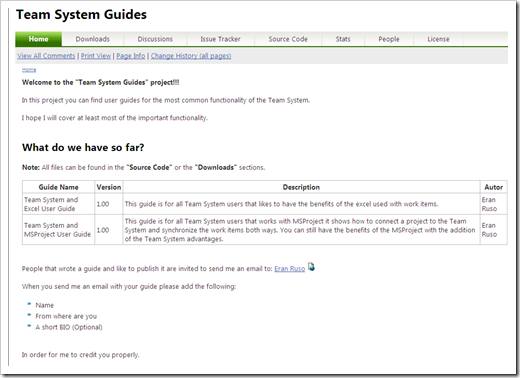
In this project you can find user guides for the most common functionality of the Team System.
I hope I will cover at least most of the important functionality.

What do we have so far?

Note: All files can be found in the "Source Code" or the "Downloads" sections.

Team System and Excel User Guide  1.00
This guide is for all Team System users that likes to have the benefits of the excel used with work items.

Team System and MSProject User Guide 1.00
This guide is for all Team System users that works with MSProject it shows how to connect a project to the Team System and synchronize the work items both ways. You can still have the benefits of the MSProject with the addition of the Team System advantages.
…”

image 

Team System Guides - Team System and Excel User Guide

“…

One of the most powerful tools in the Team System is the Excel, when I say Excel I mean the good old Excel tool that we have in our Office tools.

When I look at my customers using the Team System I see users that don't really understand the full potential that is hidden in this great tool so for them and for all the rest of our readers I decided to dedicate this user guide that will (hopefully) cover the main features.

Two of the sections in this guide will be dedicated to the upcoming Team System 2010 new functionality using the Excel.

All features that I will show in this guide are already available in Team System 2008 and the Beta release of the Team System 2010.

…”

Team System Guides - Team System and MSProject User Guide

“…

When I look at my customers using the Team System I see users that don't really understand the full potential that is hidden in this great tool so for them and for all the rest of our readers I decided to dedicate this user guide that will (hopefully) cover the main features.

One of the sections in this guide will be dedicated to the upcoming Team System 2010 new functionality using the MSProject.

All features that I will show in this guide are already available in Team System 2008 and the Beta release of the Team System 2010.

The last section is dedicated for tasks time frames, something that in my opinion is important subject.

…”

Ahh… Nothing better than not having to re-invent the wheel and to use that 80% of feature functionality we never seem to get to… ;)

(via SRLTeam - New Codeplex project: “Team System Guides”)

Sunday, June 07, 2009

Free WinForm Controls from BinaryMission (email-ware)

Visual Studio Gallery - UIControlSuite .NET Express edition

UIControlSuite .NET Express edition is a free pack of .NET WinForms controls.

This package contains several of the controls we offer in our Enterprise edition of UIControlSuite .NET package.

The express edition comprises of the following components:

SuperTooltip, Alertpopup, Header control, Button, Tooltip, ExplorerBar, Menu, Color picker, Button collection, UpDown spinner and Extended Textbox controls.

These are retail editions, and you can use them in your commercial applications for FREE.

If you need a lot more .NET controls for both WinForms and WPF, you may consider buying the enterprise edition.

To download your free Express (retail) edition, please visit us in our web site page here http://www.binarymission.co.uk/news.htm, and send an email, and you will be sent a link to download the Express edition package.

…” [Post Leach Level: 95%]

BinaryMission - Extended Textbox

 image

BinaryMission - Super Tooltip

image

BinaryMission - Menu

image

BinaryMission - Color Picker

image

BinaryMission - Explorer Bar

image

That’s just shots from a few of the controls… (make sure you click through as there’s more information available)


Free is a nice price point, one that my DFO heartily agrees with.  ;)

CLR 4 Team videos and a little Inproc SxS thrown in for taste

MaĆ­ra Wenzel's Blog - CLR Videos on Channel 9

“The CLR team is posting a series of Channel 9 videos mainly about the new CLR 4 features.

You can access all the videos posted, by clicking here.

This is the list of videos published so far:

You can download the Channel 9 videos in different formats so that you can even watch them at your Zune or IPod.

Enjoy!”

image

Speaking of In-Process Side-by-Side (Inproc SxS), CLR Team Blog - In-Process Side by Side (Part1)

“One of the new features in CLR 4 is In-Process Side-by-side (Inproc SxS) – a feature that lets you use multiple versions of .NET in the same process. For applications that use add-ins (particularly COM add-ins), in-proc SxS lets us provide a level of compatibility never before possible. If you write applications that use an add-in model (for Office or other hosts), you’ll want to understand the details of in-proc SxS, so that you can make use of the new hosting APIs that provide this compatibility. If you are thinking about using .NET 4, but worried about the impact of installing .NET 4 on end user machines, then you’ll want at least a high level understanding of in-proc SxS – it’s the feature that makes installing a new version of .NET less impactful than ever before. Finally, even if none of the above apply to you, you still might find this interesting – it’s probably the most complex change to the CLR in .NET 4.

This is a multi-part series dedicated to in-proc side-by-side, how it works, and all it’s nitty-gritty details.

What is In-Process Side by Side?

image

…”

It’s been a long time since we got a new CLR, and given the depth of features CLR4 will have, it’s not too early to start getting up to speed on it…

Windows 7 / Windows Server 2008 R2 Third Party VPN Clients

The Road to Know Where - Updated 3rd-Party Virtual Private Network (VPN) Clients Released for Windows 7 & Windows Server 2008 R2

“Microsoft's TechNet blog "Routing & Remote Access" has updated information on 3rd-Party Virtual Private Network (VPN) Clients for Windows 7 and Windows Server 2008 R2.

Download Updated Windows 7 VPN Clients:

AT&T

Checkpoint

CISCO

Citrix

F5

Juniper

Nortel

SafeNet

Sonic Wall

…”

Routing and Remote Access Blog - VPN Client Compatibility with Windows 7 and Windows Server 2008 R2

“When you upgrade your computer from an older version of Windows to Windows® 7 or Windows Server® 2008 R2, your 3rd-party virtual private network (VPN) client programs might not work. As Windows evolves, sometimes changes to the underlying infrastructure are required to implement new features, and these changes can sometime break compatibility with older programs. While Microsoft makes every effort to maintain compatibility with older programs, there are some categories of programs that are more likely to be impacted by these changes. VPN clients are one of them.

The tables below show the VPN clients available from different vendors. The tables include the minimum version number that has been tested and known to be compatible with Windows 7 and a link to the vendor’s Web site where you can download the client.

Be sure to review the More information column for any important notes that might be relevant to your use of the client.

Notes

· Microsoft provides third-party contact information to help you find technical support. This contact information may change without notice. Microsoft does not guarantee the accuracy of this third-party contact information.

· The third-party products that this article discusses are manufactured by companies that are independent of Microsoft. Microsoft makes no warranty, implied or otherwise, about the performance or reliability of these products.

image

…”

With Win7 just around the corner I thought these links/updates/etc might come in handy…