Wednesday, October 06, 2010

WoVS Quick Add Reference VS Extension helps you say goodbye to the Add Reference Dialog

World of VSNo more “Add Reference” dialog

“(You may want to read this previous intro to the Quick Add Reference extension.)

We’ve just released it to the Visual Studio Gallery for free!.

Don’t waste any more of your time firing up the “Add Reference” dialog and browsing or even searching for an assembly through the assemblies list, add it from the code editor, right from where you’re typing:

download…”

Visual Studio Gallery - WoVS Quick Add Reference

“…

The “Quick Add Reference” extension augments the smart tag that VS shows for unrecognized types giving you a chance to add the corresponding assembly reference for that type plus corresponding “using” clause if needed in a single shot.

Let’s say I’m working on a Web Application project and I just happen to want to use a type from ASP.NET MVC 2 which by default won’t be referenced by regular web app:

image…”

Funny how I was just looking for something like this this weekend…


Related Past Post XRef:
Cool VS2010 Extension: “WoVS Reference Lists” (Think persistent reference lists for simple two click adding of all your common references to a Project)

New background on NuPack - A little about how it came about…

The Fervent Coder  - The Evolution of Package Management for .NET

“When you start a journey, you are never fully sure where it is going to end up. We started the journey down package management for .NET three times with Nu[bulbar] (we in this context means the nu team, not me in particular, I was only involved in the last reboot) before we decided to try an existing infrastructure with Ruby Gems.  I have always said that I would use the best tool out there, even if it is not one that I’ve been involved in building.

Personally I’ve always felt that competition is important to drive out the best features and make all products involved better. The community benefits with competition. If you’ve spent any time with me or listened to me on twitter, you can see that I support the idea of Noodle (Bundler/gems for .NET), Horn and Open Wrap. Each of them solves a similar problem in a different way. Each of them has great things about them. Having choices is good. Not everyone likes things the same way.  I like my eggs over easy. I’m not going to force the way I like my eggs when I cook for you, but I’m going to cook them that way for me.

No one had any idea that Nu was going to be so explosively popular when it came out two months ago. After all, we started it as an experiment to see if we could even do it. Years ago, Microsoft would have ignored what was happening in the community and just introduced what they were working on without seeming to try to really understand the needs of the community. They have been criticized again and again for appearing to follow a “not invented here” model. When they saw how successful our last reboot of Nebular was, they pulled us in to show us what they had been working on for four months prior to our last reboot and started asking for input on how they could ensure it meets the needs of the community.

But then Microsoft did something different. They made the project OSS and pulled in a few open source developers (including the Nu team) to both give feedback and contribute to the same codebase the full time MS employees are working with.

Make no mistake on the name. Microsoft renamed their tool from the codename Unpack to Unpacks to signify a merging of the community and what they were working on. …

image…”

I thought this was a great backstory related to today’s Unpacks release…


Related Past Post XRef:
I “Nu” I needed you… Unpacks v1 Developer Preview/CTP 1 Released (Think, “Where have you been all my dev. life… finally an package management system/installer for .Net”)

I “Nu” I needed you… NuPack v1 Developer Preview/CTP 1 Released (Think, “Where have you been all my dev life… finally an package management system/installer for .Net”)

Scott Hanselman - Introducing NuPack Package Management for .NET - Another piece of the Web Stack

“Microsoft's been filling out the Web Stack with more and more right-sized LEGO pieces lately, and today ScottGu announced the developer preview of NuPack. It's a piece of the stack that's been notably missing for years and after using it for a while now, I'm not sure how I lived without it.

NuPack is a package management system for .NET. The goal of NuPack is to make the process of incorporating third party libraries into your solutions as simple as possible.

NuPack - The Idea

Here's how it works. Notice the "Package Manager Console" window at the bottom of Visual Studio 2010. That's PowerShell. (It'll be in View | Other Windows for this release)

image
[GD: I couldn’t snap the entire post, it’s a long one and a must read so please click through]

…”

Phil Haack - Introducing NuPack Package Manager

NuPack is a free open source developer focused package manager intent on simplifying the process of incorporating third party libraries into a .NET application during development.

After several months of work, the Outercurve Foundation (formerly CodePlex Foundation) today announced the acceptance of the NuPack project to the ASP.NET Open Source Gallery. This is another contribution to the foundation by the Web Platform and Tools (WPT) team at Microsoft.

Just to warn you, the rest of this blog post is full of blah blah blah about NuPack so if you’re a person of action, feel free to go:

Now back to my blabbing. I have to tell you, I’m really excited to finally be able to talk about this in public as we’ve been incubating this for several months now. During that time, we collaborated with various influential members of the .NET open source community including the Nu team in order to gather feedback on delivering the right project.

What Does NuPack Solve?

The .NET open source community has churned out a huge catalog of useful libraries. But what has been lacking is a widely available easy to use manner of discovering and incorporating these libraries into a project. …

image…”

CodePlex - NuPack

Nupack-logo

NuPack is a free, open source developer focused package management system for the .NET platform intent on simplifying the process of incorporating third party libraries into a .NET application during development.

There are a large number of useful 3rd party open source libraries out there for the .NET platform, but for those not familiar with the OSS ecosystem, it can be a pain to pull these libraries into a project.

Let’s take ELMAH as an example. It’s a fine error logging utility which has no dependencies on other libraries, but is still a challenge to integrate into a project. These are the steps it takes:

  1. Find ELMAH
  2. Download the correct zip package.
  3. “Unblock” the package.
  4. Verify its hash against the one provided by the hosting environment.
  5. Unzip the package contents into a specific location in the solution.
  6. Add an assembly reference to the assembly.
  7. Update web.config with the correct settings which a developer needs to search for.


And this is for a library that has no dependencies. Imagine doing this for NHibernate.Linq which has multiple dependencies each needing similar steps. We can do much better!

NuPack automates all these common and tedious tasks for a package as well as its dependencies. It removes nearly all of the challenges of incorporating a third party open source library into a project’s source tree. Of course, using that library properly is still up to the developer.

Here's a small sampling of what NuPack can do:

image…”

In a word, Cool! The V1 CTP1 vsix is downloadable from the CodePlex site, as is the source too… :)

Here’s a shot of the Add Package Reference dialog (I dig that they reused Extension Manager UI);

image

NuPack makes it almost TOO easy to use third party components. I don’t know if they could make it easier or more convenient. This SERIOUSLY takes out the pain of using these projects/packages.

I also think it’s cool that the package sources can be user driven. Think about internal package sources, or third-party lists, etc.

image


Also see:

Domain fun on a global Net… Could a country just kill your domain because they don’t like your stuff? Libya says “See Ya” to an .ly domain account

Gizmodo - URL Shorteners in Peril as Libyan Government Seizes .ly Domain

“! Dictatorships! Always spoiling our fun! That cutesy URL shortening service you might use (bit.ly, perhaps) is riding on Libya's .ly domain suffix. And Libya ain't pleased—one shortener, vb.ly, was recently shut down for violating Libya's oppressive laws.

Ben Metcalfe, (former) owner of pro-porn URL shortening site vb.ly, found that his domain was abruptly deleted by the Libyan government. Metcalfe was told his domain was yanked because …”

Talk about a slippery slope.

I can see that a country has the right to manage and control the usage of their root domain, just as we have the right to not use them… I think the lesson here is to be careful with your registrations. Just because you CAN register your cute name in another county’s domain, doesn’t mean you should…

Tuesday, October 05, 2010

Percolator. The Question is; how does Google store all that index data and keep it updated?

InfoQ - Percolator: a System for Incrementally Processing Updates to a Large Data Set

“As the amount of data being collected and stored expands at astounding rates, scalability requirements once reserved to the Googles of the world are becoming more common and often require dedicated solutions. Daniel Peng and Frank Dabek just published a paper detailing Percolator, Google's indexing system which stores tens of petabytes of data and processes billions of updates per day on thousands of machines.

image

…”

Google Research - Large-scale Incremental Processing Using Distributed Transactions and Notifications

“Updating an index of the web as documents are crawled requires continuously transforming a large repository of existing documents as new documents arrive. This task is one example of a class of data processing tasks that transform a large repository of data via small, independent mutations. These tasks lie in a gap between the capabilities of existing infrastructure. Databases do not meet the storage or throughput requirements of these tasks: Google's indexing system stores tens of petabytes of data and processes billions of updates per day on thousands of machines. MapReduce and other batch-processing systems cannot process small updates individually as they rely on creating large batches for efficiency.

We have built Percolator, a system for incrementally processing updates to a large data set, and deployed it to create the Google web search index. By replacing a batch-based indexing system with an indexing system based on incremental processing using Percolator, we process the same number of documents per day, while reducing the average age of documents in Google search results by 50%.

…”

Here’s a snip of the 14 page PDF;

image

I’m one of those kinds of guys who likes to see how something works. I can’t tell you the number of things I disassembled when I was younger (I just wish I were smart enough to put them back together… LOL) just to see what was “inside.” So when I saw that this paper gives a glimpse into how Google keeps its massive index, i.e. letting us see a little inside, I knew I had to check it out. 

Sure we’re not going to recreate Google with this paper, but seeing into the thinking behind the index storage is just officially cool (I also thought it cool that there was even a column of code in the paper… ;)

Kaliro App Explorer is a quick, simple and easy way to explore the resources, modules, etc in a .Net Assembly (Yes, like Reflector, but simpler…)

addictivetips - Inspect Microsoft .NET Applications With Kaliro App Explorer

Kaliro App Explorer is an inspection tool for Microsoft .Net based applications. Previously we reviewed Alpha SF Resource Explorer (a tool that shows resources of EXE, DLL, CPL, SYS, etc., files) and PeStudio (an application explorer to check Windows compatibility and general threats). Kaliro App Explorer can be used to check the structure and module hierarchy of a .Net based applications.

Since it targets those developers who use MS .NET framework to build applications, it displays complete anatomy of any application for which .Net Framework is required. All you need is to launch application explorer and specify the application (.Net based ) path.

It will list down all the information regarding the modules that were used in the application development. In the left sidebar, it categorizes the information into different chunks which are; Exported Types, Files, Modules, Resources, XML data, etc. All the information about the selected entry is shown in the main window, where you can also copy the contents to clipboard.

…” [GD:Click through for the download link]

If Reflector is a Tesla, then Kaliro App Explorer is a Leaf. It’s kind-of, sort-of like Reflector, yet instead of the uber power that is Reflector, is a simple, quick and easy way to explore the resources, etc. in a .Net assembly (EXE/DLL).

Here’s a snap of it with Windows Live Writer 2011 open;

image

Again, if you’re looking to extract the source/decompile a .Net Assembly, Reflector is the main game in town. If you just want to explore the resources, modules, etc. then this might be your ticket…

Monday, October 04, 2010

MVC view engines, WebFormViewEngine, Spark, NHaml and Razor - zomg my head is going to explode. Could a developer please put these side-by-side and do a review to help me intelligently pick one?… Hey, the Coding4Fun team and Jason Haley have done just that!

Coding4Fun - Developer Review - Four ASP.NET MVC View Engines

“In this Developer Review, we evaluate four view engines available for use with ASP.NET MVC. First, we discuss the role a view engine plays in a website built with ASP.NET MVC, then we provide details about the four view engines in order to help you decide which one suits your needs.

Jason Haley, http://jasonhaley.com/blog/

Source Code: Download in Branches/Playground directory

What Does a View Engine Do?

When we refer to a view engine in ASP.NET MVC, we are talking about three pieces of functionality:

· A template locator/provider (implementation of IViewEngine)

· A template that can render itself (implementation of IView)

· A template engine that can parse and compile the view file syntax into executable code

Combining these three pieces, a view engine provides your controllers with the ability to translate views into Html.

Why Use an Alternate View Engine?

image…”

This is a monster length article (21 pages) that puts a few MVC View Engines side by side to help you compare them apples-to-apples. Written by Jason Haley, of “Interesting Finds” fame, who, like most of us, is outside of Microsoft and is just trying to get stuff done. Meaning this isn’t written by someone inside trying to “sell” you something but by a dev like you…

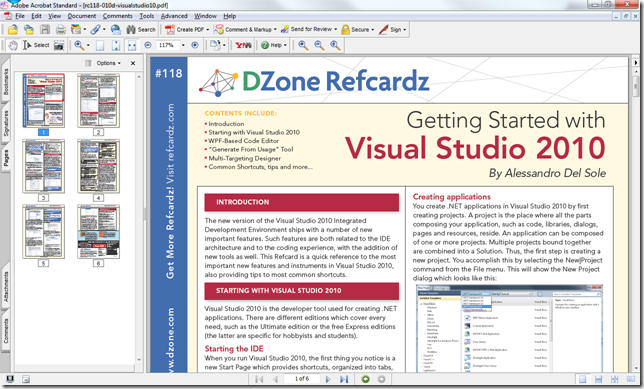
“Getting Started with Visual Studio 2010,” the Six Page DZone Refcard

DZone - Getting Started with Visual Studio 2010

“This DZone Refcard is a quick reference to the most important new features and instruments in Visual Studio 2010, also providing tips to most common shortcuts.

…”

Snap of the refcard;

image

Now I know most of you are already using VS2010(?), but the move to it will have a long tail and so there might be a few of you where this information will come in handy…

SoCal Code Camp @ USC, October 23/24. It’s free, local and Dev’s for Dev’s… What more could you want? (Oh yeah, there’s going to be give-away’s too ;)

SoCal Code Camp

“Code Camp is a place for developers to come and learn from their peers. This community driven event has become an international trend where peer groups of all platforms, programming languages and disciplines band together to bring content to the community.

Who is speaking at Code Camp? YOU are, YOUR PEERS are, and YOUR LOCAL EXPERTS are…all are welcome! This is a community event and one of the main purposes of the event is to have local community members step up and offer some cool presentations! Don’t worry if you have never given a presentation before, we’ll give you some tips if you need help, and this a great opportunity to spread your wings. Of course, we do have some ringers on our speaker list as well…stay tuned…

And yes the price is right! FREE FREE FREE
Please just check in when you get to the event so we can know how many people showed up and so we can give you some fun stuff

image…”

Oh yeah, here are the “talking points”;

“…

When you talk up the Code Camp remind folks that …

1. Hey, you aren’t getting any younger…  (toss this nonsequetor in just to break the ice – this always helps)
2. We have a great list of sessions by professionals and gurus list which will be growing even more in the coming weeks.
3. Our Geek Dinner is being sponsored again this year?  Thank you Devexpress & other Financial Sponsors!
4. Sunday lunch is being sponsored?  Thank You Telerik!
5. We have $70,000+ in raffle prizes and giveaways… so many prizes that we will be picking winning tickets during Sunday lunch as well!

…”

The sessions all look pretty interesting. And you have to love a page that ends like this…

image

I’m going… You?

Sunday, October 03, 2010

The three step guide to unit testing Entity Framework 4.0

Rab Hallett's blog - Unit Testing Entity Framework 4.0: A-Z in 3 Easy Steps

“This article gives you an ultra-fast run down on how to start Unit Testing in Entity Framework 4.0 using C#; applying a suitable Code Generation Item to your Entity Data Model (EDMX) file, and building a Unit Test Project in Visual Studio 2010.

No external test harness is required, it doesn't rely on having a Repository pattern being implemented and you don't need to buy any new products. Just Visual Studio 2010 Professional Edition, Premium Edition or Ultimate Edition out of the box.

Step 1: Set Up the Code Generation Item

Step 2: Ensure "Context Agnostic" Code

Step 3: Create the Unit Tests

image…”

I am working on a personal project that uses EF and was just thinking about how to unit test it…

Search MSDN, CodeProject, StackOverflow, DZone and more from within Visual Studio 2010 with “Vingy” (Visual Studio + Bing = Vingy)

amazedsaint's .net journal - Introducing ‘Vingy’ Add-in for VS2010 – Search StackOverflow, CodeProject, DotNetKick etc easily from with in Visual Studio

“For some time, I was thinking about developing a web search plug-in for Visual Studio, so that I can search the web (mainly sites like StackOverflow, CodeProject, MSDN etc) in a non intrusive way, with out leaving the IDE.

Here we go, meet Vingy 1.0 – A simple, but effective add in for Visual Studio 2010 so that you can search the web in a non intrusive way, and can filter results based on sources.

Getting used to Vingy

You can bring up Vingy either by clicking View->Other Windows –> Vingy Search Window from the Visual Studio IDE, or just by high lighting some text in the document and then clicking Tools –> Search Selected Text (Ctrl + 1).

Searching with Vingy is pretty straight forward. You can initiate a Search in two ways.

  • By typing the text in the Vingy search box and pressing ‘Enter’ or by clicking the ‘Go’ button
  • By highlighting some text in the editor when you type in Visual Studio, and then pressing Ctrl + 1

image…”

Small, simple, quick and easy… Four of my favorite things. :)

Friday, October 01, 2010

Interested in PEX & MOLES? Wish you could go to a five hour workshop on them? Here’s the next best thing…

Cesar de la Torre - BLOG - Recorded PEX & MOLES Workshop

“Last summer (July 2010) we delivered in Madrid a nice PEX & MOLES workshop. The speaker was Peli de Halleux, from MICROSOFT RESEARCH.

If you are interested in Unit Testing, Mocking, etc., you should take a look at it!

It was a great workshop and we recorded it, so now we just published it on Channel9. Here you have the links! :-)

…”

Channel 9 - Microsoft PEX/MOLES & advanced Unit-Testing aspects 1/3, Microsoft PEX/MOLES & advanced Unit-Testing aspects 2/3, Microsoft PEX/MOLES & advanced Unit-Testing aspects 3/3

“Pex enables parameterized unit testing for .NET: given a unit test with parameters. Pex generates inputs that achieves high code coverage. Moles is a framework that allows to isolate unit tests from environment dependencies: Moles allows to replace any .NET method with a delegate, even when the method is static, non-virtual or in a sealed type.

Pex and Moles work on any .NET applications. Pex and Moles supports .NET v2.0, v3.5, v4.0, VS2008 and VS2010.

The learning objectives of this class are:

  • Understand and write unit tests
  • Use Moles to isolate unit tests
  • Write Pex parameterized unit tests

image…”

I’m starting to see PEX & MOLES pick up some traction… From what I’ve seen it looks interesting.


Related Past Post XRef:
Think you can’t unit test ASP.Net? Here’s a tutorial for one way, using the power of Pex and Moles
Playing with Pex is just a web browser away at www.pexforfun.com

Pex 2010 (aka Pex 0.90.50303.0) now available on MSDN Subscribers Downloads
Pex license updated – You can now use it in commercial projects
Pex 0.5 Released - Your Parameterized Unit Test Buddy

Like CodePlex? Like your Local TFS? Would like to have the best of both? Here’s one way… Sync them with the TFS Integration Platform

Alkampfer's Place - Keep Codeplex projects and local TFS projects syncronized

“Codeplex is Microsoft hosting site for open source projects, based on TFS or mercurial. Now suppose you have this scenario: an open source project, with a  core team that work actively on it, and some occasional contributors that do little work. Since Codeplex does not support every feature of tfs, (especially you lack the build machine), sharepoint integration and other stuff you loose many useful feature if you use only Codeplex for the project. You wish the core team to use an internal TFS to have the full power of TFS, while using Codeplex to make the project available to everyone. Thanks to Integration Platform you can try to keep them synchronized and use the best of both of them.

Supporting this scenario with Integration Platform is not difficult, first of all, in the server where the IP is running, you should store the credential to access tfs in order to make possible for IP to access codeplex and local TFS. In windows 2008 R2 refer to Figure1 for how to do this.

image …”

There’s something about this idea that appeals to me. I host a number of projects on CodePlex, and while I REALLY dig it, there’s just some stuff you can’t do there… Like Team Build. Sure you can use Cruse Control or Team City to automate builds for source hosted on CodePlex, but I use Team Build at work and would like to use it at home too (I only have SO many brain cells you know… ;).

So if I sync, I could use the full power of a local TFS, yet keep the goodness that is CodePlex… hum… interesting…


Related Past Post XRef:
From one TFS Project Template to another Project Template Migration with the TFS Integration Tools - The Series

Microsoft Office File Formats and Microsoft Office Protocols Documentation Refreshed

Microsoft Downloads - Microsoft Office File Formats Documentation

“The Microsoft Office file formats documentation provides technical specifications for Microsoft proprietary file formats that are implemented and used in the Microsoft Office system

Version: 0910

Date Published: 9/30/2010

Language: English

image…”

Microsoft Downloads - Microsoft Office Protocol Documentation

“The Office protocol documentation provides technical specifications for Microsoft proprietary protocols that are implemented and used in the Microsoft Office system.

Version:  0910

Date Published: 9/30/2010

Language: English

image…”

In spot checking the doc list and comparing the lists to the last release, doesn’t look like any major Doc additions. In spot checking the actual doc’s looks like some have been updated, but some not… So think “just a general refresh/update/sync release”


Related Past Post XRef:
Microsoft Office File Formats and Protocols documentation updated for Office 2010 (Think “Now with added ‘X’ flavor… DocX, PptX, XlsX, etc”)
MS-PST file format specification released. Yep, the full and complete specification for Outlook PST’s is now just a download away.
Microsoft Office (DOC, XLS, PPT) Binary File Format Specifications Released – We’re talking the full technical specification… (The [MS-DOC].pdf alone is 553 pages of very dense specification information)
DOC, XLS and PPT Binary File Format Specifications Released (plus WMF, Windows Compound File [aka OLE 2.0 Structured Storage] and Ink Serialized Format Specifications and Translator to XML news)