Saturday, October 10, 2009

AvalonEdit, a (the?) WPF code editor component from the SharpDevelop team (think WPF based, monster cool, code editing, IDE like, uber textbox +10)

Rudi Grobler - Create your own IDE in 10 minutes

untitled

Ok, so I might be stretching reality just a “little” but the purpose of this post is to introduce you to two control libraries that might just do that!

AvalonEdit

AvalonEdit is the new WPF-based editor used in SharpDevelop 4.x. Using the AvalonEdit control is very similar to using a normal TextBox!

<avalonEdit:TextEditor
ShowLineNumbers="True"
Name="textEditor1"
FontFamily="Consolas"
FontSize="10pt"/>

To load a document…

textEditor1.Load("Window1.xaml.cs");

And finally, to turn on syntax highlighting?

textEditor1.SyntaxHighlighting = HighlightingManager.Instance.GetDefinition("C#");

Out-of-the box AvalonEdit supports ASP.NET, Boo, Coco/R grammars, C++, C#, HTML, Java, JavaScript, Patch files, PHP, TeX, VB, XML

AvalonDock

AvalonDock is a WPF controls library which can be used to create a docking layout system like that is present in VisualStudio. It supports fly-out panes, floating windows, multiple docking manager in same window, styles and themes and it can host WinForms controls.


…”

CodeProject - Using AvalonEdit (WPF Text Editor)

“…

The latest version of AvalonEdit can be found as part of the SharpDevelop project. For details on AvalonEdit, please see www.avalonedit.net.

screenshot

Introduction

ICSharpCode.AvalonEdit is the WPF-based text editor that I've written for SharpDevelop 4.0. It is meant as a replacement for ICSharpCode.TextEditor, but should be:

  • Extensible
  • Easy to use
  • Better at handling large files

Extensible means that I wanted SharpDevelop AddIns to be able to add features to the text editor. For example, an AddIn should be able to allow inserting images into comments – this way you could put stuff like class diagrams right into the source code!

With, Easy to use, I'm referring to the programming API. It should just work™. For example, this means if you change the document text, the editor should automatically redraw without having to call Invalidate(). And if you do something wrong, you should get a meaningful exception, not corrupted state and crash later at an unrelated location.

Better at handling large files means that the editor should be able to handle large files (e.g. the mscorlib XML documentation file, 7 MB, 74100 LOC), even when features like folding (code collapsing) are enabled.

…”

My first thought? “Oh… shinny!”

My next was; I wonder if there’s a TSQL syntax (or how hard it would be to create one)? We have a very simple TSQL entry on a form, where we done some simple, regex based syntax highlighting. It sure would be cool to be able to drop in something much more powerful.

Also I think we have teams with other embedded code entry/editing UI’s (VB.Net entry I think). This might be of interest to them too (and this might get them started moving toward WPF, so a win-win! ;)

Come to think of it I have a HTML entry area in my Text Template WLW plug where I could use this too!

Oh and there’s… and then for that… and also…

I can see a number of places where I can use this free, OSS (LGPL) component. :)

(via Reflective Perspective - The Morning Brew #451)

Wednesday, October 07, 2009

New Sysinternals utility released today, Disk2vhd v1.0 – Yes, creating a VHD from a physical hard drive, even an online one, is now a couple clicks away…

Sysinternals - Disk2vhd v1.0

“By Mark Russinovich and Bryce Cogswell

Published: October 7, 2009

Introduction

Disk2vhd is a utility that creates VHD (Virtual Hard Disk - Microsoft’s Virtual Machine disk format) versions of physical disks for use in Microsoft Virtual PC or Microsoft Hyper-V virtual machines (VMs). The difference between Disk2vhd and other physical-to-virtual tools is that you can run Disk2vhd on a system that’s online. Disk2vhd uses Windows’ Volume Snapshot capability, introduced in Windows XP, to create consistent point-in-time snapshots of the volumes you want to include in a conversion. You can even have Disk2vhd create the VHDs on local volumes, even ones being converted (though performance is better when the VHD is on a disk different than ones being converted).

The Disk2vhd user interface lists the volumes present on the system:

ee656415_Disk2vhd_01(en-us,MSDN_10)

Note: do not attach to VHDs on the same system on which you created them if you plan on booting from them. If you do so, Windows will assign the VHD a new disk signature to avoid a collision with the signature of the VHD’s source disk. Windows references disks in the boot configuration database (BCD) by disk signature, so when that happens Windows booted in a VM will fail to locate the boot disk.

Disk2vhd runs Windows XP SP2, Windows Server 2003 SP1, and higher, including x64 systems.

image

…”

This looks AWESOME for Win7/Windows Virtual PC usage…

(via @jamestenniswoodFantastic utility for Window 7 users... Disk2vhd http://ow.ly/teMr)

Windows XP Mode & Windows Virtual PC RTM are now both available on MSDN Subscribers Downloads…

MSDN Subscriber Downloads (product availability depends on your subscription program details)

image

Looks like Windows XP Mode RTM and Windows Virtual PC RTM are both now available via MSDN Subscribers Download.  :)

image

“We are not worthy… We are not…” – The Gu-ru and you

Craig Shoemaker - 15 Desktop Backgrounds to Support .NET Development (and pay homage to the Gu)

“This weekend was one of those times I just couldn't get “that thing” out of my head. After a short conversation on Twitter earlier in the week about desktop backgrounds I kept thinking about how much fun it would be to just sit down and do some design work.

The rubber hit the road after being inspired by the Smashing Magazine’s themed desktop wallpapers. Then it hit me - how about a series of desktop wallpapers themed toward the .NET developer – and who better to represent the community than ScottGu!

So, with all apologies to Mr. Guthrie here are my backgrounds for your pleasure:

15 Desktop Backgrounds to Support NET Development (and pay homage to the Gu) - Craig Shoemaker

…”

This killed me when I saw it yesterday. Note that Craig also created a Windows 7 Theme with these!  LOL

Tuesday, October 06, 2009

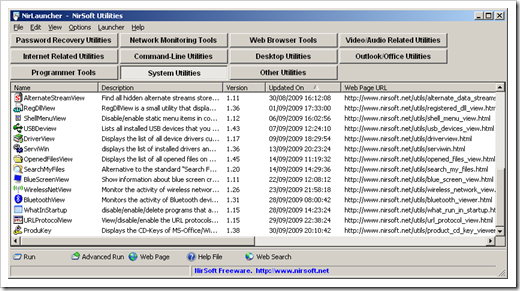
Another portable application suite and launcher, NirLauncher (Beta) - 100+ NirSoft utilities + easy Sysinternals integration too

life hacker - NirLauncher is the Ultimate Flash Drive Toolkit

“…

Windows only: Portable application NirLauncher bundles 100+ of the best NirSoft utilities into a single launcher window, and even allows you to add your own utilities to make a killer flash drive toolkit.

Tweaking the Launcher

You can edit the included NirSoft.nlp file in a text editor to add or remove the utilities that you prefer—or you can even create a new .NLP file with your own customized settings. Just make sure to use relative paths to the executable files to make sure that they will be portable when you put it onto your flash drive.

The NirSoft blog even provides a launcher file for the suite of awesome, portable, system-tweaking tools from SysInternals—simply download the launcher file and extract all of the SysInternals applications into a folder, and then …”

NirBlog - Beta version of NirLauncher package is available to download

“As I promised a few weeks ago, the Beta version of NirLauncher, with a package of more than 100 utilities of NirSoft, is available to download.

nir_launcher1

Before you go to the download link, it's important that you read the following guidelines:

  • For now, the download link of this utilities package is a little restrictive. I only allow to download it 5 times per day for each IP address. So please don't download this package with any 'download accelerator' software that open multiple connections. …
  • Antivirus False Positives - This package contains more than 100 utilities, and if you have any Antivirus on your computer, there is a very high chance that it'll falsely detect one or more of these utilities as Virus/Trojan/Spyware/Malware or anything else.
    It's also possible that your Antivirus will simply delete some of the utilities or prevent you from running them without displaying any alert.
    In any case, please don't flood my email address with messages like "You have virus in your utilities package"   or "After I extract your files, some of them are deleted" or "I double-click xyz utility and nothing happens".

NirLauncher also allows you to add additional software packages. Just for example, here's how to add Sysinternals Suite into NirLauncher:

  1. Go to Sysinternals Suite Web page, and download the latest zip file.
  2. Extract the zip package of Sysinternals into a new folder located in the same drive of NirLauncher.
  3. Download the sysinternals.nlp that I created for Sysinternals Suite, and save it into the same folder with all Sysinternals files.

Beta version of NirLauncher package is available to download …”

Okay officially that’s a bunch of utilities, all easily portable and accessed. I didn’t know NirSoft had this many, and these kinds, of utilities. …sigh…

Please note the False Positive Antivirus message above. In just extracting the zip NAV whined at me… It’s a FALSE POSITIVE.


Related Past Post XRef:
40 Desert Island (aka Portable) Web Dev Tools
LiberKey – 264, and counting, portable applications for your thumb drive are just a download away
PortableApps.com Platform v1.5 Released (with v2 coming in a few weeks) – Your App world is just a thumbdrive away…
Your Application Suite To Go - Portable App Suite v1.1 Released
PortableApps Suite
The Portable Freeware Collection

Sysinternals Suite Refreshed – All the latest Sysinternals Utilities, one tiny zip (well 10MB zip…)
Sysinternals Suite (8MB of Complete Sysinternals Goodness)
Use the Sysinternals Utilities? The EULA bug dialog you? Then try this…

Monday, October 05, 2009

Seems like it’s a WinDbg Day - Windows Kernel Debugging For Dummies

Alois Kraus - Why Does My System Hang? Windows Kernel Debugging For Dummies

“Did you ever wonder why your system at random times hangs? Sometimes it comes back after a few seconds (could simply be paging) but at least once a day I wish I would be able to know why the system is responding so slowly. Before going into Kernel land I must confess that I have never written a device driver so my knowledge to Kernel Mode debugging is quite limited but on the other hand if you did not do this either you will have a much easier time to follow me.

Some hangs seem to be Heisenbugs which disappear when you start looking at them. I have found when I let Process Explorer running on my machine it seems to resolve some issue by its pure presence. It could also be that some malware and Trojan software does not even install when Sysinternals tools are running.

Did you know that you can watch with Process Explorer the Call Stack of all applications in your system? Simply right click on a process and select Properties and select the Threads tab where you can view the stack for each thread with full function names.

When your system has frozen you can not start any new processes so starting a debugger is of little use. Luckily there is a nice trick to force the generation of a kernel dump by pressing a magic key combination: Right Ctrl + Scroll Lock + Scroll Lock will generate a nice looking real blue screen. See instructions below how to enable it. Technically speaking it is a user initiated kernel dump.

Before you can generate the blue screen (= kernel dump) you need to set the kernel dump mode to Complete Memory Dump. You can find this menu if you press the Windows Key + Pause and then look in the Advanced System Settings – Advanced – Startup and Recovery

A more thorough list has been created by Dmitry Vostokov at his famous Crash Dump Analysis web site which gives a good overview about the most used Windbg commands. To step deeper you will need to buy the Windows Internals book by Mark Russinovich to understand how the Windows Kernel and drivers do work and visit the NT Debugging blog where Microsoft escalation engineers show some advanced kernel debugging techniques.

If you have read until here you (should) have lost fear of the dreaded blue screen. Its not the end but the beginning of an interesting debugging session. It is a pity that so few people are able to analyze kernel dumps even at the most basic level. In many cases it is possible to find out which device driver is the guilty one. You then have the option to remove the faulting driver entirely or try to get an updated one. At least you know who is to blame and most of the time it is not the OS.

Why Does My System Hang Windows Kernel Debugging For Dummies

I dig the force/cause a BSOD tip (which looks to be almost as fun as the “How do I speed up this MMO that I’m playing…” “Alt-F4” tip ;). That’s one that I’m going to have to remember. :p

Related Past Post XRef:
Blue Screen of Death (BSOD) Troubleshooting for Dummies (like me)

Blue Screen of Death (BSOD) Troubleshooting for Dummies (like me)

Righthand’s Blog - Investigating Windows BSOD cause for dummies

“Does your Windows displays nice, we all love, BSOD once in a while or perhaps, god forbid, often? There are two most plausible suspects for this behavior. And no, it is rarely Windows fault. Instead it is either hardware or driver and I won’t even dig into the quality of drivers produced by various hardware companies.

But the big question here is, which one? Which driver? Which hardware? It is even harder to pinpoint the cause in case when BSOD occurs at random times. Luckily there is a tool that might shade some light on the mystery and point cyber finger at the offending driver: Microsoft Debugging Tools for Windows.

Righthand's blog - Investigating Windows BSOD cause for dummies

…”

I so rarely get BSOD’s anymore that when I do I have to relearn what to do to hunt down the reason. Also I’ve never used WinDbg much (yeah, yeah, I know there goes what little geek cred I had… lol  ;), so I found this post a nice, simple and short primer.

(via Bite my bytesLinks of the week #92)

Sunday, October 04, 2009

A Feed You Should Read #6 - Bite my bytes, Links of the week

This week we’re still on the link blog road, travelling toward an unknown destination, with an unknown goal, yet all the while trying to have a little fun and share a some companionship along the way.

um…. yeah… Sorry… The 50th anniversary of the Twilight Zone this past week (premiered October 2, 1959) seems to have gotten to me. ;)

Bite my bytesLinks of the week

image

Background:

David Vidmar’s Bite my bytes (I love that name…) has been going for a quite a few years now, first post April 17th, 2004. The Links of the Week started in September 2007.

The posts range from a weekly Links of the week links post to MS CRM, to some re-blogging (i.e. highlighting cool things he finds).

This blog, like so many others (and all the A feed you should read’s) is obviously a labor of love. He does it because

Why do I like this feed and think you might also?

I’ve been follow Bite by bytes since he linked to a post of mine in 2006 (got to love ego searches… lol) and there’s a couple things I like in his Links of the week posts.

First is that while we seem to read many of the same blogs, there’s quite a few he reads that I don’t. An easy trap to fall into online is the echo chamber. David’s links help me see outside of that chamber.

Secondly I really like the Software Updates section. I don’t know how he does it, but he’s monitoring a ton of applications and each week provides those that updated recently. This is a great way to keep up with all the different releases for a good number of different Windows utilities/applications.

The Software Update section alone is a great reason to subscribe. And once there, I’m sure you’ll find even more reasons to stay…

Snap of the latest post:

image

Blog Information:

Name: Bite my bytes - What I learn by day I blog at night.
URL: http://vidmar.net/weblog/Default.aspx
Feed: http://feeds.vidmar.net/BiteMyBytes, Links of the week, http://vidmar.net/weblog/category/27.aspx/rss
Post Types: Links, Microsoft CRM, Development, Re-blogging