Thursday, September 07, 2006

Tesseract 1.01

Tesseract-1.01

Notes: Tesseract release notes, Sep 7 2006 - V1.01. Fixes for this release: Added mfcpch.cpp and getopt.cpp for VC++. ...

Building Tesseract:

Windows: Unpack the tar.gz archive

Open tesseract.dsw in DevStudio (preferably version 6, higher versions will be more difficult)

Set Win32 - Release as the active configuration.

Build.

Copy tesseract.exe from bin.rel up one directory level.

Run 'tesseract phototest.tif phototest'

This will create phototest.txt. ..."

Tesseract has already been rev'ed, fixing the missing file issue I ran into with v1.0. This version, 1.01, built the first time (in VC++ 6) and the resulting EXE ran like a charm.

It's still not in a shape for heavy production usage, but that's today. I feel there's a good chance this will flower under Google's care and feeding...

Again, it's worth keeping on eye on this (and with RSS feeds that is just so easy  ;)

Related Past Post XRef:
Tesseract OCR - Released as Open Source

Do you know what's REALLY happening when your screensaver is on?

Now you do... Icon Wars

LOL. This killed me... ;)

(via Janus Pienaar - What happens when your screensaver is on?)

Code Snippets Library

GotDotNet - Code Snippets Library

"Reads and writes Code Snippet files (*.snippet)"

This is a cool VB.net project that provides an library/object model/etc for VS2005 snippets.

The download includes the binary and VB source for both the library and example application.

Wednesday, September 06, 2006

Turbo Delphi, Turbo Delphi for .Net and Turbo C# Available for Download

Turbo Downloads

There's something about the name, Turbo Delphi, Turbo C#, etc that strikes a cord, doesn't it?

That is if Turbo Pascal/C is not before your time... ;)

I'm not sure if I'm ready to play with another C# IDE or get back into Delphi, but I'm still downloading it...

Heck it's Turbo Delphi/Delphi.Net/C# from Borland!

(via Rudolf Henning - Turbo Delphi available)

WLW - Text Templates Plugin on WLWPlugins.com

Windows Live Writer Plugins - Text Template

Cynthia just let me know that she posted about my WLW Text Template plugin on Windows Live Writer Plugins.

I think she did a much better job presenting my plugin than I did... sigh... :0

The post was very positive (yeah) and she made a number of suggestions, all of them good ones (double yeah)... IMHO, few things are cooler to a coder than good suggestions from someone who really wants to improve the product.

I'll try to code these in this weekend. I think the biggest is the "options/filepath" bug (dogh! I really thought I tested that... grr  :|  ) and the ability to edit existing templates (It's lame++ to have to edit them in notepad... ).

In any case, I really dig constructive feature requests (lol... can you tell?). I get jazzed about coding when someone bounces me new ideas...

Thanks Cynthia!

BTW, All you Windows Live Writer users.. you ARE going to WLWPlugins.com, right? It's one of the top Windows Live Writer related sites...

Related Past Post XRef:
My Windows Live Writer Plugin - Text Template

BlogML 2.0 Released

CodePlex - BlogML

"You can download BlogML 2.0 from here and find more about it on these blog posts: 1, 2

About BlogML
BlogML is an XML format for storing the entire content of a blog.  You can use BlogML as a way to archive the contents of blogs or to act as a standard format for transferring content from one blog to another - this could include migrating a blog from one blogging engine to another.  There are currently several blogging engines that provide support for BlogML including:

  • Community Server
  • Das Blog
  • Subtext
  • SingleUserBlog

There are also implementations that exist for converting Blogger content to BlogML.

..."

When I write my Blogger Backup utility (yeah, yeah, I know... I've been talking about this for about a billion years or so... but I might still build it... really... hopefully.. maybe... ;) I'm 99% certain I'll use BlogML as the output. Seems pretty silly to invent my own schema (be it DB or XML), doesn't it?

Seeing the Blogger snip on the BlogML home page, I did a quick search and found a couple implementations. The problem is that they will not work for me. Some require template tweaks and others only grab the last 99/100 posts.

Still BlogML solves one my major problems, what to do with the data once I extract it...

Tesseract OCR - Released as Open Source

Google Code - Announcing Tesseract OCR

"We wanted to let you all know that a few months ago we quietly released - or actually re-released - an Optical Character Recognition (OCR) engine into open source. You might wonder why Google is interested in OCR? In a nutshell, we are all about making information available to users, and when this information is in a paper document, OCR is the process by which we can convert the pages of this document into text that can then be used for indexing.

This particular OCR engine, called Tesseract, was in fact not originally developed at Google! It was developed at Hewlett Packard Laboratories between 1985 and 1995....

...A few things to know about Tesseract OCR: for now it only supports the English language, and does not include a page layout analysis module (yet), so it will perform poorly on multi-column material. It also doesn't do well on grayscale and color documents, and it's not nearly as accurate as some of the best commercial OCR packages out there. Yet, as far as we know, despite its shortcomings, Tesseract is far more accurate than any other Open Source OCR package out there..."

This could be an interesting project...

Currently the SourceForge download doesn't include a binary and won't compile for me (it seems to me missing a ccutil\mfcpch.cpp?) and I don't have the bandwidth to CVS the source.

Still now with Google behind it, I'm adding this project to my watch list...

(via TheMadAdmin - Google Open Sources an OCR program.)

Tuesday, September 05, 2006

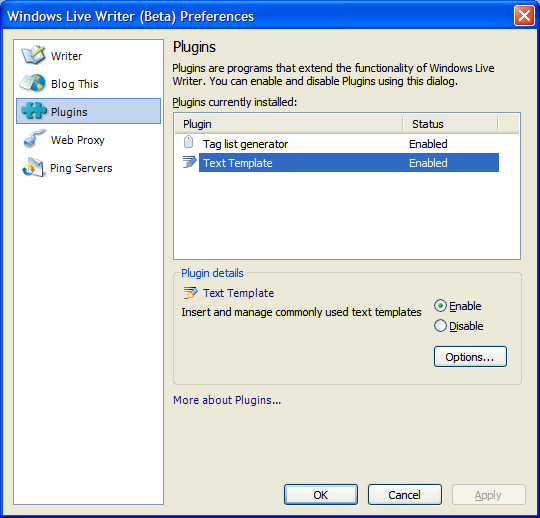
My Windows Live Writer Plugin - Text Template

I've posted my WLW Text Template plugin to GotDotNet, both the bin and the VB.Net 2 source... This is a simple plugin, but does the job.

Download (Posted as a GotDotNet User Sample)

Currently you have to manually install it by copying it to your Windows Live Writer\Plugins folder.

What is a text template? It's a snip of text/html  you commonly use when posting. For example, I use it for my "Related Past Post XRef:" snip. It's very generic and can host any kind of text/html. You can use it as a quick and dirty "moods" insert, or kind of thing...

Included in this project is the Textbox with Prompt/Cue user control (on the Add Text Template dialog) and a Folder Picker composite user control (I was tired of wiring up a textbox, folder browser and button, so created a single composite control that included has three and makes it a drag and drop to add to a WinForm...)

Again, this is a simple plugin, with limited testing (i.e. "it works on my machines") and limited error checking (i.e. um... none really). Use at your own risk, I take no responsibility for anything it does to your machine (unless it's good), etc, etc, yada, yada, yada...


Download (Posted as a GotDotNet User Sample)

Related Past Post XRef:
My First Windows Live Writer Plugin (Text Templates)
Guide to Writing a Windows Live Writer Plugin in C#
TextBox with Cue/Prompt

Friday, September 01, 2006

Free Icon's via the Neat Icons Core Set

Neat Icons Core Set

"Free toolbar icon set. The set consists of the icons that are primarily used by software developers. When creating these icons, the most attention was devoted to a neat design and Microsoft standards compatibility, as well as the metaphor that enables the user to feel comfortable when using the software.

Software developers' needs weren't ignored. Each icon is presented in several states, sizes and formats, which makes it possible to use it in the development of Win32/Win64/NET applications and also in web applications for the Internet and intranet

..."

Because I can always use more free icons...

There are the 30 above icons, broken into normal, hot and disabled states and in 9 different formats & sizes (GIF, BMP, PNG in 16x16, 24x24 & 32x32). For a total of 810 icons...

(via WindowsForms.net - Neat Icons Core Set)