Saturday, October 07, 2006

WLW Related Post Plugin - Preview Part 2

I now have sorting and real time filtering working, multiple feed delimiter option, plus bunches of tweaks and such done. I think I'm done for the night.

Tomorrow is List Management Day (i.e. simple OPML editing) and then I think I'll be done (for v1.0 at least  ;)


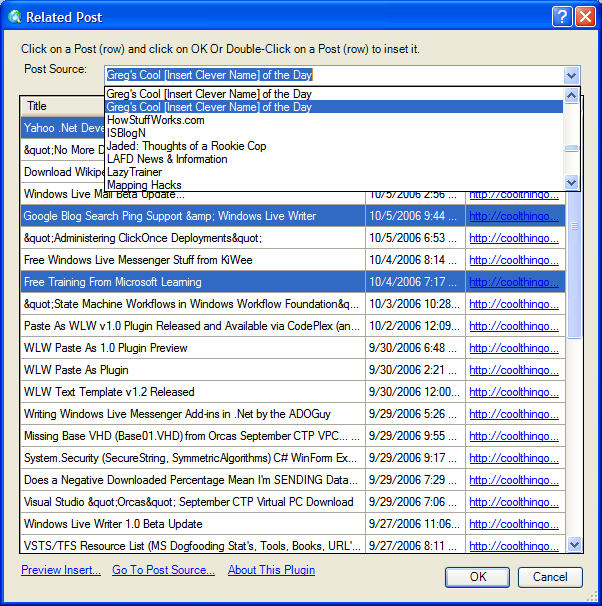
Here's filtering in action. It's done real time and you can filter by the post title and/or post body. Filter values are not currently saved between sessions... I just don't think that would be that useful? The last used Post Source IS saved and is auto-loaded though.
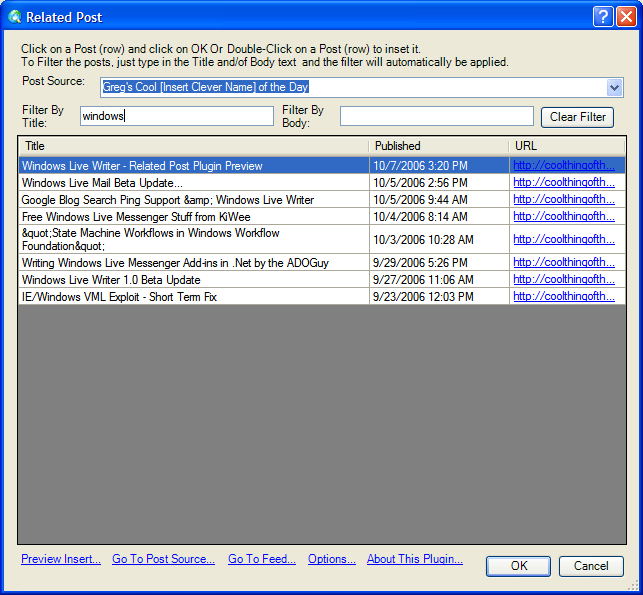
Sorting works as you would expect it too, for both the full and filtered results. The sort is not currently saved between sessions... Again I don't think that would be that useful?


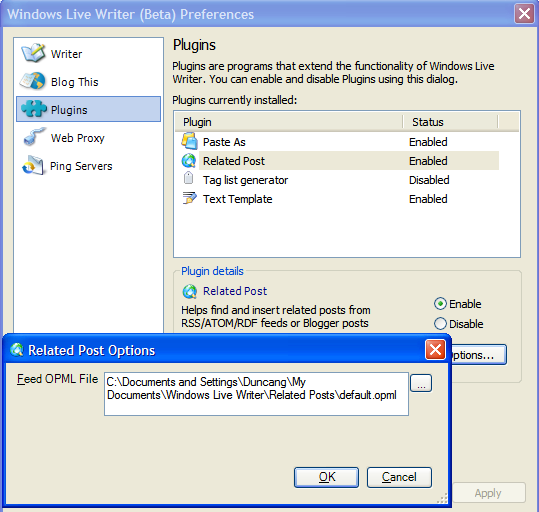
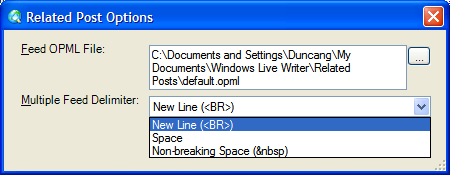
The Options can now be accessed either WLW Tools/Preferences menu or via the
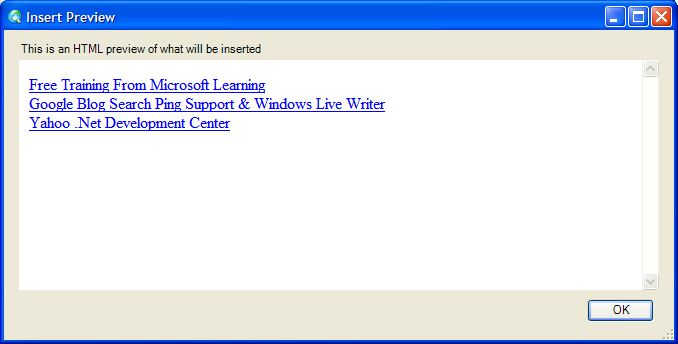
"Options..." link label. And lets you decide how to join/concatenate/delimit/etc the feeds when you select more than one for inserting. I like line breaks/new lines, but thought other people might want different options.
 

Related Past Post XRef:
Windows Live Writer - Related Post Plugin Preview

Windows Live Writer - Related Post Plugin Preview
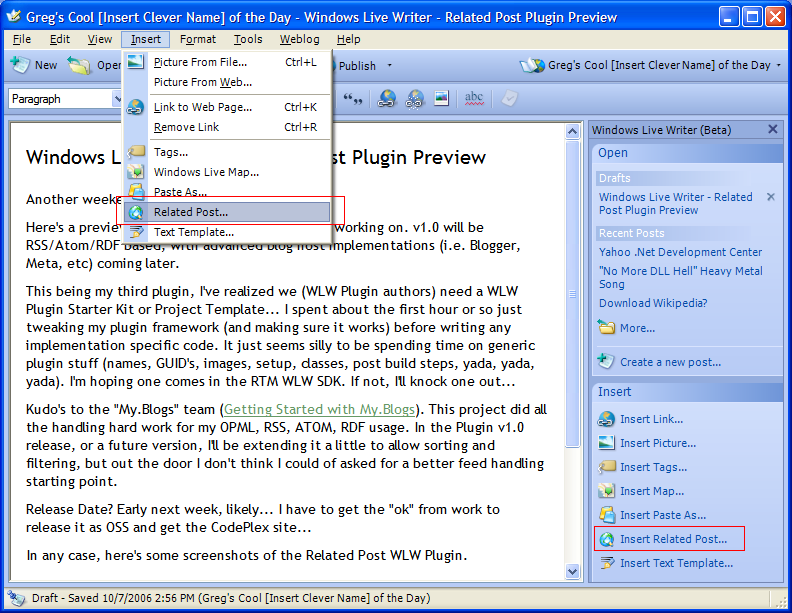
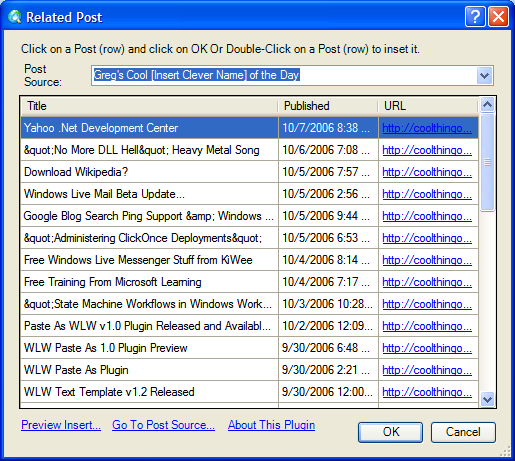
Another weekend, another WLW plugin... ;) Here's a preview of the "Related Post" Plugin I'm working on. V1.0 will be RSS/Atom/RDF based, with advanced blog host implementations (i.e. Blogger, Meta, etc) coming later.

This being my third plugin, I've realized we (WLW Plugin authors) need a WLW Plugin Starter Kit or Project Template... I spent about the first hour or so just tweaking my plugin framework (and making sure it works) before writing any implementation specific code. It just seems silly to be spending time on generic plugin stuff (names, GUID's, images, setup, classes, post build steps, yada, yada, yada). I'm hoping one comes in the RTM WLW SDK. If not, I'll knock one out...

Kudo's to the "My.Blogs" team (Getting Started with My.Blogs). This project did all the handling hard work for my OPML, RSS, ATOM, RDF usage. I'll be extending it a little to allow sorting and filtering, but out the door I don't think I could of asked for a better feed handling starting point.

Release Date? Maybe this coming week. I have to get the "ok" from work to release it as OSS and get the CodePlex site... Plus there is a ton left that I want in v1.0. I want feed list management, sorting and filtering, etc.

In any case, here's some preview screenshots.


Yep, I'm driving the feed list off of OPML...  :)


Related Past Post XRef:
Paste As WLW v1.0 Plugin Released and Available via CodePlex (and some thoughts on my next plugin)
Getting Started with My.Blogs

Yahoo .Net Development Center

"Welcome to the .NET Developer Center

This site is your source for information about using the .NET Framework with Yahoo! Web Services and APIs. Here you'll find:

  • HOWTO Articles to help you understand our technologies and how you can use them better with .NET.
  • Download the sample browser, utility libraries and source code.
  • Other Resources on the web where you can find source code and helpful tools.
  • Community Resources where you can join our mailing list and discuss the Yahoo! APIs with us and with other .NET developers.

HOWTO Articles

Get comfortable using .NET with Yahoo! Web Services

  • HOWTO: Make Yahoo! Web Service REST calls with C# and VB.NET
  • HOWTO: Using Returned XML with C# and VB.NET
  • HOWTO: Cache API Calls Using C# and VB.NET
  • HOWTO: Access Yahoo! Web Services Using XAML
  • HOWTO: Browser-Based Authentication Using C# and VB.NET

..."

Wow, even VB.Net samples...  ;)

(via SQL Server Code,Tips and Tricks, Performance Tuning  - Yahoo Launches .NET Developer Center, Windows Vista RC2 Available For Download)

Friday, October 06, 2006

"No More DLL Hell" Heavy Metal Song

New Song Released - No More DLL Hell 

"For those unfamiliar with the term "DLL Hell" (that's pretty much anyone who isn't a software developer), it's a term used by programmers to refer to versioning problems with Microsoft's older software.  My good buddy Spike Xavier and I came up with the idea of witting a song about the concept while stuck in Phoenix traffic one day.  Basically we wanted to write about how much better Microsoft's .NET platform is compared to their older technologies....mainly because we were bored I guess and because we're happy we don't have to use COM technologies much anymore.  Some will like the song's style (or lack thereof), some won't depending upon what type of music you listen to.

..."

 No More DLL Hell - The Song 

"Song Lyrics:

Verse 1:

Early days of COM components
solved our coding need

Dynamic Link Libraries - code as many as you need
we had version this and version that
confusing reg svr tre duece apps

..."

This song rocks. JUST what I needed to get me moving this fine Friday...  ;)

Thursday, October 05, 2006

Download Wikipedia?

Brad Smith ::: MSFT - How to download Wikipedia

"So you're looking for some dummy data?  Well how about downloading the wikipedia???!! 

There are over 2 million pages on the wikipedia.  Don't try to crawl the site, it won't let you.  No robots allowed!

Go to http://download.wikipedia.org and you'll see a list of all the databases.  If you're looking for the English one it's "enwiki".  Then you can choose to download a whole bunch of stuff ... but the file you generally want to download is "pages-articles.xml.bz2"..."

I don't know why, but downloading Wikipedia just seems too cool not to do... (so of course I am ;)

For "safe" sample/dummy data, I've used/downloaded Project Gutenberg files in the past too...

Windows Live Mail Beta Update...

My Windows Live Mail just updated to the new beta/milestone/etc ... It reminds me a little of Hotmail classic, but better. And I like the new flare UI.

I didn't know about (but everyone will learn with Vista), was the Windows Logo/Live menu thing. Hovering the mouse over, or clicking on, the Windows logo at the top gets you a menu of other Live services...

With those that have been updated to the new flare UI, the feel is very coordinated. Switching between Favorites and Mail is like switching between two like app's (i.e. two apps in the same suite, etc) They look and feel the same. Jumping between other apps, without the newer UI is more disjointed (which I'm sure will get less so as they update...).

The thing I don't like about the Logo/Live menu is that Mail isn't listed... I jump to Favorites, play around, but to get back to Mail I need to Back or click the IE Live toolbar Mail icon, etc. I'd like to have Mail as one of the menu options (yes, feedback submitted)...

In any case, it's nice to see it move forward... I really like using Live Mail. Going back to the old Hotmail UI is just plain painful... ;)

Google Blog Search Ping Support & Windows Live Writer

Got blog? Will ping. 

"Today we're launching the Google Blog Search Pinging Service, which is a way for individual bloggers and blog platform providers to inform us of content changes. Blogging providers who syndicate RSS/Atom/XML and want to be included in our Blog Search index can now ping us directly. We'll continue to monitor other pinging services and will contribute change notifications to the community. Read more at our FAQ." [Post Leached in Full]

There's a REST API, so it's easy to add it to your Windows Live Writer ping list.

Here's what I added to my WLW Ping list. The things in bold are the only items I had to change...

http://blogsearch.google.com/ping?name=Greg's+Cool+[Insert+Clever+Name]+of+the+Day&url=http%3A%2F%2Fcoolthingoftheday.blogspot.com%2F&changesURL=http%3A%2F%2Fcoolthingoftheday.blogspot.com%2Fatom.xml

"Administering ClickOnce Deployments"

Administering ClickOnce Deployments

"Summary: ClickOnce provides an easy-to-use and flexible deployment mechanism for smart client applications built for the .NET Framework 2.0. ClickOnce offers end-user deployment, ready-made installation dialogs, a built-in security model, and automatic or on-demand updates. But while it's great to have so many built-in features, one area that users often request more control is in tracking who uses which applications, controlling access to those applications, and knowing when something goes wrong. You may just need to keep track of who is using which versions of each application at the user level. You may want to restrict access to certain applications and updates based on a user's identity or their association with a role or group. You may want to know when launch errors have occurred for particular users so that you can troubleshoot deployment problems if they exist.

This whitepaper discusses all of these scenarios...

Contents

Introduction
Publishing and Deploying a ClickOnce Application
Installing and Launching a ClickOnce Application

Tracking ClickOnce Application Usage
Using Windows Authentication
Using Custom Application Authentication
Using Query String Parameters
Using a Custom Client Proxy to Establish an Application Session
User Authentication Summary

Limiting Access to ClickOnce Applications
Using Windows Authorization Custom Authorization
Using Query String Parameters
Using a Custom Client Proxy User Authorization Summary

Dealing with Launch Errors

Summary

Additional Resources

Appendix
Publish Directory Structure
Setting and Changing the Deployment Provider"

What interested me in this article was the "Tracking ClickOnce Application Usage" topic...

I've been thinking of tracking who installs my internal ClickOnce apps so I know who I'll be supporting, who to ask for feedback, etc. I was thinking of baking it into each app, but doing it externally would be much cooler and easier to reuse...

Wednesday, October 04, 2006

Free Windows Live Messenger Stuff from KiWee

Inside Windows Live Messenger - I Love Free Stuff!! Spread the love.

"So there is this neat site called KiWee that is having a free Messenger stuff extravaganza.  Free Dynamic Display Pictures, free Emoticons, free Winks, free Backgrounds, even free Packs.  It is technically for Canadian Messenger users, but there is nothing stopping anyone from downloading this stuff.  I am always skeptical of these types of offers, but I couldn't find anything shady or annoying about this site, no credit card info or crazy amount of profile information.  It just seems to be a sweet deal. ..."

Yep, it looks like the entire KiWee Windows Live Messenger catalog is currently free... We're talking hundreds(thousands?) of items free for the download.

Don't know how long this will last, but if you've ever wanted to get some of their stuff, now's the time.

Free Training From Microsoft Learning

Walter Stiers - Microsoft Elearning - Visual Studio 2005 - SPECIAL OFFERS: Free for a limited time

"https://www.microsoftelearning.com/visualstudio2005/ - Look at special Offers (bottom of the page)

Course 2913: Creating Your First Microsoft® ASP.NET 2.0 Web Application
Price: $44.99 NOW FREE, 1-year subscription

Course 4336: Upgrading from Microsoft® Visual Basic® 6.0: Introduction to the Microsoft .NET Framework
Price: $44.99 NOW FREE, 1-year subscription

Workshop 4249: Performing Asynchronous Tasks by Using Multithreading with Microsoft® Visual Studio® 2005
Price:$39.99 NOW FREE, 1-year subscription

Workshop 4260: Building and Consuming a Simple XML Web Service with Microsoft® Visual Studio® 2005"
Price: $39.99 NOW FREE, 1-year subscription"

Free is my favorite price for training...  ;)

Now I need to see if I can get CPE credit for these at work...

Tuesday, October 03, 2006

"State Machine Workflows in Windows Workflow Foundation"

MSDN Belgium - State Machine Workflows in Windows Workflow Foundation

"Windows Workflow Foundation allows us to implement workflows as state machines. This article uses a simple case and demonstrates how to develop a state machine workflow and solve the requirements of a case.

...

What is a State Machine Workflow?

A workflow is a defined process consisting out of several steps which implement the needed behavior. There are basically two kinds of workflows: sequential workflows and state machine workflows. In sequential workflows all decisions to progress in the workflow are taken by the workflow itself. There’s a well defined start and well defined end. Between there’s a flow consisting of branches and loops to direct the flow. This means the workflow is in control.

With state machine workflows there’s no real predefined path of all steps to undertake for a certain solution. State machines take another approach. They wait for events to happen and based on these events they change their state. State machines are used when the decisions are coming in from an external application and are unpredictable. So especially when there’s user interaction needed a state machine is a more convenient solution.
When new requirements come up, state machines are more flexible to add features. Mostly it’s a matter of adding another state. The state machine is not in control of the flow, but only controls the set of choices which can be issued by another application.

As state machines are a rather unknown concept, we’re going to build a simple but recognizable situation in this article.

..."

Now that .Net 3 is getting close to RTM, I'm going to be taking another look at WF. Also I'm taking a Developmentor course on WF ("Essential Windows Workflow Foundation for C# Developers" sigh, no VB version is available... good thing I my brain's runtime C# translation bit is flipped  ;) later this month, so I'm keyed to to WF related articles...

The above article's example also attracted me. It is a little more relatable than many, focusing on a TV state machine (TV is on, off, nothing interesting is on, cable is down, etc).

Monday, October 02, 2006

Paste As WLW v1.0 Plugin Released and Available via CodePlex (and some thoughts on my next plugin)

v1.0 of my WLW Paste As Plugin is now available via CodePlex (http://www.codeplex.com/Wiki/View.aspx?ProjectName=wlwPasteAs). Please see the preview post or the project home page for more details on this plugin.


My next plugin? I'm thinking a "Related Past Post XRef" Plugin. I like having links to past posts that are directly related to the current post. This is provides me a direct and specific conversation thread" in the post. Even in the future, when production Blogger supports categories, I'm still going to use "related past post xref's." Categories are great for general threads, but for tightly focused threads, well that's where my past post xref comes into play.

And right now it's a pretty manual process. I go to my blog, copy the title, paste. Copy the URL, paste. Get the other past xref's and past them too. Wash, rinse, repeat.

So I'm thinking that this would be a good plugin... Using the Blogger GData API, provide a list of past posts and let me select which ones I want to insert. Also I'm thinking I can add other blogs (like my Live Spaces personal blog) to the post list as well...

I'm planning on working on it this coming weekend, so we'll see how it goes...

Related Past Post XRef:
WLW Paste As 1.0 Plugin Preview
WLW Paste As Plugin