Tuesday, June 23, 2009

Things will be quite here for a bit…

It’s that time of year, time to pack up the family and head out for a vacation. Prince Edward Island (PEI), watch out, here we come again!

I don’t know what kind of wireless access I will have there, so blog posts may be pretty sparse (cough… as I should be vacationing and not blogging anyway… cough… :) for the next couple weeks.

Everyone take notes for me and let me know what I missed.  ;)


Related Past Post XRef:
Any readers in, or very near, Prince Edward Island, Canada?
Family Vacation Time... Prince Edward Island, Here We Come

Entity Framework 4 Feature CTP 1 for .Net 4 Beta 1 now available

ADO.NET team blog - Announcing: Entity Framework Feature CTP 1

“Today we are announcing the availability of the Microsoft Entity Framework Feature CTP 1 for the .NET Framework 4.0 Beta 1.  You can download the Feature CTP 1 from here.  This Feature CTP enables a number of scenarios that we've mentioned on the blog previously and now have a set of walk throughs for everybody to start playing with the features:

1) Better N-Tier Support with Self Tracking Entities

2) POCO (Plain Old CLR Objects) entity code generation via the POCO Template

3) Writing only code and having it work with the Entity Framework via Code Only.

We weren’t able to ship these capabilities in the .NET Framework 4.0 Beta 1 so we’ve decided to release them alongside the Beta. …”

Some EF4 goodness that couldn’t make .Net 4 Beta 1 is now available for us to play with…

(via Don't Be Iffy - The Rest of EF4 - Feature CTP1 Released today)

Improve your User Stories, INVESTing in them…

Steven Smith - INVESTing in User Stories

“User Stories describe features from the standpoint of the user, and should identify small units of work that can reasonably achieved within a short (1 or 2 week) iteration by a programming pair.  A useful acronym for remembering how to write good user stories is INVEST (more elsewhere and here).  A “good” user story is one that serves the needs of all of the stakeholders in the software development project, including the customer, the team lead (or PM), and the developer(s).  Ideally the story is recorded in short form on an index card (or electronic equivalent) and is a placeholder for a longer conversation that has taken place between the customer and the developer team.  Also ideally, it includes Acceptance Test criteria, which developers must ensure have been met before they consider the story complete.

The INVEST acronym for User Stories

User stories should be…

Independent – …

Negotiable – …

Valuable – …

Estimable – …

Small – …

Testable – …

…”

User Stories are an area I really need to work on. We just don’t do them well and we pay the price for it.

Some of the above items we’ve found through trial an error and some are common sense (which sometimes seems isn’t that common ;). Yet having having them together with a “business friendly” acronym is great.

I’ll be sharing this as the first part of our next Backlog Grooming session…

Monday, June 22, 2009

Easily add files to Vista’s and Win7’s Preview pane with the free PreviewConfig utility

Development in a Blink - How can I get the Window 7 Explorer Preview Pane to work with my PowerShell scripts?

“Thanks to Oising at Nivot Ink for replying to my tweet. The easy way, download the PreviewConfig Tool HERE.

Couple clicks…

image_thumb_3

The Winhelponline Blog - PreviewConfig Tool Registers File Types for the Preview Pane in Windows Vista

“Windows Vista introduces the Preview pane in Explorer, which shows the contents of the currently chosen file. You can also play multimedia files from the Preview pane, without opening Windows Media Player. This article explains how to use the PreviewConfig utility to register a custom file type for the Preview pane in Windows Vista Explorer.

Registering file types for the Preview pane

If you have a custom file type and wish to register a plain text or a multimedia Preview handler for the custom file type, you can do so using this utility.

previewconfig

…”

With this free, simple and easy to use utility you can tweak how files are handled by the Preview pane in Vista/Win7. It would be hard to make this any easier… ;)

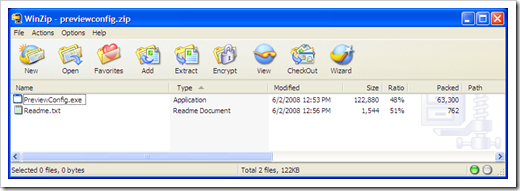
And it doesn’t even need an install. Download it, unzip and run it (with admin priv’s) and you’re good to go.

image 


Related Past Post XRef:
Setting up Vista, Windows 2008, Office 2007 to “Preview” text type files
Photoshop Vista/Office 2007 Preview Handler Project
Vista/Office 2007 Preview Handler Pack - Preview Handlers for *.CS, *.ASPX, *.SQL
Preview Handler Framework

Setting up Visual Studio to debug a Visual Studio Addin

My learnings - Debugging an Addin in visual studio

“Most of us would have done debugging at some point in time. But debugging a Addin in visual studio is a different thing all together.

Here am going to explain how we can debug an Addin in visual studio 2008 step by step:

image

I was just thinking about looking for this information, how to setup Visual Studio to debug a VS Addin, the other day… ;)

Sunday, June 21, 2009

Reusing the PowerShell PowerTools for Open XML in your C# or VB.Net world

OpenXML Developer.org - Accessing the C# code from PowerTools for Open XML in a .NET application

“PowerTools, at http://www.codeplex.com/PowerTools makes server-side document assembly of Open XML documents very easy in a PowerShell script. It does this by providing a rich set of PowerShell cmdlets. Interestingly, the smarts developed in PowerTools are also applicable to an integrated .NET business application - typically written instead in c# or VB.NET. It is simple to tap into this functionality because the PowerTools download includes source code, and within the source code, the implementation of the cmdlets already sits over a clean set of reusable classes.

This article demonstrates how to tap into this goodness. To prove the approach, an earlier sample written in PowerShell using PowerTools at http://openxmldeveloper.org/archive/2009/04/06/4418.aspx is redeveloped in c# as a windows application, and could also equally have been a web application.

My approach includes a wrapper around the PowerTools base classes. The wrapper provides .NET methods that match the PowerShell cmdlets. My wrapper is not complete in that it mostly has methods matching the cmdlets I wanted to use - but you will see that very little code is required to extend the wrapper to access any functionality in PowerTools. For example, if you wanted to use the logic provided by the cmdlet for setting the footer Set-OpenXmlContentFormat you can add that yourself with just a few lines of glue code.

The sample mentioned above uses a few methods which grabs parts from several documents and merges them in to one document. It builds a report document dynamically based on some current environment properties (processor and disk load).

…”

When I first saw the article I thought it was going to talk about calling PS cmdlets from within the C# code. Nope! Instead if talks about reusing the actual source, modifying it to fit better and directly into your C#/VB.Net application.

You’ve just got to love code reuse! (And open source/source available projects with permissive licenses that allow this kind of re-use…  :)

(via OpenXML Developer.org - New library article: Use PowerTools for Open XML to view C# code in a .NET application)


Related Past Post XRef:
PowerShell, OpenXML, WMI and the PowerTools for OpenXML = Doc generation for our inner geek
Because it’s a PowerShell kind of day… PowerTools for Open XML V1.1 Released
OpenXML PowerTools updated – Cell your Excel via PowerShell
Powering into OpenXML with PowerShell

MSDN Community CD, June 09 Release - .Net 4, VS2020, IIS SEO, Win 7 and ASP AJAX videos and more

Microsoft Downloads - MSDN Community Distribution CD June 2009

“…

File Name: 2_Download_May_09.iso
Version: 1.0
Date Published: 6/19/2009
Language: English
Download Size: 611.3 MB

…”

From the Start.htm on the ISO:

“…

Introduction to .NET 4.0

This course provides an overview of new features include the Managed Extension Framework (MEF), theading, and design by contract. Also includes a discussion of the various types of managed languages including the object-oriented languages (C#, C++, VB), the new Dynamic Languages (Iron Python and Iron Ruby), and the Functional Language F#.

New Features in Visual Studio 2010

This course demonstrates some of the new features in the Visual Studio IDE, including the new start page, the code editor, the XML schema editor, and new tools for web development and deployment

ASP.NET AJAX 4.0

This course provides an introduction to ASP.NET AJAX 4.0, focusing on the new client-side controls and templating capabilities, including the dataview control

SQL Server 2008 Developer Fundamentals Part 1

This Web seminar will give an introduction of how to use T-SQL with SQL Server 2008. It will start with covering the basics and then move on to high-lighting some of the new syntax introduced with SQL Server 2008.

Developers look at Windows 7

This is a high-level overview of what's new in the Windows 7 user interface. New features including the new Taskbar, Ribbon, Jump Lists, and Multitouch are demonstrated, so that developers know the new functionality they can leverage, but no code is shown.

Introduction to SQL Server Integration Services 2008 (SSIS)

This course will cover how to use SQL Server Integration Services 2008 (SSIS) to manage an Extract, Transform, and Load (ETL) process. We will start by looking at the fundamental components that make up SSIS and then move onto designing packages using Business Intelligence Development Studio

…”

image

I thought it very nice of Microsoft to provide me more video’s to stuff my Zune with prior to my leaving on vacation… :p

I do wish the download pages for these MSDN Community CD’s included more information about the contents. It would be much easier to determine if a given CD was worth the download if the same information provided on the ISO in the start.htm was also available on the download page. Or at least a link to it… It’s kind of a pain having to download the ISO just to see what’s on it…

image