Humor: “It Depends”
Jason Massie's Blog - Capt. Varchar & the Pagelatch Posse Vol. 26

This made the wanna-be DBA, Dev (i.e. looking for more context), Science Channel watcher and the “can almost spell physics guy” in me laugh…

Jason Massie's Blog - Capt. Varchar & the Pagelatch Posse Vol. 26
This made the wanna-be DBA, Dev (i.e. looking for more context), Science Channel watcher and the “can almost spell physics guy” in me laugh…
<ardent:Dev/> - Free Ebook Developers Developers Developers Developers
“Content from Microsoft’s {You Shape} It campaign has been rolled up into the ebook Developers Developers Developers Developers. Many of the contributors are Microsoft MVPs and/ Microsoft Regional Directors.
It’s a free download and released under a Creative Commons license so share share share!
…”
dev{shaped} - Developers Developers Developers Developers
“17 useful articles by developers for developers and comics? And available as a free download? And released under a Creative Commons license? And it’s from Microsoft?
Yup.
…
In the book:
Working with Brownfield Code by Donald Belcham (Microsoft MVP)
Beyond C# and VB by Ted Neward (Microsoft MVP)
Remaining Valuable to Employers featuring Barry Gervin, Billy Hollis, Bruce Johnson, Scott Howlett, Adam Cogan, and Jonathan Zuck
All I Wanted Was My Data by Barry Gervin (Microsoft Regional Director and MVP)
Efficiency Upgrade by Derek Hatchard (Microsoft Regional Director and MVP)
Getting Started with Continuous Integration by Sondre Bjellås (Microsoft Regional Director and MVP)
On Strike at the Software Factory by Daniel Crenna (Microsoft MVP)
C# Features You Should Be Using by Ted Neward (Microsoft MVP)
Accelerate Your Coding with Code Snippets by Brian Noyes (Microsoft Regional Director and MVP)
Is Silverlight 2 Ready for Business Applications? by Jonas Follesø (Microsoft Regional Director and MVP)
Innovate with Silverlight 2 by Daniel Crenna (Microsoft MVP)
Real World WPF: Rich UI + HD by Gill Cleeren (Microsoft Regional Director and MVP)
Hidden Talents by Peter Jones
Creating Useful Installers with Custom Actions by Christian Jacob
Banking with XML by Peter Jones
Sending Email by Derek Hatchard (Microsoft Regional Director and MVP)
…”

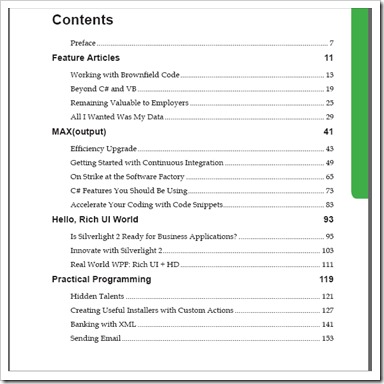
132 pages of articles from some of the top people in the MS dev sphere. Nice depth and very little marketing-ware.
I thought it cool that they are self-publishing it via LuLu (in both B&W and Color)

Doug Mahugh - Open XML developers: where to get answers
“I recently returned from a long business trip, and while working through my email backlog I’ve come across several questions from developers who are working with the Open XML formats. I’ve responded to each of them with some tips on how to best get such questions answered, and I thought I’d summarize that information here for others who may find it useful.
Your first stop for most Open XML development questions should be the forums section of the Open XML Developer web site. …
Another great one-stop shop for Open XML development topics is the Open XML Developer Portal. There you can find a huge number of code samples, articles, whitepapers, how-to videos, and free downloads, as well as …
…”
If you’re just getting started with OpenXML, interested in learning more or have been in this space for while, Doug’s post is a “must bookmark.”

marlat's blog - TreeMap control comes to Silverlight Toolkit
“Since this is my first post after over one month break I own an explanation. I have two excuses: one is of course vacations and the other one is really nice. Together with the colleagues of mine, I had the pleasure to work on a new control – TreeMap - that is included in the next release of Silverlight Toolkit.

I perceive the introduction of this control as especially important because it enables you to easily visualize more than one dimensional, correlated data in a way that is attractive and understandable to a user without any statistician or mathematical background.
…”
CodePlex – Silverlight Toolkit
I’ve been a fan of using treemaps to help visualize data for years. Since I first saw it used in WinDirStat years ago and then in NDepend, treemaps just click for me. The way they provide so much information in a compact yet easy to understand form hooked me.
The problem has been that there have been few implementations to date (or few free/cheap/reasonably priced ones). Luckily for me that tide seems to be changing. In the past few months I’ve seen a marked uptick in the number of treemap controls coming online, from commercial third parties, like Infragistics, to a number of OSS projects, like Pixel in Gene - A SilverLight TreeMap control & GPDE Team Blog - Silverlight Treemap Control.
With the inclusion of a treemap control in the Silverlight Toolkit, is 2009 the year treemaps go mainstream?
Related Past Post XRef:
Infragistics NetAdvantage Select 2008 Volume 3 released today
AddressOf.com - MS Research TreeMap.Net

All About Microsoft(Mary-Jo Foley) - Microsoft Silverlight 3 available for download
“Microsoft officials wouldn’t say a month ago whether the actual Silverlight 3 bits would be available by the day of the official launch, which is July 10. But it turns out they are available a day earlier.
Those interested in the latest version of Microsoft’s Flash competitor can download it from Microsoft’s Web site. Here’s where to get the Silverlight 3 bits.
(Gotta love the note on the download site: “Don’t Worry! We won’t install a bunch of additional stuff on your computer or try to sign you up for unwanted email.” Wonder who they’re talking about?)
…”
SilverLight - SilverLight Install
Man, that was a fast release cycle… Congrats to the SilverLight team! (Now what are we getting in SL4? lol ;)

Thoughts about IIS (and now SharePoint!) - Launch Task Manager (or any other program) from Desktop Context Menu
“I use task manager a LOT in my job. I also almost always have a ton of programs running, therefore, do not have much space on my taskbar and get tired of finding “just the right spot” to right click in on to get to Task Manager. Saving the following as a .REG file and importing it now allows me to right click anywhere on my entire desktop and launch Task Manager from there:
…” [GD: Click through for the to easily copy & paste the Registry entries]

Five seconds, no reboot needed, and you can add Task Manager to your Desktop context (i.e. right-click) menu.

Usual “Don’t mess with the registry unless you know what you’re doing as you can totally jack up your machine if you’re not careful, yada, yada” warnings apply.

Microsoft Learning Snack Box (Beta)
“Welcome to SnackBox
Learning Snacks are short, interactive learning presentations about Microsoft technologies and include various media, such as animations and recorded demos. Are you an expert? Be part of this growing and vibrant community - create your own Learning Snack and share it with the world here!
…


”
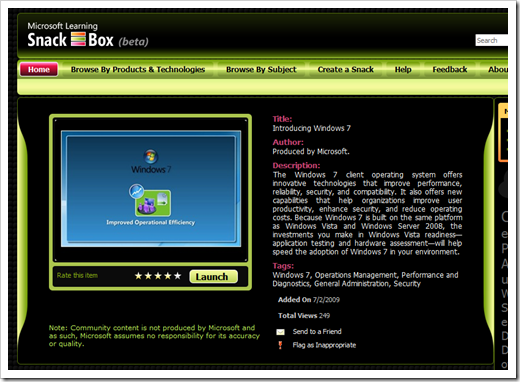
A couple things about the Snack Box stood out for me;
(via The blog of Rob Margel - Windows Help - Microsoft Learning Snack Box (beta))

The Portfolio.of Michael Anderson - Résumé / Infographics
“

…
There are many ways of displaying information, as the info aesthetics blog shows, some are just lovely. Well, in that spirit, I decided to update my résumé with a different perspective on the typical time-line theme. This is just concept art, as there are almost no real metrics represented except for time. There is no energy expenditure unit of measure, nor tics to delineate percentage or otherwise. In the fun multi-variable intake / output chart, there should be unique units per each (and a few are almost unquantifiable).
…”
What a cool way to jazz up a résumé. While I’d not replace my entire résumé with this, using this on the top half of the first page seems viable. As a hiring manager I know if I saw something like this it would draw me into spending more time reviewing the résumé (getting that eyeball-time can be 9/10’ths of the battle).
(via Robert's space - Using an infographic for your resume!?)

SSIS Junkie - LINQPad and Azure
“Since I started dealing with Azure tables I’ve become frustrated that there is no ad-hoc query tool, nothing equivalent to SQL Server Management Studio. Then I heard about LINQPad and figured there must be a way to use it to query Azure tables using LINQ and indeed there is as I’ll explain here (this post assumes that you have a working knowledge of LINQPad and Azure storage).
…

…”
Why roll your own Azure data store query tool/utility/thing when you can just use the uber-cool LINQPad? (aka LINQPad rocks… ;)
Related Past Post XRef:
Windows into Azure, the Azure Storage Viewer
This post title made me laugh, “I've Left Query Analyzer Hell For LINQPad Heaven”
LINQPad and the Entity Framework
Getting External with LINQPad – Advanced LINQPad Dimecast (aka part 3 of 3)
Fun with .Dump() in LINQPad – An intermediate level Dimecast for LINQPad
Link to LINQPad – A Dimecast LINQPad Walkthrough
LINQPad - A Free Interactive LINQ to SQL (and others) Utility (Think "SQL Query Analyzer for LINQ")

Microsoft Holm Community Blog - Introduction to Microsoft Hohm
“What is Microsoft Hohm?
Microsoft Hohm is a free online beta application that helps you save energy and money. With Microsoft Hohm you can better understand your home energy usage, get recommendations to conserve energy and start saving. As with any recommendation engine, Hohm will provide increasingly more accurate and relevant suggestions for energy conservation as its users contribute home energy input and feedback. One of the objectives during our beta period is to refine our tool and further increase the value our product can offer to you.
…
Microsoft Hohm uses advanced analytics licensed from Lawrence Berkeley National Laboratory and the Department of Energy to give you personalized energy saving recommendations. These recommendations are tailored based on your specific household circumstances including home attributes and use of appliances and systems…
…
How does Microsoft Hohm work?
After signing up for Microsoft Hohm with your Windows Live ID and postal code, you simply enter some information about your home (e.g., occupants, appliances and systems) and receive your energy report with personalized recommendations. The more information you provide, the more accurate and relevant the recommendations will be. As a default, Hohm will base its recommendations on local and national averages.
Alternatively, if you are a customer of a Hohm-partnered utility company you can choose to automatically upload your energy usage data into the application in the near future.
…”
I don’t know about you, but every time I look at my energy bills I think that I have to start working on getting them lower. One way that should work well for us is solar panels (with a South facing house/roof with little tree coverage in Sothern California solar panels are almost a no brainer). But before solar I need to first seal the house better, replace appliances, etc (in order to “right provide” my solar panels).
Anyway, having just paid my electric bill last night when I saw this site I felt a call to action and a need to share…

“We’ve heard from lots of developers that times are tough. You’re doing more with less, applying your skills more broadly, and maybe even learning new tools. That’s why we created Thrive – a one-stop community hub that offers job postings, technical content, and community resources. So whether you’re seeking new ways to differentiate yourself on the job, or you need to re-tool your skills for that next big role, Thrive has the resources to help you get there faster.
…

…”
While this site feels a little “marketing’ish” that doesn’t mean there are not some good links and resources available. Heck every little bit helps…
There’s also a Thrive for IT too. The IT Thrive site seems to have more information, links, videos, career tips, etc.

Aaron Stebner's WebLog - Final version of WiX v3.0 now available for download
“Over this past weekend, the 3.0.5419 build of WiX v3.0 was declared the final production build. If you are using any builds of WiX v3.0 for your projects, I strongly encourage you to update to the 3.0.5419 build at this time.
Here is some additional information about WiX v3.0 and the final 3.0.5419 build:
- WiX 3.0.5419 build download locations - http://wix.sourceforge.net/releases/3.0.5419.0/ or https://sourceforge.net/projects/wix/files/
- WiX v3.0 online documentation - http://wix.sourceforge.net/manual-wix3/main.htm
…”
Windows Installer XML (WiX) toolset
“WiX v3.0 released.
July 4th, 2009
The final build of WiX v3.0 has been released. You can download it from http://sourceforge.net/projects/wix/files/. Read more about the release by Rob and Bob.
…”
WiX is one of of my favorite Windows Installer projects. Why? I dig how it’s XML driven. There’s no hidden magic, munging or mumbo-jumbo. It’s all there, in the XML. Meaning it can be easily tweaked with any tool or means/method that can tweak XML, from Notepad to MSBuild.
I did think it was a shame that it was pulled from VS2010. We really need a professional means to create MSI’s baked into Visual Studio and I thought this would be it. The existing Visual Studio Setup Projects are okay and great for simple stuff, but when you need to programmatically modify the setup or go beyond what’s there, then it’s kind of a brick wall.
Anyway, if you’re building setup packages, need to move beyond what comes with Visual Studio and don’t want to pay for a third-party product then you need to check out WiX.
(via Jason Haley - Interesting Finds: July 7, 2009)
Related Past Post XRef:
WiX Resources – Some help up the learning curve
WiX 3 is now officially in “Beta”

FrazzledDad - Book Review: The Manga Guide to Physics
“The Manga Guide to Physics
by Hideo Nitta and Keita Takatsu. Published by No Starch Press, ISBN-10: 1593271964.
…
All the concepts are laid out in very clear fashion, and the examples are really spot on and understandable. There’s math involved, but it’s kept at an understandable level and is presented in very short, progressive steps.
This was a really enjoyable read – and it was even educational. I loved the format and I really appreciated the effort and thought that went into laying out the material in such a clear fashion.
…”
This made me chuckle and since everyone wants to learn Physics… ;)
|
BTW, If you liked this, there are other Manga Guides too…
Related Past Post XRef:
“Tico the fairy teaches the Princess how to simplify her data management” in The Manga Guide to Databases

Adventures in .NET - SQL Server 2008: Importing TIGER/Line Spatial GIS Data
“If you’ve been itching to use the spatial data and query features of SQL Server 2008 but haven’t figured out a way to get data to use, you’re in the same boat I was. Until today.
I have a whole slew of address information, but no way to convert that into latitude/longitude values to do any meaningful spatial querying – I was pretty much limited to Zip Code statistics only. Then I remembered that the US Census Bureau puts out a freely available database of everything from roads to highways to railways to geological and political borders with their coordinates called TIGER/Line. …
It would be quite a bit of effort to try and parse the TIGER/Line data yourself, so the use of a utility greatly helps here. Download SQL Server 2008 Spatial Tools to follow along with this blog post, although Microsoft has a sponsored project on Codeplex which I haven’t used called SQL Server Spatial Tools as well.
…
Finally we can see what we’re working with! It’s not the prettiest thing in the world, but it helps you quickly visualize the spatial results of your query.
Using functions like STDistance, you could do things such as finding all customers within a range of a certain latitude/longitude point, which I hope to explore in a future blog post. But once you overcome getting data into your system, it’s just SQL queries from here on out.
Oh, and did I mention that this is all free? :-)
”
SharpGIS - SQL Server 2008 Spatial Tools
“The SQL Spatial Tools consists of two tools to make it easy to get experience with the new spatial capabilities of SQL Server 2008 (click for more info) :
- Shape2SQL : Uploads ESRI Shapefiles to Microsoft SQL Server Spatial.
- SqlSpatial Query Tool : Queries MSSQL Server 2008 and displays geometry output on a WPF-based interactive map.
Requirements:
- A SQL Server 2008 to connect to (DUH!)
- Microsoft .NET 3.5
- Either "SQL Server 2008" or "Microsoft SQL Server System CLR Types" installed on client machine.
”
U.S. Census Bureau - 2008 TIGER/Line® Shapefiles
“The TIGER/Line Shapefiles are extracts containing selected geographic and cartographic information from the Census Bureau's MAF/TIGER® (Master Address File / Topologically Integrated Geographic Encoding and Referencing) database. The MAF/TIGER database was developed at the Census Bureau to support a variety of geographic programs and operations including functions such as mapping, geocoding, and geographic reference files that are used in decennial and economic censuses and sample survey programs. Spatial data for geographic features such as roads, railroads, rivers, and lakes, as well as legal and statistical geographic areas are included in the product. Other information about these features, such as the name, the type of feature, address ranges, and the geographic relationship to other features, also are included. The TIGER/Line Shapefiles are made available to the public for no charge and are typically used to provide the digital map base for a Geographic Information System or for mapping software.
The 2008 TIGER/Line Shapefiles contain current geographic areas (boundaries of governmental units as of January 1, 2008), Census 2000 vintage geography, and Economic Census geography. The shapefiles also contain some additional feature updates reported in the Boundary and Annexation Survey (BAS). All counties have now been realigned as a result of the MAF/TIGER Accuracy Improvement Project (MTAIP) and are included in the 2008 TIGER/Line Shapefiles. For more information about the MTAIP please refer to the 2008 TIGER/Line Shapefile Technical Documentation available in [PDF] or TEXT.
The TIGER/Line Shapefiles contain attribute data only and do not include mapping software. They are designed for use with geographic information system (GIS) software. The TIGER/Line Shapefiles do not contain demographic data from any census or survey, but do include the geographic entity codes, which provide a link between the Census Bureau’s demographic data and the TIGER/Line Shapefiles.


…”
The data available is simply staggering and all just a download and conversion away from your SQL Server 2008 Spatial Data usage…
Related Past Post XRef:
US Zip/City/County/State spatial data all ready for your SQL Server 2008… Just download, SQLCMD/import and go

*Words of Wisdom From The Elder - MSDN / Technet Subscribers Get Windows 7 July 13th
“It is official, it is Christmas in July for many MSDN / Technet subscribers. The official RTM version of Windows 7 will be available for download on MSDN / Technet on July 13th.
Wait… I thought it was supposed to be released on October 22nd?
The October 22nd date is the date it will be available in stores. The July 13th release is the same version that will be cut to the manufacturers. …”
Neowin - Confirmed: Windows 7 set to RTM on July 13
“Earlier today the guys over at GeekSmack.net "confirmed" that Windows 7 was set to RTM (release to manufacturing) on July 13, which also coincides with Wzor's unconfirmed rumor last month. A few minutes ago sources close to the company, who wish to remain anonymous, have confirmed to Neowin that Windows 7 is indeed set to RTM on July 13.
…
So with that said TechNet, MSDN, and a few other partner connections will also be getting the RTM build on July 13. So let the countdown begin!”
I can’t wait!

Microsoft Downloads - Microsoft Code Analysis Tool .NET (CAT.NET) v1 CTP - 32 bit
“CAT.NET is a binary code analysis tool that helps identify common variants of certain prevailing vulnerabilities that can give rise to common attack vectors such as Cross-Site Scripting (XSS), SQL Injection and XPath Injection.
File Name: CATNETx32.msi Version: 1.1.1.9 Date Published: 6/26/2009 Language: English Download Size: 4.1 MB
CAT.NET is a snap-in to the Visual Studio IDE that helps you identify security flaws within a managed code (C#, Visual Basic .NET, J#) application you are developing. It does so by scanning the binary and/or assembly of the application, and tracing the data flow among its statements, methods, and assemblies. This includes indirect data types such as property assignments and instance tainting operations. The engine works by reading the target assembly and all reference assemblies used in the application -- module-by-module -- and then analyzing all of the methods contained within each. It finally displays the issues its finds in a list that you can use to jump directly to the places in your application's source code where those issues were found. The following rules are currently support by this version of the tool. - Cross Site Scripting - SQL Injection - Process Command Injection - File Canonicalization - Exception Information - LDAP Injection - XPATH Injection - Redirection to User Controlled Site [GD: Emphasis added. Description Leached in Full]”
Also available on Visual Studio Gallery - CAT.NET
“CAT.NET is a static analysis tool to analyze software security issues. It uses a tainted variable algorithm based on work from Microsoft research. It is free to download and is being actively developed by the Information Security Tools team. http://blogs.msdn.com/securitytools [GD: Description Leached in Full]”
Security help is good help… Also check out the CAT.NET posts on the Security Tools blog for some more information, MSBuild integration tips and more.
PS. Brian K, Look some J# love! ;)




 The Manga Guide to Physics: Hideo Nitta, Keita Takatsu, TREND-PRO-pro Ltd.: Books

 Posts
Posts


