Sunday, February 07, 2010

A Feed You Should Read #23 – The Code Project

If you ask a developer how they like to learn new technology, techniques, etc nearly all will say, “The code, baby! Show me some code…!”

Today’s Feed is one of the premier sites for developers, by developers which revels in the code, baby!

The Code Project

image

Background:

I love The Code Project. I’ve found more cool things on this site than I can count. Almost every day there’s some project that I want to capture for future reference. Best of all is the fact that the articles are by developers, for developers.

How often have you used the Net to solve a coding problem, or to learn something? Yeah, like a million times. Me too. Yet were would we be if everyone was a consumer and no one a producer?

That’s what draws me to the Code Project, easy it makes sharing, to help you be a producer. You don’t need to be a “A Lister”, have a deal with a publisher/site, be a name in our field, a blog, yada, yada. You just need to desire, and code. Sharing a cool project, technique, solution to difficult development problem or bit of code is simple, easy and free.

The act of paying it forward is what gives this site its true power.

Why do I like this feed and think you might also?

Learn by seeing code?

Like to see people talk about and code cool stuff?

Code in in .Net, MFC/C++, ASP, C#, VB?

Want to give back a little yourself?

The Code Project is a site and feed for you…

Snap of the latest posts:

image

Blog Information:

Name: The Code Project
URL: http://www.codeproject.com/
Feed: http://www.codeproject.com/webservices/articlerss.aspx?cat=1 (All Topics)
Post Types: Development (aka Code) project articles (most with source)


Related Past Post XRef:
A Feed You Should Read TOC

Saturday, February 06, 2010

Spell check enable your WinForm TextBoxes/RichTextBoxes via a nHunspell based IExtenderProvider

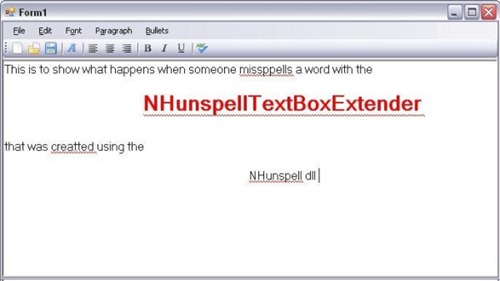
CodeProject - NHunspellTextBoxExtender - A Spellchecking IExtenderProvider for TextBoxes using Hunspell for .NET

ScreenShot

Introduction

With many applications, spell checking can be a vital aspect to include. Most people are used to the spell checking capabilities of products like Microsoft Word or OpenOffice. There are products available for purchase that can add spell checking capability, such as SharpSpell that can cost hundreds of dollars. But, there is a lack of Open Source, freely available tools that can provide the functionality of Microsoft Word. That is why I began to work on a spell checking IExtenderProvider that could extend any control that inherits TextBoxBase (both TextBox and RichTextBox inherit TextBoxBase).

Background

… I wanted to provide spell checking capability to my GUI application. There were plenty of ways to spell check text, from using NetSpell, to programmatically using Microsoft Word's spell checker in a way similar to this article. Not every user could be assured to have Microsoft Word, and opening a new Word application can take some time and uses resources, so I wanted to stay away from that. I chose instead to use NHunspell. A useful article on it can be found at: hunspell-for-net.aspx.

I also wanted to provide a visual cue to the user that there was a spelling error. With RichTextBoxes, this could be done through simple underlining, such as in this article. My problem was that I had written a lot of code using simple textboxes, and I didn't want to change all of them to RichTextBoxes. Instead, I wanted to use the IExtenderProvider to extend any textbox with spell checking capabilities. To be honest, I had no clue where to even begin to do that. That is, until I found this blog that describes exactly how to draw that wavy red line on a textbox. With that base code, I was able to use NHunspell to determine where to draw the line.

Exploring the code

IExtenderProviders can be very useful, and most of us that code use them regularly, maybe even without knowing it. The simplest example is the ToolTip. When you add a ToolTip to a form, it doesn't show up as a control directly on the form. And, while it has its own properties, it also adds

image …”

I thought the number of things that this article brings together was pretty cool. That and the fact that it’s VB… :)


Related Past Post XRef:
NHunspell - 0.9.2 released and two cool C# & VB.Net Code Projects too
Hunspell (Open Office’s Spell Checker) wrapped for .Net = NHunspell – Your LGPL spell checker, hyphenation library for .Net

The prefect TPS Report use?

CNET - Turn your office expense reports into toilet paper

“If you've ever dreamed of sticking all that paperwork on your desk where the sun don't shine, a Japanese machine can turn it all into toilet paper for you.

Appropriately named White Goat, this device designed for the office can take regular letter-size paper or shreds, including that sales report you cursed until you were blue in the face, and transform it into nearly pristine rolls of white tissue.

White Goat was developed by Oriental Co., a small shredder maker based in Kiryu City, north of Tokyo, which says it's the first product of its kind in the world.

As seen in this vid from an ecological-products trade show in Japan last year, White Goat is very simple to use. All the user has to do is supply the machine with electricity, add paper and water, and remove the rolls of toilet paper when they're done. The pulping and rolling processes are automated.

It takes the machine 30 minutes to make one roll, and each roll is made up of about 40 sheets of paper. Oriental, which has applied for a patent on the tech, says White Goat can save about 60 trees annually…” [GD:News item leach level: 90%]

Awesome…

Thursday, February 04, 2010

Using a Wiimote as a Sensor Driver on Windows 7

Code Project - Writing a Sensor Driver for the Wiimote on Windows 7

Introduction

I was as fascinated with the Nintendo Wii gaming console as the rest of the world was when it came out and thought its unique input system was jaw-dropping awesome. I subsequently happened to stumble upon some incredibly creative work by Johnny Chung Lee on the internet one day where he demonstrates how the Wii remote - also known as the Wiimote - can be used to build innovative new ways of interacting with a computer. He got me so excited with the idea that I almost immediately went out and got a Wiimote myself though I don't even own the Wii console!

When Windows 7 came out and I learnt about the new Sensor and Location Platform, I figured writing up a little bridge driver that exposed the 3-axis accelerometer that each Wiimote comes with to the sensor platform would be kind of cool. This article attempts to explain how the driver works and what it takes, in general, to write a driver for the Sensor platform.

Acknowledgements

The implementation of the Wiimote sensor driver, particularly the communication protocol implementation, has been heavily "inspired" by Brian Peek's WiimoteLib library which has turned into a sort of de-facto standard API for gaining access to the Wiimote from managed code via the Windows HID API. Also, the sample driver implementations from the Windows Driver Kit provided the starting point to get the project off the ground. The I/O management code was taken with some slight modifications from the Sensor Development Kit.

Just show me how to use this thing

If you're looking to just use the driver and don't really care how it works, then here's what you've got to do. The Wiimote is a surprisingly self-contained piece of hardware that really is a stand-alone product by itself. It communicates with the Wii console via standard Bluetooth radio signals and identifies itself as a HID input device. To make it work with your computer, here's what you'll need:

  • A Wiimote (duh!)
  • A computer with Windows 7
  • A Bluetooth card

There have been some reports out there where people had trouble getting their Bluetooth driver stack to recognize the Wiimote. If you're one of them you'll probably need to get updated drivers for your Bluetooth card. Assuming your computer is able to pair with the Wiimote, here's how you do it in Windows 7.

Taking her out for a ride!

If you are with me so far, then you should be able to launch the "Wiidiag" tool from "C:\Wiisensor\bin\Wiidiag\Wiidiag.exe" and watch a dull little graph respond to you whenever you wave your Wiimote around! Now, what's cool is that you can pretty much get any app off the shelf and have it work with your Wiimote's accelerometer if it is designed to work with the Sensor platform. You could for instance, download the plane demo app from here and it should just work! In fact I have included the binary for that demo with the download for this article and you should find it in "C:\Wiisensor\tools\PlaneDemo\DemoApp.exe". When you launch it you should see a little plane model rendered on the screen. Just check the 3 check boxes representing the 3 axes and it should immediately start rotating the plane around as you move the Wiimote.

image

…”

Awesome! Need to hurry up and post this so I can go grab a Wiimote and try this out… :)

Work Smart (by letting someone else do the icky document creation grunt work) – “Work Smart Productivity Guides” from Microsoft for your end-user training, re-use and tweaking pleasure

UK Further Education Blog - Ready-made IT user documentation

“When I started working at Microsoft, I hadn’t been in such an open, technology rich culture before. And with so many IT systems around, and so many different software resources, my head was buzzing. In fact, I remember that at the end of the first week, the number of links in my Favorites was massive – just to internal websites.

I’d never used internet telephony, encryption, instant messaging, live meeting, SharePoint or Groove before, so I was all at sea until I could play around and work out how they were supposed to operate. Meanwhile, people who’d been at Microsoft for a while were metaphorically whizzing past me, as they collaborated, shared, published and distributed information. Whilst I was trying to work out how to answer my desk phone.

One of the godsends for me was a set of documents called Work Smart Guides, which walked me through the basics of some of the new technology I was encountering.

The subjects covered in the step-by-step guides for users include:

  • Environmental sustainability (hints like using Balanced power settings on your laptop)
  • Protecting data with BitLocker
  • Getting started with email
  • Transfer files and settings to a new computer
  • Collaborating with SharePoint
  • An overview of collaboration tools
  • Customizing SharePoint sites
  • Integrating Outlook with SharePoint
  • Basics of managing email (Are you a stacker or a filer?)
  • Office tips
  • Outlook email signatures
  • New features for users in Windows 7


…” [GD: Post Leach Level: 70%]

TechNet - Work Smart Productivity Guides

Microsoft IT Showcase

Microsoft IT created Work Smart productivity guides (previously Everyday Productivity Education (EPE) guides) to bridge the gap between technology and users. Work Smart guides provide employees with scenario-based, best-use productivity aids on Microsoft products and technologies. As more Work Smart guides are published, Microsoft IT expects to see more consistent, productive, and cost-effective use of products and technologies across the company.

Work Smart Productivity Guides
Download customizable versions of Work Smart materials to use as samples and reusable templates that specifically address the scenarios and processes in your information worker environment.

…”

I don’t know how many times I’ve seen IT, User Support, Training and Doc, etc groups create or buy general, end user documentation for basic things like Office, Windows, SharePoint, etc. Too many.

So when I saw this, I thought it too cool to not mention. What’s cool is that it’s in DocX format and you are not only allowed, but encouraged, to tweak it to fit your environment. Love that…


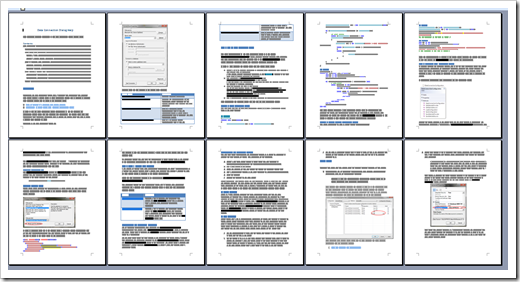
Here’s what you get in the 23MB zip;

image

image

image

Have a PDC09 Acer 1420p? Having the SDTabletPC handle leak issue? Brian Peek as got something you’re going to want to get… [Insert “There’s a Fix for that” humorous comment here]

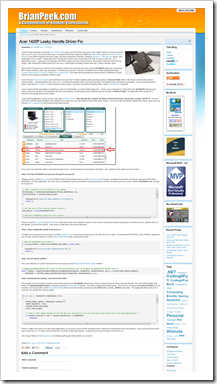
BrianPeek.com - Acer 1420P Leaky Handle Driver Fix

“I wasn’t lucky enough to receive the Acer 1420P laptop given out at PDC this year since I was “staff”, however I wound up picking one up on eBay for a very reasonable price.  I received it last week, added an additional 2GB of RAM, used my Windows Home Server to save off the original hard drive image, and then repaved the machine, installing Windows 7 Ultimate x64, drivers, and applications from scratch.  Earlier this week I noticed the machine was consuming over 3GB of memory with only 1 or 2 applications open.  Looking at Task Manager, the RAM usage by process looked normal, which didn’t match the total memory usage.  After reading the Performance tab a bit more, I saw that the operating system had over 5 million handles open!

Back on the Processes tab, I turned on the Handles column and saw that a process named SDTabletPC.exe was consuming the 5 million handles, and it was growing by 10 handles per second [GD: Emphasis added].  This file is installed and run after installing the latest accelerometer driver (v1.00.00.16) from Acer’s support site.  This driver and executable are responsible for rotating the screen based on the machine orientation in tablet mode.

I was unable to fix the executable by patching in calls to CloseHandle, so I took another approach.  I wrote a very small app in C which finds the SDTabletPC.exe process, opens a process handle to it, enumerates all of its open handles, and forcefully closes all those that are handles to \Device\STHall.  The application then sleeps for 5 seconds and repeats the process forever.

I have put the application and its source code up for download here [GD: Click through for the download link… I don’t want to leach all his traffic].  Note that this fix is only for the latest version of the driver shown here, version 1.00.00.16.  I know it won’t work with the driver installed in the default PDC image and I can’t guarantee it’ll work with newer drivers.  So if you’re still running the original PDC driver, make sure you head to Acer’s support site and download the latest version

image

…”

So there I was, my trusty PDC09 Acer 1420p in hand and looking at the Task Manager, “2 million handles! WTH?” Yeah, a single process had 2 million handles. I just had to laugh out loud, it was so over the top…

Needless to say I killed that beast. Then I went to the Acer site, grabbed the latest version of the driver and tried that. Same issue… sigh

Since I don’t use the functionality that driver provides, I’ve been killing it and checking for updates each time (yeah, yeah, I could have just nuked its Run entry, but I wanted a reminder to check for updates and since I only reboot once a month or two…)

Then Brian pinged me about a fix he was working on.

Talk about humbling… Here I was whining about it, sitting on the sidelines doing nothing and there he is firing up his debugger, Visual Studio and banging out a fix  (+10 Dev Geek Cred’s to Brian, –10 to Greg).

So Brian has not only created and released a “Fix” utility, but documented the process he went through, the resources he used and his source too! Nice…

Wednesday, February 03, 2010

Hey Microsoft MVP’s, pluralsight has got a great deal for you! A complimentary 1-Year Standard subscription to the entire Pluralsight On-Demand training library

pluralsight - pluralsight announces free on-demand! training for all microsoft mvps

“Pluralsight will provide each Microsoft® MVP with a complimentary 1-Year Standard subscription to the entire Pluralsight On-Demand! training library. We are rolling this campaign out at the upcoming 2010   Microsoft MVP Global Summit in Bellevue on Monday, February 15. MVPs can get hooked up with the 1-Year Standard subscription at the Party with Palermo - MVP Summit 2010 edition, so make you sure you  register to attend here: http://partywithpalermo.eventbrite.com/. We'll also be raffling a Zune HD pre-loaded by yours truly, with Pluralsight On-Demand! content. If you can't make it to the party, be sure to find Aaron Skonnard, Keith Brown, David Starr, Scott Allen or Jon Fancey at the summit. They'll be able to hook you up with the goods, as well. If you aren’t attending the MVP Summit 2010, email me for details.

Additionally, Pluralsight will provide MVPs who participate in the offering activation codes for 5-day Standard trials to distribute to their colleagues and peers upon request. 

Eligibility

The Pluralsight Microsoft® MVP Program is available to all current Microsoft® MVPs.

image

While I’m in no way associated, linked, connected, etc, etc, with pluralsight when I saw this I said to myself, “Wow, that’s fricken smart!” I mean what a great way to introduce a wide and influential audience to their product, generate good will, would incur little extra cost or lost revenue yet have a possible big upside. Damn smart.

If you’re a Microsoft MVP then this is a deal that you just can’t pass up. Becoming a MS MVP has been a dream of mine for years, I hope offers like this are still around if ever have the honor of earning it…

Plus I love the whole Zune HD preloaded with content angle. I’ve been saying for years that this is something Microsoft should do for its major conferences (give away Zune’s, provide means to hook a user’s selected sessions to auto-download as podcasts when the session’s video become available, yada, yada…)

Tuesday, February 02, 2010

The Team Foundation Server 2010 Work Item Guide for the Average Guy - “TFS 2010 Work Items Basic Guide”

CodePlex - TFS Guides

“In this project you can find user guides for the most common functionality of the TFS.

I hope I will cover at least most of the important functionality.

What do we have so far?

Guide Name Version Description Author Downloads
TFS 2010 Work Items Basic User Guide 1.00 This guide is for all TFS 2010 users that uses the Work Items or like to use the Work Items. Eran Ruso "Download"
Team System Work Items Basic User Guide 1.00 This guide is for all Team System 2008 users that uses the Work Items or like to use the Work Items. Eran Ruso "Download"
Team System and Excel User Guide 1.00 This guide is for all Team System users that likes to have the benefits of the excel used with work items. Eran Ruso "Download"
Team System and MSProject User Guide 1.00 This guide is for all Team System users that works with MSProject it shows how to connect a project to the Team System and synchronize the work items both ways. You can still have the benefits of the MSProject with the addition of the Team System advantages. Eran Ruso "Download"
Team System 2010 Installation Guide Beta 2 This guide was published by Microsoft and contain Step by Step instructions and Prerequisites for the Team System 2010 installation. Microsoft "Download"

…”

TFS Guides - TFS 2010 Work Items Basic User Guide

“…

TFS 2010 Work Items Basic User Guide.pdf
documentation, 1330K, uploaded Jan 31

Release Notes

One of the most common parts that are used in the TFS is the Work Items sections.
This section controls the "Management" part of the Application Lifecycle Management (ALM) and is used by all rolls that take part in the development process.
The Guide is made for the Team Explorer add-in but the concept that is shown is the same as other TFS Clients with small modifications.
This Guide is made for the TFS 2010 and can be used by every user that uses the Team System.

…”

And a snip from the Guide itself;

image  image

image

What I liked about this guide is the basic nature of it (funny that given it’s title… ) Meaning there are many people in the MS Dev/QA world who have never used TFS and I felt this guide was a nice, simple and inexpensive introduction. And the fact that it’s VS2010 is also nice… :)

A very nice, and new/non-tech user safe, 48 page Windows 7 Shortcut eBook - “The Complete Windows 7 Shortcuts”

Windows LifeStyle - The Complete Windows 7 Shortcuts eBook released

“We are pleased to release The Complete Windows 7 Shortcuts eBook. Windows 7 includes a lot of new keyboard shortcuts that are unknown to a new user. This eBook comprises of more than 200 keyboard shortcuts containing almost all the keyboard shortcuts that are available in Windows 7 and its default programs like Paint, WordPad, MS Office, Calculator, Help, Media Player, Media Center, Windows Journal, Internet Explorer, etc

The eBook is pretty exhaustive and the topics covered include:

  • General Windows functions keyboard shortcuts
  • Dialog box keyboard shortcuts
  • Windows logo key keyboard shortcuts
  • Windows Explorer keyboard shortcuts
  • Ease of Access keyboard shortcuts
  • Magnifier keyboard shortcuts
  • Remote Desktop Connection keyboard shortcuts
  • Keyboard shortcuts for MS Paint
  • Keyboard shortcuts for WordPad
  • Keyboard shortcuts for Calculator
  • Windows Journal keyboard shortcuts
  • Windows Help viewer keyboard shortcuts
  • Windows Media Player keyboard shortcuts
  • Internet Explorer keyboard shortcuts
  • Windows Media Center keyboard shortcuts.
  • …”

    image

    image image

    While this ebook seems largely based on Windows 7 Keyboard Shortcut – The full, and searchable, list it does seem to add extra content/value, is nicely formatted, printable and its initial sections look good for the novice, new, non-techie users (cough… family members who got Win7 Netbooks/Notebooks for xmas… cough).

    (via Santhosh Sivarajan’s Microsoft Technology Blog - Windows 7 Shortcuts – eBook)


    Related Past Post XRef:
    Windows 7 Keyboard Shortcut – The full, and searchable, list

    Use the Visual Studio Data Connection Dialog? Wish you could use it in your app? Maybe even tweak its source a little to better fit your project? The Visual Studio Data team has granted your wish…

    Visual Studio Data - Data Connection Dialog Source Code is released on Code Gallery!

    “Based on customer requests, we have decided to release the data connection dialog source code on Code Gallery last weekend:

    http://code.msdn.microsoft.com/Connection/

    Here, I’ll introduce it briefly to give a basic idea.

    The data connection dialog is a database tool component that released with Visual Studio. In order to use the data connection dialog independently of Visual Studio, we published the standalone source code. You can integrate and redistribute the source code with your application according to the license. With the data connection dialog, you can do following tasks:

    · Build/Modify connection strings.

    · Customize the data connection dialog.

    · Write your own custom data providers.

    Following are two main snapshots:

    1_2

    …”

    MSDN Code Gallery - Data Connection Dialog

    “The data connection dialog is a database tool component released with Visual Studio. It allows users to build connection strings and to connect to specific data sources.

    In order to use the data connection dialog independently of Visual Studio, we have released the standalone source code. You can integrate and redistribute the source code with your application according to license. This document describes how to modify the source code and also how to write a custom data provider.” [GD: Description Leached in Full]

    Data Connection Dialog - Release of Data Connection Dialog Source Code

    Files

    Data Connection Dialog Source Code
    source code, 313K, uploaded Jan 29…

    Data Connection Dialog Document
    documentation, 513K, uploaded Jan 29…”

    From the Data Connection Dialog Document;

     image

    image

    And a snip from the source;

    image

    I love this… Taking a component that is not fundamentally material to a given project or its revenue and releasing its source. Licensed as MS-PL it’s easily re-usable.

    Plus taking the time to provide a write-up on how to use the source? Nice touch…

    Azure SDK 1.1, Azure Tools for VS 2008/VS 2010(RC) 1.1 released and Azure Drive Beta

    Microsoft Downloads - Windows Azure Software Development Kit (February 2010)

    “The Windows® Azure™ SDK provides developers with the APIs, tools, documentation, and samples needed to develop Internet-scale applications that run on Windows Azure.

    Version: 1.1
    Date Published: 2/1/2010
    Language: English
    Download Size: 22 KB - 21.2 MB*

    New in the February 2010 SDK

    • Windows Azure Drive: Enable a Windows Azure application to use existing NTFS APIs to access a durable drive. This allows the Windows Azure application to mount a page blob as a drive letter, such as X:, and enables easily migration of existing NTFS applications to the cloud.
    • OS Version support: Allows a Windows Azure application to choose the appropriate Guest OS to run on in the cloud.

    …”

    Microsoft Downloads - Windows Azure Tools for Microsoft Visual Studio 1.1 (February 2010)

    “Windows Azure Tools for Microsoft Visual Studio extend Visual Studio 2008 and the upcoming Visual Studio 2010 RC to enable the creation, configuration, building, debugging, running and packaging of scalable web applications and services on Windows Azure. Installation includes the Windows Azure SDK. (For VS 2010 Beta 2 please use the November 2009 release)

    File Name: VSCloudService.exe
    Version: 1.1.30131.1501
    Date Published: 2/1/2010
    Language: English
    Download Size: 2.7 MB - 15.2 MB*

    New for version 1.1:

    • Windows Azure Drive: Enable a Windows Azure application to use existing NTFS APIs to access a durable drive. This allows the Windows Azure application to mount a page blob as a drive letter, such as X:, and enables easy migration of existing NTFS applications to the cloud.
    • OS Version Support: Allows a Windows Azure application to choose the appropriate Guest OS to run on in the cloud.
    • Bug Fixes
      • StorageClient: Expose account key from storage credentials, expose continuation tokens for pagination, and reduce maximum buffer size for parallel uploads.
      • Windows Azure Diagnostics: Fix path corruption for crash dumps, OnDemandTransfer now respects LogLevelFilter.
      • VS 2010: Improved packaging performance.
      • VS 2010: Support for linked files in Web projects.
      • VS 2010: Support for ASP.NET web project web.config transformations.
      • Certificate selection lists certificates from LocalMachine\My instead of CurrentUser\My.
      • Right click on Role under Roles folder to select whether to launch the browser against HTTP, HTTPS or not at all.

    Windows Azure Tools for Microsoft Visual Studio includes:
    • C# and VB Project creation support for creating a Windows Azure Cloud Service solution with multiple roles.
    • Tools to add and remove roles from the Cloud Service.
    • Tools to configure each Role.
    • Integrated local development via the Development Fabric and Development Storage services.
    • Running and Debugging a Cloud Service in the Development Fabric.
    • Building and packaging of Cloud Service Packages.
    • Browsing to the Windows Azure Developer Portal.

    …”

    Windows Azure Team Blog - Beta Release of Windows Azure Drive

    “Today we are providing access to a beta release of Windows Azure Drive (announced as XDrive at PDC 2009).

    Customers have told us that they want to take their already running Windows applications and run them in the cloud using the standard Windows NTFS APIs, and make sure that the data is durable. With Windows Azure Drive, your Windows Azure applications running in the cloud can use existing NTFS APIs to access a durable drive. This can significantly ease the migration of existing Windows applications to the cloud, enabling customers a more seamless migration experience while simultaneously reducing the amount of time it takes to move their applications from your own Windows environment to a Windows Azure environment. The Windows Azure application can read from or write to a drive letter (e.g., X:\) that represents a durable NTFS volume for storing and accessing data. The durable drive is implemented as a Windows Azure Page Blob containing an NTFS-formatted Virtual Hard Drive (VHD).

    image …”

    Azure is one place I’d like to play in in the coming year…

    Monday, February 01, 2010

    22 Visual Studio 2010 Testing, ALM, Coded UI, Test Elements, Lab Management and more videos

    Musings of a tester testing test tools! - VS2010 demos for testing tools – MTLM, CUIT and related features

    “Our PM team has put together a great series of demo videos to illustrate the new set of features available for testers as part of VS2010. We will eventually post these on C9 and team sites, but I wanted to publish this now to let you guys get a quick dekko at the videos. Here you go:

    Musings of a tester testing test tools!  VS2010 demos for testing tools – MTLM, CUIT and related fe  …”

    I’ve gotten a view pings from the QA side of our house for information about the coolness that’s coming in VS2010, so when I saw this I knew I needed to grab it for future reference…

    (via Microsoft UK Developer Tools Team - Visual Studio 2010 Testing Tools Videos)

    Outlook Spy 2.15 is Outlook 2010 (32bit) compatible

    Exchangepedia Blog - Outlook Spy 2.15 is Outlook 2010-compatible

    “Didn't notice earlier— one of my favorite Outlook/Exchange tools is now compatible with Outlook 2010. Outlook Spy is primarily a tool for Outlook/Exchange developers, but Exchange administrators also find it useful. It allows you to look under the hood of mailboxes and messages. Created by Dmitry Streblechenko, an Outlook MVP, Outlook Spy has been on my list of "must have Exchange tools" for as long as I can remember. Released in November 2009, the latest version of Outlook Spy (v2.15) adds Outlook 2010 compatibility.

    …”

    Outlook Spy

    “OutlookSpy 2.15

    ou_toolbar

    OutlookSpy is the ultimate Outlook developer tool. Integrated directly into Outlook, it provides fast and convenient access to all Outlook Object Model objects, lets you examine values of the properties, call functions, browse object hierarchy and monitor Outlook events. CDO is supported too!

    If you are a die-hard Extended MAPI developer or just curious about what really goes on under the hood, OutlookSpy will provide you with an access to the Extended MAPI interfaces that Outlook uses internally. See how Outlook data is stored, browse MAPI hierarchy, watch Extended MAPI notifications, or just satisfy your curiosity.

    Forget about MdbView, see what you've been missing!

    …”

    History

    “…

    11/21/2009 OutlookSpy version 2.15 build 2.15.0.453

    • Added support for Outlook 2010 (32 bit only).
    • More symbolic property tags
    • OutlookSpy now requests PT_UNICODE properties rather than P_STRING8 by default if the object supports Unicode
    • Named MAPI properties with Unicode names (MNID_STRING) were being displayed as ANSI strings.
    • Numerous performance and stability fixes.

    …”

    I usually don’t blog about closed source and/or pay packages, but I’m gladly making an exception in this case. I’ve been using Outlook Spy (and Office Spy and Redemption) for years and must say it is a must have utility for any Outlook/MAPI developer. This utility has saved my sanity more time than it’s possible for me to count. That and the fact that Dmitry provides outstanding support and is very active in the community (you’ll see him appear in many MAPI/EMAPI/Outlook dev forums) is all icing on the cake.

    Now this isn’t a general user utility, but nearly Outlook/MAPI/EMAIP developer will feel right at home with it and learn to quickly love and rely on it…


    Related Past Post XRef:
    I'll Need This Later Note To Self: .Net and MAPI/CDO Don't Mix
    Outlook Redemption 4 Released

    Tangible T4 for VS2010 - Tangible T4 Editor V1.6 for VS2008 and VS2010 now available

    Tangible T4 Editor Blog - tangible T4 Editor V1.6 for VS2008 and VS 2010 available!

    “A nice “Hello back” from the development team. We have been quite busy the last weeks to do side-by-side versions of tangible T4 Editor for VS 2010 and  VS2008. Today we will ship V1.6 for VS2008.

    What are the new features? Any fixes?

    1. We do support T4MVC now!

    2. We do support Code Libraries in T4 (Referenced Assemblies)

    3. Enhanced IntelliSense for C# 3.5 constructs

    4. We do support the .t4 file ending better

    5. We did a fix for users who wanted to generate “.js” code.

    6. A couple of minor enhancements and fixes to quality and speed.

    …”

    T4 is being used a number of places in VS2010 and it has slowly been getting more attention by the dev masses. 2010 may be T4’s break through year…


    Related Past Post XRef:
    Tons of tangible T4 tips – Updated Tangible Engineering T4 Editor, Videos and T4 Template Gallery
    It’s a T4 kind of day – Free (reg-ware) T4 Editor from tangible (with UML-Style modeling tools added for flavor)

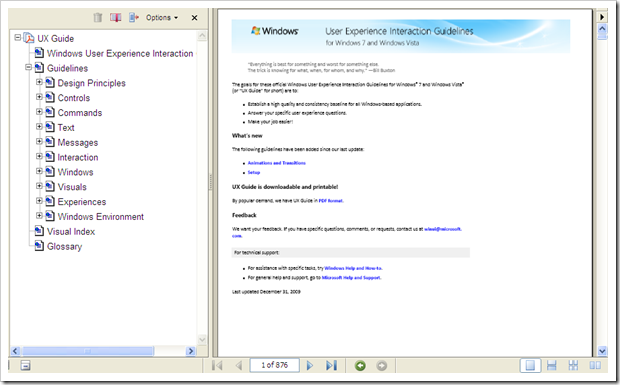
    “Windows User Experience Interaction Guidelines” – aka the UX Guide for Windows 7 and Vista free eBook

    Microsoft Downloads - Windows User Experience Interaction Guidelines

    “Download the Windows User Experience Interaction Guidelines (UX Guide) for Windows 7 and Windows Vista.

    File Name: UXGuide.pdf
    Version: 1.0
    Date Published: 1/27/2010
    Language: English
    Download Size: 35.0 MB - 76.6 MB*


    Use this page to download the Windows User Experience Interaction Guidelines (or UX Guide) for Windows 7 and Windows Vista. These guidelines contain information on design principles, and guidelines for controls, commands, text, interaction, windows, messages, aesthetics, and the Windows environment. They help designers and developers create high-quality Windows applications with a consistent “look and feel.”

    …”

    image

    “…

    The goals for these official Windows User Experience Interaction Guidelines for Windows® 7 and Windows Vista® (or “UX Guide” for short) are to:

    • Establish a high quality and consistency baseline for all Windows-based applications.
    • Answer your specific user experience questions.
    • Make your job easier!

    What’s new
    The following guidelines have been added since our last update:

    • Animations and Transitions
    • Setup

    UX Guide is downloadable and printable!
    By popular demand, we have UX Guide in PDF format.

    …”

    Only 876 pages of UX Guidance… :|

    I liked though how “new” technology is included, like guidance UI/UX for Touch app’s as well as other Win7 features like the Taskbar/Jump Lists, etc.

    (via meraTechPort - Free E-book: UX Guide for Windows 7 and Windows Vista)

    A Feed You Should Read #22 – TechNet Blogs

    Today’s feed is another feed only for the hard core, only for those who cannot get enough Microsoft Tech/IT news, only for those who feel a 0 unread post count is a personal insult, only for the die hard news hound.

    Hey, that sounds kind of familiar, doesn’t it? (cough… A Feed You Should Read #20 – blogs.msdn.com… cough)

    Yep, today’s feed is the prefect counter part to blogs.msdn.com…

    TechNet Blogs

    image

    Background:

    Where as MSDN focuses toward development, TechNet is more the Information Technology/IT side of the house. How to use it, how to fix it and how to take advantage of it are just some of the kinds of things you’ll find posted about on TechNet.

    Why do I like this feed and think you might also?

    Again, I’m torn recommending this feed due to its post volume. Hundreds of posts a day usually, though on average fewer posts than on blogs.MSDN.com. Yet since I already did MSDN, it would be a disservice to not also highlight this side of things, wouldn’t it? Fair is fair and all that…

    If you consider yourself a Microsoft Power User, work on the IT side of the business, or like me, are “IT’s worse nightmare” (a dev who likes to pretend he knows some IT stuff ;) then this is a feed to consider.

    Remember though, you will get overwhelmed if you don’t keep up or miss a few days. If it’s too much, then just say no and take advantage of the many of topic and link curators out there, some of which I’ve covered in the past, A Feed You Should Read TOC.

    Snap of the latest post:

     httpblogstechnetcomMainFeedaspxType=AllBlogs

    Blog Information:

    Name: TechNet Blogs
    URL: http://blogs.technet.com/
    Feed: http://blogs.technet.com/MainFeed.aspx?Type=AllBlogs
    Post Types: Pretty much all things Microsoft, with an IT/Technology focus


    Related Past Post XRef:
    A Feed You Should Read TOC