Friday, February 21, 2014

Microsoft Open Specifications Posters v2 released (Think "Wow, that's allot of spec's" Posters)

Microsoft Downloads - Open Specifications Posters

The Open Specifications Posters (PDF format) make it easy for interoperability developers to explore the Open Specifications overview documents for Office client, Lync, SharePoint, Office file formats, Exchange Server, SQL Server, and Windows.

Version: 5.0

Date Published: 2/21/2014

ExchangeOpenSpecPoster.pdf, 556 KB

MicrosoftOpenSpecPoster - Accessiblility Version.pdf, 336 KB

OfficeLyncOpenSpecPoster.pdf, 669 KB

SharePointOpenSpecPoster.pdf, 606 KB

SQLOpenSpecPoster.pdf, 1,011 KB

WindowsOpenSpecPoster.pdf, 1.0 MB

The Open Specifications Posters (PDF format) make it easy for interoperability developers to explore the Open Specifications overview documents for Office client, Lync, SharePoint, Office file formats, Exchange Server, SQL Server, and Windows. The posters display, by functional area, the protocols, file formats, and related technologies, as described in each overview document. A high-contrast poster is also provided for those with visual accessibility needs that contains listings for all functional areas .

Some cube art to help when you get visited by the "Microsoft is closed and the devil" guy (I know you know that guy...)

Here's a snap of the Windows PDF;

imageSNAGHTML1fe1a2a9


Related Past Post XRef:
Office/Exchange File Format,Specification and Protocol Documentation refreshed
Microsoft Format and Specification Documentation 0712 Refresh (Think Office 2013 CP update). Oh and some SharePoint Doc's too
Microsoft Format and Specification Documentation Refresh ("Significantly changed technical content") [Updated: Includes updates for Office 15 Technical Preview ]
Microsoft Office File Formats and Microsoft Office Protocols Documentation Refreshed
Microsoft Office File Formats and Protocols documentation updated for Office 2010 (Think “Now with added ‘X’ flavor… DocX, PptX, XlsX, etc”)

Microsoft Open Specifications Poster

XAML Language Specification (as in the in the full XAML, WPF and Silverlight XAML Specs)

"Microsoft SQL Server Data Portability Documentation"

MS-PST file format specification released. Yep, the full and complete specification for Outlook PST’s is now just a download away.
Microsoft Office (DOC, XLS, PPT) Binary File Format Specifications Released – We’re talking the full technical specification… (The [MS-DOC].pdf alone is 553 pages of very dense specification information)
DOC, XLS and PPT Binary File Format Specifications Released (plus WMF, Windows Compound File [aka OLE 2.0 Structured Storage] and Ink Serialized Format Specifications and Translator to XML news)

VSO EAP++ (Visual Studio Online Early Adopter Program Extended)

Brian Harry’s blog - VS Online early adopter program extended to May 7, 2014

I know this is the second time I am doing this but I believe it is the last.  For a refresher for those who don’t remember what the early adopter program is, let me explain.  We released the public preview of VS Online in November.  At that time, we introduced our business terms, in a preview form – including free access for up to 5 users.  You can read more about your options for purchasing VS Online on the Visual Studio Online overview page.  We had promised the throngs of people who jumped onto the service early (before we had announced pricing) that we’d ensure a smooth transition for them into the paying service.  Part of that transition is an “early adopter program” that enables them to continue to use the service for free for a period while they evaluate the change.  Part of our plan has been to provide the ability for customers to migrate their data from the service and to an on-premises TFS with very high fidelity should they choose to do so.  Our original expectation was that, this would have been available in the ~January timeframe.

However, readers of my blog will know that we had some post launch reliability issues and, as I described in this post, we’ve had to do quite a bit of work to evolve the service to continue to provide a great customer experience.  Since providing a great service is more important than collecting money (OK, both have to happen eventually, it’s just a question of which happens first, we chose to delay the work on the data migration capability until we had the service in good shape again.  In order to honor our promise of an orderly transition for our early adopters, we’ve extended the early adopter program (free, roughly unlimited use).  Those customers that created accounts before December 13, 2013 will have the expiration date of their “early adopter (free) status” extended to May 7, 2014.  At that time, the early adopter program will end and everyone will transition to “standard terms”.  Between now and then, we will enable the data export experience.  Stay tuned for a precise date but it’s several weeks away as of this writing.

...

At this point, we know we have some large schema changes coming this summer as we enable process customization and other important features people are waiting for.  We are not going to be able maintain the the “downgrade” code path through those changes.  I don’t like it and I’m sure I’ll get my share of comments reinforcing this but I believe it’s a call we need to make.  To manage through this, we have decided to scope the capability, for now, to aiding people through the transition and will consider doing more later.  I’m not making any promises but will certainly listen to feedback over the next year.

...

Stay tuned over the next few months because we are going to have quite a bit of service related news.  As soon as TFS 2013 Update 2 and the migration capability are available, I will let you know.  I’m telling you now so that you have time to get ready for it in the event you want to use it.

image

Good to see the team doing what looks to be the right thing, acknowledging the issues and not rushing to turn on the billing...

Need a little help cleaning up your code? CodeMaid will help with that developer dirty work...

Dotnetjalps-asp.net - CodeMaid extension for visual studio

Till now I’m a resharper fan boy and I still love using it. It is a great productivity tool. But it is not free for commercial use. So lots of my friends tell we want something open source or free which provide some kind of productivity over normal visual studio things and recently I came across CodeMaid extension of visual studio. It is a great plugin.

What is CodeMaid?

CodeMaid is an open source Visual Studio extension to cleanup, dig through and simplify our C#, C++, F#, VB, XAML, XML, ASP, HTML, CSS, LESS, JavaScript and TypeScript coding.

CodeMaid

An open source visual studio extension to cleanup, dig through and simplify our C#, C++, F#, VB, XAML, XML, ASP, HTML, CSS, LESS, JavaScript and TypeScript coding

image

Code Digging
Visualize and navigate through the contents of your C# and C++ files from a tree view hierarchy. Quickly switch between different sorting methods to get a better overview. Drag and drop to reorganize the code. See McCabe complexity scores and informative tooltips.

Reorganizing
Reorganize the layout of members in a C# file to follow Microsoft’s StyleCop convention, or your own preferences.

Collapsing
Recursively collapse nodes or the entire tree in the solution explorer window.

Configuring
Enable, modify or disable many of the aspects of how CodeMaid does its work.

Formatting
Format comments to wrap at a specified column and arrange XML major and minor tags on separate lines.

Progressing
View the overall progress of a build within Visual Studio, or in the Windows taskbar, both with a green/red status indication.

Switching
Switch between related files, such as cpp and header files or xaml and code-behind.

Joining
Join two adjacent lines, or a highlighted section of code onto a single line.

Finding
Find the current file in the solution explorer window.

and More!
Toggle read-only state, close read-only files, etc.

Download (Visual Studio Gallery) Go Straight to the Source

I dig the number of languages supported (and that it's OSS :) This is SO likely to see a Coding4Fun blog post in the near future... :)

Windows File System and Whitespace characters, do you know the rules?

Support for Whitespace characters in File and Folder names for Windows 8, Windows RT and Windows Server 2012

image

File and Folder names that begin or end with the ASCII Space (0x20) will be saved without these characters. File and Folder names that end with the ASCII Period (0x2E) character will also be saved without this character. All other trailing or leading whitespace characters are retained.
For example:

  • If a file is saved as ' Foo.txt', where the leading character(s) is an ASCII Space (0x20), it will be saved to the file system as 'Foo.txt'.
  • If a file is saved as 'Foo.txt ', where the trailing character(s) is an ASCII Space (0x20), it will be saved to the file system as 'Foo.txt'.
  • If a file is saved as '.Foo.txt', where the leading character(s) is an ASCII Period (0x2E), it will be saved to the file system as '.Foo.txt'.
  • If a file is saved as 'Foo.txt.', where the trailing character(s) is an ASCII Period (0x2E), it will be saved to the file system as 'Foo.txt'.
  • If a file is saved as ' Foo.txt', where the leading character(s) is an alternate whitespace character, such as the Ideographic Space (0x3000), it will be saved to the file system as ' Foo.txt '. The leading whitespace characters are not removed.
  • If a file is saved as 'Foo.txt ', where the trailing character(s) is an alternate whitespace character, such as the Ideographic Space (0x3000), it will be saved to the file system as 'Foo.txt '. The trailing whitespace characters are not removed.

File and Folder names that begin or end with a whitespace character are enumerated differently by the Win32 and WinRT APIs due to ecosystem requirements.

Whitespace Characters
There are various whitespace characters representing various 'space' widths (glyphs). Only the ASCII Space (0x20) and ASCII Period (0x24) characters are handled specially by the Object Manager. Although the Ideographic Space character (0x3000) is also generated by using the Spacebar (when IME is enabled), it is not handled specially.
  • 0x0020 SPACE
  • 0x00A0 NO-BREAK SPACE
  • 0x1680 OGHAM SPACE MARK
  • 0x180E MONGOLIAN VOWEL SEPARATOR
  • 0x2000 EN QUAD
  • 0x2001 EM QUAD
  • 0x2002 EN SPACE
  • 0x2003 EM SPACE
  • 0x2004 THREE-PER-EM SPACE
  • 0x2005 FOUR-PER-EM SPACE
  • 0x2006 SIX-PER-EM SPACE
  • 0x2007 FIGURE SPACE
  • 0x2008 PUNCTUATION SPACE
  • 0x2009 THIN SPACE
  • 0x200A HAIR SPACE
  • 0x200B ZERO WIDTH SPACE
  • 0x202F NARROW NO-BREAK SPACE
  • 0x205F MEDIUM MATHEMATICAL SPACE
  • 0x3000 IDEOGRAPHIC SPACE
  • 0xFEFF ZERO WIDTH NO-BREAK SPACE
Object Manager
ASCII Space (0x20) characters at the beginning or end of a file or folder name are removed by the Object Manager upon creation.
ASCII Period (0x2E) characters at the end of a file or folder name are removed by the Object Manager upon creation.
All other leading or trailing whitespace characters are retained by the Object Manager.
API Enumeration
Win32 API
The Win32 API (CreateFile, FindFirstFil, etc.) uses a direct method to enumerate the files and folders on a local or remote file system. All files and folders are discoverable regardless of the inclusion or location of whitespace characters.
WinRT API
The WinRT API is designed to support multiple data providers (Physical Drives, OneDrive (formerly SkyDrive), Facebook, etc.). To achieve this, WinRT API uses a search engine to enumerate files and folders. Due to the search approach to enumeration, the WinRT API (StorageFile, StorageFolder, etc.) does not handle file and folder names with trailing whitespace characters other than ASCII Space (0x20) and ASCII Period (0x2E) residing on a local or remote file system. It does handle leading non-ASCII whitespace characters.
Observed Behavior
File Explorer and Desktop applications
All files and folders are visible within File Explorer and Desktop applications regardless of inclusion or location of whitespace characters.
Windows Store applications

When using the File Picker, files with a trailing non-ASCII whitespace character do not appear. The contents of sub-folders with a trailing non-ASCII whitespace characters are not displayed in the File Picker. Files or folders containing a leading non-ASCII whitespace character are displayed.

..."

This is something I run into all the time, Windows' automagic handling of beginning/trailing whitespaces, and code that doesn't honor that (cough... like mine sometimes).

What the heck am I talking about?

Imagine you're writing an email export app, and you are using the subject line as the file name, and you're recording that path in a DB somewhere. Sure, you already know to handle special characters, like colons, astricks, etc. But you "know" spaces are okay in a file name, so you don't sweat them. And usually you're right... But you know how many subject lines begin with a space? yeah, enough to screw you up...

If you are taking human created strings and using them as folder or file names, you need to review this KB

A dev program for true geeks - Chess.com's Dev Program is now accepting applications...

programmable web - Chess.com Makes First Move with Awesome Developer Program

Chess.com is receiving submissions from developers who are interested in developing ideas for Web sites, apps, extensions, or add-ons with a Chess.com API and support from the staff.

Currently, the developer program seems to be in the early stages — developers are required to register their ideas and interests through a Google form; however, in reading some of the comments relating to the program announcement on the blog, the response time to these requests seems slow. This could be because of high demand. The Chess.com community boasts some 8 million users, of which a percentage will also be developers who love Chess — so interest is probably keen.  Further, the announcement of the developer program included some interesting developer bait such as free hosting and support.

..."

Chess.com Developer Program Application

Write Code? Like Chess? Check out our new Chess.com Developer Program!

Here is what we provide:

- Free hosting (with heroku and cloudflare)
- Domain names (we can purchase a unique domain for you, or you can use subdomain.chess.com)
- Access to our API
- Custom API requests
- Front-end support (web design help, graphics, css files, font, logos, board & piece assets, interactive board code)
- Marketing (we'll share your creation with our community)
- Product feedback & QA (get insights from our awesome team :D)
- Affiliate account (to earn $% from your creation)

So if you have an idea for a chess.com-related website, app, extension, or add-on that you would like to get some support with, fill this out and we'll get back to you soon!

image

Sadly, I'm not a true geek. While I know how to play, I just don't have a passion for it.

But that doesn't take away from the coolness of this... :)

Thursday, February 20, 2014

Setting up your Windows VM debugger support, a cheat sheet

Got Kernel? - Cheat Sheet: Break into a Windows machine with a debugger

Short version - there steps:

1.  Enable debugging on the Windows guest machine.

2. Change the VM settings to support debugging via named pipe.

3. Configure your debugger and break in.

Longer Version:

image

Some nice steps that might not be obvious for those who don't usually setup external debuggers.

Seven step guide to whipping up your WiX setup

Rob Seder - More on WiX, and Suppressing the License Dialog

...

As previously discussed, Visual Studio 2012 and later no longer include any sort of MSI/Installer/Setup project template. That means if you create a WinForms, command-line, or Windows Service type of application, there is no way to create an installer for it out-of-the-box.

Instead, you have a couple of free options: Flexera InstallShield Express and WiX. You might find if you work for a company, Flexera has no interest or incentive in helping you find a way to automate their per-developer, but “free” license activation stuff. If you contact them, you might just find that they spend all their time trying to get you to buy the more-expensive products they sell. So, you might be stuck with using Wix.

Wait, so what’s the point again?
So, the point of this blog post is to help out future Robert not to get mad again at WiX. In pretty much all circumstances where I’d want an installer, all I really care about is letting the user pick the installation directory. So, how do you do that? Unfortunately, I don’t have a simple answer, because the solution isn’t simple – but hopefully this blog post will answer those questions, step-by-step, and with the actual details needed!

I’m using VS2013 Ultimate for the example below, but this should work with any SKU of Visual Studio 2012 or later, I believe.

STEP 0: Install WiX:
As of this writing, v3.8 is out and that’s what I’m using, here. Navigate to: http://wixtoolset.org/ and run the installer.

STEP 1: Create a WinForms Project:

STEP 2: Create a WiX Setup Project:

STEP 3: Add Project Reference:

STEP 4: Modify the XML to install the Project Output:

STEP 5: Modify the XML to include a basic setup UI:

STEP 6: Add a reference so that the setup UI works:

image

STEP 7: And finally, suppressing the License Agreement dialog:

Now, finally, when you compile and run the setup, it should show the wizard from up above, but it skips the license agreement screen.

WiX does have something of a learning curve, and it's tough for those who are used to the Setup and Deployment Package (don't get me started on that being gone) or another UI based MSI creating tool. Rod, besides a little rant, provides a nice guide to get going with it...

"Biggy: SQLite for Documents and .NET"

wekeroad - Hello Biggy

image

A File-based Document Store for .NET

I've been using NeDB (a file-based document store for Node) for a few projects and I utterly love it. Such a simple idea, so fast, so elegant and many times just what I need! I had assumed that such a thing must be around for .NET because there are about 100 different kinds of lists in C#... someone must have made one with a persistent backing store!

But I looked around and couldn't find it, so I made it (as I'll need this in the coming months).

The idea is basically this: I want to use LINQ, I like Dynamics, and I like speed. So that's it, and here's Biggy:

...

Reading and Writing

So, by now you should be wondering why this is useful. The simple answer is that if you have a high-read application (like a blog, CMS, etc) then something like Biggy could speed things up.

Whenever you instantiate a new BiggyList it tries to read it's data from disk - this is good, and it's bad. It's good because from that point on whenever you try to query your data (using LINQ) it's an in-memory operation and you can't get much faster than that.

It's bad because this means you probably want to have a single DB instance around for the life of your app. This might be easy for some, might be repulsive to others. I'm used to doing this kind of thing with Node (all modules in Node are cached which means you always hit the same module instance).

For a blog engine, this might be a very fun thing to have - no database installs, superfast, easy to use. For a Twitter clone... not so much.

...

robconery / biggy

Biggy: SQLite for Documents and .NET

This is just a goofy idea at this point, inspired by NeDB which is basically the same thing, but with Node.

I like the idea of SQLite (a file-based relational data-store), but wouldn't it be fun to have this kind of thing for a Document database too? One nice thing about C# (among many) is the built-in LINQ stuff, another nice thing is that C# has Dynamics now too. Biggy is simply an implementation of ICollection with a JSON backing store. I added a few helpy things in there (like events and a few other things) and this might be completely dumb but I like the idea.

...

What It's Good For

The only disk activity occurs when you call "Save()" and when you instantiate the List itself - everything else happens in memory. This makes Biggy incredibly fast but it also means we're doing file management - which can be tricky.

This is one place that I hope I can get a PR for - I'm dropping the entire contents to disk on every save and YES if you try this will millions of records it will probably cause you some problems. But with 100 or so, it shouldn't be that big of a problem.

That makes Biggy compelling for high-read situations, such as a blog, product catalog, etc. At least that's what I've used NeDB for and it works great.

Performance

In the Tasks project (a Console app) there are simple loops that write 1000 records to disk at once (in a batch) as well as a simple read. You can see the results for yourself... they are OK.

Writing 1000 records in a batch takes about 30ms (give or take), writing in a loop takes about 4 seconds (!), but reading records out is too small to record :):):).

There's a lot to do to make this a bit more functional, but for now it does what I envisioned.

Wanna Help?

..."

Now that's an interesting project to play with... hum... and it looks like of fun too. [i.e. queued for a future Coding4Fun blog post ;]

Deploying your own little cloud... "Deploying Windows Azure Pack" series

Windows Networking - Deploying Windows Azure Pack - Part 1

The first article in this series provides an overview of the capabilities and benefits of deploying Windows Azure Pack in enterprise datacenters.

If you would like to be notified when Mitch Tulloch releases the next part of this article series please sign up to the WindowsNetworking.com Real time article update newsletter.

Introduction

Cloud computing is making big inroads into companies today. Smaller businesses are taking advantage of Microsoft cloud services like Windows Azure, Windows Intune and Office 365 to migrate their line-of-business applications and services to the cloud instead of hosting them on-premises. The reasons for doing this include greater scalability, improved agility, and cost savings.

Large enterprises tend to be more conservative with regards to new technologies mainly because of the high costs involved in widespread rollout of new service models and integrating them with existing the organization's datacenter infrastructure. Windows Azure Pack is designed to help large enterprises overcome these obstacles by providing a straightforward path for implementing hybrid solutions that embraces both the modern datacenter and cloud hosting providers.

What is Windows Azure Pack?

To understand what Windows Azure Pack is, you first need to be familiar with Windows Azure, Microsoft's public cloud platform. To understand what Windows Azure is all about, here are some brief excerpts from my recent book Introducing Windows Azure for IT Professionals: Technical Overview from Microsoft Press:

As a cloud platform from Microsoft that provides a wide range of different services, Windows Azure lets you build, deploy, and manage solutions for almost any purpose you can imagine. In other words, Windows Azure is a world of unlimited possibilities. Whether you're a large enterprise spanning several continents that needs to run server workloads, or a small business that wants a website that has a global presence, Windows Azure can provide a platform for building applications that can leverage the cloud to meet the needs of your business...

Let's look at the definition that Microsoft uses for describing Windows Azure:

Windows Azure is an open and flexible cloud platform that enables you to quickly build, deploy, and manage applications across a global network of Microsoft-managed datacenters. You can build applications using any language, tool, or framework. And you can integrate your public cloud applications with your existing IT environment.

This definition tells us that Windows Azure is a cloud platform, which means you can use it for running your business applications, services, and workloads in the cloud. But it also includes some key words that tell us even more:

  • Open - Windows Azure provides a set of cloud services that allow you to build and deploy cloud-based applications using almost any programming language, framework, or tool.
  • Flexible - Windows Azure provides a wide range of cloud services that can let you do everything from hosting your company's website to running big SQL databases in the cloud. It also includes different features that can help deliver high performance and low latency for cloud-based applications.
  • Microsoft-managed - Windows Azure services are currently hosted in several datacenters spread across the United States, Europe, and Asia. These datacenters are managed by Microsoft and provide expert global support on a 24x7x365 basis.
  • Compatible - Cloud applications running on Windows Azure can easily be integrated with on-premises IT environments that utilize the Microsoft Windows Server platform.

...

image

...

Windows Azure Pack vs. Windows Azure

Let's review the definition that Microsoft uses for describing Windows Azure:

..."

You all know I'm a fan of this... There are just to many businesses, and business people, who freak at the thought of their, or their client's, data being "in the cloud." The Windows Azure Pack seems to be a great middle ground, letting us have the good that is "the cloud" inside our own data centers...


Related Past Post XRef:
Windows Azure Pack (#WAPack), Related Blogs, Videos and TechNet Articles wiki round-up
Taking the Bus to the next stop... Why you, Dev and IT, should be looking at the Windows Azure Pack.
TechEd NA 2013 Day 1 Announcement Round-up - VS 2013, TFS 2013, InRelease, SQL 2014, Server 2012 R2, BizTalk Services, Azure-in-a-box and even more Azure...

The Periodic Table of Los Angeles

Mandatory - The Periodic Table of Los Angeles

image

'nuff said...

(via reddit.com/r/LosAngeles - The Periodic Table of Los Angeles)

Wednesday, February 19, 2014

[Limited Time] The TFS 2013.2 RC upgrade weekend is coming, Friday February 28th and Saturday March 1st...

Team Foundation Server, SharePoint Server, .NET, and SQL Server - Get Ready for TFS 2013.2 (Update 2) RC Upgrade Weekend

image

Are you excited about Team Foundation Server 2013.2 (Update 2) RC?

Are you comfortable running pre-release software in production?

If so, you might want to consider scheduling your TFS upgrade for Friday February 28th and Saturday March 1st. During those days, Microsoft experts will be standing by to help support you in the event that you have questions or something goes wrong.

If you’re interested in taking advantage of the Upgrade Weekend, please visit http://aka.ms/TFSUpgradeWeekend to complete a brief registration survey. This survey will remain open until February 26th, 2014. Please contact VSEAP@Microsoft.com if you have any questions about this offer.

Here are some reasons to consider upgrading to Team Foundation Server 2013.2 (Update 2) RC:

  • Work Item Tagging
    • Query on tags – You can now write and save work item queries containing tag clauses.
    • Tags in VS – Previously tags could only be assigned/used within the TFS web UI.
    • Tag permission – Now you can control, with a permission, who can create new tags.
    • Edit Tags in Excel – Now when you are managing a list of work items in Excel, you can include the tags column, edit it and publish the tags changes back to TFS.
  • Backlog Management
    • Perf improvements – Navigating between the backlog, sprints, etc is MUCH faster.
    • Non-working days – You  can define you’re non-working days (weekends, for most of us) and we’ll exclude them from the burn down calculation.
    • Configurable start date for cumulative flow diagram – Now you can define what date to start the diagram.
  • Charting
    • Pin charts to project home page – You can now pin a chart to your project homepage so everyone can see it when they visit your project.
    • Customize chart colors – Maybe not a huge deal but very nice.  Now you can select what colors you want to use in your charts.
  • Export Test Plan to HTML
    • You can now export your test plan to HTML for offline reading/sharing, printing, etc.  You can choose the level of detail you want to include in the document.
  • Release Management
    • We added a new concept of “Tags” that enables you to tag deployment targets.  Tags can be used to treat a set of machines the same.
  • Git Improvements
    • Annotate – The annotate (aka blame) feature in Visual Studio has been updated to support Git.
    • Amend – You can now update your most recent local commit from within VS just like the “git amend” command line allows.
    • Push to multiple remotes – Team Explorer now recognizes multiple Git repos and allow you to select which remote you want to push to/pull from.
    • Revert a commit – You can now easy “rollback” a commit in the event you checked in something that you’ve decided that you really don’t want.
    • Progress with cancellation –You now have the ability to cancel long running Git operations.
  • And of course, bragging rights for being on the newest version of Team Foundation Server!

..." [GD: Post Leached almost in full]

That last upgrade weekend seemed to good well, so I heard and read, well enough it looks like that they are going to have another! If you're a cutting edge kind of TFS shop, there's little better deal than taking part in this upgrade weekend. You'll get personal help, support and advice... free!

NOTE! It looks like you don't even have to already be on TFS 2013 RTM!

Here's a snap from the survey;

image

Also I guess that makes it pretty clear that we're going to be getting the 2013.2 RC about than too... :)


Related Past Post XRef:
[Limited time offer, open unit Sept 6th!] You know you can use TFS 2013 in production, right? But pre-release stuff is scary? How about if there were some Microsoft Experts on standby to help you upgrade? Sign up now for the Team Foundation Server 2013 Upgrade Weekend, September 13-15

FlightGear takes flight with v3.0

FlightGear - FlightGear v3.0 Released

image

The FlightGear development team is happy to announce the v3.0 release of FlightGear, the free, open-source flight simulator. This new version contains many exciting new features, enhancements and bug fixes. Highlights in this release include integration of the FGCom voice communications client within the simulator, improved terrain rendering, faster scenery loading, and improved usability. This release also coincides with the release of FlightGear World Scenery 2.0 – massively improved scenery data covering the entirety of the planet and incorporating OpenStreetMap roads and detailed terrain information from a variety of sources.

A list of major changes can be found at: http://wiki.flightgear.org/Changelog_3.0.

Founded in 1997, FlightGear is developed by a worldwide group of volunteers, brought together by a shared ambition to create the most realistic flight simulator possible that is free to use, modify and distribute. FlightGear is used all over the world by desktop flight simulator enthusiasts, for research in universities and for interactive exhibits in museums.

FlightGear features more than 400 aircraft, a worldwide scenery database, a multi-player environment, detailed sky modeling, a flexible and open aircraft modeling system, varied networking options, multiple display support, a powerful scripting language and an open architecture. Best of all, being open-source, the simulator is owned by the community and everyone is encouraged to contribute.

Download FlightGear v3.0 from FlightGear.org and “Fly Free!”

..."

Come on, you know you miss your FlightSim days... Well, now you can revisit them, free and via an open source project too boot!


Related Past Post XRef:
Jump!!! FlightGear lets you get out of the cockpit, literally!
FlightGear takes you into space...
FlightGear, the open source flight simulator, releases version 2.4

These are the papercraft you've been looking for... "Star Wars Papercraft..."

technabob - Amazing Star Wars Papercraft Toys: Use the Glue, Luke

Man, these Star Wars papercraft toys look amazing. And the whole gang is here. Every character that you care about anyway. They were created by Seoul, Korea-based MOMOT who no doubt uses The Force to fold paper.

image

In fact MOMOT makes all kinds of cool and boxy papercraft toys, which can be found at their international online store. The Star Wars toys are $25(USD) each. Pricey, but these toys are unique. It looks like they only have a few of the characters up right now

...

image..."

So they are not free, but hey for the Star Wars fan, what better than a Rebel you can actually crush under your Imperial boots?

Blend for VS2013 Windows Phone SketchFlow Templates

Timmy Kokke - Windows Phone Sketchflow 2013

In the past I used SketchFlow to prototype my Windows Phone apps. Unfortunately the development of the windows phone SketchFlow templates stopped back in 2011. These templates don’t work in Blend for Visual Studio 2013. Today I had enough of not being able to use that template and just upgraded it to Blend for VS2013.

To use the template you’ll need Silverlight and SketchFlow (which comes with Blend on VS premium and ultimate).

You can download the Windows Phone SketchFlow templates here: http://1drv.ms/1gfqR1d

Once downloaded, extract the zip file into: %userprofile%\documents\Visual Studio 2013\Blend

...

image

Been quite on the SketchFlow front recently. Good to see it's not dead out there in the "real world"...


Related Past Post XRef:
For the Win[JS] - Blend for Visual Studio 2012 now available (and Blend for WPF/SilverLight & SketchFlow Preview too)
Will the real Windows Phone 7 SketchFlow Template please stand up...
Sketching out an WP7 user interface and interaction with SketchFlow
A SketchFlow Two-fer day - “Shawn Wildermuth on SketchFlow/dnrTV” and “Prototyping a WPF-3D game design workflow using TrueSpace 3D, Expression Blend 3 with SketchFlow, and exporting the prototype to XNA Game Studio.”
“Application Prototyping with SketchFlow” Refcardz
Four Expression 3 Starter Kits, two for Blend and two for Web, focusing on Sketchflow, Gaming, SuperPreview and SilverLight.

Tuesday, February 18, 2014

Don't suck at your next presentation - "15 Easy Ways to Screw Up Your Next User Group Talk" and more...

Jerry Nixon @ Work - 15 Easy Ways to Screw Up Your Next User Group Talk. And, a little advice

In college, a millennia ago, I spent a summer serving Philadelphia’s inner city children with Bart Campolo. As a leader, he was an effervescent, tireless motivator; an excellent writer as much a speaker. As he verbalized his process he forever transformed my approach to public communication.

image

...

I believe we all want to be excellent communicators. Recognizing excellent communication qualities creates a roadmap for us to be better. One stepping stone toward this is motivating change over mere information. Asking ourselves, “What do I want my audience to change?” Let’s look closer

...

15 Easy Fails

If you want your presentation to fail, then I have assembled some easy solutions for you. You don’t have to work hard to be a loser when I’m here. Here are some of the top things I have used to ensure my talks aren’t successes.

image

...

Finally, here are six more great, loser tips:

  1. Over-generalize, there’s no other way
  2. Under-enunciate, the-no-thr-wa.
  3. Use logical fallacies, just like Hitler!
  4. Maximize PowerPoint & laser pointers
  5. Minimize demos, you get it
  6. Sing?

Conclusion

This starting to make sense? There is more to be said about this. But, this is the end of this article. If you are about to present something, consider your motivation. Is this for you or for them? And if this is for them, what do you want them to change – what behavior do you want to see different? If the answer is “nothing” then you are just wasting all of our time. You can be a great speaker. Start by looking at this article, and consider the qualities of other great speakers – especially their motivations.

image

One day, it will be me up there, on the stage and I'll need this advice...

Exceptionless Error Reporting Service is now Exceptional++ (as in it's now OSS!)

Blake Niemyjski - Exceptionless Error Reporting Service Goes Open Source

It’s a big day at Exceptionless.

We are super excited to announce that we are open sourcing the Exceptionless code! That’s right, now you can hack on our real-time error reporting tool yourself.

Too many apps are throwing too many errors out there, resulting in confused users, lost business, and endless frustration.

We believe Exceptionless can help the development community become more in-tune with their code by making those errors more transparent, trackable, and squashable. More importantly, we want to support developers building and shipping better code for their users.

Cool, Where Do I Start?

Check out the Exceptionless Github Repository, and make sure to read about contributing if you plan on helping us improve the project.

...

Why Open Source?

In short, we want to see what the community can do with our baby, which we consider a great development tool. The open source movement has provided innovation throughout the industry, and we cannot tell you how excited we are to be a part of it.

We hope you will take it, add to it, suggest great new features, and report bugs, but most of all we hope you will use it to build better apps for the world.

The Exceptionless Team will continue to work on a road map of features and improvements, all while providing support to developers that want to contribute.

Planned features/enhancements

...

Exceptionless

image

What Is Exceptionless?

The definition of the word exceptionless is: to be without exception. Our product provides real-time .NET error reporting for your ASP.NET, Web API, WebForms, WPF, Console, and MVC apps. It organizes the gathered information into simple actionable data that will help your app become exceptionless. Best of all, it’s open source!

  • Error notifications, including critical and regressions

  • Easily see top errors and prioritize them

  • Intelligent .NET exception grouping into stacks

  • Dashboard with error stats and trends

  • Detailed error reports, including stacktrace

  • Add any custom objects to your error reports

  • Unlimited users per organization

  • Mark exceptions as fixed, monitor for regressions

  • Real-time view of exceptions as they happen

  • Ability to mark errors as being critical

  • Supports offline and occassionally connected scenarios

  • Easy setup in less than 5 minutes

exceptionless / Exceptionless

Getting Started

** NOTE: If you simply want to use Exceptionless, just go to http://exceptionless.com and signup for a free account and you will be up and running in seconds.

  1. You will need to have Visual Studio 2013 installed.
  2. Start MongoDB and Redis by opening StartBackendServers.bat.
  3. Open the Exceptionless.sln Visual Studio solution file.
  4. Select Exceptionless.App and Exceptionless.SampleConsole as startup projects.
  5. Run the project.
  6. The app will automatically make the 1st user that is created a Global Admin and will also create a sample Acme organization and project.
  7. Send a test error from the sample console application and you should see it show up immediately in the website.

Alternatively, you can watch this short YouTube video showing how to get started with the project.

Using Exceptionless

Refer to the Exceptionless documentation here: Exceptionless Docs

Hosting Options

  1. We provide very reasonably priced hosting at Exceptionless. By using our hosted service, you are supporting the project and helping it get better!
  2. If you would rather host Exceptionless yourself, you will need to follow these steps:
    1. Setup Mongo and Redis servers. We highly recommend that you run these on Linux systems because the Windows versions aren't as performant and reliable as the Linux versions. We also highly recommend that you setup Mongo in a replica set configuration.
    2. Setup IIS and add the Exceptionless website.
    3. Modify the connection strings in Web.config to point to your Mongo and Redis servers.
    4. Change the WebsiteMode to Production in the Web.config appSettings section.

How is Exceptionless licensed?

The Exceptionless server is licensed under GNU AGPL v3.0. The client libraries are licensed under Apache License v2.0.

We want Exceptionless to be free for those of you who want to host the application and data internally or just simply do not want to pay for a hosted account. Our hope is that by making the application free and open source that more people will be aware of it and use it which will indirectly result in more people using our hosted service.

The server is licensed under the AGPL license to ensure that any modifications that are made will be contributed back to the community.

We chose to release the client libraries under Apache License v2.0 to remove any ambiguity as to the extent of the server license — you do not have to license any software that uses Exceptionless under AGPL and are completely free to use any licensing mechanism of your choice.

...

Take the easy way, and let them host it or you can host it yourself. I love that they provide this option...

101 [+ 7] C# LINQ samples, one project...

Visual Studio Gallery - MSDN 108 C# LINQ Samples Consolidated with Single Project

image

All MSDN LINQ 101 Samples and few more samples consolidated to Single project and given required comments for each topic...

...

Targeted Audience:

1. .NET Architects

2. .NET Application Designers

3. .NET Application Developers

Prerequisites:

1. .Net technologies.

2. Basic understanding of design patterns.

3. Basic understanding of OOPS.

Description:

All MSDN LINQ 101 Samples and few more samples consolidated to Single project and given required comments for each topic.

1. Open Solution.

2. Right click on the project and select Manage NuGet.

3. Select missing packages and Add

4. Run the application

Topics Covered:

1. Restriction Operators

2. Projection Operators

3. Partitioning Operators

4. Ordering Operators

5. Grouping Operators

6. Set Operators

7. Conversion Operators

8. Element Operators

9. Generation Operators

10. Quantifiers

11. Aggregate Operators

12. Custom Sequence  Operators

13. Query Execution  Operators

14. Join  Operators

15. Miscellaneous Operators

Sometimes it's just easier to have it local. And if you're using a cool code indexer like Sando (and) then finding that right snip is even easier...

BTW, here's the original/source, 101 LINQ Samples.


Related Past Post XRef:
An oldie but a goodie, 101 LINQ Samples (C# and VB)

OWIN your own Helios - ASP.NET "Helios" project (Think "ASP.NET kind of rethought" or "ASP.NET Unbound")

.NET Web Development and Tools Blog - Introducing ASP.NET Project “Helios”

In late 2013 we made available a prerelease NuGet package which allows running a managed web application directly on top of IIS without going through the normal ASP.NET (System.Web) request processing pipeline. This was a relatively quiet event without too much fanfare. At last month’s MVA Windows Azure Deep Dive, we spoke about this for the first time publicly to a global audience.

Today, I’d like to give a formal introduction to ASP.NET Project “Helios”. This post will talk about why we’re introducing this project, what we hope to accomplish with it, and how this might fit in to our ecosystem moving forward.

I assume that the reader has a basic understanding of OWIN and ASP.NET Project Katana. If you are not familiar with these, a brief overview can be found at http://www.asp.net/aspnet/overview/owin-and-katana/an-overview-of-project-katana.

...

Why Helios?

When we look at our ecosystem, we’re pleased by the success of MVC, WebAPI, SignalR, and our other recent high-level frameworks. These are valuable tools, they have a low barrier to entry for most developers, and they’re deployed completely out-of-band. This allows us to innovate quickly. MVC and WebAPI have published new major releases annually; SignalR has approximately quarterly releases. It allows our customers to deploy immediately, even to shared hosters.

Yet because System.Web is part of the .NET Framework proper, the ASP.NET runtime itself cannot iterate as quickly as we would like it to. We are bound by the release schedules of the .NET Framework as a whole. If a developer asks us to add a feature to ASP.NET, he must wait for the entire framework to rev. And then he must wait for his hoster or IT administrator to update the .NET Framework version on the web server. And if there’s a bug he must again wait for us to provide a fix.

Our core runtime iterates on the scale of years. The state of web technologies is much more agile – much more nimble. A web technology can live its entire lifetime – conception to sunset – in the time that elapses between major releases of the .NET Framework. Our developer audience deserves a base on which they can build a new breed of modern web applications.

And it’s not just wanting more agile development. Recall the list of ASP.NET pain points from earlier: unwanted redirects, too-helpful security handholding resulting in requests being denied, and so on. We’ll never be able to make more than minor tweaks to these behaviors, as we can’t risk breaking customers who have deployed sites and are depending on the existing behaviors.

Finally, we’ll never be able to make the ASP.NET core runtime a “pay-for-play” model. We have experimented several times with moving Web Forms out of System.Web.dll and into its own out-of-band package. This would finally allow us finally fix bugs that have been plaguing us for years. But Web Forms defined ASP.NET for years. The ASP.NET core pipeline and Web Forms processing are inextricably linked.

...

Goals and non-goals

As with all things, we need to define our goals before we can determine whether we have been successful in this endeavor. It is not our intent to make a new framework that is everything to all developers. In particular:

  • It is not our goal to have screaming high throughput for “Hello World” scenarios. While Helios does in fact perform significantly better than the full ASP.NET pipeline for such scenarios, these metrics aren’t terribly useful for real-world applications.
  • It is not our goal to provide 100% compatibility with existing applications. In particular, Helios projects do not support .aspx or .ashx endpoints or other ASP.NET-isms.
  • It is not our goal to compete with self-host for developer mindshare. Each OWIN host has its own benefits and drawbacks, and developers should choose the host that meets their needs. We’ll discuss choosing a host later in this post.

On the flip side:

  • It is our goal to enable higher density on web servers. For a machine running a single application, this might be measured by allowing a greater number of concurrent requests on the machine. For a shared hoster, this might be measured by allowing more active sites on a single machine.
  • It is our goal to provide behavior that mimics self-host more than it mimics web-host. We’re trying to eliminate as much magic as possible from the new host.
  • It is our goal to make the Helios framework fully out-of-band. The framework should be able to run without requiring installation as long as the target machine meets the minimum system requirements called out below. Developers should be able to acquire bug fixes / feature additions by acquiring updated packages through NuGet and bin-deploying to their servers / hosters.
  • It is our goal to reduce the friction of deploying a web application built on the Helios host. It should be just as easy to deploy a Helios-hosted application as it is any typical ASP.NET application.

Getting started

...

image

...

Conclusion

We’re excited about what this could mean for the future of our platform, especially as more frameworks and components break their strict dependency on System.Web.dll. This new design promises to allow us to ship new functionality fully out-of-band and to avoid surprising developers with unwanted behaviors.

I also want to stress that this is strictly an option. The target audience for this package is a minority of our overall developer audience. The team has no plans to force our general developer audience on to this system.

Finally, there is a supplemental post available with further information available for more advanced developers.  That post discusses performance and resource utilization in more detail. It also discusses using the Helios APIs directly without going through OWIN.

Sounds interesting and seems to mesh with hour the BCL team is also iterating faster. Will be keeping an eye on this...

Windows Azure (and cloud services) Symbol and Icon Set (Visio, PPT, PNG)

Microsoft Downloads - Windows Azure Symbol/Icon Set

This package contains a set of symbols/icons to visually represent features of and systems that use Windows Azure and related technologies. The symbols are in Microsoft Visio, Microsoft PowerPoint and Portable Network Graphics (PNG) formats.

Version: 1.04

Date Published: 2/18/2014

Windows Azure Symbols ALL v1.04.zip, 3.1 MB

This package contains a set of symbols/icons to help you create visual representations of systems that use Windows Azure and related technologies. Feel free to use the symbols in your architectural diagrams and training docs.

Snap of the zip;

image

Here are the PNG's;

imageimageimage

You had me at "visual studio"... :)

The number of different tech items are pretty cool too. From MySQL, BitBucket, GIT and more.

Related Past Post XRef:
Icons/symbols to draw pretty Azure design diagrams...

Monday, February 17, 2014

[Personal] Supporting my son in my own weird little way...

My son's unit, the 730th Transpiration Company (PLS) begins to deploy to Afghanistan this coming Saturday, February 22nd. He will be at Ft Hood, TX for a month or so and then it’s boots down in Afghanistan. He’ll be there for 9 months or so and then it’s back to Ft Hood for another month’ish, then, finally, home. So pretty much he’ll be gone a year, a very long year for all of us.

To show my support, I vowed to shave my head and keep it that way until he’s back home. This past Saturday was the day to fulfill the vow…

BeforeAndAfter

Yeah, wow.

Welcome to the new Greg, same as the old Greg (just with less hair).

IMG_3405

Yes, I know "Breaking Bad"... LOL. And yeah, I think I'm going to grow the goatee, and then we'll really see :)

Anyway, remember, our freedom is not free. It's paid by the blood, sweat and tears of those who serve and their families. God bless them and God bless the USA. 

Bing your IDE to this new C# Code Search VS Extension (from Bing)

The Visual Studio Blog - Introducing Bing Code Search for C#

Imagine wanting to read a file line by line, and process those lines. Today, we’d most likely load up a web browser, visit our favorite search engine, and start crafting a well-designed set of keywords that helps the search engine understand the problem we’re trying to solve.

In the ideal case, we’d find high quality official documentation with examples, or a highly voted-on topic from one of the major forums or crowd sourced Q&A web sites. We would then scan through the options, try to figure out what’s relevant to us and do some copy/paste magic.

We wanted this to be become more accessible and make finding relevant code samples for the given tasks you’re trying to complete far easier.

Making it better

We wanted to make that experience better for you. To that end, Visual Studio, Bing and Microsoft Research have teamed up to deliver a DevLabs experience that takes code search to the next level.

When you find yourself looking for a code-sample that you could leverage for a task, you can trigger the new Bing Code Search experience directly from IntelliSense.

image

Behind the scenes, that query is securely beamed up to Bing along with contextual pieces that help us hone in on the fuller meaning of that query. We use meta-data like the project type, semantic context (using the new C#/VB compiler services aka ‘Roslyn’!), and a few other sprinkles of Microsoft Research magic.

Those pieces along with the query then leverage Bing’s enormous search index and keyword analysis to track down potential pages that might contain high quality examples you can learn from.

From those pages, we isolate and rank the relevant code samples, using a large number of syntactic and semantic code metrics.

...

Visual Studio Gallery - Bing Code Search for C#

...[Try it out Online ]

The Bing Code Search add-in for Visual Studio 2013 makes it easier for .NET developers to search for and reuse code samples from across the coding community, including MSDN, StackOverflow, Dotnetperls and CSharp411.

Bing Code Search improves developer productivity and speed by bringing the experience of searching for reusable C# code into Visual Studio IDE.

Check out this demo video for more info

Got to love the DevLabs and some of the stuff they throw over the wall to us. Now I'm not going to comment on "Google Bing Coding" as without that my day would be much less productive! But I do wonder if there's a lack of context in using this? So many answers provide more than just code...

Is it .Net? .net? .NET? Asp.net? ASP.NET? Dan's Microsoft Grammar Guide to the rescue...

Dan Fernandez's Blog - Correcting Grammar for Microsoft Products and Technology

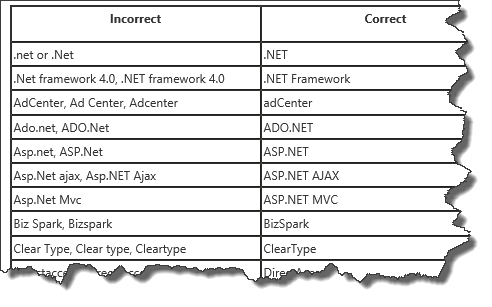
I see book authors, editors, bloggers, press, team members, and occasionally even a VP misspell our products, technologies, and features that I thought I would build and maintain a list of the correct capitalization and spelling of the most commonly misspelled Microsoft products and technologies.

Sources: Internal site (brandtools) and the Microsoft Trademarks Web site.

SNAGHTMLb58279f

I was gently reminded today (Thanks Brian) that it's .NET, not .Net. I always seem to screw that up. Luckily Brain also directed me to this post by Dan that makes it so easy that even I can use it. (Damn, does that mean I don't have any more excuses? grrrr... ;)

Bypass the Windows Phone Store in your app beta testing with Build It Beta for Windows Phone 8

Nick's .NET Travels - Windows Phone Application Testing with Build it Beta

image
Yesterday I announced that Build it Beta is now public for Windows Phone app developers, but what is Build it Beta? Well it’s all about Windows Phone Application Testing. There are a number of existing mechanisms available to Windows Phone application developers but none of them offer the simplicity and ease of deployment as say TestFlight (EDIT 6/5/2020: TestFlightApp.com is now offline, to see what happened to it check out this post, What Happened to TestFlightApp.com?, from QALead.com). Build it Beta fills that gap, providing a mechanism to allow any Windows Phone application to be deployed for testing to any Windows Phone 8 device*.
...  Next, how does it work?
Windows Phone 8 included the ability to deploy applications within the enterprise without going through the Windows Phone Store. This is referred to as enterprise deployment and involves signing an application (ie the packaged application file .xap) with an signing certificate. The same certificate needs to be distributed to the devices that the application is to be tested on. Then the signed xap can be installed on the devices either via code or by distributing the application to the device via email or via a url link. Build it Beta uses this mechanism to deliver a testing tool which eliminates the complexity for both developers and testers. Ok,  so how do I get started?
The first step is to get Build it Beta from the Windows Phone Store, but we’ve got a simple set of setup instructions that will get you up and running in no time at all.
....
Once you’ve completed the setup, all you need to do is to start sending your .xap files to upload @ builditbeta.com. Make sure you send them from the same email address that you registered with when setting up Build it Beta. We’ll ingest your xap and send you a confirmation email. You should also get a toast notification on your Windows Phone device letting you know that a new version of your application is available for testing. Click on the link in the email, or tap on the toast notification to download and install the signed version of your application.  * Build it Beta relies on enterprise deployment to install applications. This is a feature that was introduced with Windows Phone 8 which means Build it Beta cannot install applications to earlier versions of the Windows Phone operating system. If you need to deploy applications for testing on earlier versions of Windows Phone you can do this using the Windows Phone Store Beta process 
Now that's an interesting hack (in a good way). Not sure if this is something I'd use, but that doesn't mean I don't think it's a pretty cool work around/implementation/hack/thing...

Welcome WindowsAppDev.com!

The man, the myth, the legend in his own mind... err, I mean... um... time... yeah... Dan Rigby has spun off his daily curated dev news into its own site, WindowsAppDev.com.

Dan says;

Also, you may have noticed that the Windows App Developer Links posts are not immediately visible. Fear not, for they have finally been given the respect they truly deserve and now have their very own site at WindowsAppDev.com!

What this does mean though, is if you are subscribed to my blog feed (and you are subscribed, right?), if you want to continue to receive my (almost) daily Windows App Developer Links, you'll need to subscribe to the new feed.

I also find it kind of funny that his site is running in my neighborhood (so to speak);

This blog (and WindowsAppDev.com) are now running on a new VPS in Los Angeles. While I love my old host, the performance of running WordPress in a shared hosting environment wasn't great and wasn't getting better over time.

So if you're following him, you'll want to grab the new feed, asap... I'll wait. Done yet? What about now? Oh just go do it...

SNAGHTMLb4b6013

Need a Bulk Solution Scoped Assembly Version Editor? AsmVer!

Visual Studio Gallery - AsmVer

image

This tool gives you the opportunity to quickly view and set assembly and file versions for all projects in a solution.

You can set each project individually, or apply the same version info to all.

It will appear under View -> Other windows -> Assembly versioner.

It's my first Visual Studio extension, and I've only tested it with VS 2013 Pro. It's not very complicated, but I have to write at least two hundred and eighty characters in this description.

Simple, quick, focused and easy. I like it...