Saturday, February 21, 2009

SQL Server 2008 Management Studio Express RTW

Bill Ramos on SQL Server - SQL Server 2008 Management Studio Express – Released to the Web

“I just wanted to let the community know that we have just released a new Express edition called SQL Server 2008 Management Studio Express to the web today!

We teased out the Tools portion of SQL Server 2008 Express with Tools into it’s own download. It’s free and has most of the tools you would expect available in SQL Server Management Studio.

…” [Post Leach Level: 98%]

Microsoft Downloads - Microsoft® SQL Server® 2008 Management Studio Express

“Microsoft SQL Server 2008 Management Studio Express is a free, easy-to use version of SQL Server that includes more features and makes it easier than ever to start developing powerful data-driven applications for the web or local desktop.

Version: 10.00.1600.22
Date Published: 2/20/2009
Language: English
Download Size: 168.3 MB - 344.7 MB*


Microsoft SQL Server 2008 Management Studio Express (SSMSE) is an integrated environment for accessing, configuring, managing, administering, and developing all components of SQL Server. SQL Server 2008 Management Studio Express combines a broad group of graphical tools with a number of rich script editors to provide access to SQL Server to developers and administrators of all skill levels. SQL Server 2008 Management Studio Express combines the features of Enterprise Manager, Query Analyzer, and Analysis Manager, included in previous releases of SQL Server, into a single environment. Developers get a familiar experience, and database administrators get a single comprehensive utility that combines easy-to-use graphical tools with rich scripting capabilities.

…”

A handy download for when you just need the Management Studio and don’t have the SQL Server DVD/ISO handy (or don’t want to download the Express with Tools just to get the Management Studio)

Special Note: Make sure you read the entire download page, instructions and requirements before installing this as there are a number of pre-req’s and special notes.

Command Line Parsing – A wheel we can finally stop reinventing with .Net 4.0

B# .NET Blog - .NET 4.0 – System.Shell.CommandLine Parsing – Part 1

“Introduction

Command-line parsing isn’t a trivial thing and the wheel has been reinvented many times to make this job easier. Starting with .NET 4.0 though, developers will have built-in support for command-line parsing in the framework. In this series of posts I’ll dive into the details of this hidden treasure in .NET Framework 4.0. You can actually start playing with it today, by downloading the Visual Studio 2010 and .NET Framework 4.0 CTP.

So, what’s the deal? Why focus on something seemingly old-fashioned like command-line parsing? Turns out quite some programs want to support command-line arguments of some sort, no matter whether the tool is intrinsically command-line driven (e.g. console applications such as compilers) or comes with a GUI: they all have a Main method. And that’s where the pain starts. All you get from Main’s arguments is an array of strings, and you’re on your own from there on. The very first thing you’re likely going to do is some kind of parsing to turn the arguments into rich objects. Far from trivial if you even think about a little bit of flexibility at the command-line:

  • is the argument required or optional?
  • positional (like copy <first> <last>) or named (like csc /t:library)?
  • what’s the type of the argument?
  • how to validate an argument’s value?
  • support for “parameter set”?
  • etc

… But if you find yourself in a scenario where it just feels right to write a .NET console application or to add command-line support to any kind of application, System.Shell.CommandLine should be your next big friend…

…”

OMG, finally!

Let’s see I’ve written about one zillion command line parsing code blocks/libraries/modules/things (well actually 5’ish and then upgraded/converted/reused them a zillion times). Stuff like this, done right, is a perfect addition to .Net.

Update #1 3/8/2009 @ 1:12pm PDT:
Looks like this was a mistake, something that was in the CTP that shouldn't have been. Command Line Parsing in .Net 4.0? – Um… Whoops!

Keep an eye out for a CodePlex'ed Command Line API coming from Microsoft...

Friday, February 20, 2009

Some Down Day Google Sightseeing Humor - “Top 10 Rudest Place Names in Britain”

Google Sightseeing - Top 10 Rudest Place Names in Britain

“For a bit of Friday fun, here’s a roundup of our top ten rudest and funniest1 UK place names on Google Maps.

So with no further ado, in reverse order, the winners are…

10. Titty Ho, Northamptonshire

ajdt150

…”

This is the kind of humor guys seem to appreciate (and that makes my wife give me The Look). This had me belly laughing…

How would you like to have an address on #1?  ZOMG… LOL

NodeXL (fka NetMap) now with GDI+ out, WPF in

Marc Smith [@marc_smith] (for Team NodeXL ) dropped me a line;

“Thought you might be interested in the news that NodeXL has upgraded to a WPF display layer with zoom and scale features.

We are still at http://www.codeplex.com/nodexl

…”

Yep, I am interested and think it’s officially cool. :)

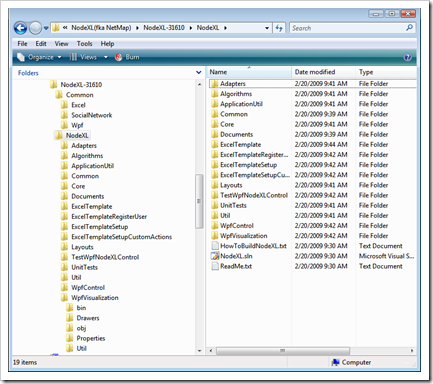
Here’s a quick snap of the project folders…

image

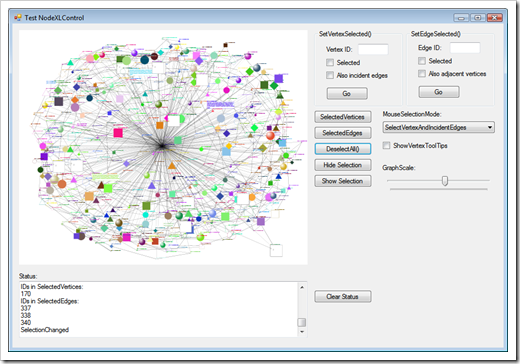
And the included WPF control test/demo app.

image

BTW, the latest source downloads, builds and runs with one one little problem. There’s a hard coded binding to c:\temp\1.jpg and 2.jpg in the TestWpfNodeXLControl project, pictured above, but that’s very easily fix’able… I love the power that OSS/source-available gives me :) Beside that it works for my like a charm. YMMV


Related Past Post XRef:
Getting hit by a Peanut Butter… um… Recall – Seeing the product relationship data via NetMap (NodeXL) and PowerShell
Mix PowerShell, some Would Bank data and a little NetMap and you get… Some cool data visualizations…
.NetMap – Using Excel, or embedded control, to graph and visualize connections, networks (social), degrees of separation, associations, etc

MS Press’s 25th anniversary free (limited time) eBooks for February, “Microsoft Visual C# 2008 Express Edition: Build a Program Now!” and “Vista Resource Kit, Second Edition”

Microsoft Press - Wait: more free e-books in February!

“…These e-books are this month’s free e-books offered in celebration of Microsoft Press’s 25th anniversary:

We hope you can appreciate the difference.  :-)

Enjoy!”

image

image

Must… fill… drive… with… more… ebooks… More… MOre… MORE!   :p

BTW, it look me a few tries to get both to download… so if it doesn’t download right away, give it a while and don’t give up.

(via Reflective Perspective - The Morning Brew #291)

Auto Twitterise your blog posts with the new Twitter Rename Windows Live Writer Plug-in

Steve Clayton - Auto Twitterise Your Blog Posts

“Another simple but very effective and very useful Windows Live Writer plugin from the plugin god Scott.

Very simply, this plugin will turn an @name in to a URL at the point of publishing. So if all works well @stevecla will magically have a URL added when I hit post on this!

This saves me about 10 seconds per post which probably equates to….well, a lot of time.

You can grab it from Scott’s Skydrive. Simply unpack the zip to c:\program files\windows live\writer\plugins and then open Writer and go to tools, options, plugins and enable it by selecting and clicking on options …”

Scott Lovegrove, @scottisafool , the WLW Plug-in Master Ninja, has release the binaries for a new twitter-rific WLW plugin. Nice!

(BTW, I’m @gduncan411 )


Related Past Post XRef:
Scott, Mr. Windows Live Writer Plugin Guy, Lovegrove has released 7 of his 10 WLW Plugs as OSS (via CodePlex)

Thursday, February 19, 2009

Official Google Doc’s API for .Net, Java and Ruby Released – Downloading those Google Doc’s, and converting them to different formats, is now just an API call away

Data APIs Blog - Start the Downloads!

“Many of you have been waiting patiently for the ability to download your Google Documents using the Documents List Data API. Today, I am very happy to announce the API's top feature request is finally live.

The undocumented (but widely used) RawDocContents url has been replaced by a more versatile Export servlet. Authenticated applications can now download documents in a number of different formats including pdf, doc, ppt, swf, xls, and more.

Exporting is available to all three authentication methods (ClientLogin, AuthSub, OAuth) and will work for developers using the DocList API with a Google Apps hosted domain.
Lastly, we've got samples!

For all the details on exporting your documents, see the documentation …” [Page Leach Level: 95%]

Interesting. I wonder if I couldn’t use this to allow easy backing up/sync’ing of Google Doc’s? Kind of a merge between this and Mesh (using the best of both)? Or maybe adding this to my Blogger Backup utility, whereas blog posts are backed up to a Google Doc’s? Or even a cheese file format conversion utility, letting Google do the heavy lifting? Or… or… or… lol

Wednesday, February 18, 2009

J.D. Meier's Millions of Magnificent Links (well lot’s-O-links anyway)

J.D. Meier's Blog - My Projects on MSDN

“This post is a simple way to get to my stuff on MSDN.  I always get asked how to find my patterns & practices stuff on MSDN.  I always have a hard time finding it.  I'm presenting at our Executive Briefing Center (EBC) today, so now I have a simple response for when I get asked, "OK, so where do we find this?"

JD Meier's Blog  My Projects on MSDN

…”

All I can say is WOW.

(via Mike Walker's Blog - Massive P&P Compile of Resources for Architects)

Tuesday, February 17, 2009

A friend of is interviewed on MSNBC (and if you’re looking for a Developer… )

MSNBC - Recession leaves many in employment limbo

image

The morning after she lost her job, Patty Powers expected to wake up with that feeling of dread you get when you realize that something bad has happened, like a death in the family.

Instead, she felt relief.

“I almost felt like a new opportunity had opened up for me,” she said. “I really felt worse when I was waiting.

…”

A good friend of the family, Patty Powers, was featured in an MSNBC article last week. It would be really cool if it were not for the circumstances. Still the only bad press is no… ?

BTW, if you’re looking to hire a developer/geek, she’s a great catch.

The Definitive Geek Guide to Windows 7’s VHD Support?

B# .NET Blog - Windows 7 Native VHD Support

“One of my favorite features in our upcoming Windows 7 (and Server 2008 R2) release is the native support for VHDs, a.k.a. Virtual Hard Disks, the file format used by Virtual PC, Virtual Server and Hyper-V to represent virtual disks. In this post, I’ll show you the basics of this feature and how to use it. I won’t cover a sister-feature, boot from VHD, in this post but as we get closer to shipping Windows 7, I plan on blogging about that one too.

Why native VHD support?

A first question quite some readers might raise is why we’d build in support for the VHD format natively to Windows? As you might have figured by now, virtualization is becoming increasingly important for consolidation of servers, so that it just makes sense for the OS to have intrinsic understanding of one of virtualization’s core pillar: the disk format. Having such support helps for a variety of scenarios, ranging from maintenance of virtual disks, creation of new virtual disks for data, booting from them, etc. And you can expect the virtualization story to grow significantly over the next months and years to come.

This said, support for VHDs isn’t something unprecedented. A while back I blogged about VHDmount, a tool that shipped with Virtual Server 2005 R2 allowing you to take a VHD file and mount it to a drive letter, using a driver installed by the tool. Native VHD support can, besides its built-in nature,  take all of this many steps further as explained above.

In this post I’ll cover the Disk Management MMC snap-in enhancements in Windows 7 as well as the enhancements made to diskpart, both to surface the new VHD support. In a later post, I’ll talk about API enhancements too (once we have a Windows 7 update for the Windows SDK published).

So, with the native VHD support in Windows 7, the Virtual in Virtual Disk Service is applicable twice, as now the VDS can be used to manage virtual hard disks or VHDs as well, hence my subtitle Virtual² Disk Service.

Diskpart

As this is a blog for geeks, let’s start on the dark side of the picture with Diskpart. As many of you know, Diskpart is centered around the idea of objects being managed. In the past, those objects were either disk, partition or volume. Now, in Windows 7, the object “type” vdisk has been added to that set. Quite a few commands know how to deal with vdisk objects (like create, select) while others are meant to be used for vdisks exclusively (like attach, detach). The picture below outlines the most important vdisk-aware or vdisk-specific commands:

…”

Bart De Smet does it again with an outstanding geek guide into Windows 7’s VHD Support. This should be enough info for the geek in most of us…

Now what would be cool is that if major application suites shipped on their own VHD’s. Think VHD = ThumbDrive. So you copy the VHD, mount it and then you start using the app’s. No install, all settings are posted back to the given VHD, it just works and is easily portable and can be backed up with one copy. Maybe even sandbox the VHD so any calls to other/outside resources are virtualized? Kind of like App-V, but simpler and with no client side drivers. Take all the work that’s been done in the portable application space and leverage that. Yeah, that’s an interesting thought…


Related Past Post XRef:
Natively booting to a VHD with Windows 7 - 10 Steps to VHD’ness
Tell me a VHDMount Story (Installing just VHDMount on Windows Vista and then mounting a VHD as a drive letter...)
Mounting VHD's via Managed Code

“Windows 7 Beta Tool Kits” – AIK, SDK, WDK Links

Microsoft Downloads - Windows 7 Beta Toolkits – All

“…

File Name: Windows 7 Beta Tool Kits.htm
Version: 1.0
Date Published: 2/16/2009
Language: English
Download Size: 12 KB - 41


An essential part of the Windows 7 beta release are the tools for deploying, diagnosing and developing on Windows. These needs are met by the Windows Kits. These kits provide consistent easy discoverability, consistent support, and a regular release schedule coinciding with the Microsoft® Windows® operating system.”

Windows 7 Beta Tool Kits.htm

Windows 7 Beta Tool Kits

Tools to deploy, diagnose and develop for Windows are an integral part of the Windows 7 Beta Release – the Windows Kits provide easy discoverability, consistent support, and a regular release schedule coinciding with the Microsoft® Windows® operating system.

The Windows Automated Installation Kit (Windows AIK) helps you to install, customize, and deploy the Windows 7 beta operating system. It is a set of tools and documentation that supports the configuration and deployment of Windows operating systems. By using Windows AIK, you can automate Windows installations, capture Windows images with ImageX, configure and modify images using Deployment Imaging Servicing and Management (DISM), create Windows PE images, and migrate user profiles and data with the User State Migration Tool (USMT).

To go to the download page for the Windows Automated Installation Kit beta for Windows 7 beta, click here for:  English, German and Japanese.  For more information on the Windows AIK, click here.

The Windows Software Development Kit (SDK) is a set of tools, code samples, documentation, compilers, headers, and libraries that you can use to create applications that run on Windows operating systems using native (Windows 32) or managed (.NET Framework) programming models. This Windows SDK contains Beta materials related to Windows 7 Beta and is compatible with Visual Studio® 2008, including Visual Studio Express Editions.

To go to the download page for Windows Software Development Kit beta for Windows 7 beta, click here.  For more information on the SDK, click here.

The Windows Driver Kit (WDK) is a fully integrated driver development system that contains material formerly found in the Windows Driver Device Kit (DDK) and tests for stability and reliability of Windows drivers.  Additional material includes the Windows Driver Foundation (WDF), which simplifies the development and support of Windows drivers.  The WDK also features header file refactoring (Windows Vista and later versions) which reduces header file complexity by providing a simpler directory structure, eliminating declaration conflicts, and using a single set of header files for all supported Windows versions.  Material formerly in Installable File Systems (IFS) Kit, including headers, libraries, samples, and documentation, is now distributed as part of the WDK.  Finally, the WDK includes verifiers and static analysis tools, such as PREfast and Static Driver Verifier, help you find bugs at compile time.

For more information on the SDK, click here[Download leached in full]

A couple links here that I want to be able to find in the future…

Monday, February 16, 2009

DDD (Domain Driven Design) Series as a free eBook

Casey Charlton - Insane World - DDD: Download an eBook of the Series

“To save you lots of clicking backwards and forwards as each part of this series on Domain Driven Design appears, I am going to collate the posts along the way into a downloadable PDF format.

The parts so far can be downloaded from here [GD: Click through for the download link]

As the series develops, this file will be updated with the latest version, so should always remain current.”

image

Foreword
There is a lot of interest in DDD recently, both in the book, and in the methodology, and in the
buzzword.

As a book and methodology, DDD is an excellent way to approach complex software problems,
and make them far more understandable and manageable. As a buzzword, DDD is in danger of
being corrupted like many other good software practices.

To try and clear up some of the confusion around DDD, I am intending to start a series of short
blog posts, covering aspects of DDD and trying to demystify it.

Domain Driven Design is actually pretty simple. It really isn’t that hard. That said, developers
seem to have a hard time grasping it. I put this down to a great deal of inexperience, with many
people who have just read the book in a cursory way saying “we are doing domain driven design”
– these people then confuse the issue for others.

…”

A free 18 page, so far, eBook for those trying to wrap their heads around Domain Driven Design (DDD). This eBook as a compilation of Casey Charlton’s series on DDD and so is a growing, living, work in progress.

The series so far;

  1. Domain Driven Design: A Step by Step Guide 
  2. DDD: The Ubiquitous Language 
  3. DDD: Bounded Contexts 
  4. DDD: There Is No Database 
  5. DDD: Command Query Separation as an Architectural Concept 
  6. DDD: Entities and Value Objects 
  7. DDD: Where is the Code? 
  8. DDD: Download an eBook of the Series
  9. DDD: Aggregates and Aggregate Roots

Wit It! – One click Work Item access from TFS Alert Emails.

Shai Raiten - Wit-It! – Outlook Add-in for TFS Work Item Alerts

“After a small talk with Guy Burstein he comes up with a Great Idea : use outlook form region to show Work Item from Team System.

Then I remembered that working with Event Email in Team System are so  irritating.

You can customize Event Emails to work with Team System Web Access but then you can’t open the work item in XML (sometimes you may need it)

But then I noticed that not everyone have TSWA and even this sometimes can be irritating(slow, new look), so why not to open a Work Item Form?

It’s fast, familiar or why not have all the options??

Wit-It!

Wit-It! allows you to open work items in various ways without customizing team system event subscription.

  1. Window Form – just like you’d see in Team Explorer
  2. XML
  3. Team System Web Access

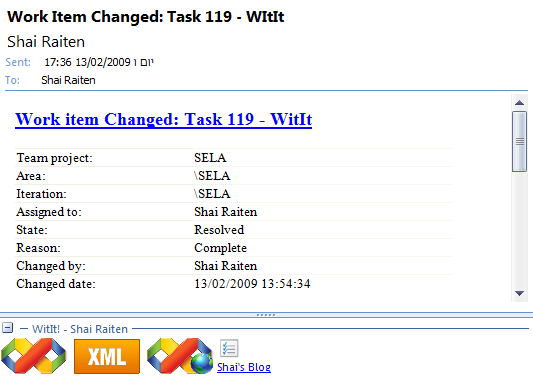
Wit-It! will automatically detect which emails comes from TFS and will show you the Wit-It! panel.


Wit

…”

Installs quick and easy and seems to work well for what it was intended for (see note below). Of course now I’d just like to get the source…. ;)


Important note: This is meant for Work Item alert emails. Not Check-in or Build Alerts (where you might errors it you use this that those kinds of alerts).

(via Ponder .NET - Outlook Add-in for TFS Work Item Alerts)

Sunday, February 15, 2009

Free WPF Ribbon that’s MS-PL and includes the C# Source – With BreadcrumbBar, CollapsiblePanel and ExplorerBar WPF controls thrown in for flavor too

CodeProject - Odyssey RibbonBar

intro

Introduction

The Odyssey RibbonBar is the next WPF control to be added to the Odyssey Control Library, available on codeplex.

Background

After the BreadcrumbBar, ExplorerBar and OutlookBar which I previously introduced at codeproject, the Odyssey BreadcrumbBar is the next Control included in the Odyssey Library. I'm aware of Microsofts WPF RibbonBar which is available as full functional preview and will be added to .NET 4.0. So you may wonder why I wrote an own RibbonBar anyway. The answer is, it's fun and interest to do this. And I also have in mind to build a Silverlight version.

Since the BreadcrumbBar is a set of various controls, it would fill a whole book to explain every detail, so I reduce it to the most important issues of the RibbonBar.

The demo application contains the xaml for a RibbonBar that demonstates most of the features. I did not create a demo that does something usefull nor does it have useful button images or labels. The Images I use for the demo are the free images available at www.glyphx.com

The BreadcrumbBar contains tabs that contain groups. Each group can contain any possible control. However, dynamic sizing is only applied when it contains IRibbonControls.
Currently, there are the following IRibbonControls:

  • RibbonButton
  • RibbonToggleButton
  • RibbonDropDownButton
  • RibbonSplitButton
  • RibbonComboBox
  • RibbonTextBox
  • RibbonButtonGroup
  • RibbonGallery
  • RibbonSeparator

…”

CodePlex - Odyssey WPF and ASP.NET Controls

“A collection of WPF and ASP.NET controls

WPF
  • BreadcrumbBar
  • ExplorerBar
  • CollapsiblePanel
  • OutlookBar
  • coming soon: WPF RibbonBar

ASP.NET
  • OdcTreeView
an ASP.NET AJAX server control with node templates, context menu and event driven node template selection

…”

I love the statement, “So you may wonder why I wrote an own RibbonBar anyway. The answer is, it's fun and interest to do this.” A man after my own heart. Why do we code? Because it’s FUN! Dugh!  :P


If you liked this article, make sure you check his others too;

CodeProject - WPF BreadcrumbBar

breadcrumbbar

Introduction

This is a Vista like breadcrumb bar for WPF that supports HierarchicalTemplates, population on demand, dynamic path conversation, and many more.

Background

The BreadcrumbBar is part of a free WPF control library named Odyssey that I'm currently developing just for fun. It is similar to the Vista breadcrumb bar, hence it is actually a multi-control bar consisting of the breadcrumb part, an editable ComboBox, a progress bar, and a button area.

…”

CodeProject - WPF OutlookBar Control

big

Introduction

The Outlookbar is the third control included in Odyssey.dll, a WPF control library for free that is currently under development.

Background

Articles about the other two controls, the BreadcrumbBar and the ExplorerBar, with animated collapsible panels are already available here on CodeProject (see the History section for links).

Using the code

The Outlookbar is the third control included in Odyssey.dll, a WPF control library for free that is currently under development. Articles about the other two controls, the BreadcrumbBar and the ExplorerBar with animated collapsible panels are already available here on CodeProject.

The OutlookBar is - as the name already indicates - a sidebar control that looks like the bar in Outlook. The OutlookBar is a container for OutlookSections to show each section as a button and the content of the selected section. …”

CodeProject - WPF Explorer Bar

XP_Metallic Vista

Introduction

This is a WPF Explorer Bar similar to the Explorer bar in Windows XP. An explorer bar usually contains one ore more collapsible panels, as shown above.

Using the code

WPF offers very nice animation features to allow almost anything you can imagine. Unfortunately, for a generic panel that supports animation while expanding/collapsing, it's not just as simple as defining DoubleAnimation to the Height property. Although it would work for ScaleTransform.ScaleY, the effect would be different to what we see in XP. Therefore, I use a custom Decorator control, which, in a few words, is a panel that can contain only one child. The AnimationDecorator has an IsExpanded property that specifies whether the decorator is expanded or collapsed. To perform the animation, I added a helper property named YOffset that will be animated. YOffset has a range from 0 to the ActualHeight of the decorator, and is used at ArrangeOverride and MeasureOverride to perform the animation

…”

Friday, February 13, 2009

“COBOL the Barbarian: Multi-Language .NET Snippet Compiler” – WPF Application with COBOL as the code behind…

CodePlex - COBOL the Barbarian: Multi-Language .NET Snippet Compiler

Project Description
COBOL the Barbarian is a multi-language .NET snippet compiler. The Barbarian is written in COBOL, and speaks C#. Support for additional .NET languages will be added in the near future.

History
The Barbarian has overthrown Add One Snippy, which was a straight port to COBOL of the C# code for Jon Skeet's Snippy. FxCop demanded a strong name for the assembly. The Gonzo COBOL Cooperative responded by unleashing COBOL the Barbarian.

Status: Alpha, Version 0.0.1.0
2009-02-12: The Barbarian does compile C#, but remains mute, and the Options menu still doesn't load dynamically. These issues will be addressed when possible. The clue to RoutedEventHandlers may lie in the generated files.

Development Tools
The development team uses the free Micro Focus NetExpress Personal Edition add-in for Visual Studio 2008. …” [Project Description Leach Level:90%]

image

The title caught my eye, but the code and implementation is what kept me.

How cool is it that this is a WPF app being written in COBOL? IHMO, pretty cool… (I don’t know COBOL, but I still think this is pretty cool in a geeky kind of way  ;)

Got to love .Net!  :)

Wednesday, February 11, 2009

Moonlight (Silverlight for Linux) v1.0 RTM’s

Port 25 - Moonlight 1.0 Hits the Street

“Moonlight 1.0 is now available.

Moonlight is an open source project that gives Linux users access to Microsoft Silverlight content, and is available for all major Linux distributions, including openSUSE, SUSE Linux Enterprise, Fedora, Red Hat, and Ubuntu. This milestone release is part of the technical collaboration between Novell and Microsoft.

Microsoft has worked with the Moonlight team and Novell to enable interoperability between Windows and Linux platforms and extend the high-quality interactive Web and video experience for the benefit of the Linux community, said Scott Guthrie, corporate vice president of Microsoft's .NET Developer Division.

…”

Moonlight - MoonlightRoadmap

“Mooonlight 1.0 Final

This will be the first Moonlight release that uses Microsoft's Media Pack 1.0 for playing back video and audio.

  • Silverlight 1.0 compatible engine.
  • Scriptable with the browser JavaScript.
  • C/C++ based, no managed code.
  • Distribution: Linux/x86 and Linux/x86-64.
  • Source code releases for any other operating systems

Release - Date

Beta - December 2, 2008

Final - February 9, 2009

…”

http://www.go-mono.com/ - Moonlight 1.0

moonlight_logo  Moonlight 1.0

Moonlight is an open source implementation of Microsoft Silverlight for Unix systems.

Release Notes

  • Final release of Moonlight 1.0
  • Support for the Microsoft Media Pack
  • Quick and easy installation of media codecs
  • Several media related bug fixes

Source

You can download a tarball of the source here or you can check it out from svn.

…”

Congrats to the Mono/Moonlight team for this very cool release. And keep your eyes open this summer for a SilverLight v2 compatible version (with alpha/beta’s before then :)

Tuesday, February 10, 2009

SharpDevelop (aka #develop) 3.0 RTM’s

SharpDevelop Community - SharpDevelop 3.0 Final

“Eigthteen months after the last SharpDevelop 2.x release, we are proud to announce the availability of SharpDevelop 3.0 Final! Without further ado, we’d like to point you to the features you will find in SharpDevelop 3.0:

Feature List

Downloads
SharpDevelop 3.0 Final:http://www.icsharpcode.net/OpenSource/SD/Download/#SharpDevelop30

Please note that to take full advantage of SharpDevelop 3.0 features, you must install the following software too:

…”

#develop - You get...

“Supported Programming Languages

  • C# (Code Completion, Windows Forms Designer)
  • VB.NET (Code Completion, Windows Forms Designer)
  • Boo (Code Completion, Windows Forms Designer)
  • IronPython
  • F#

Developer Productivity

  • Refactoring
  • Parallel build support for multi-core machines
  • Multi-framework targetting (.NET 2.0, 3.0 and 3.5)
  • Code Autoinsert
  • Starts from a USB memory stick (Link)
  • Read-only project support

Quality Tools

  • Integrated Debugger
  • Code Analysis (FxCop)
  • Unit Testing (NUnit)
  • Code Coverage (PartCover)
  • Integrated Subversion support (TortoiseSVN)
  • StyleCop addin (Link)

And More...

  • Setup projects (WiX)
  • Parser-based code converter (Online Code Converter)
  • XML "code completion"
  • Documentation generation (Sandcastle, SHFB)
  • Reflector addin (Link)
  • Easy addin extensibility mechanism
  • SharpDevelop for Applications (SDA) allows you to host SharpDevelop in your applications (Link)
  • Text editor is rehostable to add a programmer's editor to your applications (including code completion!)

…” [Page Leach Level: 95%]

The Open Source Development Environment for .NET

#develop (short for SharpDevelop) is a free IDE for C#, VB.NET and Boo projects on Microsoft's .NET platform. It is open-source, and you can download both sourcecode and executables from this site…

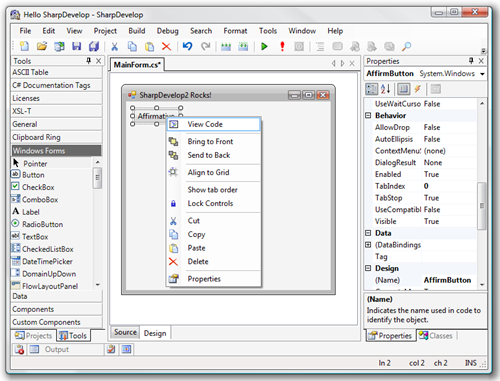
TeaserSharpDevelop2OnVista 

…”

The “other cola”… err… I mean… the “other .Net IDE” gets a major new rev.

#develop is an important project, one that benefits every .Net developer. While we don’t need a million .Net IDE’s we DO need more than just Visual Studio, if nothing else to keep MS on their toes and to provide a viable choice. Choice is good…

(via The #develop teamblog - SharpDevelop 3.0 Final)


Related Past Post XRef:
SharpDevelop for Applications (SDA)
Web Development with SharpDevelop, Web Matrix, and DBGCLR
SourceForge.net: #develop 1.0.2a stopgap release
SourceForge.net: #develop 1.0.2 available for download
SharpDevelop 1.0 Released

XAML Power Toys – The M-V-VM Edition

Karl on WPF - XAML Power Toys 4.0 Released - Code Name MVVM

“Over the last few months I’ve received many emails requesting features and I’ve got a few of my own that I’ve added to XAML Power Toys!

New Features In v4.0

Added Two New Videos that cover these new features.  Please watch them.

I’ve updated the Control Defaults section of the XAML Power Toys Home Page.  Please read this section as it explains some of the below new features.

  • Extract properties to a Style allows selecting a control, choosing desired properties and have those selected properties extracted to a newly created style
  • Create ViewModel Class from a VB.NET or C# code window.  Easily create a ViewModel stub that includes commands and exposed data class.
  • Group into GroupBox
  • Option to generate x:Name for controls
  • Option to add ForeReRead converter to TextBox bindings (both VB.NET & C# converters included in source and binary downloads.  Converter is also included in the OceanFramework.WPF namespace.)
  • Option to add TargetNullValue to TextBox.Text bindings when Source property is Nullable
  • Corrected secondary application domain load issue reported by DevExpress.  This fix also solves another edge case secondary application domain load issue.

Downloads

See XAML Power Toys Home Page.

…” [Post Leach Level: 95%]

Karl on WPF - XAML Power Toys

“Introduction

XAML Power Toys is a Visual Studio 2008 SP1 Multi-AppDomain Add-In that empowers WPF & Silverlight developers while working in the XAML editor.  Its Line of Business form generation tools, Grid tools,  DataGrid and ListView generation really shorten the XAML page layout time.

It’s accessed through commands in the XAML editor context menu and the Solution Explorer item context menu.

XAML Power Toys generates .NET 3.5 SP1 WPF compliant XAML and Silverlight 2 compliant XAML.

This version of XAML Power Toys is compatible with Silverlight 2.0 RTM.

I’ve tagged edited areas in the document with New, to identify new paragraphs and videos for version 4.0.

Goal

The primary goal of XAML Power Toys is to deliver tools that enable developers to quickly layout and maintain Line of Business Application forms using the UI controls that ship with Visual Studio.

You’ll notice that the below features are business form focused.  This does not limit the use of the software, I’m just providing the current target project type.

Feature Set

  • Create ViewModel Class - from a VB.NET or C# code window, easily create a ViewModel stub that includes commands and exposed data class.
  • Extract Properties To Style - allows selecting a control, choosing desired properties and have those selected properties extracted to a newly created style
  • Change Grid To Flow Layout - allows selecting of one of more control and will remove all MinWidth, MinHeight, Margin properties and will set all row and column definitions to Auto.
  • ….

…”

Good timing in that here I’m just getting up to speed on WPF/XAML and MVVM.  :)


Related Past Post XRef:
Who says WPF/XAML isn’t ready for Line of Business apps? Well anyway, the XAML Power Toys will help you down that road at least (Think “XAML Meets LoB CRUD” but actually sounds and looks better)

eXpert Web Performance Analysis via Fiddler - Microsoft neXpert Performance Analysis Plugin [For Fiddler]

Microsoft Downloads - Microsoft neXpert Performance Analysis Plugin

“…

File Name: neXpertV1.0.msi
Version: 1.0
Date Published: 2/9/2009
Language: English
Download Size: 386 KB


neXpert is an add-on to Fiddler which automates the classic performance best practice checks and produces a HTML report on the issues found in a Fiddler capture. neXpert adds the ability to insert step markers in Fiddler sessions to associate network objects together (create transactions). Using these steps, neXpert looks for performance issues and generates a HTML report based on the findings. A TCP model provided by Microsoft Research as well as a rudimentary algorithm to mimic web browser is used to generate response time predictions (Still considered Beta). More information can be found at the neXpert blog: http://blogs.msdn.com/nexpert/[Leach level: 99%]

neXpert Performance Tool - Introducing …. neXpert

“What is it?

neXpert is an add-on to Fiddler Web Debugger which aids in performance testing web applications. neXpert was created to reduce the time it takes to look for performance issues with Fiddler and to create a deliverable that can be used to educate development teams.

What are the features?

·         Add step markers while capturing traffic to create steps or clicks in a scenario

·         Easy access buttons for performance testing with Fiddler

o   Clear Cache/Cookies

o   Enable Streaming Mode

·         Ping each host in a capture to calculate current latency

·         Create rudimentary response time predictions for different latencies and browsers (BETA)

·         Create a HTML report which checks for performance issues with the following:

o   HTTP Response Code

o   ASP.NET View State

o   Static Files

o   Large Images

o   Compression

o   Authentication

o   ETags

o   Cache Headers

o   Connection Header

o   Vary Header

o   Cookies

…”

Sounds pretty interesting. I don’t do web dev near enough any more so when/if I do, a tool like this could very useful.


Related Past Post XRef:
Fiddler 2.1 Released...
Fiddler2 (Fiddler + HTTPS) Alpha Released
Microsoft Fiddler 1.2 Released and now Officially Out of Beta
Fiddler PowerToy - Part 1: HTTP Debugging
Fiddler HTTP Debugger - Fiddler

Kindle 2 is released – Is it time?

k2-email_002__V251584110_

New Features & Enhancements

Slim & Lightweight: Just over 1/3 inch and 10.2 ounces

Books in under 60 seconds: Get books delivered in less than 60 seconds; no PC required

Improved Display: Reads like real paper; now boasts 16 shades of gray for crisp images and text; even reads well in bright sunlight

Longer Battery Life: 25% longer battery life; read for days without recharging

More Storage: Take your library with you; holds over 1,500 books

Faster Page Turns: 20% faster page turns

Read-to-Me: Text-to-Speech feature means Kindle can read every book, blog, magazine, and newspaper out loud.

No Wireless Bills: No monthly wireless bills, data plans, or commitments. Amazon pays for Kindle’s wireless connectivity so you won’t see a monthly wireless bill.

Large Selection: Over 230,000 books, plus U.S. and international newspapers, magazines and blogs available

Low Book Prices: New York Times Best Sellers and New Releases $9.99, unless marked otherwise

…”


It’s got me thinking… but $359 still seems very steep to me. And the books are more expensive than the paperbacks I usually buy. Cheaper than hardbacks, it’s true, but not paperbacks. Book price is the big thing for me. I’m a voracious reader, easily reading a book or two a week (sometimes more, sometimes less, but one to two a week is about my current average) so book prices are king for me. Hence my focus on paperbacks (and my local “Friends of the Library” bookstore where books are 50 cents each ;)

When book prices come down, say between 3 and 5 for electronic formats, then I think I’ll be sold.

Also I think I’d really like only one “media” device. If this were also a MP3 player (with online music purchase/subscription?) then I might persuaded. I have room for two portable devices in my life, one small form factor device, i.e. phone, and then another man-purse’able, i.e. media player, eReader, maybe a netbook. Maybe one day these will all merge into a single portable device, today I think there’s room for two, but only two (in my world at least).

Still I think the Kindle is pretty darn cool and given all I’ve said, I do have Kindle lust… deep sigh…