Friday, October 03, 2008

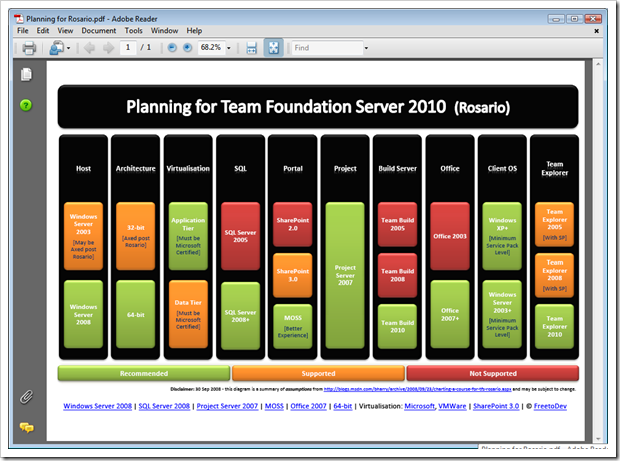
Planning for TFS 2010 (fka Rosario) – A picture says a thousand…

<FreeToDev.../> - Planning for Team Foundation Server 2010 (Rosario)

“Brian Harry posted an interesting blog which outlines some of the steps that can and should be taken in planning for Rosario. Note that this information is based on assumption and subject to change. Below is a summarised view that may be handy for your Rosario budget meeting… ” [Post leached in full, click through for PDF download link]

image  FreeToDev has put this great image together summarizing the planning we (TFS users, advocates, interested parties, etc) all need to start thinking about (as I bet after PDC we’re ALL going to REALLY want it… ;)

As they say a picture says a thousand words, and in this cause, that may be an understatement.

(via Team System Rocks/Team System News - VSTS Links - 10/03/2008)


Related Past Post XRef:
Preparing for Rosario – Think “less legacy” (no Office 2003, SharePoint 2 or SQL Server 2005)

Full Spectrum Warrior now free (Full game, ad-supported)

FileFront - Full Spectrum Warrior

“Filename: thq_fsw_filefront.exe
File Size: 1.62 GB (1,736,283,138 Bytes)
Date Added: Monday, September 29, 2008 01:48 PM
Downloads: 11,714 (This week: 11,714)

THQ’s Full Spectrum Warrior is now available to download and play for FREE as an ad supported game.

…”

Gameguru Mania News - Free Full Spectrum Warrior

“Publisher THQ has released Spectrum Warrior (review) for free. Originally released four years ago by Pandemic, the game was developed for the U.S. Army as a training tool, and then adapted for civilian use with extra booms and a storyline. If you like strategic squad games such as Ghost Recon then definitely take a look. …”

Note: There are some comments/questions about a possibly missing CD Key (3 comments), but given the 11k+ downloads, this may not be an issue? We’ll see as I’m downloading now as I’m just too much of a sucker for free Army games to pass it up… ;)

C# your way to Amazon’s S3 – ThreeSharp, a .Net Amazon S3 Library

CodePlex - C# Library and Code for Amazon S3

“Affirma Consulting http://www.affirmaconsulting.com developed this library and example code with Amazon Web Services, in an effort to simplify and empower the use of Amazon S3 in a .NET client environment. We decided together that hosting the code on CodePlex would be the best way to share the library and get community involvement on its future development.

Project Description
An advanced C# library for interfacing with the Amazon S3 system. Among its powerful features are:
- Full support for data streaming. No need to load data into memory before sending to S3.
- Data encryption.
- Thread safety and live statistics. Perform multiple simultaneous uploads and downloads and show progress in real-time.
- A powerful, unified object model that simplifies maintenance and extensions.
- Support for EU buckets.

The solution contains four projects:
- ThreeSharp. The C# library.
- ThreeSharp.Wrapper. A helper that wraps basic common procedures into single-line calls.
- ThreeSharp.ConsoleSample. A console application that demonstrates and describes the various procedures available in the ThreeSharp Library and the Wrapper.
- ThreeSharp.FormSample. A Windows Forms app that demonstrates the use of the Library in a multi-threaded, graphical environment.

…”

I haven’t S3’ed yet but when/if I do, I’m going to have to check out this library. Is sure sounds like a useful tool in the .Net S3’s developer tool belt, doesn’t it?


Related Past Post XRef:
Amazon S3 Browser for Windows Live Writer
S3 Drive - Mount your Amazon S3 Space as a Windows Network Drive
S3 from Amazon - Storage on the cheap.

TFS Build Status Screen – A quick window on your TFS Team Build Status (i.e. If you don’t have a Build Bunny or Build Lamp, then…)

Visual Studio Gallery - TFS Build Status Screen

“This is a tool for Team Foundation Server that allows users to see the current status of their builds.  This can be installed on any machine that has Visual Studio Team System 2008 Team Explorer installed on it.  This application was intended to be installed on a machine that is connected to 1 or more large LCD screens that are mounted throughout the work environment so that everyone can see.  It can also be installed on an end user machine if desired.

Build%20Screen%20Shot_thumb[Description leached in full]

Rob Aquila's Blog - Team Foundation Server Build Notification Screen

“I have been working on an application that will allow people to quickly look at a screen and determine the current status of the builds running in Team Foundation Server 2008.  This is an idea based off of having a lamp attached to your continuous build process so that everyone knows the current build status by looking at the current color of the lamp.  Besides using luminous devices, people have been using a rabbit called Nabaztag.  Basically the purpose of this device is to translate text into a spoken voice that everyone can hear.  Brian the Build Bunny is an example of using the Nabaztag API along with Team Foundation Sever to announce its events.

Lamps work well but there is an issue when there are multiple builds running at one time and you want to view each build's individual status.  The application I created builds on top of these ideas and allows people to quickly see the status of multiple builds simultaneously.  It can also be hooked up to your Nabaztag to announce build status changes.  …

…”

I’ve already downloaded, installed and am running this as it solves a problem I have. I have email alerts setup (and they actually work now.. yeah! ;) which are good for seeing the flow of TFS Project things as they change, build, etc, but the build notices can get lost in the mail, so to speak.

I’ve wanted a “build lamp” like thing (well really a Build Bunny… ;) but we have a number of builds going on and those things require a little more setup and cost than I’m ready to commit. I just wanted a simple form/window/screen that makes it really easy to see the status of our builds.

And low and behold, I see the TFS Build Status Screen!


The setup is smooth and easy. As you install, you’ll be prompted for the TFS Server, Port (which will already be defaulted to the usual 8080) and TFS Project Name. Fill those in, finish the setup and that’s it. You’re ready to run it.

My only wish is that I wish the source were available, so I could review, help and tweak it as need be (yes, I’m contacting the author right now… ;)

In any case, it worked first time for me and my projects does exactly what it says it does and for the price is just right…


Related Past Post XRef:
Building your own Brian the Build Bunny
Brian the TFS Build Bunny - That's just wrong... but in all the right ways...
Wednesday, October 01, 2008

Excel 2007 Limit List - How Accountants will love you, Excel, and EDD Professionals will hate you

Arvin's blog - Some Excel 2007 limitation

“Here is a list of all of the major changes we made to Excel 12 in the area of limits.

The total number of available columns in Excel
Old Limit: 256  (2^8)
New Limit: 16k  (2^14)

The total number of available rows in Excel
Old Limit: 64k  (2^16)
New Limit: 1M  (2^20)

…”

Arvin’s list is perfect. Simple and too the point.

Needless to say it, as a EDD (Electronic Data Discovery) professional, made me cry… The first time you see a single XLS explode into 25,000+ pages/images/tiff’s and realize that THAT was with 2003’s limits, well, that’s when you break out the tissue paper. 64K rows in 2003 and in 2007 “one million rows…” said in my best Dr Evil voice. Oh my…

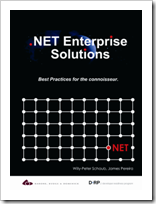
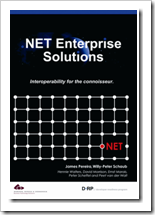
Three Free .Net eBooks: “.NET Enterprise Solutions ...Best Practices for the Connoisseur”, “…Interoperability for the Connoisseur” and “…Software Engineers on their way to Pluto” (you just have to love the title of that last one)

Willy-Peter Schaub's Cave of Chamomile Simplicity - .NET Enterprise Books for the Connoisseur ... all available in PDF!

“We have just released the PDF, soft copy, eBook style books for the following three books on www.drp.co.za and www.saarchitect.net. On the later server find the books here and remember that www.drp.co.za is geared at American region and www.saarchitect.net for the MEA region.

image_6

.NET Enterprise Solutions ... Best Practices for the Connoisseur
ISBN: 0-620-33013-9, published September 2004.
Authors: Willy-Peter Schaub, James Pereira

Information technologies change frequently and rapidly, but the principles, experience and best practices of system analysis, design, construction and deployment remain timeless. “This book is a small step towards making the toothpick of experience a reusable commodity”.

image_thumb_1

.NET Enterprise Solutions ... Interoperability for the Connoisseur
ISBN: 0-620-34680-9, published August 2006
Authors: James Pereira, Willy-Peter Schaub

Our new BB&D DRP book 2, entitled “.NET Enterprise Solutions … Interoperability for the Connoisseur”, ISBN 0-620-34680-9, is complete and currently on the printing press. We thank the authors, the contributors, the coordinators and the reviewers for sharing their knowledge and experience. The book continues the discussion and sharing of best practices we introduced with book ".NET Enterprise Solutions … Best Practices for the connoisseur, ISBN: 0-620-33013-9", focused specifically on interoperability and integration of similar and dissimilar (heterogeneous) solutions. Rather than specialising on any one concept or technology, this book presents a "broad scan" introduction to a variety of technologies within that scope.

image_thumb2

NET Enterprise Solutions ... Software Engineers on their way to Pluto

ISBN: 978-0-620-38514-5, published September 2007.
Authors: Willy-Peter Schaub, Geoff Bruce

This book continues the discussion and sharing of best practices we introduced with the books ".NET Enterprise Solutions … Best Practices for the connoisseur, ISBN: 0-620-33013-9" and .NET Enterprise Solutions … Interoperability for the Connoisseur, ISBN: 0-620-234680-9.

Unlike its predecessors this book is not focused on technology, but instead takes a critical look at how we are typically building information technology solutions, the way we define the modus-operandi of the team and the product life cycle.

…”

The DRP team’s at it a again! This time with three free .Net ebooks.

And hey, any free ebook with a title like “Software Engineers on their way to Pluto” is worth a quick download, don’t ya think?

Need a little Windows 2008 Server Core help? (aka Put down your google and pick up your Core Configurator)

CodePlex - Windows 2008 Server Core Configurator

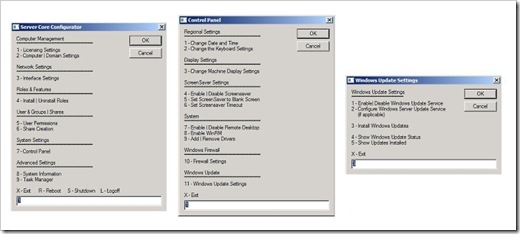
“If your using Server Core in Windows Server 2008, you'll know that there are always certain tasks you need to do upon installation to enable things like Activation, Firewall.

This Tool is a collection of scripts which will help provision and configure a Base Windows 2008 Server Core installation, The Server Core Configurator enables you to do all those 'little jobs' via a GUI, quickly and easily!

Product Licencing
Networking Features
DCPromo Tool
ISCSI Settings
Server Roles and Features
User and Group Permissions
Share Creation and Deletion
Firewall Settings
Display Settings
Add & Remove Drivers
Screensaver Settings
Windows Updates (Including WSUS)
and so much more...

control

…”

Windows 2008 Server Core Configurator - Core Configurator

“…

===================
Core Configurator Release
===================
First official release of Core Configurator

We have implemented major bug fixes and additions in the code base so any feedback would be great as it helps us make this product better and more reliable.

This tool will help anyone wanting to setup all flavour of Windows Server Core (Hyper-V Server and Server Core).

…”

When I was trying to configure my first Server Core system, I was in google more than I was on the system actually doing the configuration. So when I saw this I knew I needed to share it.

I thought it a nice touch to see the release available as an ISO, along with a CAB version as well as then source

(via [MSFT-BE] Arlindo's Blog - IT Pro Evangelist - Windows Server 2008 Core Config)


Related Past Post XRef:
Windows Update in a command line world. Installing Windows Updates on Windows 2008 Server Core.

Amazon EC2 to support Windows and SQL Server (later this fall)…

“Dear Amazon Web Services Developer,

We are excited to let you know that Amazon Elastic Compute Cloud (Amazon EC2) will offer you the ability to run Microsoft Windows Server or Microsoft SQL Server starting later this Fall. Today, you can choose from a variety of Unix-based operating systems, and soon you will be able to configure your instances to run the Windows Server operating system. In addition, you will be able to use SQL Server as another option within Amazon EC2 for running relational databases.

Amazon EC2 running Windows Server or SQL Server provides an ideal environment for deploying ASP.NET web sites, high performance computing clusters, media transcoding solutions, and many other Windows-based applications. By choosing Amazon EC2 as the deployment environment for your Windows-based applications, you will be able to take advantage of Amazons proven scalability and reliability, as well as the cost-effective, pay-as-you-go pricing model offered by Amazon Web Services.

Our goal is to support any and all of the programming models, operating systems and database servers that you need for building applications on our cloud computing platform. The ability to run a Windows environment within Amazon EC2 has been one of our most requested features, and we are excited to be able to provide this capability. We are currently operating a private beta of Amazon EC2 running Windows Server and SQL Server. Please go to aws.amazon.com/windows if you are interested in being notified later this Fall when the offering is released broadly.

Sincerely,

The Amazon Web Services Team” [Email in full]

Now EC2 has really entered into a space where I’m interested. It was pretty cool before, but of limited usefulness for me. Later this Fall when they add Windows machine support? Oh yeah, that’s officially cool.

Tuesday, September 30, 2008

I was so young then… Pictures of when I was in the National Guard…

These were taken when I was in the National Guard, during one two week “summer camp”. I think this was Summer Camp 1992 at Camp Roberts, Ca.

Yep, that’s me. Love that hair cut?

Pictures0003


My squad, hard at work… lol (Actually my team was great and busted their butt’s… when it was needed).

Pictures0004


As you can see the accommodations were outstanding. Got to love “the field”. Heck at least we had cots!

Pictures0009


During summer camp there would be ton’s of things going on, mock battles, etc. Not sure why we grabbed a pic of this helicopter from our Hummer, but since it was in the pile…

Pictures0005


At the end of summer camp we get to spend a few days cleaning up in the barracks and while there on post, we of course take pictures of each other near “cool stuff”. Nope, that wasn’t mine, nor ever flew in one… Just thought it was cool.  :)

Pictures0006


See those barracks in the background? Yeah, we “got” to live in those for a few days… um… yeah… Anyway, here’s a couple pictures of some cool World War II vehicles

Pictures0007

Pictures0002


What I need to find are the pictures of me and my friends when I was stationed in South Korea while in the Army (1986-87). LMAO, now those are some pictures! LOL


Related Past Post XRef:
Before and After Photo’s… Scary Greg and Good Greg

FreeToDev MSBuild Tasks Suite – First Non-Beta Release (and request for help…)

FreeToDev MSBuild Tasks Suite - 3.5.11640.0 (30 Sep 08)

“…

Release Notes

This is the latest and first non-beta release of the FreeToDev MSBuild Tasks Suite.

The suite may be installed via the MSI installer (recommended) or download the individual components.

The MSI Installer contains everything you need --- binaries, samples and help file.

…”

CodePlex - FreeToDev MSBuild Tasks Suite

“Project Description
Welcome to the FreeToDev MSBuild Tasks Suite. Here you will find a collection of MSBuild tasks dedicated to the .Net 3.5 Framework.

The Suite provides over 170 tasks covering the .Net Framework, BizTalk, FxCop, IIS7, SourceSafe, StyleCop, Team Foundation Server, WMI and more.

30 September 2008: Would you like to help out? --- additional developers are required to help with new task development and the future design and development of the suite. If you are interested, please email feedback@freetodev.com with a bit about yourself and how you would like to help out. Your details will be kept in strictest confidence.

…”

If you are a budding programmer and are looking to get some “real” experience, then working on a open source project can be prefect. As a hiring manager, this is one of the first things I look for in a developer. Are they a member of, or have their own, open source project? If so they get a Developer+4 bonus… If not, and they are a junior/associate and are trying to break into the field, I wonder why not. Maybe they didn’t know about appropriate projects or were afraid, etc. Well here’s a project that is actively looking for YOUR help. Yes, I am looking at you!

Sorry, I got a little fired up there (must those old National Guard pictures my mine I’ve going through…lol). In any case, this cool project as reached “non-beta” status. One of the coolest things is that there’s pretty darn good doc’s (CHM) in the release. Much better than you find in many OSS projects…

So stop reading already and check it out… ;)


Related Past Post XRef:
New (beta) MSBuild Tasks Suite - FreeToDev MSBuild Tasks Suite

Five pages to getting started with Lucene.Net - Introducing Lucene.Net

CodeProject - Introducing Lucene.Net

“Lucene.Net is a high performance Information Retrieval (IR) library, also known as a search engine library. Lucene.Net contains powerful APIs for creating full text indexes and implementing advanced and precise search technologies into your programs. Some people may confuse Lucene.net with a ready to use application like a web search/crawler, or a file search application, but Lucene.Net is not such an application, it's a framework library. Lucene.Net provides a framework for implementing these difficult technologies yourself. Lucene.Net makes no discriminations on what you can index and search, which gives you a lot more power compared to other full text indexing/searching implications; you can index anything that can be represented as text. There are also ways to get Lucene.Net to index HTML, Office documents, PDF files, and much more.

Lucene.Net is an API per API port of the original Lucene project, which is written in Java even the unit tests were ported to guarantee the quality. Also, Lucene.Net index is fully compatible with the Lucene index, and both libraries can be used on the same index together with no problems. A number of products have used Lucene and Lucene.Net to build their searches; some well known websites include Wikipedia, CNET, Monster.com, Mayo Clinic, FedEx, and many more. But, it’s not just web sites that have used Lucene; there is also a product that has used Lucene.Net, called Lookout, which is a search tool for Microsoft Outlook that just brought Outlook’s integrated search to look painfully slow and inaccurate.

Lucene.Net is currently undergoing incubation at the Apache Software Foundation. Its source code is held in a subversion repository and can be found here. If you need help downloading the source, you can use the free TortoiseSVN, or RapidSVN. The Lucene.Net project always welcomes new contributors. And, remember, there are many ways to contribute to an open source project other than writing code.

…”

I know I’m a day late and a dollar short with this as it’s been already linked to by most the top .Net link bloggers, still I’ve been watching the Lucene.Net space for years (4+) and am happy to link to another article on how to get started with it (as I swear I’m going to use it one day… really, truly I am…!  ;)

The article is short and sweet and to the point. It provides a great starting point for getting going with Lucene.Net (funny that given the article title) with a adding a “document” to index as well as how to search. I think this is one of the best getting started with Lucene.Net guides I’ve seen in a while…


Related Past Post XRef:
Lucene.Net & C# Indexing and Searching WinForm Example
Using Lucene.Net to Index And Search C# Source
Lucene.Net 2.0 Final Released
DotLucene 1.9 Final Released
"DotLucene / Lucene.Net has moved to ASF"
Indexing Database Content with dotLucene
DotLucene: Full-Text Search for Your Intranet or Website using 37 Lines of Code
Lucene.Net 1.4.0 Beta build-001
Open Lucene.NET - The Open Source Search Engine
SourceForge.net: Lucene.Net core moved from SF
SourceForge.net: Project Info - Lucene.Net search engine

Monitor your SQL Servers on the Cheap (with source too)

CodePlex - SqlMonitoring Tool

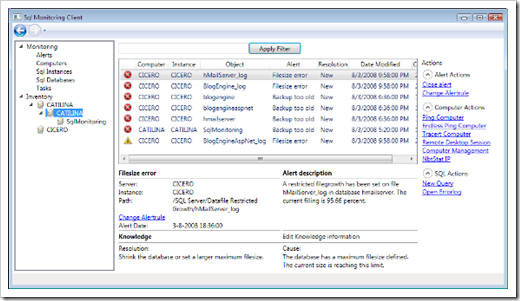
“The SqlMonitoring tool makes it possible to monitor SQL 2000, 2005, 2008 environments and send alerts to a central database (SQL 2008). A client can be used to view the alerts en perform actions on them. This tool is a good alternative if you do not have the budget or infrastructure for tools like SCOM.

Sql Monitoring FAQ

This tool was designed to be an open source alternative for tools like SCOM 2007 and BMC Patrol. The tool also focusses primarly on SQL Server.

monitoringclient1

…”

How many SQL Monitoring utilities have we made, purchased, etc? Yeah, tons, me too. Well here’s one, a finalist in the SQL Hero’s competition, where since we have the source maybe we won’t have to reinvent this wheel again? (okay… a guy can dream can’t he? ;)

Even if it’s not 100% what you need, the price is right and since you’ve got the code you can help make it match.

(via SQL Heroes - And in this corner... we have SqlMonitoring Tool.)

Sysinternals Update Day – Including new major release of Process Monitor (think PM + Network Monitoring = v2)

Sysinternals Site Discussion - Updates: Process Monitor v2.0, ZoomIt v2.11, Sigcheck v1.54, Contig v1.55 | A new Mark's Blog post: The Case of the Sloooow System | New Vista Springboard webcast

Process Monitor v2.0: This major update to Process Monitor adds real-time TCP and UDP monitoring to its existing process, thread, DLL, file system and registry monitoring. You can now see the TCP and UDP activity processes performed, including the operation (e.g. connect, send, receive), local and remote IP addresses and DNS names, and operation transfer lengths. On Windows Vista, Process Monitor also collects thread stacks for network operations.

…”

Like I always seem to say, it’s a good day when we get new/updated Sysinternals utilities… ;)

Data Dude and Developer – Together at Last! (Now for Software Assurance customers at least and a real merge in VSTS2010)

Microsoft PressPass - Microsoft Unveils Next Version of Visual Studio and .NET Framework

“…

In another move to increase integration across the life cycle, Microsoft also announced that VSTS 2010 will provide a unified VSTS Development and Database product. As a benefit to existing Software Assurance (SA) customers, those who currently own Visual Studio Team System 2008 Development Edition or Visual Studio Team System 2008 Database Edition will receive all the following products starting Oct. 1, 2008, for free:

  • Visual Studio Team System 2008 Development Edition
  • Visual Studio Team System 2008 Database Edition
  • Visual Studio 2005 Team System for Software Developers
  • Visual Studio 2005 Team System for Database Professionals

The products will be available to SA customers through their normal Microsoft Developer Network channel. More information can be found at http://www.microsoft.com/licensing/sa.

…”

This really makes a great deal of sense and I dig that MS is being proactive in this and bringing forward the “merger” into the earlier editions of VSTS. Don’t like that you have to be a SA customer, but hey, can’t ask for everything.

And I REALLY like that in VSTS2010 there’s a complete merger between the two SKU’s. That will go a huge way toward solving some of our SKU licensing problems and confusion of today.

Now to email the boss and see if we’re SA customers or not…

(via Accentient Blog - Visual Studio Team System Announcements today)

It’s the Week of Visual Studio Team System 2010 on Channel 9 (fka Rosario)

Channel 9 - Visual Studio Team System 2010 Week on Channel 9!

“The week of September 29th is Visual Studio Team System 2010 week on Channel 9! We'll have 20 videos going live this week featuring interviews with the Visual Studio Team System product team including several screencast demonstrations of the latest bits.

Stay tuned to http://channel9.msdn.com/VisualStudio/ for all of the action. Here's the lineup:

Monday, September 29th:
- Announcing Visual Studio Team System 2010

Architecture Day (Tuesday, September 30th):
- Cameron Skinner: Visual Studio Team System 2010 - Architecture
- "Top-down" design with Visual Studio Team System 2010
- "Bottom-up" Design with Visual Studio Team System 2010 Architect
- ARCast.TV - Peter Provost on what’s coming for Architects in Visual Studio Team System

Business Alignment (Wednesday, October 1st):
- Achieving Business Alignment with Visual Studio Team System 2010
- Agile Planning Templates in Visual Studio Team System 2010
- Enterprise Project Management with Visual Studio Team System 2010
- Requirements Management and Traceability with Visual Studio Team System 2010

Software Quality (Thursday, October 2nd):
- Better Software Quality with Visual Studio Team System 2010
- Manual Testing with Visual Studio Team System 2010
- Historical Debugger and Test Impact Analysis in Visual Studio Team System 2010

Team Foundation Server (Friday, October 3rd):
- Brian Harry: Team Foundation Server 2010
- Branching and Merging Visualization with Team Foundation Server 2010
- Enterprise Team Foundation Server Management with Mario Rodriguez
- Team Foundation Server 2010 Setup and Administration
- An early look at Team Foundation Build 2010 with Jim Lamb
- A first look at Visual Studio Team System Web Access 2010
- Update on Team Foundation Server Migration and Synchronization

…” [Post leach level:99%]

Click through for links to the above videos…

There’s some pretty interesting stuff! If you’ve been follow the Rosairo news then some of this is maybe a rehash, but it is still exciting to get an official name and hint at release timeframe… Then there’s the stuff which appears to be from Oslo (which I have not been following to date).

All in all, some pretty cool stuff!  :)


For what ever reason, I had a hard time finding the RSS feed for just the Visual Studio Topic area. If you’re having the same issue here’s the RSS feed for the new Visual Studio Topic area (meaning to catch most of the above videos on your Zune, subscribe to that RSS feed in the Zune Software ;)

(via Visual Studio Hacks - Visual Studio Links #75 –> Channel 9 –> Norman Guadagno: Announcing Visual Studio Team System 2010 –> Channel 9Visual Studio… got to love the link throughs… ;)


Related Past Post XRef:
Preparing for Rosario – Think “less legacy” (no Office 2003, SharePoint 2 or SQL Server 2005)
Rosario – The Nine Part April CTP Investigation (aka… “Wow, Rosario rocks!”)
Rosario April 2008 CTP VHD to Hyper-V in 8 Steps
Help in your Visual Studio VPC RAR Part Download Battle (aka How to avoid the VPC download blues…)
Video showing the Windows Workflow Foundation being used to build a Build in "Rosario"