Tuesday, June 03, 2014

My ASP.NET MVC, how you've rev'd...

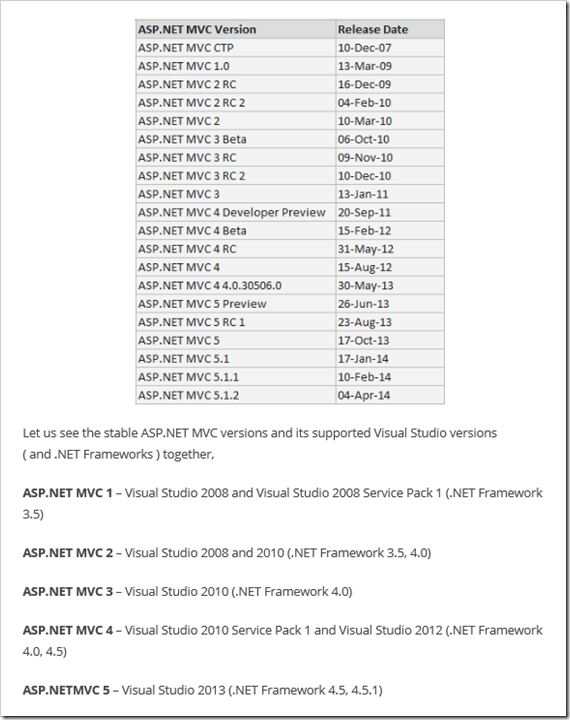
Shemeer's World of Programming - ASP.NET MVC Release History, Supported Visual Studio versions and .NET Framework

ASP.NET MVC is a web application development framework built on top of Microsoft’s .NET Framework. ASP.NET MVC framework is a lightweight, highly testable presentation framework that is integrated with existing ASP.NET features.

...

image

You do you remember when Scott Gu wrote MVC a the plane (or so the story went)? Now look at it... Not sure if it's me, but the cadence still seems to be picking up...! Guess it's hear to stay... lol

Not your usual Succinctly book... "Neural Networks using C# Succinctly" (reg-ware)

James D. McCaffrey - Neural Networks using C# Succinctly

I wrote a new book titled “Neural Networks using C# Succinctly”. It was published this week. There are many existing books on neural networks but no good ones (in my opinion) that focus on how to create neural networks from a software developer’s point of view. My book is free and you can download a PDF version from here:

...

I’ve written books before but for “Neural Networks using C# Succinctly” the process was a bit different. I was sitting at my desk one day when I got an unsolicited phone call. Normally I never answer such calls but on this particular day, I did. The call was a young woman named Hilary Bowling who worked for a company called Syncfusion. Hilary asked me if I’d be interested in writing a book about neural networks.

Hilary told me that Syncfusion published relatively short (roughly 100 page) e-books and made them available for free. I was skeptical — I figured there’d have to be a catch of some sort. But in fact, Syncfusion does publish free e-books for software developers. The only minor catch is that you have to register and end up on Syncfusion’s mailing list, but Syncfusion doesn’t take advantage of this (I signed up to see what would happen).

Anyway, it took me a few months to write “Neural Networks using C# Succinctly” (writing a book is much more time-consuming than you might expect) and now it’s available from the Syncfusion Web site...

Syncfusion - Neural Networks using C# Succinctly

image

Neural networks are an exciting field of software development used to calculate outputs from input data. While the idea seems simple enough, the implications of such networks are staggering—think optical character recognition, speech recognition, and regression analysis. With Neural Networks Using C# Succinctly by James McCaffrey, you'll learn how to create your own neural network to solve classification problems, or problems where the outcomes can only be one of several values. Learn about encoding and normalizing data, activation functions and how to choose the right one, and ultimately how to train a neural network to find weights and bias values that provide accurate predictions.

Table of Contents

  1. Neural Networks
  2. Perceptrons
  3. Feed-Forward
  4. Back-Propagation
  5. Training

How can you go wrong with 128 free('ish) pages on C# Neural Networks!

image


Related Past Post XRef:
"Visual Studio 2013 Succinctly" free [reg-ware] now available from... you guessed it, Syncfusion
"Windows Phone 8 Succinctly - The practical approach to Windows Phone 8 development" eBook (Reg-ware)
Succinctly eBook of the Day: "Twitter Bootstrap Succinctly" [Reg-ware]
Need some help up the WPF learning curve? "WPF Succinctly" from Syncfusion is now available (and free :)
TypeScript Succinctly - Free [Name/email-ware] eBook
Getting sharp with F# with the free "F# Succinctly" eBook [reg-ware]
Syncfusion helps shed a little succinct light on LightSwitch with "LightSwitch Succinctly" (Reg-ware)
"JavaScript Succinctly" - Another free (reg-ware) eBook from Syncfusion
Get into sync with HTTP with the new free (reg-ware) Syncfusion Succinctly eBook, "HTTP Succinctly"
Spelunk the technical details of the PDF format with "PDF Succinctly" from Syncfusion (Free/reg-ware PDF/Mobi ebook)
"Git Succinctly" Free/reg-ware PDF/Mobi ebook)
jQuery Succinctly - Free eBook (reg-ware, PDF and/or Mobi)


Visual Studio "14" CTP 1 Now Available

Somasegar’s blog - Visual Studio "14" CTP

Today, we are making available a first community technology preview of the next version of Visual Studio, codenamed Visual Studio “14”.  This early build is focused on enabling feedback and testing from the Visual Studio community.  Visual Studio "14" will most likely be available sometime in 2015, with a more complete preview release and final naming available later this year.  Given that this is a very early build, please install in a test environment with no earlier versions of Visual Studio installed.

You can read about the new features and known issues in this first Visual Studio “14” CTP, and also download today.

Over the last 3 months, we've announced many exciting technologies that will be important parts of Visual Studio "14" - including the "Roslyn" .NET compiler platform, ASP.NET vNext and Apache Cordova tooling.  The Visual Studio "14" CTP 1 includes these tools, as well as many additional improvements across Visual Studio, including an early look at some new C++ 11 support that will be part of Visual Studio "14".

C# and VB with the .NET Compiler Platform ("Roslyn")

In Visual Studio "14", the C# and VB compilers and IDE support are fully built on the .NET Compiler Platform ("Roslyn").  This open-source compiler as a service now sits behind dozens of developer experiences in Visual Studio "14", powering build, IntelliSense, refactoring, CodeLens, debugging and many more features developers use every day.  In most places the experiences are unchanged, but there have also been many small improvements across the entire development experience as part of the new compiler platform.

In the Visual Studio "14" preview C# refactoring support has been completely revamped including two new core refactorings: Inline Temporary Variable and Introduce Explaining Variable. Additionally, refactoring support for Visual Basic has been added for the first time.
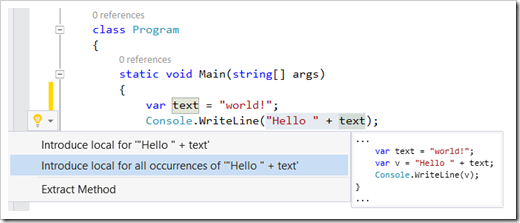
image

Visual Studio "14" also supports APIs that come from NuGet with their own analyzers, squiggling issues in your code as you type and offering you automatic fixes, all powered by the .NET Compiler Platform.

You can read more about the new C# and VB developer experiences on the C# blog and the Visual Basic blog.

ASP.NET vNext

...

You can read more about ASP.NET vNext in the Visual Studio "14" CTP on the .NET Web Development and Tools blog.

C++ 11/14

We've continued to push forward on the standards conformance of the Visual C++ compiler....

...

You can read more about the C++ improvements in the Visual Studio "14" CTP on the C++ blog.

Summary

This early preview of Visual Studio "14" is an opportunity to gather feedback on the next version of Visual Studio and .NET.  For developers picking up the CTP, I encourage you to share your feedback on the Connect website, or through Send-a-Smile in the Visual Studio IDE.

Visual Studio "14" CTP release notes

Visual Studio "14" CTP Version 14.0.21730.1.DP release notes

This article lists the release notes for the Microsoft Visual Studio "14" Community Technology Previews (CTPs).

Visual Studio "14" CTPs are previews for the next major release of Visual Studio. These Visual Studio CTPs are intended to promote continuous feedback between early adopters and the Visual Studio development team. We would love to receive your input on the new product functionality and the improved experiences. Your feedback will help shape the future of Visual Studio, and together we will improve the developer experience.

The following download link will always point you to the latest CTP:
Download the latest Visual Studio "14" CTP package now

Notes:

  • CTPs are English only.
  • CTPs are unsupported and are intended to be used for testing, trial, and feedback purposes only.
  • CTPs have not been subject to final validation. They are not meant to be run on production workstations or servers, or used to create production code. Installing a CTP on a production server will put the server in an unsupported state.
  • Although these CTPs are intended to be installed side-by-side with earlier versions of Visual Studio, complete compatibility on every CTP is not guaranteed. For this early Visual Studio "14" CTP, we recommend that you install the product in a VM, a VHD, or on a fresh computer, because there are known side-by-side compatibility issues with Visual Studio 2013.
Feedback

The goal of this CTP is to collect your feedback. To report a bug, please use Connect. You can also share your ideas and suggestions on UserVoice. Your quick thoughts can be shared by using Send-a-Smile through the Visual Studio IDE.

New Features

image


Known issues

...

Installing Visual Studio "14" CTP side-by-side with Visual Studio 2013

There are known issues when you install Visual Studio "14" CTP 14.0.21730.1 DP on the same computer as Visual Studio 2013. While we expect that an uninstallation of Visual Studio "14" and then a repair of Visual Studio 2013 should fix these issues, our safest recommendation is to install Visual Studio "14" in a VM, a VHD, a fresh computer, or another non-production test-only computer that does not have Visual Studio 2013 on it. All of these Visual Studio side-by-side issues are expected to be fixed soon.

There is an installation block in this Visual Studio "14" CTP that will prevent installation on a computer where an earlier version of Visual Studio is already installed. To disable the block that will put the computer in an un-recommended state, add the value "BlockerOverride" to the registry:

HKLM\SOFTWARE\Microsoft\DevDiv\vs\Servicing

Note the Known Issues! But Yeah! New VS!  :)
Monday, June 02, 2014

Piping in your long XML feeds to NewsBlur

Dave Shaw's Development Blog - Dealing with NewsBlur and Large Feeds

I’m a premium NewsBlur member, and have been ever Google decided to shutdown Google Reader. Mostly my experiences have been very good, with great support from Samuel when I needed it.

However, there has been one issue nagging at me for quite a while and this is, I cannot get a feed to Mark Seemann’s blog. I posted the problem on Get Satisfaction, but Samuel was unable to help due to the size of the feed. A few weeks ago a co-worker of mine mentioned Yahoo Pipes should be able to sort this, so I finally gave it a try. For those (like me until recently) who don’t know what Yahoo Pipes is it’s “a powerful composition tool to aggregate, manipulate, and mashup content from around the web”.

After a few minutes tinkering, I had finally built a “pipe” that took the blog feed, performed a “truncate” operation to 10 posts and output the feed again. ...

image

I love me my NewsBlur, but sometimes it's just not happy with long *.XML types of feeds. Dave had the same issue and instead of whining about it (or ignoring it like I have been... sigh) he's actually done something about it, and best of all, shared it with us! :)

ALM Ranger Version Control (fka Branching and Merging) Guide v3 now out (in three parts, "Branching Strategies", "Team Foundation Version Control", "Dependency Management with NuGet")

Willy's Reflections - Version Control Guidance v3.0 flight has landed delivering three great guides and lots of visuals

We are pleased to announce that the v3.0 of the Version Control (ex Branching and Merging) Guide has shipped, after Bill Heys completed the intensive copy-editing.

what’s new?

Third version of this blockbuster guidance has been split into separate topics as summarized below, allowing you to pick the “world” (guide) you are interested in. This release delivers a new crisper, more compact style, which is easier to consume on multiple devices without sacrificing any content. The content is updated and aligns with the latest Visual Studio technologies and incorporates feedback from the readers of the previous guidance.

...

Branching Strategies
Practical guidance on a number of (not all) common Branching Strategies and usage thereof.

  • Branching concepts
  • Branching strategies
  • Walkthroughs

Team Foundation Version Control (TFVC)
Practical guidance on how to use Team Foundation Version Control (TFVC) features.

  • Workspaces
  • Merging
  • New features, i.e. Code Lens
  • Walkthroughs

Dependency Management with NuGet
Practical guidance on dependency management, using NuGet with Visual Studio.

  • Managing shared resources
  • Dependency management
  • Walkthroughs

...

lots of visuals!

All illustrations used in the guidance and the quick reference posters are included in the ZIP package. Re-use the images in your presentations, documentation, etc.

image

what’s cooking?

  • The Git for TFVC user guide is still under development and not included in v3.0.

... [Click through for the download link]

Must have resource for anyone serious about TFS... (or NuGet or branching source in general...)


Related Past Post XRef:
Branching and Merging Guide v2 for Visual Studio 2012 RTM has RTW'd
Visual Studio Team Foundation Server Branching and Merging Guide, v2 [Beta] for Visual Studio 11 released

Visual Studio TFS Branching Guide 2010, aka Team Foundation Server Branching Guide III, released (by guess who? Yep,the ALM Rangers…)
Team Foundation Server Branching Guidance v2 Released
Branching Guidance on CodePlex

Don't make them squint, ZoomIt!

Next of Windows - ZoomIt – The Little Tool to Zoom In and Out Your Desktop with Ease

ZoomIt, part of the famous Sysinternals Suite, is an awesome little tool that makes presentation as well as software demonstration a great pleasure to not only the presenter but also all audiences who desperately want to see what’s on the big screen more clearly. It’s a 2-in-one tool that combines screen zoom and annotation into one little piece that is also very easy to use and highly customizable. It’s been around for years, but still it’s one of my favorite tools that I want to recommend to anyone who does presentation or demonstration for living.

ZoomIt is free and portable, runs unobtrusively in the system tray and activates with customizable hotkeys to zoom in on an area of the screen, move around while zooming, and draw on the zoomed area.

...

image

If you've seen just about any Microsoft development or technical presentation you've probably seen this tool in action. You've seen the presenter zoom in? Maybe draw on the screen? This is likely the utility they used. If you're a budding live presenter this tool is a must know... And the price is really hard to beat (it's free ;)


Related Past Post XRef:
ZoomIt, the must have technical presentation tool, get’s a major update (with added Win7 coolness) – ZoomIt v4 released

"Sysinternals Primer: TechEd 2014 Edition"
Mark TechEd's you... See all four of Mark Russinovich's recent TechEd North America sessions
The “Windows Sysinternals Primer: Process Explorer, Process Monitor, and More” from TechEd 2010 North America

How-To schools you on SysInternals, "Using SysInternals Tools Like a Pro"
"Utilizing SysInternals Tools for Windows Client" - The Seven Part Series..
A "Windows Sysinternals Administrator's Reference" book by Mark Russinovich? You had me a $30 pre-order special price (and Sysinternals... and Mark Russinovich... and... )
Sysinternals 101 – “Notes from the field,” a quick intro to a few Sysinternals utilities (Process Explorer, TCPView, Process Monitor, VMMap)
Hands On Learning How to Use the Sysinternals Process Monitor Utility

Process Explorer v16.0 is out and now cooking with VirusTotal
Disk2vhd turns 2, v2.0 that is, and a few more Sysinternals utility updates
New Sysinternals utility released today, Disk2vhd v1.0 – Yes ...

A Sweet Summer Sysinternals Suite Refresh
It's a sweet suite! Windows Sysinternals Suite gets a summer refresh [August 3, 2012]...
Sysinternals Suite 2010 Refreshed - All the latest versions, one 12.4MB zip…
Sysinternals Suite Refreshed – All the latest Sysinternals Utilities, one tiny zip (well 10MB zip…)
Sysinternals Suite (8MB of Complete Sysinternals Goodness)

Mesh'ing Live.Sysinternals.com, using Vista Scheduling and Robocopy|
A handy PowerShell script to keep your Sysinternals Suite up to date
The latest Sysinternals utilities are just a URL away, Live.Sysinternals.com

Use the Sysinternals Utilities? The EULA bug dialog you? Then try this…

More desktops for Windows 8 with Sysinternals Desktops v2.0
It's a sunny day when we get a new Sysinternals utility...
It’s a new Sysinternals Tool Day! RAMMap v1.0 released!

Ook! The Visual Studio 2013 SDK Sample (and more)

I'm sure you saw my Coding4Fun Blog post today? The one where I highlight the just released Visual Studio 2013 SDK samples? Oh wait, grrrr... maybe you didn't since just found out I screwed up the schedule for it (7/2, 6/2, so close yet so far apart) doh! Well it's live now at least! :/ Anyway, for details on the entire newly released Visual Studio 2013 SDK samples, check out Visual Studio 2013 SDK Samples Released

Of the samples, this is one that makes me smile, as I dig Ook!

Ook Language sample - VS 2013

This is the example used during the Visual Studio Ecosystem Summit Presentation "Getting Linguistic: Integrating a Language into Visual Studio" by Chris Granger. It implements the following language features for the esoteric language "Ook!":

  • General purpose token tagger
  • A classification tagger
  • A QuickInfo source and controller
  • A completion source and controller

Requirements

...

Grab it and get Ooking!


Related Past Post XRef:
Visual Studio 2010 SDK Samples - One 30MB download, 68 samples, tons of learning...
Programming Languages You May have Missed. Zombie, Ook!, Chef and more

The ".NET Framework Regular Expressions" Cheat Sheet (1 page, front and back, lots-O-info)

Microsoft Downloads - .NET Framework Regular Expressions - Quick Reference

Version: 1.0

Date Published: 5/28/2014

File Name:

Regular expressions quick reference.docx, 70 KB

Regular expressions quick reference.pdf, 587 KB

This download is a document that provides information about the .NET Framework regular expression language. It's designed for quick lookup of characters, codes, groups, options, and other elements of regular expression patterns. It's provided in Microsoft Word (.docx) and .pdf formats.

 image

If you don't regex often this cheat sheet might come in real handy. Or worse case it makes for cool cube art... :)