Friday, April 10, 2009

Getting (a) PAL in two minutes – The Busy Dev’s Guide to the Performance Analysis of Logs (PAL) tool

Ask the Performance Team - Two Minute Drill: Performance Analysis of Logs Tool (PAL)

“Today’s post comes to us from Priyanka Rotti and Sudha N – two of our Support Engineers on the Performance team.  Reviewing Performance Monitor Logs can be one of the most daunting tasks for an administrator, especially if it’s not something that you do on a regular basis.  The Performance Analysis of Logs (PAL) tool can read Performance Monitor counter logs and analyzes them based on some pre-defined thresholds.  PAL includes threshold definitions for most of the major Microsoft products such as IIS, SQL Server, BizTalk Server, Exchange Server and Active Directory.  PAL isn’t intended to replace traditional performance analysis – but, it can help to cut down on some of the analysis time.  So, let’s dig right in

…

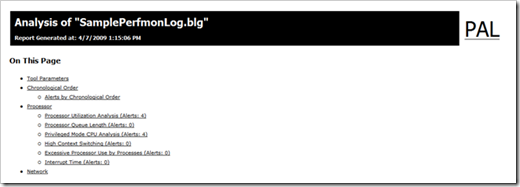
Once the analysis completes, an Internet Explorer window opens that displays the results of the analysis.  The data in this next section is generated from the sample Performance Monitor log file that is provided with the PAL tool.

1

Navigation through the report is fairly straightforward via the table of contents at the top of the page.  Each counter in the contents lists the number of alerts for that counter.  For our demonstration, let’s take a look at the Processor Utilization Analysis (the first one on our list):

2

As you can see, not only is there a description of what we are measuring, but also a visual representation of the counter (scaled for viewing ease!).  Just below that is the breakout of the values with some additional analysis (Std Deviation, Hourly Trend etc)

3

Each counter generates a similar report – making finding areas to investigate that much easier.  Remember, though that this tool is not designed to eliminate the analysis, rather it facilitates it.  Because we don’t have any contextual references or a baseline to compare our sample data to, there may not actually be anything to be concerned about with this system.

With that, it’s time to wrap up this Two Minute Drill.  We hope you enjoyed our post!

…”

I don’t PerfMon enough anymore to really be any good at it anymore (not that I was all the good to begin with, but at least I was comfortable with it…) so any help analyzing a log is help I’ll take.

Thursday, April 09, 2009

PowerShell, OpenXML, WMI and the PowerTools for OpenXML = Doc generation for our inner geek

OpenXMLDeveloper.org - Generating a document using PowerTools for Open XML and PowerShell

“In this article I have a go at creating an Open XML Document using Microsoft’s excellent PowerShell command-line environment. To do so I use PowerTools for Open XML, recently updated on CodePlex (http://www.codeplex.com/PowerTools).

As you’ll see it makes an otherwise difficult task really quite easy.

The scenario

To demonstrate this I’ve come up with what I think might be a reasonably real-world scenario. If not, hopefully it’s enough to get the concept across.

The scenario I chose is one of an SLA (service level agreement) type report. Imagine you’re a company providing an agreed level of service on servers for various clients. It’s quite likely you’d want to send your client details on how well you are fulfilling the SLA.

Here are the basic requirements for this report:

  • Create a PowerShell script that can be run for a specified client and computer name, and produces a single Word document.

  • The beginning of the output document will be tailored for the particular client.

  • The middle will be built up from 1 or more SLA metrics, using WMI information.

    • For simplicity’s sake I’m going to use simple WMI metrics for Processor Time % and Disk Time %

    • Depending on these metrics the appropriate Pass/Fail content will be output.

  • The end will be standard for all clients.

Getting Started

…

All going well you should end up with an output.docx file in the current directory looking like this...

untitled

Conclusion

Thanks to the PowerTools for Open XML we have a simple, but powerful way of building up a document using PowerShell.

PowerShell is very powerful in its own right, but I do believe it would have been a fairly painful to achieve this result without the PowerTools for Open XML.

…”

For whatever reason I find OpenXML doc gen via PowerShell weirdly attractive (like a moth to flame? ;)

(via US ISV Developer Evangelism Team - Generate a Server-side Documents Using PowerTools for OpenXML)


Related Past Post XRef:
Because it’s a PowerShell kind of day… PowerTools for Open XML V1.1 Released
OpenXML PowerTools updated – Cell your Excel via PowerShell
Powering into OpenXML with PowerShell

“Illustrated C# 2008” Free as in eBook curtsey of Red Gate

redgate - Boost your .NET expertise and performance at work

image

“…

Download your free ebook

Illustrated C# 2008
If you're a C++ or VB programmer migrating to C# 2008, this book is well worth reading. The author, Daniel Solis offers a very visual approach – with lots of figures, diagrams and code samples – that will help you get to work with C# fast.”

Because a week without a free ebook is a… well… um… what ever… ;)

image

(via Scattered Notes - Free "Illustrated C# 2008" ebook)

Monday, April 06, 2009

Sharing the Glow - Using TextGlow to display Word documents on SharePoint

Muhimbi - Displaying MS-Word files in a SharePoint Web Part using TextGlow and Silverlight

“…

This article shows you how to embed TextGlow into SharePoint and use it to display content stored in a Document Library. It is assumed that you are familiar with the Content Editor Web Part, if not then check out Todd Bleeker’s excellent resource on this topic.

TextGlow[5]

OK, let’s get started

  1. Make sure you have a copy of Silverlight 2.0 installed on your system
  2. Navigate to an existing or create a new SharePoint site collection.
  3. Download the TextGlow Silverlight viewer, unzip and copy the TextGlow folder (including the folder) to a document Library named ‘Shared Documents’
  4. Add a new Content Editor Web Part (CEWP) to a page of your choice and set the height to something suitable (I used 700 pixels),

…”

Okay, that’s just cool! And it looks like a no coding or server side tweaking solution. Will have to try this as soon as I get a few minutes…

(via James Newton-King - TextGlow SharePoint Web Part)


Related Past Post XRef:
See your OpenXML documents glow in Sliverlight via the newly open sourced TextGlow

Applying distance measuring, range finding magic to your digital picture collection – Range Finder

CodeProject - Range Finder

Rangefinder

Introduction

After a trip and when you are looking at your travel photos, sometimes you want to know some distances or sizes of objects in there. It’s somehow possible.

If you can find some objects in your photos which you know their sizes, you can measure their distances and if you know the distance of an object, you can find the size of it. For example if you know the height of a special building (e.g. Pharos or a tower) and you are kilometers far from it, you can measure your distance by a simple photo. Sometimes it is funny!

…

test7

test8

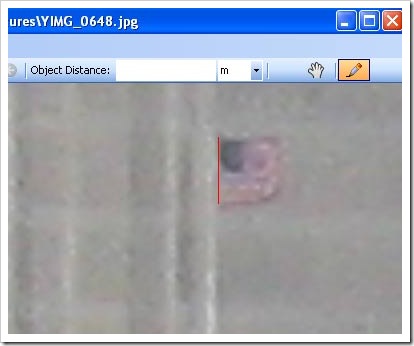
I don’t know the exact size of flag, but I guess it must be about 150 cm (5 feet), if so, I type 150 in the object size box and press enter. The program calculate the distance as about 3 Km.

test10

Points of Interest

Even with low accuracy of this program, I think it is sometimes good and you can have some fun with your photos. At least I hope so.

…”

That’s pretty neat…

Saturday, April 04, 2009

The Redmond Developer & Kathleen Dollard get MEF’ed with VB

Redmond Developer - Ask Kathleen - Working with MEF

“Learn how to free your application from dependencies and interchange implementations using Managed Extensibility Framework.

Q: I've been hearing the term MEF lately and I know it means Managed Extensibility Framework, but I don't understand what it does. Would it be a good fit for allowing customers to add their own forms to our Windows Presentation Foundation (WPF) app? We need those new forms to appear in our menus and we don't want to give customers our Visual Basic source code to recompile.

A: This sounds like a good application for MEF. …

…

MEF is an extensibility model that allows components to interact using a simple model. Components are called parts in MEF (see Figure 1). MEF is designed to be extensible to different types of models, but ships with an attributed model. This lets you define the interaction between your parts via normal .NET attributes. If a part needs something, it uses an Import attribute and if a part supplies something it uses an Export attribute. Any part can be a host or client, provider or consumer. MEF bases these interactions on contracts and offers a flexible discovery model. Your application makes a request and leaves it to MEF to provide the implementation. This frees your application from dependencies and lets you interchange implementations

…

Your application will be the MEF host while your customers will write MEF clients or extensions. Extensions are simpler to write because the host must also manage the CompositionContainer. I'll step through the process of creating an interface, building extensions and building a WPF host.

…

The compose method does the actual preparation:

Private Function Compose() As Boolean
Dim cat As New AggregateCatalog

The aggregate catalog allows you to manage several catalogs together. If a set of catalogs appear together in an aggregate catalog, all matching items within this set of catalogs are discovered. Several different types of catalogs are available, including DirectoryCatalog, which loads all assemblies in a specified directory. In your case, I'd suggest including the location of extensions as part of the application settings to allow later configuration. You'll also add the current assembly:

Dim extLocation = My.Settings.ExtensionLocation
cat.Catalogs.Add(New DirectoryCatalog(extLocation))
cat.Catalogs.Add(New AssemblyCatalog( _
Me.GetType.Assembly))
mContainer = New CompositionContainer(cat)

At this point the container is ready to work, but no work has been requested. A composition batch allows you to specify…

…”

MEF is very likely going to be one of those technologies we’re really going to want to know better when VS2010/.Net4 ships.

(via Brad Adams - Redmond Developer: Working with MEF in VB and WPF)

Related Past Post XRef:
Managed Extensibility Framework (MEF) CTP2 Released – Now with the full source
The Managed Extensibility Framework (MEF) CTP Released (Not to be confused with the Managed Addin Framework [MAF] which became System.Addin)

Anyone who’s made the LA to Vegas drive will have seen this, Zzyzx Road. Ever wanted to know where the heck it went and its history? Google sightseeing has it for you…

Google Sightseeing - Zzyzx, California

“About half way between Los Angeles and Las Vegas you might spot an unusual exit sign on Interstate 15, directing you towards the delightfully unpronounceable Zzyzx Road.

If you were to take the exit, you’d find Zzyzx Road to be rather long, and very boring. …

But the length of Zzyzx Road might well have been a deliberate ploy to keep people stumbling upon what lies at the end…

Up until 1974, travellers that persevered on Zzyzx Road were rewarded with arrival at …

…”

image

Every time I drive to Vegas this road makes me chuckle and wonder just what the heck its story is. Well now I will be able to astound my friends and family with my newly found knowledge, curtsey of Google Sightseeing. :)


Related Past Post XRef:
Some Down Day Google Sightseeing Humor - “Top 10 Rudest Place Names in Britain”
A bird's-eye view [Google Maps with Satellite]
Simi Smiley on Google Sightseeing

Thursday, April 02, 2009

It’s official, SharePoint Designer 2007 is now free… as in free (Reg-ware)

Microsoft Office Online - SharePoint Designer Home Page

image

Microsoft Downloads - SharePoint Designer 2007

“SHAREPOINT DESIGNER 2007 IS NOW FREE! Be sure to watch the video in the "Related Resources" below to learn more about details and future direction. Office SharePoint Designer 2007 provides the powerful tools you need to deliver compelling and attractive SharePoint sites and quickly build workflow-enabled applications and reporting tools on the SharePoint platform, all in an IT-managed environment.

Version: 1
Date Published: 3/31/2009
Language: English
Download Size: 143 KB - 296.0 MB*


SHAREPOINT DESIGNER 2007 IS NOW FREE! Learn more about these changes and future direction. Watch the Q&A video located in the "Related Resources" section below.

Office SharePoint Designer 2007 provides the powerful tools you need to deliver compelling and attractive SharePoint sites and quickly build workflow-enabled applications and reporting tools on the SharePoint platform, all in an IT-managed environment

…”

If you have SharePoint in house (or the free Windows SharePoint Services) and want to tweak it, then this is the tool for you…


Related Past Post XRef:
Rumor: SharePoint Designer 2007, soon to be free? (or given the April 1st date…)

Wednesday, April 01, 2009

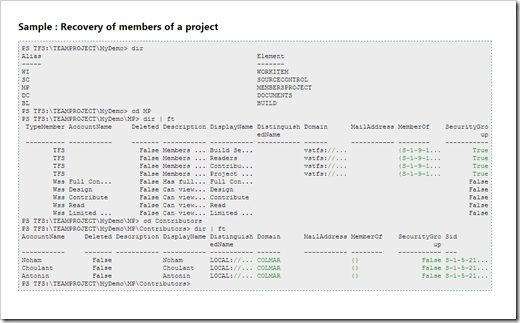
How cool would it be if there was a PowerShell Provider for Team Foundation Server? Where you could CD into a Project and DIR its work items? It’s very cool! Check this out…

PsTFS – TFSProvider

“TFSProvider allows you to browse a TFS server as in Windows Explorer.
At the root of the provider you can access:

  • Workitem
  • SourceControl
  • TeamProject
In each subset it is possible to navigate to other elements.
If you are in a TFSProvider orders PsTFS not need to setting a variable $ tfs

…

Sample : Workitems route of a project

PS TFS:\> cd TEAMPROJECT
PS TFS:\TEAMPROJECT> dir
Name
----
Demo23
DemoAuto
MyDemo
test
VSTS.Noham
PS TFS:\TEAMPROJECT> cd MyDemo
PS TFS:\TEAMPROJECT\MyDemo> Get-ChildItem
Alias Element
----- -------
WI WORKITEM
SC SOURCECONTROL
MP MEMBERSPROJECT
DC DOCUMENTS
BL BUILD
PS TFS:\TEAMPROJECT\MyDemo> cd WI
PS TFS:\TEAMPROJECT\MyDemo\WI> Get-ChildItem Format-Table

…

image

image

image

…”

Dude, how cool is THAT!

CD into A TFS Server, CD into a Project, CD into it’s Source Control, or Work Items or Documents or Builds and then DIR all the members there. ZOMG, that is officially VERY Cool.

Great work Noham!

Related Past Post XRef:
PsTFS – PowerShell and TFS, better than peanut butter and chocolate? (Okay, maybe not, but it’s close… ;)

Free (MS-PL) and OSS Math/Numerical Library for .Net/Mono - dnAnalytics

april_fools_day (Image stolen from Kloonigames - Say No To April Fool)

CodePlex - dnAnalytics

“dnAnalytics is a numerical library for the .NET Framework licensed under the Microsoft Public License. The library is written in C# and is available as a fully managed library, or as a native version that uses the Intel® Math Kernel Library (MKL). The native version of dnAnalytics provides significantly better performance when working with large sets of data. dnAnalytics is compatible with .NET 2.0 or later, and Mono. The managed version will run on a Windows XP or newer, and any platform that supports Mono. The native version supports 32bit and 64bit versions of Windows XP or newer, and 32bit and 64bit versions of Linux.

2009.4 Features
* Linear algebra classes with support for sparse matrices and vectors (with a F# friendly interface).
* Dense and sparse solvers.
* Probability distributions.
* Random number generation.
* QR, LU, SVD, and Cholesky decomposition classes.
* Matrix IO classes that read and write matrices form/to Matlab, Matrix Market, and delimited files.
* Complex and “special” math routines.
* Descriptive Statistics.
* Overload mathematical operators to simplify complex expressions.
* Visual Studio visual debuggers for matrices and vectors
* Runs under Microsoft® Windows and platforms that support Mono.
* Optional support for Intel®Math Kernel Library (Microsoft® Windows and Linux)

…”

My math ed-u-ma-ka-tion ended at Algebra II in high school (with a refresher college course when I was in the Army… decades ago… sigh…) so most of this is WAY over my head. But I still thought it was pretty cool and well worth a post (just because I can’t use it today doesn’t mean I won’t be able to in the future, and it’s my blog, so there! LOL... ;)

(via Visual Studio Gallery - dnAnalytics Numerical Library)

More spicIE – spicIE Contrib the place for spicIE samples and guidance

april_fools_day  (Image stolen from Kloonigames - Say No To April Fool)


MSDN Code Gallery - SpicIE Contrib - Simple Plug-In Creator for Internet Explorer Samples & Guidance

“spicIEContribLogo1Small

SpicIE Contrib = SpicIE Contrib is a contribution project for the SpicIE project.

This project hosts HowTo samples, guidance, code samples, etc. based on the SpicIE Internet Explorer plug-in framework.

There are some Internet Explorer plug-in samples. Comment: If the toolbar plug-ins are not visible use the menu "View --> Explorer bars --> PLUG-IN NAME".

Following sample plug-ins are available now:

  • SimpleLogger - HowTo guide and sample project for a very simple logging Internet Explorer plug-in
  • HtmlView - HowTo guide and sample project for a complex HTML visualization Internet Explorer plug-in

…

  • DisplayActiveElements - Sample project which accesses the applets collection of a HTML document loaded in Internet Explorer ( --> access to ShockWavePlayer, MediaPlayer, ActiveX, ... ). code skeleton
  • WOW Plug-in - A fully functional Internet radio Internet explorer plug-in

…
All samples using the SpicIE framework http://code.msdn.microsoft.com/SpicIE and can be used as Internet Explorer 7 or Internet Explorer 8 plug-ins.

There are some blogs entries about SpicIE at following blog --> http://blogs.msdn.com/mtcmuc/archive/tags/SpicIE/default.aspx

…” [Project Description Leach Level: 96.7%]

I thought that due to today’s the signal to noise ratio finding something cool (and “real”) was going to be tough, until I saw this… :)

(via Mostly Technical Content - SpicIE: “SpicIEContrib” project opened at http://code.msdn.microsoft.com/SpicIEContrib)


Related Past Post XRef:
Taking your first steps with spicIE
Spice up your IE with spicIE – Writing IE7/8 Plugins in managed code in minutes (beta)

Tuesday, March 31, 2009

Fix It for Me for Fix It for Me…

Microsoft Fix it BLOG - Error Code 2738 When Running A Microsoft Fix it Solution!

“Problem description
When running a Microsoft Fix it solution you may encounter an error code 2738. This error occurs because the Windows Script Engine is not properly registered.

…

Error message details
The installer has encountered an unexpected error installing this package. This may indicate a problem with this package. The error code is 2738.

Fix it for me
To fix this problem automatically, click the Fix this problem link. Then, click Run in the File Download dialog box, and following the steps in the wizard.

…”

The recursive nature of this made me chuckle…


Related Past Post XRef:
Getting your Fix it Fix – The Fix it for me blog

The VSTS Ranger Team does it again… Now with the “Visual Studio Team Test 2008 Quick Reference Guide,” 83 free pages all about Team Test

Ed Glas's blog on VSTS load testing - New, comprehensive technical documentation available for Web, Load, and Unit Tests

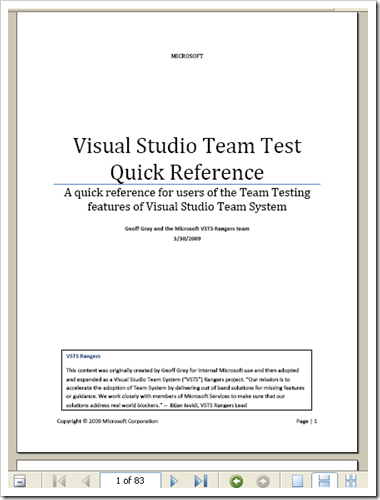
“The VSTS Ranger team, led by Geoff Gray, just published the VSTT Quick Reference Guide 1.0.

This is a comprehensive collection of technical information on VSTT –- 83 pages of information!!! Many questions you may have on how stuff works in web, load, and unit test are answered in this doc. This doc is a must have for anyone working in VSTT.

Geoff and his team, the Microsoft Services Test Labs, deliver professional services for doing performance testing. They are experts at the tools, and work closely with my team (the product team) both to troubleshoot issues as they come up and to help steer the product in the right direction. Whenever Geoff saw an answer in email, figured it out himself, or saw it on a blog post, he put it in the document. …”

CodePlex - VSTT 2008 Quick Reference Guide

“Welcome to the Visual Studio Team Test 2008 Quick Reference Guide Community Site! The purpose of this project is to build some insightful and practical guidance around Visual Studio Team Test. It's a collaborative effort by VSTS Rangers, Microsoft Services, and VSTS Product Team.

VSTS Rangers

This guidance was created in a VSTS Ranger project. VSTS Rangers is a special group with members from the VSTS Product Team and Microsoft Services. Their mission is to provide out of band solutions for missing features or guidance.

What is in the package?

One single PDF file with the following topic areas:
  • SETUP CONSIDERATIONS 9
  • WEB TEST CONSIDERATIONS 14
  • WEB SERVICE TEST CONSIDERATIONS 35
  • UNIT TEST CONSIDERATIONS 36
  • LOAD TEST CONSIDERATIONS 42
  • LOAD TEST RIG CONSIDERATION 56
  • PERFORMANCE DATA COLLECTION AND USAGE 66
  • LOAD TEST RESULTS STORE INFORMATION 73
  • TEST CUSTOMIZATION 76
  • ITEMS CHANGED OR FIXED IN VSTS 2008 SP1 77
  • GENERAL COMMANDS AND TRICKS (NOT VSTS SPECIFIC) 79

…”

image

What I dig about this reference is that it’s not a tutorial, its instead the gathering and sharing of real world knowledge and experience. Just in glancing through it I can see that there’s a great deal of hard won experience captured.


Related Past Post XRef:
Book Review: “Software Testing with Visual Studio Team System 2008” from PACKT Publishing
Team Foundation Server Branching Guidance v2 Released
SQL Load Test – Generate Visual Studio unit/load tests from a SQL Server SQL Trace
Branching Guidance on CodePlex

Monday, March 30, 2009

MonoDevelop 2.0 Released (oh and Mono 2.4 too… )

Mono Project - Mono 2.4 and MonoDevelop 2.0 have been released

“Today we announced the release of both the Mono 2.4 platform and the MonoDevelop 2.0.” [GD: Post Leached in Full]

MonoDevelop - MonoDevelop 2.0 Released

“The MonoDevelop team is proud to announce the release of MonoDevelop 2.0.

MonoDevelop is a GNOME IDE primarily designed for C# and other .NET languages. MonoDevelop enables developers to quickly write desktop and ASP.NET Web applications on Linux. MonoDevelop makes it easy for developers to port .NET applications created with Visual Studio to Linux and to maintain a single code base for all platforms.

New Features

Summary

This new version of MonoDevelop comes with plenty of new features. Here is a summary:

  • Project management
    • Native support for the MSBuild format, with support for multiple target frameworks, and a new project model which allows managing several solutions at the same time.
    • Per-project/solution policies.
    • Vala support.
  • Workbench
    • Support for multi-selection in the solution pad.
    • Pad/document switcher.
    • Go to File dialog with support for acronym matching.
    • New assembly browser.
  • Web development
    • Better support for code completion.
    • Path bar and document outline.
  • Source code editing
    • Improved code completion, with C# 3 support.
    • New managed text editor with support for code folding, split view, colour schemes and incremental search bar.
    • vi modes support.
    • Document outline pad for c# files.
    • Improved Xml editing experience.
  • Integrated debugger
    • Integration of MDB (for debugging Mono applications) and GDB (for debugging native applications).
  • Improvements in most of the existing features, including Version Control integration, the GTK# visual designer, and many others.

…”

Mono Project - Release Notes Mono 2.4

“Mono 2.4 is a portable and open source implementation of the .NET framework for Unix, Windows, MacOS and other operating systems.

…

Major Highlights

This is a released focus on stability and performance and it is also the foundation for Novell's own long-term support Mono-based product.

…”

This is a case where getting Mono is good!  :)


Related Past Post XRef:
MonoDevelop 1.0 has RTM'ed

FileSelect, a re-usable document centric WinForm File menu (one less wheel to re-invent…)

CodeProject - FileSelect - hassle free implementation of the File menu

“FileSelect is a WinForms user control for a default implementation of the "File" menu. All you need to do is to implement opening, saving and closing a document and sending change notifications:

fileselect

This will give you:

  • Correct behavior of Save, Save As and Close - whether this document is new or opened, and whether it was modified.
    this includes asking if the file should be saved, asking for a file name, etc.
  • Correct handling of file modified / not modified.
  • Disabling menu items when they can't be used
  • a Recent Files list - in place or as a popup menu
  • An automatically updating form title, including the current file name and an "is modified" marker
  • Customizable OpenFile / SaveFile dialogs included.

Most of the functionality can be activated selectively, I've tried to keep you in control with the individual features.

The download contains a sample (FileSelectDemo) that implements a basic text editor - or rather, the file handling part -  where you can explore the available functionality. It shows all commands available, including two styles of recent files. Of course, in your application you can add only the items you need.

…

Motivation

I want to share some thoughts that are not directly related to using that control. Why did I write that? Surely, this is a spare time project and way to much time went into it than could ever be justified for commercial development.

First, it is a common pattern, and I get annoyed when I see something not only I have to do over and over, but also everyone else. When learning Windows Forms, I was missing some simplicity here. I did not really (read: "totally not at all") miss the Document / View - Architecture of MFC, as it was to inflexible and stubborn for my taste - you could use either all of it, or none, or you were in for a rough ride. That's one reason this component only handles the "UI side" of providing a document-centric application.

…”

While I’m moving away from WinForm and to WPF, and were I’m still doing WinForms I’m moving toward a Ribbon UI, I still think this project is officially cool.

How many times have we all re-invented the “File” menu in our app’s? Like a billion or two? Yeah. That’s why this project reached out of my notebook screen and smacked me on my forehead (a whole V8 moment thing). In hindsight this is pretty darn logical. Investing a few extra minutes so you don’t have to re-invent the File menu every time for every project seems like a no brainer doesn’t it? Especially when Peter’s done much the grunt work for us!  :)

Sunday, March 29, 2009

[No Action Required] Feed Tweaks & finding your magical Blogger Feed URL

Summary

I’ve just made a change to my FeedBurner feed configuration for this blog. This should be totality transparent to you and there’s no action required on your part. I just feel that any change should be communicated, just to keep everyone in the loop, just in case…

Details

Seems like FeedBurner/Blogger “broke” someway yesterday.

I created a post yesterday, Saturday, afternoon but as of this morning it hadn’t been picked up by FeedBurner.  Friday’s posts were fine, and I made no changes on either side, yet there was nothing I seemed I could do to get Saturday's post into the feed. I played the Ping game, the Resync game, edit post and resave game, etc, etc. And still 18 hours later the post was not appearing in the FeedBurner feed… sigh.

I did confirm that the post WAS appearing in the xml provided by Blogger, so Blogger didn’t seem to be the broken party. How do you do this if you have your Blogger feed redirected to FeedBurner? I’ll show you a trick…


Each Blogger blog as a magical/special feed that is not redirected, no matter how you have your blog set up. Meaning this feed will return your data directly from Blogger no matter how you have your “Post Feed Redirect URL” configured.

The format for this feed URL is http://www.blogger.com/feeds/[Blog’s ID]/posts/default

My blog’s ID is 5655811 so my “real and unredirected” feed URL is http://www.blogger.com/feeds/5655811/posts/default

How do you find your Blog ID/feed URL? View Source on your blog and search for “service.post”. The value in the href is your unredirected feed URL.image 
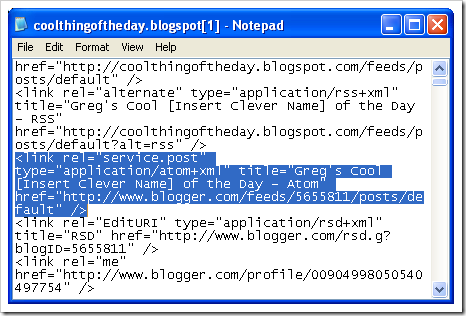
<link rel="service.post" type="application/atom+xml" title="Greg's Cool [Insert Clever Name] of the Day - Atom" href="http://www.blogger.com/feeds/5655811/posts/default" />


… We now return to our story …

So with this data in hand, the fact that I’ve confirmed Blogger has the new post in its feed but FeedBurner doesn’t, I concentrated on the FeedBurner side of the equation. (Though it does seem that Blogger did a very recent update… I don’t remember seeing a “Monetize” on my blog setup dashboard… when that appear?)

Okay, the new post is in the feed from the source… kind of. It’s in the direct feed URL, but maybe not the feed FeedBurner is using? When I setup FeedBurner years ago I used the only feed URL available at the time as the Original Feed URL in my FeedBurner setup, http://coolthingoftheday.blogspot.com/atom.xml.

Now if I go to that feed, and have the “Post Feed Redirect URL” on the blog setup, it redirects to the FeedBurner feed (as it should). Blogger/FeedBurner used to be able to handle this. It used to be smart enough handle this circular reference and get the right data into the feed.

What if something changed Friday/Saturday, breaking this?

Thinking what the heck, I changed by FeedBurner “Original Feed” to my blog’s “service.post” feed, and viola! My new post is now showing up in my FeedBurner feed!


WTH? The funny thing is that Google owns both sides of this, Blogger and FeedBurner. …long deep sigh…

ANYWAY, long story short, I’ve tweaked by FeedBurner feed a little and all seems well. As you can imagine I’ll be keeping on eye on this…

Saturday, March 28, 2009

PowerShell for SQL Server 2000+ - Chad Miller’s SQL Server PowerShell Extensions v1.5 released, with 104 functions, 2 cmdlets and 12 scripts

Chad Miller's Blog - SQLPSX 1.5 Release

“I completed Release 1.5 of SQLPSX which adds 31 new functions for working with database maintenance (CHECKDB, Index rebuilds, backup and restore) as well as login, user, role and permission management. With this release there are now 104 total functions, 2 cmdlets and 12 scripts around SMO, Agent, RMO, and SSIS.

Here's a few examples working with database maintenance functions:

#Get a database object
$db = get-sqldatabase 'Z002\SqlExpress' pubs

#Run a checkdatabse
invoke-sqldatabasecheck $db
$db invoke-sqldatabasecheck

…

SQLPSX 1.5 marks what I consider the first feature complete release. I believe the most common database administration tasks can be accomplished using the 107 functions/cmdlets provided in SQLPSX. If you feel something is missing please post to the discussion forum.

With Release 1.5 complete, I'm starting work on the 1.6 Release which will include two enhancements. …”

CodePlex - SQL Server PowerShell Extensions

“Project Description
The primary goal of SQL Server PowerShell Extensions (SQLPSX) is to provide intuitive functions around the SMO objects which are backward compatible with SQL 2000. A secondary goal is to provide an application which reports flatten/effective security settings for logins, users, roles, and permissions.

Installation

SQLPSX consists of a library file of PowerShell functions and several PowerShell scripts, if you've downloaded the files through Internet Explorer you'll need to unblock all Powershell files after downloading by right-clicking each PowerShell file in Windows Explorer and clicking the Unblock button. Using SQLPSX requires you've installed the SMO libraries which are included with SQL Server Management Studio.

…”

SQL Server PowerShell Extensions - 1.5 Production

“Released: Mar 28 2009

Updated: Mar 28 2009 by cmille19

Dev status: Stable

…

Downloads & Files

SQLPSX_1.5.zip
source code, 640K, uploaded Today…

readme.txt
documentation, 22K, uploaded Today…

screenshots_SQLPSX.docx
documentation, 1315K, uploaded Today…

Release Notes

Release 1.5 introduces 31 new functions for working with database maintenance, backup/restore, logins, roles, users and permission management. The release also includes two compiled cmdlets with help files for parsing and formatting of SQL Server scripts. SQLPSX consists of 105 total functions, 2 cmdlets and 12 scripts for working with SMO, Agent, RMO, SSIS and SQL script files. In addition an optional component of a backend database and SQL Server Reporting Services 2008 reports are provided. See readme file for details.”

SQL Server Central - SQL Server PowerShell Extensions (SQLPSX) Part 1

“Solving a SQL Server administration task with PowerShell scripts often requires the use of SQL Server Management Objects (SMO). For a DBA new to PowerShell scripting this presents a doubly step learn curve first you must learn the PowerShell language and then you must learn the SMO objects necessary to accomplish your task. There are many wonderful books and tutorials available for learning PowerShell. A good starting point is the Windows PowerShell site. For learning SMO objects, the goal of the CodePlex project SQL Server PowerShell Extensions (SQLPSX) is to provide intuitive PowerShell functions around SMO objects to make working with SMO from PowerShell easier. This article is not intended to be an introduction to PowerShell, but rather an introduction to SQLPSX. A basic understanding of PowerShell is helpful, but not necessary to follow the examples.

…”

SQL Server Central - SQL Server PowerShell Extensions (SQLPSX) Part 2

“Part 1 of SQL Server PowerShell Extensions (SQLPSX) demonstrated how to install the and use the SQLPSX PowerShell functions. In this second article we will create a database to store the output of the functions, load the data and look at the SQL Server Reporting Services (SSRS) reports and queries provided with SQLPSX to analyze SQL Server security information.

…”

What better way to spend a Saturday than playing with PowerShell and Chad’s SQL Server Extensions? ;)

(via Richard Siddaway's Blog - SQLPSX 1.5)

Related Past Post XRef:
NodeXL, PowerShell and building a visual SQL Dependency Graph

Friday, March 27, 2009

DockPanel is alive and well… V2.3 Released

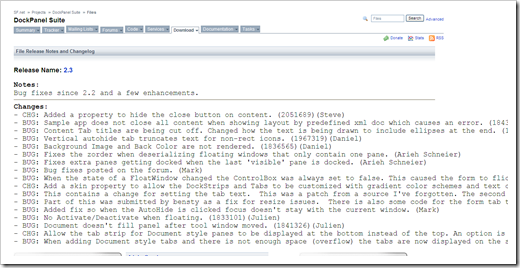
DockPanel Suite – Release 2.3

“Notes: Bug fixes since 2.2 and a few enhancements.


Changes:
- CHG: Added a property to hide the close button on content. (2051689)(Steve)
- BUG: Sample app does not close all content when showing layout by predefined xml doc which causes an error. (1843274)(Steve)

SourceForgenet DockPanel Suite Files

…”

SourceForge.Net - DockPanel Suite

“The docking library for .Net Windows Forms development which mimics Visual Studio .Net.

untitled

…”

Not a ton of changes, fixes and additions, but the sign that the project is still alive and kicking is the good to see…


Related Past Post XRef:
DockPanel 2.2 Released
DockPanel 2.0 Released
Dock Panel Suite - Public Domain VS Like Docking Component Written in C#

OpenXML/ODF Translator Add-in for Office v3 Released

OpenXML/ODF Translator Add-in for Office – V3.0 Download

image

Looks like the Open XML/ODF Office Addin V3 is done and ready for download. Haven’t seen any posts yet on what goodness is in v3, but newer is always better, right?  ;)


Related Past Post XRef:
ODF for Microsoft Office v2.5 Released
ODF for Microsoft Office v2.0 (Word, Excel, PowerPoint) Now Available
Word ODF Addin v1.1 Released
ODF Translator (ODF for Word Addin) 1.0 Released