Saturday, April 24, 2010

It’s TFS Tool Time! TFS 2010 RTM compatibility Power Tools, MSSCCI and new Build Extension releases

Buck Hodges - TFS 2010 Power Tools are now available!

“Here is the first full release of Power Tools for TFS 2010!  Previously we had released versions for beta 2 and RC.  With this release the focus was to have parity with the 2008 power tools and fix bugs.  We’ll be adding new power tools in the next release (no date yet).

TFS Build Extension Power Tool  is an exciting new addition to our power tools line up.  The Build Extensions provide the ability to execute Ant or Maven 2 builds from Team Foundation Server and publish the results of the build along with any associated JUnit test results back to Team Foundation Server.  This release is compatible with Team Foundation Server 2005, Team Foundation Server 2008 and Team Foundation Server 2010.” [GD: Post Leached in Full]

Visual Studio Gallery - Team Foundation Server Power Tools April 2010

“…

  • Last Updated: Friday, April 23, 2010
  • Version: 3.0.30423.0
  • Supported Versions Visual Studio 2010

    …

    This release supports Visual Studio Team Foundation Server 2010. The following highlights the tools available in this release

    Alerts Explorer

    …

    Microsoft Team Foundation Server 2010 Best Practices Analyzer

    …

    Custom Check-in Policy Pack

    …

    Process Editor

    …

    Team Explorer Enhancements

    …

    Team Foundation Power Tool (TFPT.EXE) Tool

    …

    Team Members

    …

    Windows PowerShell Cmdlets for Visual Studio Team System Team Foundation Server

    …

    Windows Shell Extensions

    …

    Work Item Templates

    …

    image

    …”

  • Visual Studio Gallery - Team Foundation Server MSSCCI Provider April 2010

    “…

  • Last Updated: Friday, April 23, 2010
  • Version: 3.3

    …

    The Team Foundation Server MSSCCI Provider enables integrated use of Team Foundation Version Control with products that do not support Team Explorer integration.

    This version (3.3) includes:

    • Updated provider to link against VS 2010 RTM TFS assemblies
    • Improved functionality and performance when used inside PowerBuilder
    • Improved handling of branched solutions in SQL Server Management Studio
    • Decreased number of server prompts
    • Improved error reporting

    …”

  • Visual Studio Gallery - Team Foundation Server Build Extensions Power Tool April 2010

    “…

  • Last Updated: Friday, April 23, 2010
  • Version: 3.0.30423.0
  • Supported Versions Visual Studio 2010
  • …

    The Team Foundation Build Extensions provide the ability to execute Ant or Maven 2 builds from Team Foundation Server and publish the results of the build along with any associated JUnit test results back to Team Foundation Server.  This release is compatible with Team Foundation Server 2005, Team Foundation Server 2008 and Team Foundation Server 2010.

    Prerequisites

    You must have the following installed on the same server that is hosting the Team Foundation Build Agent:

    • Java JDK (the latest one available from your JDK vendor is recommended)
    • Ant (if Ant support is required).
    • Maven 2 (if Maven support is required)

    …

    image

    …”

    I like the promise of new Tools in the future… ;)


    Related Past Post XRef:
    Extending the Team Members feature in the VSTS 2008 TFS Power Tools October 2008 Release. For example, adding Skype support…
    VSTS 2008 TFS Power Tools - October 2008 (aka 2.3) Released – Manage Source Files via Windows Shell/Explorer extension, new PowerShell extensions and Team Members tool
    TFS Power Tools - July 2008 Release (aka v2.2) – Welcome to Alert editing goodness
    TFS Power Tools - March 2008 Release (aka v2.1). Build Notification, Find in Source Control, Process Template Editor TFS2008 updates and Destroying Work Items...
    VSTS 2008 TFS Power Tools (December 2007) Released (aka TFPT 2.0)
    TFS Power Tools, v1.3 (September 2007 Release), with Two New Tools, TFS Best Practices Analyzer and Work Item Templates
    Team Foundation Server Power Tool, Process Template Editor Tip - If you open a *.WIT file and it appears as a normal XML file, instead of in a Designer...
    Microsoft Visual Studio 2005 Team Foundation Server Power Tool (formerly known as Power Toys) - V1.2, February 2007

    Microsoft StyleCop going open!

    Microsoft StyleCop - StyleCop is going Open Source!

    “I am very excited to announce that Microsoft has decided to take StyleCop Open Source under the MS-PL license. Specifically, this means that we will create a new project on CodePlex.com containing the full code base for StyleCop, and all future development on StyleCop will be done from that CodePlex site. Microsoft will continue to manage the StyleCop project, and Microsoft will be responsible for creating and releasing official signed builds. However, we will also take code submissions from the community, and you will have access to all of the source!

    Since StyleCop was released publicly, there has been an overwhelmingly positive response from the C# development community. StyleCop has been adopted by many developers and dev teams worldwide. Many tools related to StyleCop have sprung up and StyleCop has been integrated into a number of different C# development environments. This has been excellent to see.

    …

    In a few weeks we will be taking the StyleCop CodePlex site live, and shortly after that we will be releasing StyleCop 4.4, which provides full support for C# 4.0, as well as a large number of bugfixes and other improvements. Stay tuned!”

    MSDN Code Gallery – StyleCop

    “StyleCop analyzes C# source code to enforce a set of style and consistency rules. It can be run from inside of Visual Studio or integrated into an MSBuild project

    For more information about Microsoft StyleCop see the StyleCop blog at http://blogs.msdn.com/sourceanalysis.

    …”

    Nice! Not currently being much of a C# dev, I haven’t used this, but that doesn’t mean I haven’t wanted too! (and whined about it not support VB, yada, yada…).

    Well now that it’s going to be open sourced, maybe I’ll just SEE about that VB support! MUHAHAHAHA

    Again I applaud the releasing of the source for something like this. Tools, utilities, add-on’s, etc that are not material to the revenue for a product, contain no/little IP, don’t have licensing issues, etc, etc are great candidates for releasing of their source code.

    Every developer today stands on the shoulders of past giants. It’s our responsibility to be there for new/future people to stand on ours…

    Friday, April 23, 2010

    Feel at home with Azure? Well then, how about a free online hands-on workshop, with two weeks of free Azure hosting, for ya? - “@Home with Windows Azure”

    StructureTooBig Blog - Register To Attend A Windows Azure Virtual Hands-On Workshop

    “I’m really excited to announce a project my colleagues Jim, John and I have been working on.  We wanted to come up with a project that would: 1) be fun for users to learn Azure, 2) help illustrate scale, 3) do something useful, and 4) be fun to develop (from our end). 

    I think we got it!  Here is a rundown:

    Elevate your skills with Windows Azure in this hands-on workshop! In this event we’ll guide you through the process of building and deploying a large scale Azure application. Forget about “hello world”! In less than two hours we’ll build and deploy a real cloud app that leverages the Azure data center and helps make a difference in the world. Yes, in addition to building an application that will leave you with a rock-solid understanding of the Azure platform, the solution you deploy will contribute back to Stanford’s Folding@home distributed computing project. There’s no cost to you to participate in this session; each attendee will receive a temporary, self-expiring, full-access account to work with Azure for a period of 2-weeks.

    Visit the project home page at http://distributed.cloudapp.net.

    For this briefing you will:

    • Receive a temporary, self-expiring full-access account to work with Azure for a period of 2-weeks at no cost - accounts will be emailed to all registered attendees 24-48 hours in advance of each event.

    • Build and deploy a real cloud app that leverages the Azure data center

    Who should attend?

    Open to developers with an interest in exploring Windows Azure through a short, hands-on workshop

    …

    image

    …”

    This isn’t a static lecture, but a hands-on, get your fingers into the code and have stuff really running on Azure (with two weeks of free Azure hosting included).

    (via Pla.NET Southeast! - Get your head in the cloud(s) with this free training)

    And AGAIN a PDF Redaction gone wrong... When will you get the message!?

    Capitol Fax Blog - *** UPDATED x1 *** Blagojevich hurls allegations at Obama in bid to force testimony

    “Rod Blagojevich’s attorneys filed a motion today to subpoena President Obama to testify at the former governor’s trial…

    “President Obama has direct knowledge to allegations made in the indictment. In addition, President Obama’s public statements contradict other witness statements, specifically those made by labor union official and Senate Candidate B,” the motion said.

    The motion is here. Several parts are redacted, but you can easily copy and paste the entire motion into a text file and view all the redacted material. Oops on somebody’s part.

    * All of the most explosive allegations in the motion were redacted.

    …”

    NBC Chicago - Redactions Revealed: The Six Secrets You Need to Know From the Obama Subpoena Request

    “Update: Judge calls emergency meeting over redaction errors.

    Former governor Rod Blagojevich's defense team asked Thursday to issue a trial subpoena to the President of the United States of America.

    The motion, intended to be heavily redacted, was improperly edited -- the full document was easily viewable if the text is copied and pasted to another document (an error first revealed on Capitol Fax).

    Below, the six revelations the redacted portions were meant to conceal.

    …”

    This is starting to be not funny. Really, another non-really-redacted redacted PDF? Really? Really?

    If you produce a PDF would you PLEASE CHECK IT for this stupid and simple thing? Wake up people! It’s not like this is some secret, uber ninja hacker skillz needed method, it’s fricken copy and paste!

    Sorry for getting upset, but this is like the gazillion’th time this has happened, and happened with a highly visible way. sigh…

    image

    (via Coworker’s Facebook Status Update[Name redacted to protect the innocent, but you know who you are Charlie])


    Related Past Post XRef:
    PDF’s and Redaction gone wrong… again…
    Another PDF Redaction Snafu
    US Military PDF Redaction "Issue"
    CSI Trick of the day: How do you look “under” black Magic Marker’ed text?

    "Clean Up After Your PDFs"
    Microsoft Word 2007 Redaction Tool and Source released on CodePlex
    Office 2003 Add-in: Word Redaction

    Don’t you wish there was a simple way to search all the Windows Group Policy entries? There IS! Check out the “Group Policy Search” site.

    Group Policy Search (http://gps.cloudapp.net/)

    image

    So lets say you’re interested in the screen saver timeout (say because your machine’s timeout is being set to 10 minutes by your IT group and that just gets in your way and you want to know where in the registry that policy is being applied so you can self service the issue).

    In the search box, start typing in a search. As we’ve come to expect, suggestions are made as you type…

    image

    Here’s the search results…

    image

    If seeing the results in a Registry based view makes more sense to you, just hit the “>” button (see how it “points” the the “Registry view” button?)

    image

    You can refine your searches too,

    image

    Pretty cool, isn’t it? A lot easier that digging through XLS (Group Policy Settings Reference for Windows and Windows Server)

    So you’re saying you don’t see a way to get a perma-link, to make it easy to share a given entry?… Right-Click It!

    image

    Here’s the Policy URL for the above, http://gps.cloudapp.net/Default.aspx?PolicyID=96

    And yeah, you’re not seeing things, you can add this site as a IE 7/8 Search (“Provider”) AND to your Windows 7  (“Connector”) search too!

    image


    In a word? Awesome…

    (via Peter Kirchner Online - Group Policy Search ist live!)

    WebsitePanel (fka DotNetPanel) – The now free, OSS/BSD, web based control panel for your Windows servers

    The Web and Microsoft - DotNetPanel Open Sourced as WebSitePanel!

    “On yesterday SMB SAAS Systems makers of DotNetPanel Announced that they would be revising the DotNetPanel codebase and releasing as WebsitePanel as an open source project available on Source Forge. 

    This will be huge for hosting providers and server admins looking to provide a low cost Control Panel alternative …”

    WebsitePanel

    “WebsitePanel is an easy to use control panel for Windows hosting. It allows you to manage multiple servers, it has a robust, scalable and secure architecture.

    With WebsitePanel you can easily manage all your web sites, FTP accounts, databases and other resources from a single place.

    …

    WebsitePanel highlights:

    …

    image

    …”

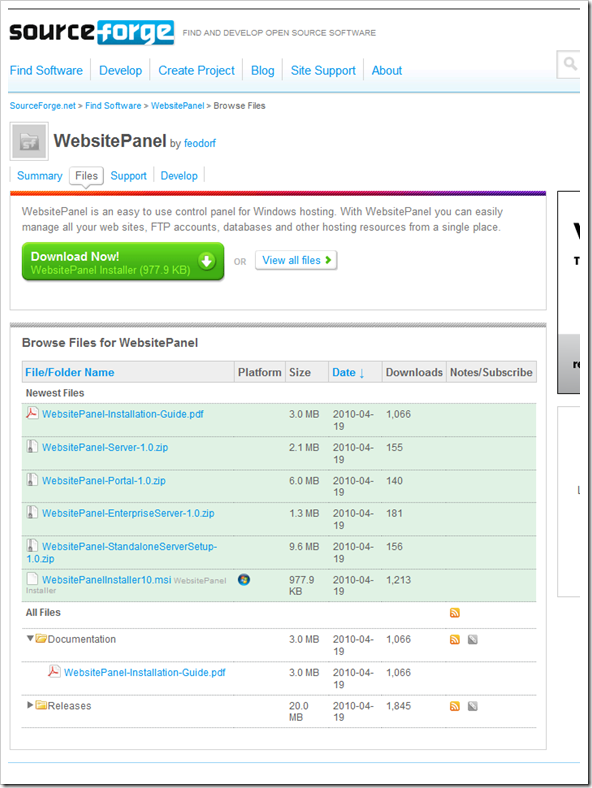
    SourceForge – WebsitePanel – Files

    image

    Cool! I don’t know if I’ve seen an broad/feature complete web control panel of this scope priced so well, nor one OSS’ed.

    There’s a tone of code here to spelunk too if you’re interested. :)

    Thursday, April 22, 2010

    Team Explorer Everywhere + Codeplex = Free (as in free)

    Martin Woodward - Using Team Explorer Everywhere with CodePlex

    “People using CodePlex can download Visual Studio Team Explorer to access a CodePlex hosted TFS instance free of charge, but what if you want to be a project team member and access the code from Eclipse or a non-windows machine?

    Well, I’m proud to say that we’ve continued the tradition and you can now use Team Explorer Everywhere with CodePlex.  Simply download the trial edition of Team Explorer Everywhere and then enter the license key given on the CodePlex wiki.  Note that if you already have a full license to Team Explorer Everywhere (either through retail, volume licensing or MSDN) then you can obviously use this to access CodePlex as well.

    Just a quick tip.  When adding the connection, be sure to hop over to the Advanced tab to ensure that you do not have “tfs” in your path. …

    …

    image

    …”

    CodePlex Information and Discussion - Obtaining the Team Explorer Everywhere Client

    “The Team Explorer Everywhere client works on Windows, Linux, Mac, or Solaris. It provides a command line client and plug-in for Eclipse to access Team Foundation Server.

    To access the CodePlex servers using Team Explorer Everywhere you can use the following free product key: …

    image

    …”

    That’s cool that Microsoft is keeping this traditional alive. Less barriers to source version control is a good, good thing.


    Related Past Post XRef:
    Free Teamprise For CodePlex - It's a Keeper
    "Free (as in beer) Teamprise license for CodePlex users"

    Team Foundation Server Workspaces 101

    I call him Mini-SharePoint! – SharePoint Foundation 2010 (i.e. new version of WSS/Windows SharePoint Services with a new name)

    Microsoft Downloads - Microsoft SharePoint Foundation 2010

    “Microsoft SharePoint Foundation 2010 is for smaller organizations or departments looking for a low-cost entry-level or pilot solution for secure, Web-based collaboration

    File Name: SharePointFoundation.exe
    Version: 1
    Date Published: 4/22/2010
    Language: English
    Download Size: 1 KB - 169.6 MB*


    Overview

    SharePoint Foundation 2010 is the new version of Microsoft Windows SharePoint Services. [GD: Emphasis added] It is the essential solution for organizations that need a secure, manageable, web-based collaboration platform. ​SharePoint helps teams stay connected and productive by providing easy access to the people, documents, and information that they need to make well-informed decisions and get work done. Use SharePoint Foundation to coordinate schedules, organize documents, and participate in discussions through team workspaces, blogs, wikis, and document libraries on the platform that is the underlying infrastructure for SharePoint Server.

    Search Server 2010 Express: If you’re using SharePoint Foundation, you can easily add search capabilities to your collaboration environment across SharePoint sites, file shares, web sites, Exchange Public Folders, and third party repositories using Microsoft Search Server 2010 Express. Click here to download. ​

    System Requirements

    • Supported Operating Systems: Windows Server 2008 R2; Windows Server 2008 Service Pack 2
    Please review the SharePoint Foundation 2010 system requirements before you proceed. Actual requirements and product functionality may vary based on your system configuration.

    …”

    Ahh… I think this is a better name for WSS, much less confusing…


    On a related note, this might come in handy for you, Priyo's SharePoint Blog - SharePoint Foundation Install Error – SQL Server has an unsupported Version…

    The free SharePoint Designer continues with the release of SharePoint Designer 2010 (but Note the Note!)

    Microsoft Downloads - Microsoft SharePoint Designer 2010

    “SharePoint Designer 2010 is the tool of choice for the rapid development of SharePoint applications.​

    File Name: SharePointDesigner.exe
    Version: 1
    Date Published: 4/21/2010
    Language: English
    Download Size: 254.1 MB


    SharePoint Designer 2010 is the tool of choice for the rapid development of SharePoint applications. Using SharePoint Designer, advanced users and developers alike can rapidly create SharePoint solutions in response to business needs. Advanced users can compose no-code solutions that encompass a variety of common scenarios, from collaborative sites and web publishing to Line-Of-Business data integration, business intelligence solutions, and human workflows, leveraging the building blocks available in SharePoint in an easy to use environment. In addition, developers can use SharePoint Designer 2010 to get a quick start on SharePoint development projects.​

    …

    Note: SharePoint Designer 2010 only connects to SharePoint 2010. To connect to SharePoint 2007 and earlier sites you must continue to use SharePoint Designer 2007 . If you elect to install both applications side-by-side, you must download the 32-bit version of SharePoint Designer 2010. Please also note that 64 bit Office applications will not run if SharePoint Designer 2007 is installed; 64-bit Office 2010 applications should only be used if not connecting to SharePoint 2007 servers.

    …”

    Note the Note above!

    Anyway… Cool to see this product is still around and still free.

    This is one of those if you need it, you need it kind of applications… (and if you don’t no sense in downloading/installing it)


    Related Past Post XRef:
    It’s official, SharePoint Designer 2007 is now free… as in free (Reg-ware)

    WhiteHouse.Gov gives Drupal an open source stimulus – Three WhiteHouse.Gov projects released to Drupal as Open Source

    The White House Blog - WhiteHouse.gov Releases Open Source Code

    “As part of our ongoing effort to develop an open platform for WhiteHouse.gov, we're releasing some of the custom code we've developed. This code is available for anyone to review, use, or modify. We're excited to see how developers across the world put our work to good use in their own applications.

    By releasing some of our code, we get the benefit of more people reviewing and improving it. In fact, the majority of the code for WhiteHouse.gov is already open source as part of the Drupal project. The code we're releasing today adds to Drupal's functionality in three key ways:

    1. Scalability: We're releasing a module called "Context HTTP Headers," …

    …

    2. Communication: Many government agencies have active email programs that they use to communicate with the public about the services they provide. …  To enable more dynamic emails tailored to users' preferences, we've integrated one of the popular services for government email programs with our CMS in the new module, "GovDelivery".

    …

    3. Accessibility: We take very seriously our obligation to make sure WhiteHouse.gov is as accessible as possible and are committed to meeting the government accessibility standard, Section 508.  … To help us meet this, while making it easier to manage the rich photos and video content you see on our site, we've developed "Node Embed."

    image ”

    I don’t do Drupal, but I still thought this is kind of cool. Our tax dollars are going into the development of WhiteHouse.Gov anyway, so it’s good to see a little return on that investment. I think I find it more even amazing that the government/White House/etc lawyers let this happen…

    So look Corp America, if the the Executive Branch of the US Government can release some of their code as open source, what’s holding YOU back?

    Wednesday, April 21, 2010

    [Break Room Humor] “This is an Ice Machine”

    I saw this in my break room and it me chuckle…

    0421000622

    Context:
    0421000621

    SQL Server 2008 R2/SQL Server 2008 R2 Express RTM/RTW Today

    Microsoft Downloads - Microsoft SQL Server 2008 R2 RTM – Express

    “Microsoft® SQL Server® 2008 R2 Express is a powerful and reliable data management system that delivers a rich set of features, data protection, and performance for embedded applications, lightweight Web Sites and applications, and local data stores

    Version: 10.50.1600.1
    Date Published: 4/16/2010
    Language: English

    …”

    Microsoft Downloads - Microsoft SQL Server2008 R2 RTM - Express with Advanced Services

    “The Microsoft® SQL Server® 2008 R2 RTM - Express is a powerful and reliable data management system that delivers a rich set of features, data protection, and performance for embedded applications, lightweight Web Sites and applications, and local data stores. Designed for easy deployment and rapid prototyping, this download includes support for Sysprep, Microsoft's System Preparation Utility for Microsoft Windows operating system deployment.

    SQL Server Express with Advanced Services is an easy-to-use version of the SQL Server Express data platform that includes the graphical management tool SQL Server Management Studio (SMSS) Express, powerful features for reporting, and advanced text-based search capabilities

    …”

    Microsoft Downloads - Microsoft® SQL Server 2008 R2 Evaluation : Trial Experience for Developers

    “Download SQL Server 2008 R2 180-day Trial Software. Building on SQL Server 2008, R2 provides an even more scalable data platform with comprehensive tools for managing your databases and applications,improving the quality of your data, and empowering your users to build rich analyses and reports using tools they are already familiar with.

    …”

    Microsoft Downloads - Microsoft SQL Server 2008 R2 RTM - Management Studio Express

    “Microsoft SQL Server 2008 R2 Management Studio Express (SSMSE) is an integrated environment for accessing, configuring, managing, administering, and developing all components of SQL Server Express. …”

    Some of the download links are working for me, some not, and nothing. as of this writing, is new on MSDN Subscribers Download. But I’ve heard an announcement was being made by the SQL Server team today, so it is a good bet it is the RTM word (and thereby these links all will work in a bit). YMMV, etc, etc

    Update #1 4/21/2010 @ 8:00AM PST:

    Yep, Today is SQL Server 2008 R2 RTM day…

    Microsoft Presspass - SQL Server Virtual Press Room

    “Welcome to the Microsoft SQL Server News Center! We are excited to inform you that SQL Server 2008 R2 has released to manufacturing, meaning customers will get it through our distribution channels in the next few weeks …

    image

    The Microsoft Patterns & Practices Catalog Cheat Sheet

    J.D. Meier's Blog - patterns & practices Catalog at a Glance

    “Periodically I create a simple summary table of our patterns & practices collection of assets.  This helps me analyze the collection as a catalog.  To keep it incredibly simple, I organize the catalog by guidance types.  This way, at a glance, I can see the collections of guides, patterns, factories, reference implementations, and EntLib.  In this case, I also added any work in progress that I was aware of to get a real bird’s-eye view of the catalog.

    …

    image

    …”

    In short, don’t reinvent the wheel if you don’t have to…


    Related Past Post XRef:
    [There’s just to many to reference, I’ve blogged about many/most of these in the past, please search or check the appropriate tags on the right of the blog… thanks :]

    Microsoft Enterprise Library 5.0 and Unity 2.0 RTW (& EntLib 3.x, 4.x to 5.0, Unity 1.x to 2 Migration Guide)

    Grigori Melnik: Thoughts on Agile Software Engineering and Beyond - Microsoft Enterprise Library 5.0 Released!

    “Last Friday I signed off on the last quality gates!  Yesterday we had our Release Readiness Meeting, which gave a resounding GO to the Enterprise Library 5.0 and a round of applause to the team. As one of the directors concluded “It is a beautiful thing… Not just the product, but also how you’ve got there.”

    And now… a drum roll, please. On behalf of the patterns & practices Enterprise Library team I am very excited to announce the world-wide availability of Microsoft Enterprise Library 5.0.

    What is Enterprise Library ?

    Enterprise Library is a collection of reusable software components (application blocks) designed to assist software developers with common enterprise development challenges (such as logging, validation, caching, exception handling, and many others). Application blocks encapsulate Microsoft recommended development practices; they are provided as source code plus tests and documentation that can be used "as is," extended, or modified.

    …

    image

    …”

    Microsoft Downloads - Microsoft Enterprise Library 5.0

    “Microsoft Enterprise Library is a collection of reusable application blocks designed to assist software developers with common enterprise development challenges. This release includes: Caching Block, Cryptography Block, Data Access Block, Exception Handling Block, Logging Block, Policy Injection Block, Security Block, Validation Block, and Unity.

    Version: 5.0
    Date Published: 4/20/2010
    Language: English
    Download Size: 5.3 MB - 16.4 MB*

    …

    This major release of Enterprise Library contains many compelling new features and updates that will make developers more productive. These include:

    • Major architectural refactoring that provides improved testability and maintainability through full support of the dependency injection style of development
    • Dependency injection container independence (Unity ships with Enterprise Library, but you can replace it with a container of your choice)
    • Programmatic configuration support, including a fluent configuration interface and an XSD schema to enable IntelliSense
    • Redesign of the configuration tool to provide:
      • A more usable and intuitive look and feel
      • Extensibility improvements through meta-data driven configuration visualizations that replace the requirement to write design time code
      • A wizard framework that can help to simplify complex configuration tasks
    • Data accessors for more intuitive processing of data query results
    • Asynchronous data access support
    • Honoring validation attributes between Validation Application Block and DataAnnotations
    • Integration with Windows Presentation Foundation (WPF) validation mechanisms
    • Support for complex configuration scenarios, including additive merge from multiple configuration sources and hierarchical merge
    • Optimized cache scavenging
    • Better performance when logging
    • A reduction of the number of assemblies
    • Support for the .NET 4.0 Framework and integration with Microsoft Visual Studio 2010
    • Improvements to Unity

    …”

    Microsoft Downloads - Microsoft Enterprise Library 5.0 Migration Guide

    “…

    Version: 5.0
    Date Published: 4/20/2010
    Language: English
    Download Size: 649 KB - 1.3 MB*


    This guide explains the opportunities open to you for migrating applications built using Enterprise Library versions 3.1, 4.0, and 4.1, and versions 1.0 and 1.1 of Unity to use version 5.0 or Enterprise Library and version 2.0 of Unity.

    Because individual application scenarios and environments vary, and the way Enterprise Library and Unity are used within existing applications will differ considerably, this guide cannot guarantee success in every situation. However, it contains practical guidance that is based on knowledge gathered during the development of Enterprise Library 5.0, and through test migrations of a range of different existing applications.
    …”

    It’s like a RTM/RTW kind of month…


    Related Past Post XRef:
    Enterprise Library 4.0 RTW (May 2008)
    Unity 1.0, Microsoft's Dependency Injection, Inversion of Control (DI/IOC) Container, has RTW'ed
    Enterprise Library 3.0 - April 2007 Released
    Enterprise Library for .NET Framework 2.0 RTM (January 2006)
    Enterprise Library MSN Messenger Log Listener
    "Avanade Integration Pack for Microsoft Enterprise Library Released"
    Enterprise Library Logging : Rolling Flat File Sink
    Microsoft Enterprise Library Tutorials
    Microsoft Enterprise Library WebCasts
    Download details: Enterprise Library
    Enterprise Library (New release of the patterns & practices Application Blocks)

    Tuesday, April 20, 2010

    A trip down the .Net 4 System.Xml path, some pitfalls and how you can avoid them

    CodeProject - Common Pitfalls in System.Xml 4.0

    “Pitfalls in working with DTD's, duplicate namespaces, significant whitespace and SchemaSets; includes new and obsolete features in System.XML 4.0

    Introduction

    Download the source: Download XmlTests.zip - 128.6 KB [GD: Click through for the link]

    Download the PDF: Download Common_Pitfalls_in_System.Xml_4.0.pdf - 189.44 KB [GD: Click through for the link]

    This small session presents my own research behind some of the pitfalls found in System.Xml and child namespaces. We’ll be discussing :

    • non-obvious differences between XDocument and XmlReaders/Writers
    • namespace handling with duplicate namespace declarations
    • how to properly treat mixed-content XML files
    • difficulties with Streams and SchemaSet

    Finally we’ll take a look at what’s been made obsolete and what’s brand new in the different namespaces in System.Xml for .NET 4.0.

    You will need:

    • Visual Studio 2010 (most will work with VS2008 SP1 too)
    • A strong base of C# and XML, working knowledge of XPath and XSLT to understand every example. If you also know DTD’s and XML Schema’s all the better!

    This session is not intended to teach you about how to process basic XML files in C#, you should know this already, sorry!

    If you’re in a hurry, skip forward to the conclusions of each topic, everything in between is background information or proof.

    I hope this research helps you avoid bugs in the future and help you pay attention to some specific pitfalls found in System.Xml

    …”

    The PDF;

    image

    As we move to .Net 4, lets learn from each other and not waste time running into and solving the same problems… Kudos to Kurt for taking the time to write this up and share it.

    Making Windows 7 XP Mode VM copying easier with XP-More

    Microsoft TechNet Ireland Blog - XP More on CodePlex for Free Download

    “Have you started to utilize Windows 7 XP Mode to get past Application Compatibility issues? This is a great tool for SME customers but one of the issues some people experience is setting up the VM’s for each user with the required applications on them, installing virus scan, etc.

    A great little application was released on CodePlex that will allow for the simple duplication of the VM’s for distribution around the office to all the users. With a couple of quick clicks, you have a copy of the VM ready for use. XP More is a great example of the open source community for Microsoft products at work!

    …

    image

    …”

    CodePlex - XP-More

    “Project Description
    XP-More is a tool that helps manage Windows 7 Virtual Machines (XP Mode and any other). Specifically, it makes duplication of VMs a no brainer - no more raw XML editing and manually duplicating files.

    What is Windows 7 Virtual Machine?
    Windows 7 comes with a built-in virtual machine. Its first use is to provide backward compatibility by making a Windows XP SP3 VM available (known as XP Mode). However, other virtual machines can be created as well. The management of the virtual machines is done from a special folder, where virtual machines can be created, configured and launched.

    Why is XP-More needed?
    The built-in VM management capabilities are quite basic. If all you're looking for is an XP environment, you can make do with that. Whoever, if you'd like to duplicate existing VMs, there's some delicate manual work you'll have to do. That is, unless you have XP-More.

    XP-More is a free and portable tool, which helps you manage your virtual machines. Want a new environment where you can test-drive the latest VS2010 RC? Want to create a backup of an existing installation before you make some changes? Just click a button, and your done.

    …”

    I’ve recently started using XP-Mode (well a copy of the original VM) as a legacy production code platform (i.e. for our VB6 code stuff) and have been thinking of creating some backups/additional copies of the VM for my team. Looks like I’m not the only one with this kind of need/desire…

    And of course I love that the code was made available too… :)

    Here’s your big chance… Eric Nelson needs YOUR help in writing an Azure eBook

    Goto 100 - Development with Visual Basic - Call for authors for new eBook on the Windows Azure Platform

    “I intend to pull together a FREE eBook on the Windows Azure Platform – but I need your help to make it rock!

    If you have detailed experience of any aspect of the Windows Azure Platform and can spare a few hours of time to turn that into a short article (400 to 800 words) then please get in touch. This is not a big commitment but my suspicion is the end result will make for a cracking good read.

    I am hoping for a mix – everything from lessons learnt from early adopters to introductions to elements of the platform to getting technologies such as Ruby up and running on Azure. 10 to 20 articles sound about right – which means I am after 10 to 20 authors :)

    All I need from you right now is:

    • One or two suggestions of topics you would like to cover
    • A pointer to any example of your previous work – which could be as simple as a blog post or a work document.

    …

    The provisional dates are:

    Confirm authors and topics by 3rd May
    Get first draft from all authors by 10th May
    Complete reviews by 17th May
    Final versions by 24th May
    Published by 31st May

    …

    image …”

    Here’s your big chance. Yes, you! You know you want to become a “name” in our field. You dream of becoming a MVP. You have considered writing, or being part of, a technical/professional book. You love programming and you dig Azure… Like I said, You!

    Here’s a pretty easy, low risk way to satisfy all these itches…

    Interested in the thought of internally hosting the Microsoft Office 2010 Web Apps? Here’s an IT Guide for ya…

    Microsoft Downloads - Guide for IT Pros for Microsoft Office Web Apps Beta

    “Provides information to help IT pros understand an Office Web Apps on-premises solution.

    File Name: OfficeWebAppsAll.doc
    Version: 1
    Date Published: 4/18/2010
    Language: English
    Download Size: 766 KB


    This document supports a preliminary release of Microsoft Office 2010 Beta. The content in the book covers information about how to understand and use Microsoft Office Web Apps Beta.

    …”

    From the Doc;

    image

    Abstract

    This document supports a preliminary release of Microsoft Office 2010 Beta. The content in the book covers information about how to plan, configure, deploy, maintain, secure, and troubleshoot installations of Microsoft Office 2010 Beta. The documentation is intended for IT professionals who plan, implement, and maintain Office installations in their organizations.

    For current content that supports the released version of Microsoft Office 2010, see Office Web Apps 2010 technical library (http://go.microsoft.com/fwlink/?LinkId=181453).

    …

    Contents

    Getting help    vii

    Office Web Apps Beta (Installed on SharePoint 2010 Products    1

    Newly published Office Web Apps content for    2
    Published the week of February 22, 2010    2
    Updated the week of February 22, 2010    2

    Understanding Office Web Apps (Installed on SharePoint 2010 Products)    3
    Office Web Apps versions    3
    Integration with SharePoint    4
    Understanding the Office Web Apps user experience    4
    Viewing and editing Office documents    4
    Improving the user experience with Silverlight    5
    Configuring the default open behavior for browser enabled documents    5
    Understanding Office Web Apps architecture    5
    Understanding how Office Web Apps work    7
    Viewing and editing Word documents using the Word Web App    7
    Viewing and editing PowerPoint presentations using the PowerPoint Web App    7
    PowerPoint Broadcast Slide Show presentations using the PowerPoint Web App    8
    Viewing and editing Excel workbooks using the Excel Web App    9
    Viewing and editing OneNote notebooks using the OneNote Web App    9

    Planning Office Web Apps in your organization    9
    Deploying Office Web Apps in your organization    10
    Summary    10
    Planning Office Web Apps (Installed on SharePoint 2010 Products)    11
    Plan software prerequisites    11
    Plan browser support    12
    Plan mobile device support    13
    Plan server distribution    13
    Plan default open behavior for documents    15
    Plan Office Web Apps Feature activation    15
    Worksheet    16
    Summary    16

    Deploy Office Web Apps (Installed on SharePoint 2010 Products)    17
    Understanding Office Web Apps deployment    18
    Install and configure Office Web Apps on an existing stand-alone SharePoint server    19
      Run Office Web Apps setup    19
      Run PSConfig to register the services    19
      Start the service instances    20
      Create the service applications and the service application proxies    21
      Activate the Office Web Apps Feature    22
    Install and configure Office Web Apps on a new stand-alone SharePoint server    24
      Run Office Web Apps setup    24
      Run PSConfig to register the services, start the service instances, create the service applications and proxies, and activate the Office Web Apps Feature    24
    Install and configure Office Web Apps on an existing SharePoint server farm    25
      Run Office Web Apps setup    25
      Run PSConfig to register services    25
      Start the service instances    26
      Create the service applications and the service application proxies    27
      Activate the Office Web Apps Feature    29
    Install and configure Office Web Apps on a new SharePoint server farm    30
      Run Office Web Apps setup    30
      Run PSConfig to register services    31
      Run the SharePoint Farm Configuration Wizard to start the service instances, create the service applications and proxies, and activate the Office Web Apps Feature    31
    Additional configuration (optional)    32
      Configure the SharePoint default open behavior for browser-enabled documents    32
      Troubleshooting    33

    PowerPoint Broadcast Slide Show    35

    Understanding Broadcast Slide Show    36
    Broadcast Slide Show Overview    36
    Understanding the presenter experience    37
    Understanding the attendee experience    37
    Broadcast Slide Show features    37
    Managing Broadcast Slide Show    38
    Broadcast Slide Show and Microsoft Live Meeting    38
    Summary    39

    Planning Broadcast Slide Show (Office Web Apps)    40
    Plan service types    40
    Plan broadcast site location    41
    Plan permissions    42
    Use Group Policy to manage Broadcast Slide Show    42
    Summary    42

    Configure a Broadcast site (Office Web Apps)    43
    Configure a PowerPoint Broadcast site    43
    Configure Broadcast Slide Show performance (Office Web Apps)    47
    Deploy a dedicated SharePoint server farm    47
    Configure broadcast capacity    48
    Configure the polling interval    49
    Modify throttling to limit Web front-end resource usage    50
    Change the maximum duration of a broadcast    51
    Set a time limit for idle broadcasts    51

    Configure Group Policy settings (Broadcast Slide Show)    53
    Manage Broadcast Slide Show by using Group Policy    53
    Disable Broadcast Slide Show by using Group Policy    53

    Manage Office Web Apps (Installed on SharePoint 2010 Products)    55

    Activate the Office Web Apps Feature on site collections    56
    Activate the Office Web Apps Feature for a site collection    56

    Manage the Office Web Apps cache    59
    Manage the Office Web Apps cache    59

    Configure the default open behavior for browser-enabled documents (Office Web Apps)    62
    Configure the default open behavior for documents    62

    Configure PowerPoint service application settings    66
    Configure the PowerPoint service application settings    66
    Set maximum worker processes by using Windows PowerShell    67

    Configure Word Viewing service settings    69
    Configure the Word Viewing service application settings    69
    Set maximum worker processes by using Windows PowerShell    70

    Configure Excel Services Application settings (Office Web Apps)    72

    Technical reference (Office Web Apps)    73

    Windows PowerShell for Office Web Apps    74
    SharePoint 2010 Products administration by using Windows PowerShell    75
    Overview    75
    Accessing Windows PowerShell for SharePoint 2010 Products    75
    Permissions    76
    Learning Windows PowerShell    77

    Windows PowerShell for Office Web Apps reference    79

    Excel Web App cmdlets    80

    Office Web Apps cmdlets    82

    System Center Operations Manager knowledge articles (Office Web Apps)    83

    Merge failures high (Microsoft OneNote Web App)    84

    Request processing slow (Microsoft OneNote Web App)    85

    PowerPoint document high download time (Microsoft PowerPoint Web App)    86

    PowerPoint high number of queued conversion requests (Microsoft PowerPoint Web App)    87

    PowerPoint high rate of "No Available Server" errors (Microsoft PowerPoint Web App)    89

    PowerPoint high rate of cache write operations (Microsoft PowerPoint Web App)    91

    PowerPoint rate of BroadcastGetData requests too high (Microsoft PowerPoint Web App)    93

    …

    image

    I dig the idea of having the Office Web apps inside my firewall. This way I can use it for internal/confidential documents without fighting with the security police.

    Now all I need is to get SharePoint 2010 on the rollout schedule… (sigh)

    [Insert Three Hour Tour and/or TPL Report Joke Here] - “A Tour of Various TPL Options” – 28 page free ebook about parallel programming options in .Net via the Task Parallel Library (TPL)

    Parallel Programming with .NET - A Tour of Various TPL Options

    “The Task Parallel Library (TPL) exposes various options that give you more control over how tasks get scheduled and executed:

    • Choose whether to optimize for fairness or for overheads when scheduling tasks.
    • Specially mark tasks known to be long-running to help the scheduler execute efficiently.
    • Create a task as attached or detached to the parent task.
    • Schedule continuations that run if a task threw an exception or got cancelled.
    • Run tasks synchronously.

    Joseph E. Hoag's article A Tour of Various TPL Options explains these options in detail, accompanied by examples of correct and incorrect uses.

    (This paper and many more are available through the Parallel Computing Developer Center on MSDN at http://msdn.microsoft.com/en-us/concurrency/ee851578.aspx.)” [GD: Post Leached In Full]

    A Tour of Various TPL Options

    “Abstract: The Task Parallel Library (TPL), released as part of the new parallel programming support in .NET 4, provides various options to the user via the TaskCreationOptions, TaskContinuationOptions and ParallelOptions classes. These options, accompanied by examples of correct and incorrect uses of them, are discussed in this article.

    …

    image

    …”

    With the release of .Net 4, the TPL and Tasks are very much the “in” thing now (and very cool)… Come on boys and girls, lets get all the Cores busy!  ;)


    Related Past Post XRef:
    TPL (That is, Task Parallel Library) Article of the Day: “Parent-Child Task Relationships in the .Net Framework 4”
    “Samples for Parallel Programming with the .NET Framework 4” gets some VB love…
    [.Net 4.0]: Get your Parallel Extensions here… All baked in and part of the Core…. Get your Task Parallel Library here…

    Monday, April 19, 2010

    Political “Engagement” help, services and code from…. Microsoft. TownHall & Campaign Ready announced (with Azure added for flavor)

    LiveSide - News blog - Microsoft announces TownHall, based on Azure

    “At the Politics Online Conference today, Microsoft announced two new offerings, TownHall, a new “online engagement program” that politicians and others can use to “drive rich discussion around top interests and concerns”, and Campaign Ready, “a collection of Microsoft products and services that can be configured to meet many of the day-to-day needs for running a political or special interest campaign”.

    …

    TownHall will be available later today via a free download on MSDN [GD: MSDN Code Gallery that is], and will be accessible via a number of platforms, according to an email describing the service …

    CampaignReady is a collection of services, including advertising from Bing, TownHall, free Microsoft Office Templates, and online fee based services to help campaigns (political or otherwise) “identify and engage citizens on the Web as part of their campaign efforts”, according to a post on Microsoft on the Issues.

    …

    image

    …”

    Windows Azure Blog - Introducing Microsoft TownHall, a New Windows Azure-hosted Engagement Platform

    “Today at the Politics Online Conference in Washington, D.C. we launched TownHall, a new Windows Azure-hosted engagement platform that fosters, moderates and houses conversations between groups. As you may have seen on today's Microsoft on the Issues blog, TownHall is an ideal tool for politicians and other public officials (among others) who want to host online social experiences that drive richer discussion around top interests and concerns with the American public.

    Think of TownHall as software that allows you to easily create a destination for folks to voice opinions, identify problems, offer solutions and come together around common interests and concerns.  It is also a place to ask questions, where the most popular or relevant questions bubble to the top, so all can quickly see timely topics at any given moment. It does this by letting the community decide what's relevant, allowing folks to ‘vote up' questions that they would like to have answered or ‘vote down' questions that don't interest them. Check out this site to see TownHall in action. 

    …

    Because TownHall is hosted on Windows Azure, we do the heavy lifting for you. Windows Azure provides a scalable environment which makes TownHall ideal for people who don't want to manage bulky technical infrastructure. It's available using a pay-only-for-usage model, so customers don't have to pay for unnecessary hardware and bandwidth that might sit idle or worry about handling a crush of traffic around a spike in activity.

    Licensing TownHall is free from Microsoft; you only pay to host TownHall on Windows Azure [GD:Emphasis added]. With the cost benefits of the cloud, you could engage with hundreds of thousands of citizens for less than a penny each.   

    Though today we're primarily talking about the ways politicians and other advocacy organizations in can use TownHall, it isn't limited to those groups. In the way TownHall fosters conversation between public officials and citizens, it can do the same for non-profits, associations and corporations in the private sector looking to connect with customers …

    …

    image

    …”

    MSDN Code Gallery - Microsoft TownHall

    “Individuals, whether in the context of citizens or consumers, are online 24x7x365 and they want to engage with organizations from whatever device they may be using at that moment, be it a laptop, tablet, phone, etc. For organizations, there is an opportunity to engage with these individuals and gain valuable insights, but this often must be done within the constraints of existing budgets.

    TownHall provides a cloud-hosted solution in a low-cost, low-friction fashion. TownHall, with its multitude of existing and planned clients, allows organizations to engage individuals on whatever device they may be using at a given moment.

    TownHall also delivers valuable insight. Recognizing the value of collecting data at the level of the individual, TownHall is delivered with a reputation system that incents users to create profiles. Every engagement an individual has with the site results in the collection of data that is associated with a profile and which can be used for analytics. To drive continued engagement within the community, TownHall’s reputation system awards points and badges for every contribution to the community (asking questions, answering questions, or voting). In our first beta customer, NASA, we’ve seen this reputation system prove itself to be very effective, with some individuals earning just under 2 million points in just under 6 months.

    With TownHall, you own the data and we’ve made it very easy to access it. The data collected in TownHall is stored in Microsoft’s SQL Azure, which provides you the opportunity to retrieve and/or interact with data into a number of existing and familiar tools like Microsoft Excel.

    This project contains the source code for the core API and the web client. This provides an organization and/or partners with the ability to make customize or extend TownHall.

    follow @mstownhall on twitter to be kept up to date on the latest TownHall news
    watch videos at http://www.youtube.com/mstownhall
    see screenshots at http://www.flickr.com/photos/49307777@N02

    The first code drop will be made available later this evening (4/19) after TownHall is officially announced at the Politics Online Conference.” [GD: Project Description Leached in Full. Also download drops are starting to become available as I write this…]

    Contoso Politics (http://www.microsofttownhall.com/)

    image

    Okay, this is really kind of cool. Sure it’s a tiny bit self-serving (i.e. the Azure hosting) but still there looks to be a great deal of time invested in this product, most of which Microsoft is making available for free. Now that’s a deal!

    I mean come on, we get badges!  :)

    BTW, the downloads for TownHall are starting to come online now…