Monday, April 07, 2008

tz/Olson Database .Net API

CodeProject - ZoneInfo (tz database / Olson database) .NET API

"This article describes a simple .NET API for using the ZoneInfo database, which is also known as the tz database or Olson database.

The API is available at http://www.codeplex.com/zoneinfo.

I hope you find it useful :)

Background

I have been developing a web site which schedules meetings and events across multiple time zones for more than a year now.

I previously used the .NET PublicDomain library discussed in another codeproject article but had a number of issues including:

  • Just not working for Australia
  • It seems to hard code in the tz database rather than reading it from the file system; therefore if you need to update the database you need to wait for the source code to be updated
  • The library seems to have a lot of other things in it which I just don't need (which is not a major issue though)

One of the big things I wanted was to have an API which I can just download the latest tz database and off I go.

..."

The tz (time zone) database comes up every so often at work, so when I saw this I wanted to reference it... for... um... future reference... ;)

Sunday, April 06, 2008

MSBuild Sidekick v2.1 Released

Team Foundation Sidekicks - MSBuild Sidekick 2.1 is available

"Talk about Fools' Day joke - but on 1st of April we have released version 2.1 of MSBuild Sidekick. This version contains quite a few bug fixes, but we managed to put several new features in it too:

  • When .Net schema version is selected in Build Options dialog, the application now will use the appropriate set of MSBuild assemblies for the build (previous version used 3.5 to build 2.0 schema projects when .Net 3.5 Framework was installed). That way build can be performed with exactly the same version of the engine (no matter versions of .Net installed)

  • Find and Refactoring dialogs all contain XML source windows and all list views are sortable

  • The application supports registry properties for MSBuild 3.5 schema projects

  • Auto version update is implemented

The new version is available here; if you have purchased license for 2.0 you can upgrade to version 2.1 at no cost. ..."

While MSBuild Sidekick v2+ is not free, we have a couple teams at work that are looking to move to TFS, with complex projects and build requirements, and I thought this utility might come in handy for them...


Related Past Post XRef:
Attrice's Microsoft Build Sidekick

Friday, April 04, 2008

Unity 1.0, Microsoft's Dependency Injection, Inversion of Control (DI/IOC) Container, has RTW'ed

Microsoft Downloads - Unity Application Block (RegWare)

"...

The Unity Application Block (Unity) is a lightweight, extensible dependency injection container. It facilitates building loosely coupled applications and provides developers with the following advantages:

  • simplified object creation, especially for hierarchical object structures and dependencies.
  • abstraction of requirements; this allows developers to specify dependencies at run time or in configuration and simplify management of crosscutting concerns.
  • increased flexibility by deferring component configuration to the container.
  • service location capability; this allows clients to store or cache the container.

...

  • Microsoft .NET Framework 2.0, 3.0, or 3.5
  • Microsoft Visual Studio 2005 or Visual Studio 2008 development system (any of the the following editions):
    • Stand Edition
    • Professional Edition
    • Team Edition for Software Developers
    • Team Edition for Software Testers
    • Team Edition for System Architects
    • Team Suite
  • " [Description leached in near full]

    Microsoft Downloads - Unity Application Block Documentation for Visual Studio 2005

    "The integrated documentation for the Unity Application Block (Unity) to be used with Visual Studio 2005.

    ..."

    Microsoft Downloads - Unity Application Block Documentation for Visual Studio 2008

    "The integrated documentation for the Unity Application Block (Unity) to be used with Visual Studio 2008.

    ..."

    Now if only I truly knew how to best use and apply this...

    Oh well, I guess you have to start somewhere.  :)

    Kerkythea - Free Photorealistic Rendering for 3D Design Programs (Blender, SketchUp, 3ds Max, etc)

    freewaregenuis - Create photorealistically-rendered images of your 3D models with Kerkythea

    "Description: Kerkythea is a free multiplatform standalone rendering software that can be used to create photorealistic image renderings using physically accurate materials and lighting when integrated with Blender, SketchUp, Wings3D, 3ds Max, Silo and any program that exports files in OBJ and 3DS formats.

    ...

    The verdict: a great program that provides seamless integration with SketchUp. You don’t have to buy a few thousand dollars worth of software to produce great quality artistic renderings of your models; Kerkythya delivers and is absolutely free"

    Ever since my Amiga days, I've had an interest in ray tracing and photorealistic rendering... This utility sounds seems pretty cool.

    It's setup and usage is pretty easy and straight forward. Install Kerkythea 2008, install the SketchUp Exporter, create a model in SketchUp, export it, render it in Kerkythea.

    Manage the Multi-monitor Madness when Moving Mobile (Subtitled - Supporting the “pajama programmer”)

    The Visual Basic Team - "Git Over Here": Making Your Windows Mind Their Manners (Matt Gertz) 

    "Supporting the “pajama programmer”

    Telecommuting is a great thing, and as the environmentally-conscious person that I strive to be, is something I wholeheartedly endorse when it can be done practically. My current job involves a lot of face-to-face meetings with people, so I don’t actually do a lot of it. However, I do work from home in the evenings (for example, when crafting blog posts), so it’s important to me that my setup for working from home is usable.

    The challenge that I face is that my work machine is dual-monitor, whereas my home machine is single-monitor. Consequently, unless I make a conscious decision to move all of my windows to monitor #1 before I go home, many of the windows I need are off-screen when I remotely access my work machine from home. Choosing to “cascade” or “tile” the windows doesn’t work, since those commands don’t actually move windows from their current monitor. I can, of course, right-click on the relevant window’s icon in the task bar and choose “Move” to slowly move the window to monitor #1 with the cursor keys, but that’s a hassle. What I want is a quick way to say “git over here!” to one or more windows.

    ..."

    We're about to move into a multi-monitor dev world at work and I thought this might come in handy, both for our team and to help us build applications for our users that provide intelligent multi-monitor (or smart movement between multi and single monitor) support.

    Personally, while I have a second monitor at work, I rarely use it (I know, I know, I can hear you all already muttering under your breath about how multiple monitors have been shown to improve dev performance and generally make life easier... I hear you...). My problem is that I have two work environments. The office and the remote office (a room at home).

    At work I have the room for a number of monitors. When remote, much less so. You see, I have little say in my remote desk layout as my cats are very demanding and require ample space with which to monitor my performance, watch the neighborhood from my window, lay in the sun, etc, etc. So no room from multiple monitors. And the mental context switch from multi at work to single when remote was just too much for my little brain.

    Plus I have a number of apps that really are not too happy about the same context switch. They are semi-smart apps and remember their previous locations, which is cool, except they not quite smart enough to realize when their remembered position happens to be on a monitor that doesn't exist... doh.

    Hence my interest in this post. Plus I really liked the subtitle... :)

    BTW, the source for this project can be found here, MSDN Code Gallery - Temple of VB - VBGitOverHere - Moving your windows to monitor 1

    Another getting started with Silverlight 2, talking to a SQL Server DB via a ASP.Net web service middle tier, example

    Jason Zander's WebLog - Silverlight 2 Map / DataGrid Demo (Part 1)

    "I did the keynote speech for VS Live in San Francisco on 3/31 and included a demo of how to use the new Silverlight 2 features including the DataGrid.  I wanted to write up the steps required to reproduce my demo for anyone that wants to build it themselves.  The demo shows how to use VS 2008 with the Silverlight 2 plug-in, Expression 2.5 preview, LINQ to SQL, LINQ to XML, as well as the new controls.  This post got longer than I expected, so I'm going to post another that shows how to use the Silverlight Airlines demo map to give  a new twist for looking up data.

    In this write up, I tried to consolidate a lot of different sources of good data (like ScottGu's blog, the "How Do I" series for Silverlight 2, and several other great examples of LINQ to SQL).  If you are an advanced user, you may find I have included too many steps.  But I thought for a lot of folks it would be easier if you could really follow along and wind up with a working application.

    ...

    The application is built in the following steps:

    Step 1:  Create the project with an ASP.NET backend and a Silverlight 2 front end

    Step 2:  Build a web service that can query the database and return an XML document with my data

    Step 3:  Create the Silverlight 2 client application that will invoke the web service and show data in a grid

    ..."

    I still think ADO.Net Data Services will end up being one of the key data services for Silverlight applications. But in the mean time (I've not heard a release date for it, nor its foundation, the Entity Framework), "normal" web services will work just fine...


    Related Past Post XRef:
    A database access from Silverlight 2 tutorial, which includes Web Services and VB XML fun

    Thursday, April 03, 2008

    Burn CD/DVD/Blu-ray's with C# and IMAPI2 (Image Mastering API v2)

    CodeProject - Burning and Erasing CD/DVD/Blu-ray Media with C# and IMAPI2

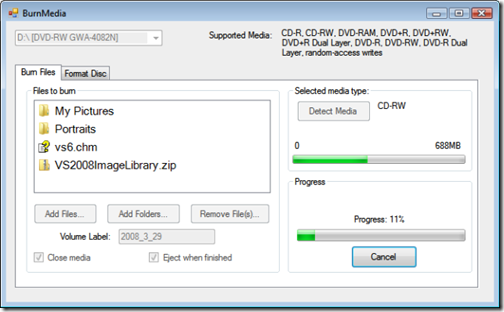
    "imapi2

    Introduction

    Windows introduced the new IMAPIv2.0 with the release of the Vista Operating System which was a big improvement over the original IMAPI. The original IMAPI is great for CDROMs, but it has some huge limitations like not being able to write to DVD media. I am sure this limitation is due to almost nobody having a DVD writer when Windows XP was released back in 2001. IMAPIv2 allows you to write to CD, DVD, and even Blu-ray media, as well as read and write ISO files. IMAPIv2.0 had a problem since it was only available with Windows Vista. But in June of 2007, Microsoft released update packages for Windows XP and Windows 2003. You can download the updates here.

    I wrote this article as a sequel to my C++ article Burning CD/DVD Media with the Image Mastering API Version 2.0. Most of the IMAPI2 samples seem to be in scripting languages. The only C# sample I found was the IBurn console project that came with the Windows Vista SDK and more recently the article How to Create Optical File Images using IMAPIv2.0 by dmihailescu, which shows you how to create an ISO file.

    This article was more difficult than I had thought it would be. Normally .NET applications are supposed to be easier, but there were a number of issues that I needed to figure out to get this to work. If you're not interested in hearing me rant and rave, you can skip over the next section.

    ..."

    I've had a long running, yet extremely low priority, interest in IMAPI. I keep thinking I'll be able to use this for work one day, where we need to burn tons of stuff to DVD.

    (Also I used to want to write an automated podcast to audio CD burner utility so I could listen to them on the road, but now that I have a Zune, no stinkin' CD's for me!  ;)

    (via Coding4fun - Burn baby burn)


    Related Past Post XRef:
    VB.Net Code Sample for Burning Audio CDs
    Burn CDs right from your .NET code...

    Wednesday, April 02, 2008

    Visual Linq Query Builder (VLinq) - A Visual Studio Add-in to help build LINQ to SQL Queries (Think "Access Query Builder for Linq to SQL")

    MSDN Code Gallery - Visual LINQ Query Builder

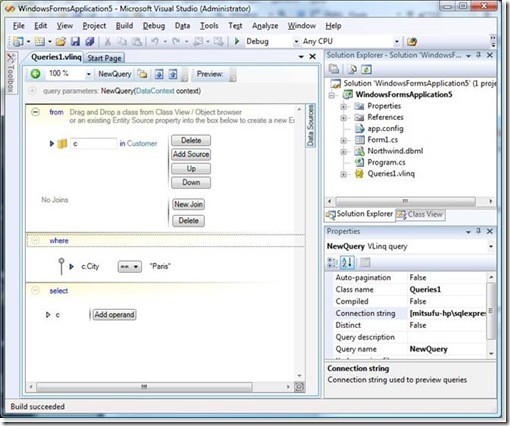
    "Visual LINQ Query Builder is an add-in to Visual Studio 2008 Designer that helps you visually build LINQ to SQL queries. Functionally it provides the same experience as, for instance the Microsoft Access Query Builder, but in the LINQ domain. The entire UI of this add-in uses Windows Presentation Foundation. The goal of this tool is to help users become more familiar with the LINQ syntax.

    It's also a project that could help you to see how to create your own Visual Studio 2008 add-in using Windows Presentation Foundation.

    ...

    You will need to have Visual Studio 2008 installed. You can use the Visual LINQ Query Builder in any kind of project that supports LINQ to SQL.

    Visual LINQ Query Builder is only supported with C# and VB.Net projects.

    Quick Reference Guide
    A Quick Reference Guide and a video showing how to start Visual LINQ Query Builder are available for download from the 'Releases' tab.

    ..."

    Mitsu's blog - Visual Linq query builder for Linq to Sql: VLinq

    "Hi all,

    After almost one year of work and organization, I am very happy to share this project with you:

    http://code.msdn.microsoft.com/vlinq

    The Visual Linq query builder is a Visual Studio 2008 addin. It's a designer that helps you create Linq to Sql queries in your application...

    clip_image016_thumb

    ...

    The project goal

    Linq to Sql and Linq more generally speaking, is a new technology mainly based on language evolutions. As any new syntax, you have to take some time to get familiar with it.

    The VLinq project as any designer helps you to build graphically Linq to Sql queries but we wanted to keep it visually very close from the code. The goal is not to hide the generated code but to make it visible in the designer. It's a kind of mix between a classical designer and a graphical intellisense.

    VLinq also helps you grouping all queries at the same place allowing easy management (edit, add, remove) and previewing and testing.

    Last goal: releasing the whole solution, including source code to share with you our experience about using WPF with VS2008 extensibility.

    What do we release ?

    The whole project has been developed using Visual Studio 2008 (betas then RTM) and Expression Blend. We provide the whole solution (binaries + source code). The solution contains a Setup project for a quick installation (msi file).

    ..."

    Lot's of coolness here... Linq, WPF, VS Extensibility, documentation, source and more.

    (BTW, I think the source is supposed to be available, but I'm not seeing it after my install... I'll update this post once I know more)

    (via No1 Microsoft Fan - Visual LINQ Query Builder)

    ASP MVC Tutorials for the VB Crowd

    myVBProf.com - An Introduction to ASP .NET MVC Framework

    "...

    This tutorial covers an introduction to the MVC pattern using Visual Basic. It shows you want software is needed to work with the model. It also includes a brief overview of the URL routing assumptions that are a foundation to the implementation of the pattern. Finally, a sample application is created to demonstrate the fundamentals of this new web-application model.

    ...


    Video Links
      An Overview of the MVC Pattern
      Setting up the MVC Preview Environment
      URL Routing
      Setting up New Pages
      MVC Controller Actions 
      Creating HTML in Views 
      MVC - Putting it all together

    ..."

    A cool series of ASP.Net MVC tutorial video's for VB9 developers.

    Also while you're on the myVBProf site, you should also check out their other VB9 tutorial series, LINQ to SQL and Programming With XML Using Visual Basic 9.0

    (via Julie Lerman - MVC with Visual Basic video series)

    Tuesday, April 01, 2008

    IronPython Studio 1.0 released with both Isolated and (Visual Studio) Integrated versions

    VSX Team Blog - IronPython Studio 1.0 for Isolated and Integrated VS Shell

    "There is now an integrated VS Shell version of IronPython Studio free for download and installation to go along with isolated version. The version has also changed from CTP mode to version 1.0. Applications using the isolated version of the VS Shell runtime allow the application to be installed and run if there is no version of VS installed, and will still run stand-alone when there is a version of VS installed. Integrated applications for the VS Shell, like the new additional version of IronPython Studio, allow the application to run stand-alone with there is no version of VS installed, but run side by side within VS when a copy of VS installed before or after.

    So the developer who would probably want to install the isolated version of IronPython Studio does not have VS and does not plan to install VS or wants it to run stand-alone independent of VS. The developer who would prefer the new integrated version of IronPython Studio has VS installed or plans to install VS and wants IronPython to run side by side within their installation of VS rather than as a stand-alone shell application.

    ..."

    IronPython Studio - IronPython Studio 1.0

    "This release contains VS Shell Integrated and Isolated mode supports.

    ...

    Runtime Binary IronPythonStudioIsolatedSetup  runtime binary, 996K, uploaded Mar 28 - 6800 downloads

    Source Code IronPythonStudioSource source code, 1014K, uploaded Mar 28 - 1338 downloads

    Example IronPythonScreenCast (wmv) example, 8949K, uploaded Dec 10 2007 - 2624 downloads

    Runtime Binary IronPythonStudioIntegratedSetup runtime binary, 904K, uploaded Mar 28 - 205 downloads

    ..."

    Do your Python development inside your existing VS install now... Or in the stand-alone, isolated Studio.


    Related Past Post XRef:
    Visual Studio 2005 SDK V3 (September 2006) Released
    IronPython 1.0 Beta

    Wireshark (fka Ethereal) 1.0 Released

    Wireshark - Wireshark 1.0 Released

    "I'm proud to announce the release of Wireshark 1.0. This is the culmination of nearly ten years of hard work by a team of brilliant and talented developers. It is an honor to be able to work with these people.

    ..."

    Wireshark/Ethereal is one of those bell weather network utilities, a must have in any IT toolbox. And yes, it's still free...

    Given they've been slashdotted, expect their site to be under some load for the next few days...

    (via Slashdot - Wireshark 1.0 Released)


    Related Past Post XRef:
    Using Ethereal - Chris Sanders Presents Packet School 101

    New Team Foundation Server 2008 VPC Released (with 12/31/2008 Expire date)

    Microsoft Downloads - Visual Studio® Team System 2008 Team Foundation Server and Team Suite VPC Image (Trial)

    "...

    This image will expire December 31, 2008.
    Microsoft ® Visual Studio® Team System an integrated Application Life-cycle Management (ALM) solution comprising tools, processes, and guidance to help everyone on the team improve their skills and work together more effectively.
    This VPC release is available in English only.

    Visual Studio 2008 delivers on Microsoft’s vision of smart client applications by letting developers quickly create connected applications that deliver the highest quality rich user experiences. This new version lets any size organization create more secure, more manageable, and more reliable applications that take advantage of Windows Vista, 2007 Office System and the Web. By building these new types of applications, organizations will find it easier than ever to capture and analyze information so that they can make effective business decisions.

    To learn more about this release, please visit the Visual Studio Team System 2008 home page.

    This virtual machine is running Windows Server 2003 Enterprise Edition, SP2. It contains a full installation of Team Foundation Server 2008, Team Build 2008, Team Explorer 2008, Visual Studio Team System 2008 Team Suite and all necessary prerequisites. In addition, it has been updated with Office 2007 SP1, current Windows Updates as of March 25, 2008, and the December Release of the TFS Power Tools. Team Foundation Server is installed in workgroup authentication mode and thus does not require a domain controller.

    This release also contains 38 hands-on labs and sample data. Please examine C:\MSLabs inside the VPC image. If you desire, you can download the hands-on labs and their support files only. See the MSI download link below.

    Please note: future updates to this image will be provided in the form of Virtual PC Differencing Drives. You may find it convenient to keep a copy of this download unmodified for these future updates so that you do not need to re-download this base image.

    This virtual machine does not have anti-virus installed. It should not be connected to any network until it has anti-virus installed. In addition, the operating system and programs installed were patched with all updates as of March 25, 2008. If you use one of the included VMC configuration files, you will find networking is not enabled.

    ..." [Description leached in full]

    I saw this release a few days ago and was thinking to myself, "I don't need this, or this link, because I already have TFS 2008 in production..."

    Then I smacked myself on the forehead and realized this would be a great help when playing with different Process Templates (cough... the different Scrum's... cough), when trying different changes to Work Items, etc, etc, etc. And given it has a 9 month life span I'm sure I'll need to do some TFS hacking between now and then... Also I want to see if the WSS 3.0 upgrade is worth the effort... I want to see what value it add's, etc and this seems like a perfect vehicle for that.

    Note the inclusion of the Hands-on Labs in this VPC. Also the "...future updates to this image will be provided in the form of Virtual PC Differencing Drives..." statement.

    The Reflector Add-in Starter Kit from Jason Haley - Hard to think of a way to make creating Reflector Add-in's much easier...

    JasonHaley.com - Reflector Add-in Starter Kit (C#)

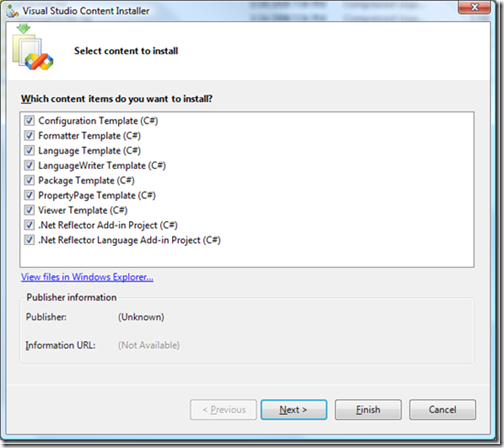
    "I've been writing Reflector add-ins now for a year or so and often find myself copying and pasting code just to get to a starting point.  I even wrote a blog entry a while ago about the typical template I used to get started (Getting started with Reflector Addins).  After reading about VSI (Visual Studio Installer) files in Working With Microsoft Visual Studio 2005 a while back, I added an item to my mental todo list to create a set of templates I use for writing Reflector add-ins - and with two Reflector presentations coming this next weekend, I figured now was as good a time as any to actually finish it.

    ...

    If you download it today, it only has the C# templates (plan to add VB templates sometime soon).

    ...

    reimage_thumb

    ..."

    Wow, that should make it easier to create Reflector Add-ins... Now if only I had a cool idea for one.  :/


    Related Past Post XRef:
    Creating a Reflector Addin? Check Out this Cool Walk Through from Jason Haley
    .Net Reflector 5.1 Released
    Reflector 5 Released
    Reflector 4.2 Released...
    .NET Reflector Add-Ins 4.0.3.0
    Reflector for .NET 4.0.0.0
    Reflector for .NET - Lutz Roeder's Programming.NET C# .NET VB .NET CLR

    IcoFX 1.6 Released

    IcoFX - IcoFX 1.6 Released

    "I'm proud to announce the immediate availability of IcoFX 1.6 !
    New features included:

    • Open, save and edit Macintosh icons
    • Extract Macintosh icons form resource files
    • Batch process Macintosh icons
    • Convert Macintosh icons to Windows icons
    • "Advanced Import" window
    • "Snapshot" window
    • Favorite folders in "Explorer" window
    • "Resource Editor" window
    • Support for creating icon library (icl) files
    • Change icons inside files
    • Added png image objects
    • Dithering for 256, 16 and 2 color images
    • Autozoom option
    • Easy color changing for "Preview" window
    • "Check For Update" window
    • "Download Languages" window
    • Import Jpeg 2000
    • Export Jpeg 2000
    • Import Image into icon
    • "Tip Of The Day" window
    • Handling multipple instances of IcoFX
    • Online forum
    • Online tutorials
    • Minor enhancements
    • Online help
    • Better zooming capabilities (up to 10000%)
    • "Shadow" window enhanced
    • "About" window enhanced
    • Better Windows Vista compatibility
    • New toolbar images for IcoFX
    • Bugfixes " [Post leached in full]

    Enough new features to qualify as a major release... :)

    (via the Portable Freeware collection - IcoFX Portable V1.6)


    Related Past Post XRef:
    IcoFX - Free (and Portable) Icon Editor