Saturday, May 02, 2009

How about 716, or so, free live and on-demand development training courses/web sessions? Then head on over to msdev.com…

U.S. Dev Partners Blog - ISV Innovation Is Now msdev.com

“Access to free online training is critically important to our Solution Provider community, regardless if the economy is on the upswing or downturn.  We continue to listen to your feedback and are happy to announce that ISV Innovation has moved to msdev.com, a new and improved training community that makes it easier to access training on the latest Microsoft technologies…”

msdev.com

image

msdev Session RSS Feed

image

As far as I can tell all the training, sessions (live and on demand), labs, etc are all free, just a registration away. With just about everyone’s training budgets under pressure (assuming you even have a “training budget”) free training is perfectly priced training.

Because I have no life, I’m currently watching, IronPython for the Visual Basic Developer (which I could also download to watch it on my Zune if I wanted too… :)

TechEd 2009 Booth Schedule – Come on by and say “Hi”

As I mentioned a bit ago, It’s official… I’m booth bound for TechEd US 2009, Microsoft has given me a cool opportunity to help out in the Learning Center/Development Practices/VSTS Developer Edition booth. I’ll be there much of the time with none other than the man, the myth, the legend, Brian Keller (of This Week on Channel 9 fame).

Here’s my final schedule, please feel free to stop on by and say “Hi” if you get a chance. This is my first time doing anything like this (well I’ve manned vendor booths at conferences before, but this is different) so I can use all the friendly faces I can get. :)

Item

Day

Start

Finish

Staffing Commitments

TLC/BLUE/DPR-ALM: VSTS 2008 Development Edition

May 11

2:30 PM

6:00 PM

TLC/BLUE/DPR-ALM: VSTS 2008 Development Edition

May 12

3:00 PM

6:00 PM

TLC/BLUE/DPR-ALM: VSTS 2008 Development Edition

May 13

9:30 AM

12:30PM

TLC/BLUE/DPR-ALM: VSTS 2008 Development Edition

May 13

3:00 PM

6:00 PM

TLC/BLUE/DPR-ALM: VSTS 2008 Development Edition

May 14

1:30 PM

4:45 PM

Remember I’m just a “guy”. Self boot-strapped into the software development industry years ago, with a driving passion for programming, but no wizard, guru or anything close. I’m a captive, in-house, line of business business developer just like many of you… So please no stumpers or trick questions! LOL. But I will do what I can to help; a sympatric ear and different perspective can work wonders.

Also the current plan is that on Thursday morning I’ll also be a guest host on This Week on Channel 9. How cool is that! It’s just a little under two weeks away and I’m already getting butterflies. LOL

So where is this booth, you ask?

 image

image 

 image

Enough for now. Safe travels and I hope to see you there.

Join Me at Tech·Ed Connect 2009!

A story of Windows 7 and an empty All Programs (and how I fixed it)

As all good stories begin, this one began on a dark and stormy night. The kind of night where all you want to do is install Windows 7 RC’s, upgrading your Vista installs in the warmth before the fire. Even while the ground shakes beneath you, you diligently stay focused on the task at hand. Finally, success! You’ve done it, the upgrade is complete! With joy in your heart you look into Windows orb, clicking on All Programs, only to have your hopes shattered, like a lighting strike to the heart, as all you see is nothing and emptiness…


LOL.. Okay, okay, I tried. Give me a few points for effort at least?  ;)

I ran into this issue yesterday and after a good bit of research, and trial and error, found a viable, and actually pretty simple, fix. Wanting to pay it forward, here’s a quick write up. Hope this helps…


Problem:

An upgraded from Vista SP1 to Win7 RC (7100), my All Programs was blank (see below).

image image

Data Points:

  • All the programs, shortcuts & folders in the All Users and current user Start Menu/Programs folders were there
  • The Shell Folders and User Shell Folders in the registry (both current user and local machine) were pointing to the right folders
  • Permissions on said folders were all set as expected
  • Able to reproduce on BOTH a Clean Windows 7 RC install and upgrade (but it’s much more likely to been seen in a upgrade).
  • To reproduce on a clean install, open either All Users or current user’s Start Menu and create a ton of shortcuts. I took the IE shortcut, copied and pasted it until I had 80+ copies. At that point, even the lean install’s All Programs broke. After deleting those copies (and end-tasking and running Explorer) the Clean’s All Programs came back.

Research:

This link lead me to a true fix for the issue, Windows 7 Forums - Program Icons Missing in All Programs Menu

Root Cause:

It seems that Windows 7 doesn’t currently like having too many shortcuts/folders in the Start Menu/Programs folder. With something close to 70+’ish shortcuts/folders in the combined All Users & User Start Menu/Program folders (common in an upgrade scenario) the All Programs list will end up being blank/empty

Resolution:

Move a number of shortcuts/folders from Start Menu/Programs into a new subfolder, like Start Menu/Programs/Stuff, and then restart Windows Explorer. Wash, rinse, repeat until your All Programs works.

Quick Resolution Walk Through:

Disclaimer: This is what worked for me, on two systems. Your mileage may vary. You do this at your own risk and while this should not break your system (nor is it really even dangerous), take care and do it slow. You assume all the risk and liabilities in this process and I assume none (i.e. don’t blame me if you jack up your system). This resolution is provided as a good faith effort to help, yada, yada, yada..

a) Left click on the Windows orb to open the Start Menu

b) Right click on the All Programs. You should see a menu like the one pictured below

image

c) Left click on the Open menu item (aka the current user’s, yours, Start Menu). You should see something like what is pictured below, though the actual contents may be a little different

image

d) Double left click on the Programs folder. You should see something what is pictured below, though the actual contents will be different, you should see a “bunch” of folders

image

e) Create a new subfolder called “Stuff” (no quotes, and you can name it what ever you really want too)

image

f) Select a bunch of the folders/shortcuts and drag (i.e. move) them into “Stuff”

image

 image

g) Start Task Manager, go to the Processes tab, select “explorer” and then click on the “End Process” button. This will kill the explorer process, taskbar, start menu, etc.

This step is very important. Unless you restart Windows Explorer your results (i.e. what you see in All Programs) will not be reliable. Believe me, I’ve found this out after many false starts. Make a change, kill and restart Explorer. Wash, rinse, repeat…

image

h) Now in Task Manager, select the File menu, Run submenu.

image

i) Enter “explorer” (no quotes) and click OK. This will restart Explorer, and the taskbar, Windows orb, etc should all re-appear

image

j) Try your All Programs now… If enough things have been moved, you should be good!  :)

image

k) If you’re All Programs is still empty, then repeat the above steps in the All Users Start Menu folder (i.e. the “Open All Users” menu choice when you right click on “All Programs”)


Now you can also begin to move stuff back up from Stuff into the Programs folder as need be. Remember to end/run Windows Explorer during this process. If/when your All Programs go blank again, you now know how to fix it..

Wednesday, April 29, 2009

Tons of tangible T4 tips – Updated Tangible Engineering T4 Editor, Videos and T4 Template Gallery

Tim Fischer's .NET Small and Medium App Blog - New T4 "How Do I?"-Videos , new T4 Editor and Online T4 Template Gallery

“As Jean Marc and Oleg pointed out T4 is getting more attention now. Tangible Engineering did now post new T4 How Do I Videos and released another great T4 editor V1.3 that comes with an Online T4 Template Gallery, intellisense and syntax-highlihting and uml-style diagrams in its free edition...

Check out the videos

- T4 Video:  Generate Data Transfer Objects

- T4 Video: Custom LINQ-to-SQL Classes via Drag and Drop

- T4 Video: Image Gallery via T4

- T4 Video: Generate multiple output Files with T4

- T4 Video: Generate Stored Procedures

- T4 Video: .NET Data Services Change Tracking

- T4 Video: T4 Editor #include-Directive

- T4 Video: Generate from XML File

- T4 Video: Generate from DSL Files

- T4 Video: Share templates online with the build-in online T4 Gallery

…” [GD: Post Leach Level: 90%]

T4 is getting more interest lately so this caught my eye.


Related Past Post XRef:
It’s a T4 kind of day – Free (reg-ware) T4 Editor from tangible (with UML-Style modeling tools added for flavor)

Vista SP2 & Windows Server 2008 SP2 RTM’s (Actual download coming in 2009 Q2… i.e. soon’ish)

The Windows Blog - Windows Vista SP2 RTM + Windows Vista SP1 Blocker Tool Removed

“Today we are announcing the Release to Manufacturing (RTM) of Service Pack 2 (SP2) for Windows Vista and Windows Server 2008. SP2 represents the latest step in Microsoft’s commitment to continuous improvement. It includes all updates that have been delivered since SP1, as well as support for new types of hardware and emerging hardware standards. 

As we have mentioned before, here are some of the key benefits of Windows Vista SP2:

  • Windows Search 4.0 for faster and improved relevancy in searches
  • Bluetooth 2.1 Feature Pack supporting the most recent specification for Bluetooth Technology
  • Ability to record data on to Blu-Ray media natively in Windows Vista
  • Adds Windows Connect Now (WCN) to simplify Wi-Fi Configuration
  • Windows Vista SP2 enables the exFAT file system to support UTC timestamps, which allows correct file synchronization across time zones.

And since it comes with a single installer for both Windows Vista and Windows Server 2008, SP2 will be easy for IT Pros to manage, deploy, and support. For a complete overview of the changes introduced in SP2 for Windows Vista and Windows Server 2008, check out the notable changes document on TechNet.

We expect Windows Vista and Windows Server 2008 SP2 to be publicly available in Q2 2009

…”

Okay, with Win7 RC coming out tomorrow (for TechNet/MSDN subscribers at least, May 5th for the public), this doesn’t seem like huge news, but you know, there are actually many people using Vista (and many Win2k8) and this will be a nice update for them. My one Vista box will be moving to the Win7 RC tomorrow so I’ll not be applying Vista SP2, but when it’s available for download I’ll still let you know…

Reference Assistant – Commercial (with free 30 day trial) Visual Studio Add-in to help cure IoC reference headaches

Darren’s Blog - Announcing Reference Assistant 1.0

“The product I have been working on, Reference Assistant, was released a few weeks ago.  Reference Assistant is an extension for Visual Studio 2005 and 2008 (and soon 2010).  In short, the goal of the product is cut down the time spent debugging runtime errors due to missing dependencies or errors in configuration.

ra-logo-320-jpg

Here are a few highlights of the capabilities in version 1.0:

  • Configuration files for Spring.net, Windsor, and Unity can be parsed and displayed visually in a tool window.  Missing or incorrectly spelled types are pointed out (project reference paths are searched for required dependencies). 
  • Navigation to object definitions in supported IoC/DI configuration files
  • Any dependencies detected in configuration files can be automatically copied to the project output directory upon successful build.
  • Reference Paths can be setup automatically using rules setup in preferences.
  • Version conflicts between dependencies are displayed visually and in a tool window.
  • Generate a report of all required assemblies for a project’s deployment, including dependencies defined in IoC framework configuration files.
  • Extensions can be written to support custom file formats or configuration types.

For more detail in addition to the product pages, we have written a blog post walking through the functionality available in Reference Assistant for Spring.net XML configuration.

…”

“Friend of the Blog” Darren Stokes, of Visual Studio Links fame (yes, Daren, Fame!.. Is Visual Studio Links is cool and a must read link blog for Visual Studio developers, so just accept the adulation… ;) has recently released this cool sounding Visual Studio Add-in to help resolve reference pain and suffering. I don’t yet use Spring, Windsor, Unity (yeah, I know, I’m lame… um… shut up?  ;) but I can still see how this add-in could come in real handy.

Tuesday, April 28, 2009

Microsoft Office 2007 SP2 is now available for direct download

Microsoft Downloads - The 2007 Microsoft Office Suite Service Pack 2 (SP2)

“Service Pack 2 provides the latest updates to the 2007 Microsoft Office suite.

File Name: office2007sp2-kb953195-fullfile-en-us.exe
Version: 1.0
Knowledge Base (KB) Articles: KB953195
Date Published: 4/24/2009
Language: English
Download Size: 1 KB - 290.2 MB*


The 2007 Microsoft Office Suite Service Pack 2 (SP2) provides customers with the latest updates to the 2007 Office suite (the products that are affected by this update are listed below). This download includes two types of fixes:

  • Previously unreleased fixes that were made specifically for this service pack.
    • In addition to general product fixes, this includes improvements in stability, performance, and security.
    • You can find out more information in Knowledge Base Article 953195, where product-specific changes are described.
  • All of the Public Updates, Security Updates, Cumulative Updates, and Hotfixes released through February 2009.
Before installing this service pack, you are strongly encouraged to read 953195, which describes some big improvements introduced by SP2, and also calls out some important information that you should be aware of before installing.

…”

Description of 2007 Microsoft Office Suite Service Pack 2 (SP2) and of Microsoft Office Language Pack 2007 SP2 (953195)

[GD: So you get a high level feel for all that’s in Office 2007 SP2…]

Description of 2007 Microsoft Office Suite Service Pack 2 (SP2) and of Microsoft Office Language Pac

Installing it now… :)

(via Aaron Tiensivu's Blog - Outlook 2007 improvements in SP2 - and Office 2007 SP2 download link - almost live as of 2am EST)


Related Past Post XRef:
Outlook 2007 Feb 2009 Cumulative Update Released – Think “Pre-SP2 Performance and Reliability Update” or “Outlook now shuts down better and is faster update”

Developer’s, do we really need to worry about concurrent, parallel, multi-threaded, many-core development? A picture is worth a thousands words…

The Moth - Windows 7 Task Manager screenshot

“Previously I linked to a screenshot of 96 virtual processors and now I have access to a machine that tops that!
Count them:

128VirtualProcessors

ZOMG, only 128 virtual processors…? :|

With Win 7/Win2k8 R2 supporting 256 I wonder how quickly we’ll run into that limit? At this rate, feels like…oh… Summer? lol

But again, this shows that “many-core” is coming hard and fast and we all need to seriously start thinking in that space.

In five years, this could be my notebook. LOL. (Well, okay my total WAG is at least 24 cores, 48 virtual, in top of the line notebooks in 5 years… ;)

GFI LanGuard is now free (as in for SMB’s, a 5 IP license freeware/reg-ware version)

GFI - GFI LANguard 9 now available in FREEWARE

GFI LANguard, an award-winning vulnerability management solution, is now available in a 5-IP freeware version.

The economic downturn is forcing more and more businesses to cut budgets and reduce spending, and security is often the first area to suffer. With cybercrime on the increase and threats becoming more dangerous and frequent, businesses can ill-afford to ignore security – on the contrary, they need to beef up their defenses!

This is why GFI Software is giving away a 5-IP freeware version of its award-winning product GFI LANguard™: to assist organizations shore up their defenses and secure their networks – and at no cost. …”

I’m getting this for my home network and thought you might be able to use it too…

(via SecureSMBGFI LanGuard: A (now) Free Network Security Scanner -> Strategies for Securing SMB Networks - GFI LanGuard: A (now) Free Network Security Scanner

LINQ to * – Cool lists of LINQ links

knom's developer corner - LINQ-To-Everywhere – List of LINQ Providers

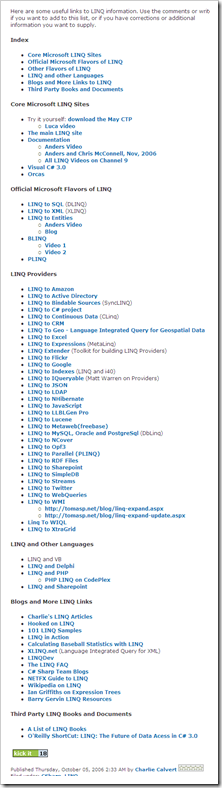
“This weekend I’ve built a small application, which queries the “Simpsons” seasons guide data and updates the filenames/descriptions. To do this I needed to query a CSV file. While searching for a LINQ to CSV file implementation I’ve found an interesting list of LINQ Providers provider by MVP Charlie Calvert.

image

Charlie Calvert's Community Blog - Links to LINQ

“Here are some useful links to LINQ information. Use the comments or write me if you want to add to this list, or if you have corrections or additional information you want to supply.

Charlie Calvert's Community Blog  Links to LINQ …”

A couple list of LINQ links that I wanted to capture for future reference…

Monday, April 27, 2009

Making pretty VM Visio diagrams with the free Virtualization Visio stencil from VESI (Virtualization EcoShell Initiative)

Dmitry’s PowerBlog: PowerShell and beyond - Free virtualization Visio stencil

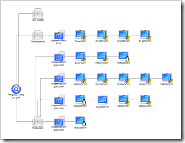
“Need to create cool-looking Visio diagrams for your virtual, VMware, Hyper-V, etc. infrastructure? You can actually get one for free!

The folks at VESI (Virtualization EcoShell Initiative) have shared the stencil they are using for Visio reporting (the same stencil is also used in PowerGUI’s VMware PowerPack). Just go to the VESI downloads page, scroll to the bottom of the page and download the stencil” [Post Leach Level: 99%]

 VESI (Virtualization EcoShell Initiative)Downloads

Visio_Sample_sm

image

We starting a VM initiative at work [snarky comments deleted], so I thought this might come in handy.

image

Sunday, April 26, 2009

Redgate is doing it again… A metric ton-load of free eBooks (and their suite of tools too) is just a quick reg away.

redgate - The Art of XSD - SQL Server Schema Collections

“Today, a lot of applications exchange information in XML format. As such there needs to be an agreement between the sender and receiver about the structure and content of the XML document. An XSD (XML Schema Definition Language) Schema can be used to enforce this contract and validate the XML data being exchanged.

This book will help you learn and use XML Schema collections in SQL Server. Prior knowledge of XSD is not required to start with this book, although any experience with XSD will make your learning process easier. This book starts with the basics of XML schemas and then walks you through everything you need to know in order to build powerful XML schemas in SQL Server.

image

Which leads you to this…

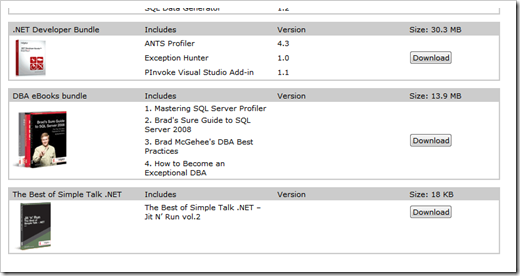
“SQL Server eBook Selection

  1. Simple Talk Crib Sheet Compendium
  2. The Art of High Performance SQL by Grant Fritchey
  3. The Art of XSD by Jacob Sebastian

DBA eBooks bundle

  1. Mastering SQL Server Profiler
  2. Brad's Sure Guide to SQL Server 2008
  3. Brad McGehee's DBA Best Practices
  4. How to Become an Exceptional DBA

image

image

…”

Also available as a single book, 'Mastering SQL Server 2005 Profiler' (redgate - Free eBook and 14-day trial for faster SQL Server troubleshooting)

image

That’s officially a “bunch” of eBooks. Enough to keep you all busy for a bit, ya think? ;)

(via Felipe Ferreira - Free E-Books)