Monday, March 07, 2011

Blobs, RIA Services, Images, SQL Server and add a little MVVM and you get Pie! (Okay, no pie, but still something that looks pretty yummy)

Mister Goodcat - Storing images in SQL Server with RIA Services

"In the Silverlight forums people frequently ask for help with storing images in their databases using RIA Services. Even though this looks like a pretty common thing to do, it is far from being straight forward, and searching the web does not seem to produce any good results (or I'm just doing it wrong). So I decided to write this quick walk-through of how to do that. This post describes all steps and possible pitfalls to create a complete application for this from scratch, from the database to the UI.

Table of contents:

  • Preface
  • Setting up the project
  • Creating the model
  • Setting up the image entity
  • Setting up the image data entity
  • Setting up the relation
  • Creating the database
  • Problems with the database generation/rework
  • Creating the domain service
  • Downloading MVVM Light with NuGet
  • Creating a simple client UI
  • Extending the client side model
  • Conversion of the images
  • The view model
  • Loading the available images
  • Loading the selected image's data
  • Deleting images
  • Adding new images
  • Further considerations
  • Potential problems
  • Summary and source code download

...

pagesnap..."

The depth of the book... err...  booklet... article... whatever... (if a post needs a TOC that's a long as the above TOC, is 17 pages printed, I think we can call it a booklet... ;) is what caught my eye. I've not done anything yet with RIA Services, but would like to, so wanted to capture this for future reference. That and image storage in SQL Server is always of interest to me...

Extending TFS's Extensible Source Control Explorer - TFSSCExplorerExtension (Team Foundation Server Source Control Explorer VS 2010 Extension)

Visual Studio Gallery  - TFSSCExplorerExtension

"TFSSCExplorerExtension (Team Foundation Server Source Control Explorer VS 2010 Extension) is Visual Studio 2010 Extension Package that adds new features to the TFS Source Control Explorer window. Most important new features are Drag & Drop support, Move and Branch functions even for multiple files selection and Merge from Sources feature.

...

image..."

I though it cool how the author extended the TFS Source Control Explorer. Got to extensible solutions and those solutions that extend them... :)

Building Custom Gauges for Windows Phone 7

CodeProject - Custom Gauge Controls for Windows Phone 7

"This article is the first of a series that will try to present my implementation of some custom gauge controls for WP7. This first article will present some implementation considerations and the way to use the controls. The next articles will go deeper into the problem and will try to explain the implementation of these controls.

Implementation considerations

In my opinion, a gauge should present a scale and permit multiple indicators to point to particular values within that scale. When I say “scale”, I mean everything a gauge should contain except for the indicators. This means that in my opinion, a scale should contain ticks (minor and major), labels, and ranges. I use ranges to assign different colors to different intervals in the scale. These ranges can be used to indicate below optimal, optimal, or above optimal values.

In general terms, a scale should present the user with the following properties:

...

SNAGHTML61ce4818

..."

I liked how this article introduced us to writing our own Silverlight gauge control for WP7. Looking forward to the rest of the series...

MVVM For Silverlight/WP7- the Refcard...

DZone Refcardz - The MVVM Design Pattern: A Formula for Elegant, Maintainable Mobile Apps

"Overview

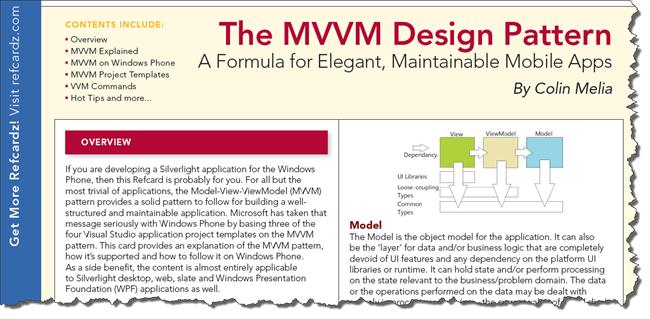
Anyone interested in developing a Silverlight application for the Windows Phone should get a copy of this DZone Refcard on the MVVM Design Pattern. Included within is everything from an explanation of the MVVM Design Pattern to some examples of MVVM Project Templates.

..."

Some snaps from the PDF;

SNAGHTML61c86078

image

Friday, March 04, 2011

"Introduction to Mobile Application Development Using Silverlight [Windows Phone 7]" lectures and resources from the Microsoft Faculty Center

Microsoft Faculty Center - Introduction to Mobile Application Development Using Silverlight (1 of 3), (2 of 3), (3 of 3)

"This course teaches students through lectures, discussions, demonstrations, and homework assignments. Students learn the knowledge, skills, and abilities necessary to develop a mobile application on the Windows Phone 7 platform using Microsoft Silverlight. Prior to taking this course, you should have some background in programming (preferably C#, but C, C++, Java helps).

...

Lesson Overviews

The Walkthrough videos in each lesson discuss the associated PowerPoint file and how to cover the material.

Lecture 1: Industry Perspective

  • Assignments (Word and Source Files)
  • Demos (Word and Source Files)
  • Silverlight Tools Demo – Hello Phone (Video)
  • WP7 L1 Industry Perspective (PowerPoint)
  • WP7 L1 Industry Perspective Walkthrough (Video)

Lecture 2: Anatomy of a Mobile Application

  • Assignments (Word and Source Files)
  • Isolated Storage Demo (Video)
  • Isolated Storage Demo (Word and Source Files)
  • Navigation Demo (Video)
  • Navigation Demo (Word and Source Files)
  • SIP Demo (Video)
  • SIP Demo (Word and Source Files)
  • WP7 L2 Anatomy of a Mobile Application (PowerPoint)
  • WP7 L2 Anatomy of a Mobile Application Walkthrough (Video)

Lecture 3: Multimedia Integration

  • Assignments (Word and Source Files)
  • Bing Maps Demo (Video)
  • Demo 1 – Media Launcher (Source Files)
  • Demo 2 – Media Element (Source Files)
  • Demo 3 – Web Browser (Source Files)
  • Demo 4 – Bing Maps (Source Files)
  • Media Element Demo (Video)
  • Media Launcher Demo (Video)
  • Web Browser Control Demo (Video)
  • WP7 L3 – Multimedia Integration (PowerPoint)
  • WP7 L3 – Multimedia Integration Walkthrough (Video)

..."

Here's a snip of the files from Lecture 1;

image

The HelloPhone.docx (i.e. assignment walkthrough)

image

So pretty much a complete class, all you need to do is give or consume it...

TFS Power Tools March 2011 Update (Backup/Restore, Shell Extension and tfpt enhancements and bug squashing added for flavor)

bharry's WebLog - Mar ‘11 Team Foundation Server Power Tools are Available

"Today we released an update to the Team Foundation Server Power Tools. You can download them here:

The primary enhancements in this release are:

  • Addressed reported issues in the Backup/Restore Power Tool
  • Fleshed out the Windows Shell Extension for version control
  • Took the first step on the path to a bunch of new TFS Build Power Tools

Backup/Restore Power Tool

We released the backup/restore Power Tool in the last Power Tools release and you can read about it in depth here: http://blogs.msdn.com/b/bharry/archive/2010/08/18/backing-up-and-restoring-your-tfs-server.aspx and here: http://blogs.msdn.com/b/bharry/archive/2010/08/19/backing-up-your-tfs-server-with-sharepoint-and-reporting.aspx. Unfortunately, we pretty quickly got feedback that there were enough bugs in it that it was not nearly as useful as we had imagined. In this new release, the experience is pretty much the same so I’m not going to repeat all of the screen shots. The big difference is that we fixed just about every bug that was reported. We also put a ton more effort into testing it. This is probably the most involved Power Tool we have shipped today and it’s clear that the standard Power Tool approach was not sufficient. We’ve tried really hard to ensure that this is going to be a great solution for you. Of course, if you find any issues at all, please let us know and we’ll get them fixed as quickly as we can. Here’s a list of all of the bugs that we fixed:

...

Windows Shell Extension

I’m really excited to finally be getting back around to giving the shell extension some more love. It’s been a long time. We focused on adding the most requested functionality to it and it’s getting close to the point where most people won’t have to run Team Explorer for version control if they don’t want to.

Here’s a screen shot showing the new commands on the context menu.

untitled

...

TFS Build Power Tools

So, why, above did I describe this above as “first step on the path to a bunch of new TFS Build Power Tools” when we’ve already got some build Power Tools. Well, because this marks a new milestone. Over the last year, we have adopted TFS Build as the heart of the internal DevDiv automated build system. As part of doing this, we’ve implemented a ton of new internal tools to manage and report on builds. In fact, we were demoing them to our MVPs at the MVP Summit yesterday and they were drooling over them.

...

Bug Fixes

And, as always, in addition to the emphasis on bug fixing in the Backup/Restore Power Tool, we fixed bugs in other parts of the Power Tools too. Here’s a list of the fixes:

..."

As a somewhat heavy TFS Power Tool Shell Extension user I appreciate that it's gotten some TLC


Related Past Post XRef:
A TFS 2010 Power Tools “Must Get” Update - September 2010 Release (Think the “zomg TFS server backup/restore help and more” release)
It’s TFS Tool Time! TFS 2010 RTM compatibility Power Tools, MSSCCI and new Build Extension releases
Extending the Team Members feature in the VSTS 2008 TFS Power Tools October 2008 Release. For example, adding Skype support…
VSTS 2008 TFS Power Tools - October 2008 (aka 2.3) Released – Manage Source Files via Windows Shell/Explorer extension, new PowerShell extensions and Team Members tool
TFS Power Tools - July 2008 Release (aka v2.2) – Welcome to Alert editing goodness
TFS Power Tools - March 2008 Release (aka v2.1). Build Notification, Find in Source Control, Process Template Editor TFS2008 updates and Destroying Work Items...
VSTS 2008 TFS Power Tools (December 2007) Released (aka TFPT 2.0)
TFS Power Tools, v1.3 (September 2007 Release), with Two New Tools, TFS Best Practices Analyzer and Work Item Templates
Team Foundation Server Power Tool, Process Template Editor Tip - If you open a *.WIT file and it appears as a normal XML file, instead of in a Designer...
Microsoft Visual Studio 2005 Team Foundation Server Power Tool (formerly known as Power Toys) - V1.2, February 2007

Thursday, March 03, 2011

New Channel 9 series; "Defrag" - Going deep into troubleshooting Windows/Office/WP7/etc issues

Defrag - Defrag 001: Startup Slow Downs, Can't Boot, Blue Screens, Homegroup, IE Logins

Today I'm joined with Microsoft tech troubleshooter extraordinaire Gov Maharajov to help walk you through solutions to your tech support problems. In an effort to help solve future problems we're going to look at these issues beyond just fixing them and drill down into how Gov would actually troubleshoot these problems. In our next episode we'll be pulling tech support issues in part from the comments here. We're happy to take on problems with Windows, Office, WP7, or other Microsoft products, so if there are nagging issues you could use a hand with, let us know here.

In this episode of Defrag:
1:35 - Troubleshooting Windows 7 Start-up Slowdowns. (Sysinfo, Autoruns, Startup Delayer)
10:23 - Windows won't boot.
15:00 - Blue Screens (WinDBG)
26:12 - Troubleshooting Homegroup
28:48 - Problems logging in to sites with Internet Explorer.

..." [GD: Show description leached in full]

Cool new show that goes deep into solving issues, problems, etc. [Insert "teaching us to fish" comment here]

What size icon am I supposed to use my for app/toolbar/menu/dialog/etc? The "Icon Reference Chart" might be just the icon cheatsheet you've been looking for...

Hicksdesign - Icon Reference Chart

image SNAGHTML4cad85c5SNAGHTML4cabdcd9

Looks like a handy chart... (I always forget what size Icon I can/should use where...)

(via devcheatsheet.com - Icon Reference Chart)

Microsoft Press free ebook roundup, eight ebooks, one post, zero cost

Microsoft Press - Ebooks: List of our free books

"We haven’t posted this in a while and I thought that it might be time for a refresh. This is a list of all of our free ebooks. We’ll have more coming up in 2011, so stay tuned.

SNAGHTML4b874f35..."

I've blogged about almost all of these individually in the past, but having them all in a single post is very convenient


Related Past Post XRef:
[Finished/done/completed and still free] “Moving to Microsoft Visual Studio 2010” eBook
Free, as in free, eBook - Introducing Microsoft SQL Server 2008 R2 (direct download, no reg required)
“Understanding Microsoft Virtualization R2 Solutions” – The free, 466 page, eBook (only available until the end of February 2010)
Students, and life long learners, who is responsible for your future career? You! Here’s a free ebook from Microsoft to help you own your future…
Free (as in direct download, no reg required) ebook - “Introducing Windows Server 2008 R2”
“First Look: Microsoft Office 2010” Free 202 page eBook – Free as in no registration required for a limited time

"Regular Expression Cheat Sheet (.NET)" from RegExLibrary

RegExLibrary - Regular Expression Cheat Sheet (.NET)

image

The straight, simple, easy to understand an d very low signal to noise ration is what I thought cool about this... The Character Escapes/Character Classes also link to the appropriate MSDN doc's

(via http://www.delicious.com/tag/.Net)

Wednesday, March 02, 2011

Ed Bott provides a simple and easy Windows OS End of Life/Support Summary

Ed Bott's Microsoft Report - How long will Microsoft support XP, Vista, and Windows 7?

"In an ideal world, old versions of Windows would roll off Microsoft’s list of supported products and be replaced by new ones at regular, predicable intervals. That upgrade cycle has been anything but smooth and predictable in recent years, however. Microsoft’s support policy is still returning to normal after XP was allowed to live well past its normal retirement date and then got multiple extensions to placate customers who just said no to Vista.

I was reminded of this confusion earlier today when Matt Gardenghi asked a great question via Twitter:

Where would I find a list of supported MS OS versions? Trying to determine what’s in support and what’s out of support.

Microsoft product lifecycle policy is actually quite coherent and easy to understand, at least on paper.  ...

...

For Windows XP, however, those calculations don’t work, because Microsoft has extended XP’s life artificially. To find XP’s end-of-support date, you should use the Microsoft Product Lifecycle Search page to get the official answer.

...

Here’s the

...

SNAGHTML480b7f37

..."

I was JUST looking for this information yesterday. I knew XP SP3 ended support in 2013/2014 but couldn't find that as a hard date (having even looked at the Life Cycle page/search and I swear I couldn't find this information "search results for Windows XP" sigh...). Anyway, Mr Bott to the rescue... :)

(via Windows Enterprise Desktop - Sunsets Ahead: Ed Bott Summarizes Windows Retirement Dates)

IRL XBox Avatar's? Well how about 3d replica figurine or 6 foot poster?

WinRumors - 6ft Xbox Avatar posters and 3D miniature figurines now available

"Ever wanted a huge Xbox LIVE Avatar poster or a 3D miniature figurine? Well they’re available now.

Microsoft announced on Wednesday that it has partnered with FigurePrints to create fully detailed 3D replica figurines. Using 3D modeling techniques pioneered by special effects houses and manufacturing technology that allows even the most complicated of these models to be created ...

Microsoft has also partnered with Fathead to produce giant Xbox LIVE Avatar stickers/posters. The leading brand in Sports and Entertainment Wall Graphics will allow you to create a custom Fathead of your avatar. Just enter your gamertag, select from one of ten poses, pick your size up to 4 ft x 6½ ft, and ...

..."

SNAGHTML47fe3433

Shame that some elements cannot be used due to licensing issues. Above is what FigurePrints can show, below is my real avatar. (FatHead has the same restriction)

image

Still I dig the thought of having a figurine or poster (though $60 for the figurine to $150 for a poster is a little much for me)

Some things you might not want to do in T-SQL (but are funny anyway) - Mandelbrot ASCII Art

SQLServerPedia - Mandelbrot Revisited.

"...

Today I’m sharing something I first posted two years ago: Something Pretty.

Something Pretty

A T-SQL script I came up with that displays the Mandelbrot set. (Tip: Hit Ctrl-T before executing)

...

SNAGHTML47f63d48..."

There's something just so wrong that it's right about this... T-SQL to generate Mandelbrot ascii art? LOL, nice...

Tuesday, March 01, 2011

Reactive Extensions graduates from MSDN Dev Labs to MSDN Data Developer Center

Matthew Podwysocki - The Reactive Extensions Extensions Now Live on MSDN Data Developer Center

"As you may have noticed, the Reactive Extensions for .NET and JavaScript have a new home, moving from MSDN Dev Labs to the MSDN Data Developer Center. The new home will provide you with not only how to get them, but also a beginner’s guide and other additional resources including hands on labs, videos, tutorials, forums and much more.

First Off, How Do I Get Them?

There are several ways to get your hands on the Reactive Extensions (Rx) either by installing them via the Reactive Extensions for .NET Home or via NuGet which we’ll cover below. The Reactive Extensions is available on multiple platforms such as:

  • .NET 3.5 SP1
  • .NET 4
  • Silverlight 3
  • Silverlight 4
  • Windows Phone 7
  • XBox and Zune via XNA
  • JavaScript

The great news about getting the Windows Phone 7 is that you get the Reactive Extensions out of the box as it shipped on the ROM itself. Since it shipped with the phone, there have been updates and you can get the latest always by visiting the site or via NuGet.

Now About NuGet…

Besides a direct download on the Rx Home Page, you can also get them via NuGet.

...

Next, in the search window, type Rx and hit enter to search. You’ll see that we ship quite a few packages already and have since NuGet was first introduced.

image1

..."

Good to see this move forward in its growth... I've been hearing more about the Reactive Extensions recently and really need to try to take a peek at it...

MySchoolApp - Windows Phone 7 Starter Kit for building a, well, My School App... (C# and VB)

Dr. Z's Blog - A Windows Phone 7 Application Starter Kit

"You can download the application along with source code (both VB.NET and C#) here. Though this application, created by Mark Frydenberg at Bentley University, is for a school, you can easily replace the logo, links to RSS and web sites in the xml files to make it your own and publish it to Microsoft marketplace. The source code is available under CDDL. Happy Coding!

...

SNAGHTML4316e33d..."

CodePlex - MySchoolApp

"MySchoolApp: A Customizable Mobile App built using Windows Phone 7

Mark Frydenberg,
Computer Systems Department
Bentley University
Waltham, MA 02452

Introduction - MySchoolApp is a customizable application written in Visual Basic for the Windows Mobile Phone platform using Visual Studio Professional 2010. The application combines links to RSS and Web sites about a school, and displays a map and local weather. It uses a Panorama control to provide slick navigation by swiping from one pane to another. See the full details in the MySchoolApp data attached - http://www.codeplex.com/Project/Download/FileDownload.aspx?ProjectName=myschoolapp&DownloadId=209131

..."

How cool is it that a third party is releasing a starter kit like this? And that he took the time to do a C# AND VB version? Too cool... :)

Here's a snip from the 9 page DocX with the project;

SNAGHTML431cf5a4

Dimecasts.net WP7 Application Released

Derik Whittaker - Dimecasts.net WP7 Application has been released

“I am super pumped to announce that today I received word from Microsoft that the Dimecasts.net Windows Phone 7 application has been released.

If you have a WP7 and you are a fan of Dimecasts.net then please download and install the app. This is the first release and more than anything is ‘get it out there’ release in order to start to get feedback. Please let me know what you think about the app, feedback is encouraged.

…”

Go, go Dimecasts…!

Here’s some snaps of the app (from the Zune Marketplace)

image

imageimageimageimage

Now if only I have a WP7 device… :P


Related Past Post XRef:
A Feed You Should Read #12 – DimeCasts.Net
DimeCasts.Net - Everyday coding issues covered in 10 minutes or less
Getting External with LINQPad – Advanced LINQPad Dimecast (aka part 3 of 3)
Link to LINQPad – A Dimecast LINQPad Walkthrough
Getting started with Lucene.Net, the DimeCast version
Fun with .Dump() in LINQPad – An intermediate level Dimecast for LINQPad
Argotic Syndication Framework Day – New Release and a DimeCast too!