Saturday, August 02, 2008

Open Source… Food – Free (recipes) as in Pizza! :)

Open Source Foods

“Amazing Recipes. Delicious Food. Beautiful Photography. Created and rated by you and fellow food-lovers from all over the world. Open Source Food is your gastronomic hub where every visit will bring inspiration and a rumbling belly...”

image

For some reason I just found this funny… in a cool, laugh with not at, way. Free as in Beer too! LOL

(via TwitterLAUpdates)

Friday, August 01, 2008

(Fixed) Problems viewing my blog with IE? Try FireFox… But you might want to check your site/blog if you are using Site Meter…

All of a sudden I’m getting "Internet Explorer cannot open the internet site… Operation aborted” error on my blog.

image


Four machines, different networks, same issue. All I did was a post the last post. No to the layout changes, nothing. It just seems to have stopped working in IE. Of course if you’re using IE you may not be able to read this… I deleted that post, same issue. Tried any of my older pages, same issue. Turning off, running in disabled add-on’s mode, same issue.

So far it seems FireFox works fine.

Am playing the google game now (found one a few sites, but How to Fix “Internet Explorer Cannot Open the Internet Site- Operation Aborted” Error has the same issue… lol.)

I wonder if it’s an Blogger/AdSense/gadget thing? The page seems to load, then dies as it loads the sidebar.

I’m going to kill some sidebar gadgets and see if that helps…

sigh

Update #1:

Not AdSense, but another sidebar gadget. Isolating now…

Update #2:

Appears to be Site Meter related. I have that gadget on the page, IE fails. Without that script block, IE’s happy.

That leads me to say that Site Meter is borked. If I comment out their supplied script block, IE is happy. With their script block, IE is unhappy.

GRRR. And I was JUST about to reach 500K visit’s too!

Update #3

image

That about says it all…

Update #4

Confirmed. It was Site Meter (and IE)

TechCrunch - Sitemeter Kills Thousands Of Sites For IE Users

the reference frame - Fix: IE7 with Sitemeter: Operation aborted

I’ve applied the “edit template” fix mentioned above and now have Site Meter back on my page.

sigh…

New CodePlex Feature - Review/Rate Project Releases

CodePlex Weblog - Ratings and Reviews for CodePlex Projects

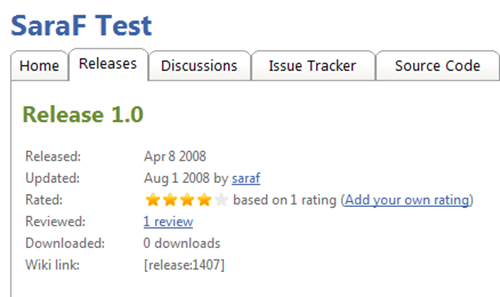
“In our latest CodePlex deployment (today), we’ve introduced ratings and reviews.

  image_2

Signed-in users can rate projects from one to five stars, and have the option of detailing their feedback in a review.

 image_4

Ratings and reviews are release-specific and are displayed on the Releases tab.  For the default release, the review is also displayed on the project’s homepage in the right sidebar.” [Post leached in full]

Sweat!

I dig the CodePlex team. Their aggressive features inclusion and release cycle is pretty darn cool. Now if only they would open source CodePlex… ;)

15 Windows & Mac Blog Writing Tools Reviewed

Smashing Magazine15 Desktop Blogging Tools Reviewed

Desktop blogging tools can benefit designers-bloggers in a number of ways. They provide extra functionality that can significantly speed up the blogging process for both newbies and professionals.

One of the main benefits of using a desktop client is the ability to comfortably write a post offline, and publish it later. Many clients also have a scheduled post feature, so you can define what time you would like to publish your articles. Some editors provide a spell checker, drafts saver, remote publishing and WYSIWYG-editor with advanced formatting options such as inserting media or structuring the post — they may be hard to deal with using standard online blogging-engines.

Let’s take a look at 15 desktop blogging editors which can speed up the blogging process. Some are free and some cost a few dollars, but in the end all of these editors can significantly improve your workflow, regardless of your skills.

…”

New bloggers will sometimes stay in their blog engine’s writing interface, thinking that this is the only place they can post from. Very quickly they learn that there’s a much wider writing world out there and they begin the hunt for a more complete tool.

Having lived that journey, I wish there had been a post like this. I’ve personally used about half of the below tools, ending up with my current favorite, Windows Live Writer.

Why WLW? For me, it’s the plugins. Having the ability to extend WLW to do things they writers never envisioned has made it a must have in my book. Plus the WLW is still very actively working on it, improving it and its API. That and the price is just right too.

ODF for Microsoft Office v2.0 (Word, Excel, PowerPoint) Now Available

SourceForge - OpenXML/ODF Translator Add-in for Office

image

image

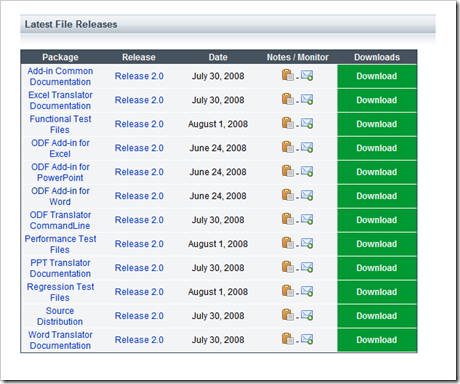
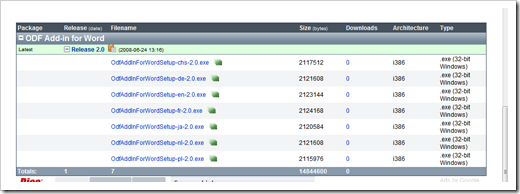
I’ve been seeing the releases show up in the RSS feed for a couple days now, but today is the first I’ve seen the the v2 downloads actually become available (even those dated 6/24 were not visible until today)

I’m still trying to determine if these are RTW/RTM or milestones as well as the features included in v2.

Also of note:

  • There appear to be setup’s for seven different languages.
  • The source is C#
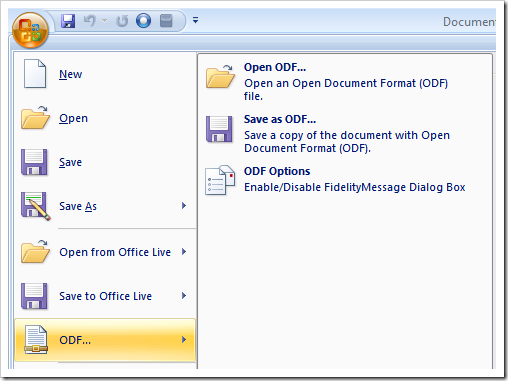
  • If you have a previous version installed, you might want to uninstall it first. The v2 setup left my v1 in place which seemed to block v2 from working. Once I uninstalled them both, reinstalled v2, I was ODF’ing in Word with no problems.

  image

Related Past Post XRef:
Word ODF Addin v1.1 Released
ODF Translator (ODF for Word Addin) 1.0 Released

Thursday, July 31, 2008

Pandora Recovery 2.0.1 Release – FAT16/32 (i.e. USB/Flash/Camera), Localized and more

Pandora Recovery - Pandora Recovery 2.0.1 - July, 3 2008

“The most requested feature, FAT support, has been implemented and released to production as a part of the new Pandora Recovery 2.0.1.

Pandora Recovery 2.0.1 expands the list of supported formats to include FAT16 and FAT32. In effect, this allows recovery of files wiped out from digital camera cards, USB flash drives, Win98 and some older WinXP hard drives.

So, if you have accidentally pressed 'Delete All' on your camera - do not despair - Pandora Recovery 2.0.1 will quickly bring your images back.

In addition to the above, the latest release implements support for automatic device insertion and removal detection, makes search statistics available to the user, adds % overwritten to the list of sort criteria and improves navigation paths.

By default, only the deleted items, or folders with deleted files or subfolders will be displayed in the browse tree, while in pre-2.0.1 releases all files would be displayed. The display can be toggled by using the 'Show deleted items only' button in the toolbar.

The user interface has been localized to Russian and Serbian locale.

Finally, Pandora PowerPack has been expanded to include 1GB Flash Drive. …”

Pandora Recovery - Find and Recover Deleted Files of Any Type

“Pandora Recovery is a powerful free tool that provides its users an effective way to attempt recovery of permanently deleted files. And that does not mean restoration of a file from Recycle Bin. Pandora Recovery actually recovers files permanently removed from Recycle Bin, files originally deleted using Shift + Delete keys bypassing Recycle Bin and files deleted from DOS prompt.

Pandora Recovery is not a backup tool - it can recover files that have been deleted months before Pandora Recovery was installed. And while the likelihood of successful recovery is negatively affected by the time passed since the deletion of files Pandora Recovery users were able to recover files eleven years after deletion and more than five years after re-formatting a hard drive!

…”

A cool tool gets even cooler (Thanks to Bojan for letting me know about the update). And still free (for home, non-commercial usage) too.

All to often an "undelete" tool can and will save your hide. And for a low price you can also get an officially supported portable version (so you can carry your undelete with you and amaze your co-workers with your technical savvy when you plug in and recover that party picture they thought was deleted from the office camera... ;)


Related Past Post XRef:
Pandora Recovery - Free Undelete Utility for Windows

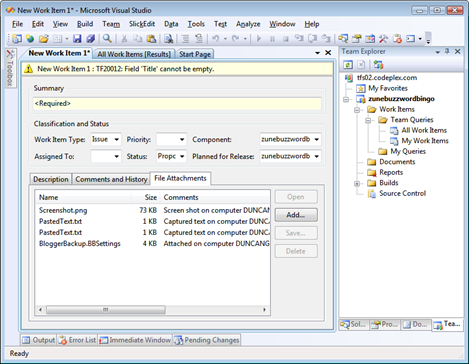
Did you know you could directly paste (Ctrl-v) screenshots/files/etc as new TFS work item File Attachments (VS2008 RTM)? Me neither…

inventive title - TFS Quick Tips: #1 Adding a screenshot to a work item

“The Team Explorer in Visual Studio provides a quick (and not exactly obvious) method for attaching a screenshot or other content to a Work Item.

Screenshots

To quickly add a screenshot do the following:

1. Press PrtScrn or Alt+PrntScrn (Captures only the currently active window)

2. Open a Work Item (Bug, Task, etc) in team explorer

3. Click “File Attachments”

4. Press Ctrl+V (Paste)

A file called “Screenshot.png” is automatically attached to the work item.

Copied Text

Copied Files

Bonus Tip – Copy and Paste Text from an Alert

…”

Oh my… This little tip could have saved me a good bit of time.

It’s really simple too.

Copy something to the clipboard, screenshot, file, text, etc, create or open a Work Item, go to the File Attachments tab and then Paste (Ctrl-V). You’re done.
(BTW, don’t click on the Add… button, just Ctrl-V on the File Attachments tab area)

image

For me, this worked on VS2008 RTM (yes RTM, the one you have in your hands now) but not VS2005.

I am SO going to use this feature going forward!

(via Team System News - VSTS Links - 07/31/2008)

Scrum Team Anti-patterns – How to piss off your ScrumMaster

Life in my own company - How to annoy your ScrumMaster

“As a ScrumMaster, these are some of my pet peeves, in no particular order:

  1. Come late to meetings.  Better yet, don't show up to the meeting, don't let anyone know that you're going to miss the meeting, and then get grumpy when the ScrumMaster asks you to not do it again.  After all, the team doesn't really need to know what you're doing.
  2. Ignore the priority of stories set by the product owner.  He loves not knowing what's going to be completed at the end of the iteration.
  3. Have side conversations during iteration (sprint) planning, or send chat messages on your computer.  Then, when asked a question about what you should have been paying attention to, have a lost look and say, "Could you repeat that," meaning the last 10 minutes of conversation.  Rinse, repeat.
  4. Prefer e-mail for communication.  After all, you don't have to bother talking to a human being and you can do nothing while you wait for a reply!  Heaven.  Why would someone use the phone, an office visit, a chat, screen sharing or any of those other pesky interactive conversation mechanisms.
  5. Never ask for help, and if you do, make sure you always ask the same team member, even if others might know more.  It'll make person your asking much less productive, since he'll have to do your work and his work too!  And if you don't ask for help, you can do nothing and blame it on not being up to speed!  Teamwork, Shmeemwork.

…”

I’m still a noob ScrumMaster, but some of these sure had me nodding…

Wednesday, July 30, 2008

Duncan’s in Space! (Well our names at least ;)

Pale HorseTo Boldly Go...

“.. well at least my name id boldly going.  Thanks to Ariel Waldman for point this out via Twitter.  You too can go to NASA’s Kepler project site and have your name included on a DVD being sent into space on the Kepler Mission.” [Post leached in full]

Send Your Name into Space with the Kepler Mission

“Would you like to send your name into space? Submit your name using the form below and it will be stored on a DVD and rocketed into space on board the Kepler spacecraft.

When you submit the form below, a Certificate will appear. You can then print this. We recommend that you save the certificate (by doing a File->Save As… from your browser) as well.

Kepler is NASA's first mission capable of detecting Earth-size and smaller planets in the habitable zone of solar-like stars. The spacecraft is planned to be launched from Kennedy Space Center in February 2009. The spacecraft will be launched into orbit around the Sun, not the Earth, with an orbital period of 372 days. The spacecraft will slowly drift away from the Earth, such that in about 25 years it will be half an Earth orbit away, 300 million kilometers distant from the Earth, passing behind the Sun as viewed from Earth.

When you submit your name, you may also chose to provide a message of 500 words or less of why you think the mission is important. A copy of the DVD with all of the names and messages will be given to the Smithsonian Institution’s National Air and Space Museum.

…”

Send Your Name to the Moon (via Pale HorseTo Boldly Go... > Wired - Send Your Name to the Moon on NASA's Lunar Reconnaissance Orbiter)

“Sign up to send your name to the moon. Names will be collected and placed onboard the LRO spacecraft for its historic mission bringing NASA back to the moon. You will also receive a certificate showcasing your support of the mission.

The deadline is July 31, 2008 for the submission of names.

…"

image

certificate_border01a

GregMarsLander

This maybe the only way I ever get into space... sigh (though I am hoping that one day I can take a space elevator trip ;)

I keep trying to convince my son he’s the perfect age to set his sights on a Mars trip, but he just gives me that “You are such a ‘tard” look.

Anyway, just in case, I’ve also created certificates for him too… :)

BYW, to get your name on the Lunar Reconnaissance Orbiter, the deadline is tomorrow, July 31st, 2008!

Team Build with Data Dude

Team Suite Development Center - How Do I: Build and Deploy Database Projects Using Team Build?

"In this video we will look at how to automatically build and deploy Visual Studio Team System 2008 database projects using Team Foundation Build 2008.

Presented by Richard Hundhausen http://www.accentient.com on July 29, 2008
Length: 7 Minutes 38 seconds

..."

Data Dude (VSTS Database Edition, for DB Pro's, etc) is a SKU that I would like to start using more...

This cast takes a nice bit lessons learned and packages it into a short video. As you watch the video it may seem like little things, but these "little things" could take a while to hunt down and learn if you were starting fresh...

Find Thread Deadlock = ACorns.Debugging - The .Net Deadlock Detector

parallelthinking - ACorns.Debugging - The .Net Deadlock Detector

"As nothing exciting has happed in my yard since the last release of Hawkeye I’ve decided to spice up my life and write a new .Net tool: The .Net Deadlock Detector.

...

The .Net Deadlock Detector

  1. The tool does not require to have the code re-compiled in any way or form, with any external dependencies, nor reference any external library or have you modify your code to use any special type of locks inside your code
  2. It works on release builds with no PDB files
  3. It works on running processes or previously captured memory dumps
  4. It detects deadlocks across multiple threads and returns detailed call-stack and lock usage information
  5. It only detect deadlocks in which threads are actively waiting for locks acquired by other threads
  6. It does not detect the dining philosophers problem or deadlocks created in combination of time waits + wake/check + lock
  7. It has an external dependency on the cdb.exe (part of the the free Debugging Tools for Windows package from Microsoft)
  8. It requires absolutely no installation. It an xcopy deployment
  9. And best of all it’s free (source code to be published soon)

..."

Interesting... As we delve deeper into the Mines of Moria (err... I mean... um... deeper into mines of multithreading... yeah...that... ;) these kinds of tools will become a "must have" in our utility belts.

Tuesday, July 29, 2008

GetVirtualSystemThumbnailImage – HyperV, WMI and Virtual Machine “Screen” Thumbnail

Taylor Brown's Blog - Hyper-V WMI: Creating a Thumbnail Image

“Hyper-V has a WMI API that will allow you to create a thumbnail image of any running or paused virtual machine.  You can create any sized thumbnail you want (640x480, 800x600, 1024x768 etc…).  Creating the image is pretty easy, you just call GetVirtualSystemThumbnailImage passing a reference to an Msvm_VirutalSystemSettingData instance and the size of the image you want…  However getting something useful from the returned data is a bit tricky…  You get an array of unit8’s that represent pixels, the API doesn’t have much choice and luckily Powershell makes this not an impossible feat.  All you have to do is create a new bitmap object and read (marshal) the pixel data into the object…

…” [Post leach level: 90%]

Oh… that’s neat! And being WMI this should be do’able remotely (given the right permissions of course).

So you could integrate this into a custom application, which joins line of business status, control, etc with a thumbnail view of a HyperV VM. Nice.

I can see how I might be able to use this… maybe. With Virtual Server there was VMRC, does that work with HyperV too? Or is it easier to Remote Desktop into the VM’s? And if so, when you disconnect (not log off, but disconnect), then the VM would lock? And so the Virtual System Thumbnail would be of a locked system? Or am I just being stupid? I guess I’ll just have to wait and see.... ;)

Tune Up Tips for Vista

Microsoft Downloads - Overview Series: Windows Vista® Performance and Tuning

“…

Windows Vista and SP1 focus on delivering greater performance and overall system responsiveness. By striking a balance between speed and responsiveness, Windows Vista and SP1 deliver a level of performance that has the greatest positive impact on the system’s usability.This guide looks at the following areas of performance improvement:

• Making configuration changes that help a computer feel more responsive when you use it.
• Using hardware to boost the actual physical speed of a computer.
• Making configuration changes that help a computer to start faster.
• Making the computer more reliable may help increase performance.
• Monitoring performance occasionally so that you can stop problems before they get too big.

…”

image 

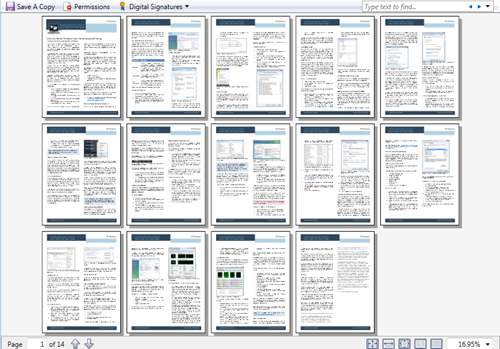
Some basic tips for improving Vista performance. It’s only 14 pages so don’t expect depth, and most of the suggestions are common ones and have been learned by many early adopters. Still if you’re new to Vista this guide could come in handy.

Monday, July 28, 2008

Master your C# Regions with Regionerate (Free and Open Source)

Visual Studio Gallery - Regionerate

"Regionerate is an automated tool which helps you to preserve your code's layout over time.

Regionerate lets you define sections in your code and determine the way members fields, methods, properties etc. should be placed inside them.

Regionerate is a zero-friction tool - when setting up, you can choose a Code Layout the way you want your code to look or just use the default Code Layout. From that moment on, Regionerate will make sure your code follows that Code Layout.

...

Regionerate is absolutely free... "

Regionerate - An automatic layout enforcement tool for the C# programming language.

"What is Regionerate?

Regionerate (pronounced ri-jeh-neh-rate) is a new open-source tool for developers and team leaders that allows you to automatically apply layout rules on C# code. Watch how it works.

Regionerate runs on Visual Studio 2005, Visual Studio 2008, #develop 2.0, NAnt and on command line.

..."

With the recent "Region wars" seeing this made me chuckle and so I just had to post about it... ;)

System Center Virtual Machine Manager Background and Installation

Ask the Core Team - System Center Virtual Machine Manager 2007 – Installation

“Virtual Machine Manager (“VMM”) is a manager of Windows Virtual Machines (“VM”) and the Hosts (physical machines) on which the VMs reside. Depending on hardware configuration, a single Host can house several VMs. A large volume of the calls we receive at Microsoft are around installation and operation - the goal of this blog is to cover each.

The newer console-based VMM is faster, and adds several features, such as more reliable conversion of physical to virtual machines (“P2V”), faster deployment of VMs, and centralized monitoring of several hosts AND their VMs. You can tailor the VMM interface to several levels of granularity and filtering, making managing several hosts and their VMs customizable to what works best for you. VMM manages your virtual hard drives (“vhd”), images, deployment scripts, and HW configurations in a centralized “Library.”

The VMM Components

There are four main components to your VMM deployment:

1. Virtual Machine Manager Server

2. Virtual Machine Library Server

3. Virtual Machine Host

4. Virtual Machine Manager Console

You’ll want to understand each of these and what they do before beginning to set up your deployment.

…”

This is a little more complicated than I thought. Looks like I have a little homework to do…

It looks like I'll need a "traditional server" to host the VMM Server/Library part? I've got some boxes where I repurpose, but I wonder if I also couldn't put it on a VM on the Win2K8 box I'm getting? Or would that be "bad"? I guess I can start there and re-install on a stand-alone box if need be at a later date. If I do the VMM on a VM I'll need to be careful with the VM Library paths... Can't have those in the VM, for that would indeed be "bad"


Related Past Post XRef:
Help keeping the VM sprawl patched… Free Microsoft Offline Virtual Machine Servicing Tool released
Microsoft System Center Virtual Machine Manager (MSCVMM) 2007 Trial Available via VHD

Before and After Photo’s… Scary Greg and Good Greg

Last week we went through the CV/Glamour shot photo process at work, professional photographer, makeup, the whole works. I just now got the JPG’s and thought it would be a good chance for a little “before” and “after”…

About once a year or so I get sick of shaving and just let it all grow out. The pictures below are after about eight months of that… This is my “Grizzly Adams” (aka “Scary Greg” or “Don’t Poke Greg the Bear”) look (taken May 2008, weight 230).

DCP_3035  DCP_3036 

DCP_3037  DCP_3038

And here are some of the pictures taken last week (July 2008, Weight 215)…

IMG_2985  IMG_2984  IMG_2972  IMG_2962


Just a bit of a difference, isn’t there?  LOL

Sunday, July 27, 2008

Scrum Resources

Since we’ve jumped on the Scrum bandwagon, I’ve been capturing Scrum related resources as I came across them and sharing them with my management peers and team. Well today I felt it was time I also share them with you… (Paying it forward and all that)

As I come across more I’ll try to update this post (as well as link to it off my main page so it’s easy to find in the future ;)

I hope these resources help you as much as they have helped me and my team…

Books

Magazine Articles

Other Documents

Blog Posts

Podcasts

Videos

Presentation Materials

Software

Scrum for Team System
Scrum For Team System Quickboard (A personal project)
Light Weight Scrum (Team System)
eScrum for Team System

My Scrum Stories & Posts (that are not already in the above lists)

Humor

PS. As I have been gathering these resources for a bit, if I missed a “(via”, reference, link back, shout-out, etc, please accept my apologies (and let me know so I can fix it… :)

Update 7/31/2008:
Added:
The Scrum Primer (via comment by Abby Fichtner, The Hacker Chick Blog)
Scrum Team Anti-patterns – How to piss off your ScrumMaster
Devcasting #14 - How to Make Scrum Really Work

Update 8/11/2008:
Added:
eScrum TFS Template v1.1 Released

Update 8/15/2008:
Added:
Mix a little WPF, with some Scrum and dash of TFS and you get... Task Board for Scrum for Team System Beta 2 Released

Update 10/15/2008:
Added:
Scrum for Team System 2.2 Released – More Reports, bug fixes, SQL Server 2008 and new Report Slide Show feature

Update 4/17/2009:
Added:
Free (reg-ware) ebook - “Scrum and XP from the Trenches” (via John Hines' Code Blog - Getting Started with Scrum)

Update 4/21/2009:
Added:
Scrum Quick Reference Card from DZone/Refcardz (via DZoneRefcardzScrum Reference Card)

Update 4/25/2009:
Added:
First/Alpha release of my Scrum for Team System Quickboard Project (Think “10 foot SfTS Dashboard”)

Update 5/9/2009:
Added:
Scrum Master Checklist – Four pages toward helping a Scrum Master succeed (via Michael James - An example checklist for ScrumMasters)

Update 7/27/2009:Added:
What is Scrum? A funny 2:47 minute video of a Daily Scrum.

Update 5/17/2010:
Added:
Scrum for Team System version 3 (TFS 2010), aka (SfTS v3) RTM released

Update 5/19/2010:
Added:
“Getting Started With Scrum for Team System Version 3 (TFS 2010)” – aka The “Okay I’ve got it installed, now what?” Guide

Update 6/28/2010:
Added:
Which TFS2010 “Agile” Project Template one is right for you? One side-by-side of MS Agile v5, MS Scrum v1[Beta] and Scrum For TFS(SfTS) v3

Update 9/22/2011:
Added:
Scrum from Team System v3 (SfTS) goes OSS

Windows Update in a command line world. Installing Windows Updates on Windows 2008 Server Core.

Robert Larson - Installing Updates on Server Core

“I love Windows Server 2008 installed with Server Core. It’s small footprint (although it could be even smaller), simplistic command line UI, and the boot speed.  One thing I dislike (until recently) is installing updates on Server Core. Well I found a nice little sample script that works beautifully to check and install all available updates from the command line

http://msdn.microsoft.com/en-us/library/aa387102(VS.85).aspx

This is a VBScript  that uses the built in Windows Update Agent (WUA) to check for all available updates, provide you a list, and allow you to select to download and install the updates on your machine.

This makes updating a Server Core image a breeze.

…” [Post leached level 99%]

I just heard my order for a “HyperV compatible system” was approved and the order placed… So while I wait on the order to come in (a couple weeks or so), I’m going to be keeping my eyes open for Windows Server 2008 & HyperV stuff. Given that I guess you can figure out why this article caught my eye.

It hadn’t registered as to how I was going to keep my Server Core system up to date. It’s been a long time since I lived in a command line OS (cough… MS-DOS 3.x… cough) that it hadn’t crossed my mind as to how update Server Core. Well with this script in hand, my update life will now be better.

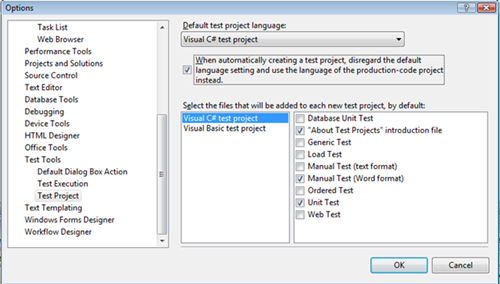
Tired of deleting the stubs and “About Test Projects” file when creating Visual Studio Test Projects? Well you have the power…

Elegant Code - Default Files in Visual Studio Test Projects

“I can’t believe I have lived this long without discovering this little gem inside VS options.

You know how Visual Studio creates default files in a test project when you create a new one? Those days of immediate file deletion are over, baby!

VisualStudioTestProjectOptionsDialog[Post leached in full]

Sometimes it the little things… While deleting these stubs is not hard, it IS something that we do over and over and over again.

We need a “Visual Studio for Ninja’s” series of posts… hum… ;)