Monday, June 07, 2010

“Visual Studio 2010 Pro Power Tools” available on the Visual Studio Gallery and free for everyone (VS 2010 Pro and above though). Think “Monster rollaway filled with cool power tools”

bharry's WebLog - Announcing the first Visual Studio Pro Power Tools!

“I’m VERY pleased to announce the latest addition to the Visual Studio Power Tools line-up – the Visual Studio Pro Power Tools.  Over the past few years, Power Tools have been such a successful way to deliver compelling value to customers quickly that more and more teams are adding it to their repertoire.  Today, we are releasing the first delivery for VS Pro customers.  These tools are focused on core developer productivity.  I think you will find some of them tremendously exciting!

To avoid barraging you with too many independent Power Tool delivery vehicles, we have standardized on the Visual Studio Gallery as the unifying way for delivering them.  Over time we’ll continue to improve the VS Gallery to make it an even more fantastic way to stay up to date.  In fact, check out the descriptions below and see that this Power Tools release is already helping with that by making it easy to find out about updates to extensions that you’ve already installed.

Of course, the other cool thing about all of this is that all of these tools just use standard VS extensibility mechanisms.  You could build cool stuff like this too if you want to.

As with other Power Tools, these Power Tools are available free of additional charge to users of Visual Studio 2010.

Add Reference Dialog

There’s a new Add Reference dialog that takes the place of the one that shipping in VS 2010 that is way faster and provides simple searching.  From the Solution Explorer or Navigator, simply right click on the References node, select Add Reference…

image

…”

Jason Zander's WebLog - Announcing: VS2010 Productivity Power Tools and Modeling Feature Packs

“I just completed the Developer Foundational Session (mouthful) at TechEd New Orleans where we announced the immediate availability of two great new projects for VS2010:  the Productivity Power Tools and Visualization and Modeling Feature Pack.

Product Release Types

Before going into the details of the new releases, I want to explain more about the types of releases you can expect us to provide:

Product Releases
Our primary distribution vehicle is normal product releases such as Visual Studio 2010 itself.  These releases are fully tested, localized into multiple languages, and fully supported. …

Power Tools
These are releases we provide periodically that work on top of a released version of the product (e.g. we don’t modify the product core but rather use extensibility points).  While these releases are done by our engineering team, they are meant to try out new ideas or answer common requests quickly.  We may or may not incorporate the ideas permanently into a future version of the product.  …

Feature Packs
Feature Packs are a new concept we are introducing with VS2010.  Like Power Tools these releases are designed to run on top of the existing core bits (no modifications allowed) using extensibility.  Unlike Power Tools, Feature Packs are ideas we fully intend to incorporate into the core product in the future (consider it a head start on v-next). …

Samples
Finally we have the venerable sample (starter kits, etc).  These are intended to demonstrate features and may be of varying levels of quality or completeness.

Productivity Power Tools

With VS2010 we made a significant number of platform investments including the new WPF based editor, DGML, UML diagrams, and TFS extensibility.  We took advantage of a lot of these features for building out the final product. But it has always been my expectation that this investment really pays off as we are able to do a full job building on this core platform.  The Productivity Power Tools represent the first example of doing that by our team (our partners have done great work as well, check out VS Gallery for more).

The Productivity Power Tools collect a bunch of very straightforward and very useful features that help you in your every day life in Visual Studio.  The features concentrate on editing, navigation, and other common tasks you use while constructing your code.

featurepack …”

Visual Studio Gallery - Visual Studio 2010 Pro Power Tools

“Visual Studio 2010 Productivity Power Tools

A set of extensions to Visual Studio Professional (and above) which improves developer productivity.

image

Wow…

I dig that the Add References dialog can be replaced at all, let alone with one like this. Given the amount of things in this release (and everything else happening today), it’s taking me a bit to digest it all…

Visual Studio [Ultimate] 2010 Visualization & Modeling Feature Pack RTM now available on MSDN Subscribers Download

image

“The Visual Studio 2010 Visualization & Modeling Feature Pack expands the scenarios for exploring and understanding your code. Extend the capabilities of the visualization and modeling tools in Visual Studio 2010 Ultimate… “

Feature Packs are like Power Tools in that they are being released “out of cycle” from Visual Studio, but different in that they are “official” and supported. If you can remember back when, think “NT4 Option Pack”. Per Jason Zander, “Feature Packs are a new concept we are introducing with VS2010.  Like Power Tools these releases are designed to run on top of the existing core bits (no modifications allowed) using extensibility.  Unlike Power Tools, Feature Packs are ideas we fully intend to incorporate into the core product in the future (consider it a head start on v-next).  Because of this a Feature Pack is of higher quality:  localized, fully tested, and formally supported.  Feature Packs are available through your MSDN subscription”

For more information about this Feature Pack, please see;

Jason Zander's WebLog - Announcing: VS2010 Productivity Power Tools and Modeling Feature Packs

“…

Visualization and Modeling Feature Pack

The modeling feature pack provides increased support for visualization (web sites as well as C/C++ code), new UML support, and increased support for layer diagram extensibility to Visual Studio Ultimate 2010.  Cameron Skinner did a great job giving a sneak peak of the feature pack here.  Let me highlight a few items here as well.

Web Site Visualization

Hopefully you have already discovered the power of DGML and architectural dependency graphs for your .NET code (read more about it here). In this release we’ve added support for the structure of your web sites. …

C/C++ (Native Code) Visualization Support

The VS2010 RTM product supports the .NET Framework (versions 1.1 –> 4).  I have received many requests for C/C++ support as well which is now included in this release. …

UML Class Diagram Code Generation

VS Ultimate 2010 added support for the most popular UML diagram types including Class Diagrams.  This release also adds the ability to generate code from your UML diagram targeting the correct T4 template.  Here is a sample class diagram for customers with orders: …

Creating UML Class Diagram from Code

Generating code from a diagram is great when you start with your model.  But often you already have an existing project without diagrams.  With the feature pack you can drag namespaces from the Architecture Explorer to a UML diagram: …

XMI Import

This release enables XMI 2.1 import which makes it easier to bring UML compliant documents into Visual Studio.  For now you will only be able to important documents targeting the subset we support.  You should expect us to add more document types in future releases of the product. …

featurepack …”

“Windows Azure Tools for Microsoft Visual Studio 1.2 (June 2010)” released – Think TechEd US 2010 Release (Azure support for VS2010 RTM, .Net 4, Cloud Storage Explorer, integrated deployment, service monitoring and IntelliTrace)

Microsoft Downloads - Windows Azure Tools for Microsoft Visual Studio 1.2 (June 2010)

“Windows Azure Tools for Microsoft Visual Studio extend Visual Studio 2010 and Visual Studio 2008 to enable the creation, configuration, building, debugging, running, packaging and deployment of scalable web applications and services on Windows Azure. Installation includes the Windows Azure SDK.

File Name: VSCloudService.exe
Version: 1.2.30517.1601
Date Published: 5/19/2010
Language: English


Windows Azure Tools for Microsoft Visual Studio extend Visual Studio 2010 and Visual Studio 2008 to enable the creation, configuration, building, debugging, running, packaging and deployment of scalable web applications and services on Windows Azure.

New for version 1.2:

  • Visual Studio 2010 RTM Support: Full support for Visual Studio 2010 RTM.
  • .NET 4 support: Choose to build services targeting either the .NET 3.5 or .NET 4 framework.
  • Cloud storage explorer: Displays a read-only view of Windows Azure tables and blob containers through Server Explorer.
  • Integrated deployment: Deploy services directly from Visual Studio by selecting ‘Publish’ from Solution Explorer.
  • Service monitoring: Keep track of the state of your services through the ‘compute’ node in Server Explorer.
  • IntelliTrace support for services running in the cloud: Adds support for debugging services in the cloud by using the Visual Studio 2010 IntelliTrace feature. This is enabled by using the deployment feature, and logs are retrieved through Server Explorer.
Windows Azure Tools for Microsoft Visual Studio includes:
  • C# and VB Project creation support for creating a Windows Azure Cloud Service solution with multiple roles.

…”

Lots of Azure coolness…

(via TakeNote... - Windows Azure Tools for Microsoft Visual Studio 1.2 (June 2010))


Related Past Post XRef:
Azure SDK 1.1, Azure Tools for VS 2008/VS 2010(RC) 1.1 released and Azure Drive Beta

Microsoft Expression Studio 4 RTM now available on MSDN Subscribers Download

Today’s the Expression 4 Launch day AND you can get it now on MSDN Subscribers Download… (your mileage… i.e. access to it, etc, will vary. Depends on your MSDN subscription level/type, etc, etc)

image


Related Past Post XRef:
Smashingly useful User Interface Prototypes (Smashing Magazine article, which includes Microsoft Expression Blend, that is…)
“Getting Started with Silverlight and Expression Blend” (SilverLight v4, Blend v3) DZone Refcardz
.toolbox Free online Silverlight/Blend and/or Design training (or the “I’m a developer, can you teach me how to design?” site )

Bing SDK updates, Spatial, SOAP, Rest and AJAX Control.

Microsoft Downloads - Bing Spatial Data Services SDK (PDF)

“This software development kit (SDK) provides programming reference and how-to topics for getting started with the Bing Spatial Data Services, in the form of a PDF file. …”

Microsoft Downloads - Bing Maps SOAP Services SDK (PDF)

“This software development kit (SDK) provides programming reference and how-to topics for getting started with the Bing Maps SOAP Services, in the form of a PDF file. …”

Microsoft Downloads - Bing Maps REST Services SDK (PDF)

“This software development kit (SDK) provides programming reference and how-to topics for getting started with the Bing Maps REST Services, in the form of a PDF file. …”

Microsoft Downloads - Bing Maps AJAX Control SDK (PDF)

“This software development kit (SDK) provides programming reference and how-to topics for getting started with the Bing Maps AJAX Control, in the form of a PDF file. …”

MSDN - Bing Maps APIs

“The Bing Maps documentation set provides information on the APIs that power Bing Maps, an online mapping service that enables users to search, discover, explore, plan, and share information about specific locations. By using traditional road maps, labeled aerial photo views, low-angle high-resolution aerial photos, and proximity searching capabilities, Bing Maps provides unique opportunities for developers to incorporate both location and local search features into their Web applications.

image …”

These are not some “light beer” SDK’s… The Bing Rest SDK PDF is 151 pages…

image

Microsoft TechEd 2010 is OData enabled

WCF Data Services Team Blog - TechEd 2010 OData Service

“TechEd North America 2010 is fast approaching (it starts Monday). This year we have added an OData service to the TechEd site, just like we did for MIX10 earlier this year. The service exposes the sessions, speakers and other associated information for the conference and is a great way to learn OData. Check-out the API page on the TechEd site here for more information on the service. If you are attending TechEd make sure you stop by the DMG booth (in the DAT section) and show the folks from DMG your OData App.

image …”

North American TechEd - API for Session Data

“Not happy browsing our list of sessions on the web, feel like doing some data mining of your own, building an app to show how schedule planning should be done? Well, if any of those statements apply to you, then we have the data you need.

The Open Data Protocol, referred to as OData, is a new data-sharing standard that breaks down silos and fosters an interoperative ecosystem for data consumers (clients) and producers (services) that is far more powerful than currently possible. It enables more applications to make sense of a broader set of data, and helps every data service and client add value to the whole ecosystem. WCF Data Services (previously known as ADO.NET Data Services), then, was the first Microsoft technology to support the Open Data Protocol in Visual Studio 2008 SP1. It provides developers with client libraries for .NET, Silverlight, AJAX, PHP and Java. Microsoft now also supports OData in SQL Server 2008 R2, Windows Azure Storage, Excel 2010 (through PowerPivot), and SharePoint 2010. Many other other applications in the works.(from MSDN)

The URL for the TechEd North America OData service is http://odata.msteched.com/sessions.svc/, and you can find more information on how to access this data on http://www.odata.org …”

http://odata.msteched.com/sessions.svc/

image

Snap via OData Explorer;

image

Continuing on their OData’ing of their sessions, started with MIX10, Microsoft’s TechEd North America also has an OData service/feed/end point.

Very cool to see this effort continued.


Related Past Post XRef:
MIX10? There’s an OData Feed for that…

OData Primer – A collaborative effort to gather and share OData information and resources

Sunday, June 06, 2010

Windows Server AppFabric v1 RTW (and samples too)

Microsoft Downloads - Windows Server AppFabric

“Windows Server AppFabric is a set of integrated technologies that make it easier to build, scale and manage Web and composite applications that run on IIS.

Version: 1.0.0.0
Date Published: 6/4/2010
Language: English
Download Size: 23 KB - 167.8 MB*


Windows Server AppFabric is a set of integrated technologies that make it easier to build, scale and manage Web and composite applications that run on IIS. Windows Server AppFabric targets applications built using ASP.NET, Windows Communication Foundation (WCF), and Windows Workflow Foundation (WF).

It provides out-of-the-box capabilities for you to easily build and manage composite applications, including:

    • Enhanced design and development tools in Visual Studio to build rich composite applications
    • Management and monitoring of services and workflows via integration with IIS Manager and Windows PowerShell
    • Distributed in-memory application cache to improve application performance

Windows Server AppFabric allows developers to build their next-generation composite applications, and for administrators to host and manage them. It integrates technologies previewed as code name "Dublin" and code name "Velocity".

System Requirements

  • Supported Operating Systems: Windows 7; Windows Server 2008; Windows Server 2008 R2; Windows Vista

  • Supported Architectures:
    • 32-bit (x86)
    • 64-bit (x64)

Instructions

  • Upgrade from Windows Server AppFabric Beta 2 Refresh and Windows Server AppFabric RC is supported. However upgrade from older versions of Windows AppFabric (Beta 1 and Beta 2) is not supported. Before starting the installation, uninstall older versions (pre-Beta 2 refresh) of Windows Server AppFabric, then install pre-requisite software. It is important to uninstall Windows Server AppFabric Beta 1, Windows Server AppFabric Beta 2 before uninstalling .NET 4 Beta 2 or .NET 4 RC respectively and installing the final version of .NET 4. For more information and a work-around see the release notes.

…”

Microsoft Downloads - Windows Server AppFabric Samples

“Windows Server AppFabric is a set of integrated technologies that make it easier to build, scale and manage Web and composite applications that run on IIS. These samples provide a introduction to some of Windows Server AppFabric's hosting and caching features.

File Name: WindowsServerAppFabricSamples.exe
Version: 1
Date Published: 6/4/2010
Language: English
Download Size: 7.8 MB

…”

There’s some interesting features in AppFabric and now that the on-premises v1 is RTW it might be time to check them out in more depth. If I were doing web work, instead of a “might” it would probably be a “must”…


Related Past Post XRef:
10 AppFabric/.Net 4 Virtual Labs now available
Windows Azure AppFabric SDK v1.0 Released (Service Bus and Access Control)

Friday, June 04, 2010

SQLIse v2.2 gets some added flavor – Now with OracleIse, Tab expansion, updated installer and more…

Sev17 (Chad Miller) - SQLIse A PowerShell SQL Server Query Tools Gets an Update

“After the first release of SQLIse (“SQL Ice”)--a basic IDE for T-SQL that includes ability to edit, execute, parse, format SQL code from within PowerShell ISE, several people contacted me to help add new features. The result is SQL Server PowerShell Extensions (SQLPSX) 2.2 with many enhancements to SQLIse…

SQLIse Features
  • Offline parsing of T-SQL code
  • Formatting (prettifying) of T-SQL with an extensive customization abilities
  • Comment/Uncomment T-SQL code
  • Uppercase/Lowercase T-SQL code
  • Execute T-SQL code and output to grid, text, text file or CSV file
  • Apply any of the above actions to selections of code by highlighting
  • Table and object browsers*
  • PoshMode (like sqlcmdmode)*
  • Save output to variable*
  • Save and manage connections*
  • Tab Expansion of schemas, tables, views, functions, procedures, columns and parameters.*
  • OracleIse module*
  • OracleClient module used by OracleIse*
  • Redistributed WPK and ISECreamBasic modules from PowerShellPack and ISECream projects*
  • Created an SQLPSX installer* [GD: Emphasis added to help my poor old eyes see all the v2.2 coolness]

* = New features for release 2.2

…”

A cool project gets cooler…


Related Past Post XRef:
Making your PowerShell ISE cool with SQL Ice – SQLIse now available as part of the SQL Server PowerShell Extensions (SQLPSX) v2.1 release

SQLPSX v2 – PowerShell for SQL Server has been PowerShell 2’ed
PowerShell for SQL Server 2000+ - Chad Miller’s SQL Server PowerShell Extensions v1.5 released, with 104 functions, 2 cmdlets and 12 scripts

PowerShell is all about enabling you. Even the PowerShell Integrated Scripting Environment (ISE) can be extended (via PowerShell of course)
Straight from the Windows 7 Resource Kit, PowerShellPack Released - 1.97 billion… (okay 600+, but that’s still allot) of PowerShell scripts to help you “think PowerShell”

“Getting Started with Extending Visual Studio” page now available on the MSDN Visual Studio Dev Center

MSDN Visual Studio Dev Center - Getting Started with Extending Visual Studio

“Learn how to customize and extend Visual Studio to automate tasks or add features.

Introduction to Automation and IDE Extensibility

Learn how to programmatically automate repetitive tasks, extend Visual Studio with tools such as add-ins and wizards, and create packages and Visual Studio applications using the Visual Studio SDK.

Project System

Learn how to write your own Project System as well as how to extend the existing Project Systems in Visual Studio.

Debugger

Learn how to extend the Visual Studio 2010 fully interactive source debugger.

Editor

Written in managed code, and implemented using the Windows Presentation Foundation. You can extend editor features by using the Managed Extensibility Framework. Learn the various ways in which you can customize and extend the Editor.

User Interface

Learn how VSPackages influence the appearance of user interface (UI) elements in the Visual Studio integrated development environment (IDE), how to create UI that closely resembles the Visual Studio IDE, and how to program UI elements in the IDE.

Help Authoring and Integration

Learn how to use tools to produce Visual Studio 2010 compatible help content.

UML and DSL Tools

Learn how to build graphical models to generate code.

Visual Studio Shell

Learn how to create a custom tool that has its own integrated development environment (IDE). The Visual Studio Shell provides a hierarchal project system, integration with editors and designers, source code control, and a familiar user interface that may reduce the learning curve for end users.

Team Foundation Server Extensibility in Visual Studio

Learn how to customize and extend Team Foundation Server to meet your specific needs.

image …”

Lot’s of cool links… one tiny page…

(via IHateSpaghetti {code} - Getting Started with Extending Visual Studio)


Related Past Post XRef:
Extending VS2010 – SDK is out, Scott Hanselman chats about it and there’s a good number of samples already on the Visual Studio Gallery
What’s New in Visual Studio 2010 & .Net 4 – The Official MSDN Source
Visual Studio 2010 and .NET Framework 4 Training Kit – February Release (aka the VS2010 RC Compatible release) – We’re talking 602MB of VS/.Net training stuff here…
UML, T4 and Visual Studio 2010, Oh my…
Feature Builder Power Tool Preview updated for VS2010 RTM – Think “Extension to help build Extensions,” or “Power Tool for Power Tools…”

Want to add additional language support to your app but don’t have the funds, people or resources? ResX Translator with Bing might help…

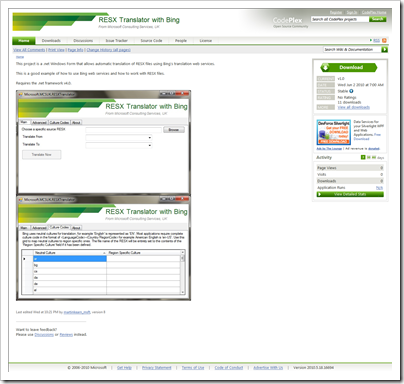
CodePlexRESX Translator with Bing

“This project is a .net Windows Form that allows automatic translation of RESX files using Bing's translation web services.

This is a good example of how to use Bing web services and how to work with RESX files.

Requires the .net framework v4.0.

image …”

A quick, easy and cheap way to get your String Resources translated. But use with caution. Remember this is a machine translation! (So humor, upset or even anger may result from a inaccurate translation…)

Having the source is also pretty cool too… ;)


Related Past Post XRef:
Here’s some help creating multilingual applications via machine language translated resource strings(VB & C#)
Free Spell Checker (Strings Literals, Comments, etc) for Visual Studio - ComponentOne's IntelliSpell Community Edition
PowerShell through your String Literals - Using PowerShell to extract and review all the string literals in your applications

Thursday, June 03, 2010

Father’s Day gift for the blogging or feed reading addicted father…

MAKE: - RSS icon throw pillow

image

“I bought one of these RSS throw pillows from Justin almost a year ago when Becky hit it in a Flickr pool round-up on CRAFT. It was a steal then at $15, and it looks like Justin has only marked it up a little bit in the meantime, to $19.99, which is still a great price. Mine is a year old, has seen daily use on my living room couch, and still looks great. Comfy, too” [GD: Post Leached 100%]

Makers Market - RSS Feed Icon Pillow

“…

This RSS Feed Icon pillow may not aggregate all your news feeds and updates into one easy to consume place. But this 100% hand crafted, 12″×12″ pillow will certainly aggregate all your thoughts and dreams into order, giving you Real simple sleep..

Whether on your bed or near your computer this pillow is perfect for snuggling after a great day of fresh news, or one of those days where everyone is publishing the same exact story.

…”

In a word… That’s cool! (okay, two words ;)

Spring cleaning should be about cleaning and not about calling 911 or visiting Urgent Care. A few safety steps can keep the spring in your steps.

LAFD News & Information - Will Spring Cleaning Force You To Call 9-1-1?

“While your parents may have paralleled cleanliness as telltale to other things, your Neighborhood Firefighters can say that getting your household clean will often - but not always - makes things safer.

Having seen many of our neighbors needlessly injured while performing seasonal chores, the men and women of the Los Angeles Fire Department suggest you take a few simple steps to prepare for spring cleaning tasks.

It's easier - and more important than you think!

Like firefighters, we suggest you first consider the tools, training and logistics necessary to get the job done safely and efficiently.

While you may be tempted to use a cigarette lighter on a leaky pipe - or your least favorite screwdriver as a chisel, please know that others once had the same thought... shortly before the LAFD arrived to extinguish their house fire or take them to the hospital.

So what are we suggesting?

Your very first trip to the Do-It-Yourself Store should be for one or more of these items:

- Goggles or Safety Glasses
- Sturdy Leather Work Gloves
- Disposable Latex Gloves (for handling paints, pesticides, etc)
- Disposable Face Masks (for non-toxic dust)
- Earplugs or Earmuffs (for hearing protection)
- Sturdy Work Shoes with non-skid soles
- Knee or Elbow Pads
- Flashlight or Safety Lamp
- First Aid Kit
- Fire Extinguisher
- Instructional Literature

When it comes to tools, we suggest E-M-S: Examine, Maintain and properly Store. …

image …”

It’s all fun and games until someone gets hurt… (well okay, spring cleaning isn’t all that fun, but you get the idea).

Being “safe” when doing spring cleaning may not be your first thought, but in hindsight you might wish it had been. As the team at the LAFD (Go LA! :) point out, it is be far smarter to be safe up front and avoid any problems then it is to deal with the aftermath of not…

Wednesday, June 02, 2010

Sea Dragon + Windows Server 2008 R2 Hyper-V Component Architecture Poster = Something you can view without your eyes bleeding…

In case you don’t have a color poster printer, or you would just like to keep your eyes from bleeding when you try read it, there’s now a zoom’able version of the Windows Server 2008 R2 Hyper-V Component Architecture Poster – aka The perfect Hyper-V Geek Cube Wallpaper courtesy of SeaDragon.

http://seadragon.com/view/12u8

image  image

(via TONYSO - Free online viewer for Hyper-V Component Architecture Poster)


Related Past Post XRef:
Windows Server 2008 R2 Hyper-V Component Architecture Poster – aka The perfect Hyper-V Geek Cube Wallpaper

Snippet Designer v1.3 for Visual Studio 2008/2010 released (Think the “Cool, HTML/ASP.NET, JavaScript and SQL” support!” release)

Matt Manela's Blog - Snippet Designer 1.3 Released!

“The key features of this release are support for HTML/ASP.NET, JavaScript and SQL snippets and a much improved snippet searching experience.

If you already have it installed for Visual Studio 2010 you will get an update in your extension manager for the new version.

Change log

Changes for Visual Studio 2010

  • Fixed bug where "Export as Snippet" was failing in a website project
  • Changed Snippet Explorer search to use a relevance based algorithm which yields much better results
  • Added support for JavaScript snippets
  • Added support for SQL snippets
  • Added support for HTML/ASP.Net snippets
  • Added support for <AlternativeShortcuts> tag
  • Made the color of the snippet replacement highlighting configurable

Changes for Visual Studio 2008

  • Fixed bug where "Export as Snippet" was failing in a website project
  • Changed Snippet Explorer search to use a relevance based algorithm which yields much better results .” [GD: Post Leached Level: 99%]

Visual Studio Gallery - Snippet Designer

“The Snippet Designer is an open source plugin which enhances the Visual Studio IDE to allow a richer and more productive code snippet experience.

The Snippet Designer supports both Visual Studio 2010 and Visual Studio 2008.  For the 2008 download please visit the Snippet Designer Codeplex page.

For more information visit the Snippet Designer Codeplex page at http://snippetdesigner.codeplex.com

Features

A Snippet editor integrated inside of the IDE.

  • Access it by opening any .snippet file or going to File -> New -> File -> Code Snippet File
    It uses the native Visual Studio code editor so that you can write the snippets in the same environment you write your code.
  • It lets you easily mark replacements by a convenient right click menu.
  • It displays properties of the snippet inside the Visual Studio properties window.

A Snippet Explorer tool window to search snippets on your computer

A right Click "Export as Snippet" menu option added to C#, VB and XML code editor to send highlighted code directly to the Snippet Editor

image …”

CodePlex - Snippet Designer

Welcome to the Snippet Designer

The Snippet Designer is a plugin which enhances the Visual Studio IDE to allow a richer and more productive code snippet experience.
  1. What do I need to use this?
  2. What can the Snippet Designer do?
  3. How do I use the Snippet Designer?
  4. How to build the code?
  5. How can I contribute to this project?

Prerequisites

  • Visual Studio 2010
  • Visual Studio 2008

Features

image …”

If you have to copy-n-paste share, or find yourself writing code that is almost the same (and doesn’t lend itself to code generation) then snippets might be just your thing. They are especially nice if you want to share code/snips with your team.


Related Past Post XRef:
Snippet Designer Released – Making VB, C#, XML Snippets the easy way… (VS2008)
Visual Studio Snippet Editor v2 Released – Formerly known as the “Visual Basic Snippet Editor” it now lives on in the source (VB) available world.
Visual Basic Snippet Editor 2005 version 1.1 Released
Visual Basic (and C#, J#, XML) Code Snippet Editor

Get GIT – The “Getting Started with Git” DZone Refcardz

DZoneRefcardz - Getting Started with Git

“…

Overview

Today, developers everywhere are migrating in droves to this exciting platform.  Users reference its blistering performance, usage flexibility, offline capabilities, and collaboration features as their motivation for switching.  Let’s get started with Git.  You’ll be using it like a master in no time at all.

…”

As I’ve been on a tiny Git thing recently, when I saw this I knew I wanted to capture and share it.

It’s the usual high quality quick reference that we’ve come to expect and love from DZone.

image


Related Past Post XRef:
Getting Visual Studio to Get GIT
CodePlex expands source control options with distributed version control support (DVCS) via native Mercurial support

Tuesday, June 01, 2010

A handful of SQL Server 2008 R2 & SQL Azure whitepapers. SSRS double hoping, DAC, SQL local vs cloud and an FAQ too

All things SQL Server Related.... - SQL Server 2008 R2 and SQL Azure Whitepapers

Kerberos/Double hop with SSRS

From a infrastructure implementation of Microsoft BI solutions, one of the most difficult things to get right can be authentication between multiple servers in a scale out solution. This is known as the ‘double hop’ situation. A new white paper released in April 2010 outlines how to configure and troubleshoot a Reporting Services environment to use Kerberos authentication.

Data-tier Applications (DAC) in SQL Server 2008 R2

The following white paper describes how DAC can be implemented both using SQL Server Management studio and Visual Studio 2010.

SQL Azure vs. SQL Server (Cloud vs On Premise)

This paper compares SQL Azure Database with SQL Server in terms of logical administration vs. physical administration, provisioning, Transact-SQL support, data storage, SSIS, along with other features and capabilities.

SQL Azure FAQ

This document addresses some of the questions that customers ask most frequently.

…”

Here’s a snap of Data-tier Applications (DAC) in SQL Server 2008 R2. DAC is something I’ve not been watching, but could be interesting…

image

And of SQL Azure vs. SQL Server (Cloud vs On Premise)

image 


Related Past Post XRef:
Free, as in free, eBook - Introducing Microsoft SQL Server 2008 R2 (direct download, no reg required)
The March 2010 “SQL Server 2008 R2 Update for Developers Training Kit” update now includes VS2010 goodness

A quick 16 page SQL Azure developing and deploying document for the discerning Dev dude

Getting “Cloud Ready” on demand - Windows Azure FireStarter event recordings now available (We’re talking 8 hours of event video…)
The fast, yet as complete as, possible SQL Azure Start to Finish Guide – aka What is a “DB as a SQL Azure/web service” demo without Northwind?
Free Microsoft SQL Azure training and a cool Migration Wizard utility

SQL Server Management Studio for SQL Azure now available

A COM and Registry review staring CLSID, TypeLib, Interface and AppID.

Marius Bancila’s Blog - COM and Registry

“If you are working with COM there are several registry entries that are important and that you need to understand. I will try in this post to clarify them. But before that, let’s enumerate the three possible COM server scenarios. (As a side note, a COM server is a DLL or EXE can contains one or more COM objects; a client is an entity that uses a COM object, which means a COM server can also be the client of another COM server.)

  • inproc: the COM server is loaded into the client process; in this case accessing the COM methods is as simple as using an interface pointer when the client and the in-proc server are in the same thread
  • local: the COM server and the client are loaded in different processes on the same machine; communication is achieved with the use of proxies and stubs via Lightweight RPC
  • remote: the COM server and the client are loaded in different processes on different machines; communication is achieved with the use of proxies and stubs via RPC

In order for the COM Library to be able to locate and instantiate the COM objects correctly, different information is stored in the Windows Registry. The most important information is located under the keys CLSID, TypeLib, Interface and AppID from HKEY_CLASSES_ROOT. The images below show examples for IIS.

image …”

Review information for many, but that doesn’t make it any less valuable (especially for those who rarely get deeper into COM than regsvr32… ;)