Wednesday, July 21, 2010

Feature Builder v1.0 Released (Remember, this is the tool that helps build tools… The Power Tool for Visual Studio Power Tools)

Adventures In SoftwareLand - Feature Builder 1.0 Released!

“Please visit http://channel9.msdn.com/tags/FeatureBuilder for more information and links to the download.

Note: While all the information on Channel9 is valid, there have been many additional features added since the videos were recorded and I will be updating them in the very near future.

Second Note: Will shortly be providing an upgrade tool on CodePlex (in source code form), which will aid authors who built Feature Extensions for the RTM-Preview version to upgrade their Feature Extensions to work with v1.0” [GD: Post leached in full]

Visual Studio Gallery - Feature Builder Power Tool

“Feature Builder is a Power Tool for Visual Studio 2010 which helps you easily create rich Visual Studio extensions.

These extensions may include tools (Visual Studio automation), code (your sample code or binaries you wish to share with others) and a map (a set of steps your users will want to follow to get the best experience with your extension). You can use this power tool to quickly package up sample code with documentation, custom menus, or take the time to create complete automated guidance experiences targeted toward a specific technology. You can share your extension with users by distributing a .vsix file, or posting to the Visual Studio Gallery.

You can create two different kinds of extensions using Feature Builder. A standard Feature Extension can contain tools, code, and a simple map - it will run on the Visual Studio Professional edition and above. A more advanced extension, called an Ultimate Feature Extension, can contain everything a standard feature extension can contain, as well as rich modeling and visualization tools that can take advantage of the modeling platform inside the Visual Studio 2010 Ultimate edition (required). These tools can be used to provide a logical view of your target solution, and to visualize your existing code. This is the preferred type of extension to use if you intend to provide architectural guidance or share specific refactoring or pattern knowledge.

Feature Builder requires Visual Studio 2010 Ultimate Edition, and the installation of the Visual Studio SDK to author/build Feature Extensions.

The 1.0 version supports feature extensions running on Visual Studio Professional edition and higher (but still requires the Visual Studio Ultimate edition to author a feature extension).

…”

Extending Visual Studio 2010 is quickly become a new hobby for many, it’s just SO much easier that in previous releases that it’s actually kind of fun! lol From the dev side all the way through deployment and updates, we’re talking a whole new ball game. Spending hours browsing the Visual Studio Gallery web site or via the Visual Studio Extension Manager, the problem will be controlling yourself and NOT installing the tons of very cool things you find… ;)


Related Past Post XRef:
Feature Builder Power Tool Preview updated for VS2010 RTM – Think “Extension to help build Extensions,” or “Power Tool for Power Tools…”
“Feature Builder Power Tool” Preview Released – A power tool to help you build tools/extensions/etc for Visual Studio 2010, a tool to help build tools…

Clean Coding, The Cheat Sheet. Starts SOLID and gets better from there…

{quicklycode} - Clean Code Cheat Sheet

image

One sheet, centuries of man-hour learning and experience...

image


Related Past Post XRef:
DevCheatSheet.com, The Developer focused cheat sheet aggregator (just about all languages, all areas, all the time…)

Microsoft Learning Content Development System (LCDS) v2.5 Released (Think x64 & SilverLight 4 Release)

Born To Learn - FREE: Build your own e-learning with LCDS 2.5

“A new version of LCDS, the Microsoft Learning Content Development System, is always great news. This is a very valuable and professional tool for anyone in the Microsoft Learning community who wishes to create high-quality and interactive online courses.

Using LCDS, you can publish e-learning courses by completing the easy-to-use LCDS forms that seamlessly generate highly customized content, including interactive activities, quizzes, games, assessments, animations, demos, and other instructionally engaging elements.

…

Highlights of this release

New v2.5 feature for learners and authors of E-Learning courses and Learning Snacks include:

  • LCDS authoring is 64 bit–compatible
  • E-learning created is compatible with Firefox 3.5.9 and Firefox 3.6.3
  • New Silverlight 4 Media Player for animations that includes closed captioning and full screen option
  • Enhanced keyboard accessibility for the sort and tile games, adventure interactivity, and Voice of the Expert element
  • LCDS authoring and e-learning created are completely Microsoft Silverlight 4.0–compatible
  • Content is now permitted at the Lesson level (previously, the SCO was the Lesson so this was not possible)

Also available on the site are 7 localized LCDS v2.3 versions: Brazilian Portuguese, Chinese Simplified, Russian, Hindi, Polish, Turkish, and Spanish.” [GD: Post Leach level 99.9%]

Anything that could make those mandatory in-house training sessions better is a good thing in my book… Winking smile


Related Past Post XRef:
Microsoft Learning Content Development System (LCDS) v2.4 Released
Microsoft Semblio – A set of tools for educators to create rich interactive content/training, with extensibility via SDK, .Net and WPF (SDK free available today, rest coming soon)

Monday, July 19, 2010

Microsoft’s Third “Official” Team Foundation Server Project Template has RTW’ed - Microsoft Visual Studio Scrum 1.0

Aaron Bjork - Announcing Microsoft Visual Studio Scrum 1.0

“Today we’re releasing the first official version of our latest process template – Microsoft Visual Studio Scrum 1.0 (formerly known as Team Foundation Server Scrum v1.0 Beta).   If you were following the beta, you know that this template was built from the ground up specifically for Scrum teams. 

Visit the Visual Studio Gallery to download the template.  Below I’ve taken some time to describe what’s changed since the beta and also outlined a few of the key concepts/artifacts in the template.

Q:  What’s changed since the beta?

…

Q:  Why did Microsoft decide to build a Scrum template?  I thought MSF Agile 5.0 was Microsoft’s answer to Scrum?

…

Q:  Did Microsoft work with Agile thought leaders when building this template?

…

Q:  How is the Sprint work item intended to be used?

…

Q:  What about the Iteration Backlog and Product Planning workbooks from the MSF Agile 5.0 process template? 

…

Q:  Can I move data from an existing project into a new project build from Microsoft Visual Studio Scrum 1.0?

…

image…”

One of the important things in my mind, is that this is an “official/in-the-box” Scrum TFS Project Template. Also I like the simplistic approach this template takes. If you need “Enterprise” Scrum, check out EMC’s Scrum for Team System v3. If you need something smaller, less complex, then this seems like a good choice…


Related Past Post XRef:
Scrum Resources

Which TFS2010 “Agile” Project Template one is right for you? One side-by-side of MS Agile v5, MS Scrum v1[Beta] and Scrum For TFS(SfTS) v3

Sometimes a picture says… Photoshop Design Templates (and other design resources) for Windows Phone 7

istartedsomething -  Photoshop your own Windows Phone 7 applications

“It looks like Microsoft is not just making the Windows Phone 7 application development experience easy for developers, but it turns out designers have most of their job cut out for them. If you need to mock up an application UI for Windows Phone 7, it’s now as easy as mashing up some Photoshop files from the “Design Templates for Windows Phone 7″ resource.

Since finding useful information on MSDN is practically a treasure hunt, this 88MB archive is a treasure chest full of PSDs with layer-licking goodness. The gems include a full suite of UI controls as well as other practical UI elements such as the on-screen keyboard, notifications and start menu for easy drag and drop manipulation, if you can find the right layer amongst hundreds that is.

…”

MSDN - Design Resources for Windows Phone

“…

Design Templates for Windows Phone 7

A collection of 28 layered Photoshop template files that can be used to create pixel-perfect application layouts, to help guide UI development, or to pitch an idea. These design templates showcase many controls that are a part of the Windows Phone Developer Tools Beta. They also include examples of controls that are a part of Windows Phone, but are not available as a part of the Windows Phone Developer Tools. These additional templates are included to help designers and developers maintain a consistent look and feel across applications for system controls that developers wish to mimic. Templates in the download: Application Bar & Application Menu, Buttons, Check Box, Context Menu, Date Picker, Dialog Boxes, Edit Control, Hardware, Icons, Keyboard & Input, List Picker, List View, Panorama, Panorama Backgrounds, Picker Box, Pivot, Progress Indicators, Quick Jump Grid, Radio Button, Reminders, Slider, Start & App List, Start Tiles, Status Bar, Theme, Time Picker, Toast Notifications, Toggle Switch …

image…”

Here’s a snap of the PDF included in with the PSD’s;

image

And a quick snap of some of the zip’s contents

image

While you’re here, and of course you find this interesting, make sure you also check out UI Design and Interaction Guide for Windows Phone 7 and Windows Phone Design System - Codename Metro


Related Past Post XRef:
Application Bar Icons for your Windows Phone 7 development

The Visual Studio Productivity Power Tools just got better (with yesterday’s update). Now it’s Cool x 2!

The Visual Studio Blog - New Version of the Productivity Power Tools is Available!

“I am pleased to announce that we have an updated version of the Productivity Power Tools. With this release, we've introduced 4 brand new extensions and we've fixed many of the bugs that were reported in the previous version. If you have the Productivity Power Tools installed already, you will get a notification that a new version is available the next time you restart Visual Studio. Otherwise, you can visit our Visual Studio Gallery page here: http://visualstudiogallery.msdn.microsoft.com/en-us/d0d33361-18e2-46c0-8ff2-4adea1e34fef

Tools Options Support

The number one feature request by far has been the ability to turn off the individual extensions in the Productivity Power Tools.  In this release, we’ve added an extension which adds a category to Tools Options which allows you to toggle the extensions on/off and provides a single place to find the options for a particular extension.

…

Solution Navigator

Solution Navigator is a new tool window that acts like an enhanced Solution Explorer.  With it, you can:

  • Expand code files to navigate to its classes, expand classes to navigate to their members, and so on (C# and VB only)
  • Search your solution, all the way down to class members
  • Filter your solution or projects to see just opened files, unsaved files, and so on
  • View related information about classes and members (such as references or callers/callees for C#)
  • Preview images by hovering over them, or preview rich information by hovering over code items

In other words, it merges functionality from Solution Explorer, Class View, Object Browser, Call Hierarchy, Navigate To, and Find Symbol References all into one tool window!

…

Quick Access

Quick Access is a new tool window that allows users to search for and execute common tasks within the Visual Studio IDE.  Not sure where a particular menu command is located?  Want a quick way to create a new Silverlight project? By using Quick Access, you can efficiently find and execute common VS operations without taking your hands off the keyboard.  Quick Access allows users to:

…

image…”

Awesome…


Related Past Post XRef:
“Visual Studio 2010 Pro Power Tools” available on the Visual Studio Gallery and free for everyone (VS 2010 Pro and above though). Think “Monster rollaway filled with cool power tools”

Saturday, July 17, 2010

Silly Trick of the Day: =Lorem(#,#) [Word/Outlook 2010 macro to automatically generate “Lorem” text]

.net Scraps - Did you know - There is a method called Lorem that gives you a bunch of text

“Today, while working with one of my colleagues, Chetan… I found a pretty neat trick to get some junk text in MS Word or Outlook.

Just type something like =Lorem(5, 2) and hit enter. Basically, you are telling to create 5 paragraphs of 2 lines each and so on…

…”

Some of the silly things you learn…

Before;

image

After (hitting return);

image

This works for me in Word/Outlook 2010 but not in Word/Outlook 2003.

Friday, July 16, 2010

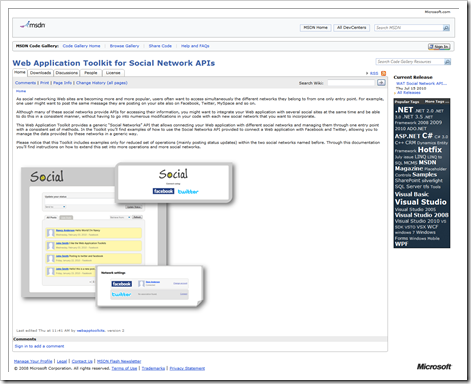
How about a generic API that hooks your Web app to different social networks? How about the “Web Application Toolkit for Social Network APIs”! (C# and VB)

MSDN Code Gallery - Web Application Toolkit for Social Network APIs

“As social networking Web sites are becoming more and more popular, users often want to access simultaneously the different networks they belong to from one only entry point. For example, one user might want to post the same message they are posting on your site also on Facebook, Twitter, MySpace and so on.

Although many of these social networks provide APIs for accessing their information, you might want to integrate your Web application with several social sites at the same time and be able to do this in a consistent manner, without having to go into numerous modifications in your code with each new social network that you want to incorporate.

This Web Application Toolkit provides a generic “Social Networks” API that allows connecting your Web application with different social networks and managing them through one entry point with a consistent set of methods. In the Toolkit you’ll find examples of how to use the Social Networks API provided to connect a Web application with Facebook and Twitter, allowing you to manage the data provided by these networks in a generic way.

Please notice that this Toolkit includes examples only for reduced set of operations (mainly posting status updates) within the two social networks named before. Through this documentation you’ll find instructions on how to extend this set into more operations and more social networks.

…

image…”

Note: “This Web Application Toolkit assumes that the developer has basic experience with ASP.NET MVC Framework.”

Once you install it you get the source, some Getting Started and Exploring the Toolkit guide (snapped below);

image

And a quick snap of the post install folders;

image

Think Notepad only opens files? Nope! File/Open a HTTP URL (and get the HTML response) in Notepad…

Just learned this today via JoshEinstein.com - Quick Tip – Troubleshoot broken OData response using Notepad…

Did you know you can “open” a URL in Notepad?

image

image

I’ve confirmed this works on both Windows XP (SP3) and Windows 7.

That’s pretty cool… :)

Moving to Office 2010? Looking for some 2003 to 2010 reference (ie. “where’s feature X now?”) help? Getting Started Guides? Maybe some Top 10 features?

Microsoft Downloads - Office 2010 User Resources – XPS (as PDF or DOCX formats)

“End user resources that can help learn Office 2010 products.

Documents related Office 2010, including an overview, product guide, getting started, and new features.

File Name: Office 2010 User Resources - XPS.zip
Version: 1.0
Date Published: 7/15/2010
Language: English
Download Size: 89 KB - 122.8 MB*

…”

There’s a good bit of free Microsoft Office 2010 training and information in this humbly named download. I think the best are the “2003 to 2010” references. These Excel workbooks provide a nice map for those moving from 2003 to 2010 and help answer the “in 2003 I used X, where is that in 2010?”

image

Here’s a snap to give you a feel for the content;

image

Here’s the full list of files;

Access 2010\Microsoft Access 2010 Features and Benefits.xps
Access 2010\Microsoft Access 2010 Get Started Guide.xps
Access 2010\Microsoft Access 2010 Product Guide.xps
Access 2010\Reference_Access_2003_to_2010.xltx
Excel 2010\Microsoft Excel 2010 Features and Benefits.xps
Excel 2010\Microsoft Excel 2010 Get Started Guide.xps
Excel 2010\Microsoft Excel 2010 Product Guide.xps
Excel 2010\Reference_Excel2003_to_2010.xltx
InfoPath 2010\Microsoft InfoPath 2010 Features and Benefits.xps
InfoPath 2010\Microsoft InfoPath 2010 Product Guide.xps
InfoPath 2010\Reference_InfoPath2003_to_2010.xltx
Office 2010 Suite\Microsoft Office 2010 Features and Benefits.xps
Office 2010 Suite\Microsoft Office 2010 Getting Started Guide.xps
Office 2010 Suite\Microsoft Office 2010 Product Guide.xps
Office 2010 Suite\Microsoft Office 2010 Top 10.xps
Office Mobile 2010\Microsoft Office Mobile 2010 Features and Benefits.xps
Office Mobile 2010\Microsoft Office Mobile 2010 Product Guide.xps
Office Web Apps\Microsoft Office Web Apps Getting Started Guide.xps
Office Web Apps\Microsoft Office Web Apps Product Guide.xps
OneNote 2010\Microsoft OneNote 2010 Features and Benefits.xps
OneNote 2010\Microsoft OneNote 2010 Getting Started Guide.xps
OneNote 2010\Microsoft OneNote 2010 Product Guide.xps
OneNote 2010\Microsoft OneNote 2010 Top 10.xps
OneNote 2010\Reference_OneNote_2007_to_2010.xltx
Outlook 2010\Microsoft Outlook 2010 Features and Benefits.xps
Outlook 2010\Microsoft Outlook 2010 Getting Started Guide.xps
Outlook 2010\Microsoft Outlook 2010 Product Guide.xps
Outlook 2010\Microsoft Outlook 2010 with Business Contact Manager Features and Benefits.xps
Outlook 2010\Microsoft Outlook 2010 with Business Contact Manager Product Guide.xps
Outlook 2010\Reference_Outlook2003_to_2010.xltx
PowerPoint 2010\Microsoft PowerPoint 2010 Getting Started Guide.xps
PowerPoint 2010\Microsoft PowerPoint 2010 Product Guide.xps
PowerPoint 2010\Microsoft PowerPoint 2010 Top 10.xps
PowerPoint 2010\Reference_PowerPoint2003_to_2010.xltx
Publisher 2010\Microsoft Publisher 2010 Features and Benefits.xps
Publisher 2010\Microsoft Publisher 2010 Getting Started Guide.xps
Publisher 2010\Microsoft Publisher 2010 Product Guide.xps
Publisher 2010\Microsoft Publisher 2010 Top 10.xps
Publisher 2010\Reference_Publisher_2007_to_2010.xltx
SharePoint Workspace 2010\Microsoft SharePoint Workspace 2010 Features and Benefits.xps
SharePoint Workspace 2010\Microsoft SharePoint Workspace 2010 Product Guide.xps
Word 2010\Microsoft Word 2010 Features and Benefits.xps
Word 2010\Microsoft Word 2010 Getting Started Guide.xps
Word 2010\Microsoft Word 2010 Product Guide.xps
Word 2010\Microsoft Word 2010 Top 10.xps
Word 2010\Reference_Word_2003_to_Word_2010.xltx


Related Past Post XRef:
Interested in the thought of internally hosting the Microsoft Office 2010 Web Apps? Here’s an IT Guide for ya…
Don’t reinvent your in-house Microsoft Office & SharePoint training… Give your users a productivity boost with the “Productivity Hub 2010” [Free, reg-ware]

Deploying your ORK (Office Resource Kit, that is) – eBook (Doc) Deployment Guide for Microsoft Office 2010

“First Look: Microsoft Office 2010” Free 202 page eBook – Free as in no registration required for a limited time

Love Windows Live Writer? Wish it did more? Then write a plugin… and here’s some tips for doing just that… (with even some VB in there for flavor :)

InsertableContentSource - Top Tips For Live Writer Plug-in Developers

“Whether you’ve written Live Writer plug-ins before, or if you’re just thinking about writing your first, hopefully this post will give you some good tips that will help you build that new plug-in.

Use A Visual Studio Template

I would highly recommend downloading a Visual Studio template. The template can be downloaded for machines running x86 or x64 flavours of Windows (for VB.NET devs, downloads are x86 and x64). The reason I have done ones for both architectures is because otherwise you have to remove and then re-add the reference to WindowsLive.Writer.Api.dll as it will be looking in the wrong Program Files folder. The template itself is based on a combination of templates written by myself and Ben Hall. …

…

Make Sure The Plug-in Copies Automatically To The Plugin Folder

If you’re using the template from above, then you can skip this tip. …

…

Run Live Writer When Debugging Plug-ins

Because Live Writer plug-ins are just dlls, it makes it somewhat more difficult to actually debug them, however, with just a simple change to the project’s properties (again), we can make this oh so easy. …

…

Add Plug-in Options to the QAT (Wave 4 and newer)

With the latest beta of Live Writer, we have been given the Ribbon UI that has been present in Office for a few years now. …

…

image…”

Scott provides a number of handy, don’t re-invent the wheel, time saving tips for your Windows Live Writer development. These are things you’ll likely figure out on your own after time, but why waste that time figuring this out when it could be better spent working on your uber plugin! ;)

And a huge thanks to Scott for taking the time to provide VB templates too. (This is his first time doing VB… Welcome to the Dark Side Scott! lol)


Related Past Post XRef:
Writing Windows Live Writer Plugins, or want too? Then Scott has written an article just for you!
Guide to Writing a Windows Live Writer Plugin in C#

Wednesday, July 14, 2010

Solar Panel Installation Update–The Two Dollar Electric Bill

Dreaming of not paying an electric bill? For my family, it’s no longer a dream…

At the end of April 2010 we had solar electric panels installed, Solar Panel Installation – We’re cooking with Solar!, and we’ve been waiting on pins and needles to see the impact to our electric bill. It’s taken SCE a bit for everything to work through the channels, but today it looks like everything finally took effect.

image

I mean, come on! How can you NOT love a $1.95 electric bill!  :)

The way it worked out was that we had an initial bill for 6/23 of $131, which kind of freaked us out. But we figured it was just taking a bit to work through and our solar installers held our hands, calmed us down, “It’s okay, don’t worry, it takes a bit…” And they were right. As of today we now have a $129 credit! Looks like we won’t be sending them a checked for a good long time… LOVE THAT!

What’s the ROI? 7-10 years. Assuming electric prices don’t increase…

Maintenance? Couldn’t be easier. Spray them off with the hose every month or so (the morning dew catches the afternoon dusty winds).

Piece of mind? Priceless… lol


Related Past Post XRef:
Solar Panel Installation – We’re cooking with Solar!

DevCheatSheet.com, The Developer focused cheat sheet aggregator (just about all languages, all areas, all the time…)

WebWorkerDaily - DevCheatSheet: More Useful Free Reference Cards

“If you liked QuicklyCode — a collection of cheat sheets that you can download, print out and pin up next to your monitor for handy reference — you’re going to love DevCheatSheet, an even larger collection of some 1,600 free cheat sheets and reference cards in various formats, gathered from all over the web.

Like QuicklyCode, DevCheatSheet is an ad-supported site that’s primarily aimed at developers, hence the “Dev” in the title, and the tagline “Cheat sheets for developers.” It has a huge number developer-friendly categories, including most of the major programing languages, operating systems, databases and frameworks. But it also has useful cheat sheets for many topics that non-developers will find useful, such as trigonometry, telephone country codes, color codes, social media, Google Docs, Photoshop, MS Office, Skype, Twitter and more. If you’re not a developer, it’s worth perusing the categories listed and as there are plenty of useful sheets hidden by the sheer number of highly technical topics

…”

DevCheatSheet.com

image

DevCheatSheet.com - Visual Basic (VB) Cheat Sheets

image

This looks like a cool site to quickly find that cheat sheet you’ve been looking for… I appreciate that there’s an RSS feed to help me easily keep up with new Sheets as they are added.

Monday, July 12, 2010

Holy ClickOnce Smoke! CodePlex now provides ClickOnce app hosting! Yes, you can now ClickOnce your CodePlex project on CodePlex servers!

CodePlex Weblog - ClickOnce Releases

“With today’s release, we are happy to announce that our #1 most requested feature, hosting ClickOnce applications directly from the CodePlex website, is now available for all projects! For those that are not familiar with ClickOnce, it is a .NET deployment technology that enables a user to install and run a Windows application by simply clicking a link from a web page. ClickOnce applications are also inherently self-updating, as they check for newer versions as they become available. ClickOnce applications are also “low-impact”, in other words, they do not need administrative rights to install, only install for the current user, and are isolated from other ClickOnce applications.

Since there is no direct way of publishing your ClickOnce application to CodePlex from within Visual Studio, we have attempted to make the process as simple as possible. The next few sections will walk you through the preparation and publishing, and ultimately creating a ClickOnce release on CodePlex.

…

image…”

In a word, AWESOME!

This has been one of my biggest whines every time I corner someone on the CodePlex team. Now I’ll have to find something else to whine about (like maybe providing Build support…  LOL ;)

Anyway, I dig the CodePlex service and team. This thing just keeps getting better and better. If you’re doing .Net dev and need a place to store your code, host your discussions, track your issues, contain your doc’s and now host your ClickOnce apps, and like “free” then you HAVE to check out CodePlex (…I’m sure this is redundant as you’re all hosting your projects here already, right? ;)

Great work guys, thank you!

Windows Phone 7 Jump Start–Four free three hour (12 hours total) virtual sessions to jumpstart your WinPhone7 development (Space is limited)

Windows Phone 7 Jump Start: Session One - Getting Started with Microsoft Windows Phone 7 and Silverlight

“Join us on July 20 2010 at 8.00 am PDT (What time is this in my region?) for an three-hour Office Live Meeting broadcast.

Windows Phone 7 promises to be an amazing mobile phone operating system given its innovative user interface and functionality, as well as its great development platform upon which you can quickly and easily build games and applications.

This course is organized into four virtual instructor-led sessions that are of 3-hour duration. They will be presented by forthcoming MS Press authors and MVP's, Andy Wigley and Rob Miles. It will provide developers a jump start for developing Windows Phone 7 applications. Labs will be completed offline with office hour access to the instructors.
This session is the first of 4 sessions.  Please register for all 4 in order to complete this training.

July 20th
Session Two:  Programming Game Applications with XNA

July 22nd 
Session Three:  Programming Applications with Silverlight
Session Four:  Review and Wrap Up” [GD:Leach Level 99%]

News of today’s release of the Windows Phone 7 Development Tools beta is everywhere (mostly) but just how best to use it? That’s where this 12 hours of training next week will come in handy. (I’ll have to catch the On-Demand version as I’ve got other training happening next week… sigh… when it rains, it pours…lol :)

(via Microsoft Journal - Microsoft Launches Windows Phone 7 Dev Tools‎)

Saturday, July 10, 2010

King’s Quest is back baby! The first episode of the fan King’s Quest project,The Silver Lining - Episode 1 - What Is Decreed Must Be, is now available for download (Free, forum registration required)

.NET & Funky Fresh - Thank You Activision! King’s Quest Lives On!

“Some months back I blogged about “The Silver Lining,” a King’s Quest fan project that’s been in development for almost eight years.  I was upset because Activision, after acquiring Vivendi-Universal, decided to shutdown the project. Well, it seams that things have changed! Activision has granted Phoenix Online a full non-profit license to release all five episodes over the coarse of 2010. Thank you Activision! You did something really good. In about 20 minutes from now, Episode 1: What is Decreed Must Be, releases to web.  Here’s the list of episodes planned in the series:

…”

The Silver Lining - Episode 1 - What Is Decreed Must Be

image

Phoenix Online Fan Club - The Silver Lining - Episode 1 - What Is Decreed Must Be Download (forum registration required)

“…

Put on your adventurer’s cap as King Graham on a brand new quest in the Land of the Green Isles, featuring beautifully rendered cutscenes and enhanced 3D graphics which enable you complete exploration while on your Quest.

Reunite with the Royal Family of Daventry and learn more about them than you thought possible as you begin a new journey which puts you in control of Graham, Alexander, and Rosella.in a brand new point-and-click adventure.

As you explore the Land of the Green Isles, your journey is enhanced by an original breath-taking musical score, fully-voiced character and narrator dialogue with closed-captioning available for the hearing impared.

…

image…”

Come on, it’s King’s Quest! (and free… lol :)

The install, and suggested Win7 patch, went smooth for me (Win7 x64, MS PDC09 Acer 1420p, 4GB RAM) and the game, and cutscenes, etc, play very well…

Friday, July 09, 2010

What’s New in Visual Studio 2010, the Quick Reference Poster…

SADev - What's new in Visual Studio 2010 quick reference poster

“One of my favourite aspects of my work at BB&D, is the creation of quick reference posters and cheat sheets for the DRP site which is one of BB&D’s way of sharing knowledge outside the organization. I have recently produced a bunch of new posters which I will be releasing over the next few days. First up is…

What’s new in Visual Studio 2010

A quick reference post which explains the edition changes, some new features (IntelliTrace and the architecture tools) and gives some hints about the IDE (docking of windows, search shortcuts, block selection and zooming). …”

Ahh… There are few better things in life than a new DRP Quick Reference poster! (Okay, maybe I exaggerate a little, but you get the idea… ;)

image


Related Past Post XRef:
What’s New in Visual Studio 2010 & .Net 4 – The Official MSDN Source
“Can you tell me about VS2010 in 5 Minutes?” The Visual Studio Quick Reference Guidance project can…

It’s there some new “testing” stuff in VS2010? Yep! Tons! And here’s a free webcast to show you all about it…
Got your hands on VS2010 Ultimate? Want to know what all the excitement is about its new Architecture features? (i.e. why this is NOT you father’s “Architecture Edition”) Dig just about everything from the VS ALM Rangers? Well

[Draft/Preview/Excerpt] “Moving to Visual Studio 2010” free ebook – Help, guidance in moving from older versions, as far back as VS2003, to VS2010
[Draft/Preview/Excerpt II] “Moving to Visual Studio 2010” Part 2, with three new chapters

Play with the Visual Studio Lab Management without paying the piper - Visual Studio Lab Management 2010 Pre-release Hyper-V VHD

Microsoft Downloads - VHD Test Drive - Visual Studio Lab Management (pre-release) 2010

“This download comes as a pre-configured VHD. This download enables you to evaluate Visual Studio Lab Management (pre-release) 2010 VHD.

Version: 1.0
Date Published: 7/8/2010
Language: English
Download Size: 75 KB - 12647.3 MB*


Download this fully configured virtual machine of the latest release of Visual Studio Lab Management (pre-release) 2010. Evaluate the new capabilities of Visual Studio Lab Management 2010 which enables teams to accelerate setup/tear down and restoration of complex virtual environments to a known state for test execution and build automation. It extends build automation by automating virtual machine provisioning, build deployment and build verification in an integrated manner. It also allows testers to file rich bugs with links to environment checkpoints that developers can use to recreate complex environments, effectively reducing wasted time and resources in your development and test lifecycle. The detailed walkthrough steps can be found here.

…

Supported Operating Systems: Windows Server 2008 R2 Hyper-V, Microsoft Hyper-V Server 2008 R2 and Windows Server 2008 SP2 Hyper-V Windows Server 2008 R2 Hyper-V is required to use this virtual machine In addition to the system requirements for Windows Server 2008 as described in the release notes, a 64-bit system with hardware-assisted virtualization enabled and data execution prevention (DEP) is required…

…”

Here’s the copy and paste’able download URL’s for your file downloader of choice;

http://download.microsoft.com/download/4/3/8/438B2F26-0575-479C-A94B-B03C1E4E32A1/Distributable VHD Image EULA.htm
http://download.microsoft.com/download/4/3/8/438B2F26-0575-479C-A94B-B03C1E4E32A1/README.htm
http://download.microsoft.com/download/4/3/8/438B2F26-0575-479C-A94B-B03C1E4E32A1/Visual Studio Lab Management (pre-release) 2010 VHD.part01.exe
http://download.microsoft.com/download/4/3/8/438B2F26-0575-479C-A94B-B03C1E4E32A1/Visual Studio Lab Management (pre-release) 2010 VHD.part02.rar
http://download.microsoft.com/download/4/3/8/438B2F26-0575-479C-A94B-B03C1E4E32A1/Visual Studio Lab Management (pre-release) 2010 VHD.part03.rar
http://download.microsoft.com/download/4/3/8/438B2F26-0575-479C-A94B-B03C1E4E32A1/Visual Studio Lab Management (pre-release) 2010 VHD.part04.rar
http://download.microsoft.com/download/4/3/8/438B2F26-0575-479C-A94B-B03C1E4E32A1/Visual Studio Lab Management (pre-release) 2010 VHD.part05.rar
http://download.microsoft.com/download/4/3/8/438B2F26-0575-479C-A94B-B03C1E4E32A1/Visual Studio Lab Management (pre-release) 2010 VHD.part06.rar
http://download.microsoft.com/download/4/3/8/438B2F26-0575-479C-A94B-B03C1E4E32A1/Visual Studio Lab Management (pre-release) 2010 VHD.part07.rar
http://download.microsoft.com/download/4/3/8/438B2F26-0575-479C-A94B-B03C1E4E32A1/Visual Studio Lab Management (pre-release) 2010 VHD.part08.rar
http://download.microsoft.com/download/4/3/8/438B2F26-0575-479C-A94B-B03C1E4E32A1/Visual Studio Lab Management (pre-release) 2010 VHD.part09.rar
http://download.microsoft.com/download/4/3/8/438B2F26-0575-479C-A94B-B03C1E4E32A1/Visual Studio Lab Management (pre-release) 2010 VHD.part10.rar
http://download.microsoft.com/download/4/3/8/438B2F26-0575-479C-A94B-B03C1E4E32A1/Visual Studio Lab Management (pre-release) 2010 VHD.part11.rar
http://download.microsoft.com/download/4/3/8/438B2F26-0575-479C-A94B-B03C1E4E32A1/Visual Studio Lab Management (pre-release) 2010 VHD.part12.rar
http://download.microsoft.com/download/4/3/8/438B2F26-0575-479C-A94B-B03C1E4E32A1/Visual Studio Lab Management (pre-release) 2010 VHD.part13.rar
http://download.microsoft.com/download/4/3/8/438B2F26-0575-479C-A94B-B03C1E4E32A1/Visual Studio Lab Management (pre-release) 2010 VHD.part14.rar
http://download.microsoft.com/download/4/3/8/438B2F26-0575-479C-A94B-B03C1E4E32A1/Visual Studio Lab Management (pre-release) 2010 VHD.part15.rar
http://download.microsoft.com/download/4/3/8/438B2F26-0575-479C-A94B-B03C1E4E32A1/Visual Studio Lab Management (pre-release) 2010 VHD.part16.rar
http://download.microsoft.com/download/4/3/8/438B2F26-0575-479C-A94B-B03C1E4E32A1/Visual Studio Lab Management (pre-release) 2010 VHD.part17.rar
http://download.microsoft.com/download/4/3/8/438B2F26-0575-479C-A94B-B03C1E4E32A1/Visual Studio Lab Management (pre-release) 2010 VHD.part18.rar
http://download.microsoft.com/download/4/3/8/438B2F26-0575-479C-A94B-B03C1E4E32A1/Visual Studio Lab Management (pre-release) 2010 VHD.part19.rar


<whine> Microsoft, could you PLEASE make these easier to download? Use your Download Manager, provide a copy-n-paste’able direct download URL list, something! Downloading 19 RAR parts via the “Download” buttons is weak. If you really want us to play with these, then you HAVE to make them a little easier to get.  The fact that I’m thinking about writing a MS Download Direct Download URL Lister/Grabber thing is… well… sigh…</whine>

(Via ActiveWin - VHD Test Drive - Visual Studio Lab Management (pre-release) 2010)

VB6 to VB.Net Upgraded Upgrade Help – Yes, you are not alone (in your VB6’ness)…

Beth Massi - Sharing the goodness that is VB - Free VB6 Migration Tool & Updated VB Developer Center

“Jason Zander just announced some exciting work that we’ve been doing for developers trying to migrate their Visual Basic 6 apps!

Good News for VB6 Migration

Today we re-launched our VBRun Resource Center for VB6 developers and announced a partner tool from Artinsoft, the Visual Basic Upgrade Companion [VBUC] that you can get for FREE. Check out the details here:

Download your FREE version of VBUC with code ‘MSDN’

You’ll also notice that we integrated the VBRun resources into it’s own tab on the Visual Basic Developer Center. If you haven’t checked out VBRun, it’s all about providing the best migration strategies, tools, support info, and training to help you on your gradual path from VB6 to .NET.

…”

Visual Basic Development Center – VBRun

image

VBRun - ArtinSoft’s Visual Basic Upgrade Companion (VBUC)

“ArtinSoft’s Visual Basic Upgrade Companion (VBUC) is the industry-leading tool for the migration of Visual Basic 6 to both Visual Basic .NET and C#. With a proven track record of millions of lines of code upgraded to Microsoft’s .NET Framework, the VBUC helps you move your business critical applications out of obsolescence, free of ties to third-party dependencies.

If you are looking towards taking advantage of new Microsoft technologies, reducing development, deployment and maintenance costs, and addressing compliance issues or meeting market demands, the VBUC is the most advanced and cost-effective solution out there.

Exciting Offer for You!

Microsoft and ArtinSoft have partnered to offer a free VBUC license to you. The discount code below can be used to purchase a license that will allow you to migrate an application of up to 10,000 lines of VB6 code to VB.NET or C# for free. It can also be applied when purchasing a larger license.

Download your copy today. Use the code MSDN for a free license for up to 10,000 lines of code! …

image…”

I love the name for this resource…lol

So you saw the “…up to 10,000 lines of code…” did you? Knew there was a catch? Well it might be a catch, but the retail price for that version of the utility is $799, so catch or not it’s a pretty darn good deal!

image 
(When placing the “order” is kind of looks like you have to enter CC information. You don’t! When you finish filling out the form, before you enter your CC info, just hit submit…)

Next you scoff at the thought of upgrading your VB6 code to .Net? Feel, as I do, that code that old, with likely that much technical debt, should probably be re-written from the ground up? Then that ugly thing called “reality” comes knocking. What we like and what we end up having to do can be two very different things.

Yes, I have upgraded VB6 code to .Net. And yes, we’re using it in production today… Am I happy? Not 100%, but it works, saved me months of effort, allowed me to solve my user’s problems faster and let me move that code on to a modern framework. All in all, I call it a win. But will I do it with the rest of my VB6 code? That, I don’t know… (Give me a break, at least I’ve finally moved all my VB6 code from SourceSafe to TFS! LOL)

Wednesday, July 07, 2010

Play Moonbase Alpha! (No, not that one… you’re showing your age… ;)

Moonbase Alpha

“Do you have what it takes ...

In ‘Moonbase Alpha’, players will step into the role of an exploration team member and will be immersed in a futuristic 3D lunar settlement. Their mission is to restore critical systems and oxygen flow after a nearby meteor strike cripples a solar array and life support equipment. Available resources include an interactive command center, a lunar rover, mobile robotic repair units and a fully stocked equipment shed.

This 'First Person Explorer' serious game includes both a single player capability and LAN or internet multiplayer gameplay for up to six active players on a team. Selectable maps will be available for specific player numbers (e.g., 2 player map, 4 player map, etc.).  Each of these maps is represented and tracked individually within the game’s leader boards.

Proper use and optimal allocation of their available resources (player controlled robots, rovers, repair tools, etc.) are key to the team’s overall success.  There are several ways in which the team can successfully restore the life support system of the lunar base, but since the team is scored on the time they take to complete the task, they have to work effectively as a team, learn from decisions made in previous gaming sessions, and make intelligent decisions in order to top the leaderboards.

Team up with your friends…
Utilize the latest NASA technologies…
Immerse yourself in an awe-inspiring lunar environment…
Compete with your team to reach the top of the leaderboards…

Minimum System Requirements

•  Win XP SP3
•  2.0+ GHZ Single Core Processor
•  2GB of System RAM
•  NVIDIA 7000-series or ATI Radeon X1900 Video Card
•  2GB of Free Hard Drive Space
•  DirectX 9.0c

Recommended System Requirements

•  Win XP SP3 / Vista / Windows 7
•  2.4+ GHz Dual Core Processor
•  4+ GB of System RAM
•  NVIDIA 9000+ or ATI Radeon 3600+ Video Card
•  5.0 GB of Free Hard Drive Space
•  DirectX 9.0c for XP/Vista
•  DirectX 10 for Windows 7

image…” [GD: Site content leached in full. It’s in part my tax dollars, so is it really “leaching”? ]

While I’d much rather my tax dollars go toward actual space exploration, getting people excited about it is a close second. Now if only we hadn’t recently scraped our Return to the Moon program (cough… irony alert… cough…)

BTW, I used to dig the “real” Moonbase Alpha (sigh… gee, NASA, thanks for the “damn, I feel old” moment. lol  )

(via The Road to Know Where - NASA Releases Free "Moonbase Alpha" Online Video Game)

A WebMatrix Roundup

I’m going to try something new today. Usually I focus on one blog post and its thread, but today, given all the news about the new WebMatrix beta release, I’m going to do a “roundup” post, aka link curation, etc. But instead of dry links, I though I’d add a visual element to it and provide thumbnails and of the posts. My intent is to give you a quick way to gage the given post’s breadth and give you a feel for what’s there... To help you spend your click-through’s wisely (we only have so many clicks left in our lives and so must spend them well… so something like that… ;)

Here’s a few, of many, WebMatrix posts I came across this morning (in no particular order).


ScottGu's Blog - Introducing WebMatrix

ScottGu The Gu does his usual rock’n post with a nice pictorial WebMatrix introduction and usage walk through.

Little on text, lots on showing your many of its features and capabilities.

Paul Thurrott's SuperSite for Windows - Microsoft Introduces Web Matrix

image[3] Paul provides a brief overview of WebMatrix and included technologies

Scott Hanselman's ComputerZen.com - Microsoft Introduces Web Matrix

Scott Hanselman - Microsoft WebMatrix in Context and Deploying Your First Site Scott walks you through downloading and building your first web site with WebMatrix.

Make sure you scroll down and check out the Related Links section. There’s a ton of links to more information, videos, walk-through’s, tutorials etc

Mikesdotnetting - WebMatrix - A First Application

WebMatrix - A First Application Mike walks us through creating our first WebMatrix based web site, using the new SQL CE database/data binding and the new view engine, Razor.

Bob's Blog - WebMatrix Top Features

image Bob highlights his top 10+1 WebMatrix features

Angle Bracket Percent - How WebMatrix, Razor, ASP.NET Web Pages and MVC fit together

image David provides a nice overview on how all the new pieces, MVC, Razor, ASP.Net all fit together with WebMatrix

BillS IIS Blog - Announcing WebMatrix – a small, simple and seamless stack for Web developers

image A brief “Introducing” post via IIS.Net

Mary Jo’s All About Microsoft - Microsoft takes aim again at Web developers with new WebMatrix tool suite

image Come on, it’s Mary Jo!

Michael Crump - The Forrest Gump guide to the new WebMatrix.

The Forrest Gump guide to the new WebMatrix How can you go wrong with a post title like that! lol

Mike starts even farther back in the “Install” thread, starting from the Web Platform Installer and going forward from there to usage and deployment.

Tuesday, July 06, 2010

The PowerGUI Visual Studio PowerShell extension is now officially a v1 (RTW/RTM, Released, Stable, etc, etc)

Shared Points for SharePoint - PowerGUI Visual Studio Extension is out of beta

“…

But as the title indicates the focus of this posting will be on the newly released PowerGUI Visual Studio Extension. PowerGUI Visual Studio Extension is an integration of the PowerGUI Script Editor into Visual Studio. In my opinion this is a very good idea because it brings PowerShell development into a familiar environment, as we can now maintain the scripts in Visual Studio projects. Additionally we get version control integration “for free.”

…”

PowerGUI Visual Studio Extension - PowerGUI Visual Studio Extension v1.0

“…

Released: Jul 4 2010
Updated: Jul 4 2010 by AdamDriscoll
Dev status: Stable

Recommended Download

PowerGUI VSX Extension
application, 578K, uploaded Sun…

Release Notes

This update to the beta 1 version is minimal. It includes mostly branding and some minor bug fixes.

  • Bug Fixes
    • The editor was forcing ASCII encoding (71202)
    • The extension would crash if an incorrect version of PowerGUI was installed (71200)
  • Added Features
    • Better branding
    • Added ability to Launch PowerGUI to start debugging the current script

…”

I love the smell of V1 in the morning…


Related Past Post XRef:
Now our Visual Studio is cooking with Power! The PowerGUI Visual Studio PowerShell extension that is…

PS for your VS – PowerConsole a PowerShell console for VS 2010

PowerGUI 1.5 RTM is now available
PowerGUI is now officially RTM
PowerGUI - Free PowerShell Script Editor and System Management Console (via PowerShell)
Want to access TFS Work Items via PowerShell? Then you'll want to check out the Team Foundation Server Project Browser PowerPack for PowerGUI
Making pretty VM Visio diagrams with the free Virtualization Visio stencil from VESI (Virtualization EcoShell Initiative)

A short diagramed guide of a few Model-View-* patterns

UK Application Development Consulting - Model-View-*

“I find myself answering questions related to the presentation patterns repeatedly. Since I am a lazy person, I am writing this post to illustrate my understanding and interpretation of the Model-View-* patterns and their variations so I can refer back to this post later.

I understand the concerns the Model-View-* purists might have around the correctness and/or pureness of these diagrams so I do apologize for potential inaccuracies in advance and I welcome any suggestions / comments!

I am not going to explain every single Model-View-* pattern as you can find better explanations in other places. Instead, I will focus on the relationship between participant components in each pattern.

Let’s start with a list of patterns we are going to cover:

  • MVC: Model-View-Controller
  • MVP (Supervising Controller): Model-View-Presenter with Supervising Controller
  • MVP (Passive View): Model-View-Presenter with Passive View
  • MVVM: Model-View-ViewModel
  • MVVMC: Model-View-ViewModel-Controller
  • MVPoo: Model-View-ViewModel with some Poo (in ViewModel)
  • MVPo: Model-View-ViewModel with little Poo (in ViewModel)

None of these are new so you should have heard the names before, apart from the last one (MVPo) where I have come up with a new name by slightly modifying the original name.

…

image…”

“MVPoo” just tickled my boy-in-a-man’s-body tickle bone. Such a true and accurate name for the MV pattern we all to often find our code in…

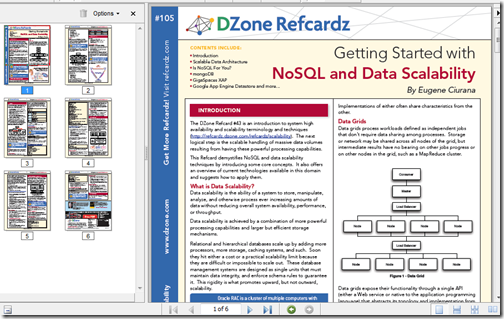
Want to learning about this NoSQL thing in five pages or less? DZone has the refcardz for you…

DZone Refcardz - Getting Started with NoSQL and Data Scalability

“Overview

This DZone Refcard demystifies NoSQL and data scalability techniques by introducing some core concepts.  It also offers an overview of current technologies available in this domain and suggests how to apply them.

…”

image

This RefCard provides a high level NoSQL overview as well as a brief introduction to three of the bigger NoSQL players, MongoDB, GigSpaces XAP and Google App Engine Datastore

From the PDF;

“…

IS NoSQL FOR YOU?

Preparation:
• Don’t fall prey to the NoSQL fad
• Don’t be stubborn; neither NoSQL nor traditional databases apply to all cases
• Apply the CAP Theorem to your use cases to determine feasibility

Brewer’s (CAP) Theorem
…”

Got to love practical, pragmatic advice like that… (i.e. programming should be about solving problems and providing solutions, not just exercising our geek/tech muscles… ;)

Monday, July 05, 2010

Programming robots without robots–Using the Microsoft Robotic Developer Studio, the Visual Programming Language and the included simulation environment

amazedsaint's .net journal - Hobby Programming – Creating your first robotic simulation using Microsoft Robotic Dev Studio and Visual Programming Language

“Preface

This is a quick introduction towards starting your life with Microsoft Robotic Developer Studio (RDS) and Microsoft Visual Programming Language (MVPL) for creating simple robotic simulations. This is intended to be an ‘absolute beginner’s guide’ to RDS.

In fact, I just started playing with RDS after some inspiration from Ramaprasanna during Kerala DevCon 2010 - and it is fun. And the objective of this post is to share the fun, mainly from a hobby programming perspective.

As a pre-requisite, for doing the hands own instructions below - you may need to download and install  Microsoft Robotic Developer Studio 2008 R3 – The installation should be pretty simple and easy.

…

Now, the fun part.

Your First Simulation

So, Let us create a quick simulation, using the Microsoft Visual Programming Language environment.

…

image…”

Been a while since I’ve mentioned the Microsoft Robotic Developer Studio (RDS) and come on, there’s few cooler things than robots! Smile

The above post is a simple walk-through of using the RDS and Microsoft Visual Programming Language (VPL) and quickly gets you playing in the virtual environment.


Related Past Post XRef:
Microsoft Robotics Developer Studio 2008 R3 Released - Now one edition, still free, VS2010 compatible, new simulation environments and more

What’s better than writing/building virtual robot tanks in .Net and having them battle it out? Having them battle Java virtual tanks!

Free “Programming Microsoft Robotics Studio” eBook (reg-ware, Copyright 2008, for MSRS v1.5)
"An Introduction to Programming Robots with Microsoft Robotics Studio"
Learn to Master your Inner Robot - Introductory Courseware for Microsoft Robotics Studio
MSDN Webcast: Robotics: Programming Lego Mindstorms Using Visual Basic 2005 Express (Level 100)

Sunday, July 04, 2010

[Book Review] “VirtualBox 3.1 – Beginner’s Guide”

[Full Disclosure Notice: The mentioned book was provided to me free by the publisher. This review is my own. The publisher has not seen it, nor promoted me in its content in any way, shape or form. All they did is provide the book free and asked me to review it… ]

The guys at Packt Publishing have given me a copy of “VirtualBox 3.1 – Beginner’s Guide” by Alfonso V. Romero read and to share with you.

image4

Table of Contents:

Chapter 1: Getting to Work with VirtualBox

Chapter 2: Creating Your First Virtual Machines: Ubuntu Linux

Chapter 3: Creating Your Second Virtual Machines: Windows 7

Chapter 4: Installing Guest Additions and Advanced Settings

Chapter 5: Storing Data in VirtualBox

Chapter 6: Networking with Virtual Machines

Chapter 7: Using Virtual Appliances

Chapter 8: Managing your Virtual Machines from a Remote Computer

Appendix A: Using Snapshots

Appendix B: Pop Quiz Answers

Overview

The book takes you from download to being productive with Sun’s/Oracle’s VirtualBox. Each chapter builds on the previous and not only walks you through each topic area step by step but also takes a step back and talks about “what just happened.” (i.e. it’s not a ton of simple screenshots and “click, click, click” instructions but also works to “teach you to fish”)

Likes 

One of the things I liked about the book is used a number of techniques to engage the reader and to help get a chapter’s point across. For example, an ongoing story/scenario was used to relate a chapter to something that might have, or will, happen to you “in the real world.” This made the reading more engaging, applicable and much less dry. It also took you beyond what you might read online (via wiki’s, VirtualBox doc’s, etc).

That was one of my questions when first getting the book. What will this teach me that I couldn’t just look up online? How is the price of the book versus the tons of free online information?

The problem is that the “tons of online information” is really “crud loads of data.” It’s up to the reader to turn it into “information” and then wisdom. This book jumpstarts your drive to VirtualBox wisdom, helping you better “know what you don’t know.”

It’s a Beginner’s Guide, so you’ll not walk away a VirtualBox Zen Master, but you WILL be on the path towards becoming one… (especially if you were like me and hadn’t ever installed or used VirtualBox)

Improvements

What did I think could be improved? Well you know I live in a mostly Microsoft world… So I wish there had been a little more coverage there. For example, Microsoft makes a number of it’s trial products available as VM’s. I would have liked to see some guidance/help/information on taking an existing Virtual PC 2007/Windows Virtual PC/Hyper-V VHD and converting it VirtualBox. Also I’d have liked to see why VirtualBox is better than the Windows Virtual PC that I already have. Something simple, a side-by-side chart would do. Just something to help me get over the concern of having two VM systems in place on the same machine (Windows 7 Virtual PC and VirtualBox).

What did I learn?

So did I actually apply anything I read in the book? You bet! Just yesterday, I used this book to help me resolve an issue my son and I were having with a legacy game what wouldn’t run well on Win7 x64 (nor in Windows Virtual PC). After reading this book and finally having my eyes opened to the capabilities of VirtualBox, it seemed well worth the effort to try to resolve this long standing issue.

So I downloaded the latest version of VirtualBox and was able to very quickly, because I already had exposure to, and a basic understanding of from my reading, get a VM created, storage added, settings configured, tweaked and VM shared. In the end I was able to be a Tech Hero to my son because I was finally able to get the game he’s wanted to play for months now working on his notebook. All because of this book (and VirtualBox)… I’ll call that a win!

Final Thoughts

In the end, one thing to remember is the subtitle “Beginner’s Guide”… It’s not Level 400 material, but then again it’s not supposed to be! It’s a guide to take the VirtualBox uninitiated and get you working and productive with it with no fuss, muss or tears.

Would I recommend a friend or coworker buy this book if they wanted to learn about VirtualBox (even if they lived in a mostly Microsoft world)? Oh yeah, no question about it. Matter of fact I AM going to be recommending it to a number of coworkers whom I know are VirtualBox users… ;)


Related Past Post XRef:
[Coming Soon][Book Review] “VirtualBox 3.1 – Beginner’s Guide”