Sunday, March 07, 2010

137 Years… That’s how far back PopSci’s magazine archive now goes. PopSci + Google Books = Hours of interesting reading

Popular Science (PopSci) - New! Browse the Complete PopSci Archive

“We've partnered with Google to offer our entire 137-year archive for free browsing. Each issue appears just as it did at its original time of publication, complete with period advertisements. And today we're excited to announce you can browse the full archive right here on PopSci.com.

As you will soon see, it's an amazing resource. Aside from bringing back memories for longtime readers, as a whole the archive beautifully encapsulates over a century of PopSci's fascination with the future, and science and technology's incredible potential to improve our lives. Tracing our dreams and visions of the future back through time, you'll see that not a lot has changed. Some things we projected with startling accuracy, and others remain today what they were then--dreams. We hope you enjoy it as much as we do.

…”

Google BooksPopular Science (PopSci)

image

I found the oldest set, from May, 1872 to be the more interesting;

image

I used to spend hours in the library looking through the old archives of magazines. Checking out the stories, style and ad’s. It was like having my own personal time machine.

Google and PopSci have now brought that time machine back into my life and onto my computer. How cool is that!

BTW, I’ve found that browsing the back issues a little easier via the native Google Book UI. PopSci currently only has the search exposed.

Hum, a WPF or SilverLight client would be cool, wouldn’t it?… hum…

(via Slashdot - Popular Science Frees Its 137-Year Archives)

A Feed You Should Read #25 – MSMVPs.com

In today’s Feed we return to the arrogation world, one site/feed that hosts a number of bloggers. Today’s Feed is also one of my favorite kinds one with, dev to dev’s, geek to geeks kinds of posts.

MSMVPs - The Ultimate Destination for Current and Former Microsoft Most Valuable Professionals

image

Background:

Those that are awarded the MS MVP are an interesting bunch. They are those in our industry with a passion and drive. A drive to learn, but more importantly to share and help. These guys and gals are not Microsoft employees, don’t get paid by Microsoft and are just normal Joe’s and Jane’s, like you and I.

Yet they also are our ambassadors to Microsoft which looks to them for guidance, feedback and input. Microsoft gives great value to feedback from the field. If you would like a feature, change, etc, find and tell a MS MVP before you find someone on the inside. I’ve had a number of chats with Microsoft employees and have heard them say (paraphrased), “I’d like feature X, Y or Z too. Could you please email me? Features have a greater chance of being done if we show it’s what our customers are asking for and not just from inside the team…”. Now if you can get a MS MVP behind the feature, then that suggestion gets a +10 signal to noise buff.

MS MVP’s are your outside insiders and this site is one place where you can hang out with a bunch of them…

Why do I like this feed and think you might also?

The “real world” nature of the posts here are what draw me to the site. MS MVP’s are not wallflowers and are not afraid to let the world know how they feel about something (lol… cough….. understatement… cough…). This site brings a number of them together into one easily reviewed feed stream.

This site is also a mix of IT/Dev/Consumer international MVP’s which I also like and helps me see a broader picture of what’s happening.

in short, this is another of those “If you use/consume/developer/support Microsoft stuff you should check out this feed” feed.

Snap of the latest post:

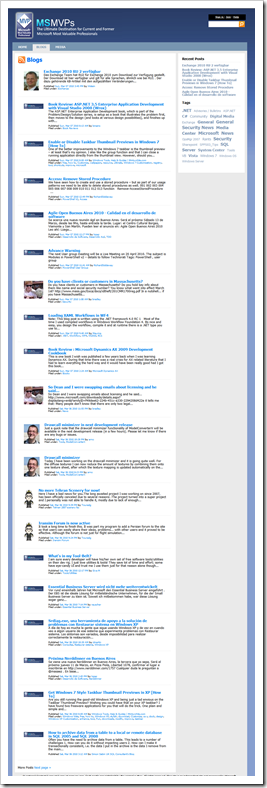
image

Blog Information:

Name: MSMVPs - The Ultimate Destination for Current and Former Microsoft Most Valuable Professionals
URL: http://msmvps.com/blogs/
Feed: http://msmvps.com/blogs/MainFeed.aspx
Post Types: Broad range of mostly Microsoft related posts


Related Past Post XRef:
A Feed You Should Read TOC

Saturday, March 06, 2010

[Humor] A t-shirt only a web geek will get

10REM.Net (Pete Brown)Zazzel

 image

This gave me a good chuckle this morning… I want this just because my wife and son will have no clue why it’s funny…

Friday, March 05, 2010

Power application launching via Promptu - Think keeping your fingers on the keyboard, Intellisense app launcher, with added .Net power!

From Zach Johnson;

“…

What is Promptu?

Promptu (http://PromptuLauncher.com) is a free application launcher aimed as a competitor to other launchers in the market (such as SlickRun and Launchy) and features a Visual Studio-like feel with .NET integration and flexibility.  Promptu lets you associate meaningful names with programs, folders, files, URL's, etc., and access them almost instantly from your keyboard.  When you press the hotkey you associate with Promptu, such as Ctrl+Q, Promptu opens a textbox for you to enter the names of commands you have created.  As you type, Promptu provides suggestions in a similar fashion to Visual Studio's Intellisense.  When you finish typing or when the name of the command you want becomes highlighted, you press Enter and Promptu executes the command for you.

Promptu also includes a number of other features to help make using your computer faster and better than ever.  Some of these include:

  • Integrated directory browsing - you can use standard paths ('C:\folder\') or base a path off a command (if 'tmp' opens 'C:\folder\tmp\', use 'tmp\otherFolder\' to access 'C:\folder\tmp\otherFolder\').
  • List sharing - share lists of commands, etc. among multiple computers, great for work and home.
  • Commands can contain more than static instructions - using Promptu's ITL (Input Transformation Language), commands can take parameters (optional or required) from the prompt and even execute and use results from external .NET code.
  • Namespaces - categorize your commands and even put commands 'behind' other commands (e.g. you could create a command named 'firefox' to start Firefox, and 'firefox.safemode' to start Firefox in safe mode).

…”

PromptuLauncher.com

“Promptu makes it faster and easier to get around your electronic world

Think speed-dial for your computer, except Promptu is much easier. With speed-dial you have to remember numbers, but with Promptu you simply remember names.

It doesn't matter if you are the type who doesn't really like computers or if you are a geek who loves computers. Promptu is built for the average user, but also includes advanced power user features for those who need them. Additionally, Promptu is provided completely free of charge.

Say goodbye to repetitive, time-consuming tasks, like hunting through your programs, folders, files, and bookmarks for the ones you need. Promptu lets you associate meaningful names with programs, folders, files, bookmarks, etc, and access them almost instantly from your keyboard in an intuitive way.

Instead of trying to remember where things are, focus on getting things done. Promptu will save you minutes every day, and hours every year. Use Promptu to rocket your productivity.

How Promptu Works

When you start Promptu for the first time, you associate a hotkey combination with Promptu, such as Ctrl+Q. When you press that combination, Promptu opens a box (the prompt) next to the mouse cursor. The prompt looks similar to this: (Note: hotkey combinations can be changed in the setup dialog)

ThePrompt

Then you start typing. As you type, Promptu makes suggestions based on your commands and usage patterns.

PromptWithSuggestionProvider

When the entry you want becomes selected, press Enter and Promptu will launch it for you. Promptu will then hide itself until you press your hotkey combination again.

image …”

Thanks to Zack for letting me know about this cool utility… But now I hate you, because I’ve just spent the last hour playing with it! LOL  :p

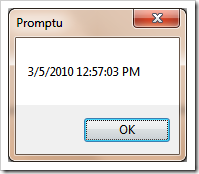
Here’s an example of the .Net Power. The System.DataTime.Now.ToString function has been exposed, with all its formatting power.

image

image

And this is just some of the fun you can have with it. Added to my Windows start-up… :)

Thursday, March 04, 2010

Pex 2010 (aka Pex 0.90.50303.0) now available on MSDN Subscribers Downloads

MSDN Subscribers Downloads

image

From the setup;

image 

image

You now know what I know…


Related Past Post XRef:
Pex license updated – You can now use it in commercial projects
Pex 0.5 Released - Your Parameterized Unit Test Buddy

Students, and life long learners, who is responsible for your future career? You! Here’s a free ebook from Microsoft to help you own your future…

Microsoft Press - Free ebook: Own Your Future: Update Your Skills with Resources and Career Ideas from Microsoft

“We’re thrilled to offer another free ebook: Own Your Future: Update Your Skills with Resources and Career Ideas from Microsoft, by Katherine Murray. The ebook contains eight chapters and an appendix describing how you can assess and build your technology-based job skills.

… Everyone entering or already in the workforce should have access to the resources they need to become lifelong learners who can adapt to an ever-changing workplace.

In this book, students will find a wealth of Microsoft resources they can use to identify the technology skills they need, and gather knowledge and experience to help them take charge of their careers. Here at Microsoft, we care about students’ career success and hope these resources will open doors to learning that will lead them to better opportunities and a deeper understanding of the way technology continues to change and improve the ways people work—both here in the U.S. and around the world.

…”

From the eBook (available in XPS and PDF);

image

image

While this book was written for students who are exploring their career choices, I felt it was also helpful for life long learners, those looking to improve their future career and/or those who may be looking to change careers/jobs.

Visual Studio 2010 Reviewers Guide – The Coffee Table Guide to Visual Studio 2010 (i.e. it’s pretty and has lots of pictures… cough… is senior management safe… cough)

Microsoft Downloads - Visual Studio 2010 Reviewer's Guide

“Visual Studio 2010 Reviewer's Guide is a detail document highlighting the new features and capabilities of the Visual Studio 2010 product.

Version: 1.1
Date Published: 3/3/2010
Language: English
Download Size: 10.4 MB - 42.5 MB*

…”

From the Guide:

image

image

I see this as a nice resource for those you may not be neck deep in the tech day after day… Or for a high level introduction to what’s new in VS2010, etc.

Free Risk (like game) – TurboRisk v2 (Now includes IDE to edit/compile/test your own AI players)

Mario FerrariTurboRisk

TurboRisk plays the classic "World Domination Risk" game, where you are battling to conquer the world.

Version 2 is out!

The main features include:

  • Support for both human or artificial intelligence players, up to ten per game.
  • Customizable rules.
  • Smart and customizable interface that speeds up cards playing, attacks and troops movements.
  • Large selection of AI players, each one with its own "personality".
  • Statistics window that shows counters for territories and armies.
  • Optional log window to track the game.
  • New! Windows 7 and Vista theme support.
  • New! Large selection of maps.
  • New! Companion program to create your own custom maps.
  • New! Smarter and more challenging AI players.
  • New! History of the played games and ranking of the players.
  • New! Games can be saved and restored.
  • New! "Quick setup" feature to save the entire configuration of the players.
  • New! Menu option to download updates from the TurboRisk homepage.
  • New! Full featured companion IDE to edit, compile and test your own artificial intelligence players.
  • New! Context sensitive help.

TurboRisk is free

TurboRisk is really 100% free: no limitations, no time-outs, no nags, no adware, no banner ads and no spyware. It can be freely used and distributed provided that neither code nor documentation are altered in any way.

image

…”

I dig the whole AI player thing (with its own AI IDE, how cool is that…). Makes playing at work so much easier… um… I mean… um… playing at night and on the weekends… err… yeah…that  ;)

Related Past Post XRef:
TurboRisk [Freeware Risk like game]

Wednesday, March 03, 2010

Second VS2010 RC UI Automation Hotfix/patch released - If you needed/installed the first, you’ll want the second one too.

WPF & Silverlight Designer - Known Issue: Second Hot Fix Available for Visual Studio 2010 Release Candidate Crash

“A second hot fix has been made available for Visual Studio 2010 Release Candidate that solves another IntelliSense related crash.

Get the hot fix Information here.

There are now two hot fixes.  Please ensure that if you are using Visual Studio 2010 Release Candidate that you install both hot fixes.

First Hot Fix

Second Hot Fix

…”

The Visual Studio Blog - Second patch now available for IntelliSense crashes in VS 2010 RC

“We recently blogged about a crashing bug in the Visual Studio 2010 Release Candidate (RC) on machines using UI Automation (UIA).  We’ve since discovered that there are actually two bugs, both of which will only affect a certain group of users but will cause the IDE to be very unstable for those users.  Both of these issues now have patches available for the RC and have already been fixed for VS 2010 RTM.

Who is affected?

Both bugs affect the same group of users.  Only machines with the Visual Studio 2010 RC and an application or device actively using UI Automation 3.0 APIs are affected.  This includes but may not be limited to RC users who are using touch displays, tablet PCs, screen reader software, and some 3rd-party applications.

What are the symptoms?

Both bugs cause Visual Studio to be quite unstable.  Bug #1 causes frequent crashing during rapid typing in the editor while IntelliSense is popping up and/or being dismissed.  Bug #2 causes somewhat less frequent crashing during tooltip invocation, most commonly when hovering over an identifier to view a QuickInfo tooltip.

How can I fix these crashes?

…”

Given how close the RTM is I’m glad to see Microsoft is patching these issues (especially since I code on a problem candidate box… ;)


Related Past Post XRef:
VS2010 RC Tablet/Touch/UI Automation IntelliSense Crash Patch available

VS 2010 RC now available for download to the general public (no MSDN Subscription required)
VS2010 RC now available on MSDN Subscribers Download. General availably coming tomorrow (February 10th)
VS2010/.Net 4 release date slips and we get a public RC in February to make up for it (and I’m okay with it)

The March 2010 “SQL Server 2008 R2 Update for Developers Training Kit” update now includes VS2010 goodness

rdoherty's WebLog - SQL Server 2008 R2 Update for Developers Training Kit – March 2010 Update

“In my previous post I announced the availability of the SQL Server 2008 R2 Update for Developers Training Kit.  Today I’m pleased to announce the availability of the March 2010 update, which includes an additional unit of new content covering Application and Multi-Server Management improvements in SQL Server 2008 R2 and Visual Studio 2010 from a developer perspective. 

Download this new release today at the following URL:

http://go.microsoft.com/?linkid=9710868

Here’s a quick rundown of what’s new in this release:

New Presentations (3):

  • Introducing Application and Multi-Server Management with SQL Server 2008 R2 and Visual Studio 2010
  • Working with Data Tier Application Projects in Visual Studio 2010
  • Managing Change in Data Tier Application Projects with Visual Studio 2010 and SQL Server 2008 R2

New Demos (5):

  • Managing Change in Data Tier Application Projects in Visual Studio 2010

New Hands-on Labs (2):

  • Creating and Deploying a Data-Tier Application

New Videos (9):

  • Presentation: Introducing Application and Multi-Server Management with SQL Server 2008 R2 and Visual Studio 2010
  • Presentation: Working with Data Tier Application Projects in Visual Studio 2010
  • Presentation: Managing Change in Data Tier Application Projects with Visual Studio 2010 and SQL Server 2008 R2 (Part I)
  • Presentation: Managing Change in Data Tier Application Projects with Visual Studio 2010 and SQL Server 2008 R2 (Part II)
  • Demo: Managing Change in Data Tier Application Projects in Visual Studio 2010

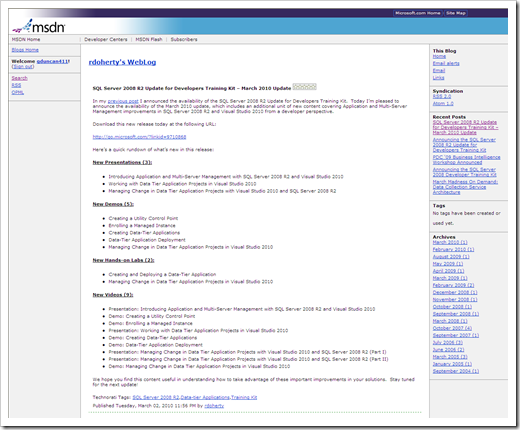
image

…”

Microsoft Downloads - SQL Server 2008 R2 Update for Developers Training Kit (March 2010 Update)

“SQL Server 2008 R2 Update for Developers Training Kit

File Name: SQL2008R2UpdateForDevsTrainingKit.Setup.20100301.exe
Version: 1.0
Date Published: 3/2/2010
Language: English
Download Size: 269.3 MB

SQL Server 2008 R2 offers an impressive array of capabilities for developers that build upon key innovations introduced in SQL Server 2008. The SQL Server 2008 R2 Update for Developers Training Kit is ideal for developers who want to understand how to take advantage of the key improvements introduced in SQL Server 2008 and SQL Server 2008 R2 in their applications, as well as for developers who are new to SQL Server. The training kit is brought to you by Microsoft Developer and Platform Evangelism.

Overview and Benefits
The training kit offers the following benefits:

  • Learn how to build applications that exploit the unique features and capabilities of SQL Server 2008 and SQL Server 2008 R2.
  • Provides a comprehensive set of videos, presentations, demos and hands-on labs
  • Contains new content for developers who are new to SQL Server.
  • Contains new content for SQL Server 2008 R2.
  • Contains all of the existing content from the SQL Server 2008 Developer Training Kit.
  • Easy to download and install.

image

…”

Cool to see VS2010 content included in this Training Kit.

But we’re seeing quite a few “Training Kits”. An official overall Table of Contents/Index for all the training kits for be officially cool… :)

Four Free WPF Utilities – Free, and with source, utilities for your WPF tool belt

LearnWPF.com - 4 Free WPF Utilities I Use Every Day, that come with source!

“Here are 4 WPF utilities I use almost daily, that also have the excellent property of coming with source-code included.

image …”

Got to love free cool utilities, especially when they are OSS/Source available… ;)


Related Past Post XRef:
Inkscape 0.46 Released
Snoop - Spy++ for WPF (kind of, sort of)

Tuesday, March 02, 2010

A WPF Documentation Samples gallery - See 89+ WPF samples from the documentation on one (long) page

MSDN Code GalleryWPF Documentation Samples

“Welcome to the Windows Presentation Foundation (WPF) documentation samples site. This site has samples that complement the WPF documentation on MSDN. These samples target Visual Studio 2010 Beta 2 and are organized in the following categories.

Getting Started with WPF Application Samples WPF Windows Samples
WPF Fundamentals Input and Commands Styles
Themes Threading Controls
Control Customization Layout Data Binding
Drag and Drop Packaging Brushes
Geometries Images Shapes
Transformations 3-D Graphics Animations
Visual Layer Programming Migration and Interoperability

WPF Documentation Samples - Home …”

Now that’s lots-o-samples…

(via Karl on WPF - MSDN WPF Samples Consolidated)

Stacks and stacks of data - Your copy of the Stack Overflow’s (and family) public data is a download away

stackoverflow blog - Creative Commons Data Dump Mar 10

“The latest version of the Stack Overflow Trilogy Creative Commons Data Dump is now available. This reflects all public data in …

  • Stack Overflow
  • Server Fault
  • Super User
  • Meta Stack Overflow

… up to March 2010.

…”

stackoverflow blog - Stack Overflow Creative Commons Data Dump

“We decided early on that all user-generated content on Stack Overflow would be under a Creative Commons license.

All those great Stack Overflow questions, answers, and comments, so generously contributed by all of you, are licensed under cc-wiki:

The current anonymized public data dump is ~500 megabytes, 7zipped, and contains these files:

  1. badges.xml
  2. comments.xml
  3. posts.xml
  4. users.xml
  5. votes.xml

All four Trilogy sites are now included in the data dump: Stack Overflow, Server Fault, Super User, and Meta Stack Overflow.

…”

I have to wonder if I can use this data…

In my day life, we have to deal with/process large amounts of production data. But to test/demo that is hard. Trying to find enough “open” and “safe” data is tough. You want “real” data, but of course you can’t use client/production data, so you’re kind of stuck between a rock and a hard case.

So while this data isn’t a normal EDD/ESI discovery target (i.e. not emails or loose files), I find the thought of its content interesting. Think about language analysis and detection. Think about it for conversation thread management. Think about using it to test scale.

hum…


Related Past Post XRef:
Need a ton of email data (10’s of gig’s)? Need it in PST form? Need it to be public data? Want to look behind the curtain into Enron? The EDRM Data Set Project is for you…
Need test/sample/demo data that’s safe for public (and/or client) consumption? Then GenerateData.com!
Data, data, everywhere free data… At least in the Guardian’s Data Store – Tons of data, all free and all delivered via Google Spreadsheets (get your mashup engines started)

Expression Hands on Labs/Tutorials - Introduction to Silverlight, Styling and Skinning, DeepZoom, SketchFlow and New Blend 3 Features

Me about things... - Expression Studio tutorials now available

“If you follow this blog and/or me on Twitter, you should know that I have been travelling up and down the UK delivering a series of talks in colleges and Universities. During the talk, I show a very cool demo of how to use Expression Blend to transform a simple Flickr application written in Silverlight by importing a Photoshop designed interface!

Something really cool and that requires to write almost no code and shows how design can really become an integral part of the development process!

I now managed to package the whole thing and share with you! All in all I have 5 Hands on Labs that you can download and use freely [GD: Click through for the download link…I didn’t want to leach his traffic]:

HOL 1 - Introduction to Silverlight

HOL 2 - Styling and Skinning

HOL 3 - Working with DeepZoom

HOL 4 - Introduction to SketchFlow

HOL 5 - Expression Blend 3 New Features

The 5th one is the one I used during the talks! So…”

When I grow up I want to be able to use the Expression tools, like Blend.

And how do you get comfortable with it? Use it… Hands On Labs (HOL) are one way to get your, well, your hands on it…


Here’s a snip of the download’s contents;

 image

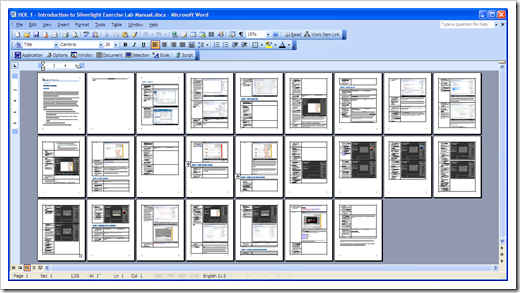
Here’s an overview of “HOL 1 - Introduction to Silverlight Exercise Lab Manual.docx”;

image 


Related Past Post XRef:
From a blank canvas to cool icon, a Expression Studio tutorial that even I can follow… (Greg != Graphic Designer)

A SketchFlow Two-fer day - “Shawn Wildermuth on SketchFlow/dnrTV” and “Prototyping a WPF-3D game design workflow using TrueSpace 3D, Expression Blend 3 with SketchFlow, and exporting the prototype to XNA Game Studio.”
Four Expression 3 Starter Kits, two for Blend and two for Web, focusing on Sketchflow, Gaming, SuperPreview and SilverLight.

Making VS2010 and/or your WPF applications happy in Remote Desktop/RDP Land

WPF Performance and .NET Framework Client Profile - Optimizing Visual Studio 2010 and WPF applications for Remote Desktop

“It is increasingly common for users to run their client application remotely, either connected to another Windows Client machine (Remote Desktop) or to a Windows Server (Terminal Service). In both of these scenarios the sources and the target machines are communicating over a protocol called Remote Desktop Protocol (or RDP).

In this blog, I wanted to share some of our findings while testing Visual Studio 2010 (VS 2010) over RDP as well as provide best practices to improve VS 2010 and your WPF-base app performance over RDP.

You may have seen the announcements (Soma , Jason Zander, Scott Guthris's) for the public release of Visual Studio 2010 RC . Some of the principles mentioned in this blog are also implemented by VS 2010.

While this blog is focusing on Microsoft remoting technologies some of the ideas discussed here should be applicable to other non-Microsoft technologies.

This blog is few pages long, the first part is a summary for folks who just want the short version. More details follow below in the document.

Summary: Best Practices for Improving VS 2010 and WPF Performance with Remote Desktop

A) Tune your Remote Desktop Connection (RDC) settings.

B) Optimize your WPF app to be Remote Desktop aware. 

C) During development, test your app to verify it is optimized for RDP

History and background

Tuning RDP for optimal Visual Studio 2010 usage

Optimizing your WPF app for RDP

How we optimized Visual Studio 2010 for Remote Desktop

WPF Performance and NET Framework Client Profile  Optimizing Visual Studio 2010 and WPF applicatio

…”

WPF in Visual Studio 2010 – Part 2 : Performance tuning

As we move to WPF applications and virtualization, making the two of them run well together will be an important step in our development process.

The other side of this coin, is that you may have people, say off-shore contractors, who will be Remote Desktop’ing into your data center to do their coding. So it will be important that you make their development experience as smooth and efficient as possible…

What I liked about this article was how it went beyond just configuration changes, but also provided concrete examples of how you can tweak your app’s to work well when RDP’ed. Config tweaks are one thing, but code is always nice… :)

Though I’ve been running in a heavily Remote Desktop/RDP world for years, this article taught me a good bit (i.e. the WTSRegisterSessionNotification/WTSUnRegisterSessionNotification messages are something I’ve been looking for for years and didn’t know it… sigh)

(via Innovation Showcase - Best Practices for Improving VS 2010 and WPF Performance with Remote Desktop)


Update 03/02/2010 @ 6:45AM PST:
If you liked the above post, make sure you also check out the Visual Studio Blog’s WPF in Visual Studio 2010 - Part 1 : Introduction and WPF in Visual Studio 2010 – Part 2 : Performance tuning


Related Past Post XRef:
Remote Desktop/Terminal Services and the Highly Graphical Application – Tips and Reg Tweaks
NGEN is Love, if you’re running your .Net applications via Citrix or Terminal Services

Monday, March 01, 2010

Visual Studio 2010 makes Testing/QA professionals officially happy (it’s true!) - Test Professional and Test Case WorkItem Type

dotnetcurry - Introduction to Visual Studio Test Professional 2010

“Microsoft offered the testing tools built in Visual Studio Team System since 2005. Although these tools were probably not as rich and mature as some of the competitors in the field, they provided quite high ROI wherever they could be used. There were some gaps like non-availability of comprehensive test management tools, test case not being recognized as workitem etc. Microsoft has done lot of homework before making a new offering with Visual Studio 2010. Name of the new product offered is ‘Visual Studio Test Professional 2010’. It is designed keeping in mind the needs of the organizations as well as the individual testers.

Visual Studio Test Professional 2010 creates an environment for various roles within the scope of testing and bug fixing.

  1. For test manager or test leads it provides the tools to define the scope and direction of the testing. They can define the test cases to be executed, configuration of the supporting environment and the settings of the testing tools. All of these are to simulate the testing environment as close to the reality as possible.
  2. Test planners can do planning of the tests depending upon the needs of requirements, features and their prioritization. They can create groups of the tests and assign owners to them. They can also assign the resources to execute (run) the tests.
  3. Testers are facilitated by a dedicated environment to run the tests that are assigned to them by test planners and if necessary file a bug that is rich in information easily.

Visual Studio Test Professional 2010 is divided in two distinct parts. …

Introduction to Visual Studio Test Professional 2010

…”

(via DotNetKicks - Introduction to Visual Studio Test Professional 2010 (www.dotnetcurry.com))

dotnetcurry - Visual Studio Test Professional 2010: Test Case WorkItem Type

“Microsoft has given a lot of importance and thought on testing in Visual Studio 2010. One of the popular demands that have been attended to in Visual Studio 2010 is to create Test Case as a workitem type. Creating such a workitem type makes it easy for test and project managers to track the testing efforts in context with various requirements, features and other logical conditions. In this article we will take a close look at this workitem type.

28022010TestCase2

Conclusion: In this article we have studied the test case workitem type in details. In the next article we will study other artifacts of the test plan in Visual Studio Test Professional 2010.

image

…”

I don’t know how many spreadsheets, doc’s, etc of “test cases” I’ve seen and written over the years, but it’s too many. It’s not the writing of them that I hate so much, it’s their static, disconnected nature. The fact that you KNOW that the minute you save it, it’s out of date. That you KNOW in the next version it’s going to be “wrong” and need to be updated. That you KNOW you’re just building a pile of legacy work that you may never refer to again (or even find for that matter).

Now I’ve been around long enough to know that TFS2010 will not be the silver bullet to slay the Test Case Beast. But it looks like a solid step forward in the right direction at least (so maybe it’s like a silver coated bullet? ;)

We’ll see once it ships and we start using it in the real world…

User Stories and TFS2010 – Like Carmel and apples

Benjamin Day Consulting, Inc.: The Blog - Creating a Project Backlog: Breaking down product ideas and requirements in to TFS2010 User Stories (PBIs)

“It’s kind of amazing how much hidden detail and complexity there is in even the simplest software product and application ideas.

Since I’m a Scrum and Team Foundation Server 2010 guy, I decided to try to turn this in to a Product Backlog and put it in TFS2010.  A Product Backlog is the grand wish-list for the product.  In this case, the product is the website for the user group and the tools to manage it.  If you’re using Scrum, the backlog is made up of Product Backlog Items (PBIs).  In Team Foundation Server 2010, the backlog is made up of User Story work items. …

Once I got the top-level stories identified, I put all the stories in to TFS and along the way, I started finding some other stories that I had forgotten. 

image_4

image

…”

This kind of requirements management is something I’ve wanted for a long time. Sure, there’s like tools out there today, but I wanted something baked in and not grafted on.

The more I see TFS2010 more I can’t wait for April 12th…

Geosense for Windows - Free software based geolocation Windows 7 location sensor (i.e. putting Google Location Services to work for you and Win7)

Rafael’s Within Windows - Geosense: The first ‘really really cool’ Windows Sensor

“Every night, or so, Long Zheng logs onto his PC and bombards me with ideas. Most of his ideas fail to root on my end but one looked promising: A ‘software GPS-like thingie’, plugged into the Windows Sensors and Location Platform. After a crash course through the User Mode Driver Framework, and a few days of enduring Long’s “is it ready yet?”, Geosense for Windows was born.

Geosense is a Windows Sensor that feeds the Windows Sensors and Location Platform relatively accurate positioning information, a lot like a GPS device. Instead of communicating with expensive satellites, we simply gather some metrics (i.e. your IP address, WiFi access points) to securely query huge databases with. In return, the databases provide location data for us to share.

Right now, Geosense plugs into Google Location Services for WiFi and IP triangulation. If the sensor becomes an overnight sensation, we’ll add support for others such as Skyhook Wireless and Navizon, to ensure you receive the most accurate data, regardless of where it came from. We’re also thinking about the implementation of mobile broadband (cell tower) detection – but that’s low on the list, due to lack of supportive hardware. (Anyone want to donate some hardware?) …”

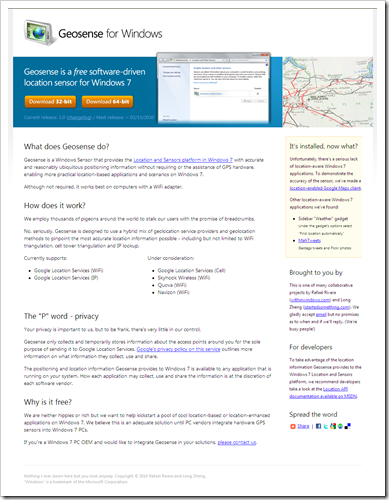
Geosense for Windows

What does Geosense do?

Geosense is a Windows Sensor that provides the Location and Sensors platform in Windows 7 with accurate and reasonably ubiquitous positioning information without requiring or the assistance of GPS hardware, enabling more practical location-based applications and scenarios on Windows 7.

Although not required, it works best on computers with a WiFi adapter.

How does it work?

We employ thousands of pigeons around the world to stalk our users with the promise of breadcrumbs.

No, seriously, Geosense is designed to use a hybrid mix of geolocation service providers and geolocation methods to pinpoint the most accurate location information possible …

Why is it free?

We are neither hippies or rich but we want to help kickstart a pool of cool location-based or location-enhanced applications on Windows 7. We believe this is an adequate solution until PC vendors integrate hardware GPS sensors into Windows 7 PCs.

image

This is indeed “really really cool”… :)