Thursday, April 07, 2011

JIT Business Cards (aka Your Swag'alious Magic Card)

The Daily WTF - Just-In-Time Business Cards

"As you may have noticed, I am a big fan of souvenirs, trinkets, and tchotchkes. And I know I'm not alone. Whenever I go to a conference, at least half of my fellow attendees join me in the pursuit for as much free stuff as possible.

Of course, it doesn't matter that I already have enough logoed pens and pads to write the entire contents of Wikipedia, twice over. Or that I have enough tee-shirts to wear a new one every day for the rest of my life (and that's assuming I live to be a hundred and fifty). No, this epic quest for swag is about something different. Something grander... and perhaps, even primal.

While swag and raffles may be free, you do have to give up something in return: a business card. This de-facto convention currency is a must-have if you want any serious loot. And there-in presents the problem. Not everyone has business cards.

Fortunately, I've got a solution to this problem. Well... actually, my employer does, but I'm pretty sure that I provided some of the inspiration for the idea.

..."

inedo - Just-In-Time Business Cards

"Don't Let This Happen To You

You find yourself in the middle of a vendor hall, with booths as far as your eyes can see. There are tchotchkes of all shapes, colors, and sizes that are practically begging to find a home in your cubicle. As you ogle all the goodies, your fellow conference-goers swarm the room and start snagging the niftiest of toys. But fear not: you've got your swag bag and are ready to collect your loot.

Now imagine the horror as you reach into your pocket for the de-facto convention currency — the business card — only to find that you are fresh out. As you fumble to find an alternative, your colleagues hand out their cards and quickly clear-out the collectables. You're left with mere scraps and gather little more than a few pens and pads of paper.

Just-In-Time Business Cards

Never attend a conference without Just-In-Time Business Cards. The backs feature Initech (à la Office Space) while the fronts offer a convenient means of conveying your vital information.

jitcards-3

..."

That last option kills me... LOL

BTW, If you fill out the online form they say they'll send you some in the mail.  :)

DARPA provides free "Hunt the Sub" game/simulation (Get it while the US Gov is still open for business...)

DARPA - ACTUV Tactics Simulator Page

"CAN YOU COME UP WITH A WAY TO KEEP TRACK OF ELUSIVE SUBMARINES THAT HAS NEVER BEEN THOUGHT OF BEFORE?
CAN YOU OUTSMART AN ENEMY SUBMARINE COMMANDER AND KEEP HIM FROM ESCAPING INTO THE DEEP?
DOWNLOAD AND PLAY THE ACTUV TACTICS SIMULATOR AND SUBMIT YOUR RESULTS TO DARPA TO HELP DEVELOP THE FUTURE OF ANTI-SUBMARINE WARFARE.

The DARPA ACTUV program is developing a fundamentally new tool for the Navy’s ASW toolkit. Before we can develop the autonomous software that will run on ACTUV’s computers, we need to understand what approaches and methods are the most effective. We have made arrangements for ACTUV to be integrated into the Sonalysts Combat Simulations Dangerous WatersTM game, and we’re offering this new ACTUV Tactics Simulator here for free public download and this is where you can play an import[ant] role!

You are invited to put yourself into the virtual driver’s seat of one of several ACTUV configurations and show the world how you can use its capabilities to follow a submarine. Of course you won’t be the only ship at sea so you’ll have to safely navigate among the commercial traffic, and the target sub has some tricks up his sleeve so watch out! Rack up points as you complete the mission objectives, and see how you stack up against the competition on our leaderboard page....

..."

The download is a 330MB zip, with setup & MSI. It installed and seem to run okay on my Win7 x64 notebook.

Here's a couple screenshots...

image

image

When playing it I had a "War Games" moment, I had no idea what I was doing, but it looked pretty cool... :P

(via Slashdot - Free DARPA Software Lets Gamers Hunt Submarines)

Mickey Makes IntelliTrace Make Sense

Team System Rocks! - Exploring IntelliTrace Part 1 – IntelliTrace Options

"As I mentioned in a previous blog post, I’ll be speaking on IntelliTrace at Tech Ed 2001 – North America. This blog post is the first in a series that I’ll publish as I delve into IntelliTrace in more detail, in preparation for my talk.

IntelliTrace is enabled by default in Visual Studio 2010 Ultimate, but it is configured so as to only capture some basic information, so as to not impact application performance. I thought a good starting point would be to look and see what the different configuration options for IntelliTrace are.

To access the IntelliTrace options in Visual Studio 2010 Ultimate, select Tools | Options. This will open the Options window. Scroll down until you see the IntelliTrace node. Expand the IntelliTrace node and select General.

...

image..."

Mickey Gousset (@mickey_gousset) is both giving us what looks to be an interesting series on a new feature of VS2010 that we've heard allot about, but maybe don't use as well as we can, and giving us a sneak peak at his TechEd presentation [Insert two for one statement here]


Related Past Post XRef:
IntelliTrace & *.itrace files eating your drive space?
Visual Studio 2010 Licensing White Paper (includes Team Foundation Server, Lab Management and IntelliTrace)
Four chapters that didn’t make the “"Visual Basic 2010 Unleashed” book are being given to you free...
The Visual Studio 2010 Lab Management video tour – Six videos, 30 minutes, toward Lab Management guru’ism

20 Awesome resources to help you design and prototype your Windows Phone 7 apps

Microsoft Feed - 20 Free Prototyping, Mockup and Wireframing Resources for Windows Phone 7

"Here are 20 free prototyping, sketching, mockup and wireframing resources for Windows Phone which can be used to create application layouts, to help guide UI development, or to pitch an idea. Enjoy and Share!

4-7-2011 10-41-53 AM..."

I think this one is my favorite  :)

SNAGHTML451bcee

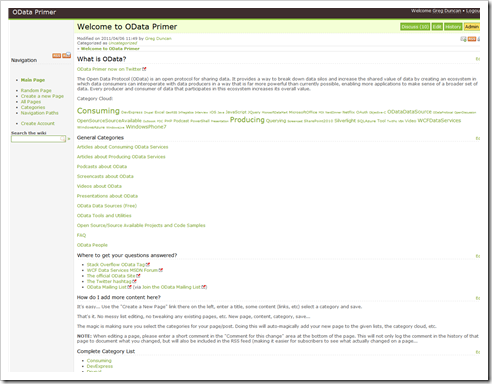
OData Primer wiki content re'org... Now we're cooking with pages!

ODataPrimer.org

For what ever reason (actually it's because I scan 1.97 billion posts a day...) I've grown into one of the news hounds for the OData Primer wiki. This wiki is a human curated resource for all things OData and had grown into a simple, yet massive, list site. It hosted just a couple pages, each with manually grouped lists. i.e. I had to first determine what page a new link should go on, what group and subgroup and then edit the page trying to put the new link in the "right" place in the list. And if there were multiple logical places for the link? Yep, copy-n-paste baby.

This past weekend I hit that threshold we sometimes run into. That point when we finally look up an realize there must be a better way and that "it's the way we've been doing it" just isn't good enough anymore. Something needs to change.

In working with Chris Woodruff (@cwoodruff) of Deep Fried Bytes fame and OData Primer wiki initiator, the OData Primer wiki has moved from a "All Data - Single Page - Massive List" model to a more traditional wiki "Page and Category" model.

Now every piece of "content", every link or link series has its page and where that page appears is based on the page's Categories (think tag, label, post category, etc).

Benefits

  • Adding new content is very easy now. "Create a New Page", add the content, assign a category, save. That's it. Done. Finished. No editing of existing pages needed, no list management, nothing. New, edit, categorize, save. Done.
  • Searching now works. Before you really needed to do in-page find's to find anything. Now the site based searching really works as intended.
  • Content (pages) can be easily assigned as many categories as applicable. No need to try to "figure out" what "kind" of link you've got. No need to duplicate data.
  • Easier to re-org the data. In the future, if need  be, having all the content in their own pages will mean we can do future re-org's, etc much easier and without actually impacting the data on the page.
  • Each content item can now have as much detail as makes sense. Before we had one line for each item. Now we have an entire page! So series can get their own page. Additional information related to the item can be included. How the given link was found (i.e. attribution) can be included. etc, etc
  • The data you get in the site's RSS feeds will be much easier to follow. Instead of relying on a page's comments to try to determine what was added, each new page will get its own feed entry
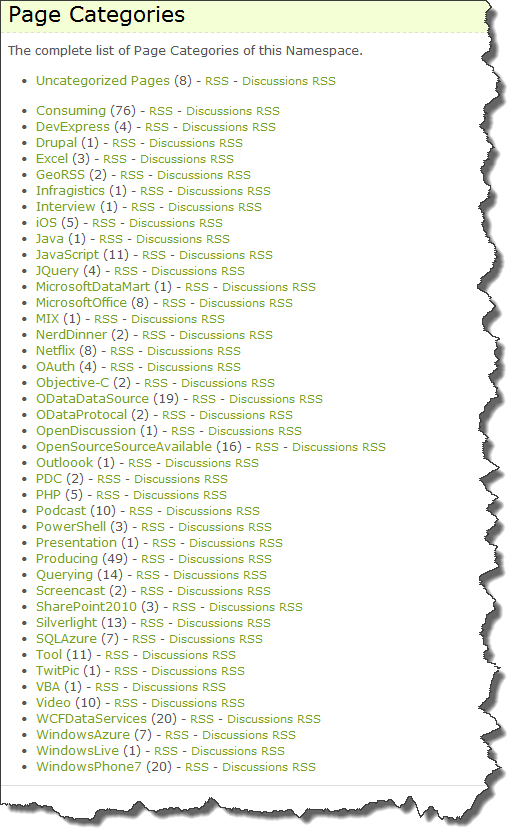
  • Each Category (and the discussions for pages in that category) gets their own RSS feed. So you can subscribe to the RSS feed just SQLAzure OData related posts if you want. Or iOS OData pages... Or the entire site.

Are we done? Mostly. The first pass is done and complete. We'll (and you, this IS a wiki you know) will be fine tuning the site, categories, etc. We went from 8 total pages on the wiki to today's 186 pages...

Before: We went from this massive list mode:

image

Today: To this MUCH slimmer, easier to read, find and add content model;

image

SNAGHTML39e99d1

Next Steps:

This new structure means it will be much easier for people to add new content, not just links, but "real" content. I'd like to see about driving forward in the mission of this wiki, to become one of the premier OData resources. Instead of OData content being all over the place, the OData Primer wiki could be the place for links AND original content...


Related Past Post XRef:
OData Primer - A human curated OData resource just for you…
OData Primer – A collaborative effort to gather and share OData information and resources

Wednesday, April 06, 2011

Customizing Team Build 2010 post series in 16 (to-date) parts

Ewald Hofman - Customize Team Build 2010 – Part 16: Specify the relative reference path

"In the series the following parts have been published

  1. Part 1: Introduction
  2. Part 2: Add arguments and variables
  3. Part 3: Use more complex arguments
  4. Part 4: Create your own activity
  5. Part 5: Increase AssemblyVersion
  6. Part 6: Use custom type for an argument
  7. Part 7: How is the custom assembly found
  8. Part 8: Send information to the build log
  9. Part 9: Impersonate activities (run under other credentials)
  10. Part 10: Include Version Number in the Build Number
  11. Part 11: Speed up opening my build process template
  12. Part 12: How to debug my custom activities
  13. Part 13: Get control over the Build Output
  14. Part 14: Execute a PowerShell script
  15. Part 15: Fail a build based on the exit code of a console application
  16. Part 16: Specify the relative reference path

As I have already blogged about, it is not intuitive how to specify the paths where the build server has to look for references that are stored in Source Control. It is a common practice to store 3rd party libraries in Source Control, so they are available to everyone, everyone uses the same version of the libraries and updating a library can be done centrally.

In Team Build 2010 these paths are specified as a parameter for MSBuild. What we will do in this post is building the values for this parameter based on the values in an argument. You are now pretty aware how to customize the build template, so let’s do the modifications in another way. Instead of opening the xaml file in the workflow designer, we open it in the XML editor. You can open it in the XML Editor by either selecting the Open with menu (see the context menu), or by choosing the View code option.

To add this functionality we need to:

  1. Specify a new argument
  2. Add the argument to the metadata
  3. Build the absolute paths for the references and add these paths to the MSBuild arguments

..."

This is a pretty awesome series which will come in handy for me in the future...

MIX'ing it up if you can't get to MIX11

Canadian Developer Connection - Catch the MIX11 Sessions, Even if You’re Not in Vegas

untitled 

You can expect to hear announcements and see sessions about Microsoft’s web and mobile technologies, from Internet Explorer to Silverlight to Windows Phone and more at this event. If you’re going to be there, we’d love to catch up with you!

If you can’t make it, there’s no reason for you to miss out on the keynotes and sessions, because you’ll be able to catch them online:

  • You’ll be able to watch the keynotes live as they happen, for free, and no registration will be required. Just point your browser at live.visitmix.com at 12:00 noon Eastern (9:00 a.m. Pacific, 4:00 p.m. GMT) on Tuesday, April 12th and Wednesday, April 13th to catch the keynotes.
  • You’ll be able to watch and download videos of the conference sessions about 24 hours after they take place. Take a look at the sessions to see what interests you.

..." [GD: Post Leach Level: 95%]

One of these years I'm going to have to get to MIX. But until then, at least I can visit virtually... :)

Coding4Fun.Phone.Toolkit v1.3 Released (New Message Prompt, Password Prompt controls and Toast fixes + now NuGet'able too)

Coding4Fun Tools - Coding4Fun.Phone.Toolkit v1.3

"...

Release Notes

New Controls: Message Prompt, Password Prompt
Multiple Bug fixes in Toast control

..."

Coding4Fun Tools

"...

NuGet Installs: (v1.3 release)

..."

With the crush Clint is under in prep'ing for MIX11 he still found some time to release this update... (I think his current motto is, "I'll sleep when I dead..."  :P  )


Related Past Post XRef:
Coding4Fun Windows Phone Toolkit (CF4 Blog Post)

The Coding4Fun team has done it again, released another “Kit” that is… The Coding4Fun Windows Phone Toolkit
CF4DevKit (Coding 4 Fun Development Kit) 1.0 Released
Cool Coding with VS2008 and Vista via the Coding4Fun Developer Kit 2008 Vol 1 (Beta)

Tuesday, April 05, 2011

Connecting with Kinect (Redux)

[With an official Kinect SDK release coming sometime in the near future (I hope), the original version of this post needed to be pulled from the Channel 9 Coding4Fun blog. With their permission, I’m reposting it here]

Yep, I'm one of the 10 million who purchased a Kinect. And as a dev I've been watching the news stream relating to hacking it.An official SDK has been promised, but there's enough out now where we can start playing with it on our PC's today...

Jim Galasyn shows us just how easy it is in his Getting started with Kinect development post.

And easy it is. Download and install Code Laboratories NUI Platform plug in your Kinect and go. No hacking, no slashing and all the P/invokes are already done for you.

Here's one of the samples included in the SDK;

image[2]-1

SNAGHTML35060dfa[5]

SNAGHTML3507fccb[5]

image[6]-1

And here's the other...

image[10]-1

Of course, this is only the very very first step. Now we need to actually do something with the data we're getting from Kinect... But every journey begins with a first step and in this case the first step is a pretty easy and painless one.

Here’s a few more links you might find interesting:

Stepping up your NuGet Server - Adding a human friendly package view and upload

CodeCapers - Building a Nuget Server with gold plating

“Last week, Phil Haack wrote a post on how to build a NuGet Server. A NuGet server is really easy to build because 90% of the work is done by running a NuGet command. Just for fun, I decided to add some extra functionality to my NuGet Server such as a package upload form and a formatted list of packages.

In preparing my NuGet server, I followed Phil’s direction to a tee except for the fact that I used a “empty MVC 3 app with Razor support” instead of using a “ASP.NET Empty Web Application”. Out of the box, you will get a barebones, but fully functional NuGet server that provides the package list in Atom Format. For each package in the repository you will get access to properties such as the version number, license information, tags and etcetera. However, since I am not a fan of reading XML I thought it would be useful to transform that XML into HTML using XSLT. This way I can see the list of available packages without opening up Visual Studio. XSLT is one of those technologies that I have always read about but never used. So in the spirit of learning I decided to give it a try.

SNAGHTML66d3c9c0…”

It’s amazing how NuGet has invigorated the .Net development community. Feels like the Visual Studio Extension capability got the fire going and nuget poured gas on it…

(via DZone . Net Zone - Building a Nuget Server with gold plating)


Related Past Post XRef:
Simple sharing for your NuGet's, with help from a NuGet of course!
Want your own “Gallery” (think something like the Visual Studio Gallery and future NuGet home) site and server? Check out the Orchard Gallery/Gallery Server Projects…

Zombie attacks catching you unaware and getting you down? “Record Zombie Attacks - Home CCTV DVR Solution”

GoArticles.com - Record Zombie Attacks - Home CCTV DVR Solution

“Pesky zombies have you down? Unable to record your security camera footage of your assailants as they seek to break down the doors and drink some brain juice? Ok...maybe Zombies aren't your main concern. Intruders and miscreants may however be what you wish to record and view when you're not at home. If this is the case then take a look at the HomeDVR as we list some pros and cons of its capabilities, and how it can potentially be a solution for your home surveillance needs.

Description

To begin lets first talk about what this cctv product is exactly. The HomeDVR is a digital video recorder solution provided by a company called Securityman, and Securityman is a company who provides a lot of diverse home based cctv products and surveillance equipment. This video recorder is a more simplistic DVR when it comes to the digital video recorders used in a lot of surveillance applications; however it is a potential option for smaller home or small business based installations.

Pros

…”

Got to love a product marketing post that starts with “Pesky zombies have you down?”… lol

Monday, April 04, 2011

Going from Fugly to Fabulous by giving your objects their own debugging visualizer

Clarity Consulting Blogs - Write Your Own Debugging Visualizer

“Have you ever been stepping through a program and tried to inspect an object only to find it has an internal structure that make it very difficult to really see what is going on in there? I recently ran into a third party object that was causing me that problem over and over so I decided to do something about it. I wrote my own debugging visualizer to take the object and put it into a format that is easy to read. I was surprised how easy it is to do, so lets create one.

The Setup

The object I was struggling with was storing collections of name/value pairs internally in 2 different collections. So I’d have to find the key I’m interested in, note the index and find the corresponding index in the values collection. It was actually worse than this since the collections were also hierarchical. Ouch. So I put together a simple class that demonstrates this called WeirdCollection. It looks like this:

SNAGHTML62fb9737

SNAGHTML62fa748b

…”

Been a while since I’ve seen a good article on writing your own Debugging Visualizer…


Related Past Post XRef:
One gets you Ten. One DLL, Ten free WCF Debugger Visualizers
A Couple Custom Debugger Visualizers (For VS2005, but with source...)

XNA Game Dev gets its own hub on App Hub

XNA Game Studio Team Blog - New Game Development Page and Tutorials on App Hub

“App Hub today launches a game development landing page with guidance for beginning, amateur, and professional developers, plus an evolved XNA Game Studio guide for beginners, called the Game Development Tutorial.

See the game development landing page, jump in and start the XNA Game Studio Tutorial, or read on for more information.

…”

App Hub - Game Development

“With XNA Game Studio, included as part of the Windows Phone Developer tools, you can create games for Windows, Xbox 360, and Windows Phone 7. Jump in and play with free tools, learn from our extensive samples and tutorials libraries, then get your game on Xbox LIVE Indie Games and the Windows Phone 7 Marketplace. If you're ready to go professional, Xbox LIVE programs are available for both platforms.

image

Game Development - Game Development Tutorial

SNAGHTML62f2988e

Monday’s are a good day to learning something new… :)

Gladinet Cloud Desktop adds Amazon Cloud Drive support (Windows integration and syncing too)

Gladinet - Amazon Cloud Drive Windows Integration

“…This article shows how to integrate Amazon Cloud Drive into Windows as a mapped network drive letter to support the BASIC cloud storage use cases:

  • Backup local folders and files to Amazon Cloud Drive
  • Access Amazon Cloud Drive with a drive letter and drag/drop capability.
  • Sync folders and files across multiple PC, leveraging Amazon Cloud Drive
  • Integrate local applications such as MS Office with Amazon Cloud Drive
  • Connect local resources with online resources such as the Amazon Cloud Drive.

Install Gladinet Cloud Desktop and Mount Amazon Cloud Drive

The First step is to install Gladinet Cloud Desktop, which continues to support a wide variety of online storage services such as those from Microsoft, Google, Rackspace and Amazon.
Support for Amazon Cloud Drive has been added in the latest version of Gladinet Cloud Desktop. After installing version 3.2.607 or greater, the mounting virtual directory wizard will display a drop down item for Amazon Cloud Drive.

SNAGHTML62ea5f56

Gladinet is one of THE names you hear when cloud drive storage is mentioned…


Related Past Post XRef:
Amazon Cloud Drive and Amazon Cloud Player - Your 5GB free cloud storage and digital music locker (and web based player)
Mapping your SkyDrive – Windows Explorer your SkyDrive

Saturday, April 02, 2011

Playing with GIS (Data)

freeware genus - Freeware to Get Started With GIS And Explore Mapped Data

"As the Web and the world have become increasingly data-driven, GIS is just another tool to process that data. GIS stands for Geographic Information System, a system which manages spatially-aware data. GIS is a booming sector even though it’s been around for a while and makes for a great direction to steer your career.

Data can be anything worth recording. For example, say I made a list of all the reported car accidents in my county. Each accident would be a data point and make for interesting conversation on an elevator ride, but that’s about it. Let’s say I got even more detailed with the data I collected and recorded what type of accident it was (rear-ender, head-on collisions, cross-over accident, etc.) and the GPS coordinates of where each accident occurred. After collecting enough data and putting it into GIS so I can visualize it, I might be able to conclude some patterns about the accidents and find solutions to reduce their number like lengthening an intersection’s yellow light, reducing the speed limit, or adding a street lamp.

[Editor’s note: this review was written by Freewaregenius contributor Jason H. Check out his tech blog: 404techsupport.com].

ArcGIS is hardly the only GIS software but it’s one of the most popular and well known. It’s like photoshopping an image with any image editor. ArcGIS is made by Esri and comes with a variety of licenses that allow a variety of functionality but cost a pretty penny. Fortunately for the freeware crowd, Esri produces a free application that allows you to explore GIS data called ArcGIS Explorer Desktop.

..."

esri - ArcGIS Explorer Desktop

ArcGIS Explorer Desktop is a free GIS viewer that gives you an easy way to explore, visualize, and share GIS information. ArcGIS Explorer adds value to any GIS because it helps you deliver your authoritative data to a broad audience.

With ArcGIS Explorer, you can

  • Access ready-to-use ArcGIS Online basemaps and layers.
  • Fuse your local data with map services to create custom maps.
  • Add photos, reports, videos, and other information to your maps.
  • Perform spatial analysis (e.g., visibility, modeling, proximity search).

image

..."

Also interesting is the online explorer (written with SilverLight  :)

http://explorer.arcgis.com/

image

image

So how would you use this? How about doing a little research into what's happening in Japan?

image

Or maybe nuclear?

image

Once you've selected a map, you can then navigate, zoom, mark it up, add additional maps, etc

image

And what I thought really kind of cool, is that you can then build presentations with the data.

image

And this is just using the free online version...

Friday, April 01, 2011

VS2010 SP1 Crashing when opening a TFS2008 Build Report/Details? Here's a hotfix...

Microsoft Connect - VS2010 SP1 crashes on build details from team foundation server 2008 build explorer

"When trying to display build details from the build explorer connected to a team foundation server 2008 team project, visual studio crashes with a NullReferenceException.

..."

Hotfix KB2522890

"Title: KB2522890

Release Date: 3/21/2011

Size: 878 KB

Version: Hotfix

Category: Build

Milestone: Hotfix

Description

Visual Studio 2010 SP1 crashes or shows the following error when attempting to view a build report on a TFS 2008 server:

"TF50316: The following name is not valid. Verify that the name does not exceed the maximum character limit, only contains valid characters, and is not a reserved name"

..."

With Visual Studio 2010 SP1, when I tired to open a TFS2008 hosted Build Report my VS would crash. The above hotfix has fixed that...