Thursday, October 06, 2011

XNA Game Studio v4.0 Refresh Released (Think "The Bug fix, Windows Phone 7.1 and VB.Net" Update)

Microsoft Downloads - Microsoft XNA Game Studio 4.0 Refresh

"Microsoft XNA Game Studio 4.0 Refresh updates XNA Game Studio 4.0 to fix bugs and add support for developing games that target Windows Phone OS 7.1 and developing games in Visual Basic.

Version: 4.0 Refresh
Date Published: 10/6/2011

Language:English

File Name: XNAGS40_setup.exe, 40.0 MB

...

Instructions

  1. Install Microsoft Visual Studio 2010.
  2. Obtain the latest updates for Visual Studio from Microsoft Update.
  3. Download and run the Microsoft XNA Game Studio 4.0 Refresh installer.
  4. Follow the setup instructions
  5. Launch Visual Studio 2010 from Microsoft XNA Game Studio 4.0 Refresh on the Start menu.

..."

The future of XNA seems pretty currently kind of cloudy, but for now it's good to get this refresh/update...


Related Past Post XRef:
Windows Phone 7.1 SDK RTW

XNA Game Studio 4 News (GDC 2010)
XNA Game Studio 3.1 Zune Extensions Released – Get your Zune HD Dev On
As promised, XNA Game Studio 3.0 RTM’ed today

Microsoft Downloads gets official RSS feeds...

I've been using an unofficial (i.e. community provided) feed for Microsoft Downloads for years now (via ThunderMain -> A Feed You Should Read #17 – Microsoft Download Center) and always thought it a little lame that there wasn't an official feed source.

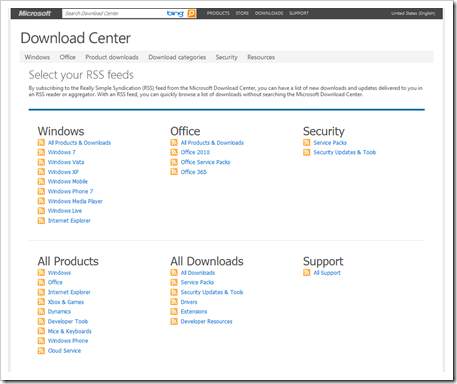
Then I saw this today...

image

What? Can it be?

Yes!

And not only a feed, but one where you can get filtered results based on your interests too!

Microsoft Download Center - Select your RSS feeds

"By subscribing to the Really Simple Syndication (RSS) feed from the Microsoft Download Center, you can have a list of new downloads and updates delivered to you in an RSS reader or aggregator. With an RSS feed, you can quickly browse a list of downloads without searching the Microsoft Download Center.

...

image

Better late than never I guess.

There's those that say RSS/Web Feeds are dead, but I think they are just hibernating and we may yet see a resurgence (At least I hope they are not dead as my whole news stream life is based on feeds... lol :)

Windows Phone 7.1(5) "Controls and Toolkits" cheat sheet

Kevin Ashley - Windows Phone 7.5 Cheat Sheet: Beyond Mango SDK – Toolkits and Controls

"This cheat sheet lists more advanced tools, toolkits and controls beyond the standard Mango SDK 7.1, such as NuGet, Silverlight Toolkit, MVVM Light, Catel, Phone7.Fx, Coding4Fun and others."

Just FYI, I'm kind of sick of playing the "7.1 vs 7.5 version numbering" game so going forward when referring to anything Mango I'm just going to call it 7.1(5)

Anyway... Here's some snips of the 2 page PDF cheat sheet.

image

SNAGHTML2322a6c2

SNAGHTML23227843


Related Past Post XRef:
Cheating at Tiles...with the Windows Phone 7.1 Live Tile cheat sheet

Wednesday, October 05, 2011

Cheating at Tiles...with the Windows Phone 7.1 Live Tile cheat sheet

Kevin Ashley - Windows Phone 7.5 Mango Cheat Sheet – Live Tiles

"One of the most important (and unique!) features of Windows Phone 7.5 is live tiles. Live tiles make Windows Phone truly recognizable, even if you see it from 10 meters away in a store. I created this cheat sheet to help you quickly add live tile features to your app. Enjoy!

..."

You guys know me, the cheat sheets I don't like are few and far between... :P

Here's a few snips from the two page PDF;

image

SNAGHTML1f938876

SNAGHTML1f944ee0

First Windows Storage Server 2008 R2 Essentials appliance for North America is shipping, the 2TB Workstation Backup Appliance

WBA Press Release

DeDuping Backup Appliance Under $800

Press Release October 10 2011

Highly Reliable Systems, Reno NV announced that they are shipping the first available appliance in North America based on Microsoft Windows Storage Server 2008R2 Essentials (WSSE). Dubbed the Workstation Backup Appliance (WBA), the box has 2TB of deduped internal storage, along with software written by Microsoft to backup 25 workstations.

“Many people don’t realize that Microsoft has backup software other than what is built in to Windows.” said Tom Hoops, Chief Technology officer. “This appliance uses WSSE, available only through hardware OEMs, which is similar to Windows SBS 2008 Essentials. But WSSE can join existing domains and multiple boxes can be ganged to allow mid size organizations to protect all their workstations and provide instant bare metal restore capability.” The appliance stores duplicate files (those that exist on multiple workstations) only once. The company says that this dedupe ability means the data stored on 25 workstations will generally fit onto 2TB. The WBA has an optional 2TB removable drive tray that provides the appliance with self-backup capability, as well as a USB key used to boot downed workstations and connect them to the appliance over the network for rapid restore.

Darren McBride, the company CEO, says that although IT people often claim they don’t allow users to store data locally, users do it anyway and even if they don’t, the ability to recover workstations quickly when corruption or viruses hit is a big time saver. McBride explained that a simple piece of service software called the Microsoft connector is installed using the IE browser to each workstation, and once configured backups are queued and processed sequentially so that scheduling is centralized and simplified. Progress can be monitored via a single dashboard and the Microsoft software has the ability to do continuous incremental protection, which means nightly backups occur quickly. Efficient version retention also allows users to go back 6 months or more to retrieve old versions of files. Add-ins are available from third party developers to extend Windows Storage Server Functionality.

Pricing on the 2TB WBA is $799 MSRP. Additional removable 2TB drives in fully protected and transportable aluminum trays are $170 each. For more information visit www.high-rely.com or call 775-329-5139." [GD:Press Release copied in full]

Highly Reliable Systems - Workstation Backup Appliance (WBA)

"Need a low cost appliance to backup your network workstations? Conventional backup appliances focus on backing up the corporate server, yet according to IDC up to 60% of critical company data is on laptops and desktops. Highly Reliable Systems introduces a Windows based backup appliance with 2TB of storage to provide workstation backup and NAS storage. The Workstation Backup Appliance (WBA) can join your domain and includes Microsoft backup software to protect 25 Windows or Mac workstations. Simply install the Microsoft Connector software on each workstation and use the dashboard via a browser to monitor and manage backup jobs. The WBA includes support for continuous incremental backups, rentention of older file versions, and deduplication of backup files across multiple workstations. There is also a built in removable drive tray to backup the appliance's internal drive.

...

image..."

You know I don't normally do this kind of press release kind of thing, but the news about the hardware news Windows Storage Server 2008 R2 has been SO quiet (cricket... cricket... kind of quiet) that once I heard about this I wanted to share. Seems like if you have a small business (or really big family) and all you want is a centralized and automated local backup solution, that something like this might just be the ticket.


Related Past Post XRef:
“Windows Storage Server 2008 R2 Essentials” Think “Windows Home Server Meets the Home Office/Small Business”

Windows Server Solutions Phone Connector RTW's (aka Windows Phone 7 Connector for WHS/SBSE)
WSSX 4 U... Visual Studio Project Template for creating *.wssx packages (Think "Windows Home Server 2011/SBS 2011 Essentials/Storage Server 2011 Add-in Packages")

Your Windows Phone 7 will be your next XBox 360 Remote?

Windows Phone Blog - Control Your Xbox with your Windows Phone Using the Xbox Companion App

"Earlier today you probably spotted the big, big news from our pals over on the Xbox team. They’re bringing a new world of entertainment to your living room and making it faster, funner (yes, that’s right, funner) and easier to find. If you haven’t seen it already, I highly recommend checking out the killer video that shows all of the new things that will be possible with an Xbox 360, Xbox LIVE and Kinect in your living room.

...

image

I was lucky enough to get my hands on a beta copy of the app to try out with my Xbox and I have to say that it’s really impressive. Here’s an actual scenario I ran through with the app and my Xbox the other day:

  • Finding Content: Just like on your Xbox, the Xbox Companion gives you instant access to the Xbox LIVE Marketplace catalog of games, movies, music and TV shows. I used it to search “Featured Content” and pulled up the X-Men: First Class.
  • Learn more about what you’re watching, listening to, or playing: Once I found the movie and touched the movie tile, the Xbox companion app took me to an info page that has all the related details about. And the content is really rich, too – for example, when I swiped to the “cast” page and touched an actor’s name, like star James McAvoy, I was taken to other movies starring him. From there, I could easily learn more about the other movies, their cast, etc. It’s an infinite road of interactive content.
  • Control & Play: Once I selected the content and hit play, the Xbox Companion flips into “controller mode” in which I could navigate my Xbox, or control video playback of your video. The best part here is that controls are virtually instantaneous – easily as fast as using my controller or a TV remote.

By now, you probably want to know more and find out when the Xbox Companion app will become available. Rest assured that it’s coming soon and that when it gets here, it’ll be a free download for Windows Phone customers. You can be sure that when it’s baked, I’ll be back with a full video review of the app.

..." [GD: Post Leach Level: 95%]

I first thought it was just some local to the phone XBox thing, but they got me at "the Xbox Companion flips into “controller mode” in which I could navigate my Xbox, or control video playback of your video. The best part here is that controls are virtually instantaneous – easily as fast as using my controller or a TV remote."

That's shiny!

But now I want to build like apps. Where's my SDK/Toolkit to build something similar? :P

SQL Server 2008 R2 Enterprise vs Standard, one Geek Girl's view...

Geeky Girl - SQL Server Enterprise vs Standard

"SQL Server 2008 R2 comes with a lot of features and functionality. Even the Standard version has a long list of capabilities to set DBAs drooling. But then there’s the Enterprise version. A question that comes up, more often than we’d like, is, “Why would I need Enterprise?” If there are so many features available out of the box with SQL Server Standard, why go to the Enterprise version?

If you want to go into it feature-by-feature, the SQL Server website has a comparison site which allows you to look at the features under various headings and see which versions of the product those features are included in.

But if you don’t want to go through the whole list, here are my thoughts on some key ones.

image..."

I get asked this a work a good bit, "What version of SQL Server... Why do you want Enterprise?" and so wanted to capture this "human readable" comparison of a few differences.


Related Past Post XRef:
SQL Server 2008 – To buy Enterprise or Standard, that is the question…
SQL Server 2008 Edition Side–by-side Feature Comparison - (aka. What Edition do I need so I can get feature X,Y or Z?)

SQL Server Compact 4 vs SQL Server Express 2008 R2 Side-by-side feature comparison

.Net Micro Framework v4.2 RTW's (Think "VB.Net + lots of community development effort results" version)

.NET Micro Framework - Version 4.2 RTM Today!! (Updated)

"We are glad to announce today the RTM of the .NET Micro Framework version 4.2. You can download the SDK and PK as well as the all sources from our Codeplex project, client_v4_2 branch, at change number 13620. (We will be distributing 4.2 solely through the Codeplex site this time and not on downloads.microsoft.com)

Version 4.2 of the .NET Micro Framework Porting Kit provides the following new features:

  • Remote Firmware Update: The .NET Micro Framework SDK and PK now support updating your device firmware remotely.
  • Complete Cryptographic Object Model over PCKS #11: Most types and algorithms used in the desktop framework are now supported. PKCS #11 allows extensibility at the firmware level for adding new cryptographic tokens.
  • 1-Wire, PWM and A/D object model: Support for PWM and A/D operations is now provided as a standard interface. 1-Wire is provided through a community development effort
  • SNTP and FTP (client and server): Support for SNTP and FTP is provided as a community development effort.
  • StringBuilder and Regex types: Support for StringBuilder and Regex is provided as a community development effort.
  • Transcendental functions for doubles in System.Math
  • VB.NET: The SDK now support VB.NET.
  • Support for Cortex M3 devices with STM32 processor family samples:

..."

Kudo's to the team for getting this out the door. I dig how much community development effort was included in this release...


Related Past Post XRef:
Netduino is opening up to an wider audience with the .Net Micro Framework v4.2 release

.Net Micro Framework Codeplex'apluza (i.e. a .Net MF Codeplex Project Round-up)
Netduino - .NET Micro Framework, open source, electronics platform, free (software), code walk though, cool…
Channel 9 - Episode 1 of the "Show with No Name" (aka The Weekly Recap)

Highlighting hits in context with dtSearch

I Programmer - Hit Highlighting with dtSearch

"What do you do with your search results after you have obtained them? We explore hit highlighting with dtSearch and C#.

In the first part of my exploration of the search and indexing system dtSearch, I covered the basic principles of operation. Now we consider what to do next once you have some search results.

What do you do with your search results after you have obtained them?

It is a good question. In many cases it is enough to simply list the files that contain the hits, but what if your users want to look inside the files and see where the hits have occurred. This is a nightmare of a job if you have to start from scratch. All those file formats and then there is the bother of finding out how to highlight the hits in each format.

No - it probably isn't worth the effort.

Converting file formats

The good news is that if you are using dtSearch, which you can try for yourself by downloading the 30-day evaluation from dtsearch.com, you can use a range of file and container parser and tap into the standard system for reading different file formats that Microsoft has implemented - IFilter.

As long as there is an IFilter for the document format you want to work with then the procedure that I'm about to describe will work without modification. If not you can write or have written for you a file parser. However, the standard range of file parsers supports most of the applications you are likely to encounter. The file parsers are used by the indexing engine to look inside each document and it is also used by the FileConverter object to allow you to process documents into a standard format so that the results of searches can be presented to users.

Getting Started

..."

Saw this and depending on your industry, search hits in context can be an important feature and something that's not the easiest to execute (especially if you're talking about "native" files like Doc's, etc)


Related Past Post XRef:
dtSearch. You heard about it, you've seen it advertised, now see how to get started developing with it...
dtSearch: Not Dead. Not Yet. [Written in 2005 and it's still around and viable so I guess it's really not dead...lol]

SQL Server 2008 Full Text Search Best Practices from the SQL CAT Team
SQL Full Text Search: IFilters or Indexing Filters used with SQL FTS...

Office 2007 IFilter Pack

That’s a hOOt! A from scratch, C# based full text indexer and search engine
Lucene.Net & C# Indexing and Searching WinForm Example
"Converting PDF to Text in C#" with PDFBox/IVKM.Net
Desktop Search Application: Part 1 [Search Office Doc's With DotLucene]

Tuesday, October 04, 2011

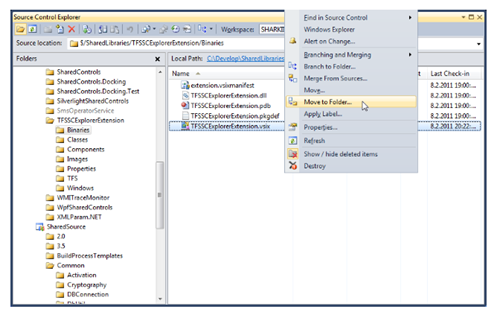
TFSSCExplorerExtension for VS10 and 11 - Think "TFS Source Control Explorer Window Features++" or "zomg drag and drop in TFS Source Control Explorer Window!"

Visual Studio Gallery - TFSSCExplorerExtension (VS 2010), VS2011 DP version

"TFSSCExplorerExtension (Team Foundation Server Source Control Explorer VS 2010 Extension) is Visual Studio 2010 Extension Package that adds new features to the TFS Source Control Explorer window. Most important new features are Drag & Drop support, Move and Branch functions even for multiple files selection and Merge from Sources feature.

image

October 2011 Update (New)

  • Released separate version for Visual Studio 11 Developer Preview.
  • New feature Undo changes to unchanged files in Pending Changes window toolbar.
  • Icon change function is now applied also on items in Branched folders.
  • Added disabling Branch command if file is new or deleted.
  • Added disabling Destroy command if file is new, move or branch pending.
  • Fixed BUG in File move function.

August 2011 Update

  • Enable Files icon change function now change icons also for Branched folders. Icon is changed in file list and in Folder Tree view of Source Control Explorer too.
  • Fixed BUG with DoubleClick on the file list of Source Control Explorer.
  • Fixed Exceptions and errors handling
  • Show Deleted items and Destroy menu commands option is now splited into two separated options:Enable Show deleted items menu command and Enable Destroy menu command
  • Added license file
  • Changed Drag Drop context menu to Visual Studio context menu

...

image..."

This awesome extension gets not only more new features but a VS11 DP version too!  :)


Related Past Post XRef:
Extending TFS's Extensible Source Control Explorer - TFSSCExplorerExtension (Team Foundation Server Source Control Explorer VS 2010 Extension)

Microsoft SQL Server Connector for Apache Hadoop RTW

Microsoft Downloads - Microsoft SQL Server Connector for Apache Hadoop

"Microsoft SQL Server Connector for Apache Hadoop (SQL Server-Hadoop Connector) RTM is a Sqoop-based connector that facilitates efficient data transfer between SQL Server 2008 R2 and Hadoop. Sqoop supports several databases.

Version: 1.0
Date Published: 10/4/2011

Language: English

  • Microsoft SQL Server-Hadoop Connector User Guide.pdf, 878 KB
  • SQL Server Connector for Apache Hadoop MSLT.pdf, 220 KB
  • sqoop-sqlserver-1.0.tar.gz, 1.0 MB
  • THIRDPARTYNOTICES FOR HADOOP-BASED CONNECTORS.txt, 33 KB

The Microsoft SQL Server Connector for Apache Hadoop extends JDBC-based Sqoop connectivity to facilitate data transfer between SQL Server and Hadoop, and also supports the JDBC features as mentioned in SQOOP User Guide on the Cloudera website. In addition to this, this connector provides support for nchar and nvarchar data types

With SQL Server-Hadoop Connector, you import data from:

  • tables in SQL Server to delimited text files on HDFS
  • tables in SQL Server to SequenceFiles files on HDFS
  • tables in SQL Server to tables in Hive*
  • result of queries executed on SQL Server to delimited text files on HDFS
  • result of queries executed on SQL Server to SequenceFiles files on HDFS
  • result of queries executed on SQL Server to tables in Hive*

Note: importing data from SQL Server into HBase is not supported in this release.

With SQL Server-Hadoop Connector, you can export data from:

  • delimited text files on HDFS to SQL Server
  • sequenceFiles on HDFS to SQL Server
  • hive Tables* to tables in SQL Server

* Hive is a data warehouse infrastructure built on top of Hadoop (http://wiki.apache.org/hadoop/Hive). We recommend to use hive-0.7.0-cdh3u0 version of Cloudera Hive.

Sqoop is an open source connectivity framework that facilitates transfer between multiple Relational Database Management Systems (RDBMS) and HDFS. Sqoop uses MapReduce programs to import and export data; the imports and exports are performed in parallel with fault tolerance.

The Source / Target files being used by Sqoop can be delimited text files (for example, with commas or tabs separating each field), or binary SequenceFiles containing serialized record data. Please refer to section 7.2.7 in Sqoop User Guide for more details on supported file types. For information on SequenceFile format, please refer to Hadoop API page.

Supported Operating Systems: Linux, Windows Server 2008 R2

Linux (for Hadoop setup) and Windows (with SQL Server 2008 R2 installed). Both are required to use the SQL Server-Hadoop Connector

..."

I don't Hadoop yet, but it's starting to get some interest and eyeballs in my day-job's field so want to keep an eye on it...


Related Past Post XRef:
Microsoft SQL Server Connector for Apache Hadoop CTP1
Do you Hadoop? Angel has your links, news and resources round-up...

"The Developer’s Guide to AppFabric" Free eBook (CTP)

The Developers Guide to AppFabric

"“The Developer’s Guide to AppFabric” is a free e-book for developers who are exploring and leveraging the capabilities of the Azure AppFabric platform.

The goal is to create a resource that will evolve and mature in parallel with the Azure AppFabric technologies. The use of an electronic format will allow sections to be added as new technologies are released and improved as the knowledge and experience of using the technologies grows within the developer community.

The first version, published on the 3th October 2011, marks seven years to the day since the first version of “The Blogger’s Guide to BizTalk” was published.

The first section will provide an introduction to the brokered messaging capabilities available in the Azure AppFabric September 2011 release. The next section will go into a lot more depth and explore the brokered messaging feature set. Future sections will cover the Access Control Service, relayed messaging, and cache. Features like the application model and integration services will be covered as they emerge and are released.

image

..."

I haven't seen many free ebooks on AppFabric, so wanted to share this...

Here's my usual snip of the PDF and page thumbnails;

SNAGHTML1a405ecb

(via Daniel's Azure South-East Asia blog - Preview version of “The Developers Guide to AppFabric” by Alan Smith -> CloudCasts BlogCTP Version of The Developers Guide to AppFabric)

Visual Studio 11 says goodbye and so long to IDE macros

InfoQ - Macros Have Been Dropped in Visual Studio 11

"As of version 11, macros will no longer be available in Visual Studio. This marks the first version in nearly a decade to not allow for crating ad-hock extensions to the IDE. Fully compiled extensions can still be created and new project templates are included to make that process much easier.

According to Microsoft’s usage tracking data, macros in Visual Studio are currently being used by less than 1% of all developers. This alone isn’t enough to cause Microsoft to drop the feature, the macro feature in Visual Studio has also a disproportionately high maintenance cost. Unlike most other features, the macro support has to be updated and exhaustively tested for each new version of Visual Studio. In theory one should be able to record and replay any feature via the macro IDE, which places a huge maintenance burden on Microsoft.

According to Matt Kaufman, the macro IDE hasn’t been updated for several versions. Firing it up, one will quickly notice that it looks like an old version of Visual Studio. More troubling is the fact that it still only supports Visual Basic. One cannot use C# or any of the newer .NET languages to create macros.

As mentioned before, the support for extensibility now includes several new project templates. The current list, which is offered under both VB and C# follows:

..."

Not an unexpected move I guess, and all features need a clean it or remove it pass, and I've never really used VS macro's, but still... Anyway, I guess it's better to be nuked than to just be left in for forever and not updated? It's like that weird great uncle you never visited, but now that's he's gone, you miss... (yeah, it was kind of a crappy and dark day... can you tell? lol )

Monday, October 03, 2011

PS'ing your MSBuild with the InvokePowerShellCommand Community TFS Build Extension

Community TFS Build Extensions - How to integrate the InvokePowerShellCommand build activity

"The InvokePowerShellCommand activity can be used to run the PowerShell commands or script files within a build without using then generic InvokeProcess activity to run the PowerShell interpreter. In this example we aim to show the basic steps that are required to get the activity integrated into a build.

Before you can make use of any of the TFS 2010 community build activities you have to make sure they are available for the build system and on your development PC. Instructions for this process can be found in the ALM Rangers build guide or in the StyleCop page of this wiki. This page assumes the InvokePowerShellCommand activity is available in the developers build process workflow toolbox.

Using the activity with an inline script

...

Using the activity with an .PS1 file from source control

...

image..."

This looks like a cool way of extending, customizing, etc, your Build process. I mean, it's PowerShell! :)

(via But it works on my PC! - Documentation for the PowerShell activity in the TFS Community Build Extensions published )

AzureDesignPatterns.com is getting a HTML5 facelift...

David Pallmann's Technology Blog - Relaunching AzureDesignPatterns.com with HTML5 and Expanded Content

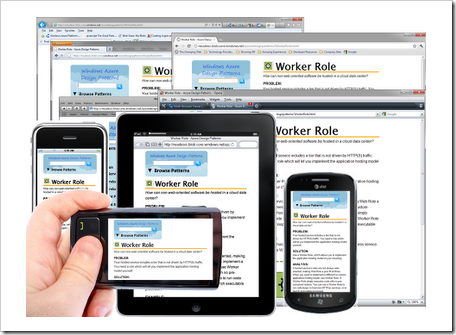
"For several years now I’ve maintained a design pattern catalog of design patterns for Windows Azure (Microsoft’s cloud computing platform) at AzureDesignPatterns.com. I’ve recently overhauled the site with expanded content and it is now HTML5-based. Since this is a work in progress you can still access the former site.

Expanded Content
Expanded content on each pattern makes the site a lot more useful. You’ll find the typical sections found in most design pattern catalogs: problem, solution, analysis, and examples.

The patterns are arranged topically (Compute, Storage, Relational Data, Communication, Security, Network, and Application). Currently the Compute patterns are up on the site and content for the other categories is on their way.

...

HTML5 Overhaul
I’ve recreated the site as an HTML5 site for several reasons. First, to broaden its reach: AzureDesignPatterns.com is now accessible across PC browsers as well as touch devices like tablets and phones. This is achieved by avoiding the use of plugins, handling backward compatibility with modernizr, and using fluid layout. The site selects one of four CSS layouts (desktop, tablet-landscape, tablet-portrait, or phone) to best fit the device it is rendering on. Layout areas and type are proportionally sized in accordance with the principles of responsive web design. Another reason for doing this is, I’m going deep on HTML5 this year and upgrading my existing sites is one way to practice and learn. This is my first “real” HTML5 experiment

image

...

Hosting in Windows Azure
It would be kind of hypocritical for a design patterns site for Windows Azure to not be hosted in Windows Azure. However, this is a content-only site with no server-side logic—it doesn’t actually require hosting in the Compute service and we can save some expense by serving the site from low-cost Windows Azure Blob Storage, a technique I've previously written about. The same technique was used for the former Silverlight-based site

..."

AzureDesignPatterns.com

image

I found this project's move from Silverlight to HTML5 an interesting story and something we're going to be hearing more of in the future...

Related Past Post XRef:
Icons/symbols to draw pretty Azure design diagrams...

If I have .Net 4 installed do I need the previous versions? [Yes]

Aaron Stebner's WebLog - Mailbag: Do I need still need older versions of the .NET Framework on my system after installing the .NET Framework 4?

"Question:

I recently installed the .NET Framework 4 on my system. Afterwards, I looked in Add/Remove Programs, and it shows that I have all of the following versions of the .NET Framework installed on my system:

  • Microsoft .NET Framework 1.1
  • Microsoft .NET Framework 2.0 SP2
  • Microsoft .NET Framework 3.0 SP2
  • Microsoft .NET Framework 3.5 SP1
  • Microsoft .NET Framework 4 Client Profile
  • Microsoft .NET Framework 4 Extended

Do I need any of these older versions of the .NET Framework now that I’ve installed the .NET Framework 4, or can I safely uninstall them?

Answer:

In general, my recommendation is to leave the .NET Framework 2.0 SP2, 3.0 SP2, 3.5 SP1 and 4 installed on your computer.

Unlike previous versions of the .NET Framework, the .NET Framework 4 does not allow an application that was built with previous versions of the .NET Framework to migrate forward and run on it if the previous version is not installed. If you are using any applications that were built with any version of the .NET Framework before version 4, then I recommend leaving both the .NET Framework 3.5 SP1 and the .NET Framework 4 installed.

..."

I've seen this asked a few times and so wanted to capture and highlight it.

The All-in-One Code Framework Browser v4 goes major Metro

Microsoft All-In-One Code Framework - Microsoft All-In-One Code Framework Sample Browser v4 Released – A New Way to Enjoy 700 Microsoft Code Samples

image 

Today, we reached a new milestone of Microsoft All-In-One Code Framework. It gives me great pleasure to announce our newest Microsoft All-In-One Code Framework Sample Browser - v4 available to the globe. With this release, we embrace the hope of giving global developers a completely new and amazing experience to enjoy over 700 Microsoft code samples.

Compared with the previous version, this new version of Sample Browser is completely redesigned from tip to toe. We heard lots of users’ voices about how we can do better. So in Sample Browser v4, its user interface, sample search and download experience have numerous changes. I hope that you will love our effort here.

Install: http://aka.ms/samplebrowser
If you have already installed our last version of Sample Browser, you simply need to restart the application. You will get the auto-update.

image

image

..."

Nice!

One thing I'm not sure about is if the source for this app is available. I hope and would expect so, but didn't see it (but given the number of samples in the Project's Source it would be really easy to miss). Have asked and will update this post once/if I find out.


Related Past Post XRef:
All-In-One Code Framework is now on MSDN Code Gallery, has a new sample browser and is cooler than ever
All-In-One Code Framework, your one stop shop for Windows code samples, examples and guidelines
All-In-One Knowledge Base Articles (aka another way to see all the coolness that’s in the All-In-One sample code base)
Three languages, tons of technologies, continual additions, all source: The Microsoft All-In-One Code Framework (think “An Official Boat Load of Code Samples!”) (Added bonus “How can I on earth write a managed shell extension” with .Net 4 sample)

Sunday, October 02, 2011

[Hardware Music Hack] Star Wars Imperial March theme played by dual floppy drives

Hack a Day - Star Wars Imperial March Played by Dual Floppy Drives

"Although many have made some sort of music with improvised electronics, few sound as cool as this Imperial March from Star Wars played by two floppy drives. According to [Pawel], “It’s nothing new” and quite simple. This may be true as we’ve featured an Imperial March-playing floppy drive here before, but it was only one drive. Although it may not be the London Symphony Orchestra, the two drives together sound quite good!

...

..."

Silent's Homepage - Evil floppy drives – English translation

"...

Summer holidays are comming to an end, I have passed all september exams and now I am procrastinating doing some dumb things instead finishing two other, more serious projects ;-) .
Here’s my another, totally useless device – a musical floppy drives.

How does it work?

It’s nothing new and it’s very simple. The sound comes from a magnetic head moved by stepper motor. To make a specific sound, head must be moved with appropriate frequency.
FDD has a simple interface – the description may be found for example [ HERE ]. To move the head you need to activate the drive by pulling the DRVSB0 or 1 (depends on the cable you have and the connector – notice the crossover on the FDD ribbon cable) pin low and then falling edge on STEP pin makes the head move one step in direction dependent on DIR pin state.

..."

That's awesome. Makes me want to dig out some old drives... (well almost, they are buried pretty deep... lol)