Saturday, May 02, 2009

A story of Windows 7 and an empty All Programs (and how I fixed it)

As all good stories begin, this one began on a dark and stormy night. The kind of night where all you want to do is install Windows 7 RC’s, upgrading your Vista installs in the warmth before the fire. Even while the ground shakes beneath you, you diligently stay focused on the task at hand. Finally, success! You’ve done it, the upgrade is complete! With joy in your heart you look into Windows orb, clicking on All Programs, only to have your hopes shattered, like a lighting strike to the heart, as all you see is nothing and emptiness…


LOL.. Okay, okay, I tried. Give me a few points for effort at least?  ;)

I ran into this issue yesterday and after a good bit of research, and trial and error, found a viable, and actually pretty simple, fix. Wanting to pay it forward, here’s a quick write up. Hope this helps…


Problem:

An upgraded from Vista SP1 to Win7 RC (7100), my All Programs was blank (see below).

image image

Data Points:

  • All the programs, shortcuts & folders in the All Users and current user Start Menu/Programs folders were there
  • The Shell Folders and User Shell Folders in the registry (both current user and local machine) were pointing to the right folders
  • Permissions on said folders were all set as expected
  • Able to reproduce on BOTH a Clean Windows 7 RC install and upgrade (but it’s much more likely to been seen in a upgrade).
  • To reproduce on a clean install, open either All Users or current user’s Start Menu and create a ton of shortcuts. I took the IE shortcut, copied and pasted it until I had 80+ copies. At that point, even the lean install’s All Programs broke. After deleting those copies (and end-tasking and running Explorer) the Clean’s All Programs came back.

Research:

This link lead me to a true fix for the issue, Windows 7 Forums - Program Icons Missing in All Programs Menu

Root Cause:

It seems that Windows 7 doesn’t currently like having too many shortcuts/folders in the Start Menu/Programs folder. With something close to 70+’ish shortcuts/folders in the combined All Users & User Start Menu/Program folders (common in an upgrade scenario) the All Programs list will end up being blank/empty

Resolution:

Move a number of shortcuts/folders from Start Menu/Programs into a new subfolder, like Start Menu/Programs/Stuff, and then restart Windows Explorer. Wash, rinse, repeat until your All Programs works.

Quick Resolution Walk Through:

Disclaimer: This is what worked for me, on two systems. Your mileage may vary. You do this at your own risk and while this should not break your system (nor is it really even dangerous), take care and do it slow. You assume all the risk and liabilities in this process and I assume none (i.e. don’t blame me if you jack up your system). This resolution is provided as a good faith effort to help, yada, yada, yada..

a) Left click on the Windows orb to open the Start Menu

b) Right click on the All Programs. You should see a menu like the one pictured below

image

c) Left click on the Open menu item (aka the current user’s, yours, Start Menu). You should see something like what is pictured below, though the actual contents may be a little different

image

d) Double left click on the Programs folder. You should see something what is pictured below, though the actual contents will be different, you should see a “bunch” of folders

image

e) Create a new subfolder called “Stuff” (no quotes, and you can name it what ever you really want too)

image

f) Select a bunch of the folders/shortcuts and drag (i.e. move) them into “Stuff”

image

 image

g) Start Task Manager, go to the Processes tab, select “explorer” and then click on the “End Process” button. This will kill the explorer process, taskbar, start menu, etc.

This step is very important. Unless you restart Windows Explorer your results (i.e. what you see in All Programs) will not be reliable. Believe me, I’ve found this out after many false starts. Make a change, kill and restart Explorer. Wash, rinse, repeat…

image

h) Now in Task Manager, select the File menu, Run submenu.

image

i) Enter “explorer” (no quotes) and click OK. This will restart Explorer, and the taskbar, Windows orb, etc should all re-appear

image

j) Try your All Programs now… If enough things have been moved, you should be good!  :)

image

k) If you’re All Programs is still empty, then repeat the above steps in the All Users Start Menu folder (i.e. the “Open All Users” menu choice when you right click on “All Programs”)


Now you can also begin to move stuff back up from Stuff into the Programs folder as need be. Remember to end/run Windows Explorer during this process. If/when your All Programs go blank again, you now know how to fix it..

Wednesday, April 29, 2009

Tons of tangible T4 tips – Updated Tangible Engineering T4 Editor, Videos and T4 Template Gallery

Tim Fischer's .NET Small and Medium App Blog - New T4 "How Do I?"-Videos , new T4 Editor and Online T4 Template Gallery

“As Jean Marc and Oleg pointed out T4 is getting more attention now. Tangible Engineering did now post new T4 How Do I Videos and released another great T4 editor V1.3 that comes with an Online T4 Template Gallery, intellisense and syntax-highlihting and uml-style diagrams in its free edition...

Check out the videos

- T4 Video:  Generate Data Transfer Objects

- T4 Video: Custom LINQ-to-SQL Classes via Drag and Drop

- T4 Video: Image Gallery via T4

- T4 Video: Generate multiple output Files with T4

- T4 Video: Generate Stored Procedures

- T4 Video: .NET Data Services Change Tracking

- T4 Video: T4 Editor #include-Directive

- T4 Video: Generate from XML File

- T4 Video: Generate from DSL Files

- T4 Video: Share templates online with the build-in online T4 Gallery

…” [GD: Post Leach Level: 90%]

T4 is getting more interest lately so this caught my eye.


Related Past Post XRef:
It’s a T4 kind of day – Free (reg-ware) T4 Editor from tangible (with UML-Style modeling tools added for flavor)

Vista SP2 & Windows Server 2008 SP2 RTM’s (Actual download coming in 2009 Q2… i.e. soon’ish)

The Windows Blog - Windows Vista SP2 RTM + Windows Vista SP1 Blocker Tool Removed

“Today we are announcing the Release to Manufacturing (RTM) of Service Pack 2 (SP2) for Windows Vista and Windows Server 2008. SP2 represents the latest step in Microsoft’s commitment to continuous improvement. It includes all updates that have been delivered since SP1, as well as support for new types of hardware and emerging hardware standards. 

As we have mentioned before, here are some of the key benefits of Windows Vista SP2:

  • Windows Search 4.0 for faster and improved relevancy in searches
  • Bluetooth 2.1 Feature Pack supporting the most recent specification for Bluetooth Technology
  • Ability to record data on to Blu-Ray media natively in Windows Vista
  • Adds Windows Connect Now (WCN) to simplify Wi-Fi Configuration
  • Windows Vista SP2 enables the exFAT file system to support UTC timestamps, which allows correct file synchronization across time zones.

And since it comes with a single installer for both Windows Vista and Windows Server 2008, SP2 will be easy for IT Pros to manage, deploy, and support. For a complete overview of the changes introduced in SP2 for Windows Vista and Windows Server 2008, check out the notable changes document on TechNet.

…

We expect Windows Vista and Windows Server 2008 SP2 to be publicly available in Q2 2009

…”

Okay, with Win7 RC coming out tomorrow (for TechNet/MSDN subscribers at least, May 5th for the public), this doesn’t seem like huge news, but you know, there are actually many people using Vista (and many Win2k8) and this will be a nice update for them. My one Vista box will be moving to the Win7 RC tomorrow so I’ll not be applying Vista SP2, but when it’s available for download I’ll still let you know…

Reference Assistant – Commercial (with free 30 day trial) Visual Studio Add-in to help cure IoC reference headaches

Darren’s Blog - Announcing Reference Assistant 1.0

“The product I have been working on, Reference Assistant, was released a few weeks ago.  Reference Assistant is an extension for Visual Studio 2005 and 2008 (and soon 2010).  In short, the goal of the product is cut down the time spent debugging runtime errors due to missing dependencies or errors in configuration.

ra-logo-320-jpg

Here are a few highlights of the capabilities in version 1.0:

  • Configuration files for Spring.net, Windsor, and Unity can be parsed and displayed visually in a tool window.  Missing or incorrectly spelled types are pointed out (project reference paths are searched for required dependencies). 
  • Navigation to object definitions in supported IoC/DI configuration files
  • Any dependencies detected in configuration files can be automatically copied to the project output directory upon successful build.
  • Reference Paths can be setup automatically using rules setup in preferences.
  • Version conflicts between dependencies are displayed visually and in a tool window.
  • Generate a report of all required assemblies for a project’s deployment, including dependencies defined in IoC framework configuration files.
  • Extensions can be written to support custom file formats or configuration types.

For more detail in addition to the product pages, we have written a blog post walking through the functionality available in Reference Assistant for Spring.net XML configuration.

…”

“Friend of the Blog” Darren Stokes, of Visual Studio Links fame (yes, Daren, Fame!.. Is Visual Studio Links is cool and a must read link blog for Visual Studio developers, so just accept the adulation… ;) has recently released this cool sounding Visual Studio Add-in to help resolve reference pain and suffering. I don’t yet use Spring, Windsor, Unity (yeah, I know, I’m lame… um… shut up?  ;) but I can still see how this add-in could come in real handy.

Tuesday, April 28, 2009

Microsoft Office 2007 SP2 is now available for direct download

Microsoft Downloads - The 2007 Microsoft Office Suite Service Pack 2 (SP2)

“Service Pack 2 provides the latest updates to the 2007 Microsoft Office suite.

File Name: office2007sp2-kb953195-fullfile-en-us.exe
Version: 1.0
Knowledge Base (KB) Articles: KB953195
Date Published: 4/24/2009
Language: English
Download Size: 1 KB - 290.2 MB*


The 2007 Microsoft Office Suite Service Pack 2 (SP2) provides customers with the latest updates to the 2007 Office suite (the products that are affected by this update are listed below). This download includes two types of fixes:

  • Previously unreleased fixes that were made specifically for this service pack.
    • In addition to general product fixes, this includes improvements in stability, performance, and security.
    • You can find out more information in Knowledge Base Article 953195, where product-specific changes are described.
  • All of the Public Updates, Security Updates, Cumulative Updates, and Hotfixes released through February 2009.
Before installing this service pack, you are strongly encouraged to read 953195, which describes some big improvements introduced by SP2, and also calls out some important information that you should be aware of before installing.

…”

Description of 2007 Microsoft Office Suite Service Pack 2 (SP2) and of Microsoft Office Language Pack 2007 SP2 (953195)

[GD: So you get a high level feel for all that’s in Office 2007 SP2…]

Description of 2007 Microsoft Office Suite Service Pack 2 (SP2) and of Microsoft Office Language Pac

Installing it now… :)

(via Aaron Tiensivu's Blog - Outlook 2007 improvements in SP2 - and Office 2007 SP2 download link - almost live as of 2am EST)


Related Past Post XRef:
Outlook 2007 Feb 2009 Cumulative Update Released – Think “Pre-SP2 Performance and Reliability Update” or “Outlook now shuts down better and is faster update”

Developer’s, do we really need to worry about concurrent, parallel, multi-threaded, many-core development? A picture is worth a thousands words…

The Moth - Windows 7 Task Manager screenshot

“Previously I linked to a screenshot of 96 virtual processors and now I have access to a machine that tops that!
Count them:

128VirtualProcessors

ZOMG, only 128 virtual processors…? :|

With Win 7/Win2k8 R2 supporting 256 I wonder how quickly we’ll run into that limit? At this rate, feels like…oh… Summer? lol

But again, this shows that “many-core” is coming hard and fast and we all need to seriously start thinking in that space.

In five years, this could be my notebook. LOL. (Well, okay my total WAG is at least 24 cores, 48 virtual, in top of the line notebooks in 5 years… ;)

GFI LanGuard is now free (as in for SMB’s, a 5 IP license freeware/reg-ware version)

GFI - GFI LANguard 9 now available in FREEWARE

“GFI LANguard, an award-winning vulnerability management solution, is now available in a 5-IP freeware version.

The economic downturn is forcing more and more businesses to cut budgets and reduce spending, and security is often the first area to suffer. With cybercrime on the increase and threats becoming more dangerous and frequent, businesses can ill-afford to ignore security – on the contrary, they need to beef up their defenses!

This is why GFI Software is giving away a 5-IP freeware version of its award-winning product GFI LANguard™: to assist organizations shore up their defenses and secure their networks – and at no cost. …”

I’m getting this for my home network and thought you might be able to use it too…

(via SecureSMB – GFI LanGuard: A (now) Free Network Security Scanner -> Strategies for Securing SMB Networks - GFI LanGuard: A (now) Free Network Security Scanner

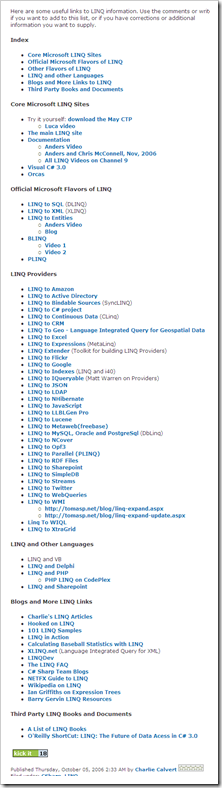
LINQ to * – Cool lists of LINQ links

knom's developer corner - LINQ-To-Everywhere – List of LINQ Providers

“This weekend I’ve built a small application, which queries the “Simpsons” seasons guide data and updates the filenames/descriptions. To do this I needed to query a CSV file. While searching for a LINQ to CSV file implementation I’ve found an interesting list of LINQ Providers provider by MVP Charlie Calvert.

image

Charlie Calvert's Community Blog - Links to LINQ

“Here are some useful links to LINQ information. Use the comments or write me if you want to add to this list, or if you have corrections or additional information you want to supply.

Charlie Calvert's Community Blog  Links to LINQ …”

A couple list of LINQ links that I wanted to capture for future reference…

Monday, April 27, 2009

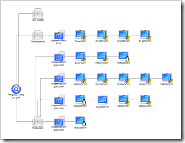
Making pretty VM Visio diagrams with the free Virtualization Visio stencil from VESI (Virtualization EcoShell Initiative)

Dmitry’s PowerBlog: PowerShell and beyond - Free virtualization Visio stencil

“Need to create cool-looking Visio diagrams for your virtual, VMware, Hyper-V, etc. infrastructure? You can actually get one for free!

The folks at VESI (Virtualization EcoShell Initiative) have shared the stencil they are using for Visio reporting (the same stencil is also used in PowerGUI’s VMware PowerPack). Just go to the VESI downloads page, scroll to the bottom of the page and download the stencil” [Post Leach Level: 99%]

 VESI (Virtualization EcoShell Initiative) – Downloads

Visio_Sample_sm

image

We starting a VM initiative at work [snarky comments deleted], so I thought this might come in handy.

image

Sunday, April 26, 2009

Redgate is doing it again… A metric ton-load of free eBooks (and their suite of tools too) is just a quick reg away.

redgate - The Art of XSD - SQL Server Schema Collections

“Today, a lot of applications exchange information in XML format. As such there needs to be an agreement between the sender and receiver about the structure and content of the XML document. An XSD (XML Schema Definition Language) Schema can be used to enforce this contract and validate the XML data being exchanged.

This book will help you learn and use XML Schema collections in SQL Server. Prior knowledge of XSD is not required to start with this book, although any experience with XSD will make your learning process easier. This book starts with the basics of XML schemas and then walks you through everything you need to know in order to build powerful XML schemas in SQL Server.

…

image ”

Which leads you to this…

“SQL Server eBook Selection

  1. Simple Talk Crib Sheet Compendium
  2. The Art of High Performance SQL by Grant Fritchey
  3. The Art of XSD by Jacob Sebastian

…

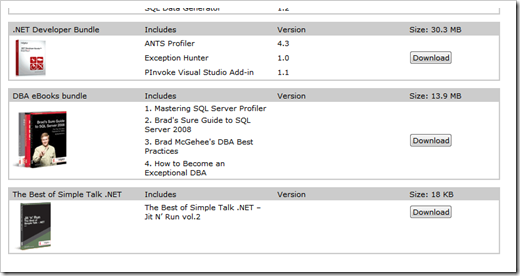
DBA eBooks bundle

  1. Mastering SQL Server Profiler
  2. Brad's Sure Guide to SQL Server 2008
  3. Brad McGehee's DBA Best Practices
  4. How to Become an Exceptional DBA

image

image

…”

Also available as a single book, 'Mastering SQL Server 2005 Profiler' (redgate - Free eBook and 14-day trial for faster SQL Server troubleshooting)

image

That’s officially a “bunch” of eBooks. Enough to keep you all busy for a bit, ya think? ;)

(via Felipe Ferreira - Free E-Books)

Saturday, April 25, 2009

First/Alpha release of my Scrum for Team System Quickboard Project (Think “10 foot SfTS Dashboard”)

CodePlex - Scrum for Team System Quickboard

SfTSMainForm

In my day life, my team uses the very cool Scrum for Team System (SfTS) TFS template. While it does almost everything we need, the one thing I wanted to see was a very quick dashboard like screen with some general Sprint summary information. The Sprint Burn down, PBI and SBI counts and hours, that would auto update every XX minutes, etc. Something I could keep up and running in the Team room next to our Build Status screen...

So I wrote one.

This is a work in progress and is very tightly coupled to the SfTS. I am using this project as a tool to help me and my team manage our Sprints, as means to learn WPF, MVVM, and the TFS API (with a little SQL Server Reporting Services fun mixed in).

THIS CODE IS FUGLY! Due to all the “firsts” for me (i.e. WPF/XAML, MVVM, TFS API, etc) in this project I’m hacking and slashing away just trying to get the darn thing to work. Yes, I know the WPF isn’t “right”. I know my MVVM – Models are not “right” yet. I know the UI is BUGLY. I know there are no unit tests yet. I know the code is fugly… Yeah, yeah, I know, I know. But it fricken works and since I’m doing this on my time, on my dime, “working” is the goal. I’ll be improving, refactoring it over time, as I “INSERT WPF/MVVM INTO Greg.Brain”…

Dev/Tech Notes

  • Model-View-View Model (MVVM) based WPF application.
  • Consumes the TFS API.
  • Written in Visual Basic 8

Standing on the shoulders of giants, here are some sources that without which this project would have been much harder (and I’d have lost even more hair … ;)

WPF

Model-View-ViewModel (MVVM)

TFS API

SQL Server Reporting Services


Special Note
To reemphasize the point, I, and this project, are not directly associated with Conchango or the Scrum for Team System project in any way. I'm just a consumer of the template, trying to add a little value and give a little back... (i.e. this is “Fan-ware… ;)


Related Past Post XRef:
Scrum Resources
Scrum for Team System 2.2 Released – More Reports, bug fixes, SQL Server 2008 and new Report Slide Show feature

Thursday, April 23, 2009

Who needs a stink’n PowerShell Owner’s Manual? (Cough… ME!... cough… ;)

TechNet – PowerShell Owner’s Manual

“This is your guide to getting started with Windows PowerShell. Read through these pages to get familiar with Windows PowerShell, and soon you’ll be driving around like a pro.

Getting Started with Windows PowerShell

A complete introduction to help you get started.

Customizing the Windows PowerShell Console

Don’t like the look of your new console? No need to worry, Windows PowerShell comes with plenty of built-in options that allow you to customize the look and feel.

Windows PowerShell Shortcut Keys

Learn how to get around your console with minimal effort with the help of a few shortcuts.

Piping and the Pipeline

Discover the true power of Windows PowerShell by learning about the pipeline.

…

image ”

PowerShell IS the wave for the Windows command-line future. Know it, live it, shell it…

(via Tweet from ScriptingGuys - Windows PowerShell Owner's Manual: http://tinyurl.com/2jaads)


Related Past Post XRef:
PowerShell Quick Reference & Graphical Help File(chm)

Wednesday, April 22, 2009

VSDB 2008 GDR R2 Released or DataDude for 2008 GDR++ RTM’ed or Latest and coolest version of Data Dude now available

Home of the Data Dude - RTM of VSDB 2008 GDR R2

“The QFE rollup release for the Visual Studio Team System 2008 Database Edition GDR release is now available.

You can download the SETUP.EXE from the regular location. (http://www.microsoft.com/downloads/details.aspx?FamilyID=bb3ad767-5f69-4db9-b1c9-8f55759846ed)

If you have the VS2008 RTM version of the Database Edition or the RTM version of the VSDB 2008 GDR release installed, this setup will automatically upgrade your installation. If you have the RC installed of the QFE rollup, you have to uninstall first and then re-install the GDR.

For more detail on what got fixed in the QFE rollup, please see my previous posting: http://blogs.msdn.com/gertd/archive/2009/03/26/release-candidate-of-gdr-qfe.aspx

…”

Microsoft Downloads - Microsoft® Visual Studio Team System 2008 Database Edition GDR R2

“…Microsoft® Visual Studio Team System 2008 Database Edition GDR R2 implements support for SQL Server 2008.

Version: RTM
Date Published: 4/21/2009
Language: English
Download Size: 209 KB - 21.0 MB*

…”

From the Release Notes (edited);

“…

The following issues are addressed in this release.

Validation

1. External objects cannot be resolved when they are aliased. The following example causes an error.

2. Permission type "SEND" should be a database level permission. The following example causes an error.

3. Permission: TSD03110: An object can only have either INCLUDE or EXCLUDE treatment on its columns. The following example causes an error.

4. CTE (Common Table Expression) names should respect the case-sensitivity setting. The following example causes an error.

5. Adding a permission with the object name defined as an empty string crashes Visual Studio

6. OpenXML generates warnings/errors in SQL Server 2000 database projects

7. Table sources should be accessible to sub queries of select columns. The following example causes an unresolved reference error.

8. "TSD03006: Procedure has an unresolved reference to Assembly" error for a referenced assembly. Defining a stored procedure that uses a SQL CLR assembly causes an error.

9. TSD03127: Cannot use CAST in a view with SCHEMABINDING

10. Validating permissions is very slow.

11. Building the database project causes error TSD03006 when the script contains an XQuery clause.

12. A script containing a left join and union causes error "TSD02010: Incorrect syntax near UNION"

Schema Compare

1. Visual Studio might crash when you compare a composite project (that has a reference to a server project) with a database on a server where the master database has lesser privileges.

2. The option to only compare objects defined in the source schema does not work. To reproduce this issue, perform the following steps:

3. Database role membership cannot be ignored using the Schema Compare option. To reproduce this issue, perform the following steps:

4. When using Schema compare, the Write Updates command, when applied to projects, comments out all composing children whose parent objects are ignored. To reproduce this issue, perform the following steps:

5. System.IndexOutOfRangeException appears when you compare a database to itself

Refactoring

1. Preservation of intent does not handle the scenario when a new object must be created that uses a name that was previously refactored.

2. Incremental deploy fails after refactor -> rename of a table that has an extended property on a column

Static Code Analysis

1. Static Analysis rule SR0014 throws an exception

2. Using LEFT or RIGHT method causes DataTypeCompatibility to throw an exception

Deploy

1. Output clause in parameters is omitted during build. The following is not built and deployed properly:

2. Composite Projects: Implementing tables and constraints in separate database projects causes a Null Reference exception when you deploy.

3. Deploy silently fails when it encounters unknown syntax from the target database during reverse engineering.

4. Incremental deployment is dropping computed columns when updating column collations.

5. Deployment fails with “An item with the same key has already been added” after the project is copied to a new location on disk or when the solution configuration is changed with a specific sequence.

6. A computed persisted function column blocks deployment if the function was changed.

VSDBCMD

1. NullReferenceException when importing a database schema with VSDBCMD

2. VSDBCMD fails if the schema being deployed has multiple references to external .dbschema files.

3. VSDBCMD exits incorrectly with code=0 on unexpected failure.

4. VSDBCMD depends on a registry key which prevents it from running on systems that do not have SSMS or VS installed.

Project System

1. SQLCMD and Deployment properties files are not being persisted in the .user file when the Dev chooses "My isolated development environment."

2. ALTER ANY DATABASE AUDIT and ALTER ANY SERVER AUDIT permission types are missing after Import Script. After importing the following script:

3. Copying a solution with database references then deploying causes deploy to crash.

4. Imported permissions are always added to the model even if the user chooses to not add them.

Unit Test

1. Problems occur in the Create Unit Tests wizard when you create a unit test for a method in a solution that contains a Database Edition GDR project, a Silverlight project, or a WIX project in Visual Studio 2008 Service Pack 1

The solution to this issue is to install this hotfix: http://code.msdn.microsoft.com/KB962866

…”

It’s funny the games me brain plays on me. I saw the news about this yesterday but when I saw “R2” and I thought I saw “RC2” so didn’t worry about it. sigh… stupid brain…

In short if you have Data Dude 2008, aka VSDB 2008, etc installed get this.


Related Past Post XRef:
Data Dude Updated for SQL Server 2008 – VSTS 2008 Database Edition GDR RTW’s (Think “VSTS 2008 Data Dude SP1++”)

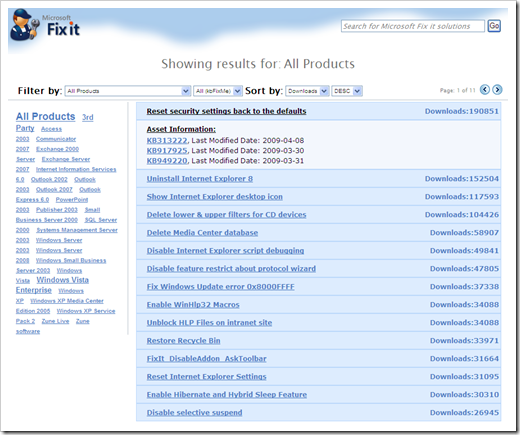
Easily Find Microsoft Fix It’s – Zillion’s of Fix It’s, one tiny gadget (and web page)

Microsoft Fix it BLOG - Microsoft Fix it Gadget and Solutions Website is Now Available!

“The Microsoft Fix it team has just released two new tools to help partners and customers find Microsoft Fix it information and track solutions. The first tool is a Windows Vista Sidebar Gadget that displays download stats and related solution assets for Fix it solutions such as Knowledge Base articles or Windows Error Reporting responses and allows the user to filter by product as well as search for Fix it solutions.

…

The second tool is the Fix it Solutions page, a companion website to the Fix it Gadget for users who do not have the ability to use Sidebar Gadgets. The Fix it Solutions page provides all of the functions and features found in the Fix it Gadget and can be used with most popular browsers.

…”

https://fixit.support.microsoft.com/reporting/

image

This is a pretty simple and easy way to browse all the currently available “Fix It For Me”s. I liked the tag cloud navigation which made it easy for me to find a couple Fix It’s that I immediately put to use.


Related Past Post XRef:
Fix It for Me for Fix It for Me…
Getting your Fix it Fix – The Fix it for me blog

Network Monitor (NetMon/NM) 3.3 Released

Microsoft Downloads - Microsoft Network Monitor 3.3

“Tool to allow capturing and protocol analysis of network traffic.

Version: 3.3 1641
Date Published: 4/21/2009
Language: English
Download Size: 5.0 MB - 16.3 MB*

Network Monitor 3.3 is a protocol analyzer. It allows you to capture network traffic, view and analyze it. Version 3.3 is an update and replaces Network Monitor 3.2. Network Monitor 3.x is a complete overhaul of the previous Network Monitor 2.x version.

…”

What more can be said? NetMon rocks? Updated NetMon == Cool?  ;)

Update 4/22/2009 @ 7:40AM PDT:
For a cool list of what’s new, check out Blake’s post, The Road to Know Where - Microsoft Releases Final Version of Microsoft Network Monitor 3.3 for Windows 7


Related Past Post XRef:
NetMon Parsers – Existing parsers available and more coming via CodePlex
NetMon API – Capture, Parse and and Capture File Access (with Managed P/Invoke example too)
Network Monitor 3.2 (aka NetMon, NM3) Beta Released – Now with application network conversation tracking UI
NetMon 3.1 Released
Network Monitor 3 (aka NetMon 3, aka NM3) Re-released for Vista
NetMon 3.0 RTW

Tuesday, April 21, 2009

Free Star Trek Icons (for personal desktop use). You know you want them. Just accept your inner-geekness and go get them… I won’t tell… ;)

Iconfactory – Star Trek Icons

“The Iconfactory has teamed up with Paramount Pictures to bring you 15 gorgeous high resolution icons drawn from objects that are used in the new Star Trek film. These icons will make the perfect addition to any Star Trek fan’s computer desktop.

…

The icons contained in this archive are Copyright © The Iconfactory, Inc. and are intended for personal desktop use ONLY. …”

image

image

Doesn’t everyone need a few more Star Trek icons?

(via Gizmodo - Star Trek Icons! Star Trek Icons!!)

New Scrum Quick Reference Card from DZone/Refcardz (Reg-ware)

DZone – Refcardz – Scrum Reference Card

“Overview

Scrum is an iterative, incremental software development framework commonly used with agile software development. This Refcard provides a concise overview of the structure of roles, meetings, rules and artifacts within a Scrum organization – it is the definitive cheat sheet for any development manager or software team that is currently using or planning to use Scrum.

…”

image

Six (well five and a quarter) pages of Scrum Reference from the Refcardz masters, DZone. Brought to us by danube, my favorite Scrum training providers (where I got my Scrum Master Certification ;)

I really liked how this card wasn’t complete overview but instead more brass tacks (as much as you can be in 5 pages anyway). I see this Card as a good reminder and fill in a few blanks (aka a “reference card” ;) resource for those you already know some about Scrum. This isn’t for the scrum-noob but instead more for those how are actually starting, or using Scrum.


Related Past Post XRef:
Scrum Resources

Can’t get to a local user group meeting/conference/etc? Still want to take advantage of goodness that INETA speakers offer? Here’s a few live webcasts just for you…

.NETicated - INETA Live Webcasts: Round One

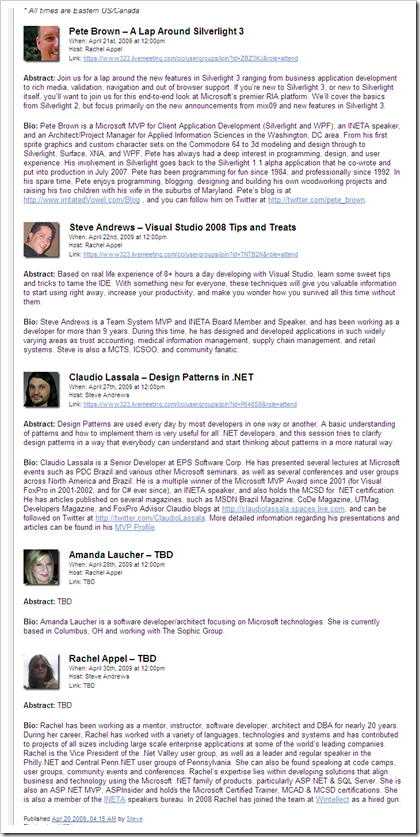
“One of my initiatives as Director of Technology for INETA is to further develop INETA Live. To that end, Rachel Appel and I will be hosting five exciting live webcasts this month on Live Meeting, all from INETA speakers. Details below, and remember to stay tuned for more exciting content from INETA Live. If you are interested in doing a live webcast on INETA Live, please contact me.

* All times are Eastern US/Canada

Pete Brown – A Lap Around Silverlight 3

…

Steve Andrews – Visual Studio 2008 Tips and Treats

…

Claudio Lassala – Design Patterns in .NET

…

image

…”

If you’re too busy, not close enough, don’t have the travel funds, like to learn on the fly or just don’t like “people” then these live INETA sessions may be just the ticket for you. The price is just right and you can attend in your PJ’s so what’s not to like?  ;)

Monday, April 20, 2009

UK MSDN Flash – Best of 2008 #1 in eBook form

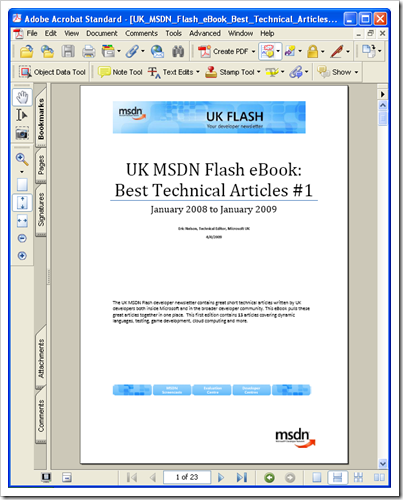
IUpdateable from Eric Nelson - FREE MSDN Flash eBook with 13 technical articles spanning dynamic languages to game development to cloud computing

“…

Every two weeks we send an email out to tens of thousands of UK based developers. This email is called the MSDN Flash. The Flash contains many useful sections including a 400 to 500 word technical article on a developer related topic either written by a member of the Microsoft UK technical team or a member of the broader UK developer community. We have had some great articles over the years which to some extent end up “hidden away” in the archives of the MSDN Flash. This is a shame as the authors have worked hard to condense complex topics into short articles which are informative and take only a few minutes to read.

I decided it was time to surface the best of the articles on a regular basis and provide them in an easy to download and read eBook. This initial edition covers the period January 2008 to January 2009 but we aim to create a new eBook every six months from here on in. The next edition should therefore be out around August 2009.

…

image 

Table of Contents for #1

TABLE OF CONTENTS 2
INTRODUCTION 4
From the Editor 4
Would you like to become an author? 5
Subscribe to the UK MSDN Flash 5
VISUAL STUDIO 2008 7
Synchronization made Easy by the Sync Framework 7
WMI Provider Extensions in .NET Framework v3.5 8
Non-Attributed Data Contracts in WCF 9
Introducing the ADO.NET Entity Framework 10
Introducing the .NET Client Profile 11
XNA Game Studio 12
LANGUAGES 13
Combining Dynamic Languages and Static Languages 13
Getting Started with IronPython 14
TOOLS AND DEVELOPMENT PRACTICES 15
Pex: Automated testing for .NET 15
WEB 16
The Integrated Pipeline in IIS7 16
VISUAL STUDIO 2010 17
Introducing Parallel Extensions to the .NET Framework 17
CLOUD COMPUTING 18
Azure Services Platform 18
Windows Azure 19
MEET THE AUTHORS 20

image

While the page count isn’t huge, the information density seems pretty high. Short and sweet read for the train or bio break (did I REALLY just say that? :P  )

TextGlow now on CodePlex

CodePlex - TextGlow

“textglow

Project Description
TextGlow is a Silverlight 2.0 demo application for viewing Word 2007 documents in the browser.

…”

TextGlow - TextGlow source code (alpha)

“…

TextGlow source code
source code, 1962K, uploaded Sun  - …

Release Notes
The TextGlow source code licensed under the Microsoft Public License.

…”

TextGlow - Source

image

Ah… A cool project on my favorite source site… :)

(via James Newton-King - TextGlow CodePlex Project)


Related Past Post XRef:
Sharing the Glow - Using TextGlow to display Word documents on SharePoint
See your OpenXML documents glow in Sliverlight via the newly open sourced TextGlow

Sunday, April 19, 2009

US Zip/City/County/State spatial data all ready for your SQL Server 2008… Just download, SQLCMD/import and go

CodePlex - US Census Data for SQL Server 2008

“Project Description
This is a repository for US Census Data for SQL Server 2008 with spatial information. Some of the data that is and will be included will be for states, counties, cities, and zip codes. The project will be updated as the data is available in SQL Server 2008 format.

Please note that this tables contain geometry data types made for the "Flat Earth Model."

Data downloaded from http://www.census.gov and imported using the SQL Server 2008 Spatial Tools (http://www.sharpgis.net/page/SQL-Server-2008-Spatial-Tools.aspx) by Morten Nielsen

…

Florida

FloridaCounties "

…”

US Census Data for SQL Server 2008 - State and County Table

“…

State Table
source code, 1785K, uploaded Today …

County Table
source code, 14132K, uploaded Sat …

Release Notes

The State and County Table are based on the 2000 Census Data and was normalized to the best of my knowledge. Please note that the the County table requires the State table. Both scripts contain the create and insert of the data.

The State geometry was derived by grouping all of the counties of each state using the User Defined Function found here: http://conceptdev.blogspot.com/2007/12/sql-server-2008-geometry-stunion.html

…”

US Census Data for SQL Server 2008 - Version 0.0.1.0

"...

State
source code, 1528K, uploaded Today - ...

County
source code, 7148K, uploaded Today -...

City
source code, 12258K, uploaded Today - ...

ZipCode
source code, 42531K, uploaded Today - ...

Release
Notes

Changes:
Added the ZipCode table
Modified all scripts
to include the spatial index
Compressed the files to a rar to make the files
smaller#

..."

A number of the podcasts I listen to have been covering SQL Server 2008’s spatial data type, so when I saw this I knew I had capture the data and mention it…

Update 4/20/2009 @ 7:15am:
There's now a City table/download (21860K) too... ;)
Update 4/20/2009 @ 4:20PM:
Added 0.0.1.0 block, which includes ZipCode data!